Muhammad Yasin Javed
Smart Scan- Scanner App To PDF Customer Service

- Smart Scan- Scanner App to PDF Customer Service
- Smart Scan- Scanner App to PDF App Comments & Reviews (2026)
- Smart Scan- Scanner App to PDF iPhone Images
- Smart Scan- Scanner App to PDF iPad Images
Scan, edit, sign, secure multiple documents easily with Face ID, extract text from multiple images in multiple languages using an advanced AI tool —fast, easy & a 100% ad-free experience!
Smart scanner is the easiest & simple app to use, which will turn your iPhone into a portable mobile scanner. Use Smart SCANNER to scan receipts, notes, invoices, whiteboard discussions, business cards, certificates, photos & just anything you want. Easily scan, save and share any document in PDF, JPEG & Text format.
Scan, Print & Manage documents in PDF with your mobile device!
Tap Scanner app is a simple Camera document scanner with high quality PDF output.
1. Scan documents, receipts, QR and business cards
Use Tap Scanner app to scan any type of document and save the scan to PDF!
2. Document Scanner app - Automatically detects borders
Tap Scanner automatically detects document borders when you scan a document!
3. Fine tune the image with many filters to reach perfection
Tap Scanner has many filters to help you get the best image quality when you scan a document!
4. Easily manage your documents
Tap Scanner lets you easily manage your scanned documents.
5. With a high quality PDF Scanner and PNG output.
Tap Scanner lets you export your document scan to PDF or PNG formats!
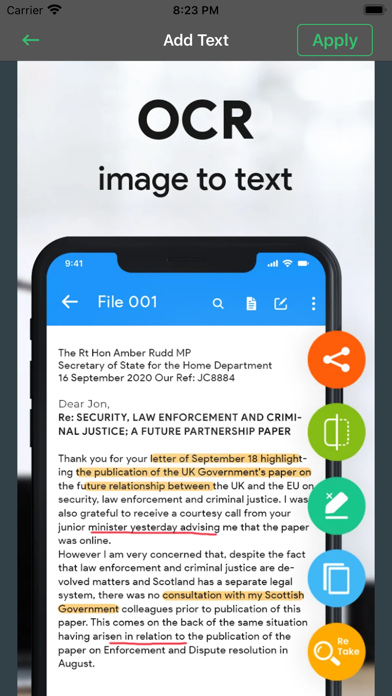
6. OCR - Convert image to text - supporting +110 Languages - enables output of live text from scanner.
Tap Scanner app has built in OCR with over 110 languages!
7. Sign & Send documents to others for signing with an electronic signature.
Tap Scanner lets you sign your scanned documents before sending them!
8. Simplify document scanning & signing by adding custom fields to documents.
Tap Scanner even lets you add custom fields to your scanned document!
9. QR Scanner app - scan QR codes, and convert them to email, text and links seamlessly.
SUBSCRIPTION:
If you want to access pro features then we offer 3 auto-renewing subscription options on either a 1, 3 or 12 month basis.
Payment will be charged to your credit card through your iTunes account at confirmation of purchase. Subscription renews automatically unless cancelled at least 24 hours prior to the end of the subscription period.
Your account will be charged for renewal within 24-hours prior to the end of the current period, for the price indicated above.
Terms of Use:
https://www.privacypolicies.com/terms/view/68237bda8beeae140d2d63c47874716a
Privacy Policy :
https://asd-app-development.flycricket.io/privacy.html
Smart Scanner app To Pdf - TapScanner - it's free - try it now!
Smart Scan- Scanner App to PDF App Comments & Reviews
What do you think Smart Scan- Scanner App to PDF ios app? Can you share your thoughts and app experiences with other peoples?
Please wait! Facebook comments loading...
Smart Scan- Scanner App to PDF on Social Media
Free International Money Transfer 💸Enjoy high maximum transfers into more than 20 currencies while saving up to 90% over local banks! The cheap, fast way to send money abroad. Free transfer up to 500 USD!Version: 1.0.8
Payoneer 💰Payoneer is an online payment platform that lets you transfer money from any corner of the world! A best and must have payment service for every blogger, traveler, freelancer, affiliate marketer, consultant, virtual assistant, business person, online sellers, and receivers. Earn $25 for free by joining Payoneer. Sign Up Now!Version: 1.0.8