Generally Helpful Software
Chemistry Keyboard Customer Service

- Chemistry Keyboard Customer Service
- Chemistry Keyboard App Comments & Reviews (2026)
- Chemistry Keyboard iPhone Images
- Chemistry Keyboard iPad Images
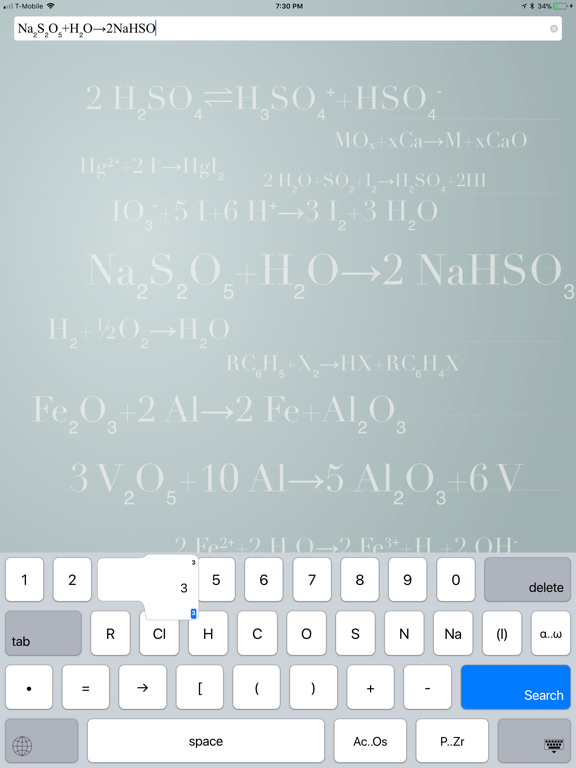
The Chemistry Keyboard is a specialized Keyboard Extension for anyone who needs to enter chemical formulae. Ever need to input Hg²⁺+2 I⁻ on your phone and can't figure out how to get those nice superscript or subscript 2s. Or proper arrow glyphs?
Quickly generate
superscripts: ⁰ ¹ ² ³ ⁴ ⁵ ⁶ ⁷ ⁸ ⁹ ⁽ ⁾ ⁺ ⁻,
subscripts: ₀ ₁ ₂ ₃ ₄ ₅ ₆ ₇ ₈ ₉ ₍ ₎ ₊ ₋,
and arrows.
lowercase Greek characters available in landscape mode.
and other chemistry related Unicode characters.
The app itself demonstrates the keyboard's use by allowing text entry and looking up data from Wikipedia.
Unlike many keyboard extensions, this keyboard does not require network access. It's entirely self contained.
Chemistry Keyboard App Comments & Reviews
Chemistry Keyboard Positive Reviews
Great app and very helpful in classWhen I first got this app last week I was having trouble getting the keyboard to load if I was in landscape mode on my 12.9" iPad Pro. I wrote a review and a few days later the developer contacted me saying he was working on a fix. A couple of days later he contacted me to tell me he submitted the revision. I re-downloaded the app and it works perfectly! I was very impressed by the quick response and how quickly he fixed the issue! I used the app in class today and it was great! No having to re-format my chemical equations when I get home! You can quickly superscript and subscript all numbers with the flick of the finger...it's great!.Version: 1.0.7
Well worth it!I don’t write many reviews, however this app deserves one! I’m an instructor in an apprenticeship program teaching Ohm’s law basics. I create many homework assignments and tests for my students. This app is well worth the $1.99 for what I needed (fractions, positive and negative super and sub scripts). Took a minute to figure out how to us it but the puzzlement went away when I held a number key instead of just tapping it for the first time. Perfect for my needs. Would recommend to anyone wanting to input scientific equations and characters on an IOS..Version: 1.1.1
SeamlessOnce I installed the app and reset my phone (I read a previous review that said resetting could fix they keyboard not showing up in certain apps, and it works) this app works well and makes it easy to find each element while typing. I haven’t had any issues with the keyboard loading slowly like it does with other apps. Great deal!.Version: 1.2
Great :), some suggestionsFinally, a super helpful app for my typed chem notes! I do wish the upper scripts were a bigger font size, such as the negative signs. Otherwise, it’s not super noticeable on my notes even when I’m close. If I skimmed through it, I’d probably miss the negative superscript because it’s so tiny. This is from a Notability typing POV w/ Verdana font style and size 10 for notes. (My headings are size 13 and the negative upper scripts are still too small to be easily noticeable. Other than that, the keyboard fits the screen and was very easy to figure out. No regrets with my purchase. Please consider my suggestions!! Will fantastically help me :) Thank you!.Version: 1.1.4
Thank God (or Glenn)!Nothing else has worked for superscript and subscript. To get symbols, I’ve had to add and toggle through many keyboards. It’s early days with this app, but I couldn’t be more pleased with it (once I figured out that holding down the key unlocks super and subscripts). I you are often typing science, this hugely helpful!.Version: 1.1.2
Great app. Just make sure to restart phoneI primarily wanted this app to make superscript notes on my monster levels in Pokemon Go. However, the keyboard globe wasn’t initially pulling up Formula Keyboard - Chemistry Keys in Pokemon Go like it was in Messages/Mail/Notes etc. I’m not sure what solved my issue – whether it was deleting and re-downloading Pokémon go or restarting my phone in between, but works like a charm now! Also, Glenn is an extremely responsive and awesome developer. Know that if you ever run into any kind of problems he’ll be right there to help you through them!.Version: 1.1.3
Good appThis is a good app, well priced for what it is, I find it very helpful in conveying math and chemistry equations, however one suggestion I would have would be the addition of super/sub script signs such as →.Version: 1.1.4
Does what it saysExtremely helpful in math and chem classes, especially if u want to make quizlets on your phone/ipad. Very easy to use subscripts ₁₂³⁴. U can add it to your keyboards to use in any app. Appreciate the app.Version: 1.1.3
Very Except …,Why isn’t the symbol for Fluorine (F) either on the keyboard or in one of the two lists of elements below the keyboard?? I know fluorine is just one letter - but you have the others either on the keyboard or beneath it. The alphabetical list with the “F” elements has Fe and others - but alas no F..Version: 1.2
Perfect!I just got this app today and I love it! It has so many shortcuts and it’s really easy to add it as an extension so I can use it anywhere! This is exactly what I was looking for.Version: 1.1.1
Great toolThis is a great keyboard for typing up scientific papers and other science related things. Once you get used it the keyboard is really effective at helping you type chemical equations and sub/super scripts..Version: 1.0.2
Fantastic keyboard for a Chemist!What an incredible idea—a keyboard for chemists! In the past I've relied upon creating text expansion snippets to change formulas like H2O to H₂O, and -> to →, but this approach is much better. I can type chemical equations on the fly now, and in less time than it would take on my iMac. Love this keyboard! Highly recommended keyboard for anyone who wants to write chemical formulas and equations on their iOS devices. Nice update in 1.0.1 allowing for Greek letter entry. Much easier than switching over to the Greek keyboard (which is what I was doing before). I’ve used this a number of times when making exam solutions for my Chemistry students. Being able to “type” chemical equations on my iPad has actually allowed me to get the job done faster than when I’m on my iMac. Imagine that! Thanks. @SSU_Science.Version: 1.0.1
GoodThis keyboard is good, however it is missing some very important features, it being a chemistry keyboard after all..Version: 1.0.6
Almost perfect!I absolutely love this keyboard. I use chemical equations pretty often and it's great to finally be able to do so on my iPad. That being said, it seems to be missing several chemical symbols. It would be great if down the line they included more, or all, of the periodic table so I don't have to switch over keyboards just to type things like Sb for Antimony..Version: 1.0.1
Very niceGreat little app that respects privacy and actually follows through on its functionality..Version: 1.1.4
Lovey little useful gemWonderful keyboard for chemists, chemistry students and chemistry teachers. Works brilliantly. I wish there was a soft keyboard version of it for Mac OS and Windows..Version: 1.0.6
Free International Money Transfer 💸Enjoy high maximum transfers into more than 20 currencies while saving up to 90% over local banks! The cheap, fast way to send money abroad. Free transfer up to 500 USD!Version: 1.2.2
What do you think Chemistry Keyboard ios app? Can you share your thoughts and app experiences with other peoples?
Please wait! Facebook comments loading...