Pixelmator Classic IOS Kundeservice

Om Pixelmator Classic IOS (Apple) App

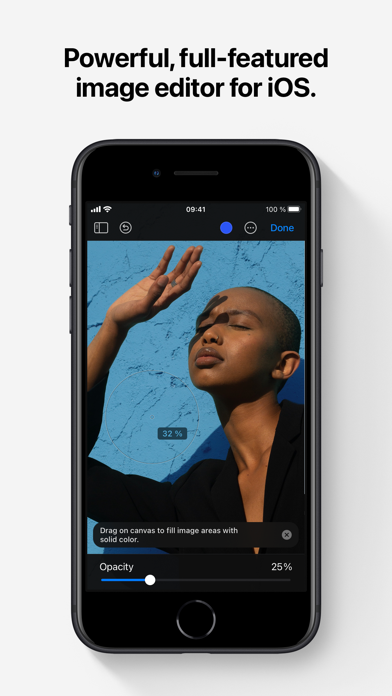
Pixelmator is a powerful, full-featured, layer-based image editor that lets you add shapes, images, and text to create beautiful image compositions, touch up and enhance images, sketch, and paint on iPad and iPhone alike.

Designed exclusively for iOS and iPadOS, Pixelmator takes full advantage of the latest iOS and iPadOS 17 features and technologies, giving you innovative, fast, and powerful tools.

Create Eye-Catching Designs

- Combine words, shapes, and images to create breathtaking artwork right on your iPhone and iPad
- Apply non-destructive layer styles like shadows, outlines, gradient fills, and more
- Insert, group, and blend layers of an image
- Easily add, combine, and customize shapes
- Blend layers, shapes, and text using any of the blending modes
- Use precise selection tools to edit areas of an image
- Automatically select subjects in images with the machine learning-powered Select Subject
- Crop, arrange, and rotate objects and layers with pixel-perfect precision
- Easily remove the background of images or cut and paste objects from one image to another

Add Shapes and Text

- Create flyers, logos, and other compositions using vector shapes and their styling options
- Customize Smart Shapes with easy-to-use controls
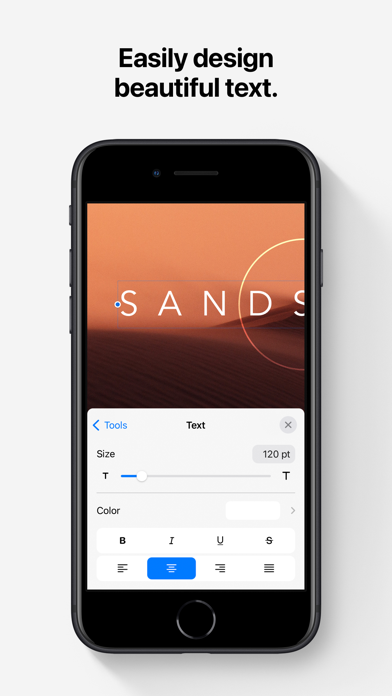
- Add text and make it look gorgeous with 24 pre-designed text styles
- Change the font, size, alignment, line spacing, use custom fonts, and more

Paint and Sketch

- Paint stunning images right on your iPhone and iPad
- Choose from over artist-designed brushes and numerous painting techniques
- Paint with near-natural wetness effect of watercolor and crayon brushes
- Create stunning pixel art images with the custom-designed Pixel brush
- Paint with incredible detail thanks to the double texture brush technology
- Vary the speed of your stroke to change the thickness of some of the brushes
- Easily select and fine-tune colors with a full-featured color picker
- Instantly choose colors right from your image with the Eyedropper
- Paint more naturally than ever with the Apple Pencil, featuring palm rejection, pressure, tilt, and acceleration sensitivity

Edit and Enhance Photos

- Get started with dozens of beautifully designed templates
- Instantly improve your photos with single-tap color presets
- Take full control over the tonal range of your image with levels and curves
- Easily remove color casts and set the right white balance
- Wipe away image imperfections, skin blemishes, and unwanted objects with the Repair tool
- Duplicate areas of your image with the easy-to-use Clone tool
- Pinch, bump, twirl, or warp areas of an image with powerful, Metal-based Distort tools
- Blur, sharpen, lighten, or darken areas of an image
- Choose from dozens of breathtaking effects to subtly improve or completely change the look of an image
- Open and edit images of up to 256 megapixels

Export and Share Images

- Optimize images for the web using quality, color depth, and size settings
- Export images to Files, iCloud, or open in other apps using a file format of your choice
- Using the integrated share extension, easily share your artwork with friends and family using Mail, AirDrop, or post it to social platforms like Instagram, Twitter, or Facebook

Compatibility

- Open and save images using HEIF, JPEG, PNG, and TIFF formats
- Work with multilayered Pixelmator Pro and Adobe Photoshop documents
- Save your edited images directly to Photos
- Create, edit, and keep all your images up to date on all your devices thanks to iCloud support
- External keyboard support with over 70 keyboard shortcuts

Built for iPhone and iPad

- Pixelmator is meticulously thought through and created from the ground up for iPhone and iPad devices
- Designed to take full advantage of powerful iOS and iPadOS features and technologies — iCloud Drive, Photos extension, Split View, and more
- Thanks to Apple silicon, Metal, Core Image, and Core Animation, Pixelmator delivers state-of-the-art performance and real-time responsiveness

Kategori Foto og video
Utgivelsesdato 2014-10-24
Siste versjon 3.1.17
Pris 129 kr
Aldersgruppe 4+
Kompatibilitet Min. IOS 15.0

Pixelmator Classic IOS Kontaktinformasjon

Selskapsnavn Apple
Selskapets Hjemmeside pixelmator.com
Firma e-post [email protected]
Firmatelefon Kommer snart...
Kundeservice pixelmator.com/account
Sosiale Medier Facebook / Twitter

Pixelmator Classic IOS App positive kommentarer og anmeldelser

Fantastisk kraftig bilderedigeringsprogram ...viser virkelig hva iPad'en duger til!. Espenhh Versjon: 1.0.2

Love it!!! Absolutely love it. Fantastic app!. Lisel08 Versjon: 2.3

LOVE IT!! I absolutely love it! I used to use photoshop and diffrent filter programs but this have everything! And its a big plus that it has realy advanced editing tools too;-) GOOD JOB!. Stiffy90 Versjon: 1.0

Hva? Amazing!!!. Zenzeser Versjon: 1.0

Heftige greier Det finnes en mengde dårligere - og sikkert også et og annet bedre - dog, dette er ikke bare mer enn nok, men også helt fremragende for 99% av oss!. HonestCritics Versjon: 2.8.3

Finally! I've been using Pixelmator on my Mac for a long time and couldn't wait for it to arrive on iOS. Loving it! ^_^. Geiir Versjon: 2.0.1

My new favorite app! Waiting for this app for a while. No disappointment. Excited to see what new features they bring to the app in the future.. OddvarSkre Versjon: 1.0.1

Five stars Amazing!. Khan212 Versjon: 2.5.3

Pixelmator Classic IOS App negative kommentarer og anmeldelser

New uptade sucks You should uptade as fast as possibile, beacuse the new uptade is trash⬇️. Ramankula Version: 2.5

En gang bra, nå er den forbigått En innholdsrik app som hadde trengt en liten oppdatering av brukeropplevelsen, filtrene og funksjonene. Bilderedigering er litt omstendelig og knotete lagt opp, sammenlignet med andre apper som Snapseed. Effekter og filtre er uinteressante og litt gammeldagse, det er dårlig flyt i redigeringen. Én og annen funksjon er fin og annerledes men ikke noe du ikke får i en annen app. Anbefaler å gå for andre apper enn denne.. Mr.ToDo Version: 2.3

Do not bother The iPhone version suck, no way of working with layers there. Hopefully the iPad version is worth the money, not that I would CARE to download it. Hildegerd Version: 2.4.4

IOS Mac interoperability no longer works This app has a fairly intuitive UI, and most features I need. The main benefit for me, has been it’s flawless exchange with the same software on my Mac. This does no longer work. I am able to open the images, but content is shifted around or gone. The iOS app complains about styled layers, or something. It’s very annoying when a tool you rely on stops working. I’ll have to find something else.. Tvedtorama Version: 2.7.3

Pixelmator Classic IOS Skjermbilder
Pixelmator Classic IOS iphone bilder 1
Pixelmator Classic IOS iPhone-skjermbilde 1
Pixelmator Classic IOS iphone bilder 2
Pixelmator Classic IOS iPhone-skjermbilde 2
Pixelmator Classic IOS iphone bilder 3
Pixelmator Classic IOS iPhone-skjermbilde 3
Pixelmator Classic IOS iphone bilder 4
Pixelmator Classic IOS iPhone-skjermbilde 4