Videdit - Handy Video Editor Müşteri Hizmetleri

Videdit - Handy Video Editor (知刚 刘) Uygulaması Hakkında

Videdit has more than 30 features: Info, Trim, Crop, Blend, Erase, Chromakey, Mosaic, Splice, Particle, BlingBling, Filter, Text, Sticker, Paint, Tuner, Dub, Speed, Reverse, Zoom, Rotate, Compress, Gif, Collage, Magnifier, Distortion, Reflection ...

With Videdit, you can edit your videos in a lot of ways and make them more awesome and different.

=== SIMPLE AND EASY TO USE ===
Choose the video from Photo, Select a way of editing, handle it and save or share it.

=== RICH FEATURES ===
+ View, modify or delete some EXIF and properties of the video file
+ Trim unwanted parts of the video
+ Crop the video into any size
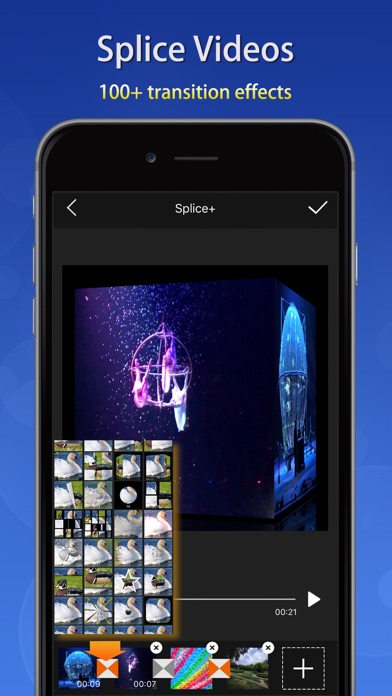
+ Splice videos and images with 100+ transition animation effects
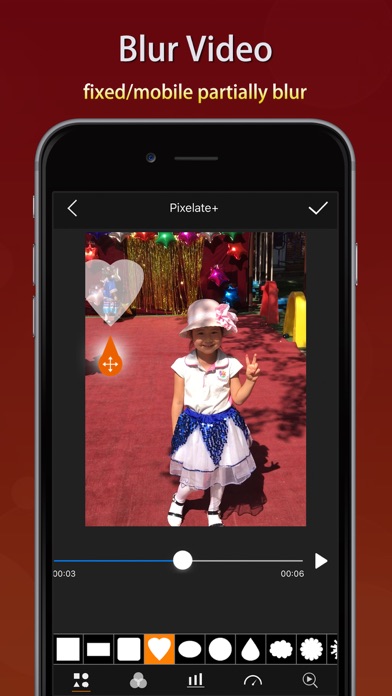
+ Mosaic a part of the video statically or dynamically: select the shape and type, adjust the blur intensity and speed of moving, drag the handler and move to blur the selected part of the video; can invert the blurred area
+ Add some text into the video with rich text effects
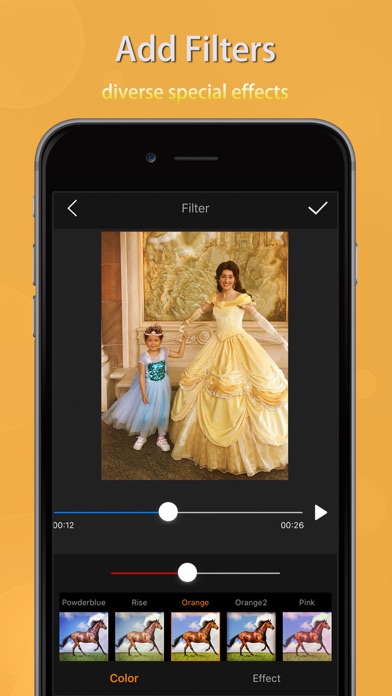
+ Adjust the color and effect of the video with dozens of filters
+ Take a picture from the video
+ Tuner by which to adjust the pitch and volume of the sound within the video, distort the sound, and add reverb to the sound make the sound have some special effects
+ Dub for the video and support to adjust the volume
+ Add special audios into the video with over 200 sound effects
+ Adjust the playback speed of the video
+ Replay a selected segment of the video and flexibly set count of loop and the the speed of playing
+ Let the video playback in reverse order
+ Zoom in or out the video
+ Rotate or flip the video and support 3D rotation at any angle
+ Compress the video by resolution, bit rate and frame rate
+ Convert the video into GIF
+ Create a picture-in-picture video
+ Add borders to video with rich border material
+ Add static or dynamic stickers to videos and can adjust the size, position, duration, speed, color and so on; can flip it; can choose an image as a static sticker or GIF as a dynamic sticker
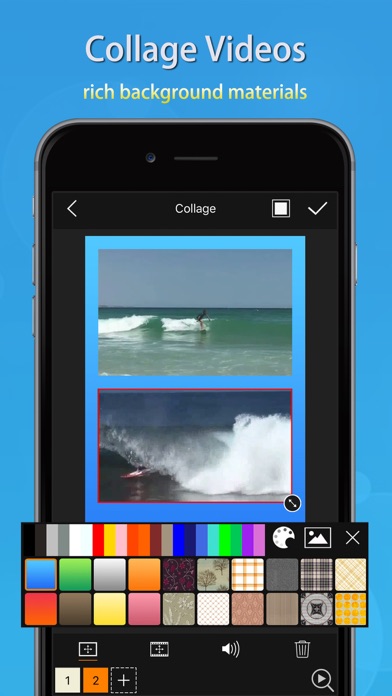
+ Support collage of videos with rich background textures
+ Paint on the video: select color and width of brush, draw, undo, redo, erase
+ BlingBling for the video and make them full of brilliance: automatically detect highlights, add spot and star streaks and flexibly adjust their quantity, rotating speed and strength
+ Add particle effects for the videos: over 100 particle effects templates and rich particle texture images,
flexible adjustment of various parameters of particle emission. Use your imagination to add surprises to your videos.
+ Add magnifier for video: flexibility to select the area to be enlarged and adjust the magnification and display position of the magnifier
+ Distort video: provide a variety of distortion types
and flexibly adjust twist radius, force and center position
+ Reflect video: provide a variety of reflection filters and flexibly adjust the boundary and center position of reflection
+ Blend videos: provide 20+ classic blend modes: darken, multiply, color burn, linear burn, lighten, color dodge, linear dodge, overlay, soft light, hard light, average, difference, exclusion and so on; flexibly adjust the opacity, size and position of the foreground; exchange the foreground and the background; make the blended area into a variety of shapes
+ Erase video: you can flexibly select the erased area (eg. the watermark) by drawing directly on the video to erase the content on the fixed area, and the effect is better for the erased area with simple background color
+ Chromakey video: chromakey by which a block of a particular color (often blue or green) in a video image can be replaced by another color
...

=== QUICK RESPONSE ===
+ Real-time preview
+ Quickly generated
+ Support 1080P HD output

=== SAVE AND SHARE ===
+ May save videos to your camera roll
+ Easily share videos with friends

If you have any questions or suggestions, please feel free to contact at:
[email protected]. Thanks for using Videdit.

Kategori Fotoğraf ve Video
Yayın Tarihi 2018-02-01
Son Versiyon 24.03.09
Fiyat 4.99₺
Yaş Gurubu 4+
Uyumluluk Min. IOS 12.0

Videdit - Handy Video Editor İletişim Bilgileri

Şirket Adı 知刚 刘
Şirket Websitesi mekits.github.io
Şirket E-Posta [email protected]
Şirket Telefon Çok yakında...
Müşteri Hizmetleri mekits.github.io/app
Sosyal Medya Facebook / Twitter

Videdit - Handy Video Editor Aplikasyonu Pozitif Yorum ve İncelemeler

Sjsjsjsj Kesinlikle indirin. Qçvp Version: 19.8.15

Kullanamıyorum Tıkladığım her videoda it is in icloud hatası alıyorum yardımcı olabilir misiniz?. U029822 Version: 20.8.12

Editör olarak başarılı ama kusursuz değil Editör olarak çok başarılı ve ücretini hak ediyor. Video oluşturma seçeneği yok sadece olanı editleyebiliyorsunuz. Bos olarak veya fotoğraflar eklenerek video oluşturma eklenirse o zaman kusursuz olabilir.. Appleperest Version: 20.8.12

Süper Şiddetle tavsiye ediyorum uygulama içi satınalma birçok opsiyonu Bedava olmuş acele edin faydalanın. Hakikat68 Version: 23.09.28

Çok güzel Süper bir program tebrik ederim. Sevgiyolcusu Version: 3.21

Video hızı düşüyor Normal videoların 6 tanesini tek video yapıyorum ancak yeni videoda hareketler yavaşlıyor.. Fener1119549 Version: 21.04.10

Bence çok güzel Özellikle instagram da post paylaşmak için bire bir. Deniz_cndn Version: 20.8.12

Videdit - Handy Video Editor Aplikasyonu Negatif Yorum ve İncelemeler

Baskı uygulandığı için Uygulama gayet güzel ben bazı içerikleri satın aldım gayet fonksiyonel bir uygulama. Şahsi görüşümdür. Ama oyla diye bunaltıp video editlememi katlettiği için 1 yıldızı dahi çok görüyorum.. ShiroKageTaka Version: 21.04.10

Videdit - Handy Video Editor Ekran Görüntüleri
Videdit - Handy Video Editor iphone resimleri 1
Videdit - Handy Video Editor iPhone Ekran Görüntüsü 1
Videdit - Handy Video Editor iphone resimleri 2
Videdit - Handy Video Editor iPhone Ekran Görüntüsü 2
Videdit - Handy Video Editor iphone resimleri 3
Videdit - Handy Video Editor iPhone Ekran Görüntüsü 3
Videdit - Handy Video Editor iphone resimleri 4
Videdit - Handy Video Editor iPhone Ekran Görüntüsü 4