OPlayer - Video Player Kundeservice

Om OPlayer - Video Player (Suzhou Totoro Network Technology Co., Ltd.) App

Play all your videos directly without having to convert them! OPlayer supports almost every format for video/audio playback. It gives you the flexibility to be able to download your files to your device, or browse a SAMBA/FTP/UPnP/DLNA share over the network.

"Best video player on the App Store"
OPlayer has been rated as "iPhone Apps Plus Best"!

OPlayer has been around for 12 years, continuous improvement in video playback and feature enhancements, has made it the first choice for millions of the users. With positive endorsements and feedback from our users we endeavor to make it even better with each upgrade.

========================================
Support Dolby Digital Audio (AC3)
Official AVI/DivX license (In App Purchase)
Official DTS license (In App Purchase)
========================================

【Supported Formats】

- Video: mkv, wmv, avi, divx, xvid, rmvb, rm, flv, mp4, 4k, mov, 3gp, m4v, blu-ray, ts, m2ts, swf, asf, vob, h265 (hevc), webm...almost all movie file formats.

- Audio: mp3, wma, wav, dts, ac3, eac3, aac, flac, ape, cue, amr, ogg vorbis, lossless music...almost all audio file formats.

- Subtitle: srt, ass, smi, sub...almost all subtitle file formats.

- Stream: http, ftp, samba, rtp, rtsp, mms...

- Widely devices support: Optimized for all iPhones running iOS 6.0 and later, including iPhone 6s (Plus).

【Key features】

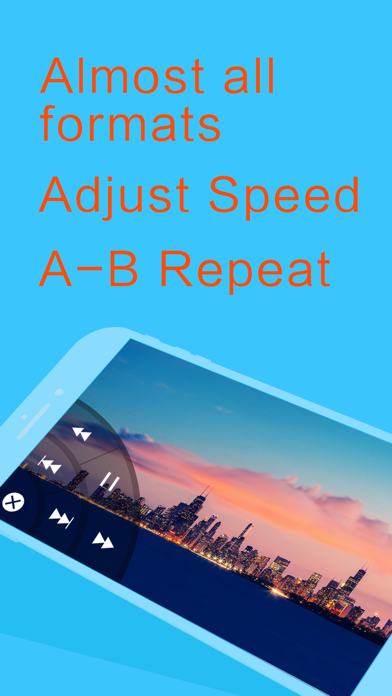
• Adjust playback speed: 0.1x ~ 4.0x
• A-B repeat: play from start point (A) to end point (B) repeatedly
• Background play: continue playing videos when app enters background
• Landscape play: useful when iPhone turned on 'Portrait Orientation Lock'

- SAMBA/FTP/HTTP/UPnP/DLNA client
- Multiple transfer ways: 1. USB transfer (support folder) 2. Wi-Fi transfer
- Play files in PC remotely without downloading
Share folders on PC, then you can stream files by OPlayer.

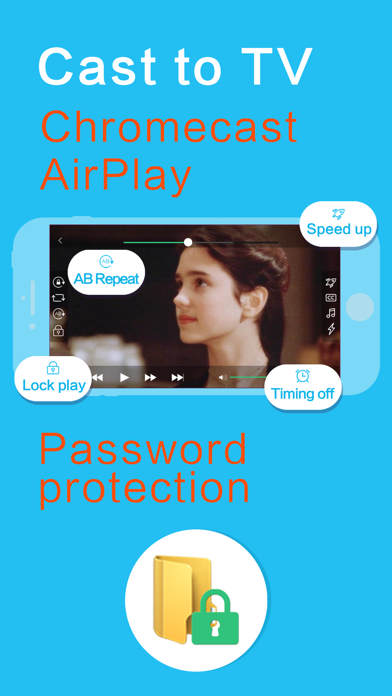
- Privacy protect: support password for app and folders, hide password-protected folders, Touch ID
- Excellent performance: support 1080P HD video on iPhone 5 and newer devices
- Less battery consumption: hardware decoding mp4/mp3 files by default
- Single hand mode: you can control playback with one hand

【Basic functions】

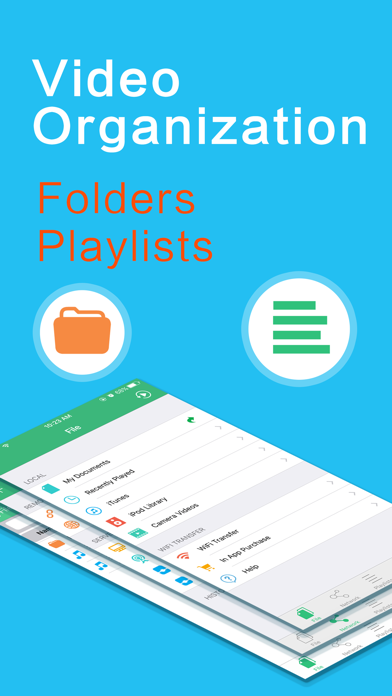
- File Manager: new folder/rename/move/delete/search/sort/open in with
- Built in web browser
- Support NAS, Router, Dropbox...network storage
- Support text file: TXT, WORD, EXCEL, PPT, PDF...
- Compress/Decompress (In App Purchase): support zip, rar, 7z (with password)

- Playlist: enjoy music by our powerful playlist functions
- Gesture: seek (forward, backward), brightness, volume, pause/resume, subtitle position and size
- Repeat/Loop mode: repeat all, repeat once, shuffle...
- Remember playback time: resume from last played position

- Render on TV (TV Out): support AirPlay, mirror, HDMI wire...
- Lock playing window: avoid unintended touch when watching movies
- Timing off: stop playing after the specified time
- Adjust aspect ratio: you can set any aspect ratio, for example 16:9
- Play 3d movies in 2d mode

- Deinterlace
- Flip horizontal and vertical
- Use headphones to control playback
- Audio boost
- Photo viewer (In App Purchase): 1. Support gif animation,png,jpg,bmp... 2. Slide show photos 3. Import from Photos

【Audio Features】

- Support left and right channel switch
- Audio tracks switch and save your settings
- Adjust audio delay

【Subtitle Features】

- Support embedded subtitles in movies
- Auto load the subtitle whose name is the same with the movie
- Select subtitle files manually
- Auto detect the encode of subtitle files

- Gesture: single touch and move to adjust position, pinch to adjust size
- Customizable subtitle font, colors
- Adjust subtitle delay

【Support】

- We will check reviews on App Store frequently
- Skype: [email protected]
- Mail: [email protected]
- Twitter: @OLIMSOFT
- Website: www.edavs.com

Kategori Underholdning
Utgivelsesdato 2010-01-14
Siste versjon 4.8
Pris 39 kr
Aldersgruppe 17+
Kompatibilitet Min. IOS 12.0

OPlayer - Video Player Kontaktinformasjon

Selskapsnavn Suzhou Totoro Network Technology Co., Ltd.
Selskapets Hjemmeside edavs.com
Firma e-post [email protected]
Firmatelefon Kommer snart...
Kundeservice edavs.com/support
Sosiale Medier Facebook / Twitter

OPlayer - Video Player App positive kommentarer og anmeldelser

Best media player I don't understand what the fuss was about VLC being released on iPhone, when this player exists. Compared with VLC and Yxplayer, this one is the best. It has the best layout and ease of use, and with the video files I've tried so far, OPlayer is the only capable of playing them smoothly. VLC can too, but the color is totally off. Recommended as the best media player app I've tried so far.. BlueLux Versjon: 0

OPlayer Works like a charm as a music player for my flac collection.. Wansfell_yes Versjon: 2.0.06

Very good! The best iOS video player.. Luben Ventsislavov Versjon: 3.3

Very easy to use Exelent Program. Nor2Good Versjon: 0

There is no better player on ios What can I say. So far the best and the most advanced player on ios. Worth every money. Lots of functions and they keep updating.. Rico pl Versjon: 2.1.00

Yay. Currently has the best framerates and file support, nice!. Dezzik Versjon: 0

OPlayer - Video Player App negative kommentarer og anmeldelser

På iPhone 4 DTS støtten mangler fortsatt. Fungerer helt fint med SD-Xvid uten DTS. Hakker på 720p mkv.. Kalleontour Version: 2.0.10

Cannot connect... Cannot connect to my Time Capsule... Worked before this new version. Rogerwesterbo Version: 2.1.07

Not much working Will not connect to DropBox. Will not connect to OneDrive. Local videos from iPhone camera plays as expected. Developers message board practically unsearchable. Do I need to mention FaceID? I’m very close to demanding a refund.. DetteNavnetErIkkeIBruk Version: 3.4

What has happend? This was such a great app! Now its rubbish... No iPhone 5 support and lost alot of audio codecs. Just sad. Tmac1090 Version: 2.0.05

OPlayer - Video Player Skjermbilder
OPlayer - Video Player iphone bilder 1
OPlayer - Video Player iPhone-skjermbilde 1
OPlayer - Video Player iphone bilder 2
OPlayer - Video Player iPhone-skjermbilde 2
OPlayer - Video Player iphone bilder 3
OPlayer - Video Player iPhone-skjermbilde 3
OPlayer - Video Player iphone bilder 4
OPlayer - Video Player iPhone-skjermbilde 4