Pierre Abel
Writing Wizard: Learn To Write Customer Service

- Writing Wizard: Learn to Write Customer Service
- Writing Wizard: Learn to Write App Comments & Reviews (2026)
- Writing Wizard: Learn to Write iPhone Images
- Writing Wizard: Learn to Write iPad Images
"Fantastic, customizable tracing practice with fun rewards." 5 Stars - Common Sense Media
470,000+ units sold (including 260,000 to schools) !
Writing Wizard is designed to help every child learn how to trace letters, numbers, and words through a fun system carefully designed to maintain motivation.
• Show and enforce how to trace letters correctly
• Letter names and phonics (customizable)
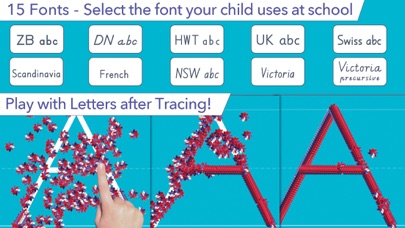
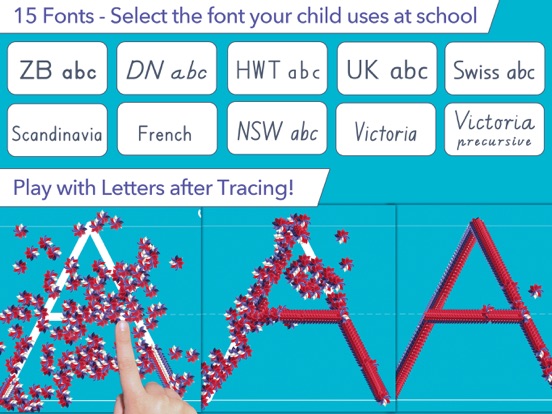
• 16 Fonts available (including 3 most popular in the US)
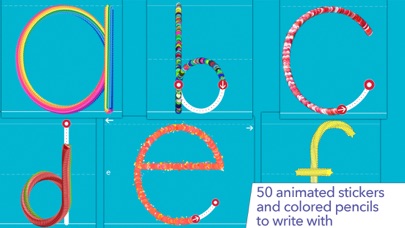
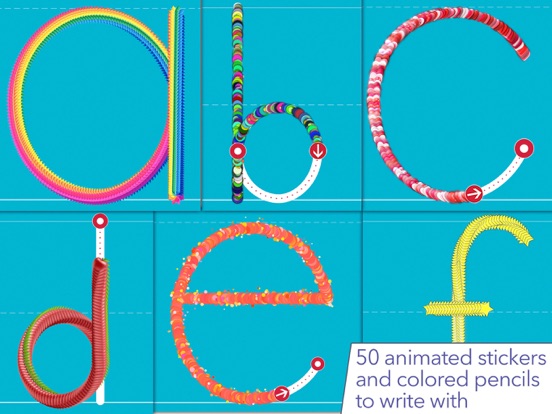
• Fun tracing using 50+ animated stickers, sound effects and interactive games that animate letters at the end of tracing
• Uppercase & lowercase letters, numbers, and words
• Ability to create your own word lists (and record audio for each word)
• Fully customizable to suit every child’s needs (letter size, difficulty,...)
• Check progress thanks to reports that display what the child has traced
• Shapes tracing activity for toddlers
• Create PDF Worksheets and print them to help your child to write on paper
• Use Apple pencil to write at a very small size
All the shapes, the first 7 letters, numbers, and words are free. The remaining letters and the ability to add your own words can be added by making a one-time purchase.
_______
ACCOLADES
• "Writing Wizard is the most complete and intelligent letter tracing app we’ve seen"" AppoLearning.com
• "This brand-new app should be the go-to for every parent, teacher and therapist to work on handwriting" - TOP PICKS - 5 stars - SmartAppsForKids.com
• "Writing Wizard by L’Escapadou is everything a parent wants in a handwriting app, and more." 5/5 - kids-app-reviews.com
• "L’Escapadou has made handwriting fun." AppyMall.com 5/5
• Listed in "20 best educational iPhone and iPad apps for kids of 2013" - appsplayground.com
• Editor's Choice Award for Excellence in Design - Children's Technology Review
_______
PERFECT FOR KIDS
Kids want to have fun, and Writing Wizard offers a lot of fun to keep them motivated in the learning process!
• They can trace using 50+ animated stickers and sound effects
• Once tracing is complete, they can interact with them on 4 games that animate letters
• They can trace any word - like their name - and record their voice for each word
• They can collect stars in 5-Stars play mode
_______
PERFECT FOR PARENTS & TEACHERS
• Ability to create your own word lists (and record audio for each word)
• Detailed reports provide information on what kids have done, including the ability to replay and export the tracings to view kids' progress
• Share word lists via iCloud Drive or other cloud providers, adhoc network, or email
• Multiple parameters to customize the app according to the child’s current education level (e.g. letter size, difficulty, show/hide model, allow to stop between key points, etc.)
• 3 most popular fonts in the US (ZB, DN & HWT) and 13 international fonts (UK, Scandinavia, Australia, Germany and France)
• Upper and lower case letters, numbers (and word lists)
• Letter names and letter sounds (which can be customized)
• A customizable 5-Stars play mode prompting the child to trace a letter or a word 5 times using different parameters (each step is more challenging)
• Create an unlimited number of users
• Many settings to customize the app (sound, game time limit, black background,...)
• In the A-Z section, special graphics available to match letters (e.g. ant graphic for A/a)
_______
Privacy Policy
KNOW WHAT'S INSIDE
As a Moms with Apps member, we follow the "Know what's inside" best practices for kids’ apps
L’Escapadou takes children’s privacy seriously. We believe you should not have to worry about your kids being tracked by apps or websites. This app:
• Does not collect any user information (we do not use data collection tools)
• External Links : Protected parent sections are available where you can send us a mail and check out our others apps. Before accessing a parent section, an addition must be solved so that young kids cannot access it.
Writing Wizard: Learn to Write App Comments & Reviews
Writing Wizard: Learn to Write Positive Reviews
Word ErrorI love this app. My only issue is each time I click on the word 1 part the words do not match the pictures. You type the right word, but that word is not the word is not the spoken word when you see the picture..Version: 2.6
Applause (and suggestion)This app exceeded my expectations. After using this only one time with a child who has multiple disabilities, I saw great improvement in his ability to form letters without segmenting them. Not only that, but he smiled, had fun, and experienced success. It was nice to see him so proud of himself. And can I also brag about the fact that you provide a left hand mode?! That’s actually how I found you; I was looking for ways to support my left-handed learner. My favorite (and unexpected) feature is the ability to record the sounds myself. I was very excited to be able to record the path of movement for the letters. For capital A, I prompt with, “slant down, slant down, across.” I was delighted that I could record this. But the same recording attached to the lowercase a. I wanted to record, “over, around, up, down” for lower case. Is there any way upper and lowercase letters could have separate recordings? Or if you could provide the path of movement, even better! Thank you!.Version: 3.0.2
AmazingI wasn’t sure what to expect. This app is fantastic for my kindergartener to learn his letters. And also to allow me to add his vocabulary and sight word list! It even has a layer built in the background that parents can access to allow parents to check what they worked on and also how their words looked when they were tracing! The only thing that would be better if there was a way to allow a quiz for the words without the tracing or even how to say them by recording them and having some form of voice recognition. Overall for only 4.99 it was completely worth it and just what I needed!.Version: 1.4
Less a review and more a suggestionI love your product. I bought the full version and used it to teach our child how to write abefore 4 years old. I was hoping to see a way of supporting the apple pen or active stylus in general. Like, I would love to see the ability to disable touch in favor of the pen only. At the moment, my son would just drop the apple pen or stylus in favor of his finger. I currently use other drawing apps that can disable finger touchs but these free-drawing apps are no where near as engaging as your app. Thank you..Version: 2.6
Great app, one important revision is neededWhen a child works in handwriting without tears mode, it is important that the sequence of writing the lower case b be programmed correctly. Right now, it is programmed in the traditional way, with the child drawing the first line down then bouncing straight up before making the belly of the b by going right and down. In HWT, however, the line for the b goes straight down then curves to the right then up and back to the left toward the starting line. This is a hugely important distinction because it helps kids stop confusing the letters b and d. Please fix this ASAP..Version: 2.6
LaggyI loved this app so much as a school based COTA. It’s fantastic in helping kids learn their letters and how to write with proper top to bottom formation and I even paid for the full version, but lately it’s getting so laggy when using it. The kids get frustrated because it’s not picking up their pencil strokes until a good 10 seconds after drawing them. I would love to continue using this app but it’s become such a big issue every time..Version: 3.0.2
Fun tool for handwriting mastery!Simple and effective without being overly juvenile. I really appreciate that the developer made it customizable. I can easily change the handwriting style, add or turn off tracing arrows, add word lists of our own, and more. This is helpful when you have multiple children at different stages of handwriting as well. It's one of the best handwriting apps I've seen so far..Version: 1.4
Perfect for our needs!My 8 year old son has illegible writing, and needed practiced. I found this app, and so far - has gotten him in the habit of writing between the line of folder paper! Developer is responsive to a question I emailed about too (grateful that he responded!). Will definitely recommend this app to his school and other who also deal with illegible handwriting!.Version: 2.0.1
Perfect for beginnersThis is a great app! While I’m teaching oldest this is perfect for 20 mins a day tracing for my pre-k beginner. The best part is that it keeps tabs on the progress history and shows in detail how he traced, what time, what letter and it’s fun! I love it because it’s a detailed game for beginners to keep track on what to work on with your child! Love this, highly recommended..Version: 2.0.1
Can make your own word lists and print itMy kids love to learn with Ipad and this app is the best app for helping them to learn hand writing, lines has different styles or fonts, it is not boring, easy to use!It’s a must-have app!.Version: 2.6
Paid but it didn’t unlockGood for my kids but I just paid for everything and cannot access everything. Things are locked and I don’t know why. Any help is appreciated..Version: 2.8
Paid for full but didn’t get even after emailing them about the issueI like the app but when I transferred it from my phone to the kids new iPad all but a few letters came with it. I purchased the full version on my phone but only the started was added to the iPad. I have email them twice about it with no response..Version: 1.3
Love this appI have tried so many hand writing apps and this is by far the best. Not only does it have fun animation, it has many customizations that you can set. Plus you can have your own word list for practice. Give it a try!.Version: 2.0.1
Occupational TherapistI love this application. I usually do not like tracing, because kids do not follow a definite pattern on paper. With this application the kids have to visually track while tracing and the visuals after the finish tracing is very motivating.Version: 3.0.2
Love it!It’s exactly what I was looking for and more! I love that it won’t let the child form letters and numbers incorrectly. My kids love the animation also. I love having the ability to adjust the settings according to each of my kid’s levels and needs..Version: 2.0
The best gameThis game helps my kid with hand writing and I would give it a 5 star it helps with so many things like for example like pations and drawing so download the game and I hope your kid or children Like this game.Version: 3.0.2
A wonderful app!This is a highly motivating educational tool. I recommend it to all the parents of the children I tutor, as well as teachers who ask me for recommendations for use in their classrooms and remedial sessions..Version: 3.0.2
Great app to help with dysgraphia!My kids really enjoy this app. Would like some flexibility with the play mode. Currently, you must complete a word 5 times before moving on..Version: 1.3
I love It!!Wonderful app! I love all the features! I love that you can add your own list and also record your voice saying the words! Great app, highly recommend!.Version: 3.0.1
LoveI love this app! It has been great for my 4 year old who is learning to write letters and for my older kids to practice spelling words. The letters that I paid for lock sometime but I just push buy and they come back..Version: 1.2.2
Amazingly good stress remover.OK. So I know that people have this problem but I’m always worried about things. Im always so stressed. Its like, IMPOSSIBLE to calm me down but this game does. Like super slime simulator, it’s a good time killer and plus it helps my handwriting and..... Well... I just love it!.Version: 2.0
Fun, flexible and immensely helpful printing toolI LOVE this app. It does everything possible to make this a fun yet effective tool for kids of all ages and abilities to learn how to print and even spell..Version: 2.8
Great app!This app is brilliant. Not only has it helped our kiddo with penmanship, it has made studying for spelling tests fun and convenient. Thank you! Definitely worth the price..Version: 2.7
SatisfyingI think this is A great app fun for all all ages specially 11. I love this game it is so satisfying. But I have a problem why can you only use a couple letters I don’t want to pay please just give all the letters for FREEEEEEEEEEEEEEEEEE!!!!!!!!!!!!!!!!!!!!!!!!#love the patterns.Version: 2.0
Great app for OTAs an occupational therapy practitioner I love this app for all of my kids even my most behavioral patients will sit and focus. Great for autism because it’s so sensory driven. Love it ..Version: 2.5
WonderfulI use this every day with the students I tutor. This is their favorite activity!.Version: 3.0.2
More characters supportedA very good writing practice fun game but why not add the letters þ and ð? This is very good, but it would be even better with these characters..Version: 3.0.2
So yeahI’m a literal 13 year old using this app- don’t ask why but that’s besides the point. i’ve been trying to improve my handwriting and this actually helps!! i think i only gave it a four because when i’m going to write a letter it made me mad how it demonstrated how to write the letter lol..Version: 2.5
Great for kids with low visionThis app is motivating and useful for students that need more assistance in writing/ learning letters. It gives rewards and is fun!.Version: 1.4
Please add black & brown skin tones for tracing handWonderful app! But would be nice to have additional skin tone options for tracing hand..Version: 2.6
I can’t do the lower case lettersEvery time when I try to do the lower case letters it is put me back to the home screen if this happens to you just give it a three star.Version: 2.0.1
Amazing!All 3 of my toddlers enjoy tracing in this app. Cute designs and I love the way the parents can change difficulty..Version: 1.2.2
5 starsI love this app because it teaches my kid how to write and spell so you should download it 🥰.Version: 2.5
The best way to writeIt’s amazing I can’t see anything else.Version: 2.7
This could be betterThis app is amazing when I am tutoring students face-to-face. It is just terrible when using an online platform such as Zoom..Version: 2.0.1
Engaging and FunYour child will love this well planned app to teach them how to write in a systematic and engaging way..Version: 2.8
Thought it would unlock moreHow can I get it to go past 9?.Version: 2.5
Jrkk,djororoThanks for making it,hope soon we do not have to buy more of it!WISH YOU A HAPPY NEW YEAR..Version: 2.8
Not idealThe concept is exactly what I'm looking for, but the strokes encouraged are not proper. Certain letters begin at the top line, midline, or baseline and this app does not address beginning pencil placement correctly..Version: 3.0.1
PerfectThis allows me to work with my grandchild. Thank you.Version: 1.4
Nice animationI like that this app lets the parent control how much sound, animation, and reward for the child. How do I unlock more letters?.Version: 2.2
Easy and simpleAwesome and easy strategy for my kiddo. Simply love this app.Version: 2.8
Great appReally helping my daughter who is on the autism spectrum and has developmental delays. This app is fun for her so she’s really motivated to learn..Version: 1.4
Let’s create writing letters numbers shapes and words to write handWriting.Version: 1.4
It’s horribleMy son got in the parent stuf.Version: 3.0.2
BetterSimilar fun.Version: 2.6
Free International Money Transfer 💸Enjoy high maximum transfers into more than 20 currencies while saving up to 90% over local banks! The cheap, fast way to send money abroad. Free transfer up to 500 USD!Version: 3.3
What do you think Writing Wizard: Learn to Write ios app? Can you share your thoughts and app experiences with other peoples?
Please wait! Facebook comments loading...