Pierre Abel
Writing Wizard - School Ed. Customer Service

- Writing Wizard - School Ed. Customer Service
- Writing Wizard - School Ed. App Comments & Reviews (2026)
- Writing Wizard - School Ed. iPhone Images
- Writing Wizard - School Ed. iPad Images
"Fantastic, customizable tracing practice with fun rewards." 5 Stars - Common Sense Media
470,000+ units sold (including 260,000 to schools) !
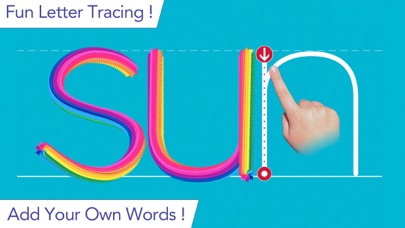
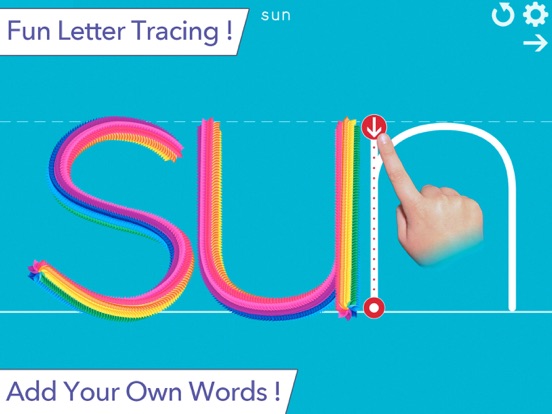
Writing Wizard is designed to help every child learn how to trace letters, numbers, and words through a fun system carefully designed to maintain motivation.
• Show and enforce how to trace letters correctly
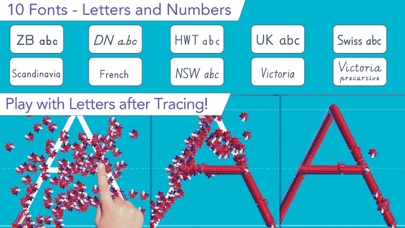
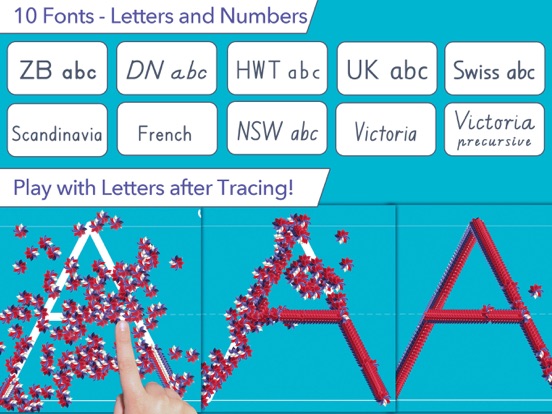
• 16 Fonts available (including 3 most popular USA fonts)
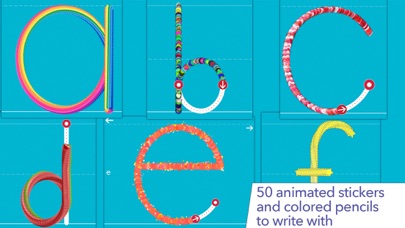
• Fun tracing using 50+ animated stickers, sound effects and interactive games that animate letters at the end of tracing
• Letter names and phonics
• Uppercase & lowercase letters, numbers and words
• Ability to create your own word lists (and record audio for each word)
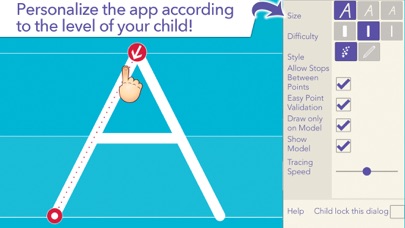
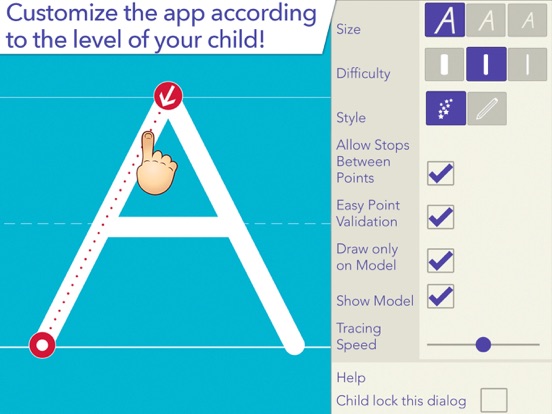
• Fully customizable to suit every child’s needs (letter size, difficulty,...)
• Check progress thanks to reports that display what the child has traced
• Shapes tracing activity for toddlers
• Create PDF Worksheets and print them to help your child to write on paper
• Use Apple pencil to write at very small size
_______
ACCOLADES
• "Writing Wizard is the most complete and intelligent letter tracing app we’ve seen"" AppoLearning.com
• "This brand-new app should be the go-to for every parent, teacher and therapist to work on handwriting" - TOP PICKS - 5 stars - SmartAppsForKids.com
• "Writing Wizard by L’Escapadou is everything a parent wants in a handwriting app, and more." 5/5 - kids-app-reviews.com
• "L’Escapadou has made handwriting fun." AppyMall.com 5/5
• Listed in "20 best educational iPhone and iPad apps for kids of 2013" - appsplayground.com
• Editor's Choice Award for Excellence in Design - Children's Technology Review
_______
PERFECT FOR KIDS
Kids want to have fun, and Writing Wizard offers a lot of fun to keep them motivated in the learning process !
• They can trace using 50+ animated stickers and sound effects
• Once tracing is complete, they can interact with them on 4 games that animate letters
• They can trace any word - like their name - and record their voice for each word
• They can collect stars in 5-Stars play mode
_______
PERFECT FOR PARENTS & TEACHERS
• Ability to create your own word lists (and record audio for each word)
• Detailed reports provide information on what kids have done, including the ability to replay and export the tracings to view kids' progress
• Share word lists via iCloud drive or other cloud providers, adhoc network, or email
• Multiple parameters to customize the app according to the child’s current education level (e.g. letter size, difficulty, show/hide model, allow to stop between key points, etc.)
• 3 most popular fonts in the US (ZB, DN & HWT) and 13 international fonts (UK, Scandinavia,Australia, germany, France)
• Upper and lower case letters, numbers (and word lists)
• Letter names and phonics (which can be customized)
• A customizable 5-Stars play mode prompting the child to trace a letter or a word 5 times using different parameters (each step is more challenging)
• Create an unlimited number of users
• Many settings to customize the app (sound, game time limit, black background,...)
• In the A-Z section, special graphics available to match letters (e.g. ant graphic for A/a)
_______
Note that a free to try version is available (search for "Writing Wizard -Starter" on the App Store)
_______
Privacy Policy
KNOW WHAT'S INSIDE
As a Moms with Apps member, we follow the "Know what's inside" best practices for kids’ apps
L’Escapadou takes children’s privacy seriously. We believe you should not have to worry about your kids being tracked by apps or websites. This app:
• Does not collect any user information (we do not use data collection tools)
• Does not contain in-app purchases
• External Links: Protected parent sections are available where you can send us a mail and check out our others apps. Before accessing a parent section, an addition must be solved so that young kids cannot access it. *
Writing Wizard - School Ed. App Comments & Reviews
Writing Wizard - School Ed. Positive Reviews
I hate the new star featureThe app is fantastic except for the new star feature. Children do not like writing the same thing over and over. I wish I could delete that feature. Other than that it is perfect..Version: 5.0.2
Great writing app!I love all the different parameters you can create to suit the needs of the children/students that you are working with. I love, love, love that you can add your own word lists. I’m an OT who works with students of a variety of levels and this app will suit so many of them. I have just 2 suggestions that would make it just a bit better for me. When you trace the letters they are overlaid with pictures, but I think my students would be hard pressed to identify those pictures. If there was a single picture off to the side and if the “voice” labeled the picture that would be great. Second, when you make worksheets it would be nice to have an option to trace a yellow highlighted line rather than a dotted line. Thank you for making this. I love it..Version: 3.8
Fantastic!I am a speech-language pathologist specializing in teaching children with dyslexia and dysgraphia. All my clients love this app and are highly motivated, from my young elementary kids to middle school kids. It works even better when I added the TacScreen bumpy screen for touch screen products, e.g. iPad, iPod, Kindle, etc. The word list feature is great for helping kids practice their spelling words and for learning new spelling concepts. I just found the worksheets feature and use it to send homework home for extra practice. Thank you for making such an all-purpose app! My only suggestion is adding a sentence list similar to the word list feature so my kids can practice their writing in sentences. Excellent product!.Version: 3.7
Writing Wizard ReviewWriting Wizard is very good and all that, but it is too customizable and is very complex to be able to suit my needs. I am very happy with it but I can’t figure out what to do and/or turn on/off to suit my needs so it is overall very good, but with that one problem, isn’t perfect- as expected with many things. But the writing is also very satisfying, and with that said is a great app to have, and I would highly recommend it to others. I only tried it to improve my handwriting but might also do Writing Wizard just because of its fun and for the sake of fun as well as handwriting improvements. Sincerely, Sam Fazeli, 4th grade student.Version: 5.0.7
Great learning to write AppI have had this app for about 5 years and it is still working great. I like that I can customize based on each of my kids different level. Also, even better with works with the IPad Pro series, which for us is an added bonus as now our kids get the chance to use a pencil while writing. The fact that they constantly upgrade the app to allow it to be able to be used on various Ipad series says a lot about the company and their customer service. As a teacher and a home educator, I highly recommend this App for children learning to write or even if they just need practice..Version: 3.5.1
Amazing!My son is basically teaching himself to read with this app. He is on spectrum and considered non verbal but this app is acting almost like an AAC for us! Thank you so much for this app—I wish there was a free page though where we could almost use it like a blank piece of paper-he uses a cheap etcha sketch sorta thing but if it were built up in that would be amazing. I would love to help with this I absolutely love this app!!! I am not one to rave about anything and I am thrilled!.Version: 4.5
Love it!My kids 4 & 6 both use this, my youngest to learn her letters and how to form them and my oldest for spelling practice. Love that it allows me to creat my own lists and record the words! Great app, super flexible with lots of settings. We also have the cursive one which is also great. We’ve only had these a couple days but we are very happy so far. Kids enjoy using it and I love that they don’t complain about practicing letters and spelling..Version: 3.5.1
Perfect for my Toddler and Kindergarten kidsI am loving this app! Being able to create different users and customize words lists is exactly what I needed for my kindergarten kids. I love that they can record themselves saying the word and hear it every time they are prompted to write the word. My toddler especially loves all the different shapes that get used while tracing the letters, words, shapes, etc..Version: 3.7.2
Great app!This app is so fun for younger kids! I downloaded the app for my 5-year-old sister one day while I was babysitting and she loved everything about it! She especially enjoys the little games after she traces something. This app not only teaches children how to write, but also how to write numbers and draw simple pictures and symbols. Best writing app we have tried so far!.Version: 3.8
Exceeded my expectations!I bought this for my 3 year old grandson. This is amazing. I don't write reviews very often. But the developers of this group of apps have more than fulfilled the promise of their apps abilities to both teach and entertain. Well done! Beautiful graphics, easy to navigate, endless features! Artistically designed..Version: 3.5
Great for 3year old beginnerGrandson loves to “play” this. Helps with letter and word recognition as he traces. Made lists with variations of his name and one with all family names. He loves learning to spell and “write” their names too. Can see a perfect transition from playing on iPad to writing on paper as we practice. Thanks for the app..Version: 3.5.1
Well designed!This app is a favorite of mine wherever I go and meet young children. In my classroom it is adaptable for every learner from those needing to identify letters and sounds to those needing to write their names to those reading and writing sight words. It is Individualized with CORRECT practice!.Version: 3.8
Years of use and it’s still lovely !Got this a long time ago. Many children have used it on my iPad at school. Even older children find it entertaining and they now added some new shapes !!!.Version: 4.0
Excellent app for childrenMy son loves this app and it’s a good practice for him. I recently discovered that I can add my own words, so I add the ones he is learning at school. We also enjoy the drawing section. It is super fun to learn how to draw basic animal faces, house, etc..Version: 3.8
Best app for toddlersThey did an excellent job creating this app. It has so many cool features like you can create your own word list. Stylus support. Also you can printout worksheets. My 3 year old daughter simply loves this..Version: 3.7.2
IPad Pro+ Apple Pencil= my 2 year old can writeMy kid isn’t even 3. She’s played this app for a few months, the teachers at daycare are freaking out that she is writing “cat” and “gum” and telling them what it is.Version: 3.7.2
Great app!I’ve been using this app for 2 kids now. Great to add sight words and learning to write his name along with the numbers & letters. Worth the purchase..Version: 5.0.1
Fine but can't access Parental ControlsWe like the writing features of the app, but I can't access the Parental Controls. It asks us to enter the sum of two numbers, but after doing so, nothing happens. There is no enter button, only cancel, erase and numeric characters..Version: 3.5.1
PichumomThis is the best game ever and the game has been amazing. I have to say that I’m super glad that you made this game. I have had this app for 7 years..Version: 4.0
Great for Autistic ChildrenMy Grandson is a kiddo on the Spectrum the sound effects keep him wanting to trace over & over Thank you and Well Done!!.Version: 4.0
The Best!My grandkids have used this over the past 10 years. Each one gets fun practicing words they want to learn. Easy to add words..Version: 4.2
Great AppBeautiful design and when sent email with question to developer, received quick, helpful response..Version: 3.7.1
My Game Works Again When I RecordDeveloper My Game Works Again When I Record So u do not have to fix the game.Version: 3.8
Writing wizardThis app was suggested by my 1 st graders occupational therapist and we love it! She’s doing it everyday and getting the hang of the letters! Great for kids who are learning.Version: 3.7.2
Excellent appMy 5 year old loves it and this has helped him write his full name well..Version: 3.5.1
Great ProgramWell worth the purchase. I use it daily..Version: 3.5.1
...I’m so sorry I finally got through a hard one :).Version: 4.2
Best thing everI am nine years old and this app has helped me improve writing a lot. It is maximum fun-ness.Version: 4.0
Writing wizard for kidsWe really like this app. Got it for a 4 year old grandson..Version: 3.5.1
Excellent app for handwriting practice!Excellent app for handwriting practice! Makes you make the correct letter formation in sequence!.Version: 3.7.2
Amazing!Easy and fun for both 1st time learners and improving skills!.Version: 3.8
Great app!I’m a dyslexia therapist and I recommend this all the time!.Version: 4.2
Add Unicode Characters!The game’s cool and all but I want there to be more characters like Latin Extended A, DŽ Dž dz, LJ Lj lj, NJ Nj nj, Cyrillic and Arabic. (Plus, add the International Phonetic Alphabet).Version: 4.8.1
Great Handwriting AppGreat for letter formation and beginning reading with sounds and sight words..Version: 3.5.1
Amazing!So impressed with the power and flexibility of this app. My sons love it!.Version: 3.8
WritingIt is really awesome.Version: 3.8
Writing Wizard for KidsGreat for proper letter formation..Version: 3.7.2
WritingI love it.Version: 4.2
HialeahUnited States.Version: 4.2
GreatVery good,!.Version: 3.7
SheSn.Version: 5.0.7
CoolGood.Version: 4.8.1
Mom CMA+.Version: 3.8
High Marks! Well Done!Writing Wizard - Kids Learn to Write Letters is wonderful! It offers various customizations which will make parents and teachers beyond thrilled! And I truly believe kiddos will have fun whilst practicing an important and necessary skill. I think it offers a great variety of writing tools and will utilize fine motor skills, letter identification, dolce word identification, number identification, and hand eye coordination. I love the ability to customize word lists and track students. I also love the animations and fun way in which tracings occur. I think the app is nicely done and is certainly worth having on hand for students who are newly learning or need additional practice with this skill. I would love to see the addition of a cursive writing font and perhaps a way for students to earn additional writing implements like: ketchup, chalk, rainbow markers, shaving cream, pudding, etc. I think this would offer incentive for those students who may struggle with handwriting and will be using this app longer term..Version: 1.0
Excellent, flexible handwriting appBoth my pre-K and 1st grader enjoy using this app. I've even caught my 3rd grader watching over their shoulder! As a parent of four children, I love the flexibility. I can control the level of difficulty and the different parameters, customizing to each child's level of learning. My 1st grader can already write her letters well, but the word writing practice is perfect for both handwriting (spacing between letters when in a word) and spelling/reading of simple words. Unexpected bonus! Also, the ability to track each kid's progress is a welcome feature. Thanks for such a great app! UPDATE: I emailed the developer a question and received a reply in less than an hour. Awesome response time! The flexibility of this app is phenomenal compared to most kids' educational apps. I have used it for my 3 year old (learning her letters), my first grader (fine tuning handwriting), and even my third grader (practice writing spelling words)! Best of all, they LOVE using it!.Version: 1.0
Fabulous,This is an amazingly incredible app for beginning writers and early elementary kids! Upper and lower case letters, numbers and word lists are introduced - using either fun animated stickers or colored pens. The visuals are engaging, but not over stimulating, keeping kids on task. What I like about this app is that the letter is the focus, and the animations highlight learning on so many levels - both to insure retention and mastery of the sub skills needed to gain competence. The ability to customize and use this app with many users, and the ability to view each individual users actually strokes and progress is state of the art. The customizations alone help to support success in graded measures, and it is very impressive how much thought and heart went into this app. I would highly recommend this app to both families whose child is struggling with handwriting, and clinicians/teachers. There are no in app purchases, and links to other apps by this developer are under a secured button..Version: 1.0
FantasticMy four year old became interested in learning how to write letters at the beginning of the school year, with the expectation at preschool to write his name to sign in each day. He is very resistant to instruction from us on how to form letters, but he loves working with this app. I love how customizable it is, with user-defined word lists, different fonts (currently Zaner-Bloser, D'Nealian, and Handwriting Without Tears), and the ability to finely tweak different aspects of difficulty. I also like how I can see what my son has been doing with it. I contacted the author to ask whether he would consider adding Getty-Dubay Italic style to the program, and he is considering it for the next revision! He is incredibly responsive and nice. What a great set of apps he's made - I think we have all of the English-language ones now except for the cursive one..Version: 2.0
Absolutely LOVE it!!!This app is great, not only for working on handwriting, but also for letter recognition- upper and lower case, letter sounds, number recognition, and learning to write short words. It is also a ton of fun! Your child or student will not want to put it down! There are many options for customization that make it work for children who are at the beginning of handwriting, or those who need to practice. Teachers will like the ability to add unlimited users and the detailed data tracking. The app has built in visual rewards for tracing, which are very sensory that may appeal to those with Autism. This has been the case for my son in other apps by this developer. All external links are locked, and there are no ads. I highly recommend this app!.Version: 1.0
Free International Money Transfer 💸Enjoy high maximum transfers into more than 20 currencies while saving up to 90% over local banks! The cheap, fast way to send money abroad. Free transfer up to 500 USD!Version: 5.3
What do you think Writing Wizard - School Ed. ios app? Can you share your thoughts and app experiences with other peoples?
Please wait! Facebook comments loading...