Pierre Abel
Word Wizard For Kids School Ed Customer Service

- Word Wizard for Kids School Ed Customer Service
- Word Wizard for Kids School Ed App Comments & Reviews (2026)
- Word Wizard for Kids School Ed iPhone Images
- Word Wizard for Kids School Ed iPad Images
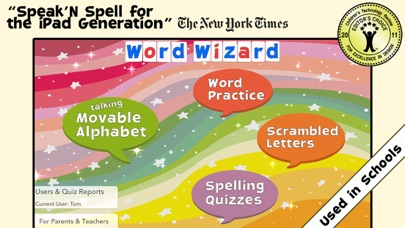
• "Speak ‘N Spell for the iPad Generation" - The New York Times •
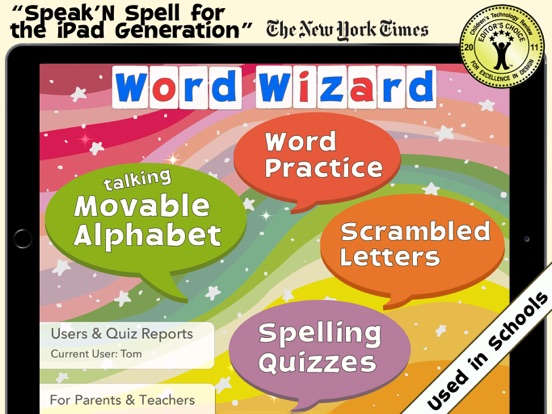
Word Wizard is an award-winning app used in schools that offers several unique reading and spelling activities for children ages four to 10.
--Learn to Read by Building Words --
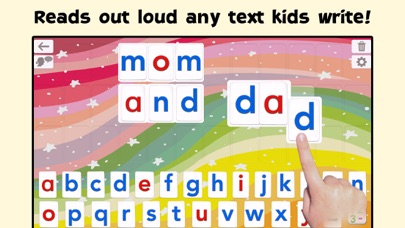
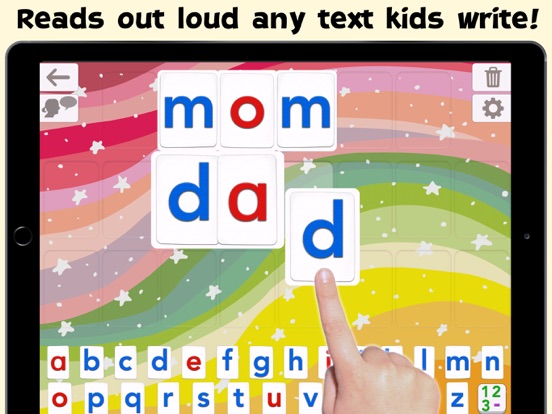
• The Talking Movable Alphabet activity allows kids to experiment with word building and phonics thanks to the advanced text to speech engine (the first step in learning to read)
• Any text can be written and spoken
• 2 child voices + 5 adult voices (US, UK & Australian voices)
• Uppercase & lowercase letters, numbers, digraphs, ABC or QWERTY keyboard
• Many settings to adapt the activities to the child’s needs (letter size, assign images to words, high contrast modes for kids with visual impairment,...)
-- Learn to Spell using the Talking Movable Alphabet and your word lists --
• 3 spelling activities that increase in difficulty
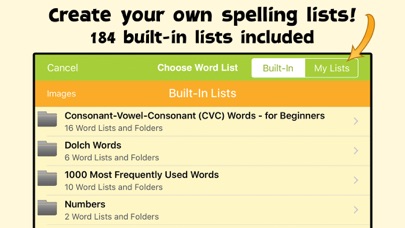
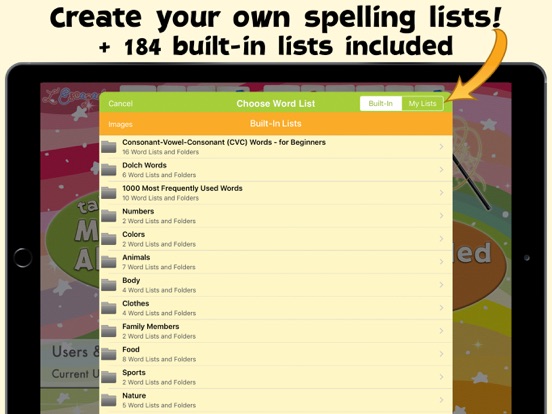
• 200 built-in word lists (about 2000 words)
• Add your own words to create unique spelling quizzes!
• Add your own images to illustrate your word lists
• Keep tabs on your children’s progress with detailed reports
_______
• Used in Schools (140K units sold to schools)
• "This is an important breakthrough in reading instruction" - The New York Times
• "This is a fantastic app for young children, right through to children in later elementary school " - Wired's GeekDad
• Editor's Choice Award for Excellence in Design - Children's Technology Review
• Winner of a Parents’ Choice Award
• More than 290K units sold!
_______
Talking Movable Alphabet Activity
_______
• Pronounce and spell-check any word, number or sentence
• Natural Sounding Voice - three American voices, one British voice, and one Australian voice
• Letter sound (phonic) or name when a letter is touched in the alphabet
• Alphabetic or QWERTY layout, letters, numbers, consonant digraphs (like “th”) and vowels digraphs (like “oo”)
• Uppercase or lowercase letters
• Keyboard emulation option
• 4 letter sizes available (allowing for more or fewer letters on the board)
• Customized word pronunciation, if necessary
• Accessibility: external keyboard support and 4 high contrast modes available
_______
Fun Spelling Activities
_______
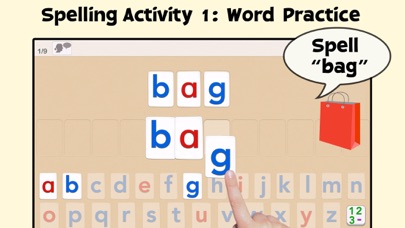
3 spelling activities of increasing difficulty are provided to adapt the activity to the child’s spelling level. You can use the built-in word lists or create your own.
1 - "Word Practice" says and displays the word to spell, and asks the child to spell it using the talking movable alphabet
2 - "Scrambled Letters" says the word and displays the letters needed to build the word or sentence, and asks the child to reorder the letters.
3 - “Spelling Quizzes” is a standard spelling test. The app won’t move onto the next word until the child has correctly spelled the word, helping them to remember its correct spelling.
• 200 built-in word lists: Words for beginners, Dolch Words, 1,000 most frequently used words, body parts and more
• Create custom Word Lists by entering your own words and sentences
• Import and export Word Lists you’ve created
• Hints are available should kids not know how to spell a word
• Colorful animations are displayed when a word is completed
• Once a quiz is completed, interactive animations are available as a reward
-- Users & Reports --
• Unlimited number of users
• Detailed Spelling Test Reports per user (can be exported in PDF)
_______
More Accolades
_______
• The New York Times
"This is an important breakthrough in reading instruction because it leverages the iPad’s size, powerful speech synthesis abilities, and touchscreen so that every letter can be a building block of phonetically accurate sound"
• Children's Technology Review
Editor's Choice Award for Excellence in Design - 4.8 stars out of 5 - "Turn your iPad into a talking alphabet/language generator - and the perfect tool for a child just starting to experiment with letters and their sounds"
________
Please send any feedback or suggestions to [email protected]
Word Wizard for Kids School Ed App Comments & Reviews
Word Wizard for Kids School Ed Positive Reviews
Boring for younger kidsIt's a well thought out app but lacks playfulness and whimsy. My toddler (who is beginning to read and write) did two exercises and got bored after the dry "spell this, spell that" commands. Still it seems like a very promising app for older kids..Version: 5.6
Word WizardThis is truly a dream come true app. I teach students from grades 2-7th grades with learning difficulties spelling. This program has helped students learn to spell and boost their confidence and grades. Students use the iPad while wearing earbuds, so I can have a full class working with no with interruptions from others. Students with writing difficulties appreciate working on the iPad in place of trying to print or cursive words that are already difficult to spell let alone write out. So using the iPad allows them to find success. I export the lists from my iPad and import them onto my students iPads. When I ad the spelling lists, I also ad a test. Grades have really gone up after using this app. I think this is my 4th year of using it and Pierre is wonderful to communicate with. He’s very helpful..Version: 6.0.3
Words of GratitudeI am so grateful for this App. I used it for my first son who has Autism . The app was a true confidence builder . The added features for speed , voice tone , colors , drag and pull were helpful collaboratively to engage him . I didn’t hesitate to use it for my 2nd son also with Autism . Now 13 and 10 , I still use it opposed to just saying words for them . I use another app that allows me to make our own list of words for spelling test etc however this App will always be held with the highest esteem for phonics and our strong foundation . I refer parents to it all the time . Best Regards Keesha , RN.Version: 6.1
Special needs childMy daughter is verbal but cannot make her needs known for her day to day activities. Plus she is so quiet that you have to stand right in front of her mouth. She uses this app everyday stop let me know what she is thinking. I don’t know where I would be without this app. I’ve downloaded other like it but she always comes back to this one! Thank you to the creators❤️.Version: 6.1
SuperbThis company has two major apps that I absolutely love. Extremely well thought out. Are used them in my classes and for me it may be easy best way to help students understand the sound system and to truly spell. I cannot recommend this app highly enough for parents, teachers, anyone wants to learn the sound system and to really spell. I also command of the company on the beautiful accent. It is authentic..Version: 5.1
Great tool to support learningAs a pediatric OT working in a school setting I use and recommend this app often. It allows for several levels of support so it grows with your child as they learn. I love that I can make my own word list. This feature has supported me in helping kids learn how to spell their own name all the way up to using it for weekly spelling practice..Version: 6.1
100s on spelling testsEvery week, my son brings home a list of words for his Friday spelling tests. I make a list on this app, and he practices each night, starting with the easiest setting on Monday to the more challenging settings by Wednesday. He always gets perfect scores on his tests. He has autism, and doesn’t like to study with me, but if it’s on a computer, he loves it. THANK YOU for this app!.Version: 6.0.3
A much needed programI have been looking desperately for a program to teach my special needs granddaughter how to read. The movable letters help with identification and sounding out the letters. It is so much easier now to demonstrate word and sentence construction. The child sees in real time how we communicate with letters that magically make words..Version: 5.1
Word wizardLove the app. Great for spelling and phonics practice. I was searching for movable letter tiles but this one is the best so far since it not only moves the tiles but gives you the phonic sound. Highly recommend this app..Version: 6.4.6
Great, thorough spelling app for kidsFor the price, this is a good deal. There are plenty of spelling words in increasing levels of difficulty, so beginning spellers and more advanced spellers can use the app. I especially like how older kids who are still working on their spelling won't feel like this is an app for littler kids. It doesn't focus on grade levels (they're arbitrary, anyway) or use "babyish" graphics for simple words. Just the letters and the voice. Being able to customize the voice is a huge plus, such as being able to choose between American and British pronunciations. But also being able to adjust the speed and pitch of the voice is a great feature. It helps with comprehension, plus it's fun to play with. If you turn off the profanity blocker and use the Movable Alphabet feature, the kids can really have some fun. :-) You can add your own word lists, too, so the kids can practice their own spelling words with this app. All in all, a good value!.Version: 2.2
Best app in its category for all ages and abilitiesMy 7 year old daughter and my 10 year old autistic son absolutely love this app..Version: 5.3.1
ExcellentI work with a non verbal autistic boy. This app is excellent and he loves it. Thank you so much..Version: 5.1
IOS 14 pleaseUpdate to iOS 14 please.Version: 6.1
Powerful, playful tool for beginning readers or struggling readersThis is one of the best uses of technology for beginning or struggling readers that I've seen, and I've been studying literacy and technology for twenty years. I strongly recommend using the phonics and open-ended option -- it allows your child to get lots of experience in a playful way in how letters and sounds work together, which is a critical foundation for successful reading. There are so many ways you and your child could make up fun and meaningful games together with this: Have him or her hide something and then "write" you a clue on the tile board to find it; Write your child a "secret" message on paper and then let him or her use the tile board to read any new and unfamiliar words. Kids like to have power in experimenting with how words work, and this type of app can give it to them. I believe any beginning reader would benefit from the app, but it could also be especially useful for children who need extra support in focusing their attention on letters and sounds to decode words, rather than guessing at them, or children who may have dyslexia-related difficulties in building up knowledge of letter-sound connections. I especially like the capability for building sentences, not just words, because getting young readers and writers comfortable in moving from words to sentences is sometimes hard for teachers and parents to do. This app could make it much easier!.Version: 2.0.1
Amazing AppMy son is in first grade and struggles with this reading and writing. I bought this app in hopes that it would assist him. Every week I add his spelling words and he loves to use it. He really enjoys when it is time to work on his spelling words!! Not only does he have fun with it, but in the last month and half I have used it, he is doing much better on his spelling tests!!! In fact he went from getting about 10 to 12 of his 24 spelling words right to getting 20 words correct last week!!! I think this is a great tool and it really helps. I am so impressed that it is so easy to get my son to work on his spelling because he thinks this is so fun!! A great feature above being able to add spelling lists is that every time my son completes his spelling list he gets a reward. He loves the fun colorful shapes of stars, happy faces and other things that he play with on the screen. He looks forward to playing with that so it is a fun reward to look forward to for him as he works on his spelling!! I definitely have to say for any parent this is a MUST have app for your iPad or iPhone, I have it on both. I just wish that the spelling list I created on the iPad would sync with the same lists that I have on my iPhone. I am sure that will come, but even without that option it is a great app!!!.Version: 2.0.1
Gets better & better!Love this app for both my 8 year old hyperlexic daughter with autism & my 5 year old. Oldest daughter uses it for labeling, answering questions, making requests. I have not seen any other app that gives her access to a keyboard while integrating the phonetic sounds of each letter she picks / word she creates. This feature allows her to hear when she's making a mistake with her spelling and correct it immediately. Awesome! I use it for my younger daughter to create sentences using her spelling words. She doesn't get to ask me "how do you spell ****?" without trying to figure it out herself on the app. Then when she gets the sentence all set, she copies it onto her paper using the model! One request -- which Pierre says he'll get to soon -- is to make the lowercase A visually look like the one that the kids learn in school as opposed to the one seen on computers with the hook at the top. My daughter spends an inordinate amount of time trying to replicate that bc she thinks it's the right way to make the letter. All in all, great app! Great support!.Version: 3.0.1
Amazing, fun, intuitive... I can't say enoughThis app is more than I was hoping for, and worth every penny. My almost 4 year old always wants to have "meetings" at the computer, where we help her learn how to spell her friends' names while she types. This app does far more. It is completely intuitive for her. She instantly knew how to remove letters from the "writing area" and she understands the subtle cues, like the red glow behind misspelled words. When she heard it repeat words and sentences that we wrote together she was cracking up! This is absolutely an app she can grow into for years as she really learns to read and write. Somehow it isn't babyish but it is still appealing to younger kids. I haven't shown her the spelling tests yet, but I know she will go bananas when she sees the "rewards" for correctly spelled words (and the good news is that they don't make me go bananas... The sound is just sparkly with birds chirping, nice and subtle.) The quality of the text to speech is very impressive. Nice work!.Version: 2.2
Word Wizard- Talking Movable Alphabet and Spelling Tests for KidsWord Wizard - Talking Movable Alphabet Works well for learners at multiple levels. The app has the ability to change the background or add choose grid paper. You can also have the letters show up in QWERTY style instead of ABC order. There is a reward for correctly spelled words. The app says the sound the letter makes as you place it on the grid or paper, and will change once you add another letter that may change that sound, example a “g” followed by an “I” changes sounds from a hard “g: to a soft” g.”. You also have the ability to change the tone and rate in which the speaker talks. You can check the progress for each list. The best feature of this app is that I can put my children’s spelling words I am teaching them that week, to work on. This app is well worth the price..Version: 3.5
Word WizardWord Wizard (by L'Escapadou), is a fun app I recently acquired. Remember those Speak-and-Spell toys? Well, this is an updated version of that! You can play around with the alphabet and make your own words, or you can take spelling tests. There is a built in word list with all kinds of choices from the Dolch word list, consonant-vowel-consonant words and the 1000 most frequently used words. You can also make your own lists. There are plenty of options for settings such as voice features, accessibility features, and specifics for how the program interacts with the user. I would highly recommend this app for young children and for those with special needs. I don't recommend this app for hearing impaired (unless they are able to hear and interpret the audio instructions), because they will not be able to hear the voice feature (which is a huge component of this app)..Version: 3.5
Spelling Tests function needs improvingI bought this primarily for spelling tests. Using the app, most words are easy to understand but some are not. Also homophones are a problem because the child doesn't know which version of the word to spell (ex: paws or pause). Since homophones are included in every spelling test my son has this year, I cannot use this app at all. Providing the option to add a hint, such as, use the word in a sentence, would eliminate both aforementioned problems. If the programmers could add this option, then I'd be happy to give 5 stars - assuming the sharing function (which I haven't tried) also works. I currently use a spelling test app in which I record the word and use the word in a sentence in my own voice, it functions perfectly, but I cannot share it across devices with any ease. I like that Word wizard says it has the ability to share across devices which is why I decided to try this app..Version: 2.0.1
FantasticI am a Special Education teacher, working with K-1 students. Over the years, I have downloaded over 850 educational apps. Word Wizard is one of a handful I use every day. I love that we can now put in multiple users. Support is wonderful, very fast and responsive. I use the app in two ways. The spelling quiz is very easy to customize and terrific for independent practice at any level. I also use the movable alphabet for kids during reading time. If they can't remember a difficult word or a name, we just type it in and kids can touch it as often as they like. If kids come to a word they don't know, they type in a few letters, or the whole word, and are able to keep on reading without asking for adult help. An outstanding app that just gets better with every update!.Version: 4.1
Must have app for beginning writers/readersI use this app DAILY in my kindergarten classroom, and my own children (3rd and 4th grade) use it to practice spelling words/sight words. My 3 yr old practices her letters and is spelling her name on it. The new updates just keep improving the app too. I especially love that now you can choose a qwerty letter order, including space for beginning keyboarding skills for children who have mastered alphabet order. My kinder kids started off spelling their names on it- and it was magical when it read them back, now they are building words. Love it! They love it too and play with it during free play time over other apps that are simply fun. This is FUN and EDUCATIONAL. It is also one of the few I am willing to pay for a class set of..Version: 2.0.1
Great App for Developmentally Delayed ChildThank you so much for this app, I can tell a lot of thought and detail went into it. My child has a developmental delay which makes spelling/reading challenging so I was very happy to find a spelling app that fits our needs perfectly. I was impressed with the built in lists which are plentiful and nicely categorized. Though geared for a much younger child I believe it will keep my kid's interest for some time as we can create our own user defined lists of his favorite things like WWE wrestlers, pop stars, etc. The explosion of stars upon the correct spelling of the word for the "I won" feeling is also a nice touch. When my kid was younger it was a big thrill for him to know he succeeded each step along the way..Version: 3.6
Customizable spelling appWe are just beginning to use this app for its intended purposes, as we have spent a good deal of time just playing with the movable alphabet screen. My entire family enjoys creating messages for each other for fun. My daughter, who is using this for spelling is delighted by the animations that tell her when she's correct, and I like the simplicity of the layout. It is colorful, but not too busy. In addition to the many other assets of this app mentioned in other reviews, I must add that I have had a completely positive interaction with the developer. I had a few questions which he quickly and thoroughly answered..Version: 4.1
Great app for spellingMy son's teacher uses this for her class spelling. It has enabled me and my son to work at a pace that is right for him. It is fun for him to do and easy for me to keep track of his lists and scores. Some changes were made lateely that took away how I was able to keep his test score next to his list and I emailed the programmer and he changed the program within days back to what worked for me. I was very happy and excited about that! It's wonderful to have people developing apps who care and about who uses them and how it works for them. We are very happy with this app! definitly worth it!.Version: 2.0.1
Great app!As a special education teacher teaching multiple grade levels, I appreciate any app that can be modified for students with different levels of instruction. I think the free play with letters is great. I also like that I can customize it with many different spelling lists. The developer is also very responsive to suggestions. When I emailed telling him that cat sounded like can't, he fixed the problem and emailed me directly letting me know that the problem had been fixed. I sure that future updates will only add to the usefulness of this app. Educational and fun! You can't get better than that..Version: 1.2
Awesome app and wonderful developer!I bought this app to replace a board with magnetic tiles, it is wonderful! My daughter loves to just play with it, trying to spell words and make funny ones even when we aren't working on spelling words! Any app that can get my daughter excited about school is wonderful! Contacted the developer about new features I'd like to see so it will work with our spelling curriculum and he was more than willing to see what he could to help support our needs! Absolutely wonderful! If you are looking for a fun and easy spelling app this is it, look no further!.Version: 2.0.1
Keeps getting better!This app has been a favorite in our home since it was first released and it just keeps getting better! I love the tons of custom features this app provides from tracking, to voices, word lists and even animation settings. You would be hard-pressed to find a better way to learn spelling and create an engaging way to get kids to want to spell than this app! We even use it with my five year-old who has limited speech abilities to spell what he wants because its so fun for him!.Version: 3.5
My child loves this and I love how educational it isMy child will start playing this and will ask me many times how to spell a certain word just to hear it speak it out loud. It's great, especially the developer. I asked for the ability to add custom filtered words and they added it! But, that wasn't all, they added some more really great features which make it the best free spelling and phonetic game I've seen. I really appreciate the work put into this and for listening to my requests. Well worth the money..Version: 2.0.1
Finally!It is fun to play around the the letters to spell words and hear the voice read them. If you click on the "Spelling Quiz" option, you can choose a built-in list or click on My List to make your own from your child's spelling list. You do not have to record your own voice like other apps. The computer does it for you and the pronunciation is great, not "computery." This is must for any public school student or homeschool student. It is absolutely worth the price..Version: 3.0.1
Has potentialAs a phonemic awareness teacher, this app would be more helpful if it would have digraphs as an option such as 'ch', 'sh', etc. The way it is now, when you spell a 'ch' word for example (chip, such, and so on), it says the /k/ sound first & /h/ until they are placed together, when it finally says /ch/. This is confusing for students, especially students with reading disabilities or auditory processing weaknesses trying to learn how to spell or blend (read) sounds that are formed with more than one letter. This applies to all sounds made with more than one letter, not just 'ch'- it would take too long to type them all here..Version: 3.0.1
App-solutely great app!Word wizard is worth every penny and then some. I love that the vowels on the moveable tiles are a different color than the consonants. The voice is very human-like and easy to understand. Love that you can add your own word lists! The company support is very responsive. During the summer, I requested a way to access the usernames without having to enter a parent password each time and they added that capability in a recent upgrade. For our LD population, this app is invaluable!.Version: 3.6
Awesome Spelling App!I looked at several spelling apps and this one has become our favorite. It has Pre-loaded words and the flexibility to add your own lists (love that!). I would love to see spelling lists by grade level up through grade five. Even better would be an app that is similar for older children and even adults. The kid and adult versions could include word definition quiz with multiple choices, use the word in a phrase, etc. As an adult, I would love an app like this to learn more words..Version: 1.0
Great for dyslexiaTeaching remedial spelling to a 5th grader with dyslexia, this app has been a savior. It helps kids to identify when they've left out a letter, or put in extra letters which are very common mistakes for those with dyslexia. It also removes the teacher (parent or caregiver) from the corrective process, helping the student to see their errors more clearly without anger, sadness or despair they feel from being corrected. It's an excellent app. Every special Ed teacher MUST have this!!!.Version: 3.5
Be careful when building wordsI do not recommend letting a young reader fly solo with this app. My 8 year old is not a great speller, and, after only building two sentences, the app voice does not pronounce words correctly when words are spelled correctly. It is fine for BASIC phonics, but it does not recognize vowel combinations in words such as "roar." "Roar" sounds as "ra-or" which sent my daughter on a search for an incorrect spelling. If I sit with her, the app is a lot of fun... I just recommend sitting with your child as they use this, and be ready to correct pronunciation. "Mom" sounded as "muh-ahm.".Version: 3.6
Great customizable app!One of the best spelling apps I have seen. Very customizable with many built in lists and the ability to create your own list. I really appreciate the phonics feature you can turn on as you practice spelling. You can really tailor the app to your child's needs. Great for prek-4th graders. This app is perfect for teachers and parents to incorporate their student's spelling lists each week. At the end of a list you get a mini report!.Version: 2.2
Great for spellingThis is a great for spelling! Your child can use it movable alphabet mode, or quiz mode. This app is very customizable and can grow with your child. Word Wizard also provides spelling practice with a list of more than 1,400 questions and answers, and the best is that you can add your own words to create any spelling quiz, and track the progress of your kids thanks to detailed reports. Love that you can add your own childs spelling list to the app..Version: 3.0.1
Lots of potential, but major flawsI love that the spelling lists are customizable, so you can use this program with whatever words you need. I also prefer the "paper" background to the swirly colors, though more options in future updates would be welcome. Some thoughts: 1) Since many Montessori folks will be flocking to this app, perhaps the option to have consonants in red and vowels in blue (or even consonants in black, vowels in blue or red) could be added, as this is an equally frequent color coding. 2) I also own the Montessori crosswords, and though it seems to be their thing (they even have an app devoted to it), the psychedelic stars/flowers/swirly things when a word is spelled correctly are super annoying. Bare minimum I'd love an option to shorten it, but preferably I'd love to have the option to make it disappear. 3) The speech functions need serious help. Some of the pronunciations are awful..Version: 1.2
Great for teachers!We use this app in our school as a part of our multisensory phonics program for students with dyslexia and other reading disabilities, and we love it! Students can manipulate letters, hearing their sounds as they are touched and words as they are formed. Spelling lists can be customized, so students can practice a preset pattern or group of words. I recommend this app to parents as well - it's a great way to practice spelling words each week!.Version: 3.0.1
Ambitious and Very Customizable!Word Wizard is a very ambitious application that is extremely customizable - you can customize the voice, letter size, uppercase/lowercase, keyboard type, phonic reading/letter name reading, keyboard emulation, and create your own spelling quizzes. The application comes with so many amazing features and an incredible amount of premade spelling quizzes! The amount of work placed into this application is amazing and quite noticeable! It is definitely worth the price!.Version: 2.2
Cheerful, Great Learning ToolOverall, I think this is a fun, cheerful app that will help kids and adults learn English. I really like the layout with the happy colors and sparkling stars. The positive reinforcement when you get a word correct is great--you hear nature sounds and see colorful butterflies, stars, flowers, rings, etc.. I also like that you get to see your score and the words that you got correct in the end, making it a very good teaching tool..Version: 2.2
Great spelling study toolWe LOVE this app. My 8 yo daughter was struggling with spelling tests at school. Using this app & her weekly word list from school, she creates her own quizzes. The graphics are great. The 'play time' after the test is great. She likes knowing how many times she asks for 'help', and enjoys trying to beat her score. She is doing SO much better on her spelling, because she has an app that she (& I) LOVE..Version: 2.1
Helps adults with autism to communicateI have been a speech pathologist for over 30 years and am always looking for new ways to help non-vocal clients communicate. One young man would only use his alphabet board with his father because he didn't find that others were patient enough. He spelled out, "THEY DONT THINK I CAN TALK I CAN TALK I AM SMART" With WordWizard he can take as much time as he needs, then press Talk! My only suggestions to improve the app: 1. Move the Talk button so clients with fine-motor issues don't keep hitting Settings. 2. The Space key in Qwerty is great but also needed in ABCD layout. 3. Provide a way to try other layouts, e.g., for clients with better vertical than horizontal scanning ABCDEFG HIJKLMN OPQRSTU VWXYZ Thanks for a great app, Ross.Version: 4.1
Great price for this app!This a great tool that is easily customized depending on the user. For those that are just beginning to spell, there are lists available. Personalized lists can be created, which allows for increased difficulty! Multiple options are available to benefit the user. This application can grow with the user and can be used across ages. For the price, this app is a must-have!.Version: 2.2
Fun educational toolIt's a great tool for teaching spelling and pronunciation. We play the word games with our four year old son and we all enjoy it. He can read pretty well and he is learning to spell without even realizing it. When I first bought the App, there was no speaking voice. I sent an email to the company and got immediate response with instruction to solve the problem. I strongly recommend..Version: 1.2
This is a wonderful app!We are so pleased with this app. I love that we can add our own spelling word lists. I love how the voice says each letter and sounds out each word. My son is developmentally delayed. He has responded really well to this app and it is helping him so much with letter and word recognition. The colors and animations are beautiful. It is worth every penny!.Version: 2.0.1
Just what I was looking forThis app is great for helping my kindergartener learn how to spell and read words that she doesn't know. It gives her a bit of independence where she doesn't have to ask daddy for help every time she gets stuck. She can just type in the word and listen to its pronunciation. This enables me to get other things done around the house. Awesome!!!.Version: 4.1
Keeps getting betterI remember downloading the first version of this app, and I liked the open-endedness of being able to create new words. I just upgraded to version 3.0, and am amazed at all of the new features, like integrated word lists, quizzes and numbers. It looks like there is also the ability to create customized word lists - nice work!.Version: 3.0.1
Free International Money Transfer 💸Enjoy high maximum transfers into more than 20 currencies while saving up to 90% over local banks! The cheap, fast way to send money abroad. Free transfer up to 500 USD!Version: 6.5.1
What do you think Word Wizard for Kids School Ed ios app? Can you share your thoughts and app experiences with other peoples?
Please wait! Facebook comments loading...