Anders Borum
SSH Client - Secure ShellFish Customer Service

- SSH Client - Secure ShellFish Customer Service
- SSH Client - Secure ShellFish App Comments & Reviews (2026)
- SSH Client - Secure ShellFish iPhone Images
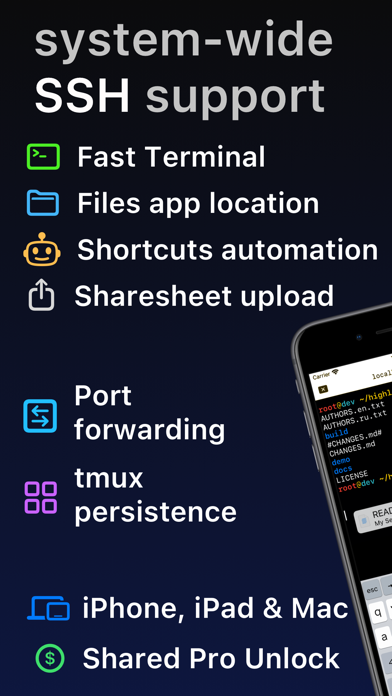
Lightning fast SSH terminal with remote file access. No other app fuses your SSH servers and iOS devices as well as Secure ShellFish. Tap Get and see for yourself.
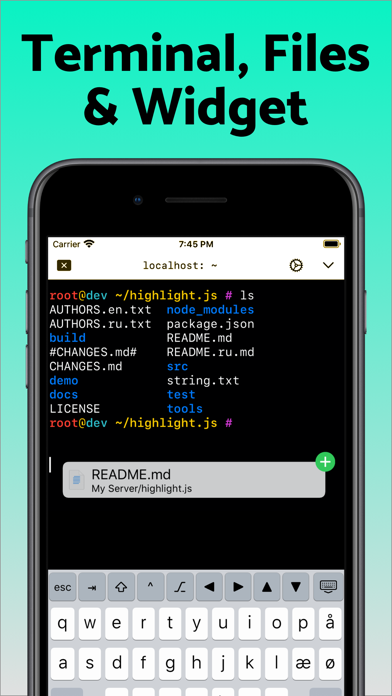
Terminal supports standard text editing gestures for selection, scrolling and copy/paste as well as custom gestures to send arrow keys and tabulator making shell entry and full screen editing with vim or emacs delightful. Bar above the keyboard makes it easy to type special keys and insert snippets.
Select and drag filenames out of the terminal as actual files and drag files from other apps into the terminal to upload. Use built-in tmux support to persist terminal sessions if you lose Internet access, pick existing sessions with thumbnails and Handoff sessions between devices.
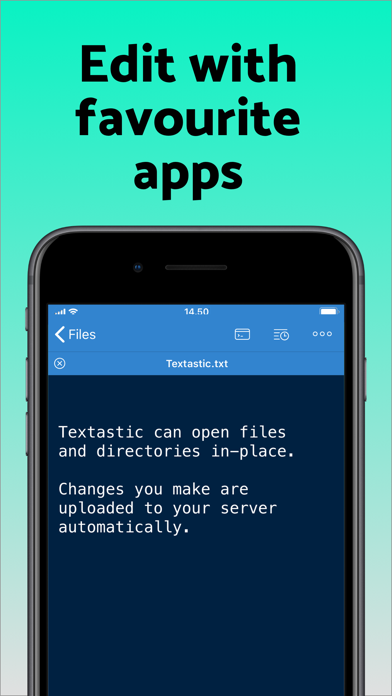
Server file system is available in the Files app and recently accessed files and directories are cached to make them available when offline. Use apps like Textastic and iA Writer for a native editing experience working on your remote server files.
Upload files or entire directories from the share sheet with minimal friction as the last destination directory for each kind of file is remembered or automate file transfers in the Shortcuts app.
Connect to your Mac, Synology NAS and any other SSH server or create new Digital Ocean droplets right from the app.
Secure ShellFish is useful as a free app and paying pro users can disable ads in the terminal, upload through the Files app and configure unlimited number of servers.
SSH Client - Secure ShellFish App Comments & Reviews
SSH Client - Secure ShellFish Positive Reviews
Just an excellent tool, continuously extended and cared forI'd written a five-star more than a year ago, and find much appreciation often enough, for the thought forward and care of abilities this developer steadily provides. It does 'just work' -- and with many of those features making it very smooth, quick, and nice to use. I monitor and upgrade my droplets from it regularly, very nice to be able to do that on the iPad. And the multi-window full-screen support into Linux means complex matters can be handled as easily -- think more than one vi, a shell window, a monitoring one too... If I had anything to wish for, it would just be a password ing option, for the one-button signin that's so effective, handling my certificate etc. so that getting in is very rapid indeed -- which is why it could happily have some smooth protection, no? Thanks again, for a very thoughtfully provided and very enjoyable tool!.Version: 2023.35
Indispensable, best ssh and remote files app for iPadOSSecure ShellFish is truly amazing. I use it for hours per day. The ssh experience is second to none, with outstanding tmux support and a super well thought out user interface and user experience. To make things even better, Secure ShellFish also allows remote server access as folders in the Files app. This has a knock on effect of making other development tools like Working Copy and Textastic even more useful than they already were. The developer is *extremely* responsive to feedback and goes way out of his way to track down bugs and incorporate features based on user input. I’m sure he’s heard enough from me to last him a lifetime, but he’s always super friendly and very accommodating. Top notch customer support, to say the least. I love you, Secure ShellFish. Never leave me, because I’m never leaving you..Version: 2022.58
Awesome appUPDATE: Turning off “Recognise Files” solved my issue and all is well now - thank you!! Just started using this app. When it works, it’s great and it has nice features. Unfortunately it seems to break more than it works however. The UI constantly locks, whether when I’m about to type a new command in the terminal, trying to run a command within vi, or simply pressing the return key in any circumstance - the UI for the app completely locks up (on-screen keyboard included) for 5-10 seconds. At that point, it will either start working again, or the app will crash and I’m back at my iPad Home Screen. I’d love to see these kinks worked out! Just starting to look for a shell for SSHing into my home server from my iPad and this app seems to have much more potential over the competition in terms of features and usability (I’ve purchased the Pro unlock too)..Version: 2020.47
SSH Sync with a Fun Twist!Secure ShellFish has been a game-changer for me. At the top of the list for me is the seamless sync of SSH keys between my iOS and macOS devices; this makes server access effortless, no matter where I am. I love starting tasks at home and finishing them on my iPhone when I'm out and about. All of the premium features are worth it—more useful than I anticipated when I first downloaded the app for free. The terminal is smooth, supports all the essential gestures, and file transfers are a breeze with drag-and-drop functionality. An unexpected delight (for an old soul like me) was the CRT Emulator: a surprisingly fun setting to toggle when the mood strikes. Bottom line, I highly recommend Secure ShellFish for anyone working remotely with SSH servers. I have other apps that do similar things, but this is the one I default to 90% of the time..Version: 2024.16
Great cross-platform ssh program!ShellFish is a great program if you use SSH on multiple devices, such as Mac and iOS, since config (including keys!) is sync'ed between devices. Support for tmux and jump servers is really nice, and I like the ability to specify multiple possible hosts, so you can set up an optimized local access as well as access via a gateway server. Native support for tmux is great too, since it removes the need to support "persistent" ssh connections — instead, reconnecting rejoins a session. Making files available (via SFTP) is really nice too, since it removes the need for editors (like Sublime) to support SFTP directly. Instead, they can just open and edit files normally, with ShellFish handling the details. Overall, a really nice terminal program that I'm increasingly using in place of (free!) iTerm. It's that good..Version: 2024.16
It is just a great app, period.This a just a really great app. I am a programmer, and I probably spend about 50% of my time on my iPad in this app. It is just that good. The developer is talented, not to mention both friendly and responsive if you reach out to them. I bought this app many years ago now, myself and I have never once regretted my purchase. I only wish all the software that I used on a daily basis was developed with the same level of attention to detail and quality. If you want to encourage quality software development, the kind which comes from an artisan and not some megacorp, you are going to want to show that is how you feel by purchasing this app. I really do not see how you could possibly go wrong by doing so. I'm just being honest; facts. 👍🏻🫡.Version: 2024.13
Magical, irreplaceable.As developer Anders Borum originated professional-grade git integration on iOS with Working Copy, which remains unmatched, Secure Shellfish remains the reference standard for remote filesystem access across the board on this platform, despite how many competitors have arisen since its introduction. I must admit: I overlooked Secure Shellfish for years and I'm not entirely sure why. I'm glad that ended last year, though, as I've actually since acquired a fair amount of remote file management in my day-to-day working life. Shellfish's magic isn't necessarily obvious, but I promise you it is worth finding out, and what may at first glance look like a somewhat disjointed series of functions actually comes together to form an absolutely irreplaceable application..Version: 2023.43
The best SSH experience on iOSThis is such a great app. Before Shellfish I’d find myself reaching for my Mac if I wanted to shell into a server. Now I just grab my iPad because this makes it so easy. The developer is very responsive to feedback and bug reports and the updates keep coming. Sometimes in a niche app like this I’m afraid to get excited for it because so many other apps like it have been abandoned. That doesn’t seem to be the case here, the developer keeps cranking out these great little quality improvements that make the app better and better. For example: if you exited a shell with “logout”, the window would dim but stay there. I always wondered why but it wasn’t a big deal to hit cmd+w to close it. Now the latest update automatically closes the window on exit. Is that amazing? No it’s not, but it’s just another little touch that makes the app better today than it was yesterday. I haven’t even touched on the integration with Files app which is super handy too. If you need to shell into servers and/or copy files to them, you have to check out this app..Version: 2022.4
How did I live without this?This app is indespensable, period. Even if your not interested in an SSH client, the files app integration is the most stable I have seen yet. As far as the SSH side of things goes the only real improvment I'd like to see is with "Snippits". I'd really like to have the ability to "Favorite" certain ones and have them directly in the right click menu. The files integration is second to none! Literally more reliable than iCloud Drive lol. I'm really hoping the developer might spend some time putting in some "quality of life" improvments into the files aspect. I'd love to see things such as: -Showing/generating thumbnails for all image/video formats even if they dont already have one in exif. -Show thumbnail/preview for any file types that support it. (Docx, PSD, PDF, etc...) -Set a default app for certain file types on iOS/iPadOS. Other than that I just wish there was a community page, something like a user forum, or a Subreddit. Somewhere users can share tips and get advice with some of the more advanced features..Version: 2023.10
Best Option for SFTP File AccessThis app is the best I’ve found by far for accessing files via sftp. It allows you to view these remote folders easily from the iOS file browser, as well as have specific remote subdirectories sync with your device locally so a constant network connection is not even needed. Also I had a problem using the offline folder access initially since it caused the app to crash, but I contacted the developer and they quickly redirected me to the TestFlight version of the app which fixed the bug. So very great support from the developer!.Version: 2021.43
Replaced Prompt 2 for me!I was looking for another SSH client since Prompt 2 was deprecated and Prompt 3 ended up being subscription. I've already been using this dev's iOS git client for years (and yes, I bought the lifetime license for that one, too). This dev just makes good software, well worth paying for. You can import SSH keys, which the app will then manage for you. You can group servers however you like. You can configure tmux within the server configuration in the app itself. You can even easily configure a jump server, right there in the app config. Direct connection with your Digital Ocean environments is provided as well, if you choose to use it. Lovely native interface, and it works on both iOS and Mac... I'm running on one of the last Intel Macs and this app is flawless. It's nice when devs don't immediately just cut Intel off to embrace Mx exclusively. Apple makes good hardware and Intel Macs will be in use for quite some time to come. Thanks!.Version: 2024.14
More than I expectedI originall needed a way to access files on my Mac server, from my iPhone, that is. The iPhone integration with the Files app makes this very straightforward. I am even able to stream films from my server to my iPhone, so no more lugging of a hard disk copy of my server files. The purchase of the iOS version also entitled me to the Mac version. I did not see a need for it because I use Cyberduck for my SSH file transfers. That is, until I discovered that, on the Mac, too, I can now mount the SSH target in the FInder, which makes SSH tranfers much easier..Version: 2024.6
Best SSH and file transfer app for iOSShellFish continues to be far and away the best of all the SSH apps out there… I’ve tried them all, from Prompt to Blink and everything In between. ShellFish literally does EVERYTHING, and has so many cool features (like being able to show your terminal as a PIP window). There are so many “hidden” features to discover. The shell integration is super-slick, and the dedicated “paste” button makes this the ultimate tool for anybody who does stuff with remote servers AND files (since it can also act as an iOS file provider over SSH!).Version: 2024.26
After more than a year of useThis is by far the best purchase I made. It just works. Slick ui, easy navigation, no lag. What more could you want. I am able to ssh into a dev machine. Vim my life away and commit my changes. In the car, no problem as long as I am not driving. By the pool no problem. In an airport no issues. For the record I use this with an iPad and magic keyboard. If I had to complain, it’s because the magic keyboard does not have an escape button, but boom the onscreen controls fix that! This app is awesome and I recommend it..Version: 2022.14
SSH Access with Solid Performance, and SupportI’ve been using Secure ShellFish for a couple of months, and really enjoy having SSH access to the various systems I support using this app. Not only does the app work well, when I ran into a slight issue in interacting with one of my systems, and contacted the author, I received an informative, and most importantly, helpful response. In my view, this means a lot, and is a clear indication of a development team that cares about the app they provide. To be fair, there are other SSH clients out there, and I tried a couple. They worked, but I’m not a fan of dumping a fair amount on an subscription for something like this. I happily paid the one time premium for Secure ShellFish early on, even though the ads were somewhat amusing. Absolutely zero regrets on my decision to use, and support Secure ShellFish. The app lets me do what I need to get done, by providing secure access to my systems..Version: 2022.65
At the risk of sounding like a crazed fanboy for this app & its developer......I wanted to take a few minutes to say thanks for, from my perspective, endlessly improving this app. It's replaced Transmit as my SFTP client of choice, which says a lot (for me, anyway). Being able to take my connections on the go from my tablet & phone is a huge advantage—I can't imagine going back from this. A lot of us users, well, use the heck out of apps like these—and from all of us to you, we appreciate you! Thank you and take care :).Version: 2023.17
Sure has come a long wayI purchased this app on day one because of the amazing Working Copy. What started out as a simple SFTP transfer app as grown to become an easy to use, full featured terminal program as well. The developer works hard to make them “iOS apps”, fix bugs, and add new, useful features with regular updates. Definitely worth downloading and worth buying if you have a need for transfers and terminals from your iOS devices. I’ve never once regretted my purchases..Version: 2023.18
Love it. Needs two things.This is the app I want to use. There are two things that keep me away: 1) arrows as buttons with no options for gestures. I would love if I could decide what swiping up/down/left/right on the terminal screen does. I would make it map to arrow keys. I use tmux so swiping to scroll up has no use. 2) ability to pick which keys are on the extra row. I use the backtick as a prefix key in tmux. Not being able to have it on screen breaks that flow..Version: 2023.29
Best SSH/SFTP App Ever! Terrible Icon ThoughThe current icon designs available are not modern enough. They are overcomplicated and overuse gradient color. They're just not pleasing to my eyes. The icon is only reason why I kept using several other shell apps for years and overlooked this one—I thought the app would be as crappy as the icon (which is completely wrong) and didn't even bother trying it. It would be great if you make a new default icon, and allow user uploaded custom icons..Version: 2022.29
Simply the BestThere is no better terminal app out there than this. Easily connect via SSH to your home servers, use an SSH tunnel to run a static site generator and preview the results on your phone, use the Files app integration to share documents to your self-hosted install of paperless-ng and build your own document scanning workflow…the list of possibilities goes on and on and on. And the developer is simply a gem. Try it today, but the subscription tomorrow, and use it forever..Version: 2022.14
Amazing appI was already a big fan of this app from using it on my iPad, but when it came to MacOS, that brought it to a new level. I have honestly started using this as my daily driver for terminal needs much of the time as the cloud sync and tmux integration make it really easy to know I can just pick up where I left off on whatever device I happen to have handy. The remote file support and Finder integration is just the icing on top..Version: 2023.43
Great SSH shell with file capabilitiesShellFish makes my iPad a much more useful tool. It lets me manage my various systems via SSH with ease. Including TMUX support. I recently had a feature request, and the author Anders wrote back in less than a day with a suggestion to try out an existing feature which should get close to what I was asking for. I haven’t made use of the Files integration yet, but I will figure out how to get it in to my workflow..Version: 2024.20
Time saverLike the traffic cop in the center of an intersection directing traffic, this app elegantly solves problems moving files between my wired ethernet macOS platform and WiFi connected iOS devices. This app is worth every penny for just the time and effort this eliminates when trying to mimic AirPlay's functionality moving files between devices. SSH Cloud server connectivity on iOS is just a plus. The user interface also does quite well taming SSH's many features. Well done!.Version: 2020.21
Well designedShellFish is well designed for efficient ssh from iOS and even macOS. I especially like - the well thought through keyboard enhancements - the ability to call ssh with a command - the ability to connect via ssh/sftp to a file system I also appreciate the ability to do a lifetime pro unlock. I just hate these recurring payments and that is a reason for me not to buy other apps..Version: 2024.23
Best Terminal App Period.This is hands down the best Terminal App i've come across and easily top 3 apps I've ever purchased. I tried the free trial and knew within 5 minutes that I could uninstall all the all the others I'd collected. Just buy it, don't even bother with the free trial it's just delaying the inevitable. The developer is awesome as well and listens to the users. I've had personal requests become features. Thank you for this app..Version: 2024.22
The main iOS app I use dailyHandily the most innovative and useful application for reaching remote folders in your Files app, including in automation, or just some good old-fashioned terminal access. Paired with the Working Copy app from the same developer (Hi Anders!) it’s a powerhouse of tools. Updated 2023: This is still the best app, I’ve started using it with Shortcuts and automations. MultipathTCP is great I often use it with Tailscale..Version: 2023.43
Added something that’s missing in the native Files appI’ve tried many SFTP apps on the app store, but they just never had that one thing I needed. Full integration support with the native files app. Right when I opened the app, it was easy to use and getting my server setup. After that the magic happened when I saw it was available for use with the native files app. Such an awesome app. Props to the developer!.Version: 2020.5
Excellent SSH ClientI’ve used a couple of other SSH clients on my iPad, including some very highly regarded ones, and this one is easily the best I’ve used. It’s reliable, has some very nice-to-have more advanced features like scrolling and copy/paste, and doesn’t have annoying paper cuts like pop-ups that obstruct your view when using an external keyboard..Version: 2024.23
AmazingThis is arguably my favorite iOS app. If I were famous enough to do a "Best of" list, it would be at the top, and I would persuade the world that *this* is the way to manage your data and servers from an iPhone or iPad. If you know and love ssh and sftp, try it, and compare it to other turnkey file management and cli solutions. Shellfish makes the mobile future I dreamed about a reality..Version: 2023.2
Excellent software!Very nice! After login credentials are loaded into the app (I only needed to do it once) my files on my web host’s remote server are readily available 24/7 in the files app on my iPhone. Simple, convenient and powerful - and it worked right “out of the box” just as the App Store description says it does. If you’re looking for an SFTP client that runs on IOS, you have to check this out. I love it..Version: 2019.8
Found my SSH client at lastRecently switched to a Mac and I've been cycling though multiple SSH clients since I connect to many different servers. So far this has been the most intuitive one to use with a clean interface and it just works. Been really happy with it so far and don't think I will be try others out anymore..Version: 2023.10
A good cross-platform ssh client and moreI origanlly tried shellfish because I wanted a decent ssh client that worked on both Mac & iOS. I had been using iTerm which is also excellent, but wanted a little more structure especially when using a touch interface. The app is clearly designed as an iPad app first and foremost and ported to Mac. As a result of that, some of the behaviors don't work quite as expected on a mac. Most of them have to do with focus when closing windows. I really enjoy the file intergration and being able to access files on my remote linux systems through finder. In general, I use this app every day and it is a vital part of my system administration. I look forward to seeing the edges get polished as the application matures..Version: 2023.37
HandyThis isn’t a utility I use very often, but when I do use it, it just works and I’m able to accomplish what I need to. I also love the integration with the Files App and use it from Files to move stuff from one location to another without fuss. Overall it’s very well designed and very stable. Highly recommended..Version: 2022.65
Great app!I’ve tried several SSH apps over the years. In my opinion, this one beats out the others with its feature set and stability. In particular, it’s seamless integration with the Files app for SFTP transfers is spectacular. Good work! Glad to give this developer my money for a lifetime subscription (which is set at a very reasonable price compared to the competition)..Version: 2022.10
Excellent Terminal and Files IntegrationThis app has replaced Blink for me. It has excellent files integration that seamlessly moves files to and from servers over SSH. Further, it now has the best terminal emulator on iPadOS. It is an absolute dream for mobile productivity. If I could purchase a second time I would. Pairing it with Tailscale VPN has added a new level of productivity as well..Version: 2023.43
Sets the bar....Anders has set the bar for implementation of remote file access using iOS with his two Apps: "Shellfish" and "Working Copy". Both provide excellent online/offline access to files - each purpose built for a specific protocol (SSH and Git respectively). These two Apps are now my go-to for full function file access at home and on the move. Brilliant!.Version: 2020.13
Great!An amazing app, easy enough for a self taught idiot to use, and powerful enough for a self-taught idiot to get her -- i mean -- 'one' --'s self in trouble:) But that'll teach me to pipe unknown scripts from interwebs directly to bash. Seriously though, this app is very powerful but also very beautiful, and CONSTANTLY being updated. I feel guilty for not paying more. THANK YOU:)).Version: 2024.23
SSH w/ sk- private key auth with NFC Yibikey on iPhone works great.SSH w/ sk- private key auth with NFC Yubikey on iPhone works great. Finally an iOS SSH client that supports an external portable hardware key. Can use the same Yubikey across Mac, windows, Linux and now iOS. Now just need USB iPad support (because ipad doesn’t support NFC). Recent Yubikey authenticatior update now includes usb support on iPad, so hopefully this is something that can be added..Version: 2022.60
Pick this oneThis is a good egg in the sea of ssh apps that kinda work sometimes. Especially with its ability to sync to things like digital droplet and cut out all the time of manual configuration, live sync sftp to your local device and offer a simple solution to editing external files with any editor you like..Version: 2023.32
Everything is hereI love it when software (or most anything) works. Spend a few minutes with Shellfish and you’ll find just that. It’s easy to tell that the developer cares and wants you to be able to transition without requiring you to jump through a hoop or do the mystery dance. Give yourself a moment, and check it out!.Version: 2023.39
Simple AmazingThis is one of those apps that isn’t just useful, but it lets me do a host of things that simply wouldn’t be possible from an iOS device otherwise. I especially appreciate the extremely robust integration with the Shortcuts app. Absolutely indispensable supplement to the very limited built-in SSH actions..Version: 2024.12
Love it!Love the app, it’s features, and most of all, the price! I don’t use the app much, but it’s nice to know I’m not paying monthly for something I only use once in awhile. I bought it RIGHT AWAY because the price is right! My only wish is that it had Telnet support. But that can be worked around for now..Version: 2022.38
Great toolAmazingly built tool, high quality and configurable. Well maintained with both feature and bug fix releases, and great release notes explaining what’s changed for anyone interested. My only issue is I don’t have to enough reasons to use this app. Keep up the great work!.Version: 2024.14
This is my new favorite iPad terminalI used to use terminus. It was my favorite for a long time. I usually don’t do monthly subscriptions but there was no other better option. This has completely replaced Terminus for me. I am very happy with the functionality, cost, and features..Version: 2024.13
Simply my favorite app everI have been using this for about 2 to 3 years now to sync files between my iPhone and Ubuntu web server (and then to my Linux laptop, via unison). It integrates nicely with the native iOS file manager. I like being able to hop into a terminal on my server on the go as well. Thanks!.Version: 2024.9
One of the most important apps on my iPadIf you use an iPad or iPhone to interact with almost any type of server, this is a vital app. SSH and SFTP, integrated smoothly into the Files app and elsewhere on your device, with all sorts of useful integrations like Shortcuts actions. Consistently updated with new features and useful additions. Great app!.Version: 2024.14
The only way to go if you want to use a shell on iPadOSOther options tend to either be subscription based or lacking features, but this one is great with responsive interface. Some of the UI could use some prettying but that’s my only complaint..Version: 2023.23
Support is top notch as wellExcellent product - nothing new to add that hasn't already been said there. What I can relate is the superb support; I had an issue that turned out to be my NAS config and nothing to do with shellfish; Anders (the dev) still ran down the issue for me amazingly quickly. Huge thanks!.Version: 2021.36
One of the few apps I don’t mind paying for.Make’s transitioning on the fly from my computer to my phone while working on remote servers much easier. Tmux support works well and in conjunction with shortcuts this app becomes a very powerful tool that I can’t do without..Version: 2023.35
The best there isTons of thoughtful features that make managing servers from a phone easier. It’s an SSH terminal app, it puts your servers into the Files app, it even integrates with Digital Ocean for creating/removing droplets. There are lots of apps that try to do this stuff, but Shellfish is the easy recommendation. It’s been my go-to for years..Version: 2024.26
Makes SSH a BreezeI just set up Shellfish on my iPad and I hardly had to anything to get to the same place I was on my iPhone. I just input my home server account’s password, installed the iPad’s public key in two taps, and that was it. Shellfish already had my home server listed, and all my terminal sessions were as I left them on my phone. At first, the price of the lifetime pro unlock felt steep, but I’ve been feeling better and better about purchasing it as I’ve used Shellfish..Version: 2024.24
Best Shell App of Any OSI have yet to see any other shell app that comes close..Version: 2024.23
Wonderful SSH iOS ApplicationOverall I’m pretty happy with this SSH client. I love SFTP integration and overall setup and use is very good. Most importantly - this app has seen regular, meaningful updates and has an incredibly kind, supportive engineer at the helm. Love the new grouping function for large/long lists of hosts. Love the native (and well designed) support for Bastion hosts. Lifetime unlock seems steep until you compare it to other apps on the iOS platform. Definitely happy with this purchase - it’s been worth every penny. If I had one wish it would be that SFTP could also download files from the remote, instead of just uploading, but hey, that’s a tiny complaint about a truly wonderful, useful app..Version: 2024.23
Great iPad and Mac appGreat app, and works great on iPad and Mac too. I use it to mount remote servers in Files/Finder..Version: 2024.22
Perfect alternative to terminal!While I like using terminal on my MacBook to do heavier tasks, this is a perfect app for quick and lighter tasks on my iPad or iPhone. Easy to set up, easy to use, and just works!.Version: 2024.21
The best SSH terminal for iPadI’ve tried all of the SSH terminals on the iPad and they all lack some feature or other. ShellFish has a shell script you can run on your machine to open files immediately on your iPad. You just type “quicklook file.pdf” into your terminal and you can view the pdf in IOS pdf viewer, and even edit it in-place with apple pencil. This has helped me so much with writing research papers and slideshows in markup directly on my server. Amazing application..Version: 2024.18
Im always late to the partyI bought a lifetime license and I have no regrets. I had a question once and the dev responded rrally fast. The app is fully of quality of life features. It's a pleasure to use for a quick checkup on remotes servers or send a file with integration of sshfs into files. The only thing bugging me when using this I the size of my screen, but the dev can't help me with that. It's by far the best terminal I know and well worth the money to acknowledge the hard work put into it..Version: 2024.18
Awesome ssh / sftp terminalIt’s perfect, 1 stop option to manage files and access through terminal. I’m using my iPad pro more with this app. Really appreciate the efforts..Version: 2024.18
Best SSH AppGood bye Prompt, this is the new king of SSH on iOS/Mac I cannot say enough about this app, I share it with everyone. It just works, and works well. Great job devs!.Version: 2024.14
Worth ItI don’t normally write reviews, but ShellFish is soo good that I need to tell others about it. I’ve used other terminal/ssh apps, and nothing compares to the usability of this app. The built-in tmux handling is nice as if I am on a flaky internet connection then I can connect back to the same session and not have to worry about my commands terminating. The port forwarding is great as I’ve been able to use it to connect to services running on a server only available to localhost and use port forwarding to access it. The files app integration is wonderful because I can browse my server files through files app and transfer files that way. Anders is also an indie dev so I feel even better paying the full price for lifetime access (which is also waaay lower than some other apps)..Version: 2024.14
Became a big fan of Anders!All apps from Anders are exactly what developers are looking for. They are feature rich, high performance, have an excellent price policy, have excellent privacy settings. Secure Shellfish easily replaced two most common apps I have been using. I have tried many ssh apps and nothing came closer to this one. Big kudos Anders! Thank you for all the hard work..Version: 2024.13
Great to fill the gap on iPadNever thought of iPad as a great tool for remotely accessing ssh servers. This makes it great with ssh key integration. Wish it supported 1Password ssh keys and it would be the hands down best app on my iPad.Version: 2024.12
The best utility on iOSSecure Shellfish is my 100% most used utility on iOS. Great for not just accessing files, but the SSH Terminal is top tier, replacing all the other apps I used before. Get the upgrade, you won’t regret it..Version: 2024.12
Perfect with the new files app!Using it daily to transfer files across multiple servers. So much value packed in there when creating documents across multiple apps!.Version: 2024.9
Excellent and well madeEasy to use ssh terminal..Version: 2024.8
WowSo useful and so clearly loved by its developer. Always getting enchantments. Well worth the money. Some apps would charge the Lifetime Unlock price per year. Highly recommend it.Version: 2024.8
Great appNo complaints use it for home ssh usuage and works wonderfully.Version: 2024.3
Best SSH Client EVER!!Shellfish has improved my workflow 1000% Having an app for my iPhone, iPad, Mac, just makes everything flow perfectly. Highly suggest this app!.Version: 2024.1
My preferred terminal appConstantly improving, the developer is very responsive to support requests. I’ve tried a bunch of other terminal apps, but the files and tmux support make this my go to terminal app..Version: 2024.2
It’s worth buyingSecure Shellfish has transformed my iPad into a powerhouse for remote access. Its intuitive interface, coupled with robust security features, ensures seamless SSH connections. The app’s stability and efficiency make managing servers a breeze. Its versatility has truly elevated my iPad’s productivity to new heights. A must-have for anyone needing secure remote access!.Version: 2023.43
Works great at what its supposed toAwesome.Version: 2023.38
Very usefulVery powerful tool leering me access my home server with ease..Version: 2023.14
Excellent SSH Client with Files integrationI’ve been suing Secure ShellFish for years and haven’t tried tons of SSH clients for iPad can say it’s been the most consistently good. The developer pushes regular great updates which add functionality and offers a lifetime unlock (thank you!). I don’t use the Files integration as frequently as the terminal but when I have needed it it’s always been quick and reliable..Version: 2023.10
So usefulI use this to manage my home server all the time. The keyboard buttons make it very intuitive, and I have never had any regrets purchasing it..Version: 2023.11
Great appGreat for mounting sftp drives in the Finder.Version: 2023.10
Outstanding, a must have tool and getting better.Very well thought out tool that is absolutely necessary as part of any mobile dev workflow and just keeps being updated regularly. Constantly improved and refined; the developer is responsive and friendly..Version: 2023.10
Like the widget a lotStill testing it and love it so far.Version: 2022.58
Amazing appAfter years of using file browser apps that struggle to stay connected and are painfully slow to update, Secure ShellFish works so well that I forget it's even there. Once set up, the only reason I've had to go into the app was to add more connections. Files from my servers are just in the Files app, no questions asked. Thank you developers!.Version: 2021.40
Free International Money Transfer 💸Enjoy high maximum transfers into more than 20 currencies while saving up to 90% over local banks! The cheap, fast way to send money abroad. Free transfer up to 500 USD!Version: 2026.14
What do you think SSH Client - Secure ShellFish ios app? Can you share your thoughts and app experiences with other peoples?
Please wait! Facebook comments loading...