Kodex Customer ServiceBruno Philipe Resende Silva

Kodex Customer Service

  1. Kodex Customer Service
  2. Kodex App Comments & Reviews (2026)
  3. Kodex iPhone Images
  4. Kodex iPad Images

Kodex is an advanced code editor which brings powerful and desktop-class editor features to your iPad or iPhone:

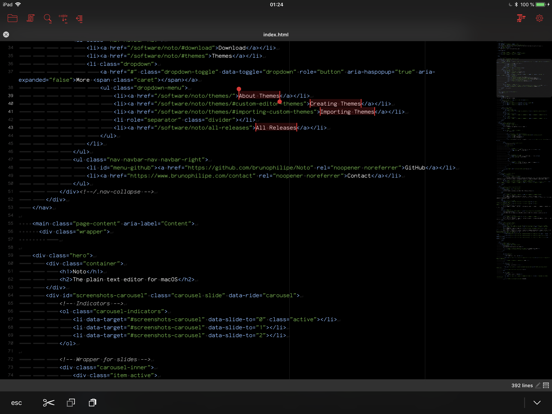
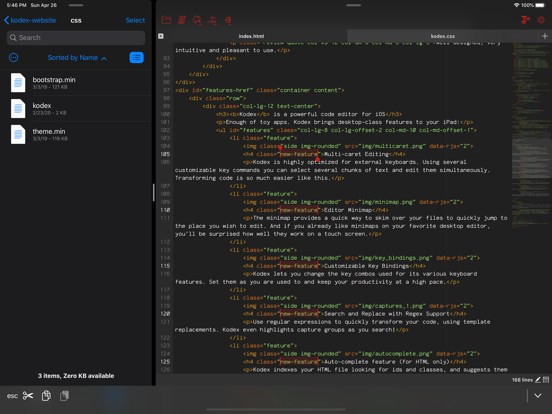
* Multi-caret editing, to quickly transform code selections.
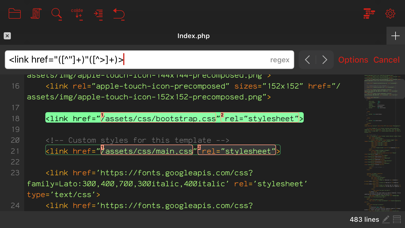
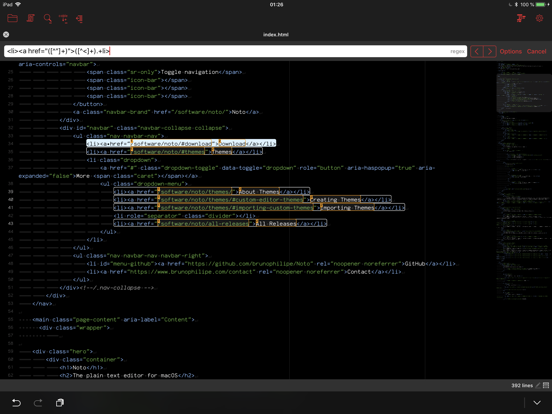
* Regex search and replace, with template matching and replace-all-matches.
* Minimap which allows quick scroll navigation though the document.
* Multiple window support
* Syntax highlighting for over 150 languages.
* Trackpad support with custom gestures to add cursors (ctrl+shift+click).
* Auto complete feature (currently only for HTML).
* Add as many guide columns as you wish (default 80 and 120 characters).
* Configurable tab size (default 4 spaces), or insert spaces when pressing tab.
* Draw hints for invisible characters such as new lines, tabs, and spaces.
* Customizable key bindings, so you can configure Kodex to use the same key combos you are already used to.
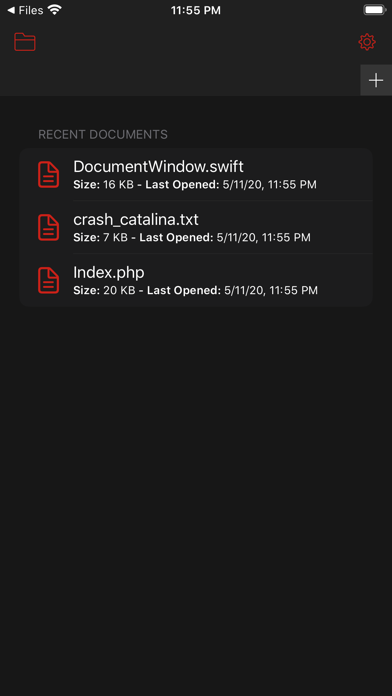
* Kodex smartly preserves your open documents so that your work stays as you left it between launches.
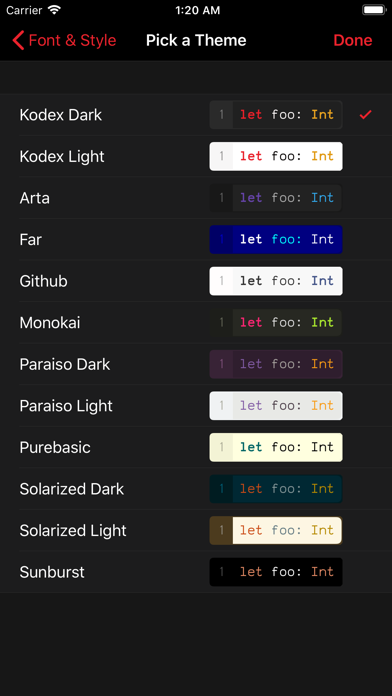
* Light and Dark modes.

Kodex is integrated with the Files app, so you can easily open files from any other app, and from your iCloud documents folder.

You can launch Kodex QuickEdit from any file sharing view in any app to edit its contents without launching the main Kodex App (be aware this functionality depends on the host app implementing the sharing activity properly).

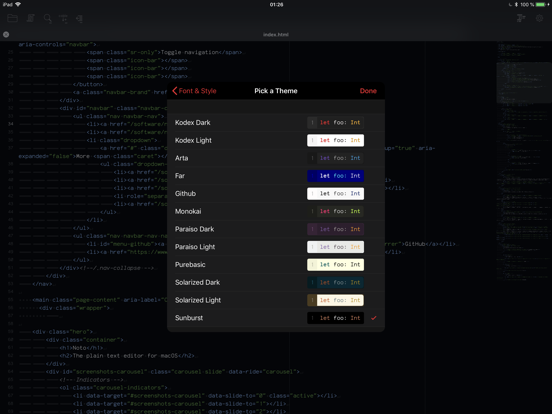
Included are 10 editor themes, and several monospaced fonts for code editing (you can install your own preferred fonts using system profiles). Font size and line spacing are adjustable, so you can configure Kodex to best fit your preferred screen size, arrangement, and orientation.

Kodex is not a compiler, and you can not build or run the code you edit from it. Think of Kodex as a NotePad++ or Sublime Text substitute for iPhone and iPad.

Kodex is currently optimized for external keyboards, such as Apple's Smart Keyboard for the iPad Pro, or any bluetooth/USB keyboard. More virtual keyboard features will be added in a future version.

Kodex App Comments & Reviews

Kodex Positive Reviews

Wish I knew about this soonerSuper awesome text editing app. Syntax highlight! Capable of opening any files! And there's theme list. I love any of the darkish purple, blue, and green text editor themes and then there's Solarized Dark. Jackpot!! Beyond text editor, I tend to think that the simple choice between white and dark themes to be boring. Too boring. A white theme with blue accent is terribly boring. I'm glad this app at least offers other accent colors. The dark theme with purple accent looks nice. I've uninstalled Documents 6 for this. That app used to be awesome until Files app introduced in iOS 11 and this app is the last missing puzzle piece I need to read and edit text files. I had to drop one star for the following reasons: ꊱ1 No alternative language keyboards. I use Japanese Romaji and Emoji. ꊱ2 The Text Replacement isn't working very well. ꊱ3 The height spacing looks weird (in Courier Regular) when there's unicode characters. ꊱ4 Following text after pasted (unicode?) text can sometime be in different font other than Courier Regular. I'd sacrifice syntax highlights, height spacing, or so in favor of keyboard honestly, if that's the root of problems. Quality text editor should be able to read and edit .txt and other text-based files without issues..Version: 1.2.5

Well thought out appIt takes advantage of so many capabilities of the iPad Pro - it includes QuickEdit mode, so even in the Files app, you get an action to open a window on a file. Really neat that it is well integrated. Lots of syntax highlighting options. It is able to access anything in the file system of the iPad. Other apps are not always able to do that. This also means if those plugins to the file system are flaky (Google Drive?) don’t blame the app. Möbius Sync syncing a Google Drive folder from your laptop is more reliable than Google’s own app. I also was at first surprised at the seeming lack of search and replace, until I realized you must hold down Ctrl while clicking the search button, and then the Search & Replace shows up!.Version: 1.4.1

Works great but needs improvementsGets the job done but I’d suggest the following features: - view only mode or prevent keyboard from coming up every time you get to a file. It’s annoying when I need to quickly jump back and forth around files. - also allow you to jump back to where you left off in a file. I jump back and forth between css and html files, so it gets quite cumbersome if I have to slide down the keyboard and slide down to where I left off every time..Version: 1.4.1

This app is incredible!The description accurate and this app looks to be exactly what the iPad needs. This is essentially Sublime Text for iPad with all of the key fix-ins right down to editing Key Bindings. After about a minute of setup I felt like I was at my desktop. Really excellent job and kudos to the developer. I’ll be digging into this more in order to allow easier coding workflow on the go for all of my projects and come back to update this review when I’ve had a thorough look through the file features..Version: 1.4.1

File extension/typesThe app is full of potential. However, it has one major flaw. I tried editing a .tex file — great, it can do that. But my Tex compiler has .aux, .log and various other files in the same directory with the same name but a different extension. This app fails to show the file extensions. So I would have 5 different “file1” in a folder, but I can’t see the extension until I try to open the file and fail like 4 times. Really takes the fun out of using this app, so I just deleted it..Version: 1.2.5

Amazing appAbsolutely loved the app. Have a few suggestions for improvements. It will be nice to have a view only mode and disable the keyboard. Also please bring full screen mode. Finally the ability to click on a function and the app gives the definition or hints would make this app a killer!.Version: 1.2.3

Trouble getting startedI created a file within Kodex and could not open it. App would crash every time. After a while I opened an existing file and it worked fine. And the Kodex file also opened. Weird bug. I wasn’t impressed with getting started, but I haven’t had much chance to really use the app..Version: 1.4.1

I love it (pls read)So I love this bc I was playing Roblox and this guy was hacker and he told me and I love it how u do it so u have to have google and kodex and u copy and paste it on to google and then u are a hacker Im still a little bit confused but I love it TYSM for the app it really helps!❤️.Version: 1.4.1

Beyond ExcellentThis application is great! Both as a tool and a showcase of the features and capabilities a tool can have. What an excellent gift that the developer has made it available for free, especially with it being such high quality! Thank you very much!.Version: 1.2.5

Almost perfectNeeds optimizing for 3rd gen iPad Pro models. I’d also like to see the interface tweaked to save space: disable the iOS status bar similar to Buffer Editor, tabs in line with controls, toggle for app status bar on bottom, and the ability to hide the extended keyboard row which is nearly useless when using a hardware keyboard. Love the mini map though!.Version: 1.2.2

Very ImpressiveThis is a great, no nonsense text editor for the iPad. I use it with a Bluetooth keyboard which makes text entry fast and efficient. This is my go to for taking notes etc in meetings. Wonderful to see the support for syntax highlighting. Especially good that Markdown is covered..Version: 1.2.5

BugI was closing tabs, before the pop-up came, I closed, then tried again, then it crashed! I tried to go to coding, then it repetitively crashed + I was on iPad 15.0! Please fix!.Version: 1.4.1

Like Notepad++ for iOSWas hoping to find some simple editor to look at some HDL source files and came across this app. Have only used it for a short time but I’m pretty impressed!.Version: 1.4.1

Seems broken on iPadOS 17.xI love this app. It’s the best text editor I’ve found or iOS / iPadOS. Unfortunately, it seems broken on the latest iPadOS 17.x. I went ahead and tipped and I hope the dev will be able to fix it..Version: 1.4.1

CrashesSuch a very great easy to work with but keeps crashing would be very glad if it’s fixed.Version: 1.4.1

Just one thing to addPlease add a spot where we can tip you for the app. This is a wonderful app and I would like to at least give something for the hard work..Version: 1.1.2

I really like it butI actually really like this but I have no idea how to make an actual webpage. Even just a page that says like hi. If I could get help that would be appreciated.Version: 1.4.1

There’s no IDEI like Kodex for coding, but to make it even better add in an IDE and interpreters that you can turn on and off..Version: 1.4.1

Love This App!For someone who uses Atom, it has the same feel to it. It’s easy to use, and file handling is marvelous. Would recommend to anyone..Version: 1.1.2

Best IDE so farThis is the best free integrated development environment I have been able to find on the App Store so far. Like having sublime text on my iPhone..Version: 1.2.2

Best editor for the IPad!This editor accommodates many different programming languages. It works with other file repositories like One Drive. Tip the Developer..Version: 1.4.1

This app can not open all files.This app won’t open a mcmeta file, which is a text file by the way..Version: 1.4.1

Lacking mobile code editorThere are so many missing features of this code editor and it’s painful. First of all, WHERE’S THE REDO BUTTON? Being able to accidentally press the undo button with no way of knowing what you did is so frustrating. And another thing: PLEASE ADD A WORD WRAP TOGGLE! Word wrapping warps the text and makes it hard to distinguish between statements so please add a toggle!.Version: 1.4.2

Good Review for the boysIf it gets more than 4 stars I might like it!.Version: 1.4.1

Option to run?Is there an option for me to run a script I have written? I do not currently see one. I use an iPhone XR on iOS 13.1, if that helps..Version: 1.2.5

Lose my dataGreat UI, but I lose my data after copy/paste undo/redo and save function.Version: 1.4.1

No Coffeescript supportNo coffeescript support 😟.Version: 1.2.3

OKNice.Version: 1.3.1

Good but needs a fix.I love this app! I wish i knew about it sooner! But something that is a bit annoying is how you cant see a screen where your code can turn into what it should be..Version: 1.4.2

Mostly greatIt’s a great editor for a lot of reasons but the major complaint i have is i can’t find a way to have any kind of error highlighting (code linting) so if you leave any kind of typos in your code it’s a major pain to find them.Version: 1.4.1

Great performance and customizationThis is a fantastic editor. It would be great to see more features in the future, like file preview, snippets, and .md editing shortcuts.Version: 1.4.1

Install for an amazing text editorThis app is underrated. I code in HTML, CSS and JS. Infinite file creation and overall good looking and pleasant to my eyes. Basically, it's VSCode for iPad..Version: 1.4.1

Freezes freezes constantly freezesI was able to open a gcode file once, scroll once and that’s it. Can’t search, can’t open settings, no icons do anything, can’t scroll. It’s just stuck. Yes, my file is good. I’ve deleted and redownloaded the app twice. It’s just a screen saver now.... bummed, as it was the first one I found that ever let me open a gcode file on my ipad pro. 2 days later - same. Takes FOREVER to open a file. I mean, if they’re just text files, then why does it take so long? Still not open, and I’ve already downloaded 2 other apps to try on them. 1 day later - now with a smaller gcode file it takes forever to load, then there’s a brief flash of the code on the screen, and the app crashes. Have to reload the text again when opening, same happens again. I really don’t get it. If it’s “just text” then why is it so hard to just see it, edit it, and download it, with ANY app, on an ipad pro..Version: 1.4.1

Nice Code Editor for iPadWould love it even more if you added syntax highlighting for vue files. :) Still looks pretty good if I just manually choose javascript from the highlighting list, though, so no big deal..Version: 1.4.1

Easy to useNot full featured as expected from a free app but very easy to use without all the bell and whistles. Great and handy to use on an iPad!.Version: 1.4.1

Wow!!I’m actually really surprised and impress at the quality of this editor, especially compared to other iOS editors..Version: 1.4.1

Best editor on ios!This is amazing! Absolutely love it! Just one tiny question. Is there a way to turn off line wrapping? (Having unlimited number of chars on a single line.).Version: 1.4.1

Good for meIdk how to code but seems really good to me 👍.Version: 1.4.1

The best (free) code-editor on the Apple App Store.Kodex has helped me a LOT with learning Python. It has an eye-pleasing UI (especially with Anko & Sunburst as the font & theme) which makes it great for getting stuck on something for 2 hours straight (has totally never happened to me before). I would definitely use Kodex for learning JavaScript (not in a sarcastic way)!.Version: 1.4.1

Feature request: search word across filesFeature request: search word across files.Version: 1.3

ThankfulI am extremely grateful for this masterpiece. I don’t like carrying a giant computer to Second Cup to work on my projects and I’ve been looking for a good text editor. This is the best one I came across and it’s free! Sure will contribute voluntarily!.Version: 1.3

Can’t believe this is freeAn app if this caliber should be at least 20.00 I will definitely be supporting the developer on this.Version: 1.3

Look no furtherIt’s unheard of for an app of this calibre to to be available for free. Not just free to download but, there are no in-app purchases or subscriptions required to use the full set of features available. Some of these features aren’t even available in the paid apps. I have many apps that I use for developing but, Kodex is the only one with the ability to edit a file without opening the actual app, using the Kodex Quick Edit sharing extension. The ability to open almost any file format I throw at it and change the encoding is a feature I never even knew I wanted. If you haven’t already, download this. I’m writing this from a first generation iPad Air. This shows great device support..Version: 1.2.5

Awesome editorIt is a great and elegant editor! Thank you.Version: 1.2.1

Wow😶RIGHT as I saw that righting I was like WHAAAAAAAAAT!?!.Version: 1.4.1

Free International Money Transfer 💸Enjoy high maximum transfers into more than 20 currencies while saving up to 90% over local banks! The cheap, fast way to send money abroad. Free transfer up to 500 USD!AdvertorialVersion: 1.4.2


What do you think Kodex ios app? Can you share your thoughts and app experiences with other peoples?

Please wait! Facebook comments loading...

Kodex iPhone Images
  • Kodex iPhone image 1
  • Kodex iPhone image 2
  • Kodex iPhone image 3
  • Kodex iPhone image 4
Kodex iPad Images
  • Kodex iPad image 1
  • Kodex iPad image 2
  • Kodex iPad image 3
  • Kodex iPad image 4