ISH Shell Customer ServiceTheodore Dubois

ISH Shell Customer Service

  1. ISH Shell Customer Service
  2. ISH Shell App Comments & Reviews (2026)
  3. ISH Shell iPhone Images

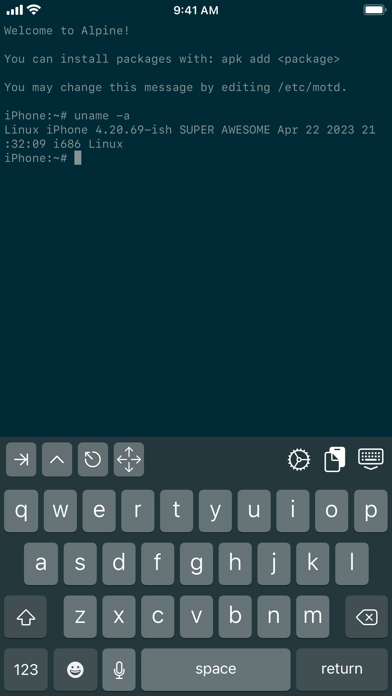
A Linux-like shell on iOS. You can edit files with sed and cat, move them around, and more!

https://github.com/ish-app/ish/

ISH Shell App Comments & Reviews

ISH Shell Positive Reviews

Excellent utility, if slowBefore I get into what I like, I'll mention my main dislikes. The most noticeable is speed: because it's JIT-like, you can tell that the performance is slower than native (for example, taking a few seconds to open an ssh key). Additionally, while many apps that I use (gcc, python, node, to name a few) work, not everything will work out of the box (for example, ip addr doesn't behave). Despite these limitations, I would still give this app 5 stars: it just significantly improves the utility of my device. I mainly use it as an ssh/mosh box, but I can also do some basic programming locally. For fun, I even got a VNC server to run! Even as a basic tool for SSH, I can easily just use my own keys and I don't see noticeable delay once the connection is established. There's probably more interesting things I could do with it given the support of APK..Version: 1.2.2

Excellent Port of Alpine LinuxI’ve been around since the project started and have followed the beta til now. The work involved in the creation of this app and the community standing behind it amazing and deserves credit for porting this over to iOS. Many man hours were put in by Theodore himself and others such as the creator UTM and other contributors that have given valuable insight to the community and have pushed the limitations of iSH in order to present a full features Alpine Linux experience right here on your iOS device which is no small feat. This application allows much freedom over file s creation, editing, and even movement of files and folders laterally to other application folders. It’s worth the download even if you just want to place games in the terminal or ssh into your devices. Enjoy! Project Zer0.Version: 1.0.3

Great Linux app so farThis is a great app, and it has great potential. I've done some research on the web, and apparently there was supposed to be in APK package manager for this app under Alpine Linux. When I try to install APK packages, it says, "Ash, APK, not found". I was trying to compile Emacs from the source, but it requires the GNU make package which this app doesn't come with preinstalled. Other than that though, this is a great step forward to having Linux in your pocket. Though it's limited and sandboxed, and can't necessarily run directly on iOS hardware, this is something awesome too see. One thing I particularly like is the voiceover accessibility support. I was able to connect an external keyboard and start working with Linux on my iOS device. The only thing that could be improved is that it's a little slow when you're typing commands, but this is still an awesome app. I am looking forward to future development..Version: 1.0.1

Excellent emulatorThis app really helps my iPhone be way more useful by including alpine Linux with all the things it needs and without anything it doesn’t. If you need a simple Linux terminal to do things like run IPMItool or mess around with docker, this is the app for you. Although it is an emulator/virtualization app, it doesn’t feel like anything’s being emulated- it feels like im talking to the native shell of my iPhone. Its simplicity is key-there is no desktop or emulated screen, but that’s actually a positive because the shell is so useable and iPhone friendly. I use this app more than I use my actual computer now whenever I need to use a Linux terminal for system administration! It’s one of the best apps on the iPhone ever! Also I love the no ads!.Version: 1.2.3

Command Line on iPhone at last!ISH is an amazing and potentially one of the most valuable applications I have seen for iPhone. It installs an Alpine Linux package that can be readily customized by adding other packages. The possibilities are limitless. Here is one of my immediate work flows: Take a movie with iPhone. Edit the movie with iMovie, exporting the finished product in a folder ISM exposes on iPhone. Run exiftool and emacs and touch as needed under ISH to add metadata to the movie such as GPS, time stamps, captions, keywords &c. Upload the movie to my Adobe account. Voila. The movie is archived for me and I am sharing the movie on my site complete with proper metadata. Other uses include administering several remote servers through SSH. Unlike other applications, ISH provides both local and remote (through SSH) command line access to whatever I use. Needless to say, I use command line for a huge number of tasks. The possibilities of this excellent application cannot be overstated. Keep up the good work! I look forward to working on my databases and numerous other applicaations..Version: 1.3.2

Great for Python and web development!Grab Python for HTTP server, eventually serving files, write some HTML files and serve, open and see what you have made in Safari! You can write codes in Python for Python stuff too. My go-to text editor is based on HTML with contenteditable attribute and some bit of JavaScript + Shortcut for a fully functional text editor. iSH is the missing jigsaw puzzle I need to serve the HTML I "need". I need iSH more than Notes app because the text editor I made is better than Notes app. There's inline calculator, there's text replacement, open and save UTF-8 document, color theme etc. What can Notes app do, is far limited..Version: 1.3

BeautifulWhat a fantastic app! My use cases are: 1) true plain text editing for iOS (i can mount my iCloud drive and use vim to edit text files...finally I can edit plaintext without using some other GUI-based 3rd-party app and I can sidestep Apple's Notes app which is fine but littered with too much style formatting assumptions...it's not pure plain text)❤️, 2) running python terminal apps (super lightweight and no fluff...a beautiful, purist way to run text parsing and data/file manipulation tools)❤️, 3) generating .wav or .aiff files with sox which can be saved to my mounted iCloud folder and then played on the iPhone❤️.Version: 1.3.2

Amazing AppThis is an amazing app, please can you guys keep updating it? it should take more resources and i dont mind paying for it. Possibly make an ubuntu version. Please i love this app and i have been using it to do so much even installed pip, python3 and more on it and it has been amazing. I cannot over emphasize how useful this tool has been and i dont want it to die. Best devops, sys admin, programming and learning tool i have seen for the ipad. Please update and release newer versions and more distros. this is even better than using emulators..Version: 1.3.2

Does it have GUI capability?I’m a beginner when it comes to Linux, but I absolutely love what I’ve seen/been able to do with it. I’ve got no experience with alpine, but wish to gain more. However, idk the limitations of this. Specifically, can it run a GUI, and if not, to what extent can you makeshift one using characters? Sry for being a bother, just wondering😅 Anyways, love the idea, didn’t think this could even be done on iOS software.Version: 1.3.2

62fAm I the first to rate? The AppStore automatically set a 3-star rating, so I decided to write a 3-star review. i686 support isn’t complete yet, app is still in beta testing even though it was just yesterday iSH listed at 69,99$. Download listed as 3.8Mb although actual (re)install has reduced that to ~2Mb. Alpine’s various ‘i386’ repositories have hordes of independent and interdependently-functioning prebuilt binaries archived into individually-downloadable apk packages, but some of these are riddled with multithreading and complex 32-bit SSE2 instructions: while an unknown number are still on their way to being supported, iSH-emulated multithreading doesn’t (yet) function for at least one of the 2020 iDevice chipsets. Caveat emptor!.Version: 1.0

A native capability that should have been available from appleI was finally able to use ipad for remote linux shell access and makes it one step closer fir mac book replacement. It feels little sluggish when adding public keys, but is working. Can not change time zone yet. However it is usable and with apk support makes it very useful. Hopefully other distros will add support as this adds portability. Using this in ipad pro 12.9 second generation..Version: 1.0.1

Holy Cow It’s Real!I have a few headless Raspberry Pi’s that I use in my home and one day I decide I want to SSH into them on my phone from the couch. Turns out none of the SSH apps that come up on App Store can connect. They are all flashy bloated apps that aren’t suited for me. Then I found this app and how to install OpenSSH apk. So happy this app exists for everyone that is comfortable with CLI and doesn’t require me to learn something new..Version: 1.3.2

Perfect, except ONE thing…Outstanding implementation of alpine. Super on all levels save one: the multi-directional arrow button. TODO: Add an option for alternate button layout: ⬅️⬆️⬇️➡️ instead of the clunky multi-arrow button. Why: because in actual phone use the multi-button provides no end of frustration because: (1) it’s a super tiny controller for big fat fingers, (2) it’s a button with an overloaded state—all 4 directions in one button!? (3) when it transitions states is unpredictable to the user, (4) you can’t see the thing transition to a new state under your fat fingers—making it even more unpredictable! There’s plenty of room on the row for all 4 buttons. Please just make 4 directional buttons an option. Other than that I can’t think how to improve this mostly wonderful app..Version: 1.2.2

Awesome, even if slowTl;dr: I was able to compile a LaTeX Beamer presentation with pictures etc. as is, by installing the full texlive distro via apk. To me this is the most important use case—-edit a presentation in a pinch with no computer nearby, and no net access. My main fear is that Apple will eventually pull the plug. I do hope they relent and explicitly allow for this kind of fully sandboxed VMs, and hopefully even allow JIT compilation. But, who knows if they will?.Version: 1.0.1

This is the best SSH client for iOSI don't want to mention the name of other similar tools, none of them is comparable with this amazing app! I just sold my MacBook and tried to use iPad with external display as the main device. I have a lot remote linux hosts. In other apps, I need to manually edit host one by one. With this, I only need to import the .ssh directory from macbook backup.. Thank you!!!.Version: 1.3.2

Greatest thing ever for iPadI have this thing, which many of you will understand. It’s not a /real/ computer until I have command line. Sure, it’s sandboxed...but hey, I can run vi, python and compile helloworld.c on my iPad! It really changed how I use my iPad and I spent time seeing how much of my day I could handle on it and I was surprised to find out that I could do most of it. Do not underestimate what a command line means to some of us..Version: 1.1

ISH ShellI was on the TestFlight program before with the apk package manager and it was a really useful app, bringing actual productivity to my iPad in the form of Alpine Linux, albeit the hardware and software limitations. Now it’s finally released on the App Store without a package manager and I am really happy for the developer! Things can of course still be installed through the Files app, file systems can by imported, and more! And the initial price was pretty nice〜.Version: 1.0

WowOne of the biggest things I missed about a particular competing mobile operating system was Termux. This app brings some of that sanity and utility to iOS and I'm happy to have found it. It may not be perfect, but it still adds so much utility to my device. No more paying $9/yr or whatever for apps that could just be a shell script..Version: 1.3.2

Outstanding and crucially important to the usefulness of iOSThis app is an absolute game-changer. There was nothing like it at the time of release, and that may still be true. The fact that Apple allows it shows that they might actually be committed to making iPads a computer replacement after all..Version: 1.2

Turns the iPad into a device which is useful for quick hacks!I was amazed: Looks like Linux, acts like Linux, tastes like Linux. After installing OpenSSH and git and emacs, this doubled the value of my iPad. OK, so it’s not the fastest machine on earth, but once a week some fire erupts and the choice is going to the office or solving it with your iPad and suddenly the iPad has a much improved standing in my world..Version: 1.2

CLI Busybox x86 emulator & Alpine Linux reposCons: no man, no distinct cursor keys for command line movement, no graphical user interface. Suggest tap i button at top-right of screen keyboard and choose upgrade repository format. Wait until upgrade completes, then go to command line interface (CLI) and type. Observe tab key, control key, escape key at top-left of screen keyboard. Seemingly useless cursor mode key as a single four-arrows button (I don't know what other keys are for cursor - Vim hjkl). apk apk info apk update apk upgrade apk list Pro: Lets you copy your personal files from iOS v12 such as your notes PDF into a Linux subdirectory and then ftp copy it to your personal computer..Version: 1.2.3

Solid app, with a price that cant be beatI was amazed when I found this app. It is wonderful to get an Alpine Linux based tool right on my iPad. Even with iPadOS limitations it is super useful, especially with the ability to import from the “filesystem”. The only thing I could ask for is the ability to change shells, though that may be baked in already..Version: 1.0.1

Awesome toolI love that I have a Linux terminal on my phone. Nearly everything that I could want seems to just work from gcc and make to apt-get. While not a perfect app, I haven’t found any other utility or programming mobile app that comes close to having the functionality that this does..Version: 1.3.2

A million thank yous!I am a linux desktop user and I hate laptops.... this shell keeps me productive the 5 minutes a month where I remotely need to access a terminal on the mothership but also could use a local session to string some commands together. May the spaghetti monster bless you for making this, and thank you Apple for finally approving of such a project..Version: 1.0.1

Great App but needs 64bit supportThis is a great app, but it’s mind boggling to me that the developers chose (and continue to choose) to emulate a 32 bit environment instead of a 64 bit environment. This makes the the app essentially useless for me (and I’m sure for many others as well). I’m giving 3 stars instead of 1 because it’s otherwise a great app and if the developers release a 64 bit version, I’d come right back..Version: 1.3.2

Makes my iPad so much more usableI have been using iSH on TestFlight for ever and have seen it mature. It’s so nice to be able to write ruby and python using vim :). Having a proper command line makes my iPad and iPhone so much more usable. Having said that iSH still has a long way to go and being officially added will definitely help it reach a wider audience and mature faster!.Version: 1.0.1

YayI sudo rm -rf /‘d the system. Does this have a display? (besides terminal) (old) (new) I just installed Fedora Linux on my Chromebook. Perfect. Absolutely divine. If you want a distro, it’s Fedora. User friendly, better than mint, smaller than mint (i see why people call ubuntu bloatware, i had 15 GB/29.6 GB just from install), just use Fedora. Screw ubuntu, Screw debian, Screw Mint, Fedora is THE ONE. Looks good, works good, and this is coming from someone who: Hasn’t used Fedora before Hasn’t used it for more than 15 minutes Is a child Only installed 1 program (supertuxkart) It’s PERFECT. This app is also good, found a way to sudo rm -rf / the app. Both: 10/10.Version: 1.3.2

Great app but isn’t modernized, lacks “app intents”Best terminal/SSH app for iOS! Almost state of the art in every way except “app intents” to run from shortcutsz A-shell is really behind this app but A-shell offers shortcut integration. I honestly don’t know how this is free with No Ads..!! But It’s great. Please great developer of this amazing app, give up shortcuts and Siri integration.Version: 1.3.2

A true Linux system on iOSThis is the best way of running Alpine Linux on iOS without using emulation. The only thing I can think off right now that the app is missing is VNC, which could be ported in the app so you wouldn’t have to background, but right now the app is perfect the way it is..Version: 1.0.1

I love this app I also have a questionHey everyone just wanted to say this app is amazing I’ve been using it since like 2019 when it was on testflight, it has amazing capabilities and it’s nice to be able to have linux terminal on an iphone. My question to the creators is does ish support docker yet??.Version: 1.2.3

Very usefulI Been using this app for developing with vim and even though it’s slow it still can do what I want and the terminal feels right at home. I just hope apple don’t decide to remove it and if it get popular maybe they can aim to increase its speed and optimize it the best they can..Version: 1.0

Pip is unusably slowThis is a fantastic project, but I do a lot with python, and pip is so slow that when I try to install some libraries like matplotlib, it just doesn’t’ finish. I’ve let it sit for an hour or more to no avail. I’m not sure why it would get stuck, the package is only 40MB. It downloads ok, but just won’t finish installing..Version: 1.2.2

Basically a VM on your phoneThis is an incredibly useful app that allows you to do everything you can on alpine Linux on your phone. This allows you to ssh into servers, download packages, write scripts, etc. (basically anything that you can do with an alpine Linux vm)..Version: 1.3.2

Best new AppStore release in yearsThis is the best app for developers and any Linux geeks around. The author is an incredible dev and person and this app is the first app I reach for. Having actual vim and tools available to on my local device is priceless, though worth every penny on Patreon!.Version: 1.0.1

Fairly extensive linux userland emulationA linux userland built from the ground up. Comes with an alpine rootfs, but you can swap that out. You can run normal x86 linux programs, and you can transfer files easily. You can even run an HTTP server! (for a few minutes, after which iOS kills the app).Version: 1.0

I can’t figure out how to install the tools needed to install toolsSo I’m order to install tools you need certain programs that aren’t in stalled or maybe I’m wron I was gonna ask for help so far this app being as it is is an 4 pretty good but an little stressful if the developers see this pls contact me.Version: 1.2.2

Five stars for the creatorThe system is not as compatible as you might think (problems with pip and stuff) but the fact it’s a x86 is pretty impressive already. Great contribution towards a more usable IOS coding solution. Thanks to the author..Version: 1.3.2

Linux at your fingertipsBeing able to access a proper shell in the walled garden on my phone nonetheless is a freeing feeling. This one terminal gives enough power to delete other apps and it is free of ads to boot!.Version: 1.3.2

Able to SSH with itThis thing is impressive but needs some setup (install openssh with apk) before you can use it like an SSH client. I will go from 3 stars to 5 if you can somehow get key repeat to work. beware that iPadOS has a tendency to show an annoying accented key popup when holding down keys, depending on how the text entry is implemented..Version: 1.3.2

It’s about timeIt’s about time Apple allows useful command line access. Developers and power users sometimes need to do things for which a nice polished app is not yet an option. Sometimes all you need is a shell or python script to get work done..Version: 1.0.3

Fantastic toolI have been using this app through the beta process. It has allowed me to turn my iPad into a mobile Linux command line. I have compiled software pulled from GitHub, ssh into servers to fix files and play with different ideas with standard Linux tools..Version: 1.0

A bit slow, but this could be a beautiful futureI really hope development continues in earnest. mosh, for example, is slow. And sometimes it hangs on installs..Version: 1.3.2

Make my iPad Pro proWith iSH and some other dev tools, I can do 90% of my day job as a software developer on my iPad Pro, which means that it’s finally a legitimate professional-grade tool for me. This nicely fills an absolutely critical gap, and without it there’s no Pro in my iPad..Version: 1.1

Alpine in your pocketYou’ve won the heart of this tinkerer!!! Excellent app that gives you a full Linux distribution in a sandbox, while keeping the rest of your iOS device private and secure!! :).Version: 1.3.2

Great work, but still needs polishing.Fast for non-JIT emulation, but since I installed python and some packages and closed the app, it would never launch again. Every time I tap it, it just immediately crash. iPhone 8 with iOS 16.5 ..Version: 1.3.2

Great little appI rarely write reviews but this app caught my attention and deserved a review First it’s like a bare bones raspberry pi in CLI mode. Nothing of the bloat is installed but available apk list | grep -i ssh This revealed a lot of options but ultimately what I was looking for I was able to ssh into my raspberry pi and do some basic things that I usually load up my laptop for. I’m sure I’ll use this app for more but that task alone was greatly worth a free download.Version: 1.2.3

My suggestionsI think it should have more oses and stuff like debian or kde. But thats the only thing mainly its amazing and hope to see more from it soon. 5 stars!.Version: 1.2.2

Not able to edit filesHello, when I installed ish on my iPad mini 5th gen, I had been able to see and edit the files of ish on my files app provided by Apple, but now after I reinstalled on the same iPad, I’m not able to see or edit those files, devolepers pls help.Version: 1.1

Most useful app everWith a well-configured iSH, I stopped to use any SSH apps because I found nothing better than native ssh with tmux in iSH. I can just sync the dot config files from my Git repo just as using a real PC..Version: 1.0.1

Run real Linux executablesThis is the real deal, it works by reimplementing a Linux kernel in native iOS code, and uses a assembly language “JIT” to emulate 32-bit x86 instructions. Worth noting some things don’t work, since this isn’t a Linux kernel in a VM (instead it captures syscalls, kind of like WSL 1)..Version: 1.0.3

Phenomenal little app!It’s surprising and truly remarkable that it was possible for the developer to create and get this working in iOS at all, let alone how well it functions. For doing basic network tasks and testing, along with remote access to administer other servers (through ssh and the likes), nothing beats it! And it’s completely free with no ads or other waste and tracking bloat! The single reviewer that gave this app a 1 star obviously doesn’t understand the entire premise behind what this is for and can be used to do....Version: 1.2.3

This app is excellent!Such a pleasure to be able to run an alpine Linux shell on my iPad. I was able to get golang, git, oh-my-zsh installed, check out my blog repo and commit updates on the go! Smooth, reliable - a great experience. Thanks for working on this!.Version: 1.1

WowI can’t believe this is real, let alone free. Really well thought out user interface too. Minimal but very fluid. Great job..Version: 1.3.2

Super lightWas searching for an app to ssh with my phone. I was surprised by this app’s low size and high rank. So I gave it a shot. It is really cool. Don’t hesitate..Version: 1.3.2

Best app on the storeSuper convenient for ssh.Version: 1.3.2

Amazing WorkI really, really want to give this five stars, but practically speaking, it is not. This replaces a lot of what I use my cloud VM for, but it just doesn't have a late enough version of Alpine to get recent enough versions of most dev tools (nodejs, python)..Version: 1.3.2

Couldn’t be happierThank you Theodore Good job.Version: 1.3.2

Amazing!This is the best terminal app for iPhone and iPad! :D.Version: 1.3

GreatCan even connect to my Raspberry Pi.Version: 1.2.3

Alpine on iPad!By far the best Terminal/SSH experience from an iPad!.Version: 1.2.3

Great appThis is great, even better with the fact that this is completely open source and free with absolutely NO ADS..Version: 1.2.3

Absolutely IncredibleAmazing work guys!.Version: 1.2.2

AmazingThis app is amazing if you wanna use Linux on your apple devices. Much respect to the creator..Version: 1.2.2

Best Shell and Real Linux on my iPadI am speechless once I opened this tools. If you are a hard core Linux / Unix user, get this app ASAP!.Version: 1.2.2

Great but kind of faulty.I love this app and use it quite frequently! But there are some issues I have with it, those being: Localhost usage — whenever I try to do something with localhost that isn’t pinging (like say nmap or implementing TCP) I get the following error: route_dst_netlink: cannot create AF_NETLINK socket: Invalid argument Internet usage: some software run into some issues using the internet for downloading, those being: NPM (with certain modules like child-process), And git (git cloning results in making a directory and sitting there doing nothing). Lastly: using FISH as a shell does not work, within seconds it will crash the app..Version: 1.2.2

Incredibly well done, better than paid alternativesThanks dev(s).Version: 1.2.2

One of the most useful app!This is a brilliant! Having real Linux on iOS is not a dream anymore. Wonder if it will be possible to have fully blown desktop Linux one day! (One can dream)..Version: 1.1

Nice Nice Nice OmG Yay !!!I love you so much all ! Nice work ..Version: 1.1

Great app but could be betterThis is the closest thing to a working Linux terminal that I’ve found for IOS. It’s taught me a lot about the simple commands and file system. One thing I think you should add is a dedicated escape button. I found myself getting trapped in different programs such as the vi text editor without being able to exit due to not having an escape button. vi uses esc button to allow the :wq command but without the escape button, I was unable to get myself out of the insert mode for vi. Also found this to be the case with some other applications and thought it was worth a quick mention. Great app though! You’ve built something fantastic and I haven’t seen any app like this. Keep up the great work!.Version: 1.1

Legit LinuxThis is real Linux actually running in an app! It is so cool to be able to run real Linux executables on an iPad! Great work to the iSH team! I’ve been using this app for a couple years now and it has only gotten better since I started using it!.Version: 1.1

What’s wrong with Apple?Why do they need to kill everything that is a bit more interesting than dumb games with IAPs?.Version: 1.0.1

Coolest coolest coolest app on the entire App StoreLiterally the best app on the entire App Store @apple notice this , you ca. run nmap and other Linux cli apps from your iPhone directly 🥹🥹🥹🥹🥹🥹🥹🥹🥹🥹🥹🥹🥹🥹🥹🥹!!!!!!! 🥹🥹🥹🥹🥹🥹🥹🥹🥹🥹🥹🥹🥹🥹🥹🥹!!!!!!! 🥹🥹🥹🥹🥹🥹🥹🥹🥹🥹🥹🥹🥹🥹🥹🥹!!!!!!! 🥹🥹🥹🥹🥹🥹🥹🥹🥹🥹🥹🥹🥹🥹🥹🥹!!!!!!!.Version: 1.3.2

Git cloneIm trying to be a script kiddy and i cant get git clone to work.Version: 1.3.2

Free International Money Transfer 💸Enjoy high maximum transfers into more than 20 currencies while saving up to 90% over local banks! The cheap, fast way to send money abroad. Free transfer up to 500 USD!AdvertorialVersion: 1.3.2


What do you think ISH Shell ios app? Can you share your thoughts and app experiences with other peoples?

Please wait! Facebook comments loading...

ISH Shell iPhone Images
  • ISH Shell iPhone image 1