Callipeg: 2D Animation App Customer Service

- Callipeg: 2D Animation App Customer Service
- Callipeg: 2D Animation App App Comments & Reviews (2026)
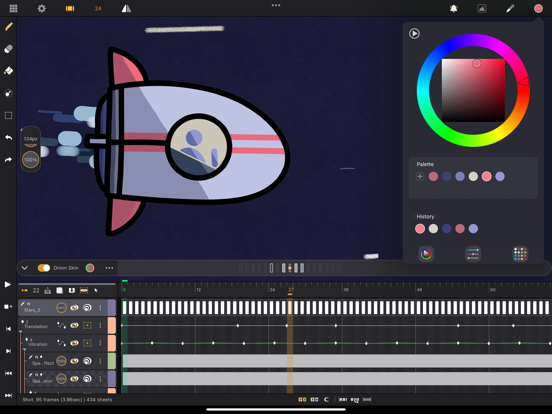
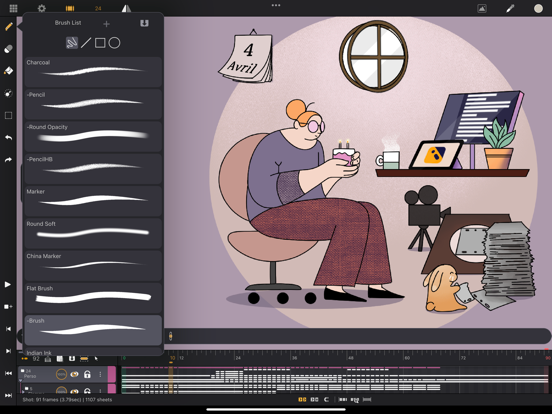
- Callipeg: 2D Animation App iPad Images
Callipeg is a professional 2D hand-drawn animation app for iPad and Apple Pencil, offering both frame-by-frame and keyframe animation tools within a comprehensive, studio-grade environment. Enjoy full access with a one-time purchase—no subscription required.
Turn your iPad into a powerful creative workspace where you can draw, craft, and refine your animation with a fully manageable timeline and advanced onion skin features—tailored for professional and aspiring animators, illustrators, and creatives.
Whether developing complex shots or full-length films, Callipeg provides the tools and flexibility for you to animate effortlessly.
Have suggestions or feedback? Join our Discord community and help us build a better animation tool together!
Key Features
Hands-on Animation Studio
- Organize your work with shots, scenes, and folders
- Drag and drop assets, use color tags, and advanced search for efficient project management
Intuitive, Gesture-Based Interface
- Fully manageable timeline with customizable frame rates: 12, 24, 25, 30, or 60 FPS
- Decluttered workspace optimized for touches combined with the Apple Pencil
- Left-handed mode and floating menu for seamless workflow
Full Drawing & Brush Tools
- Extensive brush set: pencil, charcoal, ink, and more
- Create custom brushes with adjustable smoothing, tip, and texture
- Color picker, custom palettes, and color history for fast, accurate coloring
- Fill tool with adjustable range for controlled coloring
Advanced Layer System
- Multiple layer types: drawing, video, transformation, audio, and group layers
- Import images, videos, and audio for rotoscoping, lip-sync, or reference
- Organize layers with color coding and grouping
Animation-focused Controls & Features
- Multi-touch gestures for flipping, playing, pausing, and transforming animation
- Onion skinning with customizable color and opacity (up to 8 frames before/after)
- Out of Pegs feature for advanced onion skin control
Customization & Flexibility
- Import unlimited reference images
- Move the sidebar, invert the canvas, and customize your workspace
- Export animation in .mp4, .hevc, .gif, .png, .tga, .psd, .peg, and more
- Import/export JSON, XDTS, and OCA for cross-platform compatibility and import in industry standard software
High Performance
- Animate in up to 4K resolution
- Add unlimited layers for complex projects
- Automatic saving every 30 seconds and reliable backup/version control
---
Why Choose Callipeg?
- All-in-one 2D animation studio for iPad—no subscription, just a one-time purchase
- Designed for Apple Pencil for the most natural hand-drawn animation experience
- Constantly updated with new features and improvements
- Trusted by professional animators, illustrators, and studios worldwide
Start animating anywhere. Download Callipeg and transform your iPad into a powerful 2D animation studio today!
Callipeg: 2D Animation App App Comments & Reviews
Callipeg: 2D Animation App Positive Reviews
Favorite animation program except for UII’ve been using callipeg since April 2021 and I’ve been really enjoying it the whole time! Unfortunately, a recent update changed the positions of the icons on the toolbar and has put the skip forward/backward frame buttons in a position that causes a lot of uncomfortable strain in my left hand to the point that I’m not sure I can use this program regularly anymore as I have to be extremely cautious about straining my wrists. This program has been extremely nice as it’s allowed me to be able to animate on my ipad away from my desk, so not being able to comfortably flip through my frames without hurting myself is disheartening. If the icons could be moved up the toolbar so that they sit where your hand comfortably rests again that would be incredible. This is the only animation program on iPad I’ve been able to find that allows me to quickly flip through frames, which is important to me as it makes my animations significantly more fluid. Sorry for a bit of a long review, I don’t usually give app reviews but this is a problem that’s really put a wrench in my ability to work and it’s been a bummer..Version: 1.8.1
Import audio problem specific to 1 project file?Hey today when I tried importing an audio file into my project but it seemed like it was glitched. Like whenever I tried to import an audio file into it, it crashes and even if I press the mute button/try to delete the audio layer it crashes. At first I thought it was the audio import function in general was broken however I tested it out on a different project I was relived to see that it worked perfectly fine but also a little annoyed at the same time since this one animation I was just starting to work on after days of procrastinating :/ also another thing, I decided to just deal with it and create a new audio layer in the same project with the glitched out audio layer and that one worked perfectly fine. I can’t even move the audio layer to the bottom or top so it would be out of my workspace. I even restarted my device to see if it was just my device acting up but no, I still have it. Also there’s a weird thin line and small 3 black dots underneath it in the first ‘frame’ of the audio timeline. I hope this could be just a one-off thing, I’m just a little wary about it happening again in the future the next time I try to import audio Thank you Update: I realized not even adding a new audio layer will prevent it from crashing if I just use the new one instead of the broken one, when the project plays to the end, it always crashes and undos my new audio layer so there’s no point on adding a new one in the first place :/.Version: 1.8.0
Some issues, but really positive!I really love this app and it’s versatility to allow some high-quality animations to be made. There’s tons of tools and modifiers that allow you to have some seriously professional grade content.. and when you fully purchase the app, though a bit costly, it’s totally worth it considering you get all the bells and whistles that make the app rival even the best of most animation software… and it’s still getting better too! There’s a new bug that I encountered that could be tuned. With animation layers, when you add a new frame in the child layer that’s being manipulated.. onion skin will use the original location of where you drew the previous drawing before adding the transform. This means when you enable onion skin, the onion skin doesn’t actually take the last frame where the the character should’ve moved in the transform. I’ve found a way around it by duplicating a drawing to a different layer, but it’s a bit of a hassle. Either way, bugs aside, this is a top tier app. You should definitely try it, considering it’s free for the base version and it still works great.Version: 2.1.3
Great, but some suggestionsFirst of all, I want to say that this app is GREAT! It’s been a joy to animate in, probably my favorite animation app for iPad (I’ve heard ToonSquid is pretty good, but the UI stopped me from buying it)! Although great, I have some features that I would like added: Grouping Layers: Although you can TECHNICALLY group layers using a transform layer, I would find it much more sufficient to just group layers. I work with a lot of layers when animating, and it can get tiring to try to find a specific layer. Tweening Width and Height: I may just be blind and not know this feature is there, but although I appreciate tweening the X and Y positions of my objects while animating, I would also love to be able to quickly tween the width and height. Stabilizer: Now, although you have a stabilizer, I would like an option to make the brush move slower rather than line correction. It took FlipaClip like, six years to include a stabilizer, though, so I wouldn’t be surprised if it took a while for you guys at Callipeg. Rigging: Now, this is what I assume to be an incredibly hard thing to integrate into Callipeg, but it would make a lot of animators lives SO much easier. Personally, I prefer hand-drawn animation, but I know a lot of people who use rigging in their animations. Thanks for reading my really long review, and I don’t want to rush any of you people into implementing these features! Thanks, Just some dumb animator ;-;.Version: 2.1.7
Like Procreate, but tailored for Animation!This app is the exact design and functionality that I was hoping would exist on the iPad. Yes it’s actually a paid app but it’s more than worth the capabilities that come with it. And while this is presented as an animation app, it can be used for so many other scenarios. This is a tool for any kind of pre-visualization whether for that’s for live action film, animation, ui design, game concepts, it’s pretty limitless (especially with the range of export formats available). There are very occasional hitches, but everything is auto saved frequently by default so it’s never disrupted my workflow more than a few seconds. Also, the Apple Pencil precision is not nearly as accurate as it is procreate (doesn’t distinguish drawing with the edge of the tip vs. the point), so I hope they’ll iron that out in future updates. Overall, still highly recommended as there’s no other native iPad app like this out there and many of the issues listed are already known and being tracked by the devs..Version: 1.7.5
LOVE the app as an AfterEffects user!I LOVE how feature rich this app is! Particularly, truly excellent timeline flexibility “ripple editing” sheet lengths, cycle/linked sheets, *awesome* transform curve editor, drawing while my animation plays, linking with the iPhone app, and extensive export options to name a few things. The following are the only wishlist items I hope to see updated someday in order of preference: Either Drawing layers be the same as Transformation layers or Drawing layers have transform properties as well (position/rotation/scale/opacity), more keyboard hotkeys (specifically a keystroke for “Show only this layer”), if possible a color fill feature over multiple frames (like Blender’s grease pencil), effects (blur/distort/stylize), and when exporting to AfterEffects (that alone blows my mind) if the pivot/anchor points for each layer don’t reset in case my animation/AE project has Transformation or “Null” Layers, finally ProRes4444 with alpha channel export. But to reiterate, already a truly awesome app. Can’t wait to do more animating. :).Version: 2.3.19
Love this app!!! There seems to be a glitch though…Hey! I’ve been using Callipeg for about a year and a half I think, and I knew I would love it! I have a frame by frame app which is nice, but it just does frame by frame. There’s a few other things too, but it’s just for one type of animation. I also have another that seems to be a MUCH more advanced app! But…it is just a bit too advanced for me at the time. Callipeg is the perfect middle ground for me! Frame by frame and keyframing!!! I love it!!! The glitch, which I just noticed right now, is just the past few times I opened the app or exited a project, I’m hit with the try or buy window for the app, which is a bit odd, because I already purchased the app, with the full permanent price! I should own the app in perpetuity since I bought the permanent purchase. A few times this window slides up and down immediately before I can see what it was, and I can use the app as if nothing happened. But other times it slides up and stays there until I exit the app and hop back in. It’s not too annoying right now, but I wanted to let you guys know that the “try or buy” window seems to be bugging out, even on copies of the app that have been bought using the permanent purchase. I love this app and I want to help stop a potential issue before it worsens. That all being said: Thanks so much for making this awesome app!!! Thank you all!!!💖💖💖💖💖.Version: 2.0.3
Fantastic potential!!I downloaded this a few days ago and started trying it out, and all I can say is that I’m excited for the potential this app holds. The minimalistic interface is perfect for the iPad and very reminiscent of Procreate. Some of the navigation isn't entirely intuitive. Personally, I had troubles trying to duplicate frames, among a few other things. For the most part, it's fairly self explanatory. I'm not a fan of the subscription model when it comes to pricing, so I'm glad there's an option to buy it outright. As an app, I can see where the $50 price point can be an issue. However, comparing that to other feature-rich animation software such as CSP or Animate CC, I really can't complain. The smoothing on the brushes could be a bit better, but keeping it between 1 -6% yields excellent results. I'd like to see softer brush edges and imported audio the most right now. The pop-up buttons feel a little off to me and I think an alternative menu option would be a good option, or maybe make it togglable toolbar. Ultimately, this app is worth supporting and I am impressed with how non-invasive the interface is. I feel like this could be a game changer for industry professionals looking for something on the go. I look forward to what the developers have in store!! Thanks for a great product!!.Version: 1.4.1
FantasticI am a traditional frame to frame animator. I’ve tried most of the animation programs for iPad and Apple. Some seem to be designed from a more modern perspective with more automated animation and motion graphics type mindsets. But some are designed from a traditional animator’s paper and pencil workflow. In my opinion this is one of the top two traditional animation packages for iPad. It is very intuitive and does everything that you need to do from from that type of workflow. The other program I would recommend is Rough Animator. It is a similar as program, but less feature rich. I would recommend this program over that. The new Procreate Dreams program which everyone is raving about is very nice, but it comes from a more modern perspective on animations. They are both nice programs, but from my point of view, this program is better for my type of work..Version: 2.3.1
Good Potential; Not Quite ThereNow I wanna start off by saying I’m by no means a professional animator, nor do I know how to animate, but I wanted to start trying to learn. A lot of apps lack a streamline interface or the tools to do so; enter Callipeg. It has so much potential, with an audio feature, layers that go across all of the frames, and so on. My one issue? It crashed, a ton. Particularly when pressing certain buttons, for example: Pressing play on the animation wouldnt crash it, but using the same button to pause it would instantly kick me from the app. And it was a consistent issue, not just a one off. A few other buttons are like that as well. I can see this app doing so well, genuinely, it’s one of the very few to have even close to the tools comparable to a pc program. But it just isn’t quite there yet. I have high hopes that as it progresses, a lot of the smaller bugs and crashes will be ironed out once the bigger implementations have been put in!.Version: 1.7.5
Confusing But Semi-ProfessionalI tried to view my animation and what I had so far by hitting the play button, and all it did was go back to the first frame and stay there. The developer was very helpful and told me how to fix this (hold down the red and slide it to cover the entire animation) but due to the lack of in-app tutorial I struggled a lot and didn’t bother using it for a few days. I come from FlipaClip, so I’m still getting used to the app. A tutorial that’s in-app, or one that includes my problem with the slider (as I couldn’t figure out what I was doing wrong) would be a huge help. Other than that though, it’s very easy to use once you figure it out..Version: 2.1.7
AnimatorI’ve been using this app for a a couple of months now and it’s been great!!! But they updated it a couple of days ago and the update is not great I watched the new video and literally 70% of the new update was just for the homepage and organizing projects which is great and all but the tool I use the most is broken!!! Before the update the selection too would work great!! I could move my characters just a lil and nothing would happen.. but now when I try moving my characters even just a lil they move to entirely new places and the size of the character even changes!! Could you please go back to the old update when I didn’t have to worry about if my selection tool would work or not. It’s really upsetting because I fricken love this app!! But if this keeps happening I’m afraid I’m going to have to switch :(.Version: 2.1.0
Will be GreatUpdate: Audio is now available! Now it’s just the line quality features(like hold to create shape). This app is going to be great so I’ll give a preemptive 5 stars. If you go to the website you can see a link to the development progress. This app has so much potential that I am definitely willing to change this to a 5 star review if these 2 features are added: 1. Most important to me is audio support, this would best be accomplished as an added layer like in FlipaClip. 2. Better line stabilization options, anything close to procreate would be great. This app has a lot of potential and I like the interface, if these are added then this app could become my gold standard..Version: 1.7.7
If you leave a 1 star review because you thought something was free you’re denseSome apps on the App Store don’t even have free trials. The dev was nice enough to let people try it before committing. The only way a dev can make an app with a trial is to make “Free” and have in app purchases to get the full version, otherwise you would have to pay the full price just to be able to try the app. . . This is the way Apple has it set up! Not the devs. . . Why is this hard to comprehend? Are those reviews children? Because those 1 star reviews really leave a mark and not critical of the app at all. Just “I thought it was free hurr durr. One star.” Not everything in the world is free. . ..Version: 2.3.5
SuggestionsI love this app and I believe it is the best animation program in the app store. It is so close to being perfect. Here are some suggestions that I think would greatly improve the app: - Folder layer - the timeline starts to get extremely messy with even just a few layers. A folder layer would be great for organizing the layers. It’s like merging the layers but you have the ability to expand it and adjust the keyframes. - Improve transformation layer - The transformation layer is a bit finicky. I think adding better control with easing in and out within the timeline, and having the ability to draw the guiding line on the sheet, sort of like a pen tool in photoshop and animate cc, would make it easier to have fluid animation. - Camera layer - I think it would be great to have a separate, movable, camera layer. It would make animations look more film-like, having things like camera shake, zooming in/out, and panning across the screen. Please consider these suggestions. I really do love this app and I find it incredible that this even exists on the app store. I hope more people start using this..Version: 1.7.7
I don’t understand.As it says in the title, I don’t understand. I get on the app, and the first thing it does is direct me to a payment screen. I know that the developers are not goi g to look at this, but at least the people thinking about buying the app will. I do not want to have an animation app that I have to pay for, when it says it is free in the App Store. Maybe I got it messed up and clicked a wrong screen, but the thing it takes me to when I open the app is the payment screen. I understand that I sound like a total Karen, I know, but for me,it is the truth. I do not want to have an app that says it is free on the App Store, but then makes me pay the second I get on it..Version: 2.0.3
Love it butI really appreciate how feature rich this app is. There is a bit of a learning curve and you may have to check some tutorials, but that’s pretty standard for any sort of animation software. The thing that’s causing problems for me at the moment is that since the last update, it feels like the sensitivity is way off on my pen. I have to press really hard to even make a mark, to the point where I can see my physical screen deforming. I have an official Apple Pencil 2, so it’s not an issue with a third party tool. I do also have one of those paper-feel screen protectors, but it didn’t seem to have a problem with that before..Version: 2.0.2
Best animation app!Callipeg is the best animation app out there. I am so impressed with the Keyframe/tweening features. I love the fact you can layer sounds as well. You can invert the frames at the end, so looping won’t be a problem. It’s extremely intuitive and user friendly. Here’s some features that would be cool to add, these features missing shouldn’t be enough to derive you from purchasing and using the application Extract the audio from MP4s Be able to split one long audio into a series of shots Be able to select multiple shots and play them back-to-back to preview a scene. Mesh tweening—- This would be very hard to implement so I understand Some kind of file share with procreate? I use Callipeg for sketches and line art, but I like procreate for rendering. Like a layer on Callipeg would equal a layer in procreate within a group. Frame: Group. I doubt this would be possible. Overall, I highly suggest Callipeg’s purchase. It’s a very underrated app that grows really fast. You guys are missing out!.Version: 1.7.5
It’s fine, but I’m not sure I can recommend it yet over Rough AnimatorI have a few immediate wishlist items before I could recommend this over Rough Animator (which I still find more functional even if the UI isn’t as pretty). 1) I want to be able to create cycles. When I create a looping sub animation (leg walk, eye blink, etc), it’s super helpful that I can set the last X frames to loop. I can’t in this app and it bugs me. 2) Why can’t I set frame length by default? I can stretch the drawing, sure, but it always defaults to on ones and I have to manually stretch it after. 3) One shortcut I love in rough animator is that I can set the volume buttons on my iPad to be back and next frames. This makes it a lot faster for me to just draw. Particularly when I’m doing roughs, it’s nice having that quick hardware button. 4) This isn’t something other iPad animation apps do, but the ability to parent layers would be a neat one-up. That way if I have a layer for a head and a layer for eyes, I can keep their positions relative (i.e. I move the head and the eyes follow). It’s doesn’t need to be a whole bones system (though I’d love that) just something basic..Version: 1.5.0
About 70% done real promise, but can't do it allYou can group "scenes" but you can't combine them. Attempting to copy paste will result in a memory overflow that will make your file uneditable. No warp tool. Available features work well, but lack of features. Edit. Now 4 star. They added more features buts it’s still missing somethings like warping. They just changed the button layout and it’s a bit worse TBh but I’m glad for updates. Fun tool for learning animation for 9 bucks a year. Will be frustrating if you’re used to a full suite,.Version: 1.8.0
Not there yet but getting thereThis is an excellent animation app for iPad with many great feature and with what coming will soon feel close to computer level, although still pretty for with the support I see twords this app it could be a very viable way for people to professionally animate on iPad, although as much I I want some more cool feature main focus should be on bug testing since there not many but definitely some that ruin the experience but over all I see a lot of potential and is currently good for my needs.Version: 1.8.1
THIS IS SUCH AN AMAZING APP! BUT...Alright so this app is absolutely AMAZING! It makes me want to animate and it’s so fun to use. The best part? You get so SO many tools for 99 cents a month. 99 CENTS A MONTH! THATS INSANE! It so cheap! I’m in love! It’s such a great app...but there are two cons. The first one is pretty small. It’s laggy when I draw. That may just be because my IPad can’t handle it. If it’s the app though please fix it :(. The next one is audio. PLEASE ADD AUDIO! With audio it would make this app 100 percent better. If you add audio then it will make everything WAY better!! Please add audio! You guys did an amazing job with this app! Thank you!!!.Version: 1.3.0
Neat Start!I ADORE the feel of this program! It gives off vibes similar to that of Procreate & Adobe Animate, allowing it to do complex things simply. The only thing that concerns me is if it is at all possible to import audio (mp3) into the timeline (as you can in rough animator). I’m still figuring out the program, so if this is a feature it may have slipped past me, but I’m curious about the prospect nonetheless. If this is a feature, how can I do such? If it isn’t, does the team behind Callipeg anticipate on building onto the app, and adding such a feature amongst others? I’d love it if the developers could get back to me on this, as I’m curious to hear what they have to say. ✨ Edit — Please add audio Calli 😭.Version: 1.5.1
Great app but needs some helpThis app works for animating well. However, the majority of buttons to use are really difficult to find, and unless you get taught, you need to do a lot of trial and error to even find out what one thing does. Plus(and this might just be me being a beginner), random.y it will but a red block in your animating timeline, meaning nothing can go past that point. And I’m completely unaware of how to move or stop that. I really hope this gets seen by the developer, because they’re doing a good job. And I’ll use this way more, maybe even in videos, if these things get fixed..Version: 2.0.3
Love The Commitment To Non-Subscription PricingOne of the best 2D animation software by far on the iPad platform, the interface is clean and intuitive. This software is made with passion and knowledge of the industry, the frequent reminder to backup file had saved me hours of work from crashes. especially love the recent switch to non-subscription payment. It really shows that the developers care deeply about their user base and isn’t afraid to make sacrifices for the best decisions. What an amazing find this app is..Version: 2.3.17
Great app but with issuesWhile this is a great app, It’s not without its faults however. It’s missing one thing, A ability to import images into one layer. This feature is vital if you are animating characters or even for mixed media fun. What I mean is, For example; You have a very simple sketch but you want to add more to this said sketch but you need a reference to do so. If we had this feature, It would save us from the headache that is keeping a character consistent throughout a whole animation..Version: 1.4.0
THIS IS WHAT I’VE BEEN WAITING FOR!!!This app is easily the best 2D animation app on iOS. I’m giving this app a 5 star rating because I can see all the hard work the developers have done. There’s still room for improvement but trust me it’s only minor. The main thing I hear people are complaining about is no audio import and no objects or tweening features. This is meant to simulate hand drawn 2D animation.....don’t expect this to do the hard work for you. As for the audio, the developer have already said they’re working on it so be patient..Version: 1.6.2
Just got app bug issuesI just downloaded it . It popped up free trial or buy and I clicked free trial and it still made me buy it idk if it’s just a bug but I wish I would have known wasn’t planning on buying it yet. Don’t know if I can get money back for it or not but would be great if I could. Looks like a good animation app but I didn’t want to buy until I knew I liked it for sure. Update: figured it out developers responded to help me with my problem next day!.Version: 2.3.1
The Little App That CouldThis app is 5 out of 5. I think the only reason it is (currently) 3.6 is because it was shakier in earlier releases (I tried it two years ago). This is understandable though: animation apps are limited and new on iPad. It’s everything you need and is smooth. It also doesn’t let its own aesthetic get in the way either —ahem, Procreate Dreams. I love this app! Merci beaucoup to the developers for working tirelessly to make this app so pleasant!.Version: 2.3.14
Love this appI got this app about 3 days ago, and I’m using the free trial, I am definitely going to use this for all my animations! For anybody who says “this app is bad because I can’t figure out how to use every little bit.” That is ok. But the app is fine and you will need to spend 5-6 hours on understanding this. For the developers, you should never get discouraged with what your reviews are, because you know, that there are people who love the app!.Version: 2.0.3
Starting to ImproveMost of the requests of my original review have been answered(such as being able to select multiple frames easily), though I can still see things that could be added that would make this app even better, such as layer filters, OpenToonz support, more brushes(or even adding compatibility with Procreate brushes). Granted, OpenToonz support is subtly available by adjusting the way the files are exported..Version: 2.0.1
I’m so confused???I think the app would be good if there wasn’t a limit to how long your shots can be?? I wanna make longer animations, but I can’t, and I understand if that is a storage or software thing, but I didn’t find this out till I looked it up, as it was nowhere on the app description. I’m very glad I didn’t buy the subscription and did the free trial, cause I found out way after I started to use it. Is this just something that I can’t find, and you CAN make longer animations, or is it just a limitation? If it is, please advertise it..Version: 2.1.7
Only rated 5 so everyone can see thisThis app doesn’t work at all. Where do I purchase the subscription?? Why aren’t in app purchases not allowed? Like why. If I can’t do in app purchase, then I can’t really do anything! You have to stop making it so you can’t purchase it in app. WHERE DO U PURCHASE IT? WHERE? Nobody can do anything in the app when they don’t have the subscription! And that’s unfair. Make it fair. NOW!.Version: 2.0.3
FantasticCaught the animation bug from Procreate, but found the lack of layer limiting. For $50 this is an amazing program to have with you at all times. It allows adding music, multiple layers, custom brushes and even flash-like transform tools. Took off a star because it is s little buggy at times (timeline freezing, colors blending when randomly when set to a solid brush). So far closing and re-opening has solved most issues..Version: 2.0.3
Needs better brushesI love the app, if I had the brushes I have in pro creAte in callipeg that would be awesome. The other thing I hate is when I transport a drawing from pro create into callipeg with no background I have to erase it all anyways which is a line killing time consuming ordeal. Stuff just looks better drawn in pro create and transferred to callipeg regardless. Just wish there was a way to transfer transparent backgrounds, and better brush options..Version: 1.7.7
The Best There Has Ever BeenCallipeg is without a doubt the best animation app available to public. When I started I greatly disliked Callipeg, it seemed clunky, confusing and over-complicated. But 40 hours of practice, trial and error later I discovered Callipeg has everything. Once mastered, Callipeg is the easiest, fastest and most well put together app for animating that you or I will ever use. 5 Stars from me..Version: 2.0.3
I love it! But…I have been using this app for my animations and I enjoy it so much! However there has been a problem with the recent update I think. I went to import a photo to the cel layer so I can draw over it but when I do, it just stops working completely. I tried resetting my device but same thing happens, it’s gotten to the point where my brush strokes don’t show and it crashes out :(.Version: 2.3.21
Audio issuesIt was good at first but then the audio started bugging out and not syncing with the animation. Like when playing through the whole thing the audio would start to go ahead of the animation. But when going in with scrubbing the audio was synced at the right parts, and when you paused and un-paused the audio would sync back up correctly. That or it's the other way around and the stubborn and pause un-pause are un syncing it. I don't know what going on with it..Version: 2.1.2
Great app, with a ton of room to grow.I’m currently in love with this app. It has various things that I would love to see added/improved, but overall, this is the best tool for animation available on the iPad. Things that I would love to see: vector brushes, alpha transparency lock (coming in 1.4), straight line/circle/etc. (in their todo list), better mpeg export (I would like to use this for sharing wip and the compression is currently awful). (final versions are exported as frames and imported to compositing software (After Effects) and look much better. I should note that the creators seem very engaging on discord, and have a timeline for most of the things I want to see added. Highest recommendation, don’t let the lack of a trial scare you, it’s worth the price..Version: 1.3.0
Pretty goodThis is a fantastic app. It has stylish brushes that come with customizable features such as colour mixing and smoothing strokes, a unique but fairly simple platform with a plethora of features, and the prices are pretty good too. However, you cannot import audio or videos into your animation. Importing audios and videos are great references that can help animators get a clear idea of what they want to animate. But since this app does not have that YET, it makes animating a little bit harder and challenging. So far, it is only good if you want to make simple animations without audio such as gifs. Please add in an audio and video importing feature. It will make this app so much more amazing than it already is..Version: 1.5.1
PurchasingI wish there were a way to purchase during the trial period. I see no commerce button in the App Store, on the website or anywhere..Version: 2.1.2
Great animation app!Great animation app that gives you premium features the only problem is that sometimes the app crashes..Version: 2.3.23
It’s a good animate app, but why I feel it getting worseHey creator, please let me know when you guys see it because I quite confusing with the function right now . I was using Callipeg for recent 2 years but I don’t know why it’s start have a very serious bug with audio and animate location after the update. It’s like I was editing the timing of the animation and every time when I put the framed into the right location, the audio will be messed up that it shows the animation always slower or faster rather than the right timing I put before. Am I setting up project wrong? How can I fix this problem?.Version: 2.3.22
The Best Animation App: My ExperienceOut of all the apps I’ve tested, this one turned out to be the most convenient for me. When you need to make compositions more complex and add details to frames, the right tools naturally appear at your fingertips. In the future, I’d love to see some features inspired by Procreate Dreams—like hotkeys for quickly accessing certain tools or a more compact way of working with layers. But these are more like minor nitpicks rather than real issues; overall, the app is very well-tuned for drawing..Version: 2.3.20
The best traditional animation app for iPadThis is singlehandly the best animation app for the iPad. Runs perfectly on my 9th gen, and has a left handed interference. One of the things I like about this app is the ability to do keyframes, and the feature to export to other animation programs for finishing. I'd reccomend it even more now that its now a one time buy. Its a must try for those who do animation!.Version: 2.3.19
Love it!At first, learning Callipeg can seem daunting, but only because of the depth of functionality within. The manual and video instruction are detailed. I find the video a little difficult because of the deep accent, and faster talking. A slower pace might be beneficial in making it easier to follow, but as is, I am making my way through it. Having the timeline underneath is easy enough to work with. I stumble with having the drawing layers incorporated with the timeline, rather than being on the sides, as becomes familiar in most other graphic themed apps, but I’m sure I will adapt soon enough. I very much appreciate the low monthly subscription option while I am deciding whether or not to purchase it in full. The GUI is attractive and well organized. It’s taking me some time to learn all of the buttons, but as I progress, their location seems appropriate and becomes intuitive to use. I appreciate the small arrow for easy layer selection. I’m happy to not have to dig through the layers to make adjustments. Presently, I am learning ToonSquid at the same time, and while quite good, there are points that make me lean toward Callipeg as my app of choice..Version: 2.3.12
Not free but still decentI understand they need some sort of income but if you made it free I would gladly enjoy it I think it’s pretty good by the videos I’ve seen about it, it’s a good app overall.Version: 1.7.5
LagThis is the first time that happened, but the app’s been lagging a lot. There’s a delay on the brush, it’s pretty apparent and annoying. I have an iPad Pro 2020, updated on all the updates as well..Version: 2.0.3
Great Concept, but buggyGreat concept, however kinda hard to pick up and learn, coming from an avid Adobe user… the app is somewhat unresponsive/slow, which makes it bothersome to use, especially on the frame/timeline. Click a frame and does not do anything… or does something twice because you had to click it multiple times to respond. Frustrating. Needs improvement before I purchase..Version: 2.0.1
Prix très abordable 👍Excellente application 🥇.Version: 1.8.1
UpdateWith the latest update many issues have been addressed and/or fixed making this a very useful app for animation. Upgraded review to 5 stars - thanks for all the work on making this an excellent app.Version: 1.8.1
For 2D Animation Pros and Enthusiasts on the Go!Callipeg is a sleek and user-friendly app for professional frame by frame 2D animation with FULL support from its developers! I’m a 2D animator who was at first sceptical that I wouldn’t be able to find a professional software/app for frame by frame animation (similar to TV Paint) that I could use with my new iPad Pro (as I’m mainly a Windows user with experience animating in both ToonBoom Harmony and TV Paint). I LOVE Callipeg and its community and am now a happy perpetual license holder. It’s well worth the investment for those considering freelance or adopting it into their workflow! NOW ABOUT THOSE NEGATIVE COMMENTS: Please take them as a grain of salt. Callipeg is still pretty new and growing and their developers are SUPER attentive to each user’s feedback. Understandably, there were some features lacking that have since been considered and implemented in future feature updates. One of their biggest updates being that you can now import, animate and export with audio! The developers work hard day and night alongside their community of Beta testers like myself (which you may also choose to opt-into) who all love and actively contribute to the development and growth of this app; so please, please be very patient with the team and trust that they will enhance your experience as we all continue to learn, create and expand on its capabilities. Well Done to the Callipeg Team!!! 😃💯.Version: 1.8.0
This app is fantasticI’ve tested most animation apps, and this is the best by far. I’ve already incorporated this into my professional workflow, and have finished two animation jobs using this. The export to png sequences is amazing. Update: still amazing..Version: 1.7.7
Super laggyBefore I can try another feature the performance is super laggy on my iPad Pro, sorry give up by that already.Version: 1.7.6
Audio needs fixingI can’t import audio without it glitching out on me! The whole purpose of me purchasing this app was so I could animate with audio. But I simply can’t. Please fix this issue..Version: 1.7.5
Ignore the people crying about it not being freeI purchase the permanent purchase and it was definitely worth every penny. Callipeg is an amazing animation app for your iPad. Yes I wish their was a bit more “easier to use features” to it (I might have miss them to be honest cause there is so much features, which is a great thing) but it does so much more then any of the those “free” animation apps out their. The fact that I have multiple layers is like a huge plus point since most other apps can’t seem to understand how important that is in animation! It honestly feels the same as purchasing clip study on your desk top, you pay once but it worth it cause the application works great for what it was created to do. Props to the creators of the application, I just hope they don’t get demoralized by the negative comments. Hope they continue with awesome update so that they can be as successful as procreate is now. Ps. I don’t know if you guys have this but it would be nice to have a section/button that links to videos that help better understand the functions of the application? It feels like the community is slowly growing, so would be nice to know where to go for information on the app. All the best!! FK.Version: 1.7.5
Wonderful interface designThis design of this app is really wonderful. As a user of Moho Pro animation software and Procreate, I was really impressed with the thought that went into this beautiful software. It allowed me to be spontaneous and to backtrack when I changed my mind without breaking the animation. I also appreciate that it’s so inexpensive..Version: 1.7.5
BruhI downloaded the app to see how it look without paying and I saw the review which make me so mad. i’m gonna buy a better iPad before testing the app but this is worth more than only 2$ a month. i tested Animate from Adobe which was more than 20$ a month and it was great,but kinda complicated to understand for a new user. I saw some people do some animation on this app and it look simple and have all the necessary tools for basic animation and not all the super complicated animation. ur not gonna found any app that would offer free services like that for animation,it’s not like iMovie or something.I know I haven’t tested,but the price is sure reasonable,it’s not bc it’s a mobile app that it should be free. but the app was kinda laggy on my old iPad but I’m giving a 5 star bc it’s so underrated. feel bad for the app creator tho,hope ur gonna get this app less laggy and I can’t wait to test ur app.Version: 1.7.0
Great appAmazing tool with tons of functionality !!!!!!! Dev team !!!!!! Please fix the issue with gradual slowdown of actions with time. If I use the app for an hour the response on actions accumulates a delay. The restart cleans it up. v1.7.1 (Brand new iPad Pro 4th gen).Version: 1.7.3
MisconceptionsIt seems like most of the negative reviews come from people who expected this to be a free app with in app purchases rather than a subscription based one. Now they have a free trial but the $1 a month for an animation app this good is an amazing deal. It has almost all the functions I wanted wrapped in a procreate-esqu UI. I would like some kind of alpha lock or clipping mask though. And some improvements in terms of the design would be good, but the functionality is great. It is still a new app and I’m excited to see the team improve it even more and refine performance!.Version: 1.7.3
Ignore the 1 star ratingsI’m so happy that someone is finally making a serious animation app for iPad! There are other animation apps, but they all feel like apps made for just playing around and nothing serious. With the recent introduction of audio layers that you can scrub through, it has everything I’m looking for. It seems, every 1 star rating is just complaining that you need to pay for the app..Version: 1.7.2
Has the right functionEverything in here is well built. It has the right functions, the only flaw is that the brush are not in sync with the pen or finger like it does on other animation or drawing apps. If that’s improved then I deem it to be the perfect app for animation..Version: 1.6.2
Love itttThank you so much for this fantastic app!! Please please add a gesture to flip the canvas horizontally and the ability to add music and sound it'll be prefect to me!.Version: 1.6.2
Won’t update to 1.6.2Version still showing 1.6.1.Version: 1.6.2
BugsBesoin d’une mise à jour pour corriger les crashes. J’ai aussi de la misère à faire fonctionner proprement l’anti zoom de dessin avec les doigts..Version: 1.6.2
Low rating bcz its not free???I cant understand why people putting low ratings bcz its not free. Its worth the money and we should appreciate the effort. Its an awesome app to make animations, i love it..Version: 1.6.0
BdvUn peu difficile à prendre en main à cause des brush et des outils de transformation main sinon tous est parfait g fait mes brush customs et l’app fonctionne super bien et je trouve que c juste la meilleur app d’animation 2D sur iPad si t’enlève l’es micro crash pendant le travail,ais eureusement qu’il il a des sauvegardes automatiques pour rien perdre de notre travail 🔥🔥🔥👍🏽.Version: 1.6.0
Easy to use and completeHas everyhting it should have and it works flawlessly. Maybe the UI could be improved but apart from that I recommend this app👍.Version: 1.4.1
ExcellentCallipeg is probably the best animation app for ipad..Version: 1.4.1
Free International Money Transfer 💸Enjoy high maximum transfers into more than 20 currencies while saving up to 90% over local banks! The cheap, fast way to send money abroad. Free transfer up to 500 USD!Version: 2.5.0
What do you think Callipeg: 2D Animation App ios app? Can you share your thoughts and app experiences with other peoples?
Please wait! Facebook comments loading...