The Japan Times Publishing, Ltd.
OTO Navi - Sound Navigator Customer Service

- OTO Navi - Sound Navigator Customer Service
- OTO Navi - Sound Navigator App Comments & Reviews (2026)
- OTO Navi - Sound Navigator iPhone Images
- OTO Navi - Sound Navigator iPad Images
OTO Navi is an app for listening to audio material provided with books published by The Japan Times Publishing, Ltd. Before, this material was available only through supplementary CDs or MP3 file downloads, but now OTO Navi lets you use your smartphone or tablet to listen to it anywhere, anytime!
●How to use OTO Navi●
It’s three easy steps: 1. Search for the book / 2. Download the audio material / 3. Play it!
1. Search for the book
You can easily search the database for the target book by either entering a keyword (title, author, or ISBN) or scanning the bar code on the book you own. If searching by bar code, scan the upper bar code of the two printed on the book’s back cover.
2. Download the audio material
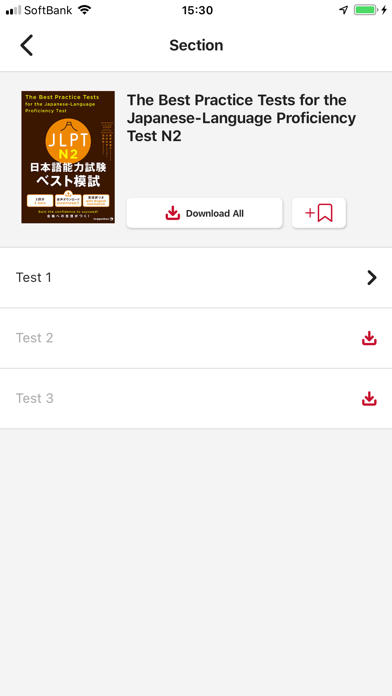
You can download either the full set of audio material for the book, or just the sections you want. If downloading the full set, you may want to use a WiFi connection.
3. Play it!
OTO Navi offers several handy playback features to aid your studies, including 3-second skipping back/forward and repeating of a single track, a single section, or all sections.
*For more details, instructions, FAQ, please refer to the following link. https://bookclub.japantimes.co.jp/en/book/b491927.html
*Please purchase the corresponding books at bookstores.
OTO Navi - Sound Navigator App Comments & Reviews
OTO Navi - Sound Navigator Positive Reviews
Progress bar missingIn the app, I can't see the progress bar to indicate how far I am into an audio file. If I try skipping back 3 seconds, it resets the audio file. Very annoying. Only happens on MacOS - it's fine on iPhone and iPad..Version: 1.1.0
Still a great app in 2026Does what it says on the tin!! Thanks for making it free!!.Version: 1.1.7
Great Convenience!I only have The second edition of the Genki textbooks and workbooks despite this resource being advertised in the back of the Third Edition. I got this wondering if they would have the audio for the Second Editions and was thrilled to see that they did! Not only that but they have the audio for numerous textbooks and workbooks that go up to N1 level! My family is having difficulty with computers at the moment so it was hard to just use the CDs whenever I felt like it. This application completely solved this problem! I am surprised that the only time I heard about it was for a brief second during a video reviewing the Third Edition of Genki One. I recommend anyone studying with Genki to use this great resource and even those who are not currently using Genki should definitively check to see if their study books are listed! To top it all off, it is completely free!.Version: 1.0.0
Perfect! Audio for Genki 2nd editionIt’s so convenient that The Japan Times has provided this app to students to download the audio for the Genki textbook and workbook. My laptop does not have a CD rom, so thankfully they have made this app, makes perfect sense. The player is well designed, allowing me to speed up or slow down the audio, and repeat audio by section. I have bought the Flashcards app that accompanies the Genki books, also produced by the same company. Overall, the company is doing a nice job of supporting its students. Thank you to The Japan Times and their developers..Version: 1.0.3
Great, but…The audio quality is really great, pronunciations are clear, you can adjust speed and it doesn’t sound distorted. They did a great job there. However, when you add a single track/lesson to favorites, the entire book gets added. I’m hoping this is just a bug that will get fixed but if it’s intentional, it kind of defeats the purpose of having a favorites list unless you’re going to offer favorite books AND a separate favorite track list..Version: 1.1.0
It works and it’s freeI’m currently about halfway through the Genki Vol. 1 textbook (self-study) and so far I don’t have any real complaints about this app. I mean, it’s free and it works well enough. What more could you ask for?.Version: 1.0.5
App always forgets where I wasIt would be helpful if the app wouldn’t lose my place every time I open it. Instead I need to remember where I was, then slowly tap to navigate to the exact audio track I was using, then find my place within that audio track. It’s like the app forgets I’ve ever used it..Version: 1.1.7
Great app for studies etc BUTThere is a bug and now the app is frozen at the title screen. It hasn’t been updated in a while so I don’t know.Version: 1.1.0
Hassle-FreeI love how simple this app is. I was expecting to have to provide proof that I purchased the book, but you don’t. All of the audio is there for you. “Well, duh,” you may be thinking. “What would someone get out of contextless audio without the book?” If this were an American textbook company, they’d want an access code, my credit card number, my social security number, my driver’s license, my vehicle’s VIN, my employer’s tax ID; and they’d require I install some separate DRM software and only allow me to access the content for 53 and a half days. It’s a sad world when I’m shocked that an app simply opens and works, but I greatly appreciate it..Version: 1.1.0
GreatLove this app and am using it for my Japanese class.Version: 1.0.3
Free International Money Transfer 💸Enjoy high maximum transfers into more than 20 currencies while saving up to 90% over local banks! The cheap, fast way to send money abroad. Free transfer up to 500 USD!Version: 1.1.7