AI Tools Apps SRL
Typefinity Customer Service

- Typefinity Customer Service
- Typefinity App Comments & Reviews (2026)
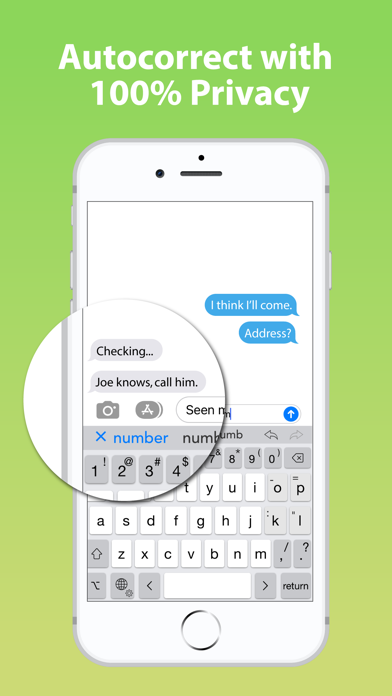
- Typefinity iPhone Images
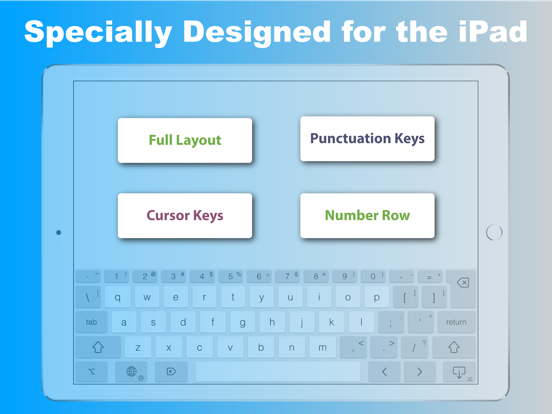
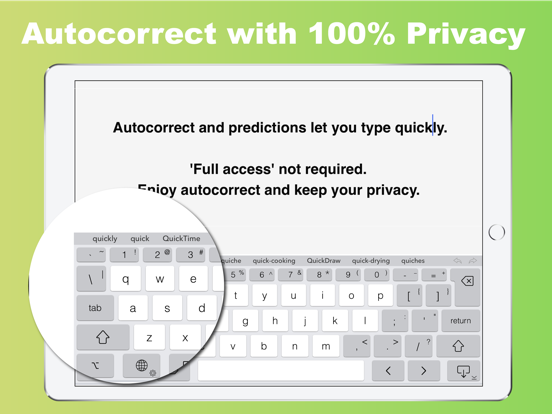
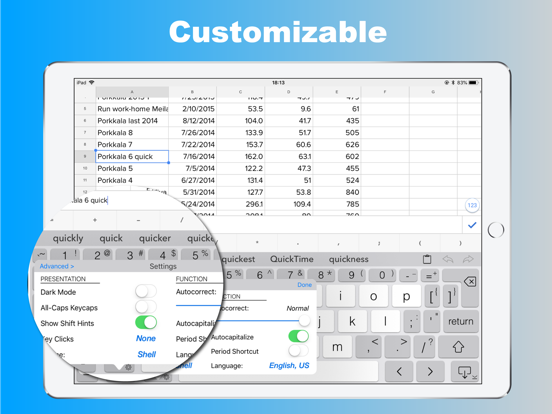
- Typefinity iPad Images
Typing without limits on iPad and iPhone. When it comes to on-screen keyboards, bigger IS different, and Typefinity is built to take advantage of the larger screen size on tablets and modern phones. Stay in the flow when it's time to type a number or symbol or you need to move around, because the needed keys are right there in the main layout. And we use the full width, not just the middle, to display word suggestions.
Ergonomics aren't sacrificed either. The main keys are big enough to type fast, and autocorrect is fine-tuned for catching common finger misses. You'll find using Typefinity is almost like having a full bluetooth keyboard -- without the weight and bulk!
• Numbers and punctuation in one layout, where your fingers remember.
• Cursor keys for easy, precise movement by letter or word.
• Dedicated keys for accented characters in your language.
• Option switch for typing other symbols and accented characters.
• Full autocorrect in all supported languages, showing more than three words.
• “Short” layout option for more screen visibility in landscape orientation.
• Swipe input (trace words with your finger), and flick up on number and punctuation keys for shifted versions.
• Numeric and calculator modes.
• Privacy friendly (“full access” is NOT required for most functionality, including autocorrect).
Languages / layouts supported: English (US and British / UK / Aus, Dvorak), Czech, Danish, Dutch, Finnish, French (France and Canada), German, Italian, Norwegian (Bokmål), Polish, Portuguese (Portugal and Brazil), Romanian, Spanish, and Swedish.
Typefinity App Comments & Reviews
Typefinity Positive Reviews
Good with LimitationsUnless I'm missing something in settings, the swipe to type feature only works with auto correct set to conservate or higher. The auto correct feature is horrible it gets nothing correct but is needed for swipe functionality. Aside from that I see a lot of potential... I'm guessing the backspacekey key location and size is something I will have to get use to... But for the love of all sanity, please fix the auto correct and make it more swipe friendly while you are at it.Version: 2.3
Now a 5-Star Product!Earlier, I rated this one star because I couldn't get it to come up by pressing the Globe key on the standard keyboard, as the installation instructions instructed. I was able to uninstall the emoji keyboard, which I never use anyway, and then I was able to install this keyboard. It works fine for me now. Just be aware that if you need to type in a password, you will still need to use the standard keyboard due to an Apple security requirement. I usually use a Bluetooth external keyboard for landscape typing and this product for portrait typing. I also use this product in landscape sometimes when the Bluetooth one has turned off to save the battery, and I don't want to turn it back on. Money well spent!.Version: 1.7.1
WOW, Excellent Keyboard App!I just downloaded this app today and I'm really liking it on both my iPad and iPhone. Yes it did take a few short minutes to get familiar with the layout, but after that short learning curve all is good. I'm really impressed with how good the auto correct works without being online. Having all of the symbols and numbers visible on the keyboard makes typing a breeze. The developers put a lot of time and thought into making this great keyboard. My thanks to the developers for this simple to use well thought out keyboard. Excellent job, well done!.Version: 2.2
TAB KEY FINALLYCons: I find it easier to accidentally fat-finger unintended keys on this keyboard. Pros: FINALLY A TAB KEY. As someone who likes to write on the go, I am forever thankful for this. Trying to find workarounds for indenting as intended on Google Docs was a disaster. Also I really appreciate the left and right arrow keys for moving the cursor around. iOS makes it super easy to switch between keyboards in the moment, so I find myself switching a fair amount. You just tap the little globe icon in the bottom left of the keyboard and it'll automatically switch between the standard Apple keyboard and this one..Version: 2.2
Swiping words is mediocreAlthough I purchased this due to it being the only symbol and number keyboard with letters available, I have to say the app performance is just mediocre. It glitches, doesn't swipe common words more often than not, and it all together doesn't type words you would expect to be in the memory system of the app. I spend more time editing and fixing my writing with this app. It's very annoying. There's been no updates either to this app since having it a year now. Within this small review, it missed at least 10 things. Could be something amazing, but it just isn't..Version: 2.2
Love–hate this appThis app was designed for the iPad, and works much better there, yet are used most on the iPhone. The lack of an apostrophe on the iPhone layout that is easily accessible is a pain with US language. Not a problem on the iPad. I think predictability of words is better than Apple's keyboard for some reason. I like the ability to move the cursor one space at a time left or right. Trouble hitting the space bar between words butPrediction if you go back know that there should be two words and you can select. I think this keyboard app has great potential..Version: 1.8.2
This keyboard is pretty good, however....Generally I use this keyboard, but for me it's major shortcoming is the inconsistent use of the long press. When long pressing, please add the superscript items displayed on the top row. For example, long press '3' produces should also offer '#' as well as '³' and '₃' this saves having to use the shift key. For example long pressing '/' also offers '?' It makes a big difference for people that only have the use of one hand or just for people that tap with one finger..Version: 1.8.3
You need this keyboardI used the PadKeys keyboard for years on my iPhone. Recently I found that the PadKeys keyboard was no longer supported and had been replaced by this keyboard. This has so much capability. I would buy it just for the arrow keys and the Return key - ever want to add blank lines in a message, the Return key is how you do it. For $4.99, this is a no brainer. And it has so many useful and intuitive features. Even if you don't use it exclusively, it's really handy to have available..Version: 2.3.1
Too little customization.I like this app in theory, but I would like the choice to remove the arrow keys and have a dedicated settings button in app rather than on keyboard. It feels cluttered with the amount of buttons which I don't need. I also wish it could have a more standard layout with backspace above enter and period next to space and a punctuation button left of the space bar. Other than those issue I am happy with it overall..Version: 2.3
Almost perfectThis keyboard has everything I could ever need or want from a keyboard except for maaaaybe emoji support – and if I need that I can just use the default emoji keyboard. The only minor issue I have with it is that while in light mode the keyboard uses a background color that almost perfectly matches the space below for iPhone X and up, in dark mode the color is a much worse match. I know, it's extremely minor, but still odd..Version: 2.1
Good, But It’s no SwypeI do want to love this keyboard. So much shift and long press power, access to foreign language characters and math/technical symbols makes this perfect for my global engineering job use. However, the swipe functionality is actually WORSE than native iPhone prediction, and terrible compared to Gboard (that listens). Does not hold a candle to the OG Nuance Swype. “this” becomes either “thud” or “Todd” No matter what I do. Accuracy improves somewhat when slowing WAY down and pausing swipe on each letter, but that defeats the purpose. Can’t get a refund, but knew that going in. Not upset - but PLEASE PLEASE PLEASE improve the prediction. I’d pay $75 for this app if prediction were as good as native Apple or G board, and $150 if it maintained a local editable custom dictionary. NOT JOKING. It means that much to me to have a sophisticated swipe functionality with easy access to symbols and a custom dictionary, but with no Internet or keylogging..Version: 2.1
So far so goodNot bad as keyboards go. Got this first because I needed arrow keys. Minus one star because they moved the backspace key to a physical keyboard standard upper right corner but that is not convenient for thumb typing on an iPhone – and ALL my muscle memory is devoted to the standard iPhone positioning for it. I get they wanted to make space for other keys on the bottom row but you know what isn't needed on the bottom row? The settings button. THAT is what needs to be in the upper right position, sliding everything over to the left on the bottom row and restoring the backspace key to the position 15 years of iPhone use trains us to expect it to be. Please, make this repositioning a setting toggle. This is a serious impediment to my successful uptake of this alternative keyboard..Version: 2.2.1
The keyboard that should be included on an IpadI bought the previous version of this called PadKeys, now I upgraded to Typefinity. It is a small price to pay for the keyboard Apple should include with an Ipad. I tried a foldable Bluetooth keyboard, it was never around when I needed it. The whole point of an IPad is portability and carrying around another keyboard was not something I enjoyed. This keyboard is exactly what I was looking for on my Ipad..Version: 2.1
Love it!So when I found out that I had to pay to get this version I was not happy. My hubby pointed out that a lot of places charge when they bring out a new version and I saw the light and ordered. I am so glad that I did! This keyboard works great, I love that you can make the numbers larger and I especially love having the calculator on the keyboard! I highly recommend this keyboard..Version: 1.8.3
Where's the spekl prediction?This is probably the best keyboard for iPhone but lacks terribly in correction. Having fat thumbs makes it hard yo be 100% accurate in key presses. This keyboard doesn't help with that or at least not very well. I love the auto space, the comma key and the number row. But I've had to correct my typing at least 5 times in this review and probably still missed something..Version: 1.8.3
Spoke too soon.I spoke too soon. It appears that the fix to load the keyboard was to restart my device in order for the keyboard to show up in any app. This takes some getting use to. The swift typing is not as fluent as the swift typing on my iphone..Version: 2.2
Everything the ipad virtual keyboard should be.The title says it all. Much needed tab, right/left cursor keys, forward delete and all the keys (such as shifted characters) are where they normally are on a physical keyboard. By far the best keyboard app I have used on the Ipad. Wouldn't a cmd key be nice!.Version: 2.2.1
EssentialThe arrow keys allow you to move left & right over text. You can also delete characters in both directions. I do not use iPad without it. this should be standard on Apple..Version: 2.2.1
Just what I was looking forIt's been so frustrating not having a number row always displayed on the keyboard. Works great on my iPad. Includes swipe typing as well. Can't live without it now..Version: 2.2
Removal of paste button - BADIOS 26 has made the standard way of pasting very unreliable. Often requires multiple attempts to get the popup. Removing the paste button from Typefinity will be a disaster for me. I don't care what permissions in requires to keep the button but, whatever they are, it would be ok with me..Version: 2.3
Works great until IOS 18.2Everything works great until IOS 18.2 when auto correct no longer works.Version: 2.2
Fantastic Keyboard without the data harvestWhat a powerful keyboard! It really speeds up the typing of emails and text. Best of all it doesn’t harvest your keystrokes like SwiftKey did. Great app that is highly customizable.Version: 1.9
IPhoneI love my iphone but hate the Apple keyboard. This is the perfect fix. You can even slide to type which I also prefer..Version: 2.2
Good start, needs polishI'm worrying thud review using the heroes as its swipe function. If toy can't read this then toy why it gets 3 streets. Here’s the same using default iOS keyboard: I’m writing this review using this keyboards swipe function. If you can’t read this then you know why it gets 3 stars. As you can see it’s pretty terrible at swipe. The location of some of the keys makes little sense as well. Wish there had been a demo version before purchase. There’s also no refund option :(..Version: 1.8.3
Perfect for meIt took some minutes to get used to the backspace key location, but this app is perfect. Very happy..Version: 2.2
Needs emoji key and option to remove cursor arrowsThis keyboard is great but it needs an actual emoji key, and the ability to remove the arrows beside the space bar. They're obsolete when you can just hold the space and drag..Version: 2.1
Good try, but Not a good alternativeIt works outside of some apps. Apps like Word though it doesnt work! Edit: After reading the support site, I got it to work on my iphone. will update further if i get it on my ipad..Version: 2.0
Love it.Makes typing and editing 100% better..Version: 2.0
Not updated for current iosAuto caps no longer working in current ios.Version: 2.2
Up & Down ArrowsSometimes the
More languagesPlease add a easy switch language button and add Persian language..Version: 2.2.1
It is interesting!Very cool way of typing! Need practicing and getting used to it. I like it.Version: 2.3
Some problemsCapitals does not work unless the key is pressed. so see the first character lowercase but the keybad is capital. the city name I used in the editor keep splitting up. Summer ton was the city as you see it split to two words "Summer ton" and ever if you quote it. Great other wise except uses 2/3 the screen..Version: 2.1
Can’t use the microphoneBe advised you cannot use dictation with this keyboard. Apple does not allow third-party keyboard apps to access the microphone..Version: 2.0
Its okSwipe typing doesn't work too well. Also does not predict the next word when typing..Version: 1.7.1
LeoGreat keyboard! So much better than the standard one with iPad..Version: 2.3
Good keyboardConfusing transparent option. Shell and bold themes are almost the same. Multilingual mode does not support 3 languages..Version: 2.3.1
Numeric keyboardVery helpful, well made, only big issue is that the numeric keyboard does not workwhen swyping the numeric keys.Version: 2.0
Great KeyboardGreat keyboard. Would it be possible to allow iPhone to turn off text/word suggestion on the top bar to save real estate space? Or a compact mode that reduces spaces between keys for the same reason?.Version: 2.3
Fantastic. However: latest version seems to break spell-checkI’ve been using Typefinity for years to get the full numeric row lacking on Apple’s built in on-screen keyboard. It’s worked great until recently when it seems to have broken spell-check..Version: 2.0
Feature request.Can you add an option to disable the predictive text row when not needed from quick onscreen settings..Version: 2.0
Free International Money Transfer 💸Enjoy high maximum transfers into more than 20 currencies while saving up to 90% over local banks! The cheap, fast way to send money abroad. Free transfer up to 500 USD!Version: 2.3.2