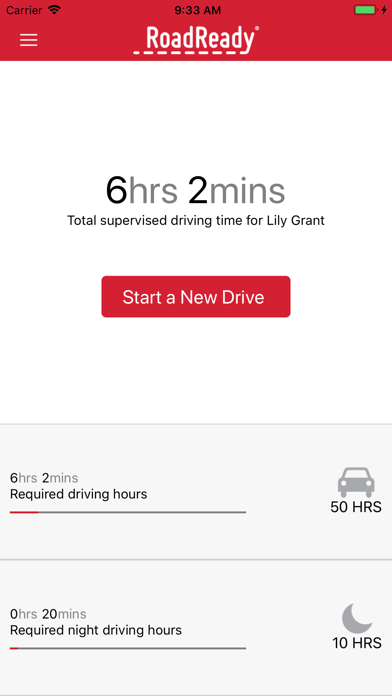
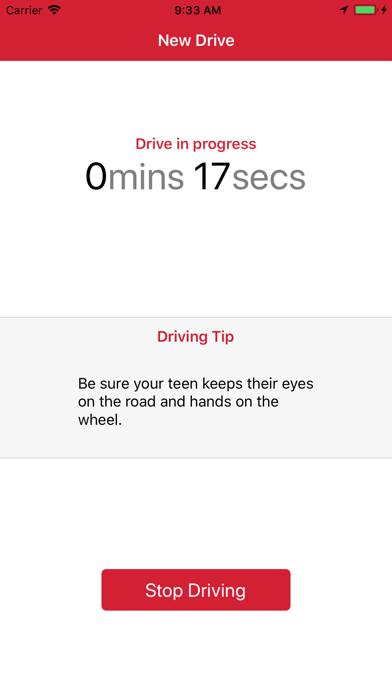
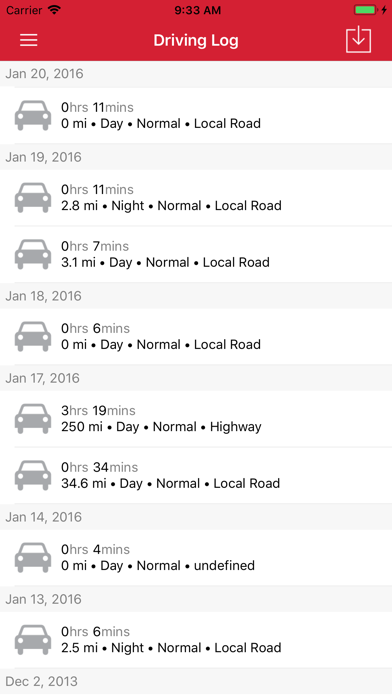
RoadReady logs teen driving practice during the Learner’s Permit phase. The app provides an easy, efficient way to ensure teens have enough experience behind the wheel in a variety of conditions before they begin to drive independently.
RoadReady allows you to:
Log teen Learner’s Permit driving
Monitor progress against your state requirements
Log driving on several devices
Track multiple teen drivers
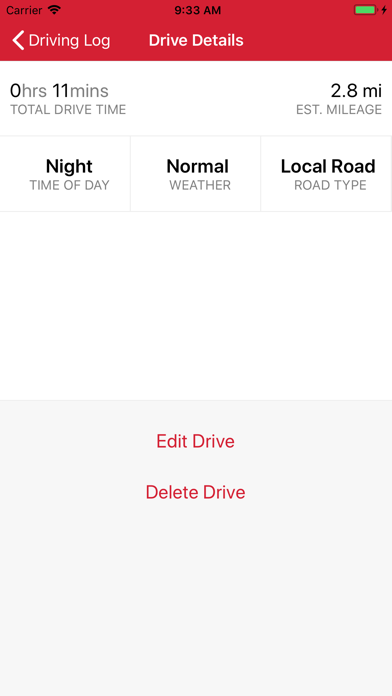
Track road type and weather conditions
Export printable driving log
Receive suggestions for safe driving
Stop logging drive time automatically
RoadReady is a component of The Parent’s Supervised Driving Program, recipient of the US Department of Transportation National Roadway Safety Award.
*Continued use of GPS running in the background can dramatically decrease battery life.
RoadReady Positive Reviews
Does the basics... but nothing elseAt first sight, this app seems great. Upon examination however I found some flaws. For one, all it auto fills in is the time and distance travelled but not anything else. This could be improved by having the app automatically fill in the weather for how the forecast is in the area. This would be great. Secondly, when you are driving it asks you to fill in what type of road you were on and then there are different options to select. You can only select one. On a usual drive most people drive on more than one type of road and so this causes an issue for me as I am not sure which type of road to select. This could be fixed by adding a function that allows the user to select/add multiple road types. Also, in the types of roads list there is no option for Freeway which causes an issue because then I don’t know what to fill in after logging time on the freeway, I have been forced to resort to the highway option. Please add this. If these things were fixed I would give this app 5 stars, however, these issues are holding it back..RN JessVersion: 3.1.0
OKish but fails at some basicsThe State of Colorado pushes this app but it isn't up to par. This app should be better than it is. There hasn't been a new version in 2 years. Ridiculous. Fix the notes box on IOS. It is weirdly right justified, and doesn't allow me to paste text. Also if I exceed the character limit, which isn't specified and there's no character counter, and you save it can crash the app and you lose the ENTIRE drive record. That's bad. So I always save the drive first then go back and edit in the notes. But again it needs a character counter because if you exceed the unknown limit you lose all your text and have to start over. So I thought I'd be smart and write my drive notes in... Notes..but nope it won't save notes copied in at all. ***As notes are central to this app, please fix this asap*** Also the Drive Guide simply doesn't work on an iPhone 12 Pro Max. It loads but won't let me scroll at all. Save the drive GPS routes and link to a maps app..PetroleroVersion: 3.1.0
This app is a necessity!!!I was so thankful to learn of this app after receiving the booklet from Secretary of State. Not only is there not enough room to jot all the information needed in the booklet, but it feels like it's all over the place. This app literally keeps track of the mileage so we don't have to check every time, it makes starting the driving time so simple. This is so important. There's no guesstimating the amount of time or miles. The only thing I've had to edit was whether or not it was raining and what type of road. I love that it has a section for notes. This is helpful for both the parents and the teen to look back on to see how far they've come, or what they need to work on. And the fact that the app sends weekly update reports ON TOP of badges that have been awarded, it's seriously the "cherry on top"! Best, most useful app for a student driver. The creators really thought of everything!.MissiAnneVersion: 3.1.0
Overall GoodI have been using this app for about a year now, and it is pretty good!
I can’t use the timer, because it has to use WiFi/data to actually use it, which is a bit annoying, because I can use the Apple Clock app on my phone without data or WiFi.
That is the main problem, is having to be on WiFi to get the app to work, but I just have to watch the clock and figure out how long I’ve been driving.
The other minor problem is when I go to log two different drives.
When I tap on “Log previous drive” for the second drive, it will glitch and go back to the main screen before I could put in the drive.
It is a bit annoying, but I don’t think too much of it.
I would recommend maybe having an option to say something like “Tasks performed” and let you put things like parallel parking, backing up, parking, stuff like that, so you can see how well you’re doing.
And maybe letting you put multiple tasks at once, so that you don’t have to put separate drives for each thing.
That would be nice for if you need to see what you need to improve on, and what you are good at.
Mainly because the app seems to be focused on only driving, and not as much of the manoeuvres you need to pass your test.
Overall, besides the two minor issues, I like using this app to track my driving, and see how many more hours I need!.Oksana BMWVersion: 3.2.0
Good, but needs some improvementsAs a teen driver, I like this app much better than using the paper booklet you get, as it is much less tedious. It logs the drive and mileage automatically, which is convenient and saves a lot of time. However, I do wish there was a “pause” button, along with the stop drive button. Often times I am at the gas station or stopping by a store quickly, and I just want to continue the same drive when I get back into the car, but I usually have to stop the first drive and start a new one. Another needed feature is a “inclement weather” meter, along with total time and night hours. Our state makes teens do 5 hours of driving in rain or snow, but I can’t currently see if I’ve completed those hours in the app without going in and adding up all the rain hours manually. Overall, I really like this app for logging my hours, but I think it could be better with these 2 improvements..Jakeknisely12Version: 3.1.0
So perfect!I LOVE THIS APP! We have not one or two but FOUR drivers in drivers ed at once. Why, is a different story but trying to keep track of a total of 200 required hours would have been a nightmare. Even if I had a single driver I would love this app as much as I do. So easy, pick a driver you have made a profile for & hit start a new drive. Done! You can tweek weather, road type & other details if needed. Note space available if you want to comment on where you went or what skills your driver worked on. You can add previous drives as well. Simply export and print for Segment 2 or other classes that need proof of your drive time. Could not have been easier. I needed to use custom Er service once as I added a driver twice. They responded immediately and solved my problem cheerfully. Thank you Road Ready!!.TLCMichiganVersion: 3.0.5
MediocreThe app does the simple task of logging driving hours and prints a log which is acceptable for the DMV. There are just a lot of annoyances. First is the constant interstitial ads for State Farm. It takes multiple screens to save the drive. I already have State Farm insurance. I don’t need an ad after every drive.
The app also always requires a data connection presumably to load the ads. This can be very annoying if you are trying to start a drive from a dead zone or parking garage.
There is no way to remove a driver. In NC after you get your provisional license you have to log another 12 hrs to get your full license. We tried to create a new driver log but the app kept hanging. As a result we wound up with a bunch of new driver entries and there is no way to delete them.
The app is easier than logging hours on paper but you will hate the app by the time you are done with it..PaulwentrunningVersion: 3.0.5
Sit and spin after 50 hoursThis app worked pretty well for my son as he has to have 50 hours of day time driving and 10 hours of night time driving to receive his drivers license in the state of Michigan. My son has 54 hours and 25 day time driving and 5 hours 14 minutes night driving clocked on the app and now the app just sits and spins as if it’s loading. I can’t use any of the really cool features I used to update edit and add drives I forgot to clock. I’m writing this review as my 16 year drives my 2019 Jeep Grand Cherokee at 8:25 Est and it’s raining on the freeway. I wish I could capture this moment somehow lol but seriously I heard this is a major issue with this app and just wanted to make you aware with my 2 cents but thanks overall great app..RIPEPJVersion: 3.3.3
Basic functionality, mostly works.Ok app. Slightly buggy to the point where saving the rides fail the first time, tracking questions, and feature request would make it a more robust app.
The process:
1. Enter ride details.
2. Save ride.
3. Close out full page advert.
4. Tap “Done”.
5. Close app.
6. Open app.
7. Get pop-up that the previous ride didn’t save.
8. Save ride.
9. Close full page advert.
10. Tap “Done”.
App wants to track location, but doesn’t show distance traveled or location info in the app - so why is location tracking necessary?
Features to improve:
1. Track distance (or remove location tracking requirement).
2. Include fields for start and end odometer. Understandably distance is not required for DMV, but more folks may use the app if this is added. I would use it for work vehicles to have a logbook of mileage and time traveled.
3. On log export screen, why not auto fill the information on page 1? It shows that same info on the successive pages, so the info is there. Not sure why the first page would omit this data.
4. Give option for alternate supervising drivers. I’m not always driving with my child. Sometimes my wife does..Dirty_JCVersion: 3.3.3
RoadReady a Parent ReviewI would say it is a good app for keeping track of your child’s driving time without logging it in a book. It was very useful for that and it sent weekly reports that helped motivate my child to drive more. It did have flaws where the time would not save the last drive and I had the remember the amount of time. I wish it had a pause drive so if you did quick stops you could continue the same drive instead of starting a new drive. You have to manually input the miles that you drive and the type of road and weather. With the type of road you can only select one and like other parents said somethings you drive on multiple roads so don’t have the option to more than one. I ended up selecting the one we spend the most time one. Other than that I like using it..JobHunting456Version: 3.1.0
Great app for tracking dive times!Hi my name is Wyatt and I have just recently finish my segment one driving Ed class and I needed an app that could track my times. And I found RoadReady. This app is great you can start it and will track how many miles you have drove and will have you fill out what you drove in like the snow or rain and even night. This app never crashes and is always working when I need it to! And when your done with your hours you can even print out a hard copy of your driving hours! Now thanks to RoadReady I can get my required hours in so I can get my drivers licenses! I recommend this app for keeping track of you driving hours and preparing for your drivers license!.Wyatt StahlVersion: 3.1.0
It used to be goodThis app used to keep track of miles but it does not anymore. They do not update it much so the bugs are not fixed. Also, if my teen does two drives in one day it will override the first drive with the second one. It would be really nice if it had a pause button for stoplights because some stoplights are at least two minutes long and when driving in the city limits that could be 10-15 min we are just sitting at a stop light. The start and stop feature isn’t good for that purpose because it’s not keeping track of miles so if you need to have miles for your drivers Ed you have to calculate every single drive. That is a lot of drives if you have to push start and stop at every stoplight..Gabe24 JohnsonVersion: 3.2.0
Great customer service!Really loved the customer service I received when I accidentally deleted the app then couldn’t log back in because I’d mis-typed my email address. They were able to find my driver so we didn’t lose any data!
The other great thing about this app is the ability to use the same log in on multiple phones so my teen can have his drives logged even when he’s driving with his grandparents!
I was really concerned when I found several durations of 0.0 miles when I exported and printed the log. I figured out though the the 0.0 miles were when we lost GPS on my phone (not unusual in Montana) and the app easily lets you edit the drives..SNRBanditVersion: 3.0.5
Useful but very unprofessionalThis app is very helpful and easy to use and I really liked it. But like all the other reviewers, I found this last update disastrous. It was somewhat relieving to hear that I am not the only person who was logged out of their account and cannot log back in. And I’m pretty sure I know what my password is; it just says it’s incorrect. Thankfully Ohio only requires a parental signature for driving time so I can kinda guess how much I had. But they just made their app completely useless, so unless you’re careful to re-record all your drives, i wouldn’t recommend.
UPDATE: the developers have reached out to me with a link to get my account back. So there is hope! (But it’s a bit late; my affidavit is signed already. Nice try, though.).JalisajoyVersion: 3.0.4
Needs a Pause FeatureHave a pause function. As a young driver I often drive my parents to the store, or swing by someplace to pick something up. The car may not be in motion for 10-30 minutes. But I shouldn’t the leave the timer running during that time because I am not driving. Also it’s inconvenient to have to stop the timer and start a new drive when all I may be doing is getting gas. So having a pause feature where I can pause my drive timer then resume the same drive after when I start driving again.
Other than that the app works well. Though when adding notes it has the curser in a strange spot, but that’s not a big deal..Hidden20Version: 3.1.0
Very usefulI love this app but I have 2 recommendations for changes. 1. Give the option to pause and restart a drive. That way when I’m stopping to pick up my youngest at school I don’t have to end and save one drive then start another one 2 minutes later. And 2. When selecting where the drive occurs let me select more than one option. We live on the outskirts of town and very often travel one exit up or down the interstate to get where we are going. So a lot of our drives are half on the highway and half local roads but I can only pick one..Precious2009Version: 3.3.3
Awesome AppThis is my 2nd child learning to drive. With the 1st, I had to write down everything and keep up with everything. This app is awesome compared to writing it down on a sheet of paper. Does it have everything you might do, no but it’s pretty close. Highway, freeway, major road? They’re all close enough to choose one or the other. Specifics aren’t that important. Can it detect the weather? No but you have choices. It’s a click, not hard to do. Trust me it’s WAY better than writing it all down. I love how it keeps up with the drive time and you can edit it if need be. Love it!.Up2date MomVersion: 3.1.0
Good but needs fixingThis app is really good for tracking your driving time, but the one downside about that is that there are a lot of bugs within it. For instance, I got practically locked out of my account through a loading screen and it wouldn’t let me do anything within the app. It would just show that the app was loading something that would never load, so what I ended up having to do was delete the app off of my phone and then re-download it onto my phone and log back in to my account within the app which then brought up my account and everything was back to normal..NINJANICK23Version: 3.3.2
Great Customer Service & Super App!RoadReady is reliable and easy to use with terrific customer service! I had a slight issue with my menu selections and after a quick email to customer service I received an immediate response. An update to the latest version of the App was all I needed. I would recommend RoadReady to anyone with a new driver as a way to track driving hours. The App tracks distance, time driving, road conditions and time of day. My teen driver liked earning the different badges for accomplishments such as highway driving, driving consecutive days in the week, etc. I liked the weekly summaries of my teen’s drives..CLS-NorthCarolinaVersion: 3.1.0
App freezing and not taking sign in info.Worked great at first, but suddenly froze. I deleted the app after trying multiple times to get it to work. I then tried to resign in but it would not take my information. After using other emails I had not used in the previous original sign in, I was able to get it working and start logging hours again. The same thing happened to my friend and she has not been able to get it working again. If that would get fixed it would work great and do everything it’s supposed to. Considering this is the app recommended by the DMV, I hope it gets fixed soon. Thanks!.Kea s.Version: 3.3.3
Used it for both kids and it is a lifesaver!With my oldest I used this app for the last half of her driving and everything else was written.
I love how the app keeps track of everything. I can change the types of roads, weather, to fit the conditions. My dad cuter gets badges, weekly driving reports, and I can print it out for court.
This app is free and a lifesaver with a ton of thought put into it. Thank you to the developers for making it easy to teach my child by having the manual, tips, and log available on my phone in one place!.Airborne_ReconVersion: 3.3.2
BadgesThis is an awesome app. I love ❤️ being able to easily track my progress. There is just one ☝️ teeny weeny problem. Now I am an avid 100 percenter (AKA I feel like my life is not complete if I do not have all of the badges 🪪) So I would like if there was a possible way to have, like, a list 📋or something like that to see exactly what badges I can strive to complete. (It’ll also make me more eager 🤩 to go out and try new things to get badges.) Thanks for taking the time 🕐 to read this review. Other than the little rant above 👆, I think this is a great app
⭐️⭐️⭐️⭐️⭐️.✅ZetroVersion: 3.3.3
Better before updateI like the ease of use. It is easy to start and stop drives, it automatically tracks weather day or night, and allows me to edit if I started the drive late or accidentally forgot to stop it at the end. It is easy to select the weather conditions.
It also used to automativally track the miles. It has stopped doing that, and I believe that was after I install the update.
Not a big deal, but since it used to work I’m hoping they will fix this.
Instead of auto filling, it shows 0 miles for each drive. I can’t find any setting that can fix that. (In phone settngs, I have location turned on while using the app, and precise location turned on.) I can manually input the miles. So that’s fine for trips that we have taken so many times, we know. But other trips I have to guess.
The app also allows you to retroactively log times when you forget to use the app.
I would’ve given it at least 4 stars if the mile tracking was still working..BlogmomVersion: 3.2.0
Slick and easyMy granddaughter passed driver’s ed this summer. The instructor introduced the new drivers to RoadReady. It is the greatest thing since sliced bread. My granddaughter happily keeps her phone charged, sets it up as we get in the car, and RoadReady sends a detailed report every week. Except once for two weeks. I sent an email to RoadReady and Chris contacted me. We got the trouble straightened out and we’re back on track! Way easier than pencil and paper. And RoadReady will be there for as long as it takes us to get in 50 hours of daylight driving and 10 hours of nighttime driving. Thanks RoadReady.PDOKeefeVersion: 3.0.4
Free International Money Transfer 💸Enjoy high maximum transfers into more than 20 currencies while saving up to 90% over local banks! The cheap, fast way to send money abroad. Free transfer up to 500 USD!AdvertorialVersion: 3.3.3
RoadReady Negative Reviews
Good but lacks featuresI like the app and that it tracks the hours and conditions that my child drives in (although I usually have to edit the weather and road type because it gets it wrong 90 percent of the time) during her permit period. Takes a lot less time than trying to jot it down.
My issue is, why doesn’t it actually track and show a map of where she has driven when reviewing the drives? Speed? Altitude? Etc? All these things are very easily added to an app such as this. It would be great to go back and review the route so that if for example two different parents are teaching, We can each see where the other has taken her and try new roads without having to ask. I can also see how many miles she has on each type of road on a long drive. It would be nice since you can only pick one type of road in the app. That doesn’t help much when the child goes from backroads to a highway and back. By tracking speed, I can give her pointers on staying consistent with her speed such as going up hill or merging onto a highway, etc. All great tools that can be incorporated into the app. Visual references are a valuable tool in teaching..Jasper7788Version: 3.1.0
Was great….until I got logged outI’ve had the app for about a year now, and have 45 hours of driving time on it. It was going great, other than little things like having to manually put in the correct weather etc. recently, I got a new phone. Both phones I had this app on were iPhones. So I seamlessly transferred all my information from one phone to the other. Except today, I went to start a new drive and log some hours, and the app wanted me to log back in. Okay, no biggie. Except it refuses to take any of my email or passwords. And when I click forgot password, it says they have no accounts with any of my emails. So I tried the one parent email. They also said they don’t have that email in its account log. So now I have to start all over and possibly log my hours somewhere else. I tried calling customer help but no one answered, and even tried the online technician chat. No one was able to help me. If I can get my hours back the app would easily be 4/5 stars..Taylorcheyenne1223Version: 3.3.3
Once a day?The idea seems good, but it’s flawed. Unless I am the only one having issues, it will only let me log one drive a day. My son drove to work in the morning and I logged that drive, then when he drove home, I tried to log the afternoon drive and it overwrote the first drive. I was entering these in manually, because I forgot to “start” the app when we left, so I don’t know if this is an issue when using it that way. I guess one could add all the time together and edit the log, but this will become a problem when the driving conditions change (ie, daytime/nighttime or weather ).
As someone else said, it would also be nice to be able to choose more than one road type. The only thing mandatory in our state is a certain number of daylight and dark hours, but for our (parental) reference, keeping track of road types and weather conditions would be nice too. People rarely drive on one type of roadway when they go somewhere..Crazylulu22Version: 3.2.6
Would not recommend. Pointless app that stops responding after internet change.This app would stop loading if your phone has an internet change and you stop the timer that’s tracking your driving time. It basically shows you the driving summary after you stop the timer but never responds when you click the done button forcing you to force quit the application. After you go back into the app, it just shows whether you want to save or discard the last drive to which clicking either option will just make it load without response. This would force you to delete the app and then reinstall it just to get it functioning again which is a pain if you forget to disable the WiFi first before stopping the timer. Honestly would not recommend since this app prioritizes loading ads first before your data. If a DMV agent recommends this app, please just ignore them. This app is not reliable, littered with ads, many pointless feature and lack of useful ones, and can’t even function correctly..Ak_2109Version: 3.3.3
It was good.. till it wasn’tThe app was pretty good, it kept time and whether it’s night or day but you’d had to manually put in weather, road type things like that. I was fine with this till it didn’t save a drive. I thought “no biggie I can just put it in later.” Then I tried to put it in later and the app wouldn’t let me do anything, it just had the home/dashboard screen with the little spinning wheel, at first I thought it was my connection but it had been doing it for HOURS even though I had full bars and WiFi, I even went to different places. I went to see if there was an update in the App Store, cause many people were having the same problem before with the app and suggested that, but there was no update. I turned my phone off and back on again, that didn’t work. I uninstalled and reinstalled the app and thought I could just sign back in. Now it wont let me sign back in and is just telling me ‘error’ when I try to put my email in and when I try to do the forgot password option..MoonlightlupinVersion: 3.3.3
App is horrible and useless for my teen driversThe app lets you select multiple drivers, which I needed in this case as I have two daughters with their permit trying to record hours for the state requirement.
First off, while the app lets you enter multiple drivers (which I thought was a great idea as I have to teenagers both with their permits), but when you log the hours, you can’t differentiate or assign those hours to the individual driver. so if I log hours for one kid driving, then I take the other one out driving, it just creates one log with no way to know who did what.
Another Major issue, when trying to add previous drives, it does not let you select the year, just the month and day. So if I am starting the app in January 2023, and want to log the previous hours for December 2022, it will actually record them for December 2023 as that’s the current year. Kind of a problem when you’re turning in the printed up record of your teens hours, and the app is stating that your team drove on dates in the future..CGSwimmerVersion: 3.3.2
Do not download!!This app just stops recording after pressing “start drive” randomly. i’ve lost hours and hours of driving hours on huge busy roads and small backroads. Even when it does “record” the time, it does. not get added to the big number that is all drives combined. For any colorado drivers that understand this reference, i’ve driven through the busy Boulder streets, down highways and small busy roads just to get to my school. Keep in mind i do this drive 2-3 times a week and it takes about 45 minutes. for the past two weeks, ZERO of that time has been recorded which is significant, and i need this time to get my license. In short, the app doesn’t actually record you drive when you press start drive (it might if you’re lucky), and in that lucky scenario that it does record you drive, 80% if the time it will not get added to your total drive time. Awful app. I now have to switch apps and make up all my lost time on this trashy platform so i can prove i drove enough to get my license..CocororaVersion: 3.2.6
Decent app but buggy and problematic at timesThe app is decently designed for its purpose, however, it can sometimes be a bit laggy and buggy. It worked well for about nine months and then one day while using the app, it completely froze on me and just showed a spinning loading wheel. I restarted my phone twice, updated my phone, updated the app but whenever I would open it, it would be a spinning loading wheel and I couldn’t interact with user interface. I noticed that a lot of other people experience this issue. I realized that as long as you have an account (download the app on someone else’s phone and sign into your account to make sure your data is saved) and then once I confirmed my data was saved, I deleted the app from my phone. I then reinstalled it, signed into my account, and all of my drives were still saved. I was able to resume using the app as usual..Thomas And3rsonVersion: 3.3.3
Time-wasting junk app. Better off with a pad of paperThis app is a negative value proposition. First you must create an account, which is quite tedious as it must be done in the app and not online, the password requirements are a secret until you try to create your password, and despite all attempts to prevent the service from sending me email, it still opted me in to email notifications.
It won't use the full screen on the ipad. The first time I tried to record a drive it froze my phone. Manually entering drives is absolutely cruel: you must pick numbers from a dial instead of typing them directly. And then after you record your drive manually (because the app failed to do it) you are sent an email: "congratulation, you just did a thing". What possible value could that give me after enduring the terrible manual drive entry?
Don't bother with this. Get a piece of paper or use a spreadsheet. All of them are easier that this and it won't sacrifice your privacy or time to do so..RobdewVersion: 3.3.3
Login in errorI have had 35/50 hours worth of driving in this app with little to no issue, but then all of a sudden the entire app logs me out of my account with no consent. I have no idea why this has happened because I made sure my password was safe, and made sure to write it down in my notes app just in case anything like this happened. I then tried to log back into my account, but it kept giving me the same error to my password even though I knew it was 100% correct. I also tried to reset my password, but it rejected my email, sending me an error each time I tried to send the reset password information to myself. I also tried to use my dad’s email to send the reset password information, which apparently “sent” to his email, although he never received it. I am now pretty frustrated because I just lost 35 of my driving hours, and am unable to access that information. Please be cautious with this app, it is honestly terrible..Levi KuiperVersion: 3.3.3
THIS is the gold standard?We use this app because our driver's ed school told us it's approved by our state...but about the only thing this app does consistently well is display ads...which always seem to do with issue. But it's core drive tracking functionality? Very inconsistent.
Can't tell you the number of time I've started a new drive timer for my son only to get home a half hour later and the timer has stopped and the app is sitting at the home screen. Now that I know that happens I have to constantly monitor the app to make sure it's still logging.
Or how about when it's successfully saved a drive, then the next day I open the app and it tells me that my previous drive was not saved.
Or how about the fact that it's 2022, and it still doesn't have a useful GPS or weather tracking feature. If you drive in the rain or on the highway, you have to manually enter that information in. Silly.
We'll use this app because we have to...but it's unreliable, lacks basic features of a driving app, and you have to pay as much attention to the app as you do your teen driver make sure it's doing what it should.
I never review apps but had to share my frustration with this one..603JPVersion: 3.2.4
Awful, beyond awfulCrashes constantly. We use a backup app called Student Driving Logger that is so much better, but this terrible app is the one approved in our state. It loses drives constantly. “Your last drive was not saved.” Get used to seeing that phrase. This unstable app shows it all the time.
Update: when awful gets worse. It crashed and had to be reloaded. The password I knew was correct did not work. It required a password reset, which also did not work. Support for this app has completely ceased. Their database must be gone. But their ad money is likely still rolling.
I am so glad we used a backup app from the get go. The driving hours were secured. I am hoping that no new users will be conned into using this. Use something else. Our state will have to accept the hours logged in another format because this app was awful before is got worse..Momto2NAVersion: 3.3.2
I expected better.At first it was fine, I notified it was lacking some details about the driving besides the time driven and time of day, but that didn’t really matter to me. After a total of 5 hours and 6 minutes, the app crashed. It has been this way for over 2 days and I’ve had to write down the time driven in notes to keep track. This is absolutely ridiculous, and I was really enjoying the convenience of this app despite its flaws already, but to have it crash and not work for days? I mean I tried multiple things, such as the classic reboot of the app and then my phone, I tried signing out and back in only for it to have errors with that as well, so then I deleted the entire app and re-downloaded with the same result as before. Fix this bug please or I’ll use another dmv approved app, maybe one that doesn’t crash with only 5/50 hours logged..Jasperk16Version: 3.2.0
App error issuesMy account randomly got removed when I updated to iOS 18. During attempting to re-log in using my information I wrote down it claimed an error so I tried my 2 school emails, my work email, and professional email in case it wasn’t my usual email for various social media or app accounts. I called 5 times a day for 2 weeks with no response and getting hung up on. My parents account is still functional however even with clicking “forgot password” it still says error. My login was saved in my phone passwords as it was so I fail to see error on my end but I see an immense lack of customer service and if my mothers account wasn’t functional still I would have gotten kicked out of segment 2 for not being able to provide proof of hours.
WRITE YOUR HOURS DOWN DON’T RISK MONEY DOEN THE DRAIN!!! The convenience during logging hours isn’t worth $480..Ali🔕Version: 3.3.3
Finally Loaded -UpdatedApp won’t load after first drive. Looks like it is busy pinging an ad server. I will give you a couple of dollars to get rid of the ads and fix some of the stuff with the application.
Update: This app is trash. Feel like this was somebody’s MS/HS coding project, but somehow is the only one accepted by the Colorado DMV! 🤯 This app will not track mileage. Cannot tell what time of day. Never even asks about road conditions. It is basically a glorified timer. There are others that are far superior, but not accepted by my state. Which is really sad. I would like to be able to give my child some actual stats. And I would like it if I wouldn’t have to edit every little thing. Heck even my iPhone knows when I am and am not driving 🤦🏻 Get it together. Or at least get rid of the ads. That money is obviously going straight into your pocket and zero development!.IREALLYhatePEOPLEVersion: 3.2.0
I can’t log back inSo my boyfriend just got logged out after trying to put in some more driving time and it won’t let him back in. He was almost done with his hours and now he can’t log in so I logged out of mine and tried all of his information a bunch of times and it didn’t work. We both even tried to do the I forgot my password thing with all of his emails he has and it won’t work. So then when I tried to log back into mine and it did the same thing to me. And we are both mad because we can’t get our driving time back so can you please help us get it back.
Edit: it has been 11 days and we still can’t log in we better be able to have proof of our hours before it’s time because this is insane we are teens and this app was recommended by the DMV this is crazy please log us back in!!.Leeleek2004Version: 3.1.0
Version 3.2.4 Isn’t Working At AllOk, so I hate to look a gift horse in the mouth and write a negative review of a “free” product, but here goes.
We’ve been using this app to teach about 26 hours of driving, and then version 3.2.4 was released three days ago, and suddenly the app won’t save any new drives nor allow prior drives to be logged, effectively shutting down any use for the app! The problem is an ad appears at the bottom of the screen covering the save function, and scrolling is disabled, so there is no way to save the drives! Very annoying to incorporate an app into your child’s driving education and then have it stop working half way through, and even though it’s free, I would think with sponsorship from Toyota, State Farm, etc. there would be enough funding to make sure the updates don’t shut down the app’s functionality altogether!.Denver GenVersion: 3.2.4
Deletes previous drivesI’ve used this for two teens now, and the problems haven’t changed. Drives disappear in multiple different scenarios… the main ones:
one: logging a current drive - sometimes it will decide to cancel/reload, even if the drive was ongoing and the app had not been closed. (Why would it cancel after 5 mins sometimes - when it will log an accidental 14 hour one that I forgot to stop at other times?)
Two: there have been times I’ve had to add previous drives (such as when he drives with someone else). These are FREQUENTLY removing previous drives on the same day. I don’t know if it’s an overwriting issue if it can only have two a day or something, but it’s ridiculous that with no warning a new drive deletes an old one. I think it’s just a glitch, because I can eventually get a third or fourth drive to show up, but not before I have to reenter some of them multiple times. It is UNRELIABLE unless you have a backup chart - and then what’s the point?
I really like it when it works - but if you’re expecting it to work and don’t notice it’s not keeping all the drives - it causes a big problem getting their time in!.PaluapVersion: 3.3.3
Tracks drive time ok, but editing or adding is brokenIf you only use it to track driving time while driving then it seems to work ok.
Recent changes make it nearly impossible to add or edit the log though. Let’s say you forgot to start a new drive, and decide to add it afterwards:
1. Click on the menu
2. Click on Log previous drive
3. Edit values
4. Click on Save
5. Notice that the time hasn’t changed accurately
6. Click on menu
7. Click on view driving log
8. Notice that the entry you just added has no time or the wrong time
9. Click log entry
10. Click Edit (notice there’s no save or back!)
11. Correct the time
12. Find there’s no way to save the update or go back to the log
13. Kill the app
14. Reopen the app
15. Read the notice about an unsaved log
16. Save log
17. Confirm that the drive has been logged correctly as the total drive time now reflects the newly added log.
17 steps just to save a drive log is pretty ridiculous given that’s the primary function of this app.
Hopefully they’ll fix it, however I’ll probably be looking around for a better app for my other kids if I don’t switch for this kid before he’s done..AdamEngineerVersion: 3.3.0
Broken app. Not Road Ready - Make Apps Great AgainApp stopped working this morning. Can't make any entries.
This app has so many issues and bugs. Data entry is poor and the app is entirely dependent on an internet connection. Editing rides is also too difficult. And I'm a bit tired of seeing a National Guard add after every drive. Logging miles should be easy utilizing the data already available on iPhone. My kids most recent drive was never recorded. The app quit. When I tried to manually enter it, the prior trip erased. When I re-entered that the earlier trip was erased. The data should be stored on the phone and then synced with the online date base, not just wait for an internet connection. I can take a walk and know how far I walk, so why can't this app figure out how far we drove?Hire some high school programmers to fix this app..QuantumSamVersion: 3.2.7
Better Than PaperThis app could be soooo much better. Problems I experienced in just the first 30 minutes of using it. 1) it didn’t save our second drive; 2) I tried to “Log a Previous drive” but every time I tried to create the drive it simply edited an old drive. I had to “Start a New Drive” end drive and then edit that drive; 3) when you try to edit the duration, the selection for the time given is under the advertisement at the bottom. I don’t quite understand why it asks for position data since it clearly doesn’t use it for anything. I hope to use this app as little as possible. I wouldn’t use it except it’s required by the DMV (or paper- but I guess it’s better than paper)..Jon Hager '97Version: 3.3.3
Bugs with the app lost all my dataI had 42 hours using this app everything was working good. Then one day I go into the app and there’s a spinning wheel. I close out the app and it’s still there. It wouldn’t go away. I looked up what I should do about this issue. On the RoadReady website it recommends to delete this app if this issue occurs. I’d do that and I obviously had to sign back in. I plugged in my email and I realized that I didn’t write my password down for the account. That’s on me, but when I press forgot password and I type my email into the form and press “ok” it was say “error, something went wrong”. This is extremely frustrating considering it was working completely fine up until this moment and I was almost done with by required 50 hours. I hope you consider fixing this problem..Luke Min.Version: 3.3.3
This app is broken, please fix this broken appI don’t know how this app has “support” from toyota and aaa but i just lost my precious driving hours from this broken app.
for the multiple times i have timed my drives, ive had the ability to close my phone while the app was still timing my drives. my last drive was different. after i ended my last drive, i opened my phone to save the drive. when i opened the app, it gave me a pop up from the app asking me if i wanted to save my drive. of course i clicked yes and tried to add all of the extra details i needed to add. i look at what the app put as my starting and ending time and i noticed that they were exactly the same time (it can’t be manually changed unless you manually log a drive). i had been driving for an hour and a half.
usually, i got these pop ups when you go to describe the drive after you stop and save the time of your drive and describe the details of your drive. i thought this whole thing was a glitch considering the timestamps were completely far off from what i actually drove. i reloaded the app and discarded the incorrect drive, attempting to manually log a drive. the app gave me a buffering screen longer than it should have been going. i kept reloading the app and i still got the long buffering screen. considering the one to many glitches that have been happening, i decided to completely redownload the app and log in again. for some reason, i try every password and email in the book that could have possibly been my account information. this app refused to take it. i try “forget password” the app dares to tell me that there was an error. do i know what kind of error the app is trying to inform me about? no!
in conclusion, i will not be trusting any app to record my drive if this continues to be the case in trying to be a licensed driver. thanks for reading..IiizziiiiVersion: 3.3.3
Needs Serious Work… May loose your kids info.We were using this app to track our son’s drive time as it was recommended by the Secretary of State… Everything was working fine for the first few months. Today, when I went to save a drive the app froze… it then wouldn’t let me do anything. Can’t start a new drive, can’t look at his drive log, can’t do anything. Ended up having to delete and reinstall it. Only problem is when it reinstalled, it didn’t recognize my login info and when I finally got in it didn’t even have him listed as a driver. The app has successfully LOST all of his driving logs! Unless you are specifically required to use this exact app, I recommend you find something else so this doesn’t happen to you..Jpd822Version: 3.3.3
Why are we still here? Just to suffer?After tracking nearly 37 hours…. It is now trapped permanently in a spinning circle where I can do nothing but cry over the lost logs. There is nothing that can be done (unless there is?????). Help. I now have to either remember every drive I have ever done and log it somewhere else or… or what? What do I do but despair? In my time of learning this great pain has been the cause of my emptiness as of late. Please. I know no one looks at this app. (Who can fix it) because absolutely nothing has been done about any of the glitches and I have seen a mountain of one star reviews. I know no one looks at these reviews, so I beg the next consumer of this app- track it on paper. Or on your notes app! For your own sanity! Please!!!!.Chaos_ducksVersion: 3.3.3
Suddenly stopped working and freezes upWorked great since February, but in the last couple of months suddenly device started freezing . I deleted the app after trying multiple times to get it to work. I then tried to sign-in again but the app doesn’t work and accept my login attempts and it wouldn’t take my information. After using other emails I had not used in the previous original sign in, I was able to get it working and start logging hours again. The same thing happened to my friend and she has not been able to get it working again. If that would get fixed it would work great and do everything it's supposed to. Please consider fixed this use asap. Thanks!.Bigcajun1973Version: 3.3.3
Payoneer 💰Payoneer is an online payment platform that lets you transfer money from any corner of the world! A best and must have payment service for every blogger, traveler, freelancer, affiliate marketer, consultant, virtual assistant, business person, online sellers, and receivers. Earn $25 for free by joining Payoneer. Sign Up Now!AdvertorialVersion: 3.3.3
 Safe Roads Alliance, Inc.