Swift Playground Customer ServiceApple

Swift Playground Customer Service

  1. Swift Playground Customer Service
  2. Swift Playground App Comments & Reviews (2026)
  3. Swift Playground iPad Images

Swift Playground makes it fun to learn to code and build real apps. You solve interactive puzzles in the guided “Get Started with Code” and learn the basics of building apps in “Get Started with Apps.” You experiment with a wide range of challenges and samples that let you explore unique coding experiences.

Swift Playground doesn’t require any coding experience — it’s perfect for anyone just starting out, from eight to one-hundred-and-eight. The whole time you are learning Swift and SwiftUI, the powerful programming technologies created by Apple and used by professionals around the globe to build many of today’s most popular apps. And because it’s built to take advantage of iPad and the real iOS SDK, Swift Playground provides a one of a kind learning experience.

Lessons Built-in
• Apple-created lessons guide you through the core concepts of programming by using code to solve puzzles
• See your code run in a beautiful, interactive 3D world that you can rotate with a finger and pinch to zoom
• Animations introduce each new coding concept at a high-level before you dive into the puzzles
• Glossary and built-in help pages give detailed information about available commands, frameworks, and terminology

Explore and Create
• Interactive coding shows the results of your code instantly, alongside your work
• Step through code in playground books to highlight each line as it runs
• Books provide a head start to create your own playgrounds that use graphics, sound, and touch
• App Gallery walks you through the building blocks of apps, like tabbed navigation and receiving input from device sensors

Build Apps on iPad
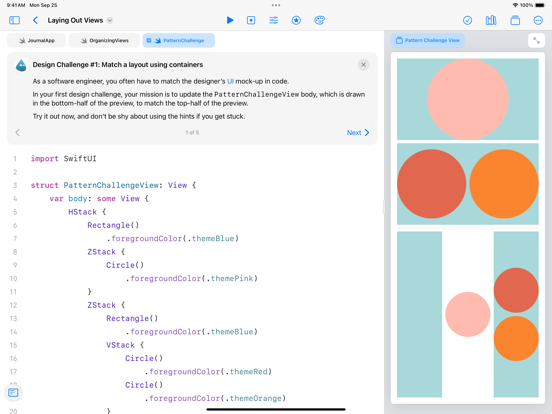
• Create real apps on iPad using SwiftUI
• See your code changes reflected live while you type
• Type quickly and accurately with inline code suggestions
• Extend your app with an ecosystem of Swift packages
• Navigate your code with project-wide search

Smart Coding Assistance
• Touch and hold to grab any command and move it around to change the order of your code
• Drag a brace with your finger to wrap a block of code inside a loop or conditional statement
• Drag and drop snippets of commonly-used code directly into your playground
• Fix common code errors with helpful inline suggestions
• Stay organized with automatic code formatting

Real Swift, SwiftUI, and iOS Code
• Learn the same powerful Swift programming language used by the pros to create apps in the App Store
• Build dynamic, elegant apps using SwiftUI, a modern way to create user interfaces
• Access iOS frameworks such as SpriteKit for 2D games, SceneKit for 3D graphics, UIKit, and more
• Your code has direct control of iPad hardware, including the gyroscope, accelerometer, camera, and touch events

Share or Publish
• Send your projects to friends and family using Messages, Mail, AirDrop, or other Share Sheet extensions
• Bring your app projects to Xcode on Mac and back again
• Submit your completed apps to the App Store with App Store Connect

Swift Playground App Comments & Reviews

Swift Playground Positive Reviews

Great Learning Tool with a Major BugThis is actually a very fun learning tool and I am enjoying using it a lot. I am not a developer by trade, but I have been wanting to learn and this is a very nice introduction. There is one major bug with the iPad, however. Intermittently the Playground will stop accepting keyboard input. I tried with the Magic Keyboard and with a bluetooth keyboard with the same result. It doesn’t happen on the macOS version. Outside of that, I have been really enjoying it. And some of the new 3rd Party notebooks like one from Procreate seem really interesting. I am looking forward to getting to build my own app one day soon..Version: 4.5.1

Wonderfully Motivating!As a previous reviewer mentioned, this app takes the dullness out of learning how to program. Even as an adult, I am able to enjoy this learning process. I was an amateur programmer in high school, so I believe that for me to say this is a wonderful way to learn and/or brush up your basics for programming logic is quite a statement for what the developers have created. The team who created this executed the interface in a very intuitive design; something I find quite uncommon with these "learn to program" apps. I would love to help spread the word about this app so it is not abandoned. Kudos to the Apple team!!! Please keep up the awesome work! Even adults need a more stimulating environment for expanding their skill set. There are a lot of people mentioning device incompatibility and software bugs. I am running this on an iPad Mini 2. The bugs I have encountered are minor and do not interrupt my progress in a truly time consuming way. Typically, the little map won't load, so I will go back to the previous lesson then return and all will load normally..Version: 1.5

Great app!I just got this app like yesterday, but so far it’s working great! I haven’t experienced any crashing, and it’s super fun! I was looking for another coding game and swift playgrounds caught my eye. I looked at it and got the app. So much fun! Swift playgrounds is definitely one of a kind! I liked how the main screen was translucent and I could kinda see the Home Screen. I also thought that the way all the playgrounds are in an app format was pretty neat, though I have one question that I had from the app format. When you download a playground, does it take up iCloud space? Other than that question, this app is totally recommended, some levels easy, some hard and the game is so easygoing. I totally recommend, 5/5 ⭐️ ⭐️ ⭐️ ⭐️ ⭐️.Version: 3.4.1

Awesome app for swift codingThis app is helping me learn a LOT about swift. I’m about to get Xcode on my computer so I REALLY need to learn swift and this app is teaching me everything I need to know for Xcode. The only bug I found was that sometimes the app crashed when I wrote a really long function and a visual error where if you find one of those arched holes inside the island (where water usually comes out from) you can see clear out the other side even though the other side appears solid. I know it’s not that big of a bug, but can you please consider fixing it? I’m just paranoid that it will show up somewhere and I won’t be able to get around it. Otherwise, GREAT app..Version: 3.0

There was a problem running page error is always popping upI have an iPad Pro and even when I downloaded the newer version, the character is always yawning and the program is not starting. I keep getting a “There was a problem running this page” on it. It was working fine earlier when the older version was there. I think Apple needs to improve the newer version. The app quits unexpectedly and is the most underrated when it does this. I even notice it on my friend’s MacBook Pro..Version: 4.4.1

Best!! But needs some stuff...I wish that there could be more programming languages and you could use two or more programming languages to use in one playground.I also wish that I could Collab with other people. That is because other people and me have tried to make a project and we wanted to use all diffent kinds of languages. Like.. python. And we wanted to make it together. But we noticed we couldn’t do it. So then we stopped the project and my friends were sad. So, yeah. That’s all for now!.Version: 3.2

Love it!What a beautiful and engaging app - exactly what I've been looking for - and it's free?! These mini-puzzles are an excellent and entertaining way to learn for anyone new to coding. It really adds color to what would otherwise be a pretty bland learning experience. I also personally find it addictive. I've been working on it for several hours straight and can't wait to finish the rest. I really hope that Apple continues to offer this sort of education style. This really helps with getting over the hump. Thank you!!.Version: 1.5

Easily one of the most enjoyable coding experiences I’ve ever had.Randomly decided I should learn how to develop iOS apps the other night, and ChatGPT suggested trying this app. Am I learning Swift? Probably a little — I do love how the native Boolean has a `toggle()` method. I’m mostly just having a blast devising excessively sophisticated algorithms for solving one-off puzzles with no edge cases. The challenge of not knowing the syntax and full capabilities of Swift has actually been part of the fun..Version: 4.5.1

My takeSo here I am writing an unsolicited review... I’ve never written a review without being prompted by an app. So I’m in the process of learning. And the student has to be diligent in his/her search of knowledge. So in the path of learning swift I’ve also been search of the best resources. I’ve been on this search for a little bit now and this is an awesome tool for learning swift. Of course it doesn’t suffice the student by itself but its an excellent complement for those that desire to learn..Version: 3.3

Great codes! But flaws........................You know, people like me aka kids are addicted to games but why not try a better app? This game is helpful and it is educational for all ages. But, there is some flaws. Sometimes, it just crashes and then I have to start the page again. I don’t quite remember what I have done, so can you please not do that? Also, sometimes it just puts a red sign 🛑 for no reason. Can you please work on that? I think everybody should use this app..Version: 3.3

Fun Coding ApplicationFirst releases are never perfect; however, this one is pretty good. I have ran into some problems with having to re-open my project to get changes to graphics items and some data structures to update and reflect changes. Sometimes errors cause an occasional crash. Please add find and replace to help with refactoring along with some support for settings bundles. In general I am happy with the application….Version: 4.0

Could use more capabilitiesOne thing that is missing is the inability to incorporate some app capabilities that are included with XCode, such as CloudKit, push notifications, etc. It would be nice if there was a graphical interface for working with Core Data. My primary computer is an iPad and it is fun to use it to write an actual iOS / iPad app..Version: 4.0

Battery drainer, but decent programming intro teaching toolThis app really drains the battery fast. What and how it teaches seems to be pretty decent and someone should be able to learn the basics. However, as others have pointed out, it can be sluggish (even on a newer ipad pro) and the using the keyboard and shortcut bar is tricky and can be frustrating. (I find typing and text editing ios generally frustrating anyway, it seems to presume where you need an insertion point rather than putting it where your finger is.).Version: 3.0

Some stability issues, but very entertainingTreat this like a game that happens to get you some coding knowledge and practice. It isn't a replacement for reading documentation, but it keeps you engaged and motivated with puzzles of reasonably increasing difficulty and introducing tools gradually. It still lets you use tools that is hasn't taught you, and it encourages creativity by not forcing particular colution paths..Version: 3.4.1

One of the very best apps of ANY KINDSwift Playgrounds is one of the very best apps of all times in ANY category. It's great for kids, too. They think it's a game, but they're learning important programming concepts, not just the Swift language syntax. I especially love that I can do the exercises offline, on a plane. Also, the Swift language interpreter is REAL, which means I can use more advanced concepts even before they're introduced in the lessons..Version: 2.2

So cool, please read!So from an early age I wanted to design my own computer games, and make video games, and this app helped me a LOT. This is so fun, and I use it all the time, and every level gets harder and harder and makes you better and better at coding. Also, the level where you control Botsy is so fun, and love puzzles and strategy games, so this is perfect for me. Amazing overall!!.Version: 3.4

Better than any other teacher I’ve ever hadThe lessons in Swift playgrounds do an incredible job of teaching one little thing at a time, and ensuring that you remember everything that you need to. For anyone who already knows several languages, or who’s never even used Scratch, this is perfect It’s fun, and beautiful Apple, you’ve created something wonderful.Version: 3.3

OutstandingThis app is fantastic. I’ve been wanting to learn coding, and this app is the best tool I’ve found. It starts at the beginning and makes the concepts easy to understand by using well put metaphors at the introduction to each section. Then it helps you learn it by interacting with the puzzles and coding challenges that are aesthetically pleasing and fun. Huge applause to the developers of this app. Thanks..Version: 2.0

Great appIt’s a wonderfully made app I love it 😍, but whenever I want to click to edit something it deletes something that I don’t want to be deleted. Also please give more vital information on how to use the app properly ( still figuring it out ). I am wanting to create an app, but can’t thought I could use this app. Please kindly add an option to do so. Thanks.Version: 2.1

Great place to startThis is an excellent place for people who have little or no experience programming to give it a try. It’s also a great introduction to Swift, no surprise there. My one complaint is that there is no simple way to keep the lessons synced between two devices. I know I can airdrop them between my iPad and desktop macs but that creates a duplicate lesson each time. How hard would it be to simply store the programs in my iCloud account and load them from there?.Version: 3.3

Great Coding ApplicationThis is by far one of the best tools I have ever used to learn coding. If you ever wanted to learn coding, this is the app for you.  has done an amazing job in making coding easy and simple to learn. People of all ages can benefit from this app. I highly recommend it. Once I started the first lesson, I couldn’t stop. That’s how addicting this app is. Thank you !.Version: 2.0

Improvements on general useIt needs a couple of typing updates. For example the cursor 😫 I should be able to drag the cursor like I do in most of my iPhone apps, to where ever I want. I have fat fingers on the iPad. So it’s cool I can record a video but why would I if I can’t even drag the cursor correctly 🤔 I think the developers should focus on the more general and simple coding aspects of the app vs making something super fancy. Go back to the basics!.Version: 3.4

One of the most entertaining coding appI downloaded yesterday and I have to admit that this app is my most enjoyable one compare to others app, also it make me addicted to the world of coding. Thank you Apple for creating this app. It such a wonderful app that I can play it anywhere, anytime. A must try for kids and teens who interested in Technology..Version: 3.3

Love the new projects feature, but needs macOS Catalyst supportI love the new project feature. It is great as a playground or to easily build something that non-developers in the organization may be able to tinker with. Xcode has a huge learning curve. It just needs a way to build for macOS with Catalyst too..Version: 4.0

“Else if”I love how this app teaches. I am stuck though, and I have no other way, I’ve seen, to contact this specific developer than rating. So hopefully I get a response. Its the beginners chapter. Its when you start using “Else if.” Its not on my bottom bar to select. I have “if” but not “else” or “else if” I also can’t type it. I am stuck. PLEEEEase help. This would be a 5 star if I could keep going!.Version: 4.1

Local save gets deletedI can’t quite understand why my local project keeps getting deleted and I end up having to find an internet connection to continue working on it. I’m not always near an internet connection. I’ve been unable to work on my project on occasion while off the grid because for some reason my local copy gets deleted..Version: 3.4.1

Func greatApp!() {The only thing is, it has multiple bugs, and normally I wouldn't mind, but these particular bugs make it extremely hard to tell what you're doing. If you fix -er.. debug the app, I'll give five stars! Besides that, I lovelovelovelovelovelove this app. It's better than anything else I've ever tried. I highly recommend this app. }.Version: 1.6

As a teacherI have search ways for better approaches to convey coding to children and adults. This is by far the best way. Apple should add functionality to the new lego Inventor. If Apple does that… This will be the primary way to teach robotics from 5th grade to 12th grade and beyond. Please apple hear me on that..Version: 4.1

Good but slowFor anyone who has an old/iPad mini 3/4 I don’t recommend it. It’s super useful to learn, but then it’s really slow. It takes TWO MINUTES for the animation to start. I feel that that really derives the user from what they want to do. So please fix this since I want to learn. For anyone who has an old device, please don’t bother. But overall, a good app and idea. The graphics are great and cute. You learn so much..Version: 3.4

How to change language?Swift playground is very good app for new developers and children, but on my iPad it's default language is Chinese so I cant even change it to english because I don't understand anything. But the worst is that I cant find a way to setting although I visited a lots of sites and read whole support guide.Version: 2.2

Wonderfully done, still buggyIf you are reading these reviews, give the app a chance. It is buggy at times but stunning graphics and a very very solid way to learn swift/SwiftUI. I can only assume it will continue to get bug fixes.Version: 4.1

Font Size, Dark Mode, Please (Xcode for iPad please!)I use my iPad attached to a projector or TV to teach coding. The font size it just too small. I use accessibility to increase font size, but it is just not enough. Magnification is just horrible. Additionally, I would like horizontal scrolling. We also need Xcode on the iPad. It is time..Version: 2.2

App is very nice for testing basic ideasThis app is awesome for testing simple ideas and animations in SwiftUI, even for professional developers. The caveat is that it tends to be buggy when showing view previews and it takes too long to get the updated version of Swift! When will it support the newest Swift version and features??.Version: 4.3.1

Incomplete playground along with annoying crashes on iPad ProIt is ..well good for general, which I do main play with the free playground feature, but the unexpected crashes to the desktop and lacking features in debugging console is hard to believe. Really anticipating full version of the Xcode coming to iPad Pro lines..Version: 3.3.1

I give this 4 stars because...I used to use this app a lot in the past, it’s extremely motivating and challenging even as an adult but I’ve downloaded it lately and none of the playgrounds provided seem to be downloading. I’ve deleted and reinstalled the app multiple times, shut off the iPad, etc....Version: 2.1

I love it butI’ve been using this for about 2 years and not much has been added I hope apple will see this and please add where you can create your own graphics and be able to place a block anywhere that doesn’t have to be through a puzzle world.Version: 2.1

Swift PlaygroundsThis Apple Application is a great opening platform to the world of coding for those interested in learning. The true importance of Swift Playgrounds for the future of the iOS operating system can be seen in its democratization of programming and this can only be done if the tools included in this application can make programming accessible and it does..Version: 1.6.1

Finely EducatingAlthough the app its self has some bugs it’s a great way to learn the fundamentals of coding and more! I’ve found the app to be very encouraging and helpful. I would appreciate if they could fix the bugs such as the ones that make the app crash. Overall though it’s a great experience..Version: 2.1

LolI’m so glad I’m playing this game. In fact your something else. It’s so much easier then taking a class. I’m so excited about taking many challenges. I’m very proud of myself for my work.👏.Version: 4.0

Endless Crashes and Can’t Work with Magic KeyboardNot bad coding learning app but there are too many crashes while using it on iPad. And what’s worse is that after upgrading my iPad Pro to iPadOS 15.1, Swift Playgrounds is unable to work with magic keyboard. I just cannot input words through magic keyboard while using this app..Version: 3.4.1

Pages consistently crashIt doesn’t give me much confidence in the Swift language or cocoa touch in general to see the app from the creators of that language constantly crashing. If I’m going to spend my time learning a language and building applications in it, but there is consistent instability running simple commands are the long term prospects really all there?.Version: 3.4

BugDoesnt let you run the code sometimes even when there are no mistakes.Version: 1.5

Crash when openedGreat way to learn but the app is crashing when I try to run the first section of learning..Version: 4.5.1

Fun way for leaning the basicsI was able to get through all 2 of the learn to code modules, however now that I’m finished I want the 3rd one but can’t find it anywhere. I know it was released in 2016 but I can’t find it in the actual playgrounds download page. Please can someone tell me how I can get the 3rd one. P.s if you have any trouble with any level just YouTube it and there are many guides. Also if your stuck on a concept just move on to the next and at some point through the repatriation you’ll get it. Just keep at it folks!.Version: 3.2

PerfectGood and fun way to learn programming for both kids and adults.Version: 1.6.1

GoodThis app is so good why are people rating it bad they are probably just don't understand but this app is really good for coding but really confusing too but awesome.Version: 4.5.1

Good idea but with bugsThis app seems promising but it has too many bugs. I’m getting a Unsupported file error msg right when I click “new app”..Version: 4.5.1

UmmWell it’s kinda good for beginners,but its kinda hard for me,as a beginner, I personally think that swift is hard to learn from..Version: 4.0

No bugsGreat app no bugs you just need to fix the code and it will work just stop being lazy..Version: 4.5

HiHi.Version: 4.2.1

BugOk I like coding on this app but when I run the code sometimes it says there is a problem with the code but I am using a iPad Pro and it’s pretty bugged.Version: 4.2.1

Amazing for coding and programmingGreat for coding.Version: 4.1

This isn’t good anymoreWas good isn’t anymore. Get your stuff together apple Canada. I like Microsoft better anyway. P.s. try apple. Not apple Canada..Version: 4.0.1

For some reason I have an error I have to delete one of these “}” but it does not let meRead the top.Version: 3.4.1

BuggyReally hard to motivate a kid to program when the environment is unreliable.Version: 3.1

Love itI’m a student and my school uses it for our tech class. I’ll still be using this app even though school is over. We only did the first « apprendre à coder 1 » and I’ll be doing the others during the summer as entertainment..Version: 3.3

Great tool for teaching kids!This has been a great way to teach programming to my 7 year old son. There are a few small bugs but nothing a quick restart doesn’t quickly fix. Highly recommended!.Version: 3.3

FantasticI was looking for a teaching tool for my introductory programming students to use on their iPads. Too many coding apps have jumped on the building-block bandwagon which I personally find frustrating. This app maintains the feel of traditional programming and gives fun challenges to keep kids interested. It won’t be the primary programming tool for my class, but I am sure that it will come in very handy for warm-up exercises to get students on board with the lesson of the day..Version: 3.2

Free International Money Transfer 💸Enjoy high maximum transfers into more than 20 currencies while saving up to 90% over local banks! The cheap, fast way to send money abroad. Free transfer up to 500 USD!AdvertorialVersion: 4.7


What do you think Swift Playground ios app? Can you share your thoughts and app experiences with other peoples?

Please wait! Facebook comments loading...

Swift Playground iPad Images
  • Swift Playground iPad image 1
  • Swift Playground iPad image 2
  • Swift Playground iPad image 3
  • Swift Playground iPad image 4