College can be tough. Navigate Student makes it easier by helping you discover and connect with the right people and resources.
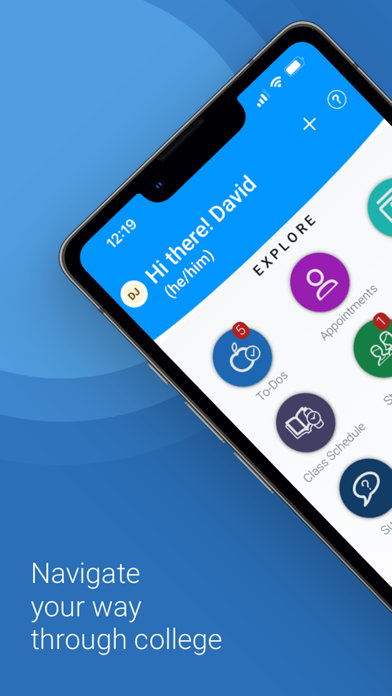
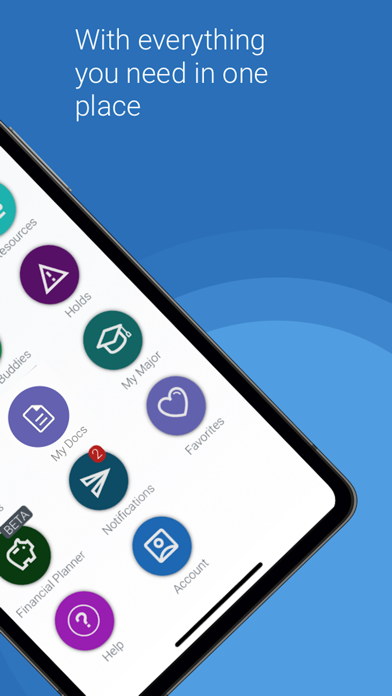
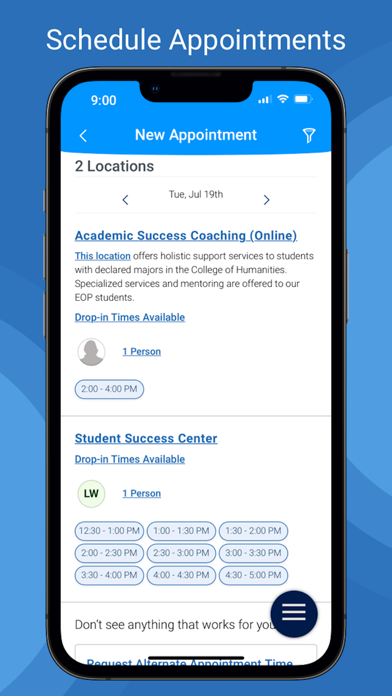
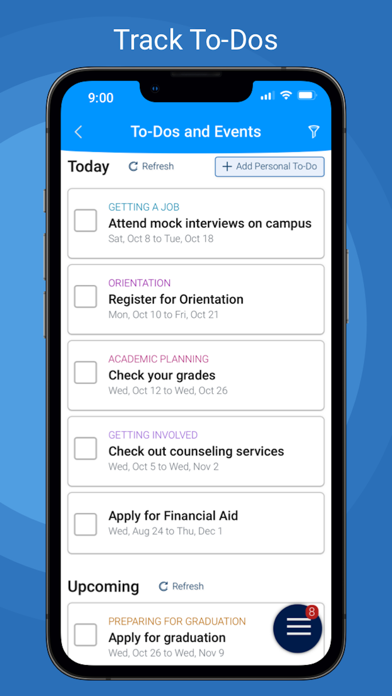
Use features like... 1. Appointment Scheduling - Schedule appointments with your school staff 2. To-Dos - View to-dos and events from your school 3. Class Schedule - view your classes and sync them to your phone calendar 4. Resources - View location and contact info for people and places at school 5. Study Buddies - Make study groups with other students 6. My Docs - View appointment summaries, progress reports, and notes from your school 7. Holds - View your holds and steps to remove them 8. Surveys - Share valuable feedback about your experiences at your school 9. Notifications - Configure email, text message, and mobile push notifications 10. My Major - View your major and explore others that might be a good fit Use our desktop website for course planning, scheduling, and registration.
Note: - You can only use Navigate if your school partners with EAB. - Navigate relies on data and configuration from your school. Some features might not be available depending on your school. - If you have login problems, please use your school-affiliated email address to contact [email protected]
Navigate360 Student App Comments & Reviews
POSITIVE REVIEWS
NEGATIVE REVIEWS
Navigate360 Student Positive Reviews
Helpful, but why can’t it store password info??The desktop version of myACC does store passwords, but the app doesn’t, and it won’t use facial recognition, a 4 digit pin, or the “passport” feature either, so you have to manually enter your whole student number and your whole password every time you open the app or go back to the app. With such long student number and long password requirement, it can be a nightmare to enter it every time, especially when I’m just trying to see an assignment really quickly. The scheduling portion of the app makes you redo the search for classes every time you back out to look for a different section, and the D2L is similarly quick to boot you out and make you reenter your info. Just adding a quick login option would make this app infinitely better. If my bank can do it securely, any other app should..KristieciaVersion: 26.9.18
Better than it wasWhen this app was first rolled out for us to use, it worked maybe 25% of the time. Now, it works about 95% which is great. I like being able to see my schedule and the registration process has greatly improved - on the website at least. I can't stand using my phone to find, plan, and register for classes. Also, the last time I had to make an appointment with my advisor, only a couple months ago, it didn't show me their availability until I selected a day. This was a royal pain as I had to go day by day for a month to find an available time for me. I hope they fixed this since..Dirty hands, clean moneyVersion: 25.13.50
The app is OKThe app has useful features like information for classes and abusing appointments. That being said, I don’t like how when scheduling an advising appointment it doesn’t show which dates are available from the start instead I have to click the calendar on each day to see if there’s an appointment for that specific day and do that until I lick a day where there are appointment available. The app also gets stuck sometimes and I have to refresh it in order to get it working again..Jacques studentVersion: 25.13.50
Great for Class Schedule and InfoI have never had any issues with Navigate. From the start, logging into your student account is easy. I’m able to see all of my enrolled classes and add them to my calendar, which helps remind me of my schedule easily. I have easy access to all the university resources through the app, which is also very helpful!.CAWin42Version: 25.13.50
Better Than it Used to BeIt’s definitely shown some improvements. It’s a little more intuitive than it used to be, but sometimes nothing happens when I tap on a button. It’s still kind of hard to schedule things with a counselor so I find it easier to use the website instead of the app, but if I didn’t have a computer available, the app would suffice..Serend1pitousVersion: 25.13.50
Navigate Makes College Organization Easy and Stress-FreeI use Navigate for college—it’s super helpful for seeing my schedule, adding events to my Apple Calendar, and getting reminders. The dashboard keeps me organized and makes it easy to stay on track with class and important stuff.Justacollegestudent1Version: 25.13.50
Big helpI love the navigate app because it makes life so easy when it comes to scheduling meetings with an advisor or anyone else. As a student completing my BSW life can be a bit hectic. It’s nice when I can click on one app and get a ton of things done ! The app does has its down siee like viewing my schedule isn’t the easier but overall I like the app..Karena1204Version: 25.13.50
Good enoughThe app has all the same features that the Navigate website has and is convenient to have available on my phone. Only issue I have with it so far is that it logs me of the account even when I used it often..Ar OrtizVersion: 25.13.50
NavigateI like this app as it works very well except sometimes it is a bit slow. Other than that it’s very simple to use and provides all the info you need..Vkj01!Version: 25.13.50
App is very helpfulNavigate 360 is very helpful because it makes it easy to find my classes. It shows exactly which building and room number I need to go to, which saves me time and reduces confusion..Queencmb2000Version: 25.13.50
ReviewI enjoy the app! I love how you can see if your classes have group studies today, help with homework assignments and more. You can schedule appointments with your advisor, view checklist, and more..AcostaRoseVersion: 25.13.50
Beneficial!Great to have downloaded this app. I can keep track of everything necessary to feel at ease with my classes..JtggdyhbVersion: 25.13.50
Great appThey show you all the information you need and allow you to make appointments with counseling in school..Steven hafVersion: 25.13.50
BrilliantOnce you actually figure out how it works I think it’s actually a really good tool while you’re in school.Bam7bam3Version: 26.6.10
ReviewI’ve never had issues with the app, I think it’s a good tool for college student to use and it’s easy to navigate..Giana MajestyVersion: 25.13.50
Good AppI think the app is good! I mainly use it to manage/view appointments. The schedule feature is a nice implementation for students to visualize their semester schedules. I’ve have had no issues using it..GarciaM:)Version: 25.13.50
Simple to use.Pretty easy to use app. Haven’t had any issues so far. Any questions I had I was able to get answered through tech support..Django Fett IVersion: 25.13.50
Great New FeaturesThis app has come a long way. All the new features help me stay connected..LittlejoseVersion: 25.21.14
Navigate for SchoolI used this app as a college student. And it is helpful and I like the design, but it does move very slow and sometimes the graphics are messed up..BriJa'eVersion: 25.13.50
This app is very goodIt is new for me at the moment, and I find it very helpful, as I am currently unsure about what I am doing. I appreciate your assistance..DUiCholVersion: 25.21.14
GoodThe app works fine for me and it has great features to be on top of things..Madelei8Version: 25.13.50
AmazingI love the way navigate helps me keep track of my classes. Really good app!.Brittle sceneryVersion: 25.13.50
StudentVery helpful app to have as a student !._kai342Version: 25.13.50
Not good not badApp works half the time.Max1726Version: 26.1.12
This app is niceWorks well most of the time, i was honestly pleasantly surprised the first time i downloaded it..Lemurlover101Version: 25.13.50
Free International Money Transfer 💸Enjoy high maximum transfers into more than 20 currencies while saving up to 90% over local banks! The cheap, fast way to send money abroad. Free transfer up to 500 USD!AdvertorialVersion: 26.10.5
Navigate360 Student Negative Reviews
2/5 - Adds Frustration to Your Hectic DayThe Navigate App is not very user-friendly on mobile. Navigation is frustrating—there’s no easy way to go back to a previous page, so you often have to restart the entire process. Many buttons are also glitchy or unresponsive, which makes the app feel unreliable.
Another major issue is scheduling. There’s no option to reschedule counseling appointments—you have to cancel and go through the whole process again to book a new one. Overall, the app needs better navigation, more reliable functionality, and basic features like rescheduling to improve the user experience..SWEETHEARISMEKVersion: 26.8.11
Truly DespicableThe app is more of a testament of human endurance in the face of blatant, concentrated evil when vanquished than it is a tool for one’s education. I spent a good hour trying to make an appointment because the app kept resetting everything I typed in or just assumed the first micrometer of contact with the screen was what I wanted to select. In another universe, the people who made this app work for the likes of Lex Luthor or perhaps someone more comically evil like Dr. Doofenschmirtz. I am not kidding when I tell you that this is the only time I have felt the need to write a review because this app is what Catholics believe hell is like and somehow this ends up being more punishing and evil. Hellspawn. Satan-sent. You people disgust me, put more effort into your app if you want to exploit my education..Inconspicuoususer7153Version: 26.9.6
Update removed the only feature I likeApp was recently updated and removed the
"schedule planner" from when you click the rocket at the bottom of the screen. I would use this tool to get a sneak peek of what courses are being offered next term, before they were published by the university officially. This was the only reason I kept the app. Since the update I no longer have any use for this app. Before this update I would have given it 5 stars, but since then, it's useless..DevilsCounselorVersion: 26.3.16
Unpleasant experienceConstantly has bugs, and glitches within the app. Can be frustrating to use at times. You’d expect a better app to interact with when it comes to affiliations with academia..ZjvgrbVersion: 26.2.7
This should be zero starsIt’s like pulling teeth trying to schedule an appointment. I’ve been trying to select the correct department for my advisor for the past thirty minutes but because it’s so sensitive it just keeps registering things I don’t mean to click. I can’t even scroll to the bottom, that’s how bad it is. If you’re lucky, your University won’t use this..If I could kill myself I wouldVersion: 26.9.6
Horrible Load TimesThis app takes seconds to load a single drop down menu only to tell you there is no available appointments available that day. Why is it even organized that way? Why don't you just list the next available appointment slot?.Geff BallVersion: 26.9.6
A bug for not English phone userIf your phone system language was some other language not English when you try to login into cuny it will show a white screen.Good 们Version: 25.16.23
Better website than appThe app is still very glitchy and still needs bug fixes.DaaasssfffVersion: 25.19.20
Calendar unable to syncI’ve been able to use the calendar sync just fine until I deleted my courses to update them on it and now it doesn’t want to add my classes to my calendar anymore.Anonymous user18Version: 26.6.10
New User login Survey problemThe app does not display any survey questions but it still demand I participate in a 5 survey before I can use the app..Keny2222Version: 26.10.5
WhatI’ve used this app ten minutes and it clicks on buttons I do not even click on for me and I can’t apply for a counseling appointment which is the soul purpose of downloading this app..Tyoungs24Version: 26.5.17
RidiculousImpossible to use. Trying to make an appointment, the app is the only way. Constant glitches, won’t let me select what I need. Unbelievable..Mmdwii77Version: 26.9.6
Doesn’t show class start datesThe college I attend requires us to download this app as a out of state transfer student. The overall app is user friendly and easy enough to use and figure out. However there are some major UI issues.
In the class schedule tab you are able to see the classes times and days of the week they meet. However it does not show the first day of classes and last day of classes. Nowhere on the app are you able to find this information.
This is a really important thing to have on a college app because certain colleges have rolling enrollments. Meaning some classes may be on a 12 week basis while others are on a 8 week basis. (My college has 4 enrollment options all with different start dates for the same semester) This causes enough confusion on start dates as is however without a way to check the actual start and end dates a student could easily miss their first day of classes if they don’t revisit the website.
At this time I’m more inclined to use the website for my college needs than this app due to its lack of properly thought out and working functions. Everything is there in the menu I’d want, half of it just isn’t fully fleshed out is the issue. The app needs serious work if it is to be the main hub for multiple colleges to direct their students to. College is hard enough already, students don’t need another headache trying to use a 75% completed app..TheReviewTrutherVersion: 23.8.12
HateIt won’t even let me log in with my college student account I’ve changed my login like 2 times and it still won’t let me like hello?? Fix the app bums.Leave me alone stupidVersion: 25.13.50
HorribleAlways glitches, doesn’t let me choose from the drop down menu, stupid app I hate it.SlydlydludluVersion: 26.8.11
Screens teleport awayU can’t tap anything after 0.3 seconds because the screen disappears so you have to preaim the button.Granny SnarkVersion: 26.9.6
TerribleBarely functional, buggy and hard to use, very very annoying..Veec06Version: 26.8.11
Do better.Literally so glitchy, so slow and acts as if it hasn't had an update since the app first came out.....Meowluvr67Version: 26.4.7
Very buggyTried scheduling an appointment and couldn't because it was so buggy.Why do I need a name bruhVersion: 26.8.11
Professor of nursingI have NEVER been able to log it to this thing. Why is it even offered on app!!! It’s great in desk top only.CarolateobVersion: 26.7.21
Bad appThis app makes something simple into something unbelievably complex and unintuitive. Not a user friendly app whatsoever..PoujDaShmuckVersion: 25.14.7
FinickyIt deletes my class schedules and other information randomly..Countrychanel2013Version: 25.13.50
IssuesThe app genuinely never works..Le4955Version: 25.21.14
Completely uselessDoesnt work, im amazed at how awful this app is.Pro..t..einVersion: 25.21.14
App is No Good/Cry for HelpWriting this review because I currently do not have a laptop and have been forced to use my phone for the last semester. I was hoping this would just somewhat be like a mobile version of the website found on a laptop but it is absolutely horrible. For starters, and easily the BIGGEST problem with the app is that it does not let you look or even edit your planner/schedule. This is really the only reason why my school even uses the app so to not have this feature on the mobile download basically renders itself useless. Next, because for some reason you can actually access your planner on the website while your on mobile I tried that and it still left me useless. Every time you grab a class to drag to your calendar the website scrolls with the class you’ve dragged essentially never being able to let you scroll all the way down to the calendar unless you let go of the class your dragging. This leaves the whole registration process debunked and making me unable to sign up for any classes. Registration for winter classes came out today and I need help IMMEDIATELY because I have no way to register and if I don’t sign up soon I’m going to lose the classes I have planned. Please fix your app to at least be able to access and edit the planner would make everything so much better. I hate to give an app a one star review but this one is more so a cry for help than poo-pooing the app, I just need to be able to sign up for my classes asap..NategotsauceVersion: 22.10.25
Payoneer 💰Payoneer is an online payment platform that lets you transfer money from any corner of the world! A best and must have payment service for every blogger, traveler, freelancer, affiliate marketer, consultant, virtual assistant, business person, online sellers, and receivers. Earn $25 for free by joining Payoneer. Sign Up Now!AdvertorialVersion: 26.10.5
 EAB Global, Inc