James Rhoades
Ikiru Customer Service

Ikiru is a simple but powerful app for making lists, keeping notes and setting reminders. It aims to help you live a productive and meaningful life, by enabling you to focus on the things that are most important to you.
IKIRU IS VERSATILE
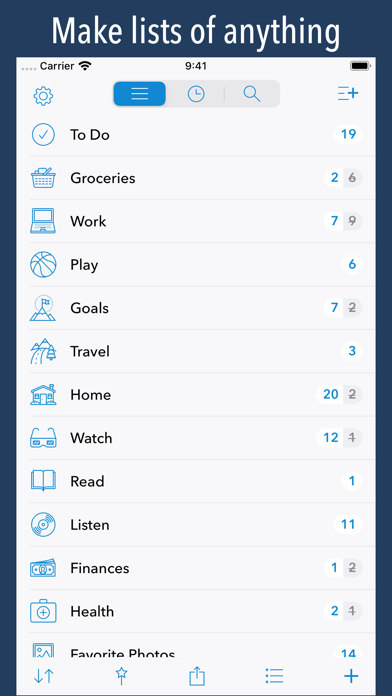
Use it to create to do lists, shopping lists, take notes, store contact information, keep track of books to read, or movies to watch... or anything else you'd want to make a list for.
IKIRU IS BEAUTIFUL
With a clean and easy to use design, choose from over 2000 icons to assign to your lists.
IKIRU IS POWERFUL
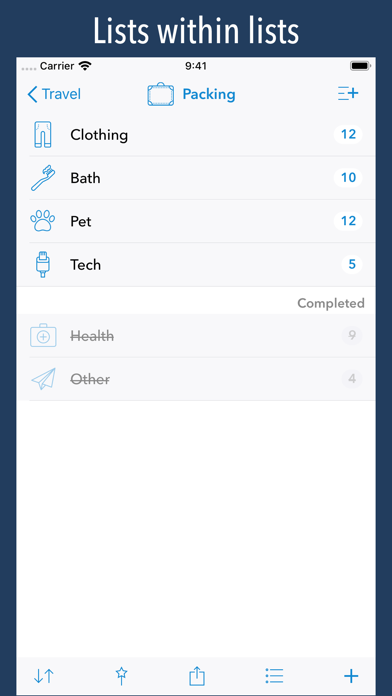
- create lists within lists
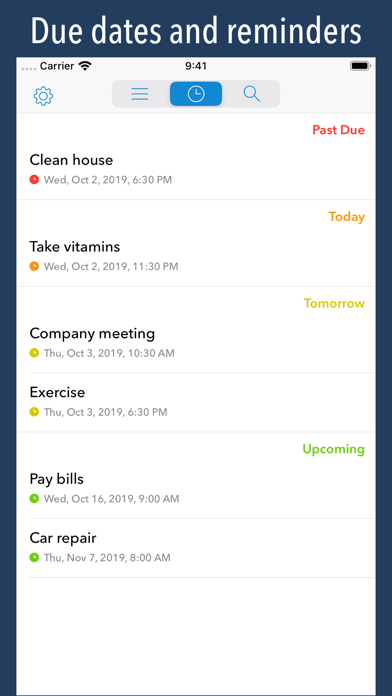
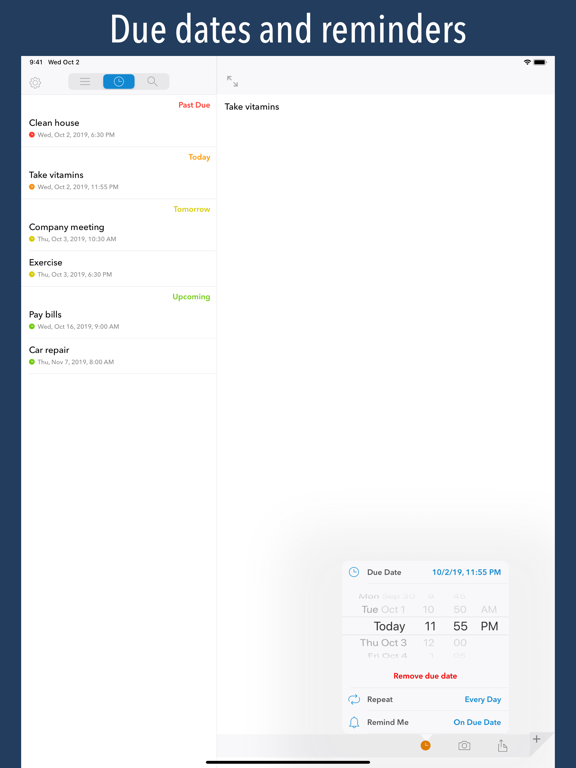
- assign a due date and reminder to list items
- view all items with a due date in one convenient timeline
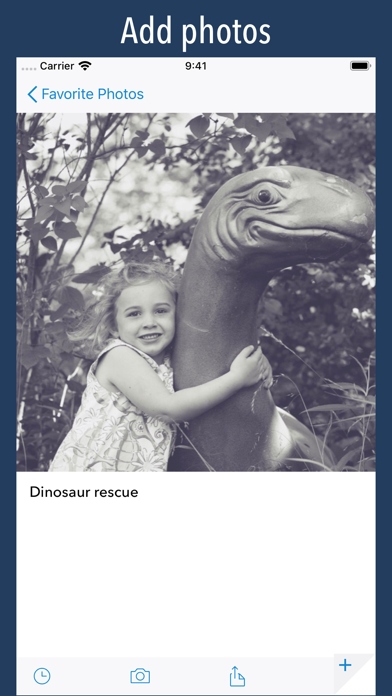
- add a photo to list items
- drag and drop to sort list items, or automatically keep a list sorted alphabetically, by modification date, completion date, and more
- easily copy or move items from one list to another
- mark items incomplete to return them to their original position in the list (this makes lists easy to reuse)
- send a list via email, and the receiver can import your list into their copy of Ikiru
- view items with due dates on your Apple Watch
IKIRU KEEPS YOUR DATA SAFE
- automatically back up and sync lists between iOS devices using iCloud
- use Touch ID or a custom passcode to protect your information
IKIRU HAS PURPOSE
The word "ikiru" (ee-kee-roo) means "to live" in Japanese. It's also the title of an Akira Kurosawa film about a man who decides to do something meaningful with his life. Ikiru (the app) is my attempt at doing something meaningful with my life, and hopefully help others live meaningful and productive lives.
IKIRU HAS HISTORY
In 2010 I released a list-making app called "Paperless". From busy moms to airplane pilots to people who needed a little help remembering things after suffering a brain injury, Paperless has been used by hundreds of thousands of people worldwide. Ikiru is built upon that legacy - incorporating the best ideas from Paperless, greatly improving upon them, and adding big features that people have requested.
IKIRU NEEDS LOVE
If you find Ikiru useful, please rate and review it in the App Store. Thank you!
Ikiru App Comments & Reviews
Ikiru Positive Reviews
Love the solid simplicity, missing one thingI’ve had Ikiru for just long enough to spend a few weeks putting in my lists. Wonderful! The lists include everything from 'wise words to review' to things I hope to get to someday...or perhaps an approach to some project to consider. Which means Ikiru can handle wonderful variety. The one thing I so wish was available, is a 'share option' TO Ikiru that comes up when I want to send something from another app (For example I use Things for its calendar integration... but some bits from Inbox I would like to easily send to Ikiru) I could copy / paste...but was disappointed not seeing this option, and have found myself not referencing / using my lists quite as I'd hoped (hence less a star). Still: a solid app..Version: 1.1.2
Yes!Update: I had been using this app quite a while ago but stopped. Not sure why. I reinstalled it recently and began with it again. I’m OT sure when the password/finger scan option was added, but this makes the app a good deal more useful to me. I think this is going to be my go-to app for to-do’s, passwords, grocery lists, short study notes, birthday lists, and a host of other things. It’s so flexible. I would still like to see more flexibility in date recurrence, i.e. repeat from completion, but still a wonderful list/notes app. Thank,Ikiru. I had been using Paperless for a long time and really liked it - and used it. But I kept wishing for an update with the ability to attach dates - with a repeat function and also for the ability to create lists within lists. Wish granted! Thank you! It works well, and I can keep track of SO MANY things with this app! So functional! Like other reviewers have mentioned, it would be nice to have other themes to select from. Yes, the old Paperless WAS much more attractive. I do have one other wish - now that dates and repeat function are available it would be great to see the repeat function a bit more flexible, i.e., repeat from date or from completion, and repeat every # of days, weeks, etc. Thanks for a great app which is at once functional and easy to use. 🙂.Version: 1.2.2
Ikiru Lists: A productivity app that's actually productive.NOTE: Hmm. Seems there’s confusion in these review between Ikiru and Paperless (also from Crush Apps). I have both apps. They’re similar in their powerful and flexible list/note structure, but very different in purpose. Ikiru’s strength is in the added task functions: due list, lists within lists, intuitive swipe-to-complete, photos, etc. If you need keep many massive text-based lists, Paperless is your guy. If you’re looking for the easiest productivity app out there, then Ikiru is what you need. HERE’S WHAT I LOVE ABOUT IKIRU LISTS As many as you want, lists within lists, huge selection of icons, drag lists to order them, flick right to check an item off, flick right again to restore it. It doesn’t get simpler. NOTES Ikiru is the only organizer app I’ve found that takes notes seriously. Each list item is an endless plain-text note. (I’ve typed entire an white paper in a note and still didn’t run out of space.) You can also add a photo of the whiteboard to your meeting notes. DUE DATES Add a due date to any item and it appears in a timeline list. A no-nonsense way to keep track of what’s due, overdue or coming up next month. I’ve been using Ikiru for a few years now and am in it 10 hours some days. I use it for work, but the flexibility of design makes it function just as easily for organizing your life, organizing anything else or organizing all three at the same time. Somebody finally made productivity easy. Hurrahlleleujah..Version: 1.1.2
So Easy! Best App for Keeping Track!!!I have used Ikiru for years and Paperless before that. I can’t find any other app that works so effectively and fluidly for keeping things organized and easy to find and retrieve. I use it for everything. It keeps my life organized! I especially love the way you can make folders within folders within folders. It makes it so quick to find exactly the item you need. The thousands of icons are fun and quick and help you find things at a glance. I also love the way you can slide items around and rearrange them as priorities change. It’s great for adding photos, copy & paste, moving, rearranging, exporting, checking off. It does almost everything you could hope for. I only wish it did bold, italics, and bullet points. It’s such a fantastic app!!! Thank you to the developers! I just LOVE Ikiru!!!!!.Version: 1.2.2
Great app for organizing tasks and notesI moved to Ikiru from Paperless primarily to better organize my lists with the sub list feature. I also really like the swipe to check off an item and a shake of the device to backup if needed. I also like the feature to schedule a due date and time to get a list of priority items that are time dependent. The one thing that is really needed is when searching for items, there needs to be a way to know where the item is located in the lists and sub lists. Once the item is found by a search, there is no way to know to what list the item belongs. Sometimes the meaning of an item is dependent on the title of the list. And, some items are copied across multiple lists so by not knowing the list the items are in, there is no way of working to resolve and consolidate. If I could see the list an item was associated when found with a search, I would say this is a near perfect list managing app..Version: 1.1.2
It Changed My Life!I’ve been using Ikiru for about 5 years and have gone from being disorganized, unproductive, and restless when it came to performing daily tasks and projects large and small. I created lists for just about everything that I need to get done and I now live a life of daily organization and order. Being able to cross things off as they get done is a real joy! And you can reset the lists to use daily, weekly, whatever. I can’t recommend this app enough for people who love to be organized or for those who are at the beginning of becoming organized. Really... it has changed my life!.Version: 1.2.2
Ikiru loosing functionalityLove the program, love its structure, e.g. the ability to have a heading with subheadings and subheadings to the subheadings, To Do’s listed in chronological order, etc. However, some Ikiru features no longer function, such as automatic data sync upon closing, return to the the last view when reopening, etc. I can only attribute this to the fact that there have been several changes to Apple’s operating system and Ikiru has not kept up; there have been no updates for too long. For this reason, I’m now hesitant to entrust important information to Ikiru in case the next major Apple operating system update leaves Ikiru inoperable.Version: 1.2.2
Staying with Paperless for shopping listAs others have mentioned, I prefer the check boxes to swiping - too easy to delete with others updating. It should be an option. I prefer Dropbox to icloud because we use Paperless between icloud accounts. Emailing a list to update is a pain and not efficient realtime (shopping). Color and font size should be improved. Visual is important. I read the reviews and the developer blog but purchased it to see for myself the issues and to support the developer. I see this as another useful list app separate from a checklist for shopping..Version: 1.1.1
Almost perfect - needs colored iconsPaperless, Ikiru’s parent, is almost perfect but is missing lists within lists (within lists). Ikiru adds that, but its small monochrome icons aren’t as useful as Paperless’ colored icons. It’s much faster to scroll through many items to find what you want if you can recognize icons by their color. The small monochrome ones looks very similar to each other so are almost no use at all. Ikiru chooses form over function in this case. Other than that, the best list app out there IMO..Version: 1.2.2
I miss some features from PaperlessI bought this app because I was excited about the list within list feature, due dates, photos, etc. All of these are great, but there are a few features from Paperless that, to my disapppintment, were taken out! :( No more checkboxes(replaced with a slide right on completed items)...i liked those. Also...where are the colors! I miss my pink background...blue and white is a little dull IMO. Finally, I’m not a fan of the amount of lines previewed for an item on a list...i preferred just the one line to be shown. I saw some other people comment on these same missing features...maybe they’ll come back? please!.Version: 1.1.1
Nice stable appThis is a lovely stable app. This is very important with note keeping apps. I’ve had others that have lost notes, crashed after updating. This one, however, is very reliable. I made my notes look prettier and more colorful by putting emojis in front of my categories. The only thing that I wish with this app is that it had a universal search feature. It only searches the notes on the level you are on..Version: 1.2.2
Really cool list appI love this app; it has useful features to make and view lists that a lot of other list apps ignore. For example, you can email a list to someone else and they can import the list into their copy of the app; it worked seamlessly when my son sent me his list of game figures. It’s pretty, thoughtful and exudes attention to detail. I really would like it to support drag and drop for pictures, using this app to maintain items with a pictures attached to each one is fun, but I don’t like navigating the attach picture pop up every time; I’d rather keep the photos app open on the side and drag pictures onto items. Tags/labels, lists that you can group by tags/dates/status and an album/grid view to browse lists with pictures would be nice features. Thanks for the great app!.Version: 1.1.1
Great app but needs updatingI have been using this app for years. It’s a great note taking app. I love it’s functionality and simplicity. However both my spouse and I have noticed a problem with current notes that are either not saving properly or deleting themselves. Another Ikiru reviewer complained about something similar happening with their notes. I am concerned that this app is not being monitored enough to keep up with iPhone updates. Unfortunately due to the app becoming glitchy I am going to look for a replacement..Version: 1.2.2
Great app - that’s sadly stopped synching, and zero response from supportI’ve loved and used this app now for years. Suddenly, it’s stopped synching across devices. I’ve removed and reinstalled it several times, ensured I’m on all current OS versions, quadruple checked that all synch settings are on, and written the support email four times asking for guidance, each time ignored. It’ll be a shame to delete the app, which is now useless, as is their help line..Version: 1.2.2
LOVE IT!! Liked paperless,Love IkiruI used Paperless and thought it was fabulous, and Ikiru is even better. All Lists are “check lists” just by swiping Right. Easy to restore a swiped item to refurnish your list. Delete is swipe to Left. This app is clean and fresh, very straight forward just as Paperless was. Has enough features but not confusing or crowded..Version: 1.1.2
Paperless was betterI had the original list app Paperless from this developer and enjoyed it. He changed everything when he stopped Paperless and launched Ikiru. I got it to support his work but I’ve never liked it nearly as much as Paperless and rarely use it. I see that an update is supposed to be in the works. I hope some of the color and utility of the old app returns..Version: 1.2.2
Great app, just needs tree view!This app is great, and expands on the functionality of the Paperless app with the ability to have subfolders, etc. I would love to be able to expand or collapse folders in tree view - this would make it much easier to see items in subfolders. Thanks!.Version: 1.0.7
Awesome!Using this app for an item database with lists in list plus pictures of items to stock workshop. Kinda wary of putting hours of work in an app when later the developer gives up...fingers crossed...paperless is still around and has longevity. Only complaint is....what took em so long!.Version: 1.1.1
Nice, but needs a few featuresI really enjoy using this app. After using it for some time, however, I feel a few features would be nice. Specifically, the ability to create sub-lists WITHIN other lists and SELECT/MOVE SELECTED items to the new (or other) lists. Overall a nice app. Hopefully these and at least a few of the other great suggestions will be forthcoming..Version: 1.2.2
Good start- free apps have some added componentsI like the ability to use the lists and share them, but for a paid app, there should never be a free app that can offer substantive improvements. Wish I could see the tasks on a monthly, weekly, and daily calendar. Of course I always home for calendar syncing abilities, especially with Outlook and Google Calendar..Version: 1.2.1
Go on !Great start. Almost there. Would love to see that you can use URL that get recognized and open in a browser. Would like to see just first line of item and not text below. But all in all great app. Keep it on the track !.Version: 1.1.1
Love IkiruIt’s a simple to use app with lots of features. Can have several folders all on the home screen with sub folders. Can import or take pictures easily for a specific topic..Version: 1.2.2
Functional but ColorlessApp does everything as promised. As a Paperless user for several years, found Ikiru better. Would have given the App 5 stars had a little imagination been used to add some Color..Version: 1.1.1
Handiest list keeper, simple with a photo.Useful, syncable or not, as you wish. Don't need a shopping list on multiple devices. But can if I want to..Version: 1.2.2
Bogus remindersI loved this app. Last several months I started to have reminders from past timed items. I got more and more of the lately. All the timed items are removed, and reminders are coming. Very annoying!.Version: 1.2.2
Wonderful and SimpleAfter paying for countless apps that made organizing my life a complicated chore this one is heaven sent. So simple, so logical, so adjustable. Simply wonderful. And works on my Apple watch too. I just loooove it..Version: 1.1.2
Would be 5 if sync stayed onI love Ikiru- simple, easy to manage lists. Just wish icloud syncing would stay in instead of randomly disabling itself..Version: 1.2.1
Best List App I’ve FoundBest of paperless app, but with more functionality, my only thing would be more apple watch functions!.Version: 1.0.7
Well madeMy go-to for lists. But dang, it could use some color!.Version: 1.1.1
My favoriteI’ve tried a lot of apps to get organized. This one is simple and has features I love!.Version: 1.1.1
Love ItUse it all the time. Great syncing across my devices. Would love to be able to use my Apple Pencil for note taking!.Version: 1.1.2
DisappointedI Love Paperless. I have used it for years! I decided to try Ikiru. I love the lists within lists, however, I’m going to stick with paperless until Ikiru has checklists and color!.Version: 1.1.1
Love this AppI keep a myriad of lists in Ikiru, from book recs, menus, shopping lists. PLEASE PLEASE let this sync to Apple Watch!.Version: 1.2.2
Do I rate this ⭐️⭐️ or a ⭐️⭐️⭐️⭐️star??? I guess I’ll make it ⭐️⭐️⭐️… Please read why.For those who aren’t in reading the details. Long story short, this will make your life and lists so much better. I really do love it and use it weekly, if not daily. Now read and I’ll tell you things you can do. This is a long review, but I promise it’s worth it. I LOVE THIS APP! REALLY, REALLY!!! That’s why I’d give it a ⭐️⭐️⭐️ ⭐️However, it hasn’t had any updates in forever. Which is why I want to give it ⭐️⭐️⭐️⭐️. If it would get some updates, I’d be more than happy to give it ⭐️⭐️⭐️⭐️⭐️. I use it for groceries, bills, medications… things are easy to cross off and then restore. Things may take time to set up depending on your level of detail and number of things on your list. But it is well worth your time. Like bills… I have a list by date. If it’s only on a specific month. Then the bill and if I have auto deduct set. If so, which account is it coming out of. After I’ve finished a month, I mark everything incomplete. I’ve got things set up so they’ll sort by the number. Go thru, mark thins completed that aren’t due this month. Now I have a list of bills due and on what date. When I pay or a bill’s auto deduct date passes, I mark complete. Rinse and repeat. End of month, mark all incomplete and do it again. It has really helped me make sure I’m paying everything on time. I have a lot of medications and doctors. And a new doctor always wants to know what you’re on. I have a list with the med name (generic and/or brand), strength, quantity per am/pm, what is prescribed for, who prescribed it, and start date (if I know it). So very helpful. And if they read your meds to you, you can check things off. Then when they say, “are you on anything else,” you can see if there’s anything left unchecked on your list. I used to travel a lot for work. I have a packing checklist. A list of certain items at home, so I stop from buying something again if I already have it. Vaccines and dates back to babyhood. Restaurants, locations, how I feel about them, what I really like (if anything). Todo lists. History of car maintenance and repairs. Cat food, if they like or hate it. Surgeries/dates. Lists of places I want to go, movies I want to see, songs I want to buy, and on and on This app has been a godsend. But there’s a number of improvements I think they can make and the version listed in the App Store is years old. So I’m very disappointed that they seem to have made it and the forgot about it. Maybe they’re out of business, the person passed away, had a stroke, whatever. Then I’m very apologetic to them. But if sound and healthy, please update things (contact me, I’m happy to give suggestions)..Version: 1.2.2
Please updateFor the love of god update your app.Version: 1.2.2
Add paperless icons and checkboxes for 5 starsAlmost there. Got spoiled with paperless but a good start..Version: 1.2.2
Absolutely Love This App!!!Over the years I've gone through DOZENS of "to-do" list apps. I've always been a list maker but after a stroke, things I need to do jump into my head and right back out. When I found "paperless" I'd found the ALMOST ideal to do list. I used it daily but there were a few things I really wished I could do and I ended up still using the old fashioned paper and pen method. Ikiru has solved all those problems! With Ikiru I am able to put lists within lists within lists! I also love the different sorting methods (alphabetical, drag and drop, and order in which item was input). I love that I can add photos of a specific item (great for when you send your hubs to the grocery store!). If you're a geek/nerd you're going to love some of the icons and suggested icons (put in something with life...almost made me spit out my coffee I was lol'ing so hard). I do, however, miss being able to change the backgrounds to several different patterns and colors and I miss the colorful icons. But to have a list app that is so powerful I don't mind all that much. It is a bit confusing at first...especially if you've been a paperless user, but it's become easier over the last couple of weeks as I've explored through it. Honestly, it's the best $5 I've spent in months and I almost never spend money on apps. Especially more than $0.99 but really I couldn't be happier with it. It has made my world so much easier and ordered. It's absolutely wonderful..Version: 1.0.2
List Inception and subtle improvementsSo far, so good. I downloaded this app because I love Paperless but recognize that its simplicity has some limitations. I intend to use both apps for different purposes -- I do prefer the colorful icons that Paperless has, and will keep using that for a few simple lists I want to be able to access easily, but Ikiru can have more than two levels of nesting lists, which I appreciate, and is very simple to use once you get used to the differences. For instance, being able to drag and drop list items without getting into edit mode first is extremely convenient for to-do lists where you want to change the priorities as you go, and being able to reuse checklists and have them return to their original order is a distinct, if subtle, improvement. I look forward to finding more subtle improvements as I continue to use the app. Since I expect to use Ikiru on a daily basis, I don't mind the higher cost. A good five dollar app that gets used every day has better value than five $0.99 apps that get used rarely or are frustrating to use. I do wish there was an OS version though so I could pull up my lists on my laptop..Version: 1.0.2
More of a Notes app than a List app, to meIkiru is a nice app. I've been using it quite a bit. It works reliably, including synchronization across two iPads and an iPhone. It really doesn't look like a "list" app, though. I came to Ikiru from the same developer's earlier Paperless app, which looks a lot more like a "list" app, with nice checkboxes to mark list items complete. Ikiru, like many post-iOS7 apps, doesn't look like anything but a bunch of white space with random items floating in it, devoid of contextualizing user interface elements that make it intuitive how to use it. How I do use Ikiru is more like how I use the Notes app, or Simplenote, or Bear, than like Paperless or Chaos Control or the Reminders app. I use it as much for note content as for lists. And I never mark anything complete in Ikiru, because I don't like strike-through -- why would I want text I took the trouble to type into an iOS device to be rendered semi-illegible by being struck through? I prefer checkboxes for marking items complete. Man, I am complaining! Ikiru hits my pet peeves. But it does work well and I do use it..Version: 1.0.5
Fantastic App!I LOVE THIS APP! I was a fan of Paperless and used it for straight up lists but Ikiru has replaced Paperless for those lists and I now do those plus SO MUCH MORE on Ikiru! The best thing I do on it is work on organizing and writing my book on it. Ultimately, I will need to get my content over to my iMac and Scrivener but until I need Scrivener, Ikiru has what I need...the ability to create a hierarchy of chapters and content that is easy to work with on my iPad. I really value the quick and easy email back ups which allow me to see everything that I've entered into the app in a single, clean document while also providing me with another method of back up in addition to the cloud. I am very happy to be able to add photos and reminders. I'm super excited that I now have a single "control center" for everything I do. The Book is just one of my lists and is broken into sublists. I have many lists and love the "list within lists" structure. It's what I've been hoping for!.Version: 1.0.4
Great app. One of a kind.Not many apps out there have this sleek look and allow you to make folders, sub folders etc. My suggestion would be to have a “highlight” option for to do items that you want to mark as priority. Perhaps an option on a swipe that results in background colour for that item being a few shades different than other items that are not “highlighted”. Besides that this app is awesome for the price. I have purchased it twice now. I give this app a 4.5!.Version: 1.1.2
Great Secondary App for Personal ListsAs a longtime happy user of Paperless, I’ve been looking for an app that allows you to build lists within list categories and add photos, when necessary. This would’ve been exactly what I was looking for, had it been an app that offered shared live lists through something like Dropbox, as Paperless does. My husband and I share the grocery list and add items to it regularly, even as one of us is in the store shopping. This app, unfortunately, doesn’t allow for that..Version: 1.2.2
Great App But I Stopped Using ItThe features of this app are great; you can build lists within lists and the interface is user friendly, but the two main issues I found challenging were the limited options for reminders (for example, you cannot set a reminder for every 4 months, or every third Monday, etc.); the only options are every day, week, month, year. This was a minor annoyance compared to that of the second issue of getting multiple reminders for the same item, or worse yet, getting reminders for items deleted as though they were never deleted. For these reasons, I decided to delete the app for good and to use something else. Disappointing..Version: 1.2.2
Could have been a great appCould have been a great app, but unfortunately not a lot of development and enhancements happened in the last few years I have had it. You still can’t tag, you can’t even view parent of your note which is very limiting in searching something that has unlimited layering. Most annoying bugs have not been fixed. On my iPad pro, once you turn on faceID the app never opens on the first try! You have to close it and reopen it. Not only that but once you turn on faceID lock you can’t go back and disable it. When you try to do that from the interface the UI just blinks and takes you nowhere. Also constant issues with losing synch between devices..Version: 1.2.2
I'm revising my review below from one to three starsI'm changing my review as I have resolved some of the issues I was having and have increased my rating from one to three stars. I LOVED this app and have been using it for years but it started to crash constantly. When my iPhone 7+ started playing up recently I increased my iCloud memory to 1Tb to ensure I had backup. I had so many problems backing up to my support phone that I had virtually given up on this App. After much help from Apple and the purchase of a new iPhone 14 I have overcome most of the issues and I can again access the App and still use it as I have SO much data on there but it just shuts after a few minutes. It's VERY frustrating. The App seems to be unsupported but I would gladly pay a small annual subscription as it is so comprehensive. Maybe the developer has been seriously ill or heaven forbid has died. I have dozens of lists here in fact I use it as a pictorial inventory for hobby collections like numismatics (google it). I have lists within lists for everything from storage lockers to shopping lists and recipes. It's simply amazing. I'm just FRUSTRATED to hell that I have to keep reopening it every couple of minutes! Original review - Best avoided, unsupported for years. I used to use this app extensively and had many VERY detailed lists. It WAS an AWESOME app but was never well supported. Recently it stopped syncing and when I changed my phone I could not transfer my lists. As far as I can tell all the good reviews are years old and the app is redundant. I’m surprised Apple still list it..Version: 1.2.2
Everything is fixed now I’m happyAll good now.Version: 1.2.1
Simple But Extremely FunctionalI have tried numerous checklist/reminder apps and this one, in my opinion, is the best there is. Great value for the price. The app is very powerful and does exactly what you need. I love the various sorting abilities, and the strike through to show when there are no more outstanding items. A few things need improving - functions which will hopefully show up in future releases: No ability to add interval repeats (e.g. you can specify every month, but not every 2 months - workaround: use iOS Reminders app. When viewing a reminder, does not display repeating type (e.g. whether the reminder repeats weekly or monthly - you have to select the setting to view how often it repeats). Only items with a reminder are displayed on Apple Watch. I can't use my watch to check off my grocery list - workaround: use my phone. I’m not a big fan of the swipe to complete items. Checkboxes with a quick tap are much easier but I’m sure I’ll get used to it..Version: 1.1.2
I like this appLike all good apps, this one takes a while to get to know it. I find it works quite well so far. Make sure you read the help feature. I've had paperless for a long time and will now be using ikiru instead. Note that you need ios 9 or 10. Good job on the app..Version: 1.0.2
Ok for iPhoneGreat for iPhone but does NOT put lists on Apple Watch. That is a fail and should NOT be listed as compatible for Apple Watch..Version: 1.1.2
The list app I’ve been looking for!I love this app. It’s intuitive to use, beautiful to look at, AND it lets me duplicate lists. Also has list-within-list functionality. I have tried A LOT of list apps but this is one is my favourite. Worth every penny - thanks for making it!.Version: 1.0.7
Love it !So simple and clean. A list maker's perfect app.Version: 1.0.3
IkiruJe préférais les fonds de couleur et des icônes colorées de Paperless, mais les nouvelles fonctions sont très bien..Version: 1.0.2
Perfect (almost) for meBeen using paperless for several years but I was ragging on crush to create sub lists. Tried onenote and Evernote. Far too many issues with their list capabilities but I do like their integration features. I have now used ikuru for a week and am loving it!! So much easier/efficient to organize projects and lists. Only issue I have so far is I miss the checkboxes. I'm ok with swiping but the boxes look MUCH better and are more intuitive. I'm a checklist guy (checklist manifesto is a good read).Version: 1.0.1
Great supportI'm an early adopter. Even if Ikiru doesn't work right now on iOS 10 Public Beta 3, James (Jim) immediately responded within a few minutes to let me know why Ikiru was not running properly and confirmed that it was a known issue that sould be resolved in a timely fashion. Contrats! J.B..Version: 1.0.0
Free International Money Transfer 💸Enjoy high maximum transfers into more than 20 currencies while saving up to 90% over local banks! The cheap, fast way to send money abroad. Free transfer up to 500 USD!Version: 1.2.2