 Robert Chin
Wikipanion Plus Customer Service

- Wikipanion Plus Customer Service
- Wikipanion Plus App Comments & Reviews (2026)
- Wikipanion Plus iPhone Images
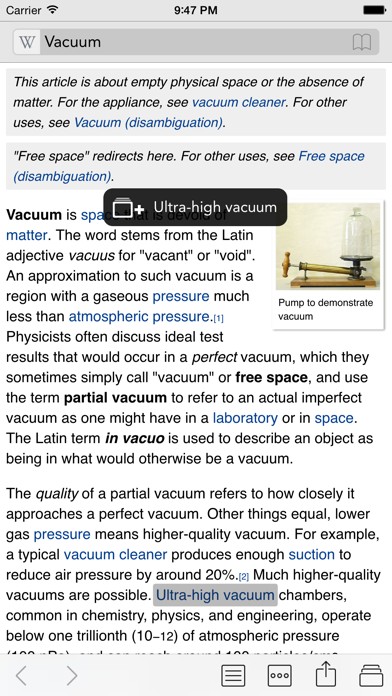
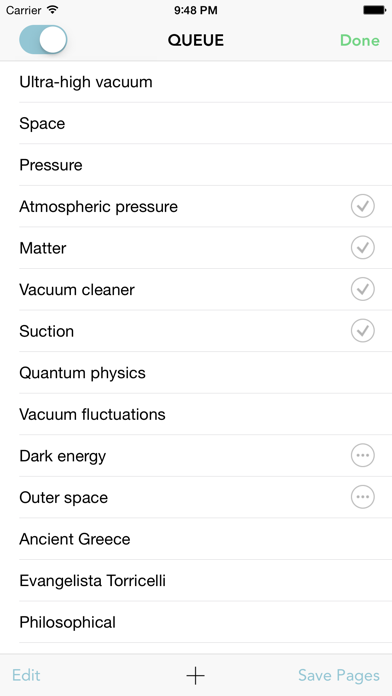
The best gets even better! Enhance Wikipedia with queue mode, designed for keeping track of entries you want to read in the future. Add entries to the queue easily while browsing, and optionally save them for faster visiting or offline browsing. Downloading entries for offline or accelerated reading happens in the background while you browse and read other pages, so you don't have to stop and wait for pages to be saved.
See the Wikipanion web site for more details about Plus features. Want to see why Wikipanion is the best? Download the free Wikipanion.
Wikipanion Plus App Comments & Reviews
Wikipanion Plus Positive Reviews
Great but...I've used this app since my very first iPhone (3GS) days and have used it pretty much every week and has worked great. I have several Wiki sites I subscribe to and this app has been my go-to every time. Just this week, I noticed that Memory Alpha no longer works although other sites I've tried do work (I didn't test all, but just a few). It's forcing me to go a Google search rather than using this app which is annoying. Hopefully it's a simple fix and this app can be my go-to once again soon..Version: 1.9.8
Still the best Wikipedia AppI have used this since iPhone 3s like many. It’s on every iOS device I’ve ever owned and is probably my most used app. My one feature request is to be able to view images full screen and zoomable, without having to download images to my photo library first. When returning to the app after some time, it opens on what appears to be a blank white page. Dragging down reveals the search bar. Perhaps the auto-hide should be suppressed when fist opening the app..Version: 1.9.29
One of my top appsI’ve used this app since time immemorial, and it’s one of the most-used apps on my phone. It’s invaluable as a mobile interface for MediaWiki wikis other than Wikipedia (though Wikipedia works well, too). It would really, really be nice to have Dark Mode, though. That’s probably the #1 thing that’s missing. 4 stars because it’s missing Dark Mode. It would be 5 stars if Dark Mode was added..Version: 1.9.28
Almost PerfectI’ve had this Wikipanion installed on every iPhone I’ve ever used, and for years it’s been a daily go-to for easily browsing Wikipedia. The queue feature is simply indispensable, and I’ve read and stored thousands of pages. This unique feature is the main reason I use the app. Literally all that Wikipanion Plus is missing is dark mode. With that, this is a 5-star no-brainer and must-have..Version: 1.9.29
Almost PerfectThe app would be 5* if they had a dark mode that mirrored the kind of dark mode that the iPhone is using. So far I’ve been unable to find any setting to enable this within the app. It’s jarring to go from black screens to suddenly a bright white one in Wikipedia..Version: 1.9.25
Fast & Easy to UseThis is way faster than the default Wikipedia app. It also makes it easier to move around a page by letting you directly navigate to the categories. Too many apps are bloated and slow today, but this one has stayed as fast as ever. Keep up the great work!.Version: 1.9.28
Mostly plus, a little minusQueued browsing and individual control over saved (cached) articles--independant of bookmarks--is why I spent the 5 bucks, why I use this Wikipedia reader the most, and why this app stands alone among the many. These features seem to work perfectly, or nearly so. On the other hand, the UI could be improved. For example, the only access to all bookmark-related controls and screens (and history) is via the button in the search textbox at the top of the page. Also, the "More" option in the settings menu in landscape mode seems pointless. Why not just continue the list of options? Last, a full screen mode/control would be great—like how many iOS Web browsers have..Version: 1.9.8
An invaluable toolWikipanion Plus makes searching Wikipedia or other popular wikis easy, providing scoped search for these sites in a native iOS app. I use it all the time. It's definitely worth it to support indie developers like this and get a powerful, easy-to-use app..Version: 1.9.8
Still great...but...Since Apple has given the choice to change web browsers, I can now no longer open external links. It doesn’t even give me the option of using Firefox instead of Safari, it just refuses to open Safari as “Don’t Open” is the only option I have now when opening links..Version: 1.9.25
Helpful app, when wikis don’t break itThis app works great, except for newer wikis it struggles to parse. It’s a shame, really, because it’s great for the wikis it can handle. Also, category handling isn’t ideal when the listing is complex. Not sure how best to address this..Version: 1.9.28
Love itI have been using this app for like a decade. It’s great. To the developer: we’re begging; Please, please, please release an update with dark mode though it’s all we could possibly ask for!.Version: 1.9.29
No longer queuingSince the update to iOS 15.0.2, queuing behavior doesn't seem to work. Holding down on a link doesn't reliably add it to my queue and I'm not sure why. I've been using this app for 10 years so I don't think I've changed how I'm pressing..Version: 1.9.29
Crashing latelyI’ve used the app forever and also own the iPad version. But lately it’s been crashing on my iPhone 8 Plus. I’d give it 5 stars if it wasn’t crashing..Version: 1.9.17
WiktionaryWhat happened to wiktionary? No longer loads.Version: 1.9.8
Good app that’s been broken recentlyThis app was solid but has had recent problems with custom wikis that used to work. Still good for just Wikipedia though..Version: 1.9.29
Best app for WikipediaI love this app, and have used it for years. Happy to see an update. I'd love to see a dark mode. Thanks!.Version: 1.9.29
Adding other wikis doesn’t workIt won’t let me add Wiktionary no matter how many times I try. And it doesn’t work offline like it says..Version: 1.9.29
Great AppGreat app. The only thing lacking is dark mode..Version: 1.9.29
Wikipedia app has a dark mode.Give us a dark mode..Version: 1.9.8
Great app, very useful! 4.6/5Update #3: The app is still crashing, but due to the most recent update, it has crashed a lot less. The app is not necessarily crashing, as so much when you scroll while the info is loading up, is when it crashes, or tries to load, but it doesn't and crashes. Also it just may be due to certain pages that is crashing the app, as it does happen w/certain pages and wikis as well. Should be noted that I am running an 4th gen iPod running iOS 5.1.1. Should also be noted that before version 1.79 (and the most recent updates)the app VERY RARELY CRASHED. Update #2: This thing is now crashing more often since the most recent update. Update. I cannot go to the top of the page when I tap the top of the screen. The app is very good, very useful, a very essential app, if you like Wikipedia, and it's wikis. The app could however use more updated info from each wikis and be updated as often as the actual Wikipedia site, to keep things up to date. The app could also use an account option so as to store data, when switching from device to another device and continue where you left off. Would make the app almost a 5/5, actually a 4.95/5.Version: 1.7.9.2
Best Wikipedia app in the app store: Here's whySuffice it to say that the official Wikipedia app leaves a lot to be desired. There are far better apps for Wikipedia than that one. Wikipanion+, however, beats ALL of them by simple virtue of the queue function. You don't have to leave the page you're on and you can have new pages ready for you to read. I've tried iWiki and a couple of others; Wikipanion+ has them all beat. iWiki's search is not located in the right place, requires a LOT more clicks to read through the entire article and does NOT have the queue function. The others are also-rans. Not only that, but the developer of Wikipanion+ responds to emails within 24 hours and makes changes just as fast. I bought this app for the queue function, the offline reading, and to support his noble efforts. Is it worth the $5.00? absolutely. Is it worth $3.00 more than iWiki? Without any question. If I were to rate the top three Wikipedia apps, it'd be 1. Wikipanion+ 2. iWiki 3. Wikipanion regular. So, go try out the free version of this app. Then, come back and buy this one. It's truly great..Version: 0
Elegant UI and great features for heavy Wikipedia usersThe author of this app has done an outstanding job on both the free and paid-for versions. The Queue feature on the Plus is the killer upgrade: a simple tap on a link adds the article to the queue for later reference and browsing. And the ability to download links for offline reading is great for airplane trips. Other wiki-oriented apps do this too -- some of them for free -- but I find the elegant and intuitive UI in Wikipanion Plus to be superior. I'll gladly pay a little to save time over free, and I'm more than happy knowing the author is being compensated for the time spent making this a polished app. One improvement I'd like to see is a simple way to file queued items. The issue is this: I sometimes have the queue load up with tons of links that are no longer related. Some I'm immediately interested, others are more of an exploratory whim. It would be great to have the ability to Archive specific links to get them out of the current view. I could always go back to the Archive to view or delete the links..Version: 0
WOW! I mean...WOW!!!I was diagnosed with fibromyalgia a year ago, which I thought was a "melting pot term" that doctors use when they can't find a diagnoses; and are either too frustrated to continue investigation or have exhausted all insurance allowable tests (possibly that would otherwise compromise the physicians' bonuses). Anyway, I looked up the diagnosis and there is so much information that I don't have time to complete the article tonight. ALSO, the information--from what I have read so far--describes me to the point that if I didn't know better, I'd think there were cameras watching me (I should look up paranoia). I was suspicious of all the five star reviews, because that usually indicates that the reviews are hyped by dev's friends and relatives. NOT SO. I am neither. I agree with all other reviewers. Five dollars seem like a lot until you consider that this much info was at one time not even half of what a volume of 25 books held and had to be financed in payments of more than five bucks each. I'm holding in my hand a goldmine of information while I'm looking at so much wasted space on my bookshelves. Get it. Before they wise up and raise the price..Version: 0
It's better than using the website on a real PC.There are many additions such as the que mode, the history of what you've read, bookmarks, iphone menu instead of html link menu for the table of contents for articles, and an iphone menu for related content and categories make the $5 worth it if you are the type to like reading wikipedia. The que mode is pretty brilliant because when you see something interesting and click the link it goes into a que, instead of being taken to that article. This allows you to finish what you're reading. The iphone menus for table of contents etc are always available so you don't have to scroll and lose your place. I think it's a cool app..Version: 0
Please change the icon colorThis is a great app. It works well with Wikipedia and all manner of other wikis. It's very easy to create customized wikis, which is why I purchased this app. That said, there's a couple of improvements that could make this better. First is the icon. I use Wikipanion and Wikipanion Plus- one for Wikipedia and one for custom wikis. The problem is that the icons are identical, which means that I'm constantly tapping the wrong one. A simple color change would fix this. The second issue is Wookieepedia- the Star Wars wiki. The text tends to render on top of each other- making it unreadable..Version: 1.8.80
BeautifulI love this app- oddly, mostly because I love the icon! Darn thing looks fantastic on my screen; compared to the other wikipedia apps, it's a thing of beauty. That aside, the que is a fantastic bookmarking idea, & I find I come back in my free time to read old interests often. The scrolling is solid, and the formatting is nice. My only gripes are: sometimes the search doesn't show the same results as wikipedia's main site, and the icons are a bit of what us Art Directors call 'Mystery Meat'. Meaning, with no description, I often have to guess which one is the que or the table of contents- the icons aren't specific for me. Hopefully, these minor gripes will improve... till then, still my favorite wikipedia app..Version: 0
Well worth the money - Unique 'Queue' featureWikipanion Plus was well worth the $5 when it had the 'Queue' feature as its main attraction. Now with the local save feature for off-line viewing, it's a no brainer, Wikipanion Plus is a must have for the I-Touch and the I-Phones without a data plan. Also, the in-program font size adjustment control is nifty, allowing you to size up or down as much or as little text as you want on the screen. Suggestions for future releases: 1) Add an AUTO scroll feature with a user setable speed control. This will allow the read to have a hands free experience. You could even tie the scroll to accelerometers so that a slight flick of the wrist will scoll by a user setable amount. 2) Add a folders option in the bookmarks. Without folders and after much bookmarking, it becomes overwhelming with pages and pages of bookmarks. 3) Add a skins feature or at least an option to change the background or foreground colors. Great job. Keep up the good work. Looking forward to future updates..Version: 0
Right on Queue!Best Wikipedia app on the App Store! I prefer Wikipedia Mobile's layout, but the Wiktionary lookup and the queue mode make Wikipanion+ the best, even at $5. The queue mode is a dream for curious Wikipedia readers like myself, who previously had to hop between pages when they found an interesting link. Also, both Wikipanion apps have a beautiful, functional, and intuitive UI that Apple could not improve on (except for one thing: make bookmarks accesible from more places than just the article entry bar)! So, why are you still reading? Get one of the Wikipanion apps! Please add a simple integrated web browser to explore external links..Version: 0
Buy It! Buy It Now!I never write reviews, but I LOVE Wikipanion. It's had spot #1 on my phone for so long that I've built up muscle memory for using it. The queue feature is awesome, especially if you tend to find lots of interesting Wikipedia articles anytime you're on. The scrollable content guide is super smooth and surprisingly helpful. And the ability to switch between languages and use other wikis (especially Wikipanion, for me) is superb. Try the free version, and if you like it half as much as I do then I guarantee Plus is worth the money for the queue alone. I couldn't imagine my iPhone without it!.Version: 1.7.8.1
Best Wikipedia app since its inceptionI have downloaded hundreds of apps across several devices, and Wikipanion+ is the only one I will download for each device. The ability to queue pages for offline reading creates an immense library of random facts and interesting articles. It has nourished a curious mind for so many 12-hour flights and when Internet is unavailable during my travels. This is a wonderful app that optimizes the wealth of information offered by Wikipedia. Worth every penny, this paid version should be on everyone's device..Version: 1.8.0.3
Good luck understanding the instructions. . .I am not stupid. Neither is my wife or brother. None of us could understand the instructions on the developer's web page. We read the instructions in the tutorial over and over again, line by line, hoping to make some sense of it. No such luck. I guess I could fumble around with it for an hour to understand all the app's capacities but for 5 bucks I would prefer crystal clear instructions and ease of use..Version: 0
The best wikipedia app!It's awesome now that we have offline page viewing. This app blows evey other wikipedia app out of the water. A MUST have for any college student. This app has saved my life many times. Since I use an iPod Touch, I need the offline page view for when I leave a wifi area. Plus, the bookmark feature comes in handy win you frequent articles that change every couple days or so. Buy it. One of the best $5 apps out there. One of the best apps period. Get it and get wiki-ing.....Version: 0
BuggyUPDATE: The latest update fixed my concerns. Upgrading rating to 5 stars. Thanx! I bought this app for the queue function only to find out it doesn't work 100%. When in queue mode, if you "long tap" on a link, it does not take you directly to the link as advertised. The "free" version that was accidentally posted with all the paid functions works though. Glad I kept a backup. I will keep using that version until this one gets fixed..Version: 0
One of several good Wikipedia clientsThere are several good Wikipedia clients, each having some feature that sets it apart. For me, the key feature of this one is Queue Mode, which allows you to click links in the current article and, rather than jumping to them immediately, save them for later followup. This is a brilliantly simple idea that fits perfectly with the way I've always wanted to use Wikipedia, but couldn't till now..Version: 0
Great design, consistent improvements from developerI've emailed this developer a number of times over the years I've used this app and he's always been very responsive and helpful. On top of that, he consistently updates this app with fixes and improvements, which is pretty rare in a time when many developers are out to make a quick buck and move on. Props to this guy and to this app. It's easily the best Wikipedia app for iPhone..Version: 1.8.5.3.1
An Integral Part Of My iOS ExperienceI use this app everyday—it's great! One feature I'd like to see added, though, is the ability to read the talk pages for articles. Even if it wouldn't be possible to contribute to those conversations through Wikipanion+, they contain important info about why certain articles say certain things and would therefore be very worthwhile..Version: 1.7.5c
Wikipedia App To BuyThe newest update makes using this app a joy to use. Although this app sometimes doesn't display Wikipedia content as elegantly as Articles, this is the app that I keep coming back to due to it's functionality. It's literally good enough that I don't even need my laptop anymore to lookup things on Wikipedia when studying. In hindsight, easily worth the $5 I spent..Version: 1.7.5b
Great app with minor issueOverall great app. But links use a long tap command that makes it hard to click on some links. With no way to turn it off. Oddly the free version does not seem to have this issue..Version: 1.9.29
InvaluableWikipanion has been on my Home Screen and I have used it daily for well over a decade. Robert, if you read this, I love you. I would pay you more money. I hope you’re well..Version: 1.9.29
The best in the store but room for growthOf all the wiki readers this was the most convenient for readability and feature. I was very satisfied with the free version, and only decided to upgrade when the developer informed me this version could save the full page with pictures for offline viewing. Unfortunately this is not really the case. Photos incorporated in the article are not saved. However it might be an OS limitation. One feature that would greatly improve the app would be an easily and readily accessible "save current page for offline reading" and a way to organize folders of saved pages. As it is although you can save for later reading, the process is unwieldy.Version: 0
Great iOS7 updateAn already great app, with better features and UI - fits very well with the new OS..Version: 1.8
Great app!I have had Wikipanion+ since iOS 2.0 and it has always been a great app with a lot of functionality..Version: 1.8.5.4
Clean & fastNice clean interface, very fast, definitely the best wiki app I've found. Better off-line browsing would give it 5 *. Great app though..Version: 0
Best of the Wikipedia appsI have tried a ton of paid/free Wiki apps and this is by far the best. Simple, neat and well built. Even the free version is awesome. I bought this paid version more as a way to support the developers and say thanks. I'd love to be able to invert the text/background colors and it'd be awesome to have a sepia color scheme (like iBooks) :).Version: 1.7.7
Best of the Wiki'sI've tried them all and the + version beats them all..Version: 0
Pretty GoodBest in the store, as mentioned earlier a button for saving the current article directly would be helpful but there are ways to save without this although the convenience is limited. Images are save but only as thumbnails in the article. Queque feature works well and this is more or less as advertised. You'll have to decide for yourself if it is worth $4.99..Version: 0
I paid the four ninety nine because of a job well doneBest program in a competitive market. I wanted to say that this program is one of my favorites and I tried the rest. I'm buying this even after I bought iwiki.Version: 0
YesI didn't really need the new features offered by + but I wanted to contribute with this payed version.Version: 0
Free International Money Transfer 💸Enjoy high maximum transfers into more than 20 currencies while saving up to 90% over local banks! The cheap, fast way to send money abroad. Free transfer up to 500 USD!Version: 1.9.29