GLOBILE BILISIM BILGISAYAR HIZMETLERI ILETISIM DANISMANLIK SANAYI TICARET LIMITED SIRKETI
My Contacts Backup Customer Service

- My Contacts Backup Customer Service
- My Contacts Backup App Comments & Reviews (2026)
- My Contacts Backup iPhone Images
- My Contacts Backup iPad Images
"No signing in, no accounts, no activations, just send your contacts in a universal format to yourself or others through the mail app. This app backs your contacts up, or simply transfers them in a simple, tangible way that just about every device can read. Bravo!"
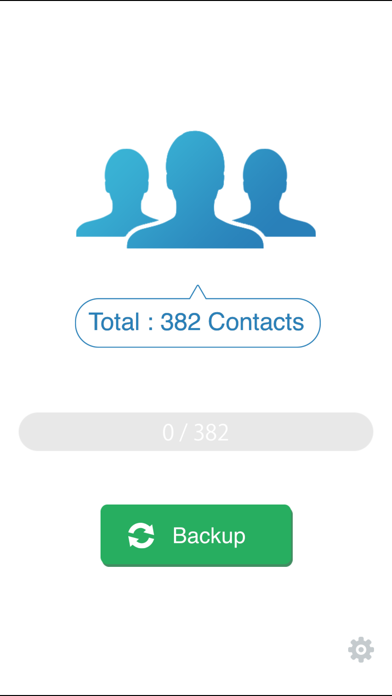
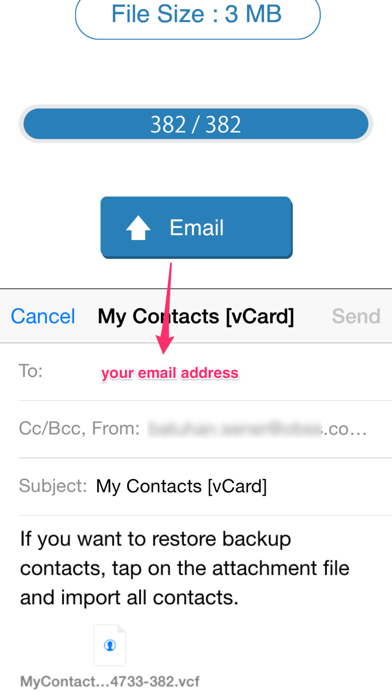
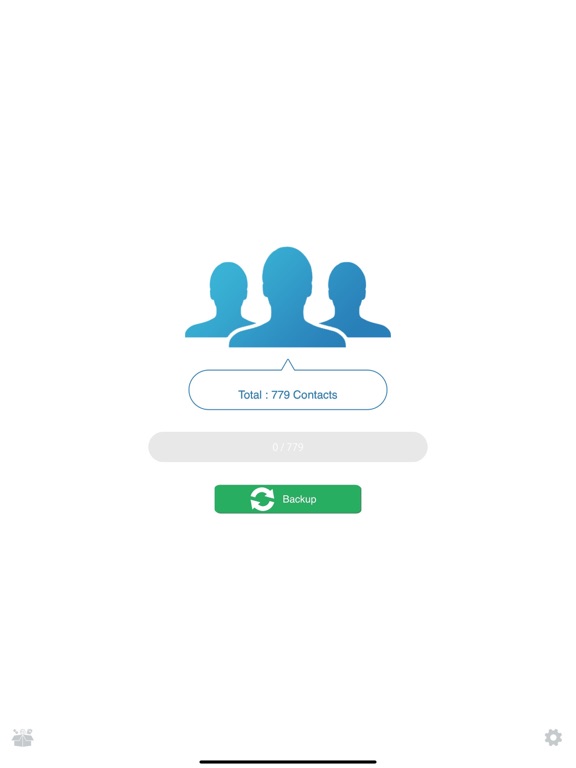
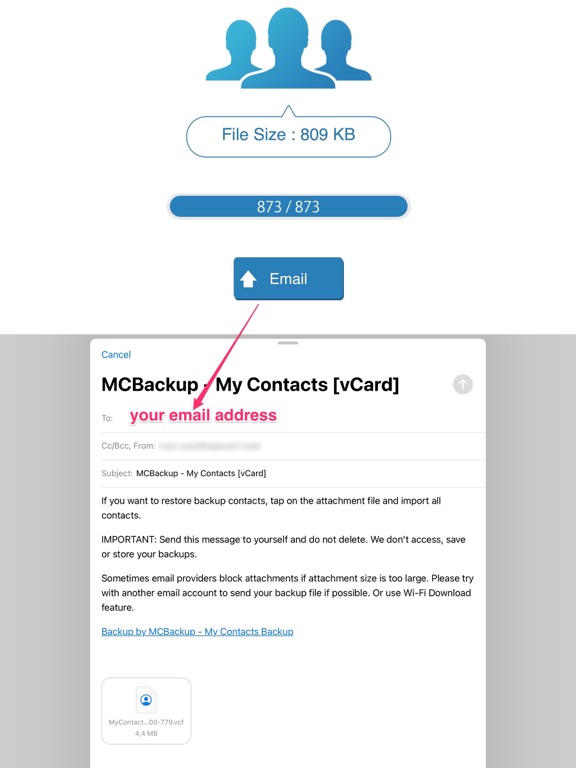
My Contacts Backup is the easiest way to backup and restore your contacts all from your phone without needing a computer or synchronization. You can backup all your contacts with a single touch and send them to yourself as a .vcf attachment via email.
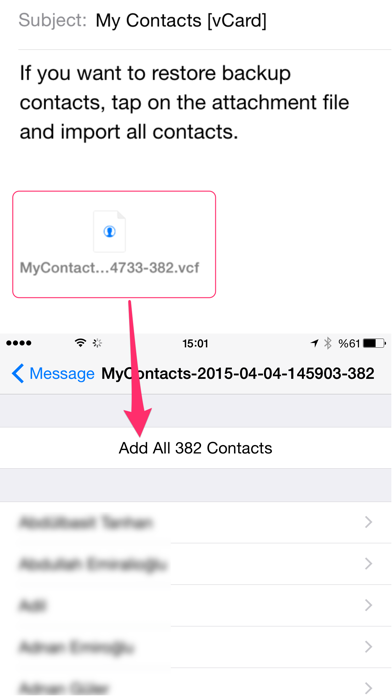
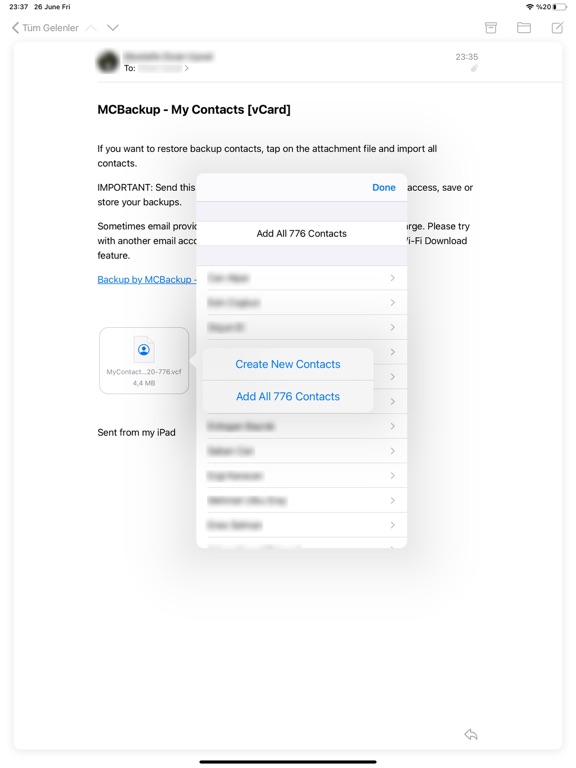
All contacts can then easily be restored any time by simply opening the .vcf file in your mailbox with iOS Mail app.
Key Features:
* Offline Backup. No need to sync to any server. Just email the backup file to yourself.
* Easy restore. No need to use any app to restore backup file. Just tap on the *.vcf backup file in the iPhone, iPod Touch or iPad Mail client and restore your contacts for FREE.
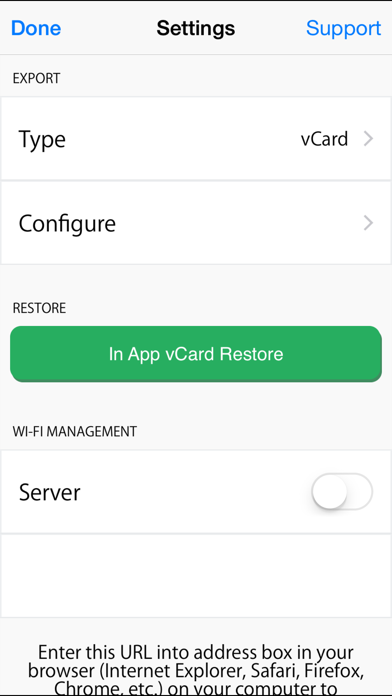
* In App vCard Restore Feature
* Set REMINDER to backup regularly (weekly or monthly)
* Easily transfer contacts between iOS Devices using just email client.
* Backup Contacts as VCF (VCard) or Export Contacts as CSV (Excel) file
* Delete All Contacts in Address Book
* VCF backup is limited to max 500 contacts. You need to download PRO version for unlimited contacts backup.
----------
IMPORTANT NOTE: After sending backup file (*.vcf) to yourself, please check your inbox to see if message arrived and contains attachment (backup file). Sometimes email providers block attachments if attachment size is too large. Try with another mail account if possible, to send your backup file.
My Contacts Backup App Comments & Reviews
My Contacts Backup Positive Reviews
Did exactly what I wantedI found this app through a Google search. I had an old email account that I didn’t want on my phone anymore because I kept getting junk mail. But when I deleted it, I would lose 92 of my contacts. For some reason those contacts in my phone were associated with that email account. I downloaded this app, ran the backup, and within five minutes had a back up sent to my current email account. I deleted the old email account from my phone and sure enough lost half my contacts. SO I ran the backup from the email and instantly all of my contacts were back! I clicked “add all” and then another prompt came up saying it would add the ones not already in my contacts. So no duplicates!! (I was worried about that) Thank you so so much for creating a solution to my problem!! I will absolutely recommend this app to friends and family..Version: 2.3.3
Worked like a charmSuper easy! For quite a while I’ve been living with contacts split between several accounts and since they weren’t on iCloud I couldn’t migrate them. Most of my contacts were tied to an email account I don’t have anymore but I couldn’t delete the account for fear of losing the contacts so I was just constantly being bugged by password requests because my phone kept trying to connect to the deleted account. This solved everything in like ten seconds. 1. Unsync iCloud contacts and delete local copies 2. Backup remaining contacts on other accounts 3. Turn sync back on and set iCloud to default contacts 4. Load backed up contacts I haven’t tried it yet but I think this might also be a good way to automatically remove duplicates without losing unique contacts. There were several contacts that I had three instances of and I went through manually deleting all the extras. But when you load the backed up contacts it first asks if you want to merge them with existing ones and then it creates new contacts for the ones it doesn’t recognize. Backup all your contacts then stop syncing everything except iCloud and restore the backup to consolidate them all. Just an idea..Version: 2.3.3
I kid you not - I spent HOURS trying to sync contactsI honestly was just giving up. I did not think of THIS method I was used to back when I had other smartphones. So many years passed that I forgot about apps like these. Today, I searched various websites throughout the course of a whole day, tried countless methods, and nothing via iCloud/Bluetooth/Airdrop/syncing would work. ALL methods lead to a limited amount of contacts - those that I see on 'Contacts' in the Mac but on the iPhone there's MANY more. I don't have a USB-C adapter yet to connect iPhone and Mac... so no third-party apps worked. After tweaking with Mac and iPhone settings, I achieved nothing. Finally at 11:10pm, this app imported 1.2k contacts in less than 3 seconds..Version: 2.3.5
Contact List with deprecated email, this app solved my problem!Many of my most important contacts were in a Contact List that was using a deprecated email address. Unfortunately after searching the Internet and finding no solution that Apple natively provided I reluctantly opted to try a 3rd party app. This app exported ALL 1,000+ of my contacts and I was able to send them to myself via email. The only downside is I could NOT include profile photos due to email size limitations. Nonetheless I got the most important information via this app!.Version: 2.3.6
Great App...worked perfectlyI had hundreds of contacts in my iPhone associated to an old work exchange account. Whenever I tried to delete the exchange account, I’d lose the contacts; so, I had to leave the old exchange account until this app changed everything. I downloaded the app, made a backup (less than 1 minute), emailed the backup to my gmail account, deleted the exchange account, and tapped the .vcf file in my email and “viola”...my contacts were all back. I couldn’t have asked for something easier and more efficient. Great app!!!.Version: 2.3.3
Quick and PainlessSo easily backed up my contacts to my email, literally within seconds. Then was downloaded right to my address book on my iMac for even more safekeeping, just as seamlessly(have your iPhone plugged into your computer of course). Forget about the anxiety of upgrading your iPhone anymore, especially if you forgot, or even want to change your Apple ID. Excellent app that does what it says it’s gonna do, no strings attached; which is unfortunately not so easy to find anymore..Version: 2.3.5
Saved from Frustration!My iCloud wasn’t syncing with my contacts, no matter what I did. So I saw a suggestion online to use this app, and it worked! I was able to finally sync my contacts to my iCloud, so now I can see my contacts on my iPad too! I was worried that it still wouldn’t sync any changes made to those contacts, but it does! Any changes I make to contacts that were manually imported are updated with iCloud immediately when I make the changes on my iPhone now! This is a lifesaver! Thanks so much!.Version: 2.3.3
AmazingSo, I quit my job and my company shut down access to email. Ok. No sweat. The shut down prohibited me from transferring contacts to and from the cloud. It was discouraging and I was afraid the next step was calling my old company and explaining the situation. Nah. Well, I found this app and voila! From my old phone, I loaded all 1079 contacts in the app and emailed one vCard to my gmail account. Opened email, opened attachment, and BOOM! All contacts appeared and loaded into my new phone. Bam! Boom! POW! Nice work app developers!!.Version: 2.3.5
Saved me!For some reason, my contact list on iMac displayed all vCards/contacts (over 1000) but each card was empty. Google search and found it app. So i downloaded app, backed up and emailed to myself and then imported and replaced with backup. No good, but at least had backup as all my other devices were ok! Then imported again and also went to preferences settings to delete my gmail account contacts. Not sure what happened but now iMac contacts set up properly -- thank you!.Version: 2.3.2
Works As Advertised!Could not be happier with this App. With multiple contact groups I could not get iCloud to backup my contacts. Also, did not rely on iTunes backup since you can not read the format. I needed an easy way to backup to vCard and .csv so I had a hard copy of my contacts. Within second of downloading the app I had a full list of my contacts in a spreadsheet. Now I can organize and update my contacts and re-import them into iCloud. Thank You!.Version: 2.3.3
Very simple and just what I neededWow, downloaded the app, gave it access to my contacts, exported my contacts and sent to myself by email. Default was a VCard, didn’t work for me. Changed it to Excel and sent the email again and that is it. Simple and easy. If the app lets me edit the Excel contacts and the import them back in, that would be amazing. Great easy app that is very useful..Version: 2.3.3
Very good!! (Small but...)Backs up all your contact info quite easily. This is one of my top 10 apps. I also like that you can see your contacts in the backup email. So glad I found this app years ago! UPDATE: Had to drop 1 star because every time I use it it tries to make me remove photos saying 4mg might be too big for email which is ridiculous and annoying! In 2021 I complained about the app saying 3 mg might be too big to send. There hs been no update or support since then..Version: 2.3.6
Works well - Easy to useThis product works well and is easy to use. After opening click the backup button and then email the list to yourself. If you need to restore, just click the email and it will even give you the option to add them new or merge them with any contacts out there..Version: 2.3.3
Perfect simple fix for icloud importI love this app. I just used it to import my phone contacts into icloud so that I could share them across devices. This fixed a syncing problem I have been dealing with for over 2 years!!! I used the app’s wifi feature to download the backup onto my computer. Couldn't be simpler or more effective. Thank you!!!.Version: 2.3.3
Saved CSV FileSaved my iPhone contacts including notes field into a .csv file. So far have opened it google contacts. They all appear to be there but have not go through list in depth. Took a couple minutes to save the file. Seamlessly emailed to myself. Funny how well it works for some and not others..Version: 2.3.3
SAVED ME!!! This app is PERFECTIONI had about 800 contacts saved through an email address on my old iPhone that I no longer had access to, and it wasn’t saving to icloud. MCCloud saved it all in an instant, I emailed it to the new phone and downloaded them all on there in seconds. What a lifesaver..Version: 2.3.6
Awesome Fast EasyThis app is Great! I had a unique situation where I couldn’t use my iCloud or iTunes backup cuz I needed to send my contacts to one iCloud account to another. This compressed all my contacts into a vCard and you just email it to yourself. Transferring over 1,200 contacts took less than 30 seconds!! Best fix! Thank you!!.Version: 2.3.3
Awesome AppI have most of my contacts under my college email—- i never deleted it from my email app. Since it was purged by my college— i wasnt able to sync with icloud, bluetooth (too many contacts) or sign in with that email. Save me from a headache!! Says what it does under 5 mins!.Version: 2.3.3
AwesomeI spent over an hour trying to backup my contacts and move them from Outlook to iCloud. The info on the Apple forums and MS forums is outdated for the latest versions of the apps. I downloaded this app and had everything backed up and consolidated in under 5 min. Highly recommend!.Version: 2.3.3
AmazingCouldn’t get iTunes contacts to sync properly and was worried about losing my contacts when I removed my work email from my phone. Was sent this app by a friend and was skeptical. Worked like a champ in 2 minutes. Just Thrilled. Many Thanks!.Version: 2.3.3
Couldn’t delete email without losing contacts until this app!So happy with this app. It was free, it was hassle free, and it worked quickly. Finally am able to delete old email accounts and keep all the contacts.Version: 2.3.3
Such a relief...to know my contacts are available quickly via email. If my phone disappears, no need to head to the AT&T store for help. I can access my email from someone else’s phone to get phone numbers. I haven’t got them memorized, of course!.Version: 2.3.3
THANK YOUI am one of the many people whose iCloud says it's full when it isn't this was literally the only way I could move my contacts from phone to phone without doing a full restore. Thank you for this app. WiFi download option was key..Version: 2.3.2
Fastest and easiest way!First off, screw apple and iPhones, but after Apple made me wait a week to download my contacts, it downloaded only 1, and it was myself. I used mcbackup and it literally took 30 seconds from phone to email to phone. Thank you!.Version: 2.3.3
Perfect for work phone backupsOur IT department can’t help you save your contacts when your work phone dies, a 5 second ad is more than worth the security of keeping all my numbers.Version: 2.3.6
Best transfer appI really appreciate the speed this app gave me. For months I’ve tried everything and then I’m 2mins after discovering this app my contact problem has been solved. I highly recommend.Version: 2.3.6
Lost contactsI had lost all my contacts at one point when my phone crashed for some reason. I remembered I had been using this app—and got all my contacts back! Just remember to backup monthly to stay current..Version: 2.3.3
Great fixThis helped me push contacts from my phone that weren’t syncing with icloud by uploading the file the app outputs into the icloud contacts platform. Then removed duplicates on the macbook pro contacts app. Then everything was synced up! Great work :).Version: 2.3.3
QuestionI successfully backed up and emailed the backup to myself. But here’s my question : I did this to find an easier way to delete unwanted contacts vs painfully doing so one by one on the iPhone; nice I have pruned the list, then I want to restore that edited list back as my contact list in iPhone. How do I do that ?.Version: 2.3.4
PerfectChanged jobs and my contacts were backed up to the companies exchange. I had no solutions to disconnect from the exchange and not lose my contacts. IT departments couldn’t help, Apple couldn’t help....enter this app. Worked perfectly - 100%. Thank You!.Version: 2.3.3
Deleted all my contacts on my iPhoneDeleted all my contacts on my iPhone when I tried to delete my contacts off of this app to delete the app..Version: 2.3.6
Great ApWhen I got a new phone, made transfer of contacts seamless 😀 Very fast, easy and re-assuring to be able to access contacts - past and present - not only on the phone but wherever I need them..Version: 2.3.3
This works!My iPhone wouldn’t sync on my computer or iCloud! I was in such a panic. My daughter suggested trying an app and I am so happy to have found this one. It was so easy and so fast! Every contact was transferred perfectly. Thank you so much!.Version: 2.3.3
This app is a lifesaver!Literally backs up all your contacts within a few seconds and then allows you to email them to yourself. It has definitely saved me on several occasions..Version: 2.3.3
Malware gateway?I have been using app for a while, with no problems. But today, after the backup was done, a screen came up saying in Portuguese that I had 4 viruses and asking me to click on a link. Obviously malware distribution, so be careful..Version: 2.3.2
The best ever works every time on time lost my phone got a new one one click all there 🥹🥹🥹The best ever works every time on time lost my phone got a new one one click all there 🥹🥹🥹.Version: 2.3.6
QuestionHello! when trying to transfer contacts, the mail button is not pressed. What can be wrong ?.Version: 2.3.5
Works...Takes a backup quickly and easily. Thankfully, however, I have not had to restore from backup, so can’t rate that aspect..Version: 2.3.5
Actually Really GoodI was skeptical at first and totally prepared to lose all my contacts when I had to reset my phone, but it did exactly what it said it would and it was the easiest thing ever..Version: 2.3.3
Great App, Easy & Quick To UseI heard about this app on a popular computer website & it has not disappointed. Works quickly to backup contacts. Can’t go wrong with this free utility..Version: 2.3.3
Happy BackupBeen using this back up program to save all my contacts for many years and I’m very satisfied..Version: 2.3.6
PerfectoWas able to the mail function then download to pc, itunes never worked lol too much sych this that but don't show file or preview , but this app does it super easy.Version: 2.3.3
Great once I figured out the email problemSuper simple, easy and effective app. Exactly what I was looking for (backup contacts into Excel). However, took me a while to figure out how to be able to “send” the email as the “send” button was grayed out at first..Version: 2.3.3
Easy to UseThis is a simple app, does what it says and is easy to use. I recommend it..Version: 2.3.6
Good for freeLike this app.Version: 2.3.1
Mcbackup 2.3.6 version no longer works on iosShows triple the contacts wont backup wont play the ad keeps getting stuck on ios spple phone it was good program while it lasted will look for snother app.Version: 2.3.6
One of the best appGood.Version: 2.3.6
A very very good appWonderful utility app.Version: 2.3.5
Easy if you know how to use itIn order to send the email you should have the apple email app activated. I did not have the email app and nothing happened when I tapped email button..Version: 2.3.3
BackupIt doesn’t get any easier than this..Version: 2.3.3
Saved my lifeHelped me to restore all my contacts when my mobile crashed Thanks.Version: 2.3.3
Worked great!I used this app to backup my contacts when I reset my phone worked great just took a couple of taps and my contacts were all set up.Version: 2.3.3
ExcellentBeen using it since iphone 4, so let’s say 7 years. Always installing it when switching mobiles or just doing a factory reset. Never let me down. Recommend !.Version: 2.3.3
5Star Rating for Back up ContactsI thank you very much for this wonderful app. I only wish I knew how to move all my other Contacts and Information from my other I Phone all over to join this I phone. Lonnette Lussier.Version: 2.3.3
MCBackupIt’s great.Version: 2.3.3
Absolutely amazingI was trying to get my contacts to sync with my Mac from my phone for hours and it was not working. My iCloud didn’t upload all of them and I couldn’t backup through iTunes for some reason. But it took all of 3 minutes for me to get all my contacts. I am so happy with how well this worked..Version: 2.3.3
Fantastic appVery quick and hassle free..Version: 2.3.3
Yes!FINALLY this does what it says it does.Version: 2.3.3
Fast and incredibly easyWhy bother searching the Internet when this app does exactly what it says... extremely fast and so easy even I can use it!.Version: 2.3.3
Contacts back up appGreat app backs up 500 contacts on your email for free.Version: 2.3.3
Great app!I was surprised how fast the transfer was. Great app!.Version: 1.4
Super easySo grateful to have such an easy way to keep my contacts backed up. Thank you!!.Version: 2.3.1
Does what it claims....Does the back up....Version: 2.3.1
Works great !!Perfect!!!.Version: 2.3.1
La meilleure appsLa meilleure apps pour transfert des contacts et gratuite en plus, merci de faire ces apps simple et fonctionnelles.Version: 2.3.1
V good appHelp full lot.Version: 2.3.1
FantasticRead existing review and did exactly like they did on my iPhone6, all my contacts emailed in excel format in 20 seconds! Too bad Apple didn't think of this. Godsend for anyone with failing phone..Version: 2.3.1
Super Easy and fastI just bought this, I have over 5,500 contacts on my iPhone, it took less than 2 minutes to get them all off my phone and emailed to me. I then opened the file on my mac and it uploaded all of them into my contacts on my mac. It came in a vcf file. Awesome! I had to hit 3 buttons, so easy!!!.Version: 2.3.1
Works well!Works as it is supposed to. What more can you ask for..Version: 2.3.1
Awesome, easy & fast to useI love this app. I've finally found a way to print my contacts. I'm old school... still like my paper copy backup:).Version: 2.3.1
Easy to useThis app works every time. Saved me when phone was replaced..Version: 2.3.1
McBackupMcBackup is the best application in Apple Store I have seen Go ahead don't stop....Version: 2.3.1
2-Clicks and DoneLiterally the easiest way to back up or transfer ur contacts to another device!.Version: 2.3.1
Free International Money Transfer 💸Enjoy high maximum transfers into more than 20 currencies while saving up to 90% over local banks! The cheap, fast way to send money abroad. Free transfer up to 500 USD!Version: 2.3.6