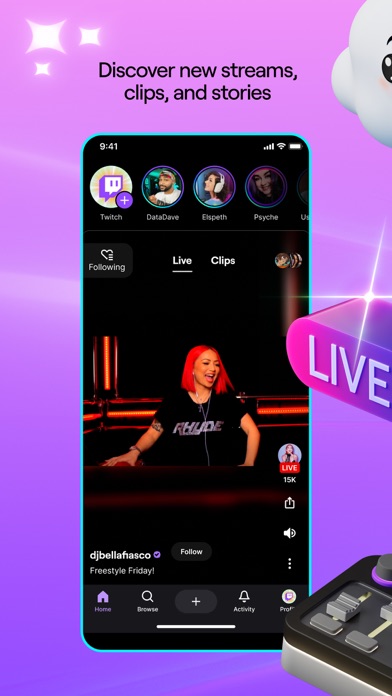
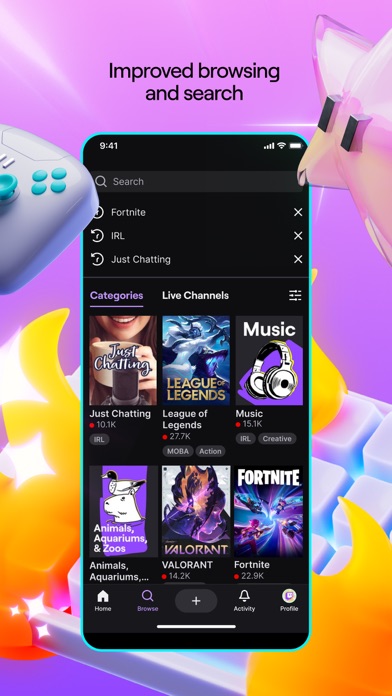
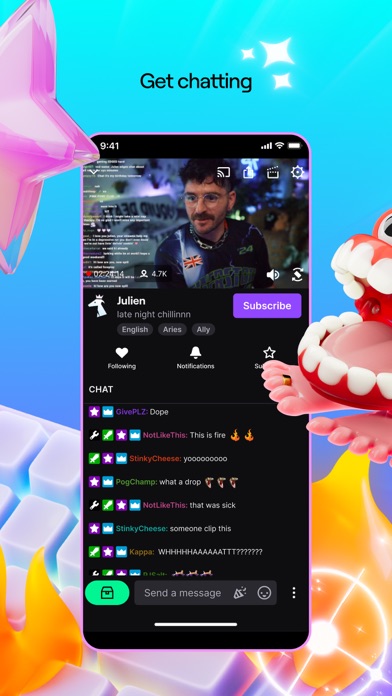
Twitch is where thousands of communities come together for our favorite streamers, for the games we love, for the lulz, for each other, for whatever. Download Twitch and join millions enjoying live games, music, sports, esports, podcasts, cooking shows, IRL streams, and whatever else crosses our community’s wonderfully absurd minds. We’ll see you in chat.
Here’s a convenient list of other awesome things about Twitch:
Everyone is “about” community. We actually are one: Whatever you nerd out about, you can find your people on Twitch.
Give support, get support: Find new streamers and subscribe to your favorites. Plus, unlock exclusive perks for your support.
Start your own channel: The Twitch app is one of the easiest ways to start streaming. Just create an account, go live directly from the app, and bring people together around whatever you’re passionate about.
You never know what you’ll find: Popular games are always live, but so are music festivals, rocket launches, street tours of Tokyo, and goat yoga. Yes, really.
Dark mode: Y’all love this one. Black and purple have never looked this good together.
Twitch's Terms of Service are available at https://www.twitch.tv/p/legal/terms-of-service/
For feedback and assistance, please visit our Support Center: https://help.twitch.tv
Please note: This app features Nielsen’s proprietary measurement software which contributes to market research, like Nielsen’s TV Ratings. Please see http://priv-policy.imrworldwide.com/priv/mobile/us/en/optout.html for more information
Twitch: Live Streaming Positive Reviews
Mobile finally doing wellI love the streamers I watch on twitch. I’m going to watch them regardless of my experience, but the experience can definitely cause frustration when it’s not working. There’s been a lot of headaches (annoyances) over the years on the mobile app and each update that would bring features also seemed to bring some annoying bugs. I say this as someone who will use this app most of my waking hours. Even at work or on a commute I’ll have it running but be listening in only. I’ve realized that the annoyances I’ve been having have significantly improved. I no longer feel like Im missing out by not watching from my PC. Picture on picture mode was a huge improvement. Im not stuck having to stop listening/watching when i need to multitask. Low latency mode brought to mobile no longer makes me feel behind the community in the chat. Ability to do sound only mode is excellent for lower connection areas (perfect while I’m driving!) and even when bugs come with new updates twitch is actually making some quick fixes now. I’m impressed. For years it felt like the app was an afterthought. They’ve turned a new leaf everyone!.Danie728Version: 12.9
The app is alright, but could be better in allowing customization when opening the appDon’t get me wrong, I would chose this app over all the other imitations out there, especially for streaming something I like in the background when doing something or nothing. But what I really get frustrated about with the app, is the new “feed” feature being designated as the first thing you see when opening the app. To which that just closes out the stream I already wanted to watch when it’s pop up banner comes across my screen.
I was wondering if, in the next update installment, you allow the users of the mobile app version, to switch around the different settings when opening the app. So that their are less-no frustrations when choosing if you want to watch the feed of any streamer you follow, or allow the same settings as how they were before the “Feed” setting was added. Since it is a mildly annoying thing to have to open up the app and see a feed you don’t want to, at that moment, see and have to switch to something like following or browse, etc. to find the stream you want. Since feed, might not have what you are interested to watch at that moment in time. But it will automatically cancel out the stream you do want to watch when tapping the banner pop up and it opens the app, because it doesn’t know how to handle both at once popping up.
Sorry for the rant, it just gets annoying to me when this situation happens since the new update happened. Thanks for hearing me and I hope you, and the company employees/employers have a great week..The_Terror_Of_DeathVersion: 19.4
App bugsEarlier this month, the watch streaks feature has stopped working properly in the app. Streaks don’t display or get registered when watching in-app, requiring users to watch streams, clips and VODs on the desktop site to update them. (For this reason, I’ve lost streaks for most of the streamers I watch, if no eligible clips to recover a streak are on a channel or I didn’t visit the site to recover the streaks within the 24-hour window.) Streak notifications informing users of missed streams also don’t appear in-app (except in sparse cases), resulting in users risking losing streaks that reset without notice, especially because of the in-app streak registry glitch.
Other issues with the app have cropped up that haven’t been resolved. Since February, the iOS/iPadOS app has had glitches with player controls and chat refreshes. When resetting WiFi or cell service while watching a stream, chat gets stuck in a buffer that prevents typing in messages, even while the chat stream updates. Player controls and stream descriptions also fail to generate when tapped at times, especially when tiled with another app or after tapping the channel points, bits and emotes tabs. Those three tabs also get stuck when trying to close them, requiring multiple tries to get those menus closed.
I’ve filed support tickets regarding these issues, but they don’t seem to be getting received by support staff. I just get automated emails giving tips that don’t address or fix the problem..TmanokcVersion: 29.5
Please change the layout to it’s original versionIt’s so difficult to navigate the app that the older version of the Home Screen is just instagram reels but with live streams on them. I can’t even see the streams I have yet to finish watching and I have to now search the name of the streamer and look for the video I was watching which is sometimes a hassle because to watch older video you have to scroll down all the way and sometimes even miss it because the bar it blends in with the background and thumbnail before I just had to scroll down a bit and boom there was my stream that I haven’t finished watching and I didn’t have to got through an entire process to find one video. I understand what Twitch wanted to do with the layout but it just doesn’t work or either remove it or just add another space in the bottom bar to access this because it really is a great idea what isn’t a great idea tho is to eliminate the Home Screen that has worked so well for the app scrap it and add an entire new UI that you can’t go anywhere with it just isn’t practical. On another note you can make the viewer choose how they want the UI to look like and make it more practical for every individual viewer and put it to their taste then you don’t have any problems with UI issues in the first place because they can just change how they want it to look like and that is a much better update to make..Sooooooo….Version: 20.6.2
App structureI think twitch is cool and different than other platforms. I have a couple channels that I follow and browse some others that peak my interest occasionally. There are some issues that I have with it tho. When you open the app, the first thing you see are other channels that are being promoted or match who you are currently following. The channels you follow are at the bottom and you have to scroll all the way down just to get to them. Put the ones I’m following at the top for quick access, please. Also, I understand that the app is for ages 17+ but when you open the app and the channels that are being promoted show up, I’d rather not have a bunch of pages of girls with every part of their anatomy hanging out as the first thing you see. A good 2/3 of the channels are like this. I don’t even follow channels like them; just some gaming channels and a couple where the women actually wear all their clothes and talk about everyday life. Yet they are spread all over my front page in string bikinis in hot tubs. I’d rather not open the app and look like some creep who views those kinds of adult channels when I don’t. It’s like you have to open the app with your phone or tablet covered in case there’s someone else looking by mistake. Maybe I’ll look through the app and see if I can fix things myself or hopefully the app is updated in the future..MACDERMATRONVersion: 10.6
Some problemsA bug still exists that has for a long time where when in dark mode, certain movements or actions can cause the app to switch to light mode, which takes a long time and 4 menu pages to flip through to turn it back on which is inconvenient and slightly annoying.
Another issue exists that when you are watching a stream in full screen mode and you double tap to open chat, and you click on a chatter’s name, a menu will pop up that allows you to gift them a sub, or look at their info etc. The problem is that when this menu pops up when in fullscreen (phone sideways), there’s no way to close the menu; you can’t click anywhere to get rid of the menu as it takes up the entire screen, and the only way to close it is to flip your device and go back to non-fullscreen, tap anywhere outside of the menu, and it’ll close. Again, this is an issue that has a solution but requires a lot of time spent to undo which can be annoying for users. A simple fix would be to add a close button for this menu, both in fullscreen and non-fullscreen.
Similar to the last issue, when you tap on emotes in chat, the only way to close the menu is to click outside the menu which can be difficult/inconvenient. The same solution exists where all that is needed for this problem is to add exit buttons to menus..Crazykid0416Version: 9.1
Great content - unfortunate User InterfaceHey! Big fan of twitch, I’ve been using this site for the better part of a decade now. Unfortunately, recent changes over the last few months inspired by competing apps like “TikTok” and “Instagram Live” and “Snap chat” has drifted the user interface from a wide screen format to a portrait format. This viewing style makes many clips nearly unwatchable, as very few games actually run in portrait mode. I’ll be watching clips from fighting games, and the action will simply be off screen due to this change. In addition: the “live” section, while a nice edition, no longer allows me to view over several channels at once, instead requiring me to scroll over each one individually. This reduces the amount of content I can scope for interest at a time. I understand attempting to grow a userbase by embracing various changes, but I really do think this has impacted the usability and appeal of the application. While I still love Twitch, I’m finding myself increasingly disinterested with the mobile client due to these changes.
Edit: THANK YOU FOR RESTORING THE FOLLOWING TAB! ❤️❤️❤️.Blargin flarginVersion: 22.0
I just need to knowWhy does this app have an update every single day? I open the app and it says something about updating or dismissing. I update every single time too sooooo how many more updates could there possibly be? Will there always be a new update? Are there honestly that many bug fixes? I’m all for improving an app but there’s no way you guys roll out something new every single day. Are you actually doing anything or just testing to see how many people choose to update? I’m just so confused. If there is any other update the rest of this week I would not be shocked. I’d probably check the news to make sure Twitch is ok. I’m almost tempted to apply for a job with twitch bc if there seriously an update every day then that must mean that’s confirmation of job security. I just imagine meetings with teams scrambling to come up a new update that you guys are running out of ideas. Are you trying to meet a quota for certain number of updates by the end of quarter? I’m sure by the end of this review there will be another update.
Ps- i love to watch my friends stream games, chat with people, and discover new games to play. i don’t love all the updates so for that you lose a star..NnnnicoletteVersion: 22.3.3
Nice but app’s update timing…I’m a newcomer over 6 weeks. App has some interesting features for live stream segments with content streamers and chat. But last Thursday after 5pm, I got an update notice during the same time I was trying to get on Sasha Grey’s live stream segment (not a recent one). Held off the update but most of things were affected; her live stream froze and live chat was stuck in limbo. I could not update while on public transit to home. There’s no wifi signal until I got home; I updated the app. I tried getting on an hour left of Sasha’s live segment, I was kept out with a brief message on the lower bottom frame I tried to read, only appeared 2 seconds then disappeared before I could finish reading it. Don’t know why I wasn’t allowed to attend her segment. Either her chat room was full or something else from the update affected the app from letting me attend her live segment(s) I subscribed for 3 months. I’m not that interested in viewing recent streams since users cannot interact with the streamer(s) nor with others in chat. Now I’m considering on dumping this app since the update affected a number of things and most of the content streamers I’m not familiar with..Devil U KnowVersion: 15.3
Design Problem fixed!UPDATE: the below problem was fixed! Thank you for making hype train stop taking up all the screen on mobile! Keeping the original review below to show that there was a problem but it was resolved. Obviously still not a perfect app, with problems such as implementation of DMCA rules, but at least the UI designers are trying, thanks :)
Please fix this design problem. When I am watching a stream on mobile (iPhone XR) in horizontal mode with chat, if a Hype Train appears, it extends the chat to over half of the screen space. This makes watching the stream harder, as it becomes very small in comparison to the chat. Please don't force the Hype Train to make chat bigger, or give an option to remove seeing it entirely please! When I am watching my favorite streamers sometimes the Hype Train lasts several minutes and I have to decide whether to not see chat or not see the stream well. Other than that, great app/service..TooManyNicknamesAreTaken8Version: 11.0.1
Broken AppI started having issues with the bonus chests a little while ago, when I tried to claim them it didn’t work and a message would pop up saying “Claim failed, please try again later”. So then after that happened I would just delete and redownload the app and then just keep it open, and it would work fine for a while. But now that’s not working, I just can no longer claim the bonus chests at all. I tried deleting and redowloading the app and I tried logging out and logging back in to my account, but neither of those worked, so then out of curiosity I tried using twitch on Safari and used the desktop version, and on there the chests work perfectly fine but it’s very annoying to use it like that. Oh yeah, and I also recently discovered that when you tap on people’s usernames in the chat it doesn’t bring up their profile and it also brings up an error message, so there are probably other things that are broken that I just don’t know about. Please fix it soon! Like I said, it’s been like this for some time but now there is no way for me to temporarily fix the issue, so I would really appreciate for it to just be fully resolved already!.ColorfulDarknessVersion: 15.5
BugsThis app honestly has a lot of bugs, and design flaws. If I click one of the icons on my following page, the whole app freezes, The only way I can see their pages is if I go to the search menu and search for them instead. My clips that I create, and other creators clips, keep repeating the same clips so if you click on one, you’re not watching the clip you clicked on and instead are watching one that’s several clips ahead or several clips behind. If I send a clip to someone, then the sound goes away when you come back to the app, and you basically have to back out of whatever clip you’re washing and click back in. Also, making clips on the app is pretty much impossible. When you enter someone’s stream, the promotion is taking up the entire chat, and you can’t read it until it goes away, which takes forever. The clips are dark around the edges for some reason, and you can’t do anything to get rid of the display icons, so a lot of the screen is covered. It feels like about a third of the screen when you add it all up. The website online doesn’t show you where these icons are going to show up making it easier to make the clips..Melody chorusVersion: 26.3.2
Was great. few features falling offResolution is standard at top for stream 1440p or 1080p which is only okay on wifi with fast internet. Cell service at these default resolutions that constantly change, even though the user sets them to 480p for keeping up with chat and streamer; real time.. This is incredibly frustrating. Constantly having to adjust resolution, EVERY TIME YOU CHANGE STREAM CHANNEL. and go back to :(
Also, stream channels randomly change to unknown streamers that I've never seen not even in looking at live streamer lists. Nor on prior screens to have possibly pressed to change to their live stream. What is happening, twitch inc??
Please please please please please fix this.
Also, being pulled out of a viewed stream knowing that I have not pressed anything. But, having been in that stream a few minutes or hours prior to and then arriving at RAID time to whomever that channel is raiding. These are glitches which must be fixed. Thank you :)
For your lovely streaming service. Which helps people through the tough times with good people and good chat communities. Even when those are a little extra friendly and joking at each other..GladlyreviewingVersion: 24.8.2
I had it but…So recently around June 19 I was doing a live stream (just chatting) and a couple minutes later my stream just stopped then I went to start it again and it said log in or sign up I was really confused and I was like at first oh I got logged out let me log back in when I did straight to the appeal page if you don’t know what that is it’s where it sends you to submit a request to get unsuspended/unbanned and then I got an email saying my twitch account was indefinitely suspended this is a bit emotional for me to talk about so I’m not gonna say what for but I promise you it’s not anything bad and when I try to make a new account it doesn’t work it’s a I think it’s a hardware ban if you don’t know what that is it’s when you get banned on one account and they send a signal to your what ever your using and ban you from even making an account. well at least I can watch people on my pc, well anyways (8/10) and that’s my review and I actually have to go back to bed it’s literally 4 in the morning #FreeExtremeisaiah?????????? aka my twitch if you wanna check it out see y’all later peace..TSM zaiyahVersion: 13.4.1
A major suggestionI did not know this app defaults to auto play. Not to say there’s anything wrong with auto playing streams themselves but I was not aware of it and as a result I assumed a stream would end if I let the phone be. Halfway through a late night stream, I fell asleep without worries. However, I woke up and found my phone went from 100% to 13%. The streams stopped it from naturally falling into sleep mode after I unplugged it and set it to low power mode. This night of nonstop video playing no doubt harmed my phone battery’s maximum capacity, meaning it will be quicker to drop to 0% in the future and I did not intend for that.
My suggestion is that you please make a pop up for mobile that stops the stream, live or otherwise, and asks the viewer “Are you still there?” after one or two auto plays have already occurred without outside input. If there’s no further response, the phone can fall into sleep mode. If there is someone still watching, they’ll tap ‘Yes’ and keep watching.
Anyway, I’ve turned off auto play in settings, so this problem won’t happen for me again. But I still I wouldn’t want any people starting out with this app to make the same mistake I did..MoonlitSkyPaintingBlueVersion: 7.1.1
New updateI have been a bit frustrated with the new update for the twitch mobile app. I have an iPhone 10, so the corners of my screen are rounded off and when I go to full screen the top and bottom of the video get cut off, along with things being blocked by where the camera is placed. This used to not be a problem because they left a blank space on each side of the screen so that it all fit in frame, but now especially while watching games like Minecraft where the bottom of the video is very important(the players inventory and the chat box) is impossible to see. This can be frustrating to watch and take away from my overall experience as a viewer. Another bug I have encountered is that often when I start to type in chat it will make the stream lag, causing the video and audio to get out of sync. Reloading/refreshing the page always fixes it, but leaves me waiting through an ad. This makes me less inclined to interact in chat, which is one of the best features of twitch. Besides these two bugs I absolutely love this app and the community that Twitch has created!.A Consistent Twitch ViewerVersion: 9.10
Unstable as of lateI used to never have problems with twitch, it was one of the apps I used to always get on and just watch a stream for fun. After a while I left because had life things to handle. But recently I decided it was a good time to get back on twitch. Was I wrong, yes and no. While the audio is fine without video, I’ve had troubles watching a stream and have audio at the same time. While the video plays just fine, it’s the audio that don’t work well on the stream. While I’ve been thinking maybe it could be my end, but when it’s been constant, I just don’t see the point in watching anything. Another thing, you removed the option to switch from 720 to something like 480, how can you test something to make sure it’s not your end if you actually take away a feature that was fine to begin with. I get the times are changing and technology is getting more and more advanced, trust me, I was born in the age of technology’s very beginnings of taking over. Just fix the stability of the app please, is that so much to ask. And please just add back a 480p button just for the users who can’t watch in 720..Shane247Version: 7.1.1
EhhhhI love twitch and the platform itself, but the idea that it’s a multi million dollar company that can’t figure out how to properly run a stream through their TV app honestly blows my mind I’m trying to watch a streamer currently and it is buffering like crazy to the word it’s like almost impossible to even watch my streamer, but I had no problem watching it on my phone. I also don’t understand how, you guys don’t know how to make the option for sending an unplanned request through the app, but I can do it through the laptop. These things should be super obvious to your app instead of only making it exclusive to one part of the site kind of just shows that you guys believe that everyone just has access to a laptop or computer and just completely ignore that some people either watch on their TVs or their phones, but the idea that you guys can’t figure out how to run Twitch through TV without it acting like I’m experiencing bad Internet intense, and the app itself because like I said, I just watched the same streamer on my phone with absolutely no problems.TheManSockVersion: 20.2
HELP ME PLSGood afternoon, dear administration of Twitch. At the beginning of 2023 I got my account banned for bypassing service blocking. A lot of time has passed since then. I appealed 2 or 3 times, but all to no avail. I am simply ignored. I understand if I received a letter to my mail, which would explain to me that I have not yet earned an unban. A simple response would have sufficed. I understand why I was banned, but I don't think this ban is entirely fair. Prior to this ban, I very rarely got blocked, and the ones I did get were not particularly serious. I have never been seen making political statements, insulting people on racial or other grounds, bullying or incitement. An indefinite block is the ultimate punishment, which I don't think I deserve. Additionally, I did not bypass account lockout, but a chat lockout from an individual streamer, which makes my ban even more unreasonable. I'm not charging or lashing out, I'm just really offended that people get off with a 30 day lockout for more severe offenses. I am writing to you out of desperation, as the service responsible for handling appeals can give me absolutely no answer..Максимов СемёнVersion: 22.3
People should only get banned for one day. hear me outHonestly, I enjoy the platform a lot however, me and my younger brother share the same account and he is really immature because he has autism so he would end up saying things really inappropriate thinking. It’s funny in some of my favorite streamers chats and end up getting banned and since we share accounts, that means I am also bad too and he has did this to some of my favorite streamers like defective nutt, frost fox, and even dream. And I know you can appeal your ban but I am still banned. I even gave the peel some time, but my band still didn’t get appealed, so hear me out if someone says something inappropriate and that certain streamer bins them, it should be one day then the next time to get banned it’s 2 day then if they get banned one more time it’s permanent I know some people will disagree with me, but it’s a lot better than having to appeal bans I hope twitch sees this, and if you do, I hope this gets added into the app Goodbye. Oh and if there are some misspellings, I do have dyslexia and I’m not the best at writing so yeah.J-117Version: 14.4.1
Easy to use, ethically shadyI’ll cut to the chase: Twitch pushes a lot of ads onto the user as soon as they open any stream they’re not subscribed to. It can be anywhere from one five second ad to eight thirty second ads. Furthermore, they’ll intermittently push MORE ads from that range (more often than not landing on two or three thirty second ads) unless the streamer is doing it hourly on their own initiative.
The format and the like ability of their streamers is twitch’s saving grace. Unfortunately their current set up makes it almost impossible to willingly discover new people to watch. I’m also not 100% sure on this, but I heard that their creator deals are being lowered to 50% revenue for either side, which is the lowest I’ve heard a social media platform go with their affiliates.
Twitch feels like a money grab and any good community it has, has nothing to do with twitch itself but entirely with the streamer it pertains to. Twitch has demonstrated time and time again an utter lack of care for all its streamers, even their poster children and highest earning streamers..Elle_ReedVersion: 15.1
Verified emailI verified my email but still can't talk In chat because I receive a message saying It requires a verified email address.HgfbmhnbhhvVersion: 5.3
Uncontrolled adsSelf-refresh means ads all the time, no matter what the broadcaster wants..Dudleys2Version: 5.4
YaGreat app 👍.HahannsVersion: 5.4
PogNeeds a bit more jack manifold.GoggintonVersion: 10.6
Allowed me to stay calmGave me access to many of my comfort streamers hecc yeah
Ranboo my beloved.PineconeiusVersion: 11.0.1
Quackity my belovedQuackity my beloved.Unipayton2Version: 10.6
I love karlThis app helped me watch karl 😩.Cunty Cunt CuntVersion: 10.6
HelpThe app is great but..... every time an ad plays while I'm in the middle of a stream it would restart it. Pls fix this soon.【Amanda】Version: 7.13
Great AppPlease add subtitles for different languages!.CV95CodeVersion: 11.3.1
YayI can watch mcyts now👁.Ii_nxra_iiVersion: 10.0
NEW Update needs to be roll backDONT UPDATE your Twitch .. The latest update has ruined the user interface experience .
Please twitch Stop trying make it look like TikTok.WeasyFFVersion: 20.5.3
Anwesome burgersThis was the best burger I have ever tasted in my life five stars. I would definitely eat her again. Stunning dishes!.Gourdon RamseyVersion: 11.7
Free International Money Transfer 💸Enjoy high maximum transfers into more than 20 currencies while saving up to 90% over local banks! The cheap, fast way to send money abroad. Free transfer up to 500 USD!AdvertorialVersion: 29.5
Twitch: Live Streaming Negative Reviews
The new UI is unusable and frustratingIt seems like Twitch is playing around with their UI layout, however this new one is not intuitive and hard to navigate. When you open the app, a random livestream starts play, just one and you have to swipe each stream one by one to even see the thumbnails or what they’re doing. You cannot pause them or turn them off. When I go to see the entire list of who is live, I can no longer see the thumbnail or title of the stream, only the name of the stream and the game they’re playing. There is NO WAY to quickly see all the titles and thumbnails of the all of the livestreams anymore. There is also no longer a “suggested streamer” category, which concerns me cause that was a main way that smaller stream could easily be found on the main page and now the main page is just a preview of a single random livestream, with no easy or good way to be able to preview all of my live followed channels and have a way to quickly see “suggested livestreams” section. It’s completely missing, replaced with this strange tiktok-esque scrolling, which is no way to quickly or easily preview multiple stream at one time. The old UI was way more intuitive and easier to use and navigate. This new one is a completely mess and it’s now impossible to quickly even see what the stream is about. I’m barely getting any information and I have to basically click through and guess which stream is doing what. Please reimplement the old UI or a similar version of it.Katie A. B.Version: 20.6.2
Latest Update Ruined the AppHome page is essentially useless if you just want to see what your favorite streamer is up to. Twitch will say just look at your follow list but the only information available is the game or category they are doing. It was nice having a preview of their title or thumbnail for a quick glance to see what they are up to. Having to scroll through the home feed to see who and what they are streaming is so much more inconvenient that it previously was. Previously you could see multiple previews of the streams at once and what they are doing where as now you only get one. From my perspective it's pointless to even scroll through the home page because it is what Twitch's algorithm wants us to see, not what I want to see. If they wanted to add this current home page layout to the app they could have just added it to the discovery page on the previous version because that's what the home page has become. So also because of this new layout, if you do want to browse twitch home page, if you are watching a stream and minimize it, it automatically pauses which is quite annoying. I don't know what the thought process behind this design was, but if it was to try and keep people more engaged with the app and discover other streamers, I think it has done the opposite,at least in my case, because now I just look at my follow list and close the app if there's nobody I want to watch..Arrx7Version: 20.6.2
Unfortunate UpdateUI changes will always be hard at first, but this TikTok imitation for the Home section is vile. It not only looks weird but functionally doesn’t make sense. You can no longer just scroll through who you follow and it mixes in other content creators you’ve never seen. The live and clips buttons are right next to each other yet the clips won’t be of the creator your currently seeing on your screen. With most streams horizontally oriented there is so much wasted space on the screen just so you can scroll, and “better” yet they don’t support vertical stream previewing at this time, so this function seems painfully useless. The new layout of the browse, activity, and profile sections aren’t bad, so not sure how they butchered the Home Screen so much, but a HUGE ISSUE I’ve seen is there is no longer a section to continue watching VODS(which helped when leaving someone mid stream and wanting to finish it later) and isn’t even available when going into a streamers profile. The twitch forums for comments have been disabled, likely due to negative feedback so I am sharing my review here. I have used Twitch for years and find it sad that with subs more expensive to give on mobile they’d do us dirty like this. This is officially deterring me from using Twitch mobile and I hope there is AT LEAST an option to go back to the old UI soon. With a large percentage of Twitch users being on mobile I hope the decline in usage paired with negative feedback shows them they messed up. Please right this wrong Twitch..SweetEclipseVersion: 20.6.2
The most recent update is awful.I tried stalling the update after seeing what was involved, but I could only delay it so long. The most recent update introduced buttons on the side of the screen, and chat on the bottom of the screen when in horizontal viewing. I cannot find a way to toggle this feature off, so it is just stuck there. Twitch probably figured that having these buttons here would increase interactions by making it easier, but instead it’s driving me away from the app.
The problem is that video games, the primary media viewed on twitch, already make heavy use of the sides of the screen. The HUD for video games, and any sort of informative overlay in esports use the sides and bottom to convey important information so that they don’t interfere with the main components of the game. And now, Twitch has decided that on mobile, their stuff is more important than the piece of media I am trying to consume.
This isn’t an ad that ends after time. This isn’t interactivity that goes after not touching the screen for a bit. These are bits/cheers/messages that sit on the screen the entire time, preventing me from seeing the stuff I want to see. If you’re gonna fundamentally alter how users can interact with your platform, at least give us the option to turn it off. If not, I’m probably gonna stop using the app. What’s the point if I can’t see the the game?.Damnit KyleVersion: 16.0.2
Bad uiThe new update has made using the app an absolute chore. The first thing I did was turn auto play off. The ui is ugly and unintuitive. The “following” tab floats in a weird part of the screen, it should just be on the bar with all the other things I actually use. I don’t like that the clips section doesn’t show me people I follow. I don’t like that it’s mimicking tiktok when I use Twitch for a completely different entertainment purpose. It doesn’t make sense to have a stream autoplay but then have to take extra steps to actually get to the stream+chat, when half the point of watching streams is to interact via chat with the streamer. I tried to give the update a chance but it’s just so miserable to use as a watcher. As for the stream manager, it doesn’t make sense for the “quick actions” to not be immediately accessible, the point is that they are quick. Having to toggle over to the quick actions before you can even choose your action defeats the purpose.
I’m sure this update was released knowing that there would be instant feedback, so I can only hope that the development team is ready to make immediate changes based on all the feedback I’ve seen in other reviews. This is Twitch, not Tiktok, and when so many of us are here to watch long-form content it makes absolutely zero sense to switch to an app style that was made for binging short form videos. Clips and Tiktok videos are not the same thing..ElylionsVersion: 20.5.3
It keeps getting worse and worseIt feels like every update, they want to try to modernize their app but it just keeps getting worse. Like 2 updates ago, it was bearable, you could somewhat watch clips without audio bleeding out even after closing out of it. Then an update happens and your clips when you back out of them just minimizes to cover half you screen and you can try to scroll and watch another clip which will be layered under the clip that you clicked out of. Now on the most recent update, while you try to clip or make clip, it’s harder to make clips cuz no time stamp but also they cut audio sometimes so you don’t hear what is said. Then when you add the clip, the clip won’t even save so all that work you tried to bear through just became pointless.
Twitch, I know you want to make the app better and I do wish that too. But for a second, just look at what’s broken and what’s not broken, fix that first and then build on what’s not broken. Don’t revamp the whole thing when it’s working. All you’re doing is making it worse and worse.
Also, listen to your users when they give feedback. Like I have one genuine question that I feel should be regarded. How come after the 3-4 years I been using this app that featuring a clip isn’t an option on the app? Only accessible on the website version which in mind is sometimes difficult to use because they don’t tell you how many clips can be featured or how many you have selected until you learn that mistake. Make that option accessible in the app too, make it easy to use and in the creator dashboard. Don’t make it a wasted opportunity..StasisXVVersion: 22.5
Ongoing Sub Issues [ Updated ]BONUS UPDATE: the cached advertisements are gone for me now??? They were there for a while but they're gone as of today. Maybe somebody actually reads the reviews who doesn't have the authority to change the layout back, but who DOES have the authority to push little fixes like cache clearing...if that's the case then good job review intern, sorry about all the stuff you can't fix but I appreciate you!
UPDATE: Cached advertisements are taking up over 2GB of space with the Twitch app without any way to clear them. Unfortunately, the Twitch app experience keeps being degraded to be worse and worse, so if I go through the usual iOS method of clearing the cache (delete and reinstall), the app won't even be worth opening. Just a miserable experience all around. EDIT: SAME ISSUE HAPPENED AGAIN. I give up buying subs. Gifted only from now on... I'm having an issue that I see reports of online going back years, except it's worse. I see reports of people cancelling subs on their phones and then being unable to subscribe on their computers. I was gifted a sub, subscribed on my phone near the expiration date, cancelled autorenew (AFTER already being CHARGED for the SUB) because I dislike automatically recurring charges, and now I *instantly* cannot use the sub that I *just* paid for. Trying to repurchase throws an error. This happened before the holiday break many companies have so I've wasted a week of time that I paid for, simply unable to use the sub or pay again to get access to what I already paid for. Lunacy. You guys had years to figure this out..TakenlessNickNameVersion: 22.2
Dear Twitch,When I first opened the app with my phone on silent and a stream started playing out loud, I thought I had accidentally tapped on something. I frantically tapped to pause it, and instead it took me right to that person's stream. Overwhelmed, I exited out of the app and the stream followed me PiP still playing something I didn’t want to watch. I’m not even sure how to use this app anymore. It is the most unintuitive app design and UI I’ve ever seen on an impressive level. Without exaggeration, I cannot think of another app I’ve had this reaction to. Not sure where the idea to use short-form (vertical) content style scrolling with long-form content (horizontal) came from. People aren’t streaming in the same overly-engaging style that’s required of quick scrolling discovery. Like, this change was worked on by many people and was signed off on at many levels, and they all thought “ahhh yes, this is the future of streaming!”? Devs, If you’re really sticking to your guns with this change, at least make it so I’m not startled by immediate audio while just trying to see if people I follow are live. I really do hope you are able to make some quality of life adjustments (or even better, make this as a additional explore feature within the old UI if you must) so we can continue to watch our creators, big and small, on your platform..Uff-Da Shuff-daVersion: 19.8
The first time I’ve actually had to write an app reviewThe new layout is awful, it genuinely makes the app worse to use. The old layout was very useful and there was no need to change it. When I open the app I want to know who is live of the streamers I follow and get recommendations from there I don’t want to immediately jump into a stream.
To make matters worse when scrolling through the live stream it doesn’t automatically follow you followers list when scrolling through and instead just jumps through random live streams when swiping. Until the UI is either reverted back or they make improvements to make it useful in the way it once was for now I’ll be using the app exclusively on iPad as the UI hasn’t changed on the iPad version of the app.
I wish companies would actually think before rolling out these types of changes especially when it seems like no one was asking for them. Amazon’s quest to make Twitch a profitable branch of the business just continues to make the service worse and worse. Between ads that disrupt the live content, not paying partners/affiliates a fair percentage and taking a genuinely useful app and making it borderline unusable it’s no wonder Twitch has yet to turn a profit for Mr. Bezos try doing things right instead of what you think shareholders want and guess what profit will follow..F34RA11Version: 20.5.3
Incredibly badHats off to the twitch mobile dev team on what absolutely has to be the worst version of the mobile app on ios ever. Can no longer send more than one emote in a single message - doing so causes you to be temporarily disconnected from chat and the message is not sent. Some emotes will show up as text instead of the image - this happens when sending and when viewing those sent by other chatters. The minimized view has been made larger which is nice, and it still stays on the screen when temporarily leaving the twitch app to open another app like a web browser, however it is now impossible to return to watching the stream in full screen after returning to the twitch app. Hitting the button to return the video player to fullscreen will cause the app to have some kind of meltdown where the mini view of the stream will disappear when you try to return it to full screen whilst the audio is still playing in the background. Attempting to go back into the stream or try opening a new stream does not work - the video will still be completely out of sight with only audio in the background. The entire app must be closed then restarted - real fun for streams where you are not a sub and thus have to sit through preroll ads again. The nagging popup telling you there’s a new update is annoying. All around a truly awful experience. Sad to say that the versions before the 2 or 3 most recent updates were less borked than these! Seems there was absolutely or bare minimum testing done before release. Really incredible job everyone on the app dev team as well as the UI/UX team at being so horrid at making a functional and enjoyable mobile experience. Cheers!.CastorRudyVersion: 17.4.1
Someone needs to be firedPreface: the app is usually fine. It’s decent enough and mostly does what it should, which would usually net it 3-4 stars from me. HOWEVER, in one of the recent updates they added even more screen clutter. Tried to watch a stream today and it was unbearable—and I wish I was exaggerating. The “hype train” notification can’t be dismissed, which takes up a significant chunk of the screen. The emote progress bar also brings up a bar that spans the entire screen. Then there’s the stream title. And the bar where you type to chat. And all of the options on the upper right THAT SIT OVER THE STREAM, cluttering things even more. There’s the stupid emote explosion that pops up, again, ON TOP OF THE STREAM THAT I AM TRYING TO WATCH. Now, there’s also a new useless “feature” to spend buts on the not only refuses to go away above the chat bar—there’s also an OBNOXIOUS ICON **OVER THE STREAM**, complete with a counter below it. I genuinely couldn’t stand trying to watch the stream because there was so much sh¡t on the screen. I get that they want people to engage with the various “fun” and “community” features, but LET ME TURN THEM OFF IF I WANT. I AM NOT GOING TO USE THEM. I JUST WANT TO WATCH THE STREAM. As someone with mild sensory issues, if I’m having trouble with the overload, I can only imagine how awful it now is for people with more severe sensory issues..RLeighAVersion: 24.7.2
GarbageJust awful, loses all stars due to not having BTTV alone, I could go on. So I will! When someone posts a twitch clip in chat it doesn’t show the thumbnail or the name of the clip, just the stupid pre-made url for the clip. Boring, garbage, stupid. I could go on even more SO I WILL!!!! The delay, even with “low latency” turned on is still worse than a stream on PC WITHOUT low latency, even worse once low latency is on for the pc stream. I could go on SO I WILL! One of my favorite streamers got partnered and changed how their emotes are spelled, this updated on my desktop but not on my garbage phone. So instead of the regular image of the emote being posted it just sends a bunch of letters, great. I could go on SO YOU KNOW WHAT I THINK I WILL!!! Getting notifications for gifted subs expiring is so annoying, 90% of the gift subs I get are to channel I don’t watch so when I see a notification for twitch it is almost always useless garbage. Give me the option to have full control over notifications so I only get notifications for actually useful things. THIS APP IS SO BAD! there is also a group of people, or maybe just one person, that is creating multiple and I mean hundreds of accounts to harass multiple multiple multiple multiple multiple streams and twitch can’t do anything about it. Now this is probably just result of how garbage the Internet is, where things like a VPNs exist where you can evade suspensions and bans, But the fact twitch can’t do anything about it is embarrassing. You should feel bad if you work for twitch Just awful, error loading streams? But only certain streams not all, just fantastic.#68 two chainzVersion: 13.7.1
OptimizationEdit: Even viewing the subscribed channel has been dreadful. With audio bug, video bug, random error msgs that force quit stream, after that, loading signs that takes forever. What a performance by the biggest streaming service.
I go on twitch mainly to watch live streaming service and connecting with the gaming community. The current layout makes it impossible to enjoy what twitch offers. On full screen, chat taking half of the screen is okay, but the other buttons such as follow, subscribe buttons and streamer descriptions taking the other screen is just too much, especially when i have already subscribed or followed the streamer. When i open the chat the actual gameplay takes less than 20% of the full screen. As twitch updates its mobile applications it makes me not want to use the app. It becomes more and more inconvenient to users. Also please let users decide what they want to do when the ad is playing. I’m watching the stream at 460p trying to save data and this 5min ad comes out in 1060p. No way to change it. Maybe ill try to subscribe when the ad is playing or follow the streamer but it is not available. These buttons and descriptions that are annoying when people are actually watching the stream will be useful when people are watching the ad..NanaQ110Version: 12.0
The app has been made unusable after a recent updateWhile the app has always had problems with stability no matter when you look at it, as of recently it’s been extremely unstable. The slightest wrong move and you’ll freeze the video you’re watching. But not only that, if you close your app and then try to come back to the video and resume progress, your app immediately freezes every time! Another problem exists where if you switch from landscape to portrait, and back again, you’ll cause the dimensions of the video to be out of whack (basically shrinks the picture and puts it in the top left corner and leaves the rest of the space where your video should be blank) and when you try to get the original dimensions of your video back by switching between the two modes, lo and behold, the app freezes! It works as it’s supposed to for pretty much everything else, although i can think of a few minor nitpicks. Like when fast forwarding and rewinding through past broadcasts clears the chat each time instead of the chat simply being synced with the video. As I’m trying to test the app to find these minor issues, my app is now freezing no matter what video or stream i try to watch. It’s truly never been this unstable, but currently, the app is unusable garbage..Aaron RamesVersion: 11.0
Horrible and sexist teamWhoever runs twitch has some serious issues and needs to be stopped. They treat streamers unfairly and favor certain channels quite obviously. For an example, Alinity, a female streamer, spoke the n word and got zero punishment. Meanwhile another streamer spoke a word that was mistaken as the n word and was banned for 30 days. For example, TFUE referred to a raccoon without the rac with no bad intention, a complete accident, and was banned for 30 days. This Alinity woman also TOSSED her CAT behind her and got zero punishment. She also drank vodka and let her cat LICK her lips which had vodka on it. She smiled and laughed as this happened and of course got ZERO punishment. ABSOLUTELY UNBELIEVABLE!!! This seems like animal abuse to me. Other instances with female streamers had been just passed by with zero punishment while male streamers got punishment. I am a female and I see this as very wrong. Also, when Ninja, who I don’t even like, switched to Mixer (another streaming site) Twitch was extremely salty and used his channel to promote other Fortnite streamers. They have NEVER done this to any other channel and Ninja had been building his brand on that platform for years just to get it treated that way. Not only that but Twitch accidentally put a p0rn video on the very top of that recommendations which many children saw since Ninjas fan base is mostly kids. So far Ninja can’t even take his own channel down on Twitch. I will never ever use Twitch ever again and I am absolutely disgusted with the platform..Nfksnq smclwn slcokenw cVersion: 7.13
Not always copying competitors is best here’s why:Twitch mobile app has taken a sharp turn by emulating TikTok’s format, which has ultimately resulted in a less-than-ideal experience for viewers. This shift prioritizes short, bite-sized content over the immersive, long-form streams that originally defined Twitch. As a result, the app’s interface now feels cluttered and disjointed, making it challenging for users to find and engage with the deeper content that streamers have built their communities around.
For viewers, this transformation is particularly disheartening because it encourages a culture of superficial engagement. The quick, scrollable videos may capture attention momentarily, but they lack the meaningful interactions and narratives that longer streams provide. The essence of Twitch lies in its ability to foster connections between streamers and their audiences; the new format undermines this by reducing the viewer experience to mere snippets, often devoid of context or continuity.
Moreover, the focus on short content dilutes the unique qualities of the Twitch platform. Unlike TikTok, where brief, curated clips reign supreme, Twitch has thrived on the community aspect of watching longer gameplay, discussions, and performances. By mimicking TikTok, Twitch risks alienating its core audience—those who appreciate the depth of content and the real-time interaction that live streaming offers. In essence, the new mobile format could drive viewers away, as they seek platforms that better align with their desire for engagement and connection..Jackofaces13Version: 20.5.3
Dislike the new updatesI’ve always been ok with Twitch mobile. For adapting to a small screen it seems fine but moderator view not existing until the last couple of updates has helped, but there’s so many compromises that I rarely open the mod screen because of how much it reduces viewable chat space. If I open the keyboard to chat, it drops down to two lines of viewable space. As a moderator, that’s not cutting it in some of the more fast paced chats. I get it, may not be anything that can be done but honestly I don’t need the same size content screen so I’d like to be able to landscape and have a larger view of chat and a smaller viewable screen so I can see more of chat in moderator view.
I also really don’t like the most recent update where if I open the app from scratch it automatically starts playing one of my favorite channels. That was a remarkably unpleasant surprise when I opened the app in a meeting to check on something and the audio started playing on my phone. Now I know to lower the volume before I open the app, but I don’t like having the channel it opens selected for me. I’d rather have a screen that shows my favorites that are live and lets me choose which one I want to open..NopetoobadVersion: 19.9
Useless support**update** figured out how to get around it. May only work with a Gmail account. Used the Gmail + trick for unlimited emails and made an account. Once in the account using the Gmail email trick changed the email to my regular email address that was used by someone else and when it sent a verification email to my original email I gained access. Thank you Google for having the unlimited email trick.
*******************************
I tried to sign up for a twitch account and found out that an account was already made with my email. I have never had a twitch account before so I go through the motions of forgot my user name or password and whatnot to see if I can get into the account that was made using my email. Nothing worked as it would not send a reset request to my email address. Sent in a support request and basically told me to do what I did above in many emails sent to me. It will not send me a reset request. It cannot create a twitch account because they allowed an unknown person to use my email address and make an account and lock me out of creating one. Why is an account being created with no verification? Why do they not have something so simple in place? How hard is it to do a an account will be made but must first verify? So idiotic..UseyourownemailVersion: 26.5
This layout is not itThis is the first review I’ve ever written. I’ve seen so many horrible UI changes over the years, but none have been as abrupt and in your face as twitch mobile in 2024. It took me 30 minutes using the new layout to make the decision to stop using the app entirely.
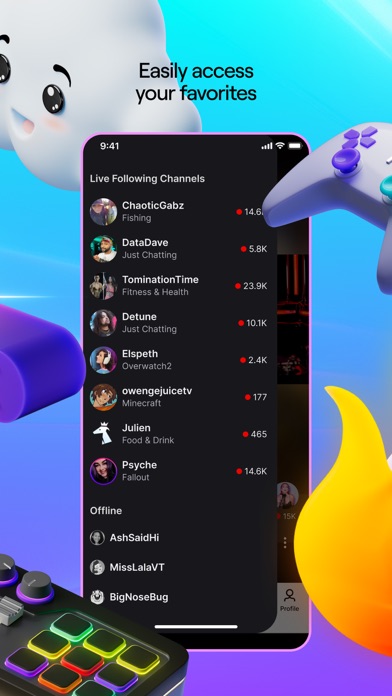
No more followed categories menu, no more vod/clip watch history (if there is, it now takes way more steps than it used to), no more easy way to preview what your followed streamers are doing, way more steps to look at past vods/clips, much more annoying to even pull up a streamer’s profile. Before I was content with just watching my followed/subscribed, but I know that finding new streamers was also much easier and more streamlined than it is now.
Like other recent reviews have said, this app is for long-form content, it is not TikTok. Either revert the main page back to how it was—moving the new “live” page somewhere else, or make the new format for clips only. But until a change is made, I’m uninstalling the app and using twitch on my phone’s browser for the foreseeable future—at least it has a somewhat well-designed interface there. Don’t hesitate to use an ad blocker either—this garbage app doesn’t deserve to waste any more of your time than it already has..Game guy 222Version: 21.6
Annoying adsAbsolutely horrible and difficult for NO reason. Overall, this app would be great. If the ads were such a nuisance. Now I see what ur gonna say “oh there just ads blah blah blah”. I get creators need their money and all of that good stuff. But GOODNESS GRACIOUS. I really don’t mind the ads. If its like 2-3 ads then okay. But I will get 5 WHOLE ADS. And that's not even the worse number of ads. I’ve gotten 9 WHOLE ADS BEFORE. MORE THAN ONE TIME. That is INSANE. I will watch 4 ads and then twitch will give me another 5 ads! What is the point of using this app if I don’t even watch the streamers? I watch ADS. This is not a streaming app it is an AD app. And yes it is annoying. VERY annoying. But I still wouldn’t mind the 5 stupid ads if it WEREN’T GIVEN TO ME IN SUCH LITTLE TIME. Like for example: I watch five ads then they finally end and I can watch the stream again. Not even 5 MINUTES LATER, I get another 5 ads. AND IT WILL KEEP DOING THAT OVER AND OVER AND OVER. I’ve had to watch so many ads one time that the streamer literally FINISHED the game. I didn’t get so see any of it. Do u want ur app to have good reviews or not? Im not the first person to complain about this. I know creators have settings where they can control the ads. The creator I watch has the ads on LOW setting. And its STILL so many. Chill out. 2-3 ads every 1 hour is fine. Its not annoying and it doesn’t get in the way. That sounds nice doesn’t it? At least 5 ads every 1 hour. PLEASE. Enough is enough. And then when I get done watching the ads the stream that I watch is delayed and I’ll have to click on it again to catch up with it. And sometimes when I click on it again, MORE ADS. Do u want ur app to stay up? I suggest u fix this..SodaCanSnifferVersion: 21.5
I’ve had this app for 10 yearsIn the 10 years since owning this app, it has shot downhill. One of the worst problems, Notifications, will randomly stop working all the time or will just randomly stop working for random periods of time for Random streamers. It will work for one person 5 times in a row, then randomly NOT work for months even though the notification button is clearly active.(doesn’t matter what device you have (I have iPhone 13pro, newer iPad and Mac) the only notification you can rely on is if you’re literally on your desktop PC with the WEBSITE open…). Your best bet is to always assume that notifications will have no effect, and just hope whichever stream/podcast you watch on twitch at that time also posts “Live” notifications on their social media. Another huge problem is when you’re watching a stream using the minimized player, while the app is running in background…it will VERY VERY often just STOP the stream randomly, usually between 1-5mins of minimizing the livestream once leaving the app. Also, the UI is constantly buggy when opening the app/swiping around too quickly, or it will happen after turning your phone sideways. The fix to these glitches often requires closing the livestream and rewatching another preroll ad to get back to the stream you’re no longer going to watch because of it. Can’t forget ADS! ADS ADS ADS ADS ADS!!!!!!!!!!! You can watch preroll ads, then accidentally pause the stream 5sec later and you’ll get hit with ANOTHER preroll! They cram ads into this app like cockroaches in a crack house. Chats always broken too, they’ve even removed chat-related feature over the years like being able to swipe the chat to either side of the screen. What ISN’T broken on this app? Nothing. 0/10..FfdugadjyamoggddsrhnnuaonnvVersion: 23.9
New update garbage on iosApp was fine prior to last update. Freezes constantly and completely locks up your screen you have to open and close multiple time till app actually closes completely and restart again once it close To get it reopen properly. Ios app as a whole it terrible if you mod anywhere your a glorified chatter with a hammer cant do any real mod functions to create interaction with the community. Not sure if thats twitch's fault or ios being to controlling either way seems as though it shoulda been a simple fix 2 years ago but here mods are still waiting to have mod functions. Fix it for real kicks available and becoming a very viable option to alot of growing content creators. Not a time to suddenly be subpar or we can all buy androids and stream to kick instead 🤷♂️but who am i thats just my personal feeling as of late as someone that spends the majority of my days being a lack luster mod in several communities due to you app and device functions not existing. Ive even tried loading pc version from browser which is even worse if you do manage to get a poll or prediction started in a chat from there good luck on the app not freezing long enough to pay it out. FIX IT for real!.QwicslvrVersion: 17.0
What is wrong with their development leadership?This is the third or fourth one star review that I’ve come back to rewrite because I am continually amazed at how poor the management and cadence of the twitch iOS app has been. With history having shown multiple iterations on the user interface when it wasn’t broken and nobody was asking for it. Only to result in a user interface that was less favorable and very obvious based upon user feedback. So we sat with this current user interface for over a year only to have the development team release some kind of new, unstable infrastructure on the week before Thanksgiving… The week before everyone will be sitting at home on their devices watching streams. Twitch is now incredibly unstable: the picture-in-picture crashes every time, the app just crashes sometimes when switching between streams, the stream will randomly freeze while chat is still connected, just to name a few of the current issues. Why would you do this right before the holidays? That is literally roadmap 101. I think I’m less than 12 months away from being entirely done with twitch as a company at this current pace… the frustration is growing and becoming immense..Broseidon55Version: 27.1.4
Getting worseIn there, forever more push based content, twitch have made your follow list, extremely cumbersome, and annoying to deal with.
It no longer shows all of your off-line channels (I had to manually go find some channels that weren't showing up in order to find that they were already followed, but not showing up, unfollowed them, then re-follow and order to get them back on my list, only for other channels to drop off my list), which is lovely, my main reason for having a follow list… is to keep track of all of the channels. I follow without needing to memorize them, But on top of that, it's more cumbersome to navigate and is far too easy to accidentally change channels, causing me to sometimes leave a channel I've just entered but haven't followed yet, leading me to paranoiacally follow every channel I have the remotest interest in, leading to an even bigger follow list and more problems.
Every update, user interface gets worse, like Twitch doesn't know the value of good design or good designers and fired them all. Or they are doing it on purpose to make it more like old-school television where they can cram whatever they want in your face and you watch it..EleithiasVersion: 21.8
We want Twitch, not a TikTok cloneI have used this app for several years, and its interface, despite some quirks, has served as a viable mobile version of the desktop browser. It worked, and I had enjoyed using it… until I just updated it.
I have no idea who decided to make this change, but whoever did is completely detached from the Twitch community and decided that it’d be better to turn the mobile app into yet another copy of the TikTok formula, completely erasing the traditional home page in the process.
It is completely unusable now, and even though there is a side menu that allows you to select the streamer you want to watch, it doesn’t change the fact that a streamer you didn’t intend to watch is autoplaying in the background and wasting precious data. The old menu was completely fine, there was zero need to change it.
That said, I will no longer be using the app until we have the option to default to the traditional menu. If you want to keep experimenting with this new feature for things like clips and highlights, that’s one thing, but forcing so drastic and overarching a change on a viewerbase that’s predominantly desktop-oriented is not savvy..Ajr1218Version: 20.7.2
Certainly is an appThis App use to be decent place for people to stream and hang out with other people / communities and it seems like in the last few years it has become a place that doesn’t seem to have any rules. I’ll start with the front page that advertises the biggest “best” streamers usually the people on this page are either advertising their special “18+ content” while streaming with less clothes then if they were on a beach or just bullying smaller content creators and threatening people’s lives, no this isn’t a Joke the specific streamer Doxxed a viewer live on stream and the streamer got a 1 day temp ban, I will not elaborate on who the streamer is because they have a habit of doxxing and tracking people who talk negatively about them. If Apple or whoever reads these would like proof of this I can get clips and recordings from
Multiple sources including unedited clips from the multiple offenders streams and the reason I’m posting the complaints here is
Twitch is an unserious company that refuses to enforce their own rules if the creators are large enough. In Twitch’s own community guidelines it states that illegal activities are to be enforced depending on the severity of the crime anywhere between 24hours to indefinite and it seems Twitch is perfectly ok with sexual assault/ harassment, doxxing, threats of harm to viewers and other creators as most of these bans for large creators are only a single day ban all of the streamers average anywhere between 15k-40k viewers. I ask that this app be changed from 13+ to 18+ as I don’t believe twitch will be made to enforce it’s rules or Laws, for the parents out there if you allow your kids on this app please pay attention to the streamers you allow your kids to watch on this App..1slasherVersion: 28.2
Why??Before, my only real complaint with this app was how frequently the app updates (seems like twice a week, if not more often), how inconvenient these updates are (completely disables app usage until these horribly common updates are fully implemented), and how it is seemingly only backend tweaks, every time.
One of the recent updates (again, the app updates far too frequently, so I couldn’t hope to tell you which version implemented this) caused a HUGE new frustration: the app will, with no warning whatsoever, shift off of whatever stream I was watching, to the stream of whoever is live with the highest viewer count in my following list. There is no input from me on this, it will just violently interrupt my watching experience the same way Twitch’s miserable approach to advertising does.
It is tremendously unfair to smaller streamers on Twitch for *the official mobile app* to say: ‘why are you watching this person? Silly, they only have fifty people watching them! You could be watching THIS person, like ten thousand other people! They’re WAY more popular, so you should watch them too! In fact, we’re going to FORCE you!’.FlyingbodysymphonyVersion: 20.3
App Needs Work for Mobile DevicesI have the app for both my phone and iPad. I have never Live Streamed from my Phone, but I attempted a few weeks ago to do a Live Stream from my iPad because of technical issues with my computer. There was no real tutorial process of how much of anything worked for someone NEW to the Twitch app (had the same similar issues with the PC app version) and I could not make heads or tails of if I was actually LIVE or not. It just kept giving me a screen that was my cam, but appeared that it was still loading and this went on for a while.
I also kept accidentally re-setting my stream details, only because I was trying to figure out what everything did (and that’s frustrating when you’ve told your viewers you are going live, only to have it take forever, it feels like, to get things up and going).
The app for mobile devices and non-mobile definitely still needs some work in my book, but thankfully since I’ve been using it for a bit on my PC I have a better handle for it now, but when I first started I did NOT feel it was very New Streamer friendly..MistMoonTearsVersion: 10.8
A Simple, Critical Review of Twitch SafetyTwitch has clear and strict Community Guidelines that prohibit both sexual misconduct and content supporting terrorism or violent extremism. However, the platform faces constant and severe criticism for the inconsistent enforcement of these rules, especially with high-profile streamers and the challenges of live moderation.
Key Criticisms
1. Sexual Misconduct and Harassment: Despite having an Off-Service Conduct Policy (allowing Twitch to ban users for severe acts that happen off-platform), the company is often seen as being too reactive and slow to punish abusers, particularly popular creators. Many streamers feel the daily burden of combating harassment and hate raids falls primarily on them and their volunteer moderators.
2. Extremist Content: While Twitch uses automated and human review systems, the real-time nature of live streaming makes it difficult to instantly stop the spread of propaganda and extremist messages. Bad actors constantly use subtle or evasive methods to exploit the platform's speed before detection can occur.
In summary, Twitch has the right rules, but the consistency and speed of its enforcement—especially against high-severity harms—remain the platform’s biggest challenge in maintaining a safe environment..Pumpkin too pieVersion: 26.5
FINALLY STOPPED SENDING VODCAST NOTIFCATIONSFinally. You still get one star though. There are nice ways of showing off a new feature and then there's the way you chose to do it..KevL0CKVersion: 5.3
Change the layout backWho asked for this? What is making ceos think that anyone wants every app to turn into a TikTok knockoff? There is absolutely no way they got people to test this and none of them said that it is abysmal and unusable garbage, which it is, and that it was possibly the worst change they could’ve made. Please don’t subject us to this any longer.Idk like george or somethingVersion: 20.6.2
8 ads in a rowTwitch, are you kidding? 8 ads 30 sec each in a row while streamer is in online?.AndreyfrenchVersion: 9.9.2
User interface is being destroyed overtimeI hate the current mobile layout. I’m so sick of apps ruining their navigability of the content you want for the sake of trying to squeeze extra minutes watched out of you with junk you don’t. I recommend anyone look into third party apps to watch your twitch streamers because realistically UI will only get more abrasive from here..Matt.ChristiansonVersion: 20.6.2
Horrible new layoutScrolling view UI is bad for usability. Lot harder to find what we want. Not every app needs to have a TikTok scrolling system..Tristan_RedVersion: 20.5.3
New UI update is terribleHorrible idea to have a random stream autoplay on the whole screen when you open the app. bring back the old look of the app.Anonik11Version: 20.5.3
New version is terribleCan’t see what all the streamers I follow are doing, if I wanted to watch people on TikTok I’d use TikTok. Just terrible UI I can’t find one thing that has been improved, you ruined it.TheRealFroggyBearVersion: 20.5.3
Twitch is simpTwitch is dumping for thots.MyronXD20Version: 9.7.2
Who asked for Tiktok layout?This is the most inconvenient and irritable format I’ve seen for this app ever..MoodyShibaVersion: 20.6.2
If I could write a review for an update this is what it would look likeNot everything needs to be a carbon copy of Tik Tok, especially when Twitch should be the exact opposite of Tik Tok in the first place. Please understand and revert the changes made to the mobile Twitch app..Adam BjelicaVersion: 20.6
Horrible user interface update20.5.2.
Has to be the worst update, interface is bad, sounds auto playing, streams auto playing, scrolling to see the followed streamers. Awful tiktok experience..PdrwskyVersion: 20.6
TikTok-like formatA format that’s similar to TikTok has no place on a platform like Twitch. I’m not trying to scroll, I’m trying to watch long form content.
It’s bad design to have my followed streamers be put off into a side bar while I’m forced to see this UI. I can’t even find my previously watched/unfinished streams. I genuinely don’t understand the choices behind this..Trey_P.Version: 20.6
Revert the tiktok updateAbsolutely terrible. Who approved this? The app is seriously unusable.Twice101Version: 20.5.3
Tiktok like scroll mechsStop implementing scroll short form content on a platform that deals with long form content..MattyuuuhhVersion: 20.5.3
New look is terribleI know the content I want when I open the app, I don’t want to be force fed channels I do not follow.Grimwulf42Version: 20.5.3
UpdateNew layout is terrible on mobile. Thanks for the update..UpdateTodateVersion: 20.5.3
Ui update is terribleCan’t believe someone greenlit this disgusting update. Absolute brainrot ui and not even slightly user friendly.Andyy1738Version: 20.5.3
Bad new UINot intuitive nor pratical. The usage of the menu that opens from the left is way old school.. Previous version was way better.. Looks like a weird version of tiktok now.Eduardo RTAVersion: 20.5.3
App sucks.This app is straight dog water compared to the actual pc version. It loads so much slower and every time you are watching something that isn’t live, it will bring you back to the start of the stream if you get an advertisement. Love using twitch, just not the app. D o g w a t e r ..Gabe M.N.N.Version: 12.3
Videos for bitsI can’t watch videos for bits please fix this. It is a great app otherwise.Masonq6Version: 7.2
New mobile UI is awfulNobody wants to scroll through livestreams on a feed 💀.SomeoneelseyycVersion: 20.6.2
New UI is horribleThe tiktok style is not giving since twitch contents are not short form videos. Jus bring back the old one, easier to navigate.DesteentyVersion: 20.6.2
TrashNew design is absolute trash, go back to the one before you ARE NOT TIKTOK. Disgusting..XBlvkInfinityzVersion: 20.6.2
V20.6.2Absolute garbage version, who ever came up with the main menu UI should be dragged out back with old yeller. Morons..SickofthisshitttttttttttttttVersion: 20.6.2
UpdateThe new update has made the app garbage.Badupdate69Version: 20.6.2
2024 mobile update = Walmart TiktokI understand the need for clips, but my 0 IQ brain could think of 10 different ways that have ZER0 to do with what this update brought.
Buggy, can’t tab out without the app freezing, manually scroll on a side button just to find who I’m following
Please reverse this.Kick EnjoyerVersion: 20.6.2
Twitch is not tik tokNew app layout is complete trash. I’d rather just watch in safari now..ButtrugVersion: 20.6.2
Ruined by updateClassic case of “if it ain’t broke don’t fix it” newest update changes UI to some TikTok wannabe setup. Use frosty instead much better layout.NunyabidnessssssssssssVersion: 20.6
Latest up date made me deleteMobile app is trash now, no longer are you directed to your favourites. Just dumped into what ever twitch want to push. So long and gone now..Ghost1069Version: 20.5.3
New redesign is not itI cannot see titles of my followed live channels on one screen? That’s absurd..Hellokurisu.ioVersion: 20.5.3
New update is the worst thingThe new update is an utter atrocity. Unintuitive, annoying and generally unpleasant to handle, I absolutely despise it. I can’t wait to have access to a computer again so that I can never touch the app again. Absolutely atrocious.
I understand why they do what they do. They want to encourage scrolling and keep people on the app. This isn’t a short plateform. Nobody wants that..Beniboy76Version: 20.5.3
So many adsJust go on twitch on pc and get an adblocker..RafTrevVersion: 20.5.3
Mobile audio problemOn mobile if I switch to a different stream the other stream audio still plays in the background on top of the steamers audio I just clicked to watch..EunhyeeeeeVersion: 12.0
BanBan pokimane.Bo2veteranVersion: 8.3.1
New update sucks (items on the side)The new update is horrible and I have no idea why they permanently have items on full screen visible. We do not want to see this while watching. In what world is this a good idea? Give us the option to the turn it off or just remove it..Great cow manVersion: 26.8
Ugly.This app used to be perfect and user friendly and now it's like TikTok and hideous. Why do I have to tap the option to show who I'm following instead of just having it up and open when I open the app? This "feed" feature is really stupid. Also, why am I being told to update the app almost every time I open it? I'm seeing a lot of reviews on here that are somehow 5 star reviews but the people are writing about a negative experience. Makes no sense..FleuryTVersion: 22.3.3
UpdateThe new update sucks.Sonny3609Version: 21.8
BadI hate the change on iPhone just roll back to original view also now on iPad there ads popping every 2min taking half the screen..Falcos01Version: 21.8
Payoneer 💰Payoneer is an online payment platform that lets you transfer money from any corner of the world! A best and must have payment service for every blogger, traveler, freelancer, affiliate marketer, consultant, virtual assistant, business person, online sellers, and receivers. Earn $25 for free by joining Payoneer. Sign Up Now!AdvertorialVersion: 29.5
 Twitch Interactive, Inc.