Canyon Art, LLC.
IWeaveIt Customer Service

- IWeaveIt Customer Service
- IWeaveIt App Comments & Reviews (2026)
- IWeaveIt iPhone Images
- IWeaveIt iPad Images
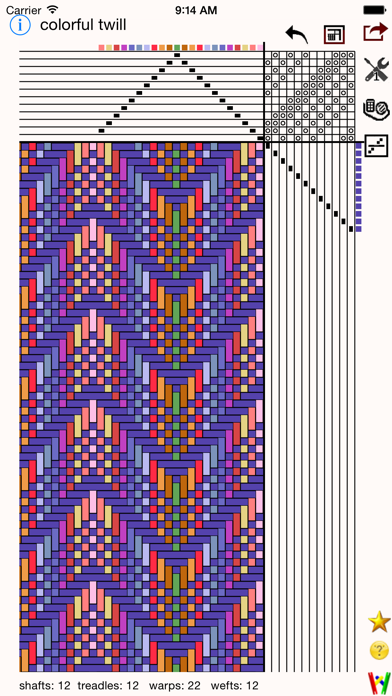
iWeaveiIt is drawdown app for designing hand weaving patterns. It was developed by the same people who did WeaveIt for the PC Windows environment. The single purchase of iWeaveIt will download to both your iPhone and your iPad.
The iWeaveIt app supports Apple’s human interface guidelines with many of Apple's features. It uses gestures and touches for draft manipulation. This makes the program easy to use on the iPhone, iPod and iPad. The many animations give the program pizazz. The result is a fun and enticing program to create and view weaving drafts.
√ Zoom with gestures, double click and two finger click similar to Apple’s Map program.
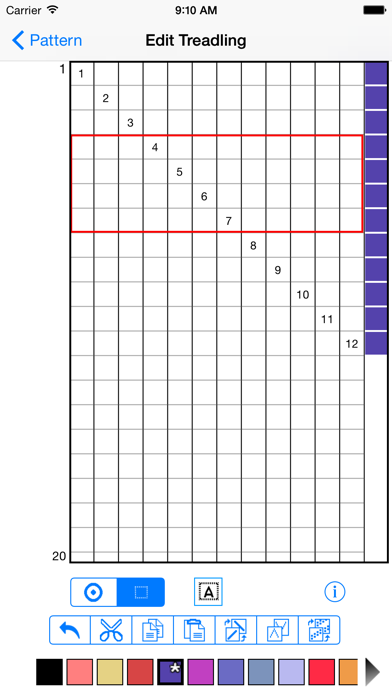
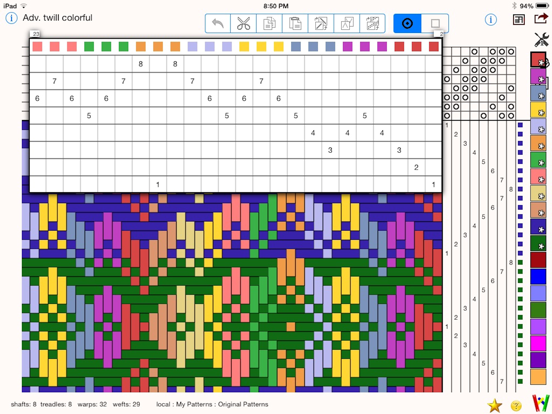
√ Create and edit threading, treadling, and tieup for your drafts with multiple edit functions ( cut, copy, paste, flip, wrap, and change colors).
√ Supports lift plans.
√ Multiple levels of undo are available for editing.
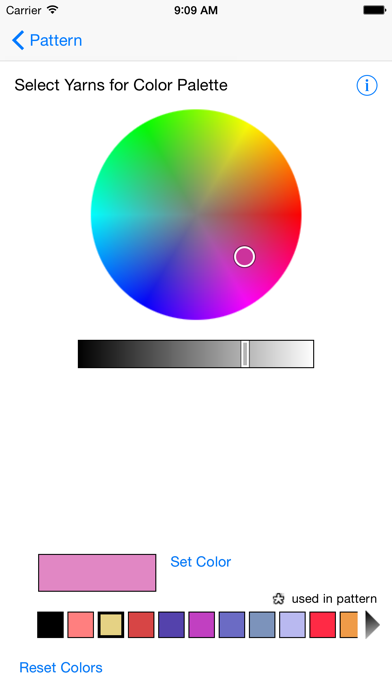
√ Create custom color palettes.
√ Reads and writes WIF files.
√ Export your pattern drafts as WIF files via email, iCloud or save to local storage and transfer with iTunes.
√ Import WIF files into iWeaveIt from email or internet (www.handweaving.net) with only one click. WIF files are recognized for iWeaveIt and load immediately.
√ Sync files using iCloud between all your devices (iPhone, iPod, iPad and Macintosh, Windows PC).
√ Print the draft to your air printer. You do not have to email or transfer your file to another computer.
√ View one repeat of the design or multiple repeats to get a feel for how the whole cloth will look.
Editing allows up to 8 shafts on iPhone and 24 shafts on iPad.
The following modules are now included with the app at original purchase
√ Yarn and Project Management
√ Tracking your threading or treadling while you weave
√ Designer One -- Add Tabby, Turn Drafts, Find Floats,
IWeaveIt App Comments & Reviews
IWeaveIt Positive Reviews
Pretty goodThe cheapest wif editor I have found (other than on line) and pretty good. The warp, tie up, and treadling areas expand to allow editing with fingers (good) but when they do, they hide part of the draw down (depending on zoom) which is very frustrating when you are trying to shift a pattern to get the desired edges. No repeat capability that I could find, which is unsurprising for the price, but is a feature I would gladly pay extra for. A recent update dramatically improved the iCloud file handling. It can now open and modify files anywhere in iCloud. Creating new files is slightly broken: you can save as untitled, but other names cause a file error. For now, use the Files app to rename new files..Version: 5.3.0
Beginner weaver and I love this appI have found using this for weaving has been so helpful! I love seeing how colors interact and getting a visual for what I’m creating. I also love the tracking of threading and treadling, it keeps me on track and accurate. The one thing I have noticed that could be improved is the tracking for the treadling: I often have 2 or more projects going at the same time and when I go to track the treadling for the one saved file, it notices that I am tracking on another file, and if I click “yes” to start on the file I’m currently on, it then erases where I am at on the previous file I was tracking. It would be VERY helpful if it would save where I am at in the treadling and threading for each individual file that I am using concurrently..Version: 5.3.4
Print out the user manual for referenceI found that printing out the user manual was quite helpful ... I know, I know we should all be getting away from printing so much paper, etc. Each page is put into a plastic sleeve and then placed in a 1” binder. I then earmarked particular pages for quick referencing. This is a wonderful tool!.Version: 4.3.1
Nice for editing but poor file systemI am new to weaving but I think I understand this app fairly well. I do like that you can modify so many aspects of the files. Unfortunately you cannot specify where the files are saved so if you have downloaded one from the internet and open, then save it seems to always go into the “on my iPad” folder. So these are not in the iCloud Drive! Do I have to move everything so I can see it on another device? Also some of the files (in the Samples folder) do not show the threading unless you click on it to edit, but still does not show or print it. It would also be nice if you could set defaults, such as treadling or lift, number of shafts, etc. so you don’t have to do this for each wif. If these features are there please let me know how to find them!.Version: 5.0.2
Pretty good except for colorsPretty good app, not entirely intuitive. Looks like most weaving apps are expensive, but for this price having better color options would be nice. I would love to be able to re-arrange the colors on the pallet, and have the ability to put in RGB colors or hex codes, so I could better color match the yarn I have and create shades and tints of a specific color. I would also love a way to save multiple different palettes, besides making a bunch of patterns. I would also appreciate a way to replace colors (en mass) without having to get rid of the previous color- like the paint bucket tool. I would also love a rigid heddle setup option :) But the twill it option is great..Version: 5.4.2
So far so goodI am new to weaving and thus still learning. It would be nice to have the app tally up the number of heddles so that I can check to be sure that I have threaded it correctly. Right now I print out the sheets and tally up the 4 heddles manually. Also it would be nice during the editing mode to scroll with accidentally moving or adding a threading position, this is also true with the treading. Otherwise it has been great to keep tract of the lifting of the shafts while weaving. I am sure I will get better at weaving with this App..Version: 4.3
Home useI bought this program app about a year ago and it is great. When I have any questions I email them from the app. And I always gets reply the same day or first thing the next day. If I had the extra money I would by this program for my Mac. I have also bought all the extras. Things I did on graft paper I no longer have to do. I can go back and look at things I have woven before. Great Application every Weaver should own this. 10 stars I give it. Ted wiz.Version: 3.5.05
Just what I needI’ve been using iWeaveIt for years now and it’s always done pretty much everything I need it to. The in-app purchases are worth it. I use it on my iPad which is perfect to put on my castle while I weave. My only issue is that it seems to lag sometimes, but for all I know, that may be my device..Version: 5.4.1
Love iWeaveItI have been using this app for at least five years and have found this one fits my needs. There are a few other weaving apps available, one of which I purchased and use far less than iWeaveIt. The app works on both of my devices, iPad and MacBook..Version: 5.2.6
Great!Love this app but would like ability to delete projects right from the app and to rename projects from the app..Version: 1.8
⭐️⭐️⭐️⭐️⭐️I’ve been weaving for about a year now, and being able to visualize how changing a draft affects the final look of a project in real time has helped me read drafts much more fluently!.Version: 5.3.1
Great design toolAs a new weaver, this app has helped me understand how weave structures work. I’ve learned so much by playing with the tools that helped me experiment in a way I wouldn’t have done without it. Great product!.Version: 5.3.3
Good solid appWeaveit is s fine app and works well. Will not display wif files that contain more than I believe it’s 12 shafts but for most weavers that’s not an issue..Version: 5.3.1
Love This App!!!I’m a fairly new weaver & was sooo excited to discover this App for my IPad! After trying it out, I purchased the add-on’s also. It is well worth the price! What a wonderful tool to have..Version: 5.0.2
WorksThis app wouldn’t work when I first got my iPad. I uninstalled and reinstalled it, which worked. The app does what it should..Version: 5.0.2
So convenient!With the add-ons, this is pretty complete and very easy to use..Version: 5.2.3
ColorsPlease add more colors do the option to insert rows and columns!.Version: 3.4
A Great Deal and Great (Portable!) FunThis app is so much fun. It does basic draw downs and has a color wheel picker. It is fairly easy to figure out, but I suggest you play with some of the samples and learn how to save and manage files and poke all the icons/do the different things before starting to work on your next real project. You can save as wif files which can be read by the computer programs and you can print. The woman who wrote it is a weaver, so she knows what she is doing. If you want to add on yardage estimators and heddle counters and things like that, there are add on packs for $7 each. Even if you bought everything it would still be a third the price of a computer sized program. It's not so fancy as those, but it does everything I need, it is a sixth the price and I can do it on my iPad! I have had zero problems with crashing or anything like that..Version: 3.0
It does everything!Love love love this app. Just sat here and designed some blankets. Picked my own custom colors, quickly tapped in the threading, let the add-in app add the treading and figure the yardage of each color I will need and how many heddles on each harness I'll be using. Something that was a surprise, I could add the SIZE of each yarn I'm using (my weft is fatter than my warp) and the drawdown compensated for this! Neat! I'm looking forward to planning some bands (yes, you can indicate that you're weaving a warp-faced project) and a rug (yes, just tell the app you are weaving a weft faced project). I love the flexibility of working with the program on my iPad and saving my projects to the cloud, too! Love this app!.Version: 2.3.4
I LOVE THIS!I find this app even more user friendly than my PC version of WeaveIt. I don't know if it's more intuitive but I much prefer to enter my drafts on my iPhone, save & export, then open them on the PC to print...(wait - just found out I can print wirelessly direct from iPhone!) Regardless, awesome job on this app!! I just used the Threading & Treadle Tracker features to thread my heddles then to double-check accuracy when sleying the reed. THIS APP MADE THREADING A FANCY TWILL SO EASY! And now I am actually weaving my project Trompe as Writ and with the Treadle Tracker it is going so quickly. I am so happy with this app! Again... GREAT JOB!.Version: 2.0
Excellent app!I am really so impressed with this app -- I'm actually using it more than my full-featured desktop weaving software. Very easy to use, taking full advantage of the Apple iOS. It does get a tad pricey if you decide to go for the additional add-on features, but it's definitely worth it for the pleasure and convenience of being able to do everything on my iPad. Congratulations -- and than you -- to the developers!.Version: 2.3
App fixed; all is well again!I freaked when the app was in transition, but it's all fixed now .... Something to do with a change to iCloud. The save function still seems a little odd to me, but I can easily find my drafts, and everything else works perfectly, so I'm happy..Version: 3.3
ExcellentThis is one of the most useful weaving tools you can get. In relation to the other weaving applications on the market this one is the most reasonable cost wise. I would love to see more additional features even as an in app purchase..Version: 3.01
Weave itGreat tool for setting up your weaving patterns and keeping track of what you wove. Great tool to have beside you while you are weaving. Almost like having a computer loom. Almost... Would I do without? No way in ****! I love it!.Version: 2.1.3
Invaluable Tool !5 stars again for the upgrade pack. Everything I wanted was included! I use this app all the time... Love the print capabilities and ease of use..Version: 1.5
Terrific customer supportThe new update solves the problem iPad gen 1 users had with saving files. Thank you! I can't wait to start designing and weaving. A beautiful, intuitive program..Version: 2.1.2
I like itI plan on designing on the iPad and finalizing my draft on my pc using the original WeaveIt. No problem storing drafts locally. Since I'm using the pc version for final processing, I don't need to purchase the add on features here..Version: 2.2.2
Excellent mobile design toolI'm using this all this time with my 4/4 Harrisville loom. The counter is great. I can design while on the go, or waiting around..Version: 2.3.3
Great UpdateReally like the icons showing the file. Great response to the problem of crashing. Just a very nice weave design app to use. Very easy to learn.Version: 2.1.1
You won't believe how fun this is!The first time you use it, you will create a new fabric. How fun is that? So easy and so fun! And, don't forget to get the add-on..Version: 1.8
Everything I need and more!This app is very nice and I use it to create my project patterns. I highly recommend it!.Version: 2.2.2
Great productI love this, it's user friendly has a great interface!.Version: 2.1.3
Long needed upgrade to iCloud supportFull disclosure: I am an iOS developer. With the update to iOS 8, Apple changed how iCloud documents are stored. They are now stored in "iCloud Drive" which is a document storage system that will work seamlessly across different platforms including macOS. Unfortunately, Apple did *not* include automatic migration of older files from the "iCloud Documents" system to the "iCloud Drive" system. Consequently, in order to migrate users to the new system, each developer must decide on how to do this. With iWeaveit, the way the developers chose to approach the issue was to mark the old files as read-only. When you save changes to those files, it will *only* save to "WeaveIt Drive" (or locally). Additionally, the devs chose to leave your old files where they were and not move any to the new system without you actively choosing to do so. Likely, this was for performance reasons since if you have a lot of patterns then trying to automatically move them would make the app appear to freeze as it tries to move a lot of data. Unfortunately, this is confusing (and I've docked the app one star for this reason) though I am not sure what a better design would be. Personally, I know how challenging it can be for a small company to balance great performance and an intuitive UI, so I'm not complaining too much. ;) I'm delighted to see that the team is taking a proactive approach to managing this change and I really like how nicely it integrates with the Mac version of the app. (Using iCloud Drive allows me to pull up designs I've been working on while at home and play with them on the bus.) Message to the developers: Please consider adding in a mechanism for users to batch migrate their files and remove them from the older read-only file system. Apple has a history of deciding (somewhat arbitrarily in my opinion) that it will stop supporting older technology and then giving you two months over the summer (when my kids are out of school and I would rather be camping) to support the new version of iOS before all your users upgrade their phones..Version: 3.2.8
AWESOME!I love this app! It works perfectly and has some really nice add on features too..Version: 2.1
AwesomeI would be lost without this awesome app. The treadle tracker is the greatest upgrade also!!.Version: 1.8
Simply GreatEasy and logical to manipulate. Best weaving app. to use on iPhone and iPad. Thank you.Version: 2.1
Outstanding!This is THE app for designing your weaves on the pad. I love it! Great job!.Version: 2.0
Love itThis is my most used app on my iPad! I love it.Version: 2.2.2
Great little weaving programIt has a lot of interesting applications for an ipod app..Version: 1.0
Good app!It is a very handy little app. I see myself using this for every project. I would have given it five stars except that all the useful features were additional in-app purchases adding another $21.00 to the app fee..Version: 2.3.1
Handy for working out pattern ideas on the iPadI've just spent the evening in my comfortable chair "playing" with pattern and colour ideas. What a treat. I must admit I'm glad I have a stylus to make it easier to tap in threading, treadling and colour choices. I'm new to the iPad world and it's wonderful to have a good, portable and affordable weaving program I can use to work out my weaving thoughts. iWeaveIt is a well thought out program for the iPad platform..Version: 1.6
Good trackerThis program isn’t as convenient for design as the weaving programs on pc but you can open a wif file in an email and follow the treading as you weave. Well worth the price.Version: 5.2.1
PerfectThis app is so useful! I totally recommend it, been using it for many years, I find it more more easily accessible than my pc software 😊.Version: 5.0.2
IWeaveitI really enjoy this little weaving program. I have had Fiberworks and was reluctant to change when I got my ipad a few years ago. However, with the upgrades over the past years it has become my favourite go to weaving program. Love it. Mary.Version: 3.2.2
Great AppWow, I love this App. I saw it recently at a Lace weaving workshop I was at recently. I immediately bought it on my iPhone and played with it for a week, when my husband bought me an iPad so I could use it to its fullest..Version: 2.1.3
Love this appThe iWeaveIt app is the best app on my iPad bar none..Version: 2.0
Has potentialI'm new both to weaving and to iWeavIt. I was having a lot of trouble understanding the relationships between the tie-up, the weft and the warp. Using squared paper and colored pencils was consuming way too much time (and paper) to see what effect one small change would have on the pattern. By playing with iWeavIt, it's much easier to experiment and to eventually comprehend the process. I really appreciate the library of drafts provided on the web site; there's some beautiful patterns there. Once I successfully weave something, I'll submit another review. Thanks, folks!.Version: 1.5
IWeaveitHandy for sharing WIF Also for a portable teaching aide.Version: 1.1
Free International Money Transfer 💸Enjoy high maximum transfers into more than 20 currencies while saving up to 90% over local banks! The cheap, fast way to send money abroad. Free transfer up to 500 USD!Version: 6.1.0
What do you think IWeaveIt ios app? Can you share your thoughts and app experiences with other peoples?
Please wait! Facebook comments loading...