Daniel Ricciotti
Timecode+ Monitor & Log Customer Service

- Timecode+ Monitor & Log Customer Service
- Timecode+ Monitor & Log App Comments & Reviews (2026)
- Timecode+ Monitor & Log iPad Images
Drop time-stamped markers while you shoot. Timecode+ is production logging for crews who move fast. One tap creates a marker at the exact timecode, so you never lose track of a good take.
Used by camera operators, DITs, producers, and script supervisors on sets worldwide since 2012.
WHAT IT DOES
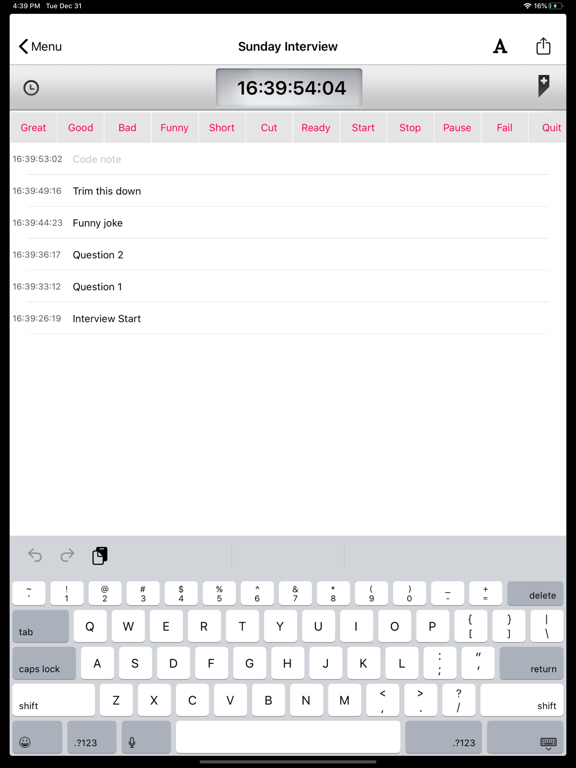
Start a session, name your scene, and tap to mark moments as they happen. Each marker stores the precise timecode. Good takes, mistakes, boom in frame, great performances - whatever your crew needs to remember.
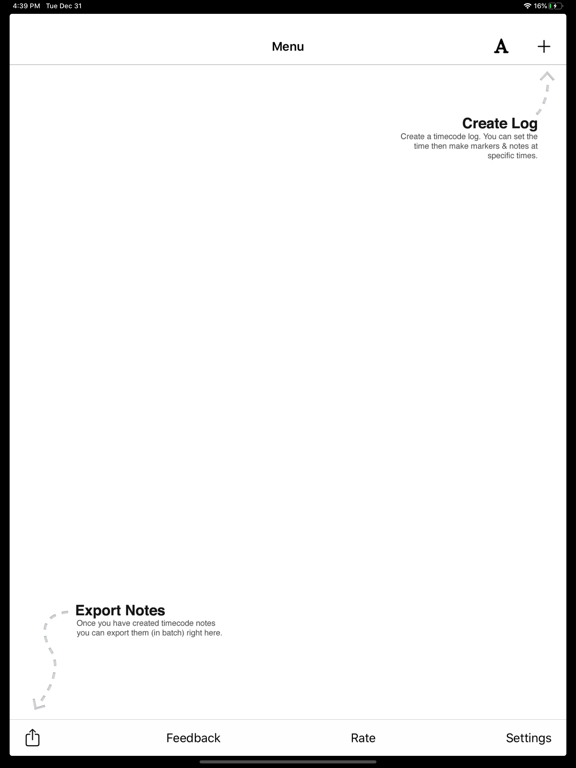
One note holds dozens of markers. When the scene wraps, export your log directly to Final Cut Pro, DaVinci Resolve, Premiere Pro, or Avid.
KEY FEATURES
- One-tap markers with custom Quick Labels
- Time-of-day or manual timecode source
- On-device voice transcription (no internet needed)
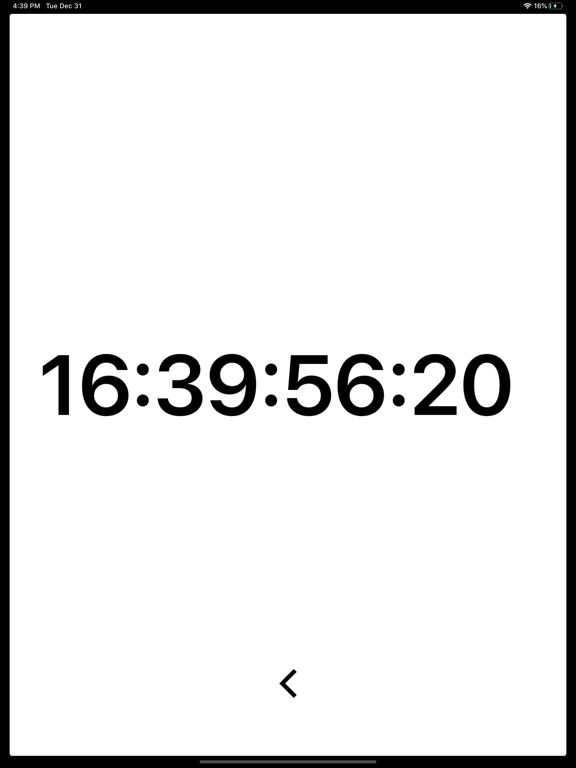
- Full-screen slate display your whole crew can read
- Designed for iOS 26
EXPORT FORMATS
- FCPXML for Final Cut Pro
- EDL for DaVinci Resolve
- Premiere XML for Adobe Premiere Pro
- CSV and TSV for spreadsheets
- Markdown and plain text for sharing
- SRT for subtitles
BUILT FOR THE SET
No accounts. No cloud. No internet required. Everything stays on your device. Open the app, start logging, export when you wrap.
TRUSTED BY PROFESSIONALS
12+ years on the App Store. Used on TV productions, film sets, live events, and corporate shoots around the world.
Questions? [email protected]
More at timecodeplus.com
Timecode+ Monitor & Log App Comments & Reviews
Timecode+ Monitor & Log Positive Reviews
Super useful tool for video production!As a video shooter and editor who hates going through endless talking heads and interviews looking for the best sound bites, this tool will now be a vital part of future projects. My only suggestion would be to include a record run timecode function that can be started and stopped in conjunction with cameras that don't use free run tc. Maybe the shot number can be entered and automatically increment with each start& stop, and notes are grouped under a subject or set up?.Version: 3.1.1
Just what I was looking for!I wanted an app that would allow me to sync the timecode from my camera once and then effortlessly add notes whenever I needed. This does exactly that. It's so easy to use and continues to keep the timecode in sync even when you quit the app. My only problem is that for some reason, even though I initially set the correct timecode and frame rate with my camera, the time slowly went out of sync throughout the day and there's no way to edit all future timecode once you've initially set it. However I'm guessing since no one else has had that issue that it has something to do with my Canon C100. Thank you for saving me tons of time editing!.Version: 2.6.0
User issuesThis application is used by mostly everyone in the industry unfortunately it is not available on a Mac laptop in addition I find that having to text as fast to keep up with show notes often leaves many errors and using voice text it often translates incorrectly which makes it even harder to go back and create show notes trying to remember what you said 300 lines later. Overall it’s the only thing that’s out there so I’m looking to perfect it.Version: 3.1.1
Worked really wellWorked with a Production Company from the UK on a comedy show and it worked perfectly for the show. Easy to use, quick to learn, recommend it. Only thing is, how do you delete older files?.Version: 3.1.1
Super Helpful AppI produce Reality Shows and Documentaries. This app has helped out tremendously in the field, makes end of day hot sheets a breeze. It's so easy to jot a note and it's automatically time stamped Time of day. You can export it out as an excel file which is also helpful. Developer is super friendly and listens to suggestions. The app is only getting better!!.Version: 2.6.0
Best app for logging field notesI’ve been using this app for 5+ years now and it has never let me down. Easy to use, easy to sync, and does exactly what I need it to do. Would highly recommend!.Version: 3.1.1
Gets better with every updateDanny has been listening to comments in the App Store and on email. Timecode+ works great on my Mac an on the iPhone We use this everyday at work on set. Psyched for the next update!.Version: 5.0.0
Great appI work in remote areas like on the Bering Sea shooting Deadliest Catch, Where internet isn't available. It would be super awesome if there was an alternate way to get the notes from iPhone to laptop without needing internet or email..Version: 2.6.0
Love!Love this app! I’ve worked on a show for the last 3 seasons where notes are heavily relied on and this app has helped so much! If there was a desktop version to this, it would really really set it off!! Please make one!.Version: 3.1.1
Attachment Feature Doesn’t WorkUsing the text app is extremely time consuming because you have to copy and paste. I wish the Attachment feature worked on my phone an iPad as it would cut my work load drastically. Open to any suggestions as to how to make this work..Version: 3.1.1
API highly recommend this APP! Makes taking field notes a breeze. If you're an AP or logger you need this app! Only wish there was a desktop version..Version: 2.6.0
Like itI like program, works well for logging but when exporting file to an email, numbers don't export in same order. Always have to switch them around. Also would be helpful if log would export top to bottom, not bottom to top..Version: 1.1.1
Must have!This app is a lifesaver when I am out in the field and logging. I've recommended it to all my producer friends - it is a must have!.Version: 2.6.0
Best timecode log app!!This is super useful if you're and associate producer or assistant camera on reality. Simple UI and quick to use..Version: 2.6.0
So far so goodHave been using it on a reality shoot an so far I am pleased with the results..Version: 2.6.0
Fantastic appI love it. I do wish I could export the log as an SRT so I can translate my notes to captions..Version: 2.6.0
Works great...Captures events along with time of day and frames. Exactly what I needed to record when soccer highlights occurred to simplify editing. Great, simple tool. Thank you, Scott.Version: 2.6.0
Log notes and run a camera.I gaff tape my phone to my tripod and log notes while recording classroom sessions. This app makes it so easy with customizable shortcuts, so I can quickly log in my notes when the speaker is referencing a PowerPoint slide, or good and bad camera and audio moves. Overall, post production goes much quicker when I can reference this app. If I were being picky, I'd say the only annoying thing is that the "new note" button and the "send notes' button are very close to each other. I try to take notes while I'm running camera and I often hit the wrong button when I try to add a new note. It's inconvenient but not the end of the world. Also, I haven't figured out how to set the timecode to something other than 24p. Overall, great app. Thanks!.Version: 1.1.1
Great for videographersThis is a great piece of gear - I use it when I'm filming conferences. While speeches are being given I make a note every time someone says something I think I may use in the edit later on. Then I email it to myself directly from the app and it's waiting on me when I get back to the office to edit. I'm using it right now for something I shot at CES. It is literally saving me hours of time. If youre a shooter editor this apps a great return on investment..Version: 2.0.1
Best yet!I've used several other apps for logging timecode and I really like this one best. Exporting is quick and easy, and I've never had any issues with the markers being out of order. Works great for me! After this week's production I had 40 files... When deleting from my device it would be nice to have a select all option for deleting (and maybe for sending too). Awesome job! Thanks!!.Version: 2.4
Great start... Could be amazing!This is a great tool to use while recording sports. It's exactly what I need. However, there are some features that would put this app over the top for me. Custom "Quick Buttons" For example rather than having to use "Good, great, bad, or funny" we can create our own custom words like, "Goal, save, penalty, hit". On that same note, it'd be great to be able to preset those buttons. Maybe I shoot baseball too? I'd like to choose a set of buttons I've made for "home run, strike out." Just a suggestion!.Version: 1.0
Feature requests-Would love to have access to the quick entry buttons without having to click the log entry button so it's a one button entry. And have the buttons be labelled with the quick entry text. Also 2-4 more quick entry buttons would be great. And frame rate control. And DF or NDF timecode and you'll have a winner..Version: 1.1.1
Great field applicationMakes my job a lot easier in the field. Great app! (Used for major network television shows. Discovery, PBS, Travel Channel etc.).Version: 2.3
Great Tool for the FieldReally strong logging tool for field shoots. Reliable app and easy to use! Developer, Danny, is also extremely helpful and responsive..Version: 2.0.2
GREAT AP!This fantastic ap is terrific for anyone who wants to make a quick and useful log while shooting. You can personalize the quick buttons, set time code without hooking into an external generator and export files as text or TSV to your editor, producer or studio. It’s very handy on your phone or iPad and you can learn it in about 3 minutes. Best ap for logging I’ve come across!.Version: 3.1.1
Best simple time code app!Use this all the time in the studio! No complaints..Version: 2.6.0
AwesomeGreat, useful. Time code is locked solid after your first marker, preventing any change. Very useful!.Version: 2.2
Free International Money Transfer 💸Enjoy high maximum transfers into more than 20 currencies while saving up to 90% over local banks! The cheap, fast way to send money abroad. Free transfer up to 500 USD!Version: 5.4.0
What do you think Timecode+ Monitor & Log ios app? Can you share your thoughts and app experiences with other peoples?
Please wait! Facebook comments loading...