Omz:software
Editorial Customer Service

- Editorial Customer Service
- Editorial App Comments & Reviews (2026)
- Editorial iPhone Images
- Editorial iPad Images
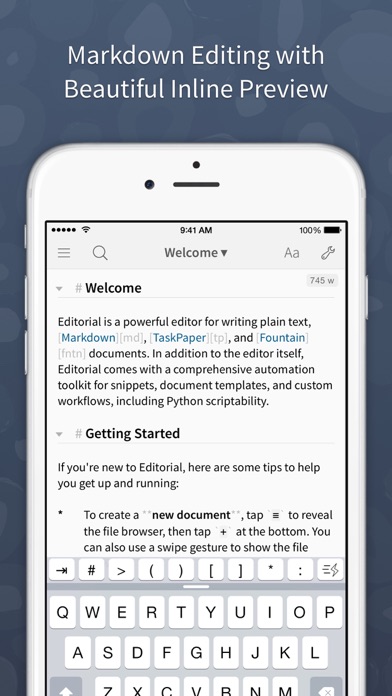
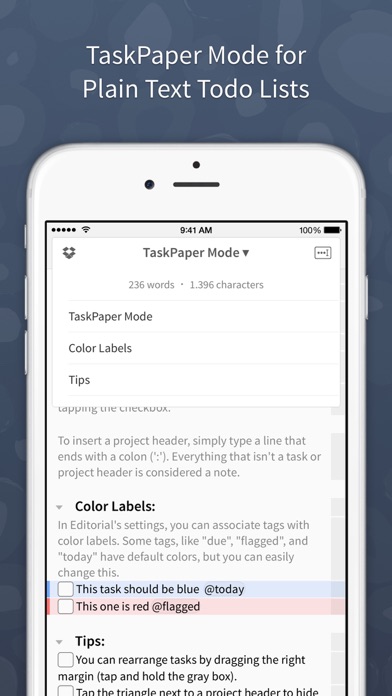
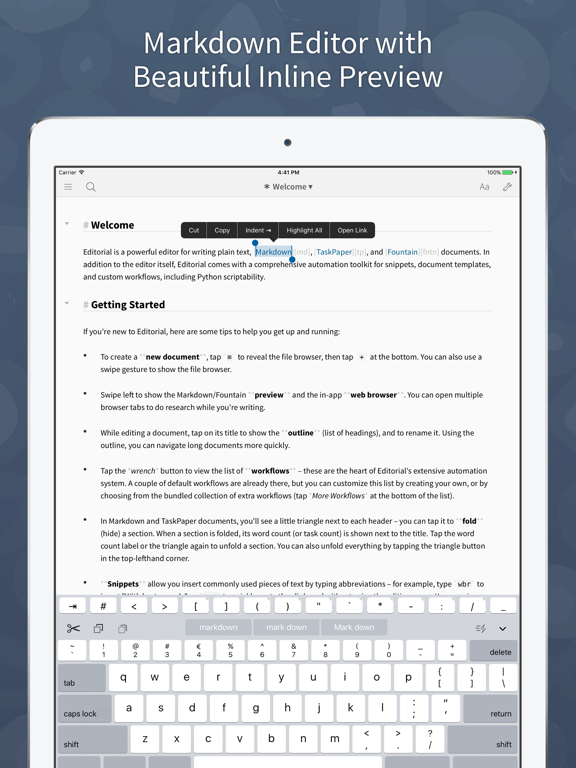
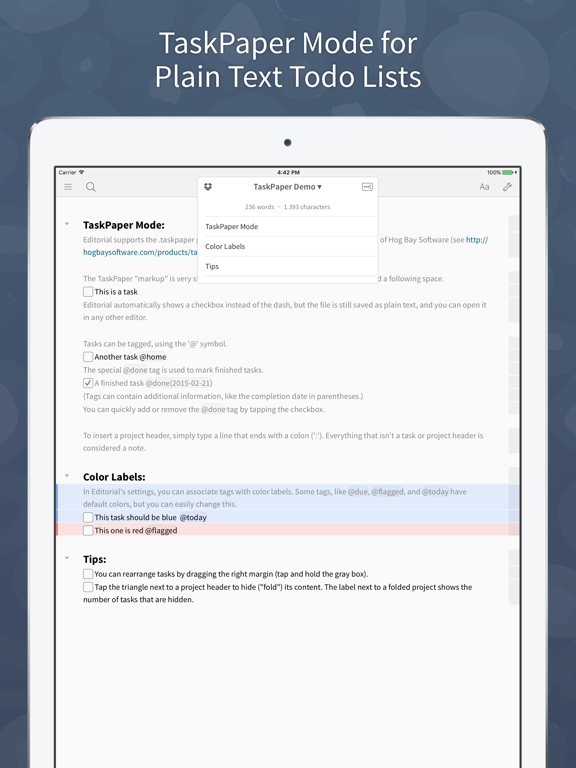
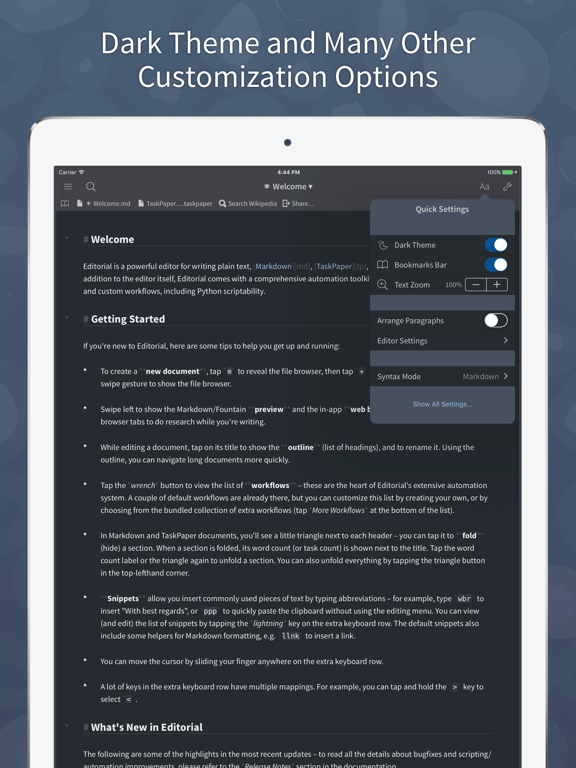
Editorial is a plain text editor for iOS with powerful automation tools and a beautiful inline preview for Markdown, TaskPaper, and Fountain documents.
Features:
* Inline Markdown/Fountain Preview – With Editorial's subtle syntax highlighting, you can see your document's formatting immediately while you're writing. And when you need a full HTML preview, it's just a swipe away.
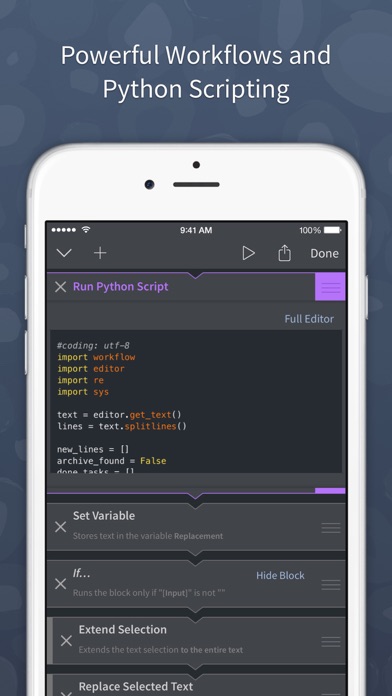
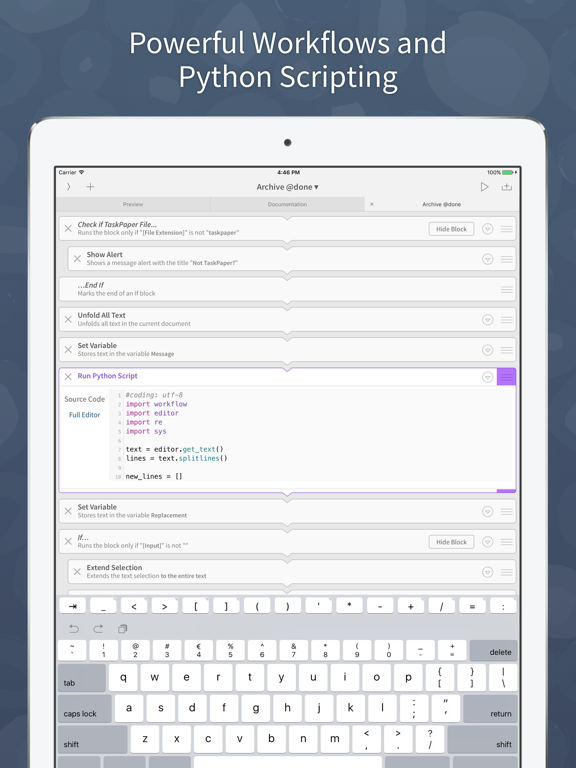
* Extensible with Workflows and Scripts – Select from over 50 text processing actions to create your own workflows for extending Editorial's feature set. For even more advanced automation, you can write Python scripts with an integrated code and UI editor.
* Dropbox Sync – The sync folder is customizable, so you can easily edit your documents with multiple apps.
* Smart Keyboard – The extended keyboard was specifically designed for writing Markdown and includes all the special characters you need. You can also control the cursor with simple swipe gestures.
* Snippets – Quickly insert frequently-used pieces of text by typing abbreviations. Snippets can include dynamic text, e.g. the current date or clipboard contents. TextExpander™ snippets are also supported.
* In-App Browser – If you need to do some quick research while writing, you don't have to leave the app for that. You can even open multiple tabs.
* "Folding" allows you to quickly hide individual sections of your document while you're writing.
*** *** ***
“It would be hard to imagine a better editor, let alone recommend one that actually exists.” — The Verge
“This is it. Editorial sets a new standard for third-party iOS automation, and, for me, there’s no going back.” — Federico Viticci, MacStories
“Editorial just reinvented iOS text editing.” — Merlin Mann
Editorial App Comments & Reviews
Editorial Positive Reviews
Great app, would like to see additional functionalityBeen using the app for some time now. It has a lot of great features and works very well. I especially like the folding headings feature which allows me to hide and show different parts of a document. The only disappointing thing so far on the app is that it does not allow folding subheadings which would be very helpful for organizing more complex documents..Version: 1.3.3
Best markdown editor for iOSThis is my favorite Markdown editor; I have never found another that comes even close—search works amazingly well every time I've had to find something; I love how customizable the typography while you're working is and how you can write your own CSS for preview themes (so few editors do this, and it's so satisfying to not only write in text that pleases me but also use the Markdown previews I create in a form that's most beautiful and useful to me, right in the app); the UI isn't too graphical and clunky, but more like a filesystem, which gives me more space to work; the extra keyboard keys and macros are so useful and easy to use and set up (I use them all the time). I adore this app! I take all my technical notes in it because of how customizable it is, the Multimarkdown support, the TextExpander support, and how sweet it is not having to put up with themes you dislike but know how to fix if only the app would let you. (Thank you so much for updating! I've missed the full functionality of this app, but everything works wonderfully now.).Version: 1.3.4
The Most Powerful Writing AppI use it primarily for note taking in meetings, at conferences, etc and it works amazingly for my workflow. I do agree that the app is ready for some updates, however in my opinion it was 6 years ahead of it's time when it was released. Ole Zorn is a forward-thinking genius and Apple is just beginning to even become close to catching up from the OS side by acquiring Workflow and launching Siri Shortcuts. At this point, the app is still ahead of it's time in some areas, but just barely beginning to fall behind in other areas. It's important to keep in mind that Editorial is primarily geared toward power users with at least a little bit of programming knowledge, the extremely negative reviews are coming from users who were in way over their head when they installed it. If you have a little bit of curiosity, hunger to learn, ans commitment to improving the way you write or take notes, Editorial is for you..Version: 1.3.3
The most flixible & powerful editor I have foundSorry to see this app die. It has been such a huge help for me I wish I could give it six stars. It has performed flawlessly, and though I mainly used it with Markdown on files stored on Dropbox, I was in it almost daily without a single hiccup. That said, it looks like it is no longer maintained, so I am checking out Obsidian. Joplin also appears to be a very capable (and less fiddly) option with good sync. Both are extensible and multi-platform, if like me you are looking for options..Version: 1.3.4
My favorite writing appIt is wonderful to see this maintenance update. I use Editorial on a daily basis as my primary writing program on both my iPhone and iPad, and it is encouraging to see this progress. I have tried dozens of other apps as potential replacements, and none of them come close to the feature set and quality offered by Editorial. There are good apps out there, but I have yet to find one that both hits the key features I want and does so in a refined and elegant manner. I love the way it displays Markdown and Taskpaper, and the folding sections option is exceptional when I am working with larger documents. The ongoing ability to use Dropbox to sync is essential for my use of iOS with a PC, as iCloud struggles to perform well on Windows. Editorial continues to fill a vital need in my work that other apps have been unable to replace, no matter how many I have tried. Really appreciate the work that has gone into this app!.Version: 1.3.4
❤️Love it! A TaskPaper Editor on my iPad!! 😊This app does three valuable things that I've not seen mentioned in the other reviews: First, this app is "File Sharing Enabled," which means I can use apps like iTunes or iMazing to see, grab and transfer any of the files I've written within this app onto my Mac, and vice-versa, through a USB cable or local WiFi. I know a lot of folks like the convenience of automatic synching, but I live in a place where the internet is not always fast or reliable, so doing this without internet is a BIG issue for me. Also, I've never lost any data doing transfers this way. Second, this app still supports iOS 9, which means I can use it on my ancient iPad 2!! Third, this app does a BETTER job with making TaskPaper ToDo lists easy to work with than the original TaskPaper app (on the Mac). And that says a lot!.Version: 1.3.4
Excellent professional level appEditorial is a serious application that has outstanding multiple capacities from simple text editing to Python programming. It is almost the Emacs of iPhones. It's modal interface takes some getting used to. Expect to spend a few hours before going into the field to take notes. You will be rewarded by this well thought out and professional level application..Version: 1.3.3
Finally updated for iOS 13!This wasn't working on my iPhone XR and I ended up paying for another text editor that I didn't like as much. I'm finally back to Editorial and it's working great! The only thing I feel I'm missing is a Favorites list so I can go straight to my most-used text files, but that's a minor inconvenience (and they're usually in the Recent list anyway)..Version: 1.3.4
Great app for writing markdown notesThis is a great app for writing notes in markdown. It syncs well with dropbox, and is a breeze to use on ipad. I use it as a mobile editor for Obsidian, and it does that very well. I really wish there were more keyboard shortcuts and especially wish there were customizable shortcuts. I end up touching the screen too much when typing. Additionally, tiered lists look really weird in the markdown previewer..Version: 1.3.4
Perfectly Designed, Easy to UseI cannot imagine a more beautiful or well-designed application for working with Markdown files on iOS. Editing, viewing, and exporting documents feels perfectly natural. For mobile devices I can recommend no other editor more highly than I can this one..Version: 1.3.4
A lot to like, but what about iCloud Drive?There's a lot to like, and the potential for automation using Python is something I want to explore. Being able to open documents on a Mac without exporting is important to my workflow, and so deeper integration with iCloud Drive as primary storage would be very nice and seems like such an obvious feature in the Apple universe. I don't use Dropbox..Version: 1.3.3
Awesome writing app!Now that it HAS been updated for IOS 10, this is my favorite writing app. I have several workflows that enhance how it works for me. If you like customizing your writing environment with snippets (text substitutions) and workflows (text manipulation scripts), then this editor might be for you. Since being updated, it CAN be used in split screen mode!.Version: 1.3.3
Fantastic but I would like to have more flexibility for shared file locationFantastic but I would like to have more flexibility for shared file location. The only shared file location is Dropbox but I would like to be able to use iCloud for storage as well for cross device synchronization..Version: 1.3.4
Awesome Tool for taskpaperHoly cow this editor is amzing. I am using it for taskpaper and it just works. I can see it replacing a host of other tools I use. I would love an OS X version. My original 2 star review was about lack of iCloud support - still annoyed but dropboxed instead. Have to say, the better tracking of files and deletions in Dropbox is worth the hassle..Version: 1.3.3
Folding HeadersAs far as I know, this is the only app in the App Store that supports folding headers. “What’s that?”, you ask. It means if you use a # Symbol to start a line, you can then tap the symbol to fold the section headed by that line. It essentially turns the app into an outliner. Super powerful. And that’s just one of many impressive features. This is my go to Dropbox editor..Version: 1.3.3
Yipee!Editorial is back and better than ever. Keep the updates coming and add an in-app purchase tip jar if it will help. Thank you so very much for updating. I had switch to AI Writer and while it does some things good, it is missing other things from Editorial..Version: 1.3.4
Perfect TaskPaper editor on iOSI made the move to TaskPaper recently on MacOS and I’ve been searching for a good solution for editing files on iOS. Turns out I bought Editorial some time ago but never really got into it. It’s a fantastic solution for editing TaskPaper files on iOS..Version: 1.3.4
Still the miracle appIgnore the low reviews, they're out of date – yes the updates are infrequent, but the app is in good shape for new phones. Check it out, especially Workflows, there's still nothing like it. Play with your docs, is the best way to describe Editorial..Version: 1.3.4
Amazing, Perfect and Full of SurprisesI keep forgetting all that Editorial is capable of. I forgot about the snippet/text expansion capabilities for inserting current date and time, and after spending all day looking for an affordable option on iOS… I realized, Oh right, Editorial does THAT too!!! Amazing!.Version: 1.3.4
Editorial for workCovers a lot of ground. I tailor as many of my organization (of info) tasks as I can to Editorial. Nicely behaved. What I can’t do easily I bounce via Dropbox to my main (Linux) machine. Easy because everything’s in plain text. All thumbs up!.Version: 1.3.4
Great editor, with one minor annoyanceGreat editor, with Dropbox sync that works like a charm. The only annoyance is that even if it has an auto-capitalization feature, it does not work when creating lists (does not activate when typing ‘* ‘ on a new line)..Version: 1.3.3
It’s good, but...It needs an update to support iOS 14. There is a weird paste dialogue every time I add text. Also there should be native support for the iCloud file structure. It’s seems really weird to use something like Dropbox when iOS and MacOS provide an easy to use structure. I don’t like having to use iTunes to transfer my files back-and-forth..Version: 1.3.4
Does not work with iCloud DriveI'm so bummed. This almost did it. It had what I wanted and it works with my decade old iPad. Like finding a unicorn. BUT I got it to to work with files in my Obsidian folder on iCloud. IT DOES NOT WORK WITH ICLOUD DRIVE! This ONLY works with DropBox and local storage. Drop box login doesn't even work on my old iPad web browser..Version: 1.3.4
Awesome App Except.......lack of support for anything other than Dropbox and local files. It might have made sense back in the day when every cloud provider had to be integrated separately. But nowadays iOS (iPadOS) support a central file repository which integrates with multiple cloud providers including Dropbox and local files. Why not support that?.Version: 1.3.4
My daily driverCouldn’t get my work done nearly as easily without editorial. Would pay 10 times as much for this app. I couldn’t script my way out of a paper bag, yet I bought pythonista only to support the dev..Version: 1.3.3
Workflows are AmazingThis is a solid Markdown editor but what really is amazing is the power that come from workflows. I’m using a workflow to publish blog posts to GitHub Pages (using Working Copy) and it’s incredible how powerful and customisable I can make the workflow..Version: 1.3.3
Amazing appEditorial is an amazing app. It is robust in so many ways that aren't available in other apps. For example, a workflow allows folding and rearranging headings. Please continue to develop this app..Version: 1.3.4
Still good—a pity it's abandoned.No other text editor even comes close to its absolutely transparent Dropbox integration. I'll keep using it until it won't launch any more..Version: 1.3.4
Solid DropBox SyncReally like the way it’s been syncing reliably with DropBox. However, I wish there was an option to sync through iCloud Drive as well..Version: 1.3.4
Only DropboxWould love to use it but unfortunately Dropbox is the only option for file sync. Not even iOS Files is supported.Version: 1.3.4
Powerful and now works with large iPhones!Shortcut keys and scripts make this the most powerful text editor. There are many features I don’t use (like Taskpaper) - this software is deep! A good compliment to Emacs..Version: 1.3.4
Still works… but abandonedStill works! Unfortunately, it is pretty much abandonware..Version: 1.3.4
NiftyI use it and Pythonista to learn and to just write. These apps help the days go by and I'm saying that in the best way possible. Thank you..Version: 1.3.4
Love the features so farCant believe I didnt check out this app sooner.Version: 1.3.4
Still good!Not gonna lie, I’d love an update. But this still has features modern apps don’t have..Version: 1.3.4
Most powerful editor you’ll findEditorial is my main text editor, and its taskpaper support is exceptional..Version: 1.3.3
Thanks for the update!This is one of my most used, most depended on apps. So glad you are continuing active maintenance on it..Version: 1.3.4
The BestThis is, in my opinion, the best Markdown editor available on any platform..Version: 1.3.4
Updated!!SO happy to see an update after 2 years. Thank you!.Version: 1.3.4
🏆 Great App, 🤔 Needs OneDrive IntegrationBest iOS text/Markdown editor I've found, but I'd really like to see integration/sync with OneDrive in addition to Dropbox..Version: 1.3.3
Best mobile phone editing for Markdown**.Version: 1.3.4
Please add Box support!Great app with all the core capabilities and functionality I need, except the ability to link to Box and iCloud! Adding these features would make this a 5 star app!.Version: 1.3.3
IPhone X update pleaseThank you for this great app but it’s been quite a while and it would be nice to see an update for the screen size of iPhone X..Version: 1.3.3
Powerful writing tool !I love this app and use it every day!.Version: 1.3.3
The Best but...One of the best and most functional writing apps. It can do so much. However: - no iCloud sync - no way to sync/backup workflows Adding these feature will make the app 5 stars..Version: 1.3.3
This is a good app, but hasn’t been updated in over a year.This application is a fully featured text editor with many powerful workflow features. Unfortunately, it hasn’t seen an update in a long time. In particular, it hasn’t been updated for the iPhone X/XS/Max line of devices..Version: 1.3.3
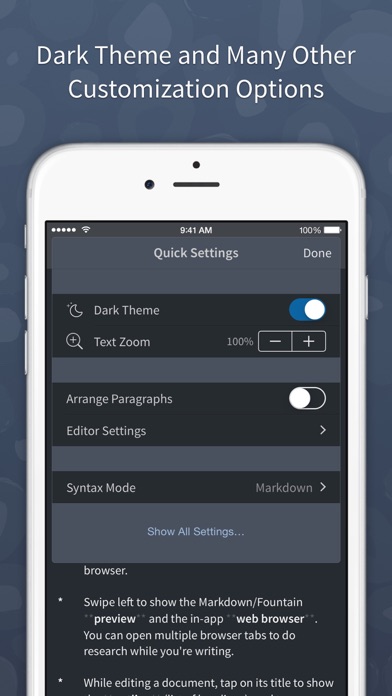
Wish there is a True dark modeThen it’s be perfect.Version: 1.3.4
No updates - was great appThis was a fantastic app, but sadly is no longer maintained. iCloud sync seems very unlikely to ever happen. So sad. The foundation and idea for this app was excellent. Still hoping for the developer to reconsider....Version: 1.3.4
Beautiful and feature-rich text-editing appThis app is a delightful experience as a writing environment. It was just updated this month..Version: 1.3.4
Surprised it’s relatively unknownThis app is nicely designed with so many features. I had a bunch of writing apps, and many defunct now, I’m glad this one is still useable. Nice support for script writing and fountain format. Syncs nicely to Dropbox. I see some have issues with it no being updated. That’s a shame. I’m using on an old device so maybe I have less issues for now. Hope it keeps getting developed!.Version: 1.3.3
Outstanding text editorThe best text editor I have found so far for a touch platform. Treats basic file formats (plain text, markdown, taskpaper) in a sensible way, provides intuitive gestures and controls for different text manipulations, and is highly extensible via a Python API. The dropbox synching mechanism works flawlessly. I hope the developer keeps updating this elegant piece of software..Version: 1.3.3
Lots of Potential...This app would be 5 stars if it had more integration. The option to send text from safari straight to the app is a big one for me personally as well as the others mentioned in previous reviews. Too bad it hasn't been updated in a while. Will have to look for alternatives..Version: 1.3.3
Dropbox BugsGood app, but its Dropbox sync is unreliable. I’ve twice lost work because of this. Contacted support (the first time) but the thread was dropped. Be very careful with this; make sure you have frequent backups..Version: 1.3.3
Fantastic!Only needs two things -- multitasking and better Python script editing. Other than that it's close to perfect. Love it's markdown and taskpaper implementations -- use them everyday..Version: 1.2.1
Great Great app. Need more like this!!!Great powerful professional app. We need more like this!!.Version: 1.3.1
Beastly goodnessPowerful text editor..Version: 1.3
Almost perfectYet, would it be possible to * inform continuously (maybe via an icon) about the Dropbox sync status? * include mathjax rendering in the preview? * adapt the extended keyboard to the iPad's split keyboard view? tbc.Version: 1.2.1
On a completely different level than other editorsThe workflow and TaskPaper modes alone raise it to a high level. Everything else takes it to the clouds. I'd rated it five stars on v1.0 for iPad ... Now 1.1 completely surpasses all expectations! The best text editor just got better. 1.1.1 adds some "niceities" to TaskPaper mode ... Excellent as this is now my second most used app!.Version: 1.2.1
A MileStone.I have get hundreds of apps since 2010. Most where fine, but none reached the level of refinement and the touch of perfection that Editorial has to offer. As a scientist and a programmer, i have recently discovered the genius underlyng Python and i must admit that the power of such a language coupled with the inovative approch of Editorial result in a solution that propulse the mobile software industry far above. I have never write a single review before, for as most of us, i think only extraordinary worth a mention. But let me tell you this : should i have to keep a single app on those devices, that would be Editorial for shure as long as i can freely expand it through Python. It just feels like being back on track with a text editor and a programming environement that fit in my pocket. I can just say congratulation and thank you for the great quality and creativity of your work. Keep it up!.Version: 1.2.1
One of the best apps aroundTop notch app. Best in class as a plaintext editor, and can also be extended by all sorts of workflows. One of my top three most used apps..Version: 1.2.1
Crashing after today's updateLove the app but I can't even open it after today's update. Looking forward to new update. Thx.Version: 1.2
Still stellarWith this update (1.2) Editorial continues its growth into the best and most intelligent text processing app. Useful and well-done features added to an already superb app make this app the best choice for text and notes. Well done!.Version: 1.2
Nice update!Great app! Loved it when it was iPad only so I could work on my projects when at home; now that it's Universal, I can enjoy working while on the go, without needing 2 hands..Version: 1.1
AwesomeWhat a great and fun app, It lets you take Python on the iPad to new levels..Version: 1.1.1
Markdown Preview is beautifulAmong equivalents,I found the Editorial has the best markdown preview effect..Version: 1.1.1
Love it.Very cleverly done. Will not disappoint..Version: 1.1.1
Giving your iPad some real powerSimply amazing, a text editor for the post PC world. This app should cost more..Version: 1.1
Excellent appI absolutely love Editorial. It's fantastic for writing both for the web and for notes, and the Workflow integration is helpful beyond compare!.Version: 1.1
No Title Can Describe ThisI would easily pay $29.99 for an app of this grade. Easily cuts my editing process in half..Version: 1.0
Wow.This changes everything. Go read Federico Viticci's review on MacStories for the full rundown and then come back here and buy this app..Version: 1.0
Fantastic toolGreat extensible writing and automation tool. Expertly designed. Love it!.Version: 1.0
Free International Money Transfer 💸Enjoy high maximum transfers into more than 20 currencies while saving up to 90% over local banks! The cheap, fast way to send money abroad. Free transfer up to 500 USD!Version: 1.3.4