Davy Wentzler
Audio Evolution Mobile Studio Customer Service

- Audio Evolution Mobile Studio Customer Service
- Audio Evolution Mobile Studio App Comments & Reviews (2026)
- Audio Evolution Mobile Studio iPhone Images
- Audio Evolution Mobile Studio iPad Images
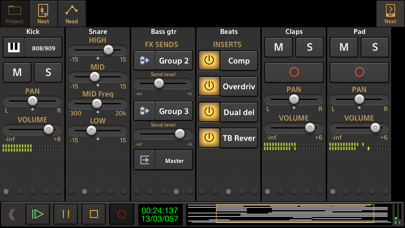
Record your ideas on the go or create entire music productions from scratch, we'll leave it up to you! This app is a portable multitrack audio and MIDI recording studio featuring virtual instruments, pitch and time editing of vocals (*), unlimited undo/redo, mixing, real-time effects, automation and much more!
Features:
• Multitrack audio recording / playback
• MIDI sequencing with piano roll editor and MPE support
• Drum pattern editor (including triplets, use your own samples and effects chain per drum sound)
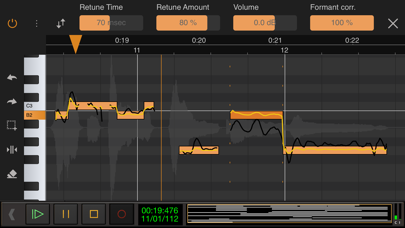
• Automatically or manually tune your vocals with Vocal Tune Studio (*) : an editor to correct pitch and time of vocal recordings and the timing of any audio material. It features retune time, retune amount, volume and formant correction per note as well as vibrato controls.
• Add tempo and time signature changes including gradual tempo change
• Real-time effects including: chorus, compressor, delay, dual delay, reverse delay, reverb, flanger, noise gate and many more!
• Flexible effect routing: an unlimited number of effects can be placed on a grid, featuring parallel effect paths.
• Assign LFO's to effect parameters or lock parameters to tempo
• Sidechain on the compressor effects
• Inter-app audio effects and instruments
• AudioBus support (including AudioBus remote)
• Audio Unit instruments, effects and AU MIDI
• Multi-output support for Audio Unit instruments
• Virtual analog synthesizer 'Evolution One' featuring morphing oscillators, FM, Sub Osc, Noise, Portamento, 2 LFO's that can be routed to 12 targets, Moog type filtering, effects, ARP, sequencer and more!
• Soundfont (sf2/sf3/sfz) support: free GS/GM Soundfont included, add more from the Soundfont shop or from your own collection
• Non-linear editing with move, trim, split, cut/copy/paste, remove, cross-fade, time-stretching etc. with full undo/redo
• Virtual instruments (comes with free instruments and more instrument packs to download)
• Track freezing to save CPU usage
• Clip volume and fade points
• Loop playback
• Automation of mixer and effect parameters
• Mix-down to WAV, AIFF and ALAC
• Metronome
• Ghost track display on the piano roll
• MIDI clock sync
• MIDI remote control
• Punch in/out
• Unlimited number of tracks and groups
• Offline effects: fade in/out, normalize, reverse, pitch shift, time stretching
• Several grid options for aligning your samples (with tempo and time signature settings)
• Export to other DAW's by rendering all tracks to separate audio files (stems)
• Media server to access your files easily from a desktop computer
• Multi-core support
• AudioShare support
• Trackpad support
• Cloud sync using Google Drive and Dropbox
In short: a complete portable multitrack music studio that will replace your fourtrack recorder or tape machine!
(*) The following in-app purchases are available to expand your studio:
• ToneBoosters effect pack 1 (Barricade, DeEsser, Gate, Reverb)
• ToneBoosters EQ with frequency analyzer
• ToneBoosters Compressor
• ToneBoosters Ferox
• ToneBoosters V4 Barricade
• ToneBoosters V4 BitJuggler
• ToneBoosters V4 Compressor
• ToneBoosters V4 Enhancer
• ToneBoosters V4 EQ
• ToneBoosters V4 MBC (multi-band compressor)
• ToneBoosters V4 ReelBus
• ToneBoosters V4 Reverb
• ToneBoosters V4 Sibilance
• ToneBoosters V4 Voice Pitcher
• Vocal Tune with two-voice harmonizer and Vocal Tune PRO, both real-time vocal pitch correction effects
• Vocal Tune Studio: auto tune your vocals, pitch and time correction
• Soundfont instrument packs
• Loop packs from Function Loops
The 'PRO' in-app purchase is only for people who downloaded version 1.x in the past and is not applicable to version 2.0 or higher.
If you have any suggestions, questions or want to report a bug, please contact us! We'll gladly solve any problem!
Facebook: https://www.facebook.com/AudioEvolutionMobile
Forum: https://www.extreamsd.com/forum
Audio Evolution Mobile Studio App Comments & Reviews
Audio Evolution Mobile Studio Positive Reviews
Recorded 48 tracks from my Midas M32r!Great DAW apP PLEASE UPDATE THE APP TO BE ABLE TO RECORD TO EXTERNAL STORAGE!!!!! With IOS 17. Great for backup recordings to my iPad or iPhone off my M32r so its worth the price just for that, and able to get files off to my Mac Pro easily unlike N-track where you have to jump through hoops to get them off. That being said N track has easily selectable channel outputs when connected to my board, with AE you have to setup mix buses to output each track to separate channels. N track creates them for you when you select an output. N track also can handle a lot more AU synths. I really like AE so hoping they keep improving on it and for the price it can’t be beat..Version: 5.9.5
I have all of the iOS DAWs and this one is #1Like the title says, I have all the iOS DAWs including Auria Pro, Cubasis 2, GarageBand, Nano Studio 2......etc, etc. I have used Auria Pro and Cubasis 2 as my main workhorses. Auria Pro for its bussing, Cubasis 2 because of its much better work flow. By sheer accident or by divine fate I stumbled upon this DAW and at first I almost passed it by. With the puny $9 price point what could it possibly offer that I already had? Well, for whatever reason I decided to download it. My two biggest gripes about Cubasis are the lack of busses and lack of markers, which is something I use quite a bit of. Auria Pro has the busses but I just cannot get into the workflow of that software. Audio Evolution has it all and more! The workflow is seamless AND it covers busses and markers. I think the developers have lost their mind on the price point! If you are looking for an iOS DAW or are just tired of all the work arounds required by the others then I seriously suggest giving Audio Evolution a try. THIS is what I’ve been looking for all along! I’ve been an iOS musician since 2014 and a recording musician for over 35 years, so I’ve had some experience with these things. I finally feel like my search for an iOS DAW is over..Version: 2.1.9
Deluxe features Obsolete file handingThere are levels of control this app offers that are deluxe and not found in competitors and I wish I could love it more than Cubasis3 , even though overall feels a bit stiff workflow wise. There is no simple browser mode to gain access to all save or share locations now so abundant since Apple granted easy usb options for iPhones and iPads running ‘modern’ iOS versions. I should choose where I want a saved file to end up, on my device, external drive, or micro sdxc… without going online/cloud then download back to device if your cloud server allows it…other than to photos app only option. Adds way too many limitations…a “Cold War” artefact from the time Apple made it impossible to use mobile devices for creative work by limiting access to that work from anywhere but the app it was originally recorded in. Also, high on resources use, admittedly I was using Audio Evolution on an old iPhone 8+ but I got a lot more tracks working with competitors who offer a more contemporary although (appropriately) also more expensive app..Version: 5.0.6
Intuitive and transparentI am mostly using this daw to mix sound files to make ambient fixed media pieces. I have used most other ios daws and find this app to be quick, transparent, fast and doesn’t get in the way. If a bit quirky at first, I adapted to it quickly and it is now my primary ios daw. There is something organic about using my fingers to manipulate the file instead of a mouse but then transfer to the desktop for a more robust computer environment or quickly store files in AudioShare. I am not playing midi instruments and recording voices ( maybe a bit) as many others; so, maybe I can’t entirely speak to this. But this seems like it would be quick and great for this and the tone boosters mastering purchases addons are reasonable and excellent. The purchase price of the app is much cheaper than others and I prefer it regardless of price..Version: 3.0.0
Capable but outdated dawJumped into this daw because of the features that have quickly been added like Vocal Tune Studio, full track pad support and iOS clipboard support. However, it didn’t take long to realize how outdated the user interface is. This daw feels like it was designed for a phone but wasn’t imagined to take advantage of an iPads bigger screen. We should have a proper mixer icon and have a mixer/playlist view and not have to flip through pages to get to the mixer then next again to get to groups and master track then next again to get back to the playlist view. It’s very unintuitive. There’s no way of having multiple effects on screen like AUM and are forced to have effects full screen. This daw lacks 32 bit float rendering and multi core rendering..Version: 5.5.8
Doesn’t live up to it’s potential.I’m upset with what’s happening here. this app, it’s not a full Daw, though it has the potential to be and be better than most. I gave you my money and I expect what you say it does to be on the money for my money. I know a thing or two about midi applications and for the price, the outside looks good, but the engine needs work. I have a list of things that could make it a better product, but what you have could be cost efficient, If made to run smoother. I could scream I want my money back or I can say, but fix it and make it worth every cent. right now there is a growing mobile music community and I am part of it. this is not a hobby for me. don’t ad on what the others have. Fix what’s already there!.Version: 4.3.5
Easy to use, but does not work with AltiSpaceI like how quickly I can get tracks down with the software, and really like the operational flow. And since the recent update fixed the prior issue with AltiSpace, this is now my go-to program. I also own Auria and GarageBand, but using this, once you get the hang of it, is cassette deck simple and fast, and has most if not all of the horsepower of Auria, but hidden under the hood, just where I want it. From the the time the notion hits to record a song, to the time it is being recorded is measured in seconds, including plugging in a mic, with great audio quality and plenty of built in effects. Great job!.Version: 1.2.7
Great for what it is!Seeing a lot of negative reviews for this nitpicking at what it doesn't include at the base price of FREE. I just wanted something that I could route all of my audiobus 3 channels into that would actually treat them as multi tracks. I already have some great apps on my laptop so I didn't want to drop another $20-$40 just for a multi track app on iPad. This met my basic requirements and gave me a ton more. The only feature requests at this point would be a way to view the whole mixer as a separate window from the tracks as well as view track labels when recording..Version: 1.1.8
Wats good in it ?8 99 and dose you verry much, other 50 dollar programs are not that much better this app is light and fest. i also find the marker option something what i dont see elsewhere, i dont know why people are complaining it dose the jub gr8. now the only thing i need is the option of exporting midi 0 not just midi 1 what evry app is probably using, so i can use it to make all my korg programs on it because of the marker option. also if the tracks in editing mode can be a little nicer so i can see every track before editing. but besides that its 1of the best thanks.Version: 2.2.9
This is The iOS DAW to buyAfter spending a downright embarrassing amount of money on other iOS DAWs that never seem to get it quite right, I am so pleased that I have found Audio Evolution mobile. This app is a real gem and if you’re looking for a DAW I highly recommend that you start with this one. Then you can spend the rest of your time making music instead of falling into the endless cycle of searching for a workable DAW, spending money and getting frustrated. And guess what, this developer actually answers questions too! Promptly even!.Version: 2.0.9
Great, but...I think this is a great app, but what’s holding it back from getting a five stars is that whenever I import certain midi files, everything is then loaded into one single track. All of the notes from the multiple different tracks, for some reason, are put into one single track. Even though whenever I import those same midi files into other apps, they work fine, everything is loaded into multiple different tracks. I don’t why this happens but I hope this gets fixed soon..Version: 4.2.0
DecentDropping in samples and recording works well. Have not been able to use au plugins successfully. Wanted to buy the audio interface but not sure anymore.Version: 3.0.3
Wow a wonderful surprise!!!It’s like Auria pro meets Cubasis meets MTS meets NanoStudio 2 mixed them all together in a bowl and this is what you get. You can’t beat the price which is a game changer for me. Sure it may not have all the features but not far from it. So far no issues and seems very stable. There is no reason to not try this one. AEM please keep up the good work. I’ll be using this one a lot. I think this is the Daw to buy I have all the iOS Daws and this one is my go to. This one just makes sense and can wrap my head around very easily..Version: 4.0.1
This is my Acid Pro for iPhone!This is absolutely in a class by itself! You’ve made life easier because I no longer need to drag out my laptop. I’ve tried the others and all Daws have something to offer but for editing I find nothing more precise. I am impressed with it’s ease of operation. Once you do learn the program editing becomes breeze. AE is now my Acid Pro for my iPhone, I have it installed on both my iPhone and iPad but I mainly use my iPhone! A Truly Excellent App!.Version: 2.1.4
Cubasis 3 making me crazy..then found this hidden gemCubasis crazy dsp spiking..got me looking elsewhere. I’m a professional musician and have used many DAW’s , So this app is really nice to find on ios , as I can intuitively find all the features I’m accustomed too on the desktop workstations. *I really hope the developer continues to improve on it. Some suggestions : would be to include a search for Auv3 plugins Some work on the midi editing function .. *A feature like , a live looping function, to set tempo organically and overdub..or a seemless integration with loopy pro . Features like that will get people interested..and bring this awesome ios daw into the light 💎🎧🎼.Version: 5.0.6
It's a KeeperAs a new digital music maker I've been challenged to understand the technical aspects enough to even evaluate apps. AEM has been on my iPad all along, and I keep coming back to it. The developer has been incredibly responsive and helpful while I struggled to connect a synth app to Audio Evolution. I'm psyched to continue this journey and highly recommend this app..Version: 2.3.2
Don’t buy anything elseIve used Cubasis 2 & 3, Auria Pro, n-Track.. this is closest to the daw’s i have on my studio computer. Cubase & Studio One. I’m a professional songwriter & producer in Nashville. I’m amazed the capabilities of this app from recording to editing to automation. And to add to that Davy’s product support is second to none... so there you have it.Version: 4.2.0
Solid Time Line DAWThe app works well and has all of the features you needed in such a DAW. The developer is responsive to user feedback and constantly seems to refine the app. The piano roll and automation work well including the parameters for AUv3 apps. Integrated Files app functionality. You can output stems and import SF2 soundfonts. One of the best values for apps in this category..Version: 2.0.8
Awesome DawI never leave reviews. I’ve used many Daws both on desktop and mobile. This is by far one of the best. It does require some of the paid plugins to really tweak but it does a fantastic job. Certainly going to become a tool I use a lot. Please keep developing for this Daw. Thanks.Version: 5.9.5
Overall I give 3 stars !I love this daw! Has so many great features but I wish it had a better piano roll. Features like a brush tool where you can paint in hihats or a simple 2 step fill feature for the drum track would help workflow a ton! Crashes sometimes but for the price it’s great… hopefully you guys add some plugins like a sampler and not just sound kits.Version: 6.5.1
UpdateI wrote a review over a year ago but THIS app has become my go-to iOS DAW. It’s so slick and well laid out that it beats a lot of the other options by a mile. And it’s not a toy like some other apps. He updates this constantly. All the changes are useful. Kudos..Version: 6.8.0
SurpriseNot bad DAW. But with surprise. In the description of the application there is no information that I buy trial version with three tracks remaining (hilarious for DAW) About one month I purchased this product, I was happy and started with my project. After some time, three tracks remained from my project and there demand appeared to pay an additional $8 to get unlimited tracks. Its not a money and I paid. But my work got lost. Plus some issue with note length editing in piano roll. So not 5, but about 3.5 , almost 4.Version: 6.5.1
Benefit of the doubtThis app has so much potential. I really do hope that they continue to update and improve it. I even tried to buy the full version but I guess there’s some kind of bug and it’s interfering with my ability to do so.Version: 1.2.6
Convenient, well-built AppI recorded and arranged an entire 13 song project using this app. Though I've began using a desktop since then, I still upload all vocals into the app to do initial EQ before mixing and mastering..Version: 4.3.1
I don’t even know where to start..Affordable, Easy to learn Base plug ins, Sick sounding upgrades. I’d personally vouch for audio evolution anywhere, On the new iPhone 13, you can pre master your tracks in your car using this app, And take them back for fold over or leave them as is, Remarkable to say the least ✍️ Been using it since my first year of making music so I might be being a little biased, However, I. Do. Not. Care. Best app on the market hands down 📖.Version: 5.0.6
Great app.....butLove this app. I’ve been a professional mix engineer for nearly 30 years and have an incredible studio. This app is amazing for on the go stuff between studios and sessions. One thing.... is sidechain coming to the iOS version? Great work so far..Version: 2.3.4
This app is probably the best multitrack recording app EVER if you have a tablet or phone!I might suggest adding the ability to press and hold onto the volume and typing the number of decibels you want in order to balance the music out..Version: 2.1.7
Top tier daw for 10 bucks.This DAW will hold it's own, and thensome, with rhe "other" more expensive ones. The manual has to be one of the top 10 best I have ever read (and I'm a 58 yr old IT guy). Absolutely fantastic job dev team..Version: 6.0.0
The bestA lot more intuitive than logic when when it comes down to mixing.Version: 6.0.0
Awesome update!The devs of this app are working to get this program evolving for sure! Getting better and better. Thanks!.Version: 6.7.6
BugsHad a layout bug where the image of the app looks grainy. Improvements to be made in that area.Version: 2.1.9
Get the AIThey have this AI it’s like 5 minutes long I think it would be neat I’ll buy it. Perfect app been using it for a thousand years winkwink.Version: 6.0.0
Audio evaluation is fireI’ve used this app and it works just as good as pro tools to me. I had to give it 5 starts, and I’ve been doing music for over 20yrs..Version: 1.2.6
I LOVE THIS BUT ?Like I said this is one of the best editors in the App Store, just one thing….could you add a snap to clip function so the clips can lock to one another, then you will be Numero UNO 4 sure‼️.Version: 6.9.6
CoolNeeds more microphone options and I want to connect my audio interface to it to use my microphone of choice.Version: 2.0.6
AmazingOne of the best purchase I’ve ever made in the Alp store!!! Over 10 years later I’m super happy I did!!!.Version: 6.9.8
AEMSA FREE DAW for your mobile device. Easy to use and understand Fast, no latency, and Record within the apps daw. Best mobile mobile app yet. I'm impressed. Thanks!.Version: 1.2.2
Always great until nowGetting error message all the time. Never had this all these years..Version: 7.1.9
Good stuffYou won’t find any better on iOS then this I highly recommend this the end -Ron Swanson.Version: 2.1.9
Somewhat stableCrashes randomly when using audio units. It is good for audio tracks and automation. Midi and software instruments are mostly unusable for me because of frequent stuck notes..Version: 2.2.1
Audio Evolution MobileFeature packed and stable. Patiently waiting for version 3 upgrade to be released for iOS....Version: 2.3.4
WowThe only thing I can ask for is dark mode.Version: 4.0.0
Amazing valueAnd great design. I had no idea there were internal Fx on board! This thing is amazing. Love it.Version: 4.3.0
My ReviewIt is a great app but I need to know how do you sync Audio.Version: 4.1.0
Super Great DAWDoes everything I need. My only request is to add more IAPs for Drum parts and fills..Version: 6.9.8
FreezingKeeps freezing everytime I press undo.Version: 6.8.0
Phenomenal Developer!When I recently picked up this app, I had an issue using my midi keyboard. I emailed the developer (Davy), and he answered almost right away. We weren’t able to find an answer after trying 2 or 3 things. Davy actually went to the length of purchasing the same midi keyboard I have so he could get to the bottom of the problem, which he did. Absolutely unbelievable customer service! As for the app itself, one need only look at the constant updates and upgrades. Great, professional IOS DAW at a great price. Nice alternative to some of the others..Version: 5.5.8
ExcellentTrès simple a prendre en main, plus simple que GarageBand. Excellent soutient du développeur..Version: 2.1.9
Free International Money Transfer 💸Enjoy high maximum transfers into more than 20 currencies while saving up to 90% over local banks! The cheap, fast way to send money abroad. Free transfer up to 500 USD!Version: 7.2.4