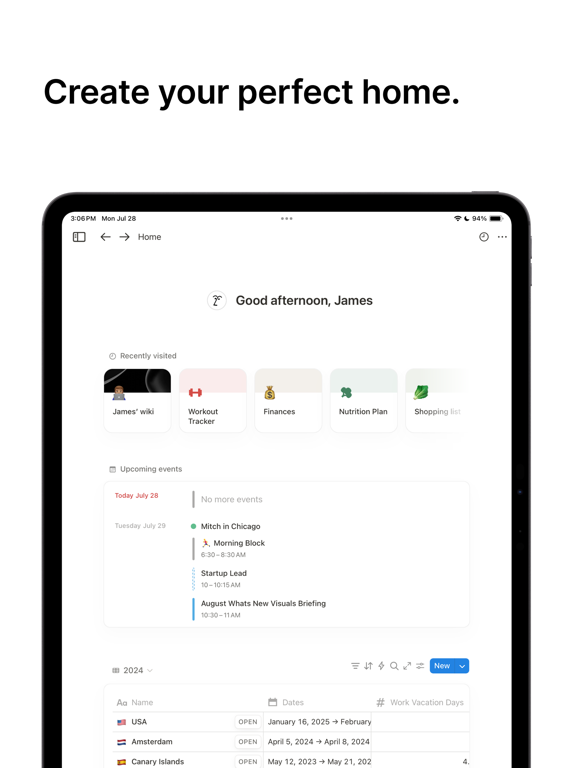
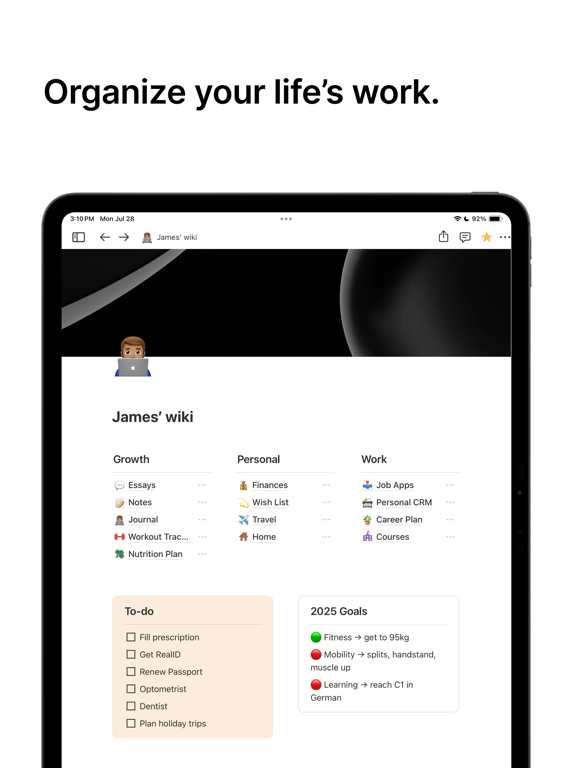
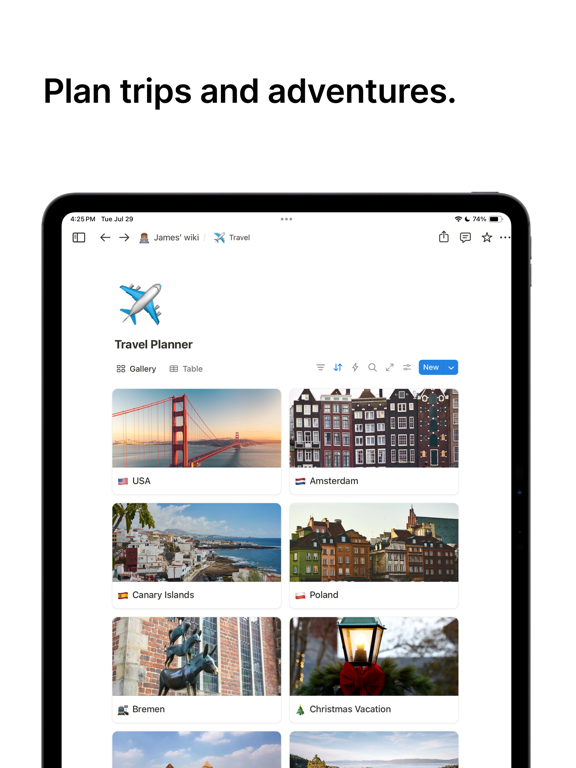
Notion is an AI-powered all-in-one workspace that helps individuals and teams write notes, manage tasks, organize projects, and collaborate in one place. Whether you’re tracking personal to-do lists, writing and organizing class notes, or managing projects with a team, Notion helps users plan work, stay organized, and achieve goals.
"AI's everything app" — Forbes
Notion is a productivity app where you can write, plan, and organize your notes, projects, tasks and more. Ask Notion AI about project updates, upcoming tasks, and suggestions for a more streamlined workflow.
Simplify writing notes, project and task management, and collaboration. Whether for personal, student or professional use, Notion scales to meet your individual needs with customization tools for everyone.
NEW features:
• AI Meeting Notes: Perfect meeting memory. Your notetaker catches every detail and delivers actionable summaries, right where you work.
• Maps View: Turn databases into interactive maps. Use the new Place property to pin restaurants, trips, offices, clients, and more.
FREE FOR PERSONAL USE
Individuals manage day-to-day tasks, notes, and personal organization.
• Create as many notes, docs, and content as you want.
• Use one of thousands of templates to get started.
FREE TO TRY WITH YOUR TEAM
Teams run on Notion every day, from next-generation startups to established enterprises.
• Import Google Docs, PDFs, and other content types easily to get started
• Write and organize meeting notes, or transcribe with AI.
• Collaboration and team work at your fingertips, in one connected workspace.
• Connect tools like Figma, Slack, and GitHub to Notion.
FREE FOR STUDENTS
Students organize notes, assignments, and study plans in one place.
• Your study planner, class notes, to do lists and more, your way. Loved by millions of students worldwide.
• Get organized for your best school year yet with beautiful, customizable templates created by students, for students.
NOTES & DOCS
Communication is made efficient with Notion's flexible building blocks.
• Create docs with beautiful templates, images, to-dos, and 50+ more content types.
• Meeting notes, projects, design systems, pitch decks, and more.
• Find exactly what you need using Search with powerful filters to find content across your workspace.
TASKS & PROJECTS
Catch all details big and small in any workflow.
• Workflow manager: Create your own priority labels, status tags, and automations to choose the exact info you want to track.
• Capture every detail in a table. Break projects into manageable tasks to get the work done.
AI
One tool that does it all - search, generate, analyze, and chat - right inside Notion.
• Create notes. Transcribe meeting notes with AI.
• Turn databases into interactive maps. Use the new Place property to pin restaurants, trips, offices, clients, and more.
• Write better. Use Notion AI to help write and brainstorm.
• Get answers. Ask Notion AI questions about all your content and get answers in seconds.
• Autofill tables. Notion AI turns overwhelming data into clear, actionable information — automatically.
SYNCS WITH BROWSER, MAC, AND WINDOWS APPS.
• Pick up on mobile where you left off on desktop.
MORE PRODUCTIVITY. FEWER TOOLS.
• Track to-dos, write notes, create docs, and manage projects in one connected workspace.
THINK IT. MAKE IT.
Notion: Notes, Tasks, AI Positive Reviews
Everything I’ve been looking forI rarely write reviews but I think this app needs way more credit. Its everything I’ve been looking for, a combo of trello, google calendar, and the IOS notes app. You can customize it for your specific needs and there’s so much you can do with it! I would suggest checking out a few YouTube videos to see how people use it to get an idea because it might be overwhelming at first but once you get a hang of it, it will organize your life..Hslhs2012Version: 1.6.5
My second brainNotion is the notes app that I’ve been searching for years. I used all kinds of mainstream apps such as Evernote, OneNote, etc. Nothing really compares to Notion in terms of features and how easy it is to use (even Microsoft’s sad attempt called Loop).
Now with its Q&A AI feature, it stands out even more. Notion can use AI to digest your notes and provide you with amazing insights. Their Q&A AI is similar to Google’s NotebookLM. I really hope Notion continues to improve the Q&A AI development, it’s really awesome so far! Thank you Notion team for developing such an amazing product :).Dave ChennerVersion: 1.7.167
It deleted everythingEverything was going perfectly and I had a lot of different shifting scripts and stuff that took me days and days to make then one day I open notion and it’s all deleted. everything. Gone. Forever. I tried exiting the app and going back in and it didn’t work, I tried updating it, I tried logging out and back in and nothing works. It’s gone..ClairelikesfrogsVersion: 1.7.124
Make it a widgetIt’d be cool and handy. Color in calendars !.ZABA ZOOVersion: 1.6.5
Very nice appHave been using for a few years. Excellent.
Only problem is that it doesn’t support handwritten notes yet..StewierealVersion: 1.7.99
Very good with minor annoyancesSolid document collaboration tool. Some annoying things to fix: slow app launch not as snappy as notes app, cursor positioning using the spacebar does not work always..Mountainman112Version: 1.7.6
ComplicatedIt’s too complicated for an average user..NavSG84Version: 1.7.211
Lacking functions that available on PC/MacSo currently I’m using Notion on MacBook, and it is very good, so I want to try to use it on my iPad since iPad is much easier to handle to university. However, I found that the iPad version is hard to use since some function are missing (like link, inline equation, etc.). If you receive this review, please add functions that available on PC/Mac to iPad, thank you!.SwiftiecottVersion: 1.7.124
It’s a bit difficult to use NotionLike I wanted it to be like a productive machine for me, but it’s kind of difficult to set it up for myself, but it’s a really good app in my.Habeeb7245Version: 1.7.214
So usefulAmazing app, can’t live without it now. Only comment would be to add functionality to take hand written notes with Apple Pencil and maybe improve calendar functionality. And WIDGETS..Ka-zooieVersion: 1.7.32
Powerful appReally loving the aesthetics, functionality and easy to use app for putting in calendar items, scheduling and note taking. Really hope Handwriting with apple pen tho - I’m definitely not going to use anything else then!.周一lzoeyVersion: 1.6.3
Best app!!I use it for everything so glad i found this app!!!!.KnottavaVersion: 1.7.11
Cannot resize imagesPossible on desktop, not possible on the app
More liberty with fonts, sizes etc. would improve the experience too
Can’t crop images on desktop or app
Otherwise amazing.Catarina3987Version: 1.7.20
Je recommande à 1000%Facile d’utilisation et me permets d’extérioriser mes idées en les organisant et en ayant une vue parfaitement claire sur l’évolution de mes projets..JUST EMMYYVersion: 1.7.308
JokerWhen I first started using Notion, the interface felt very confusing. But after a day of using it, it turned out to be exactly what I wanted. I now use it on both my desktop and iPhone, where it works great for viewing my weekly planner and notes. The callout feature is fantastic..Jason @@Version: 1.7.303
WowGreat app.DjmasterflowVersion: 1.7.302
This is amazingI just got this app and evernote. This one is my first superior immediately the way that it shows you how to use the app is really cool and really simple. Then the fact that you can use it to save articles and the rest is just amazing. It’s just intuitively built really simple and has everything that everybody’s ever wanted whereas with Evernote it’s not bad. It’s not great..MmmhairstyleVersion: 1.7.295
Overall ..it’s okayAt first, the app was great—I found it very practical and easy to use. However, I’m not sure if it’s because I’ve created several entries, but now I’m experiencing multiple issues.
I have to delete and reinstall the app because I can no longer add photos to my tasks. I also can’t select dates from the calendar anymore and have to enter them manually. Additionally, I’m unable to write comments under my tasks—what I type simply doesn’t save or send.
In short, it was perfect at the beginning, but now it has become almost unusable..Makito.directorVersion: 1.7.298
Love it but…Super helpful app on my phone, iPad and laptop but always seems to freeze lately and I need to restart (especially on the computer) I also wish i could figure out how to connect my outlook calendar I don’t use google..ElfunkybunchVersion: 1.7.298
Free International Money Transfer 💸Enjoy high maximum transfers into more than 20 currencies while saving up to 90% over local banks! The cheap, fast way to send money abroad. Free transfer up to 500 USD!AdvertorialVersion: 1.7.310
Notion: Notes, Tasks, AI Negative Reviews
App won’t allow me to use subscriptionThis app worked fine as a free user, however after becoming a subscribed member, I ran into some annoying and suspicious issues. I wanted to utilize the AI to see where the limits were and then to eventually use it for academic and creative purposes. Of course, there’s a limit to free uses so I subscribed to a month to see how often I would have to use this and if it was really worth paying for longer. I paid $4.99 for the one month subscription, but it won’t actually let me use the AI and instead tells me that I need to subscribe, but I already have. The receipt is in my email as proof that I did pay. My app says I am a subscribed member, so why is it denying me member benefits? I have tried many things to fix this including restarting my phone, restarting the app, deleting and downloading the app again, logging out and then back in etc. Nothing has worked so far. Not only do I feel robbed, but it almost feels intentional because when I tried to use the AI before paying for a subscription, I would only get a message saying that I have run out of free uses, but after subscribing, it sends me straight to the subscription choice page. That gives the impression that the app is purposely not letting me use the AI program even though I have paid for it, regardless of if that is actually the case or not. Looking through some of the other lower reviews, I am not the only one who has ran into this problem. Please fix this because it is frustrating to not be able to use what I paid for. Summary: I paid for premium, but the app isn’t letting me actually use premium benefits. Thank you, Frustrated Notion User.Carisma.SVersion: 1.7.107
Very Poor Experience, Customer ServiceI am new to Notion. I downloaded the app and watched a bunch of tutorials. I was disappointed in the lack of offline support. I was also disappointed in the lack of font size settings. But I moved forward anyway with a subscription. Then I got to a point where I wanted to start from scratch after importing a couple hundred notes. But after deleting the notes, they remain in the trash and continue to show up in search. There is no way to empty the trash. All you can do is permanently delete each individual file, which takes forever. So I deleted the workspace.
Little did I know at the time that the payment plan is attached to the workspace, not your account. So suddenly, I had no subscription. Not only that, I had no way to cancel my subscription. I wrote customer support. They jumped on it right away, but it seemed nobody was familiar with this problem. Surprising. So they needed to escalate, and someone would be back with me in 1 business day. Except they didn’t get back to me. It’s now been five days, and nobody is responding. I’ve posted messages asking for help again, but they’re ghosting me. I have no idea why. I was very polite and patient. Maybe it’s because I’m a lowly consumer instead of a big business, but it’s clear Notion doesn’t care about me or helping me cancel my plan. Now I need to do a chargeback with my credit card company. More wasted time.
So stay away from Notion. It’s possible my experience is a fluke, but you don’t want to get locked into Notion’s proprietary system anyway. Just download Obsidian instead. It’s free and much more flexible. They both have about the same learning curve. Notion doesn’t care about their customers AT ALL..EvilkowVersion: 1.7.67
Great potential, but buggy and lacking essential featuresI feel that the iPadOS version of notion is a dumbed-down version of the MacOS version, with many features lacking that people have been asking for for the past several years, and that make the app completely unusable for me on the iPad, forcing me to switch between different apps to accomplish tasks that would normally be done within Notion on the Mac. - The font size is way too small on the iPad, and there is no way to change it. The app doesn’t allow CMD +/- to increase font size, which has been one of the most voted requests on Reddit - You cannot have multiple windows, which is a MUST-HAVE for me to work. When I contacted their support, they suggested opening several windows in Safari. If that’s the solution, what’s the point of having an iPad app in the first place? - You can’t copy several paragraphs in a page. If you select multiple paragraphs, it’s impossible to copy/paste. Absolutely impossible. A feature that any iPad app has, but Notion doesn’t! I can go on, but my advise is for the company to take a look at the Reddit forums and user feedback, and start prioritizing what people have been asking for for years over what the company keeps adding to compete with similar apps. In other words, please prioritize the user experience over features.
UPDATE: A year after my first review, I dropped my ratings to 1-star because Notion kept ignoring the most important features that made their web/desktop apps great, and never solved the most important problems with the iPad app that thousands of people are begging for in forums and groups. Even basic Undo/Redo isn’t working anymore. And for that, I started using documents and spreadsheets more, and completely reversed direction on paying for Notion membership for myself and my team..Miro_MKVersion: 1.7.118
Frustrating Search and Useless AII had high hopes for Notion, but the app has some glaring issues that make it practically unusable for serious note-taking or knowledge management. The search functionality is, frankly, terrible. It’s almost impossible to find keywords in my notes because it doesn’t direct me to the specific location of the term within the note. To make things worse, you can’t even search within individual notes, which is a basic feature that any note-taking app should have. If I can’t easily find references in my notes, what’s the point of using this tool?
The AI feature is equally disappointing. I have detailed and long-form notes, but Notion’s AI consistently fails to process them properly. It rarely provides useful outputs based on my content, which defeats the purpose of having an “intelligent” assistant. It feels like the AI struggles to handle anything beyond surface-level queries, making it borderline useless for anyone with complex or detailed notes.
Overall, Notion looks great on the surface but falls apart in critical areas like search and AI functionality. If you rely on robust search or intelligent assistance, Notion is not the tool for you..Manny-nVersion: 1.7.205
I love notion but the app is not itI love notion when it is in it’s web form. I used it when I still had my computer and I just recently changed to an iPad since it is lighter and I could use a stylus which I could not before. Notion is such a great idea to organize your thought, tasks, goal, and more. And the best part is you can use the app without paying for a good experience. But the app just doesn’t work. Simple thing like repositioning the cover and resizing photos are just not possible. Also I use the magic key board do when ever I use the track pad and the cursor hovers over some parts of the settings and it keep bring me to more selections which I have to close. Then I go back down and then cycle continues unless i use my finger which i dont really like doing when i decided to use either my hand or the keyboard. Switching between is a little annoying but i think i can get use to it. Even if these seem small but this is really frustrating that I deleted the app. If this was just another app, I would think this was a decent enough app but this is suppose to be an app version of notion but its really lacking. It’s not bad but it is just not living up to the stands of be the app of notion. I would most likely redownload it but not right now. It really isn’t bad and I am really thankful for the developers who created the wonderful website and the app. Another problem is not just the app. It is when that I try to get the web version of notion through safari or chrome or edge, I can’t. The “desktop” version that safari and chrome calls it is just a web version of the app and missing all the same things. I don’t know if this notion’s developer’s fault or apple’s but if I hope the developers would fill in what the web has to the app and if not hopefully allow us to use the web version on safari or chrome..All Nike names are takenVersion: 1.7.158
Good app for reviewingI am a huge fan of Notion. I use it several hours everyday to tackle, organize, and create things for both my work and home life. It is a truly amazing tool that has replaced several apps that I used to rely on. Don’t let this iOS app discourage, go check out the platform.
That said, the iPhone app is fairly useless when it comes to creating and organizing content. It’s slow, clunky, and buggy. It’s a fine enough app if you’re simply using it to review your content inside Notion. It’s slightly better on iPad, but still not great. This is very clearly a desktop app that’s not reached maturity on mobile. Working with text, tables, styles, is slow and unintuitive (or broken). Trying to select text, hold space to move your cursor, make edits across multiple paragraphs is all basic functionality required to be efficient in Notion, and none of it works right in the current app.
So if you’re new to Notion or wanting to test it out, use a computer. This app will not give you a full sense of what this amazing app is capable of..Tanookisuit_tyVersion: 1.7.18
Gen AI is BAD, FORCED PAYMENTSo basically the constant advances and pushing of AI from the app itself has been increasing constantly to the point where, you’ll accidentally click on the AI stuff and it tries to force you to use it.
This is only ONE of the negatives, but the worst part is once you run out of free storage you are FORCED to purchase more storage or you have to just make a new account altogether. This is because even if you delete things to make more space it doesn’t actually give you your storage back meaning, you deleted it for nothing because you still don’t have any space. Once you run out of space it prevents you from actually being able to even add bullet points or any feature outside of typing and even that is limited. You can’t add anything at all once you run out of storage, deleting things doesn’t give you more storage, and you literally have 0 other options. This is horrible, like genuinely everyone should find better alternatives because this is just ridiculous, personally I WILL be finding alternatives and stop using notion..Note Taking EnjoyerVersion: 1.7.285
A Notion of a UII’m a sucker for streamlined and effective tools with under-the-hood features and performance. Notion has so much potential, but the UI is just cluttered. Every page can optionally have an icon and a banner image, while useful for making a page pretty and easily findeable in the page list, it’s a full third to half of the screen when you open it up… meaning you probably have to scroll from go. I would be ok with this for some pages, but there is no setting available to have a minimal version of these without removing them entirely. That page icon is useful when looking for the page in the left side bar so you’re sacrificing quick recognition/access for a streamlined header, which is a usability fail!
Let’s talk about lists & tables (which is arguably the core of this platform)… also come with their own bulky headers which are visually distracting and destroy the notion of a clean interface.
Overall, Notion is on track to give Sharepoint a run for it’s money as the dev focus seems to be more in line with team info repository than usable second brain..Ana70gVersion: 1.7.184
Weird iPhone plan and horrible supportI don’t understand this app or its support team.
So here is my dilemma.
I recently discovered Notion and wow! love it. So naturally I want to purchase the subscription. I also wanted the Notion AI added. So I purchased the plan through the Apple app. Only to find out that this plan is not actually a Notion plan. You need to go onto the desktop and web app and purchase subscription through there. I have no idea why the Apple subscription plan is even offered. It is very limited and you can’t add Notion AI to it. When I tried adding Notion AI, it gave me an error message saying to cancel the Apple subscription. Well I did, but not have to wait the full billing cycle. So now I’m stuck with no paid account, less money in my bank account and left with a bitter experience. I then tried getting help from support. I’m not sure how their ticketing system works, but I went through 8-10 agents. It got escalated to someone who just said they can’t help and best of luck. That was really frustrating. ALL I WANT TO DO IS GIVE YOU MY MONEY!!!!!!!.Ellopete22Version: 1.7.185
Wish it didn’t have AIHad to delete because of the AI. Obviously AI is not only terrible for the environment (uses so much water without recycling it) and contributes to cognitive decline (our brains need to stretch and work doing even “simple” things to build and maintain key neural pathways), it’s also a massive security risk AND the generative aspect of it straight up just doesn’t work, like you end up typing like four or five prompts in and faffing about refining the result that it would have taken less time just to write whatever you were trying to make the AI write. As much as I hate AI, I really really loved Notion and I would have kept it if they’d have some option for toggling off the AI features. They’re just really obtrusive and obnoxious for how useless/harmful they are, like I don’t want an AI assistant helping me write and stealing my content. But rather than remove or add an off-switch, the developers just kept cramming more AI slop in there, so I’ve had to delete it. It’s such a crying shame. I recalled loved Notion. I’d come back in a heartbeat if they ditched the AI slop..MG1671Version: 1.7.301
All aboard the AI hype train!Been using Notion for all of my note taking for about 3 years now. Works great on iOS.
Recently, in light of ChatGPT, every soulless product manager in tech is scrambling to shoehorn some kind of AI into their product, and sadly Notion was a casualty of this.
In adding their AI to the toolbar in iOS, they have REMOVED THE OPTION TO HIGHLIGHT TEXT AND MAKE IT AN EXTERNAL LINK. This is fundamental to my Notion workflow, as this is a basic WYSIWYG feature. This has made Notion nearly unusable for me.
If they don’t bring back external links and/or have a way to turn off the AI features soon I’ll be moving to Obsidian or something else..Himynameisdave9Version: 1.7.102
I went on the app tonight and All my notes have been deletedTonight I went on the app and it had logged me out I logged back on to my account To find Every note I’ve ever had gone, I checked the trash and still there seems to be no records of them on my App, They were very important to me, Most the notes Are over 3 Years worth of Work, I’m incredibly Heartbroken over this and I’ve tried many different things to get them back and it’s like they have just disappeared, I worked Incredibly hard in these Notes and there is no back ups to them And the Only ‘Back ups’ I have are from months to years ago so they are not right and not updated, This is incredibly frustrating and if there is any way to bring them back please help a girl out here. Thanks.AvasillynnVersion: 1.7.122
BUSINESSES BEWAREThis review is more about Notion itself than the app. After reviewing a bunch of other programs I subscribed to Notion to help build my new businesses internal infrastructure.
I was happy at first but it seems that the moment anything goes wrong Notion support is less than helpful.
I’ve been going back and forth with Notion support trying to fix some billing issues (updating my payment details). Notion seems fairly incapable of actually troubleshooting the problem and at this point as I keep getting the same suggestions from different ‘people’ I’m convinced Notion help is running on AI and not an actual human with problem solving skills. Despite numerous occasions saying the system won’t let me update my payment details and suggesting an actual bug that may be causing the issues their reply was: It’s so easy, you don’t even have to log in. Please update your information with this link.
Also to note, you only get a reply every 24 hours, so after every (it’s so simple update your info) communication gets a bit tiresome.
If you’ve seen Sh*+s creek this whole exchange was the equivalent of “just fold in the cheese - what do you mean - it’s easy, you just fold in the cheese”.
I’ve tried to escalate this to a dept manager or someone in tech that would hopefully have the skills beyond “it’s so easy just update your information” however the more frustrated I get the less inclined they seem to be to help me. It’s at the point where I’m considering switching to another service which will be a hard decision seeing as we have put a lot of time into building our systems in Notion.
Also to note despite being told that the old payment info is incorrect and I cannot update my payment details they continue to attempt to bill the old card number and then send me warnings that I need to update my information.
So, let this be a cautionary tale for anyone using Notion for their business - it’s good, until it’s not. At which point you better be able to problem solve on your own. Just fold in the cheese..BUSINESSES BEWAREVersion: 1.7.116
DisappointedI downloaded this app on my Mac a week ago. I was really surprised by the quality and how easy to use it is. But today , the app gave up IN THE MIDDLE OF MY CLASS. I can’t open it, it just keeps loading and loading and loading….Dazai is a looserVersion: 1.7.20
TEXT FONT SIZEWhy cant we change a text font size? it’s a simple feature people need.LourelynVersion: 1.7.131
BEWARE! AI feature not supportedI made my upgrade to AI plus in September, everything was working fine until Notion made an update on the app 3 weeks ago. Since then, I received a message that I maxed out the free AI support. If I try to upgrade Again, I am blocked because I purchased the upgrade from a 3rd party (Apple). Notion keeps telling me to reach Apple for a refund. Apple ignores all my requests. Because I purchased the Plus upgrade for a year, I am stuck not being able to use the App. Notion refuses to take any responsibility for this, and I am ignored by Apple. It’s been a horrible experience from both sides, and I will look elsewhere since Notion will go in never ending circles repeating the same thing, rather than help to find a solution to help rectify the problem..Beware of the upgradesVersion: 1.7.207
Please remove AI search in mobileHi! This is feedback about the mobile app specifically. I get you’re really trying to push your AI search. But it’s ruining my experience of the app. You’ve made a search bar appear across my screen with no way of removing it. There’s already limited screen space on my phone!! It’s removed like 20% of my usable screen space that already feels scarce. I don’t need a search bar in notion. Not to mention on desktop I’ve previously had it suggest weirdly invasive questions related to my writing. Like on my daily todo list having it ask me if I want to search for the side effects of my own medication I take!!! This medication is something I faced a lot of medical gaslighting to get. And now I can’t even use a journaling app without someone trying to tell me “hey do you want to know what that medication is for?” I know that wasn’t intended but please take some responsibility that people use your app to make personal notes and maybe they don’t want an AI commenting on topics in their personal writing.
It’s gross, invasive and weird and I don’t know what to do with it and it progressively feels like I’m getting it shoved down my throat. Especially since it’s a beta it should be optional or able to be toggled off.
Please give me some agency on this or I’ll have to stop using notion altogether. AI isn’t the solution you think it is here. It feels like your disconnecting with your audience to follow a fad in a way that’s irrelevant to the product. (Or maybe just my usage of it).DisappointedanimenerdVersion: 1.7.166
..Loved this app until it kicked me out of my acc and deleted all of my notes for school.Ava🪴Version: 1.7.119
There goes another great appIt was a great app until it wasn’t. AI was slowing things down bad and was always accidentally triggered. This should be an optional feature but they won’t offer that. My experience went from a slow loading app to unusable app quickly. No page would load, all blank. I could only access my notes on the web browser at the end. Weeks with customer service back and forth went nowhere. I moved all my data to Obsidian now and deleted my Notion workspace..SteSimVersion: 1.7.110
Buggy and nagging (iPad M1)… moving to click up if it does get more stableNotion would be amazing if if it was easy to do easy things. There is a lot of functionality that would make your life a lot easier. What takes away from all of this potential is a buggy and nagging experience trying to input information.
Trying to add a to-do list (checkbox) - click the Hamburger menu with your finger (iPad), list comes up, click “To Do List”, menu goes away… to do list item doesn’t populate.
Try using touchpad, follow the same steps…. to do list doesn’t populate.
Create a bullet point, and click the hamburger menu, “change to..”, “to do list”, to do list doesn’t populate.
You are also able to do slash commands. So I press “/“. I see the menu open and it closes immediately.
The to do list is only an example. There are endless nagging bugs like this throughout the experience. So instead of being able to use the app to enhance workflows and life in general, you are constantly fighting the app.
I stopped using Notion for about 8 months and used a number of other products. Because of all the data in notion and all of the “things” I had set up already, I came back to because SURELY they had fixed the bugs. It’s the exact same. No more consistent or stable than it was 8 months ago.
What is really annoying to me, is that they release new features. New and shiny things like their AI tool. I WOULD RATHER HAVE AN APP THAT WORKS PROPERLY and not have AI. I don’t care about AI. I just want to be able to input data. If that works, AI would be amazing.
It will be long and arduous, but i’m moving to ClickUp..GardenjalenVersion: 1.7.105
Insanely Slow & No ISO DatesGet ready to wait 10 seconds for a short page of text to load.
There’s no support for ISO formatted dates.
App URLs aren’t detected either.
So much pain..🏎Version: 1.7.4
Love notion, hate this appIt just sucks man. the ui is awful and its so inconvenient and slow. The lack of easy mobile access significantly reduces my uses for notion for which is unfortunate as i have a lot of ideas for it id love to explore. i really hope they direct their efforts towards improving the mobile version soon..QuinnzzzzzVersion: 1.7.166
Mobile app is very very limitedThere is no way of scaling pages to be smaller, no functioning image paste, clunky rearrangement of items. Buggy and missing features..Alltheusernamesaretaken12Version: 1.7.104
Confusing and annoyingGoing between mobile and desktop is super frustrating, difficult to figure out how to do the same simple functions.
Makes simple things so complicated, I don’t want to keep adding 100 pages to a simple “to do list” note. And yet when I want to add additional pages to another note it seems impossible. I tried to add a page within a page, and edited the new template but it ended up deleting months and months of client info… I give up.KaaaaypesVersion: 1.7.98
Worst appThe customer service sucks whenever u need help with anything. I wouldn’t trust my data with them either.EmmiewowsaVersion: 1.7.17
Didn’t let you delete acc on mobileI tried to delete my account but you can only delete your account by accessing a certain tab. That tab isn’t available on mobile so you have to do it on pc. Kind of weird how you don’t have the option to delete your account without a pc or laptop. Please fix this.__PeanutButterVersion: 1.7.10
None of my notes saved.Weeks later after using the app for the first time to organize some projects the app makes me re login and nothing is there like I’m using it for the first time..Try again l8rVersion: 1.6.5
No More AIWas pretty happy with it until they jumped on the “AI” bandwagon. Leaving for Joplin instead..MemenaarVersion: 1.7.103
Ipad version needs improvementsIn the ipad version you don’t have the toolbar option when you select a text, you can only see the copy paste options, not even with an external keyboard.
You can’t paste any URL, you can’t move the cover in the pages to adjust it. Not the best..142ihogbrueabVersion: 1.7.99
Lost Data - Twice!I have lost all data from my account twice in the last year! The first time I believed it to be a fluke and managed to recover some files. I reached out to Notion support but never heard back. Today I lost all my account data again. I have again reached out and am doubtful I will hear back from their support team. I used to use Notion for both work and personal information. I have cancelled my companies Notion account and will be using other services for work and personal use from now on.
Stay away!!!.HamezMVersion: 1.7.91
Hot messSpent 10 minutes trying it out and deleted it. It’s an unstructured mess of options trying to be everything and not succeeding in doing anything well. Couldn’t get my head around it. Not to mention the scary 1 star reviews about losing all their data wasn’t very comforting either. Back to my well organized and reliable OneNote app..PointingfingerVersion: 1.7.88
Privacy IssuesForces you to hand over your Apple ID and removes the option to sign up with an anonymous Apple ID like EVERY OTHER APP does. Deleted..YesIAmSamIAmVersion: 1.7.13
Recent update issueThe latest updates have been absolutely horrible on mobile, it makes editing a near impossible task when trying to colour the sections with the options, it causes phone to freeze or just kicks me out. It has been the same way for my mobile devices and my friends mobile devices. The push for AI is also annoying, it’s unnecessary and needs to be placed elsewhere or have a way to be turned off. I didn’t have issues when I downloaded it at first but lately more and more updates seem to be breaking the code in a way that makes the app nearly unusable and very unstable. Please fix your app, it’s great for creative projects but is very annoying when it continues to crash over and over and options to edit things don’t work, it become more of a hassle and does not make people want to use it..RomanticLovely404Version: 1.7.308
BugsThis ish mad buggy bruh 🥀.Arkin DeezyVersion: 1.7.308
Stuck after logging inI have an iPhone 14 Pro Max and after logging in Im stuck at the landing page with the skeleton of the components..GersoncjuniorVersion: 1.7.306
Mise à jour terrible !!!Plus rien fonctionne avec ce logiciel.Jonny 777Version: 1.7.304
Use to be a good toolFew years back, I was the one who transitioned my company to Notion, and now I wish it didn’t happen. I loved how simple and reliable it was. Now it’s so overcomplicated I spend more time to organize things than working. AI that so useless not sure when you need it. Docs jump all the time, hard to redact text, columns, and you can invcert picture to the chart unless it’s data base, please give me a break..DbendovskyVersion: 1.7.302
Notion ai is becoming unusable to story writers and authors, seriously revert it back.I genuinely don’t understand why Notion AI removed some of its most useful features like improve writing, continue writing, saved prompts, etc. The old system with the blue highlighted text and a confirm button made it so easy to see exactly what the AI changed before accepting it. And the continue writing button was a lifesaver you didn’t even need to think of a prompt it would just keep your work going instantly. As a student that saved me so much time and now I feel like I’m doing extra steps for something I’m literally paying to make faster. They even removed all the saved prompts and turned them into these “skills” which just makes everything more complicated for no reason. I get that they’re trying to push more advanced AI features and automation but it feels like they sacrificed simplicity and usability in the process. Are they planning to fix this or bring back those features in some way? And is there any way at all to revert to the older version because this update honestly feels like a downgrade 😭.BlushwaifuVersion: 1.7.302
Love notion and the robot hate the greedy app creators and editorsGood ai but the company will charge you a lot for one month and it will say you didnt pay and try to charge you double my account cant download apps until i oayed even though i did pay already and got one day of premium instead of the month i was promised.Aa0209Version: 1.7.296
Make an ai free optionNotion is amazing but I hate ai and it is so hard to work around please make options for us available..Roach!!!.Version: 1.7.296
Keeps crashingThe app keeps refreshing and crashing. I love the desktop version but I was never able to make the mobile app work even after many updates..PraaviVersion: 1.7.294
Payoneer 💰Payoneer is an online payment platform that lets you transfer money from any corner of the world! A best and must have payment service for every blogger, traveler, freelancer, affiliate marketer, consultant, virtual assistant, business person, online sellers, and receivers. Earn $25 for free by joining Payoneer. Sign Up Now!AdvertorialVersion: 1.7.310
 Notion Labs, Incorporated