Notion Labs, Incorporated
Notion Calendar Customer Service

- Notion Calendar Customer Service
- Notion Calendar App Comments & Reviews (2026)
- Notion Calendar iPhone Images
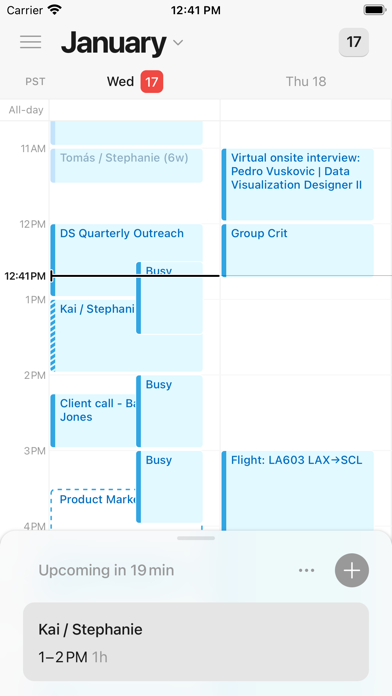
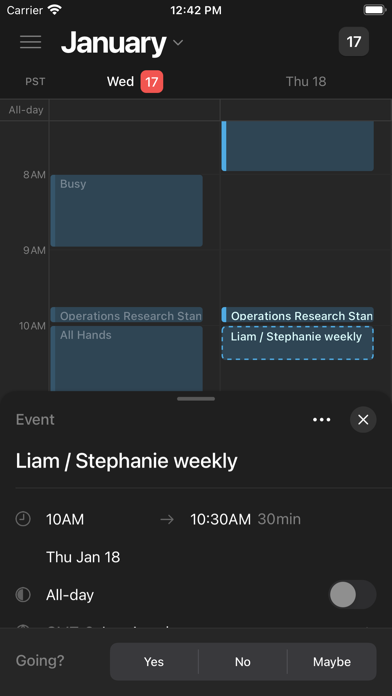
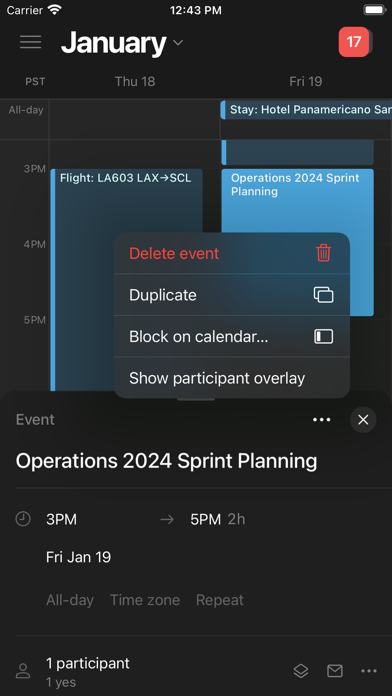
Notion Calendar lets you schedule meetings and control your time like never before. It deeply integrates with Google Calendar accounts so that all your events are synced.
Along with speed, beauty, and light/dark modes, Notion Calendar includes powerful features:
- CONNECTED TO NOTION — add Notion docs, projects, and timelines.
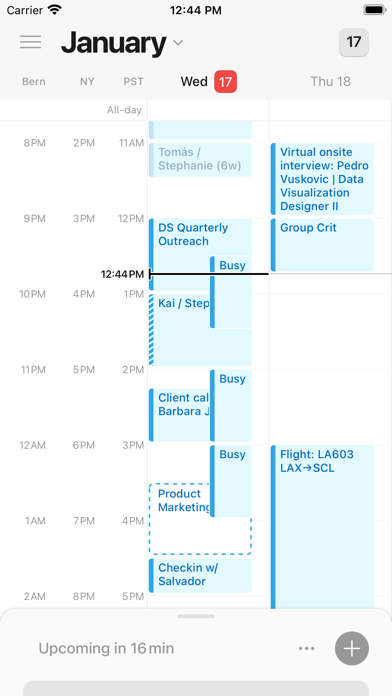
- MULTIPLE TIME ZONES — pull the time zone column to the right to “travel to any city” and add more time zones.
- ALL IN ONE PLACE — see one unified view across multiple calendars and auto-sync events between them.
- WIDGETS — select from 6 Home Screen Widgets featuring rich previews of upcoming events, month overviews, quick-add event buttons, and more! The Lock Screen Widget lets you see what’s coming at a glance when picking up your phone.
- AVAILABLE IN 12 LANGUAGES — Japanese, Korean, French, German, Spanish, Portuguese, Danish, Dutch, Finnish, Norwegian, and Swedish.
It’s time.
Notion Calendar App Comments & Reviews
Notion Calendar Positive Reviews
Lot of potential - love the design!There’s a lot of reviews that talk about the pros and cons of the app but let me just say my favorite thing is I don’t immediately create a new event if I just fat finger my phone and hit a random spot on the calendar. So much time wasted on hitting a random spot on Google calendar and I’m like no I didn’t mean to please - no event oh god! Love the design and the way information is presented it makes it feel less overwhelming. I would love a 5 day view - 3 days is great because it’s intentional but getting the work week in one viewable window would be helpful. I know Google calendar forces the whole week on you though which I don’t totally love either. Either way I’m excited to see where the app goes from here!.Version: 1.49.0
Missing Month ViewThis app works great, I use it every day for work, on my iPhone and on my computer through the browser. It syncs quickly with all my other calendar services, and the ability to show scheduled tasks from my Notion boards is really convenient. My only gripe with the app, and it’s a big one, is that there is no month view. I have needed to keep the Google Calendar app on my phone just so I can see a full month at a time, which I need to do anytime I’m trying to schedule meetings more than a week in advance. I’ve almost deleted this app many times since juggling two apps is inconvenient, but my Notion tasks won’t show up on Google Calendar so I’m sorta stuck with it. Works perfectly in the browser on my laptop though, where it has a great month view, and that ends up being where I use it the most..Version: 1.87.0
Best iOS CalendarNotion Calendar is a game-changer for iOS users who want a calendar that's more than just a scheduling tool. Its integration with the Notion workspace is unparalleled, allowing you to link events to relevant pages, databases, and notes. This interconnectedness provides a rich context for your appointments, making it easier to stay organized and informed. The clean, intuitive interface is a joy to use, and the app's features, like customizable views and seamless syncing across devices, make it a top choice for anyone seeking a powerful and efficient calendar solution..Version: 1.49.0
Helpful Tech SupportI’m just starting out with Notion and Notion Calendar (NC) on iPad and iPhone and so far I like the features and functionality of the apps. I’m mainly here to talk about their tech support. I had a difficult time getting NC to sync with my Apple Calendar. I tried multiple attempts to sync, regardless of device. I carefully wrote a detailed explanation of everything I tried and the tech support guys were kind and helpful with their response, once I got past the initial response from the AI. Now it’s working and I can’t wait to get more organized and learn all the features of the app. I’m giving the app 4.5 stars rather than 5 because there are some areas for improvement I’m seeing, so far. Would prefer the app to recognize when my device is in landscape mode and automatically switch, since I rarely use portrait mode on my iPad and the tiny narrow calendar view is annoying. I would also prefer to get a real human response from tech support the first time. The AI assumes you know nothing and didn’t read the instructions or documentation before requesting help. It was a bit off-putting for someone with decades of experience working with computers..Version: 1.73.0
Widget Design & Status changesI recently obsessed with using notion calendar on my laptop so I downloaded the iOS version but got a little disappointed. I really wish the design for the iOS version can get improved. 1. The Widget design. I love to have a calendar view as a widget so I can get a sense of my agenda of the day, but for now the notion calendar widget is designed like a list of todos. I cannot get the sense of the actual agenda of the day. I need to know when the stuffs are scheduled and also how long they are going to take. 2. Also about the widget. Although it now looks like a todo list, but there is no way on the widget itself or even in the app to allow me change the status of the task like done, in progress, or not started..Version: 1.82.0
Good but needs FeaturesNotion Calendar is good on windows and iPhone but it has no special support for iPads. The iPad experience should be closer to the windows experience than the iPhone. The window should scale to the iPad screen and be able to show more than just a few on the screen at a time. Reminders in general should probably have a few more options that are further out from the event (3 days, 1 week, 2 weeks). Going back to the iPad support, I should be able to see the days of the month in a grid pattern with the activities listed under each day. As for the quality of the app, you can tell it’s refined and had time spent on it. It just needs more features that are standard in other calendars..Version: 1.73.0
Great App, But Mobile Calendar View might Needs ImprovementI really like using Notion Calendar and overall it’s been a smooth and helpful tool for organizing my schedule. However, I’ve noticed something odd: when using the mobile app, the classic calendar view doesn’t show any visual indicators (like dots or marks) on the days where I already have events. This makes it hard to quickly glance and know which dates are busy. On the desktop app, everything looks fine — the marks are there and it’s easy to see which days have events. I’m not sure if I’m missing a setting on mobile or if this is a feature that hasn’t been added yet. Either way, I just wanted to share this in case others are experiencing the same thing or if the developers might consider improving that aspect in a future update. Thanks for a great app overall — hoping for this fix soon!.Version: 1.73.0
Buggy experienceI had to fully unsubscribe from a calendar because Notion kept unhiding it even when I hid that calendar multiple times. And without strong internet, I can’t add events. A calendar app needs basic offline functionality. What if I put in a work event and the app closes before it saves because it didn’t store the event locally until it could connect? I have been a loyal Notion user, but I’m not impressed with the lack of polish and functionality. I have patience with Notion, but if you’re going to roll out Calendars and Email features without fixing and upgrading basic stuff, I’m going to start looking for an alternative..Version: 1.83.0
Amazing, and hopefully will only get betterThere are still a few features it needs to be perfect, but there is no other calendar that can allow you to do what this one does. I have all of my tasks (school assignments, and other life stuff) stored in notion and I’ve always wanted to be able to see them on my time calendar. This not only allows me to do that, but I can drag items from my tasks database directly onto my calendar and plan which hours of the day to do them. It is amazing..Version: 1.54.0
Pretty, simple, and easy to useLove Notion Calendar! Great that it’s connected to Notion, but mostly I love the design. Super smooth, easy to use, and pretty ✨ I use it on the desktop extensively and I love that the mobile app gives me all the info I need in a simple, clear UI without too much overwhelming detail on the initial landing surface. I can dig in further when I want to see all my event details, but otherwise Notion Calendar’s mobile app just surfaces what I need to know when I need to know it in a simple, beautiful way..Version: 1.49.0
Please, Please, Please make an ipad versionLove notion and the calendar and want it to work as flawlessly as it does on my desktop...but on my ipad. Many features are limited for ipad os and frankly riddled with hiccups. Give us desktop functionality on the ipad that mimics functionality on the desktop, ipads are not just large iphones. Notion is great and this oversight really cuts productivity off at the knees. Also, why isn't their two way calendar syncing on notion databases with notion calendar? I want to see my schedule while planning tasks without toggling back and forth or doing a split window which is also annoying. Just why??.Version: 1.86.0
Very Practical and Does What It AdvertisesWorks well with Notion and Google. All of the things that need to be in a calendar are available in one spot. I can move things between calendars. If you need a calendar scheduler, this program will not do that. Calendly adds appointments to one of my Google Calendars, which show up here automatically. I have another tool that copies selected calendar events into a notion meeting so that I have an easy place to track all notes and documents related to the meeting places by Calendly..Version: 1.60.0
Calendar w/ lots of potential!!I started using the Notion Calendar app when it first released and really liked the app’s simplicity and aesthetics but the functionality was definitely more limited than what I was expecting. Recently, I’ve noticed that there’s been a ton of improvements made, and I’m impressed at how much smoother it feels relative to before!! So much so that I find myself reaching for Notion Calendar over Google Calendar nowadays. Def see a lot of potential for this app!.Version: 1.49.0
Needs iPad VersionThis app is basically perfect on MacOS and iPhone, but 2 things I’d love to see: 1. A version optimized for iPad - it’d be nice to have it formatted for iPad OS instead of just a blown up iPhone version. 2. On MacOS it shows the actual date similar to iCal but on mobile, it always shows the 31. This is a small but super helpful sleeper feature iCal has built in so you don’t have to open the app to see the date. If Notion calendar showed the accurate date on mobile like it does on MacOS without opening the app, that’d make it a 5 star..Version: 1.83.0
Love the features!I’ve tried a few calendar apps and none have really sticked. I love the simplicity of Notion Calendar. It’s visually very appealing and I find it very incredibly easy to schedule and organize events. I’ve been using the app since it was released and I’ve really happy with the features and fixes. Looking forward to more features!.Version: 1.49.0
SuggestionI’m really enjoying notion calendar so far. Lots of great features. 2 suggestions: (1) when I set a reminder on an event (e.g., 15min before), the reminder pops up on my iPhone notifications 15 minutes before the event as “[Event] now” instead of “[Event] in 15min.” (2) sometimes there’s a bug where I can create an event on my laptop/phone and add a description, but can’t later edit the description from my phone—only from my laptop. Maybe add an “Edit event” button to obviate this tap-back issue?.Version: 1.83.0
A few suggestionsI really love Notion Calendar, and find it easy to use and visually appealing. However, there are a few things that I would like to see from it in the future. In the iPhone app, I think it would be nice to have a week view when the phone is rotated sideways. I like seeing the whole week and I feel like this would be pretty intuitive. I wish they had a way to make the calendar colors customized rather than picking from a limited list. Being able to input hex codes would be a huge plus for me. I also wish they had an iPad version of the app (not just the iPhone version but smaller) so I could see the detailed calendar and also hopefully a full week view similar to the web application. Overall, I really like the app and have enjoyed using it over other options, but I think it should have these things to make me love it..Version: 1.49.0
PASSSLOW. Takes fully 15 seconds to load when you open it. Isn’t a physical day planner better at this point? Just do that! Or opt for a dry erase board! Instead it’s this slow, buggy nonsense. I’m so sick of it. I was on board at first, but it stopped doing what any calendar can do: at a glance what is happening today? I can’t believe I sit staring for 15 seconds at the notion calendar icon while it loads this. I hope we can just return to day planners instead. I’m only 32, btw. EDIT: do you know how thet might bother to listen to feedback. Thet don’t..Version: 1.83.0
Great potential!This app has so much potential, especially as a person who made her own calendars from using notion….but the mobile NEEDS a monthly spread BADLY. it makes the app less accessible/handy to use. and i also find it hard to put in an event at a specific time and date, especially if the time goes past 11:59pm. i don’t know if that’s my fault but it seems to send the event date back in time, instead of forward, to the next day..Version: 1.49.0
Missing simple thingsIt looks fantastic and runs really well but one of the main features it’s missing is the ability to see the entire calendar full screen and seeing which dates have task or events via a dot. Every app does this and it helps out tremendously with seeing ahead but now with this app you have to manually check the dates to see if you had anything planned for the week. Please add some indication..Version: 1.69.0
This app is AWESOMEI love that it’s functional with other applications and bring other calendars together. I like Google’s Flexibility, but I have an iPhone and use iCal. Notion Calendar is a super great tool for productivity, especially in the era of productivity that we are currently in. I gave 4 stars for the moment because it lacks functionality with iPad as of yet, but it’s a great tool for both desktop and iPhone, and I would happily change it to 5 stars if they had a Tablet/iPad update!.Version: 1.87.0
On its way to being my favoriteI have really enjoyed using the Notion calendar as I love that it integrates all of my calendars on Notion with my Google Calendar. On the iPhone app I wish you could see the full week instead of just two or three days. I also hope that the app will soon be updated for an iPad format. I dislike the Google Calendar app very much, and would much rather just use Notion Calendar across all of my devices..Version: 1.54.0
HelppppI have no idea what I’m doing wrong, but for some reason it just won’t load, I’ve waited well Over 45 minutes, and it just stays on the load screen, i wanted to try this app out because like most highschoolers, I’m unorganized, and often forget deadlines, so I wanted to try this app, and I don’t know if it’s my phone or if the app just won’t work, I run on ios 15.8.9 and I have an iPhone 7+, is this just and issue with my phone model or is this happening with anyone else?!.Version: 1.83.0
Almost perfectWould love to see which days have events and which don’t from the month view. Would also be great if events were listed instead of showing the time view while the month view was open, and then transition to the time view when you close the calendar, I find that evens are hiding under the fold when they’re scheduled for > 7pm. Well done with integrations! And widget views look great..Version: 1.80.0
Where’s the iPad app?I’ve been very excited about both this and the mail app, but both are missing a dedicated iPad app. With the growing number of people working almost exclusively on iPads I would think (or hope) Notion would push out a real app for iPad on par with their great Notes app. I hope this is coming soon, but considering how long they’ve now owned and have been operating the Notion Calendar app since it’s Cron days without pushing an iPad app, I’m unfortunately not too optimistic..Version: 1.83.0
IPad version?Love the app on my desktop and phone (it’s literally what’s keeping my life together right now), but as a student using an iPad on the regular, I wish that the iPad interface could be optimized! It is hard to navigate when it’s just the iPhone interface on a larger screen and would be much more helpful to have it work like the Google Calendar app for iPad. Please make an iPad version🙏.Version: 1.59.0
New updateAs soon as I had hit the update button, things I had written down on my calendar deleted and instead got synced with my google account. Now I have to rewrite EVERYTHING. And when I sigh out of the notion calendar, instead of saying “sign in with notion” it says sign in with google. I used to adore this calendar but after the update, not so much..Version: 1.68.0
Love it, but slow to syncIn some ways, I find this app irreplaceable; I use Notion for tasks and event planning and was struggling to constantly cross reference against my Google Calendar… so having them all in one place is amazing. My only complaint is that the app loads calendars a kind of slow; sometimes it’ll take up to a minute! I’m busy and running around, so that is a bit of an ongoing irritation..Version: 1.73.0
Great calendar for daily events and remindersNotion’s Calendar app is a great one to use for everything I schedule throughout my days, be it meetings or just reminders for myself. Easy UI, integrations with other products, and cool feature like reminding me I need to RSVP for events others have sent me. Looking forward to seeing more in the future!.Version: 1.49.0
Pretty!I’ve started using Notion Calendar instead of Google Calendar for my work and personal calendars! I especially love that it knows when events are “the same” across multiple calendars and shows them as the event. Sure it’s just a UI for gcal at this point but maybe someday they’ll have their own system. One can dream!.Version: 1.49.0
Amazing appIt’s a great app to organize your daily life aka it’s so easy to use. It’s smooth and obviously no adds Better than Google calendar in my opinion and Google calendar I also have Notion is a free form site to take notes and plan stuff and create lists I I’m still in school and Notion free form is amazing and helped me so much to be organized.Version: 1.69.0
Useful and CleanThe design is nice, and events are easy to input and keep track of when looking at the different views. This is true particularly for the mobile version in Notion calendar. My only problem with Notion calendar as a whole is that there is no other way to have an account than through Google accounts. Would love to use my alternate email to sign in.Version: 1.54.0
Recommendation for the appThe calendar is very useful on both computer and iPhone, is it possible to make an iPad version? Really need that! Also recommend to add weekly/monthly views to check out the overall schedule and a spot for quick notes or to do list. It will be more helpful for everyday life. Hope this helps the app to get better!.Version: 1.83.0
The most used app on my phoneThis app is extraordinarily core in enabling me to run my life. It has amazing integrations with Notion. I manage Notion database content alongside my calendars, allowing me to both manage events for work / life and also time-block my tasks. Super excited to continue using this product. It gets better every day!.Version: 1.49.0
Solving Multiple Problems For Me… ButNotion is simple amazing, period. And Notion Calendar is a fantastic simple product that solved multiple issues for me: free, multi-accounts, different email providers, can add Zoom FaceTime or Google Meets… and more! BUT the one issue I have is there is NO LIST VIEW?!?! It seems every other Calendar app has this simple view but Notion Calendar doesn’t? Please add this feature!.Version: 1.73.0
Could be great. Not good yet.Obviously the Notion ecosystem is growing and adapting over time. The Notion Calendar web app and native windows app are great. This app is not functional for the iPad. Just a fair warning. If you’re hoping to rid yourself of Google Calendar, we are not there yet. Don’t get your hopes up too soon. I hope they bring the same functionality and features (plus the additional ones needed to make it a competitor) to the iPad..Version: 1.61.0
Best Calendar AppI’ve tried many, Notion Calendar is my favorite. Intuitive UI, all the necessary features, works with every calendar type (Gmail, Outlook, iCloud etc.).Version: 1.87.0
Needs an “Agenda” viewReally like the clean look and ease of use. Just wish there was an agenda view in the mobile app..Version: 1.89.0
Bro just let me use the browser ver on ipad plsI don’t even need it’s own integrated app i just don’t wanna use google calendar.Version: 1.87.0
Sam CharleboisThe best. Hands down. Thank you Notion..Version: 1.87.0
Loveeee itI use it for everything ! I love that you can add databases to it and keep everything organized.Version: 1.86.0
RemindersOn the mobile app, I can’t put reminders for 1 day prior etc. I would rly appreciate that feature..Version: 1.87.0
Love itAmazing cal..Version: 1.86.0
Great UI but no IPad app is a massive oversightI use notion calendar on all of my devices to coordinate my different calendars between school, work and personal events! UI is easy to use and integration with notion tables is great but no iPad app is a crazy oversight with no updates in sight. Seems like an odd thing to gloss over especially with how long it’s been since the app has been released..Version: 1.86.0
The best calendar periodWould recommend this to everyone as well as their journal app. Cant live without!.Version: 1.83.0
Fix on iPadThe screen doesn’t adjust itself when being used on iPad, it only uses a third of the screen when on landscape mode. Using the 11 in m3 iPad Air.Version: 1.86.0
Lack of featuresLack of customization for widgets. It would be nice to have different calendar visible for each widget. Lack of monthly view. Calendar view names dont match with the desktop version. Great potentials, but overall lack of features.Version: 1.85.0
Needs bug fixI love this app but the calendar has not been working since I updated it.Version: 1.83.0
NO OUTLOOKDoes NOT link to your outlook calendar. Lost me right there..Version: 1.83.0
Please put the app on iPadIt would be best if this app is on the iPad as it can be useful and it would have every deadline on one space.Version: 1.83.0
Great, just needs some tweakingIt’s basically a more integrate-able Google Calendar. And it’s especially great if you’re already deep into the Notion ecosystem. There are some very small things that I know will be worked out in the next year or two. Like the ability to drag and drop all-day events to another day, specifically on the IOS app. It works great on windows. Plus some other things that I don’t have the time to mention. Otherwise, I would’ve left a 5-star review. :).Version: 1.83.0
Add outlook calendarGood tool for daily and weekly planning. Would be even better if they could integrate outlook calendar directly into the notion calendar.Version: 1.83.0
IPad versionHope there is iPad version soon!.Version: 1.83.0
Super mais manque une version iPadL’application est vraiment bien conçue, fluide, pratique et intègre toutes les fonctions qu’on peut attendre mais MAIS… impensable qu’après tant de mois il n’y ait toujours pas de version iPad. C’est ridicule de devoir fonctionner sur iPad avec une version iPhone..Version: 1.83.0
Awesome but add to iPadI love this app and I use it everyday with notion but I would love it if it had iPad integration.Version: 1.80.0
Need 7 day view option on mobile appLove the app on desktop but on mobile i find it to be less accessible with the 3 day view. the widgets also are not great only the huge one ans at that point i should just open the app. hope these things will be adjusted because it’s a great system!.Version: 1.83.0
Love the calendar BUTIt’s a great app however, if there was a way to integrate the events in the calendar with a calendar view inside your notion database, so you can see all events and projects in one place would be ideal!.Version: 1.77.0
Good appI’ll give it five stars when it comes to iPad!.Version: 1.79.0
EfficientWell designed calendar app that syncs with notion calendar database perfectly as well as my Google account. Not too many bells and whistles but is efficient, well designed, and has everything I need. I just wish that I could control a Google calendar from my database…..Version: 1.70.0
Mate iPad compatibilityWell app design but needs to have iPad compatible.Version: 1.73.0
IPad compatibility?This is my primary calendar that I use as a university student, and I love most things about it, but it really needs a better UI for the iPad app! At the moment, it’s just the iPhone UI pasted onto the iPad, which is pretty bad. I also wish there was an option to be able to see the calendar in the Notion app. Otherwise, it’s a pretty good (somewhat basic) calendar, which works well paired with Notion..Version: 1.67.0
Almost there, no 5 day view?Notion calendar has so much potential. I was pleasantly surprised by how good they started off. Please add a 5 or 7 day view, this would make this the best mobile calendar out there!.Version: 1.67.0
IPad AppPlease create a full size iPad app not just a scaled iPhone app..Version: 1.67.0
Customize reminder option on mobile appHi there, can we get more customization for reminders in the mobile app, i only get 1 hour and 30 mins before, i want to add more like days and weeks.Version: 1.67.0
IPad App PleaseFor those who are power iPad Pro Users, would love to have an iPad app!.Version: 1.67.0
Free International Money Transfer 💸Enjoy high maximum transfers into more than 20 currencies while saving up to 90% over local banks! The cheap, fast way to send money abroad. Free transfer up to 500 USD!Version: 1.90.0