Otter.ai, Inc.
Otter Transcribe Voice Notes Customer Service

- Otter Transcribe Voice Notes Customer Service
- Otter Transcribe Voice Notes App Comments & Reviews (2026)
- Otter Transcribe Voice Notes iPhone Images
- Otter Transcribe Voice Notes iPad Images
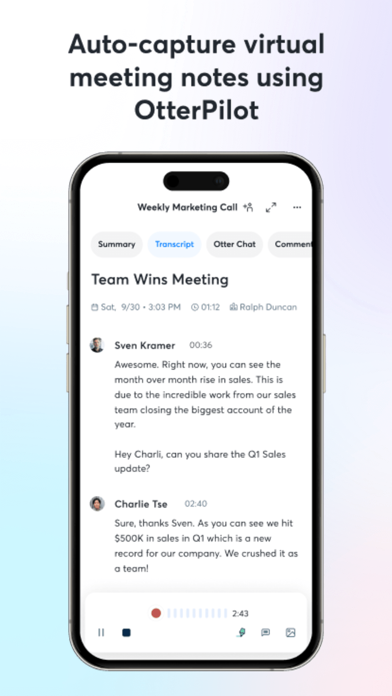
Never take meeting notes again. Otter AI is the fastest way to transcribe voice in real time. Get a meeting assistant that records audio, writes notes, automatically captures slides, and generates summaries.
Available in English, Spanish, French and Japanese. Otter AI is also available on the web. Start for free.
Trusted by over 10 million people and featured by Apple as "App of the Day" and "Editors' Choice."
Automated meeting notes for Zoom, Google Meet, Microsoft Teams, and more. Stay connected and collaborative when you work from home.
Otter transcribes all your meetings, interviews, lectures, and everyday voice conversations in real time, so you can focus on the discussion.
KEY FEATURES
• AI Meeting Assistant: get automated meeting notes & summaries
• AI Chat: get answers and generate content
• AI Channels: combine live conversations with async updates. Chat with teammates.
• Record & transcribe live
• Automated meeting notes & summaries
• Share & collaborate
• All notes are searchable & shareable
• Edit & highlight
• Organize & export
• Import & sync
Looking for a specific feature? Here are the details:
RECORD & TRANSCRIBE LIVE
• Instantly record in one tap
• Transcribe in real time
• Highlight key points to review later
• Insert photos of whiteboard discussions, slides, etc.
• Input audio via built-in mic or Bluetooth device
ENRICH NOTES WITH AI
• Gather information across all your conversations
• Ask questions about a specific meeting
• Generate follow- up emails
• Automated Slide Capture during virtual meetings
• Generate summary, outline and keywords after all meetings
• Punctuate, capitalize, and break paragraphs automatically
SHARE & COLLABORATE
• Invite group members to view, edit, and highlight collaboratively
• Add comments and assign action items
• Share links externally
SEARCH & PLAYBACK
• Search the text so you don't have to scrub through the whole audio
• Playback at adjustable speeds
• Follow along the highlighted word as the audio is playing
• Tap on any word to jump the audio to that spot
EDIT & HIGHLIGHT
• Edit the text to correct any errors
• Tag the speakers to label the paragraphs and train Otter to identify speakers too
• Highlight sentences in one tap
IMPORT & SYNC
• Import audio and video files
• Upload from other call recording apps
• Sync your calendars to be reminded to record your meetings and auto-title your notes
• Import your contacts for easy sharing
OPTIMIZED FOR iOS
• Start/Stop recording with Siri Shortcut & home widget
• Record via AirPods
• Sync with iOS Calendar, Contacts & Camera
Otter Pro
Get more playback speeds, skip silence, and bulk export. Payment will be charged to your iTunes Account at confirmation of purchase. Subscription automatically renews unless auto-renew is turned off at least 24-hours before the end of the current period. Account will be charged for renewal within 24-hours prior to the end of the current period. You can manage your subscriptions in Settings and auto-renewal may be turned off by going to your Account Settings after purchase. Any unused portion of a free trial period, if offered, will be forfeited when you purchase a subscription.
Need help? Check out our Help Center: https://help.otter.ai
Terms of Service: https://otter.ai/terms-of-service
Privacy Policy: https://otter.ai/privacy-policy
Otter Transcribe Voice Notes App Comments & Reviews
Otter Transcribe Voice Notes Positive Reviews
Life ChangerOtter has honestly been a life changer. My university supplied it for me as an accommodation to have a live transcription/record of classes/lectures and it was INCREDIBLE! Up until grad school I had been getting lost during class and often having to ask classmates what we were talking about - but now I could simply scroll up the transcript and read verbatim what I had missed. It was also very helpful for when professors verbally explained assignments. In the past I would have the prompts but forget what the professor had explained, but now I could go back and read the transcript or actually listen to the audio of their instructions! It’s also been so helpful during meetings to create a transcript so I can focus on the conversation itself rather than trying to write everything down. It creates highlights which are helpful to jog my memory, and then I have everything right there if I want to look back at it. It also is so helpful when I write papers! In the past I’ve spent a lot of time staring at a blank Word doc because I just didn’t know how to start or write out all of my thoughts. With Otter I start by talking through my outline, and then use that transcript document to flesh out the rest of my paper. I don’t know how I would have finished grad school without Otter..Version: 3.47.240408
Life changerThis tool has been a life changer for me. I used to struggle to write, and voice memos become my preferred method of expression. I hated having to listen to my voice to get a transcription, and the free voice to text service from word and google docs never got an accurate transcription (i have a tongue tie and don’t speak “properly”). I have been using otter for a couple months now to help me write. It’s the best service i have found for the price, and i would recommend to anyone who uses voice memos to record notes or write. The transcripts are very accurate and the ability to make corrections makes this very powerful. There are playback speed options, and you can see in the transcript what word is which from the recording timing. I just wish i could take the videos of my livestreams and upload them for transcription, but i get around this by simply playing the livestream later, while this records the audio, or by recording the audio into otter while i stream. Such a great service! Wish i had this in college, i probably could’ve had the best lecture notes, as well as a cohesive strategy for essay writing via voice memo. Highly highly recommend, the free version is very useful so give it a try!.Version: 2.1.53
Great BUT Please Get Google Integration!I’m in yearbook at my highschool and I do interviews all the time and this is the best app for the job, hands down. I still have to make edits to my interviews because the hallways can be noisy and the people I’m interviewing can be quiet and this can lead to the app not picking up words or getting the wrong words, but I can’t really control those things. My only problem with the app is that I cannot just convert it into a Google Doc straight from the app, many school districts are moving to Google for their way of communication (Classroom, Docs, Slides, Gmail) and it would save me time because currently I have to put it in my notes app, then copy it, then create a Doc, then paste it in the doc. My guess is you guys have been thinking about this for a while and I saw that you guys respond to reviews somewhat quickly so I thought I would give a review. P.S. Also, does a visual representation of the different speakers exist on the app? I would love to be able to visually know when speakers change, I understand how this would be hard because not everyone talks the same all day but maybe you could let us do it manually? Like my font would always be grey and other people talking (in my case it’s 1 person) would be another color. Alright, I hope this gets through to somebody who can at least think about it. Thank you for your time. Great app..Version: 1.4.31
Taken aback by how closely accurately and easily this worksOkay, so I’m one of these people that hardly ever writes a review because either apps work they way they’re supposed to or not, in which case you look for ones that do, but I’ve been using this app for the past 10 minutes and I can attest that the transcription part has been working perfectly (probably 95% accuracy). I only need to go back into it and edit a few words which they it gets wrong, but basically this will end up saving me hours of the transcription process — what makes it even better/easier is that as the words are heard spoken, it highlights the specific words so it makes it that much easier for me to make sure that what was said is what was transcribed and I can fix it on the fly right there if it is not. You gotta try this out for yourself to believe it. In my case, it was just me speaking into the microphone from wherever I was and my voice was pretty clear, plus it imported perfectly from Scrivener into the app, I made corrections and instead of exporting it back into the app, I got as far as right before importing and copied the corrected transcription to paste into the app. If I had to do this for a living I’d be getting the premium service. Anyway, this truly works..Version: 1.4.15
Almost PerfectFrankly, this app is fantastic. It does an amazing job transcribing voice to text. It’s very accurate. It’s very fast. It has lots of amazing functions. It makes meeting notes and organizing your transcriptions and everything really fantastic. It’s a beautifully wonderfully made app. It’s just really unfortunate that it is only available for English. I’m an American, working in Mexico and, I read Spanish much better than I understand it often because there’s lots of different accents and dialect and it can be challenging throughout the day especially once I get tired but if I can read what’s being said makes a lot easier for me. I don’t need a translator I just need transcription and I really really wish I could use this app in the Spanish language because it would make my life so much easier running a business in Mexico and I literally would be using this app all day every day if it could understand Spanish but It can’t unfortunately, so please add the ability for other languages. Spanish is the second most widely spoken language in the world, I would recommend adding that ability to the app and it would make it for me perfect.Version: 3.43.240212
I would give this a 5 but…I’m a writer and love the convenience of Otter which has worked better for me than other apps I’ve tried. Over all its accuracy has been improving and its voice recording quality is good. What has been a problem for me is the clunkiness when editing. Simply getting the two cursors to the right point in the text has been aggravatingly difficult and then once there instead of the one word I’m trying to replace or the punctuation I’m trying to add several words or several lines will select themselves instead and I’ll have to start the process all over again. And back at its location once again I’m still having to retype back in the several others next to it. The other issue I’ve been having are the recording and transcription limits (90 minutes per session) even after upgrading to pro. And the only next level they offer is business which is not available to use on my phone and which charges for features I don’t need. The other thing which would add value for me would be to be able to see at a glance the list of my writing and meeting notes with the information next to each one whether it has been saved to a cloud (by me or by the app) and if so to which one..Version: 3.34.230918
Excellent customer support!I am a student at university, Otter ai helps me a lot with my studies all the time. I have to say I can’t live without it! This is an excellent app! Not only the app is super, also their customer support is awesome! Recently I encountered an issue with my Otter account. The issue related apple private relay as a unique function. When I accidentally signed out, I couldn't sign back to my pro Otter account due to apple private relay security barrier. Since a lot of study materials in Otter, I am so worried these super important materials might be lost. I almost got depressed about the incident and wrote an email to Otter customer support team expressing my concerns. Otter ai team responded to me promptly. They further investigated the issues, making sure my materials were still stored at their end, and helped me bring my account back. I am so impressed by their skill and customer care, putting customers' needs as a priority. I can't thank them enough for doing the effective work! And I must say, you will never worry about the data being lost, because their data equipment has higher quality and support team is very skilled and service is excellent!.Version: 3.31.0
PERFECT for the deaf/hard of hearing!In these Covid times, many places of employment have switched to remote/distance communications via different platforms. In the world of education, we will be starting our school year remotely and as a teacher that is hard of hearing, I rely on lip reading. For years I have been looking for an app to transcribe speech to text. I have downloaded tons and paid for more than I’m embarrassed to admit. Today. My life was changed. 5 minutes before a scheduled online training, I threw up a Hail Mary and downloaded otter. I pushed record and waited for the usual transcript...which is usually: what.....come......no.......books. To my huge surprise otter immediately begin transcribing the speech of the presenter word for word. I couldn’t believe it. I used it for the entire 8 hours of my training today. Best app I have ever used. It was FREE AND it saved every single transcription that it recorded. I can’t thank this company enough or sing it’s praises enough. I can now participate, ask questions, give feedback via online classrooms only bc of otter! Download it....it is so worth it. Excited to try it in meetings, drs offices, etc! Thank you Otter! Thank you!.Version: 2.1.24
BestBelieve me when I tell you I am a connoisseur of speech to text voice recognition. I have been using dragon anywhere but will cancel that account to use this one. My suggestions would be to make it so that I can use my Apple Watch with this. That would seem to make sense since it is designed to handle multiple conversations which the Apple Watch could be the intake for. The other suggestion, which is more important to me, is to simplify the process by which I can export the text to Notes. Having to click continue every time is a nuisance. My congratulations to the developers. Also because I have been doing so much speak to text voice recognition I routinely say the word Period. I also say the words new paragraph. This is not a big issue but perhaps you might allow for a setting that permits me to say these words and have them activate commands. And I think it is amazing that I can just leave it on and it only records when I start speaking. I hated it when dragon anywhere would stop recording on its own. Take-home message: make it easier to copy to notes. Make it easier to share. You still get five stars..Version: 2.0.7
How did I live without youI’ve been transcribing for a couple years but I’ve usually only don’t small segments. Most were just small snippets of audio and never the full version. I recently accepted an offer from a client who required full transcription of her interviews, some of which, are over an hour. I was 15 mins into transcribing and I was exhausted. I did some googling tried Google Docs but it was complete trash. I found Otter and downloaded it on my phone at first. I played the audio on my computer and recorded it on my phone. I thought I hit the jackpot. Once it was done, I emailed it to myself. I got on my computer to open it and it made me sign in online. This is where I discovered that I could just upload the audio file and it would process it for me! Then by pure accident, I realized I could play it and it would highlight the words as it played. I would say it’s about 90% right. I love that we can assign speakers and timestamps. Then when we export it into word, you can choose to keep the speakers and timestamps or remove them. This has cut my transcribing time down extremely!! Saving me hours!! Love love love!.Version: 2.0.22
Just FabulousI can’t say enough good things. I work from home now and it makes it so much easier to take notes of meetings, phone calls, etc. and after I have a long meeting, I can go back and easily see the talking points a summary, and action items. They’re already done for me. I don’t even have to do that part myself, the transcription is extremely accurate and very fast. When I need it, I can even listen to the conversation back as well. I just have nothing but good things to say. I ended up paying for the additional minutes/conversations after using the free version for about a year. I didn’t necessarily need to upgrade, but just decided that I liked it so much that I really wanted to invest in using it much more often and not having to be too judicious about using it. That said, I think a lot of people could just use the free version and have no problems at all. I intend on continuing with the paid version as long as the price doesn’t get entirely too steep. If I owned a business, I would get a license for all of my employees..Version: 3.48.240425
Otter is making it possible for me to graduateDear otter, I am writing a research paper for my year 12 English class in which one of the requirements is to conduct a professional interview, as of which we need to transcribe verbatim. In receiving this information I began to prematurely mourn the loss of hours, days even, that I would lose to transcribing this interview; that is, until I found this app. Otter Transcribe Voice Notes transcribed my interview in minuets, with a total of 4 grammar errors, singlehandedly transforming hours of work and suffering into 20 minutes of grammar checking. With thanks to Otter I will graduate on time with the rest of my class, rather than giving up due to mental exhaustion and dropping out; subjecting the rest of my life to 9-5 work days at McDonald’s or a local pub. Otter is the perfect example of maximizing your time and efficiency, in other words “working smarter, not harder”. I give this 5 star rating as my unmatched thanks for the service otter has provided me. Once again, thank you Otter, my absolute goat..Version: 3.69.250226
Thank youThank you for creating this app. It is what the deaf and hearing-impaired community needs. I wear hearing aids and today, I went to Bible study and discovered that I had left my hearing aids at home. My pastor is soft-spoken so I began to search for real-time transcription apps and came across your app. I wasn’t expecting much from it as previous apps I had tried in the past had been terrible. About 5 minutes into using your app, I became convinced that this app is revolutionary: I was blown away by the speed and accuracy of the transcriptions. I used it throughout the two-hour Bible study and the transcription kept up in speed and accuracy. I am very impressed. Please, market this app to the deaf and hearing-impaired community because it is needed. A potential market for you is to find a way for cellphone calls to be transcribed real-time for deaf and hearing-impaired people. There is company that offers this service but their transcriptions are very, very bad. Thanks and I am happy to join your customer base..Version: 1.4.17
Great for voice journaling or therapy!I use this app primarily for audio journaling and I LOVE IT. It’s the best free app I’ve found that records and transcribes voice in real time. The real time aspect is important because as someone with ADHD, I get distracted easily and lose my train of thought. With the real time transcription, I can easily read back what I had just said and get back on track. The app also automatically adds “tags” so I can see what certain entries are about at a glance. Ex: “work” “john” “stress” “hope”, etc. I think these tags are based on which words are repeated most. I like to go back sometimes and either reread or re-listen to entries so I can reflect on how I was feeling that day with a fresh perspective. The free version of the app gives you a limited number of minutes, but I’ve never come close to hitting that limit - even though I use the app several times a week. I also really appreciate that the app runs in the background (meaning you can use other apps at the same time). This means I can Google things that come to mind on walks, or navigate while I drive, all while continuing to record. I told my therapist about how much this style of journaling has benefitted me and she now recommends this to clients who have trouble with other kinds of journaling. The app is intended for business / professional use, but it works wonderfully for my purposes. Thank you!.Version: 3.7.0
This app is saving my thumbs!As a writer I often wake up inspired by switcher dreams or whatever it is our brains do during sleep. My whole life it’s been a groaning struggle between sleep, or breakfast, and capturing my inspiration when it is fresh and clear, Otter fixed this, because reaching iPad with half closed eyes and clicking record, then mumbling through my new material take sthe keast amount of effort ever. And the frustration of having an hour of deciphering what was transcribed because Otter gets it 90% right—usually only stumbling over new terminology or character names, and not recognizing a long pause as a comma not a period. But I do see it learning, both my character names and commonly used but u usual words. I’m not sure if that’s because I edit before exporting text, or some other voodoo. Also I have pain in my hands after too much thumb, or even finger, typing and this minimized the need for that. Anyway, thank you little Otter..Version: 2.1.47
Awesome!!I was trying to take notes from podcasts and I would have to keep going back over and over again to try to make sure I wrote everything down correctly. (I’m 54 so my retention of things isn’t as good as it used to be). After struggling with this problem for a couple of weeks and wasting too much time, I started wondering if there was an easier way. I started searching the tech websites for speech to text options and this app was one that was recommended so I gave it a try. I also needed something that was cheap or free right now because I’m unemployed and not receiving any unemployment compensation so money is tight. There are a few words that I have corrected that were close to what was said but it’s not a whole lot. In a perfect world everything would work perfectly but since it’s not a perfect world, correcting a few words isn’t a problem. I am using the free version now but as soon as I’m able to find a job, I will be upgrading..Version: 2.1.24
Otter is life-changing!Otter has been transformational for me as a professional writer, and has dramatically accelerated progress on a book I’m writing. I can wake up in the middle of the night with a single idea — wearing a sleep mask, not even opening my eyes — turn on the app and start talking. An hour later 15 pages of the book are written. And because I’m doing this in a half-dream state, the creativity and flow is incredibly intuitive and natural. I also use the Otter app to record meetings or conversations, or simply to jot down ideas as they occur while walking (since I always have my phone with me) that I can edit and export as a Word doc, etc later. What’s brilliant about Otter is that it synchronizes the audio to the text, so you can be in the middle of a one-hour interview, click on a word that was misheard/mistyped, and immediately find it in the audio version and correct it in the text. Otter is a writer’s best friend!.Version: 3.14.0
Incredible functionalityIt’s hard to believe that someone came up with an app that is exactly what I needed and has features far beyond what I expected. I’m constantly being surprised by what I can do with this app. Transcribing from voice to text is just the beginning of its capabilities and usages. I’m now composing wide range of content and refining them using the transcriptions in unexpected ways. For example: I will transcribe a lot of random subjects or thoughts and string them together into a document from which I then create a narration that reads like I had spent hours composing it, when it only took me a few minutes. That’s an incredible shortcut for content creation. The transcription isn’t perfect but it’s really good and can be enhanced by adding your own vocabulary words which I think is incredibly important. I absolutely love this app! It may be the best app that I’ve ever downloaded. I highly recommend the upgrade. It increases the functionality by a factor of 10x..Version: 2.1.46
Best of its class! Fast, accurate, fab on iOSOtter is superior to any of its competitors (I’ve used all premium auto transcription apps available for Mac currently available l). Outstanding features: Otter’s auto transcription is both faster and more accurate in compared to its competitors and it does a surprisingly good job with punctuation. It really shines on iOS—on iPad I arrange split screen view so Otter is in one pane and the Google doc I’m working in another; I can listen and control audio on my iPhone while editing, fact checking and formatting on the iPad or Mac full screen. “Tag” (name) a speaker once and Otter will update the speaker’s name on that transcript...and the next time (whether a month or a year later) that speaker is on an audio recording, Otter will recognize and tag the speaker (on the rare occasions it selects the wrong speaker, correction takes seconds). The free version offers a generous number of minutes but limits choices for playback speed; the paid version is worth it’s relatively low fee. Thanks Otter!.Version: 2.1.40
AMAZING!! What a time saver!This app is incredible! I conduct many interviews and meetings and WOW, this app has made my work so much more efficient! The accuracy is impeccable, even when the people speaking have thick accents or soft voices. You can highlight text, play back the audio in sync with the corresponding transcription segment, and even go in and edit mistakes, name the different speakers, etc. You can record straight into the app or import recordings (if you have premium, which I have, though is definitely not necessary for getting good use out of this app). I can’t think of one issue (obviously the transcriptions aren’t perfect and there are still many small things to tweak but I think the accuracy of this app is so much better than many others I have tried). The sleek design and easy accessibility and usability is the cherry on top. Thank you SO much for this app!!! One of the best productivity tools out there👏🏽👏🏽👏🏽.Version: 2.1.65
A really good option for hearing impaired persons to use during Zoom callsI currently serve on several non-profit organizations and was concerned about being able to participate in Zoom calls this year. Closed captioning services are cost prohibitive and I find them to be frustrating especially if the captioner usually is a court reporter who has installed legal jargon that often pops up but is not relevant to the conversation. An online class I was taking was using Otter and I was duly impressed with it. And because it was a class it allowed me to go back and read over the transcripts for review. I now am considering a premium membership but really hope to survive on a basic membership since I do not have a regular income to sustain a paid one but have been asking my non-profit boards to invest: it is still very reasonable. Thank you and I look forward to great improvements as technology continues to grow..Version: 2.1.27
Workplace Game-changerThis app is PHENOMENAL. I’m deaf, wear hearing aids, and while I can talk well, I have to read lips in order to understand what the person is saying. Just to give you some context. With that said, this app has KICKED open a door in my career! I work as content strategist and handle media relations for a marketing firm. Meetings have always been a challenge for me because the more people involved in a conversation, the more likely it is that I’ll miss what’s being said. And there’s a lot at stake when it comes to clients. Then, staff meetings can be difficult because one of the employees I work with the most is a remote employee and she reports in over the phone. Enter Otter. I can’t tell you guys how much this has changed things for me! It’s quick, it’s really pretty accurate (just make sure the microphone is positioned just right!), and it’s rendered correctly! I love this app I love it I love it. My boss is considering springing for the paid plans after seeing how much easier this has made my life. I’m a better employee and a happier person for this. If you could just include a real-time transcription service for calls made on cell phones to your roadmap....you would be killing it. There are NO services for the Deaf that do what Otter does with the same speed and accuracy! Keep up the good work. You have made a serious and fervent fan out of me. Thank you for helping me on so many levels..Version: 2.0.6
By far the most accurate automated transcriptionThe accuracy of this app is the best out of all the transcription services I have tried. Obviously it’s not perfect, but it’s surprisingly good even given less than ideal background noise. Some suggestions that would make this extremely valuable for me: 1. Recording via Apple Watch. I currently have to use an app called Just Press Record to record on my watch and synchronize to my phone, and then manually import those recordings into Otter. It would be better if I could have an Otter app on my Apple Watch and record through the app. It doesn’t even need to be real time. 2. Developer API. As a software developer I currently build integrations with the Google speech recognition API, which is not nearly as good as Otter. I talked with the Otter team at a conference recently and they said they have no intentions to release a developer API, which is a shame. Please reconsider! I would happily pay for developer access to your amazing speech recognition system. 3. Integration with Spotlight. Transcriptions should be indexed so I can search them via iOS. 4. I love that they added custom vocabulary in the most recent update! But currently it's all manual. It would be great if it preloaded the person contact list vocabulary with my phone's address book, and maybe infer the rest of the vocabulary from my Messages/Gmail/other data the way SwiftKey does..Version: 2.0.15
I’m in loveOk, so I downloaded this app super quick because I needed a way to transcribe an interview that I did, but I didn’t want to pay. Usually I just listen through and type along, but as this was a feature so the interview was quite a bit longer than normal. Not only can you record in the app, but you can also upload audio files from other sources. It takes about the time length of the interview itself, and while it doesn’t get every word perfect, you can click through the transcript and it will play the audio file in the background as follows through, highlighting the written part that went with the audio that’s playing. It’s a really helpful feature to check back and make sure the quotes are accurate. This app saved me so much time, and even without paying you get 10hours of transcriptions per month..Version: 1.4.31
Great app, but annoying bugs :(I’ve recently started using this app for conducting interviews at my school, since I’m apart of the newspaper club, and It’s super convenient! However, theres been some weird glitches and bugs that have been making the app hard to use. First, whenever I highlight text in the transcript, I can’t un-highlight it and it gets pretty annoying. It also never highlights what I want, and always messes up my text. Another thing is that when you sort a recording into a folder, you can’t take it out, and your left very unorganized. It would be great if you could look into these bugs and fix them, since I look forward to using this app more in the future! I also suggest that you add some more organizing features like being able to underline text, different highlight colors, a way to trim audio-recordings, and more. Thank you so much for taking the time to read through my review, and I hope you can consider these suggestions and fix the bugs :).Version: 2.1.56
Otter delivers like nothing elseI use this app for classes. Much of the vocabulary is unique to the course of study and is often distorted by other speech to text options. Otter gets it right almost every time and it seems to have improved as I used it. I noticed that it corrects the text on the fly. I don’t know if someone is listening or if it is real ai contextualizing the speech to find the appropriate solution but, whatever it is, I love the service. I pay when I need to and drop the paid option when I no longer need it. I would not have paid for this app at all if they tried to force me into a one year plan at the current rate. Here’s what I would like to see: Integration with Evernote and other note options. I don’t like having to have my notes held hostage in this app. I paid for the service when I needed it but cannot now export those notes. I don’t need to keep my current notes but this will impact my long term thinking..Version: 2.1.15
Can’t live with it, can’t live without it.There are aspects of making Otter work, specifically editing text into a finished product, that are frustratingly obscure. It’s not for use by the time-challenged. Take your time to learn it well before you use it while facing a deadline. The delay waiting for the transcription process is both understandable and mightily annoying. The process’s inability to recognize a question, for example, that should be obvious from the structure of the sentence, and to add a question mark rather than a period, can require a huge amount of editing time. Similarly, Otter seems to randomly interpret long pauses, sometimes representing them with periods and other times ignoring them altogether. That’s one of the most frequent items requiring correction. There is little point in continuing this list unless the Otter team is reading it. If you can benefit from an approximate transcript accompanied by disambiguating audio, this app is a blessing. If you need a verbatim account of what was said, plan to put in substantial time making corrections. Finally, this app would be of great benefit if the editing process could take place collaboratively in the cloud, and if it could begin on the part of the file that had already been processed. Perhaps there is already a means of doing this, but it seems it would be very clumsy. Clumsy and collaboration are not comfortable companions..Version: 2.0.21
Great tool, but DESPERATELY needs a few featuresReorder/Sort by Function — This is my biggest complaint with Otter. It would be SO helpful if AFTER you added recordings to a folder, you could reorder them or choose to sort them by anything other than the date you added them in. Right now, you’re stuck with them in the order they are added in, and it’s super frustrating. Sub folders — Folders are nice, but I have a pro account and my folders are getting too numerous to be easily manageable. Renaming — Right now, the only way to rename recordings is to individually open them, rename them, and then close them. This process is slow and clunky - particularly because you can only view like 16 characters of the name as you’re typing into the box. If you could rename recordings from the same page you view them from, that would be a lot better. The font would be smaller, and you wouldn’t have to wait for wait for each recording to load in its entirety before renaming it. Find/Replace Function — There are some words that are specific to particular fields of work that the AI gets consistently wrong, even if you manage to think of all of them and put them in your vocabulary ahead of time. If there were a find/replace option, correcting these errors would be a lot easier than having to control F and fix them all individually..Version: 2.1.37
Helps me get things doneI’ve used it for formal interviews, papers and work. Allows me to get things done - even in traffic, which can tie me up for hours. The transcription is quite good and getter better - it seems to keep improving. Very easy to transfer to written versions - which is a big plus for me. My only knock is the lack of clear instructions and that the writing on the screens is small and they don’t easily zoom in. Since I can’t be the only one using it while driving, they should bring in some designers of apps people use while driving - make it more user friendly for that environment. As an aside, wish the highlighting text features were a bit easier to use - works at times but then won’t turn on - can’t figure out how to clear. Used to more standard features in adobe or other readers..Version: 2.0.25
Quality of interface has gone DOWNOtter has always been a godsend for me and it is still the most accurate automated transcription service I’ve been able to find, which is why I spend $12 a month on it, which is more than I spend on most streaming services. But lately the interface has been unfreaking usable and it is making me rethink, or at least resent, my investment. Everytime I highlight a sentence, it jumps me down to the bottom of the page and I have to scroll back up to find where I was. It does this EVERY TIME. It’s also gotten so slow in terms of the audio playback working and scrolling down and up the page. And it forces me to refresh and find my place in the transcript every couple of minutes. It’s gone from saving me time to almost costing me time. There’s no survey I can take so I am writing this here in hopes that someone at Otter sees it. Please work out your bugs !!!!!.Version: 3.2.0
Great for work meetings!This app has been an invaluable tool for me in my job over the past couple of years. As someone who frequently uses Zoom for meetings with 15-20 people, taking accurate minutes can be quite challenging, especially when everyone is talking at once. However, this app has been a true lifesaver, allowing me to transcribe minutes, notes, and summaries of my meetings with great accuracy and ease. I particularly appreciate the feature that allows the app to learn the names of speakers, which helps me to organize my notes more efficiently. Additionally, I can easily highlight and add summaries, which has made my job much more efficient. Overall, I highly recommend this app to anyone who needs to take a lot of notes and provide minute summaries for meetings..Version: 3.29.0
Wow! This works incredibly well.I just used Otter for the first time for a *phone meeting* with a client. My client was *on speakerphone* - so I didn’t think there was any chance that it would really work. As such, I kept taking notes and switching between different apps on my iPad. So when I went back to the program & found out I could already hit keywords (Otter picks them out of your text) and jump to that part of the meeting, etc. I was really surprised. The transcription isn’t perfect, but I was having a phone meeting with my client on speakerphone, so I didn’t expect it to be anywhere near as accurate as it was. Additionally, you’ve got the recording synced up with the notes, so even if the transcription isn’t 100%, you can go back & listen & make an adjustment. Normally after a meeting, I’m trying to go back through my notes and deciphering my abbreviations to figure out what exactly was said - inevitably losing some of the conversation, spending all the time to try to figure out what actually happened, and time to clarify what my abbreviations meant - but this was SO easy. I am still learning as I’m going (May update this later ; )) but Thank you!!! This is awesome. You just made this meeting the easiest I can remember in ages. Wow!.Version: 2.0.19
Moving the wrong directionI’ve used this app for several years. Even though I’m a light user I paid for the pro. I started using the app to transcribe some meetings recently and saw that my legacy account was converting to a pro at double the price. I figured no big deal until I saw the complete robbery of my minutes. 6000 to 1200 or whatever is absurd. The say it’s because of their innovation and their new services they’ve added to the pro. I won’t use those services nor would I meet with anyone who tried to surreptitiously record a meeting. My company uses TEAMS which already comes with transcription and it’s better than Otter so why would I go for this change. I’ll be cancelling my subscription tonight. I wish them luck with their business model. They’ll learn soon enough not to mess over the early adopters and users who don’t need more digital assistants to perform redundant services..Version: 3.15.0
Best Transcription AppI normally don’t pay for the “upgraded” version of many apps but this one is 100% worth it! As a previous Administrative Assistant I wish I had this app; however, in my current role this app is so helpful in recording meetings and helping my minutes and notes go smoothly. Of course not every transcription is going to be 100% accurate (because technology is not perfect) but that is where the clear and concise sound on this app comes in to play. I think it records better than any recorder I’ve ever used! The transcription is about 85% accurate depending on who is talking. My minutes and notes go by so much faster with this application. The free version is amazing but I take so many minutes at various minutes I had to buy because... why not??? So download this app! It’s the best one I’ve found to date!!!.Version: 2.0.24
My go to for all things transcribedI can’t stand typing, but have been an incurable list maker since the beginning of time (as I know it). No checklist apps seem to measure up, so I made Otter into one! Simply put, I just record my lists with my voice and upload them to Otter to be transcribed. ‘Wola!!’, the perfect answer to satisfy my need to write without any typing at all! 😀Yay me!! 😁 One thing I do wish that the developers would consider: Please make transcription recognize a numbering system or a way to automatically go to the “next line” or “new line” seamlessly without needing so much editing. It’s impossible to do this quickly and easily, so I may just have to keep searching and spend my $10/month elsewhere. I’d pay twice that much for a service that has it all!!.Version: 2.1.60
Knocked out by the quality of transcriptionsI am truly knocked out by the quality of the transcriptions from audio recordings and specifically, it's not just the accuracy it's the way the recording are presented as a transcript with time codes and "word-by-word" follow along. I work as a journalist sometimes to contribute to industry newsletters and record many 20-30 min interviews with quickly scribbled notes, on-the-fly noting the timecode for good quotes so I can go back to the recordings to extract them. This app just made my job so much easier, from the transcripts I can skip straight to the parts I know contain the good quotes, extract the text, and if needed I can listen to the snippets if occasionally it got the transcription not quite right for highly technical words or rough parts of my original recording..Version: 1.4.0
Fantastic for studyingI am a very visual learner and have found that utilizing this app for school has been a game changer. In the past, I have struggled with both writing down notes during a lecture and so much of my focus ends up on writing that I don’t fully process the main information that is being presented. With Otter, I can have my lectures transcribed for me so I can read through them at a future date. Allowing me the ability to just listen to the key elements my professors are presenting without worrying that I will miss small details. This has helped me understand the material I am learning with greater ease. I cannot speak more highly of this tool for people who struggle with processing during long lectures in school..Version: 3.76.0
I really like this appAs a student with dyslexia an app that helps get my notes down and written out and the point I might have missed the day or the lesson is really helpful. I like using this app to record my lecture, especially for history and chemistry, and it has been an amazing tool. Personally, I’d have not gotten the pro. I just used the basic level and I seem to really enjoy it definitely not a five star, but it definitely is a four. At first, it might not seem user-friendly, but it really is. I love how I can upload lectures. I may have recorded on Voice Memo or I can record straight from the app and it’ll put it into a summary of Notes if it was actually an amazing total to use if you were a student and long lectures or somebody who has to go in long meetings..Version: 3.68.250212
Amazing AppWorks flawlessly and has a great UI..Version: 1.4.28
Great apps,It save a lot of time for writing minutes or notes.Version: 1.4.33
Hard of hearing wonderGreat for Hh people because you can review transcript and listen to audio again too. Cut and paste transcripts for study notes for school.brilliant and accuracy is better than most.Version: 2.1.21
Not work if weak signal or off line!Not work if weak signal or offline..Version: 3.10.0
GoodWish the app could transcribe more medical terms . But overall, it’s suitable for my lecture notes.Version: 2.1.64
Please support .ts files for import featureTired of having to remain silent while running .ts files just to get a transcription cause this app won’t let me import .ts files..Version: 3.32.230821
Crashes continually when open in GoogleI have had to stop using Otter in Google, it continually crashes. I use it now on my IPad which is inconvenient when transcribing minutes for a Board Meeting..Version: 3.9.0
Need a lower priced optionWorks better than other apps for the hearing impaired, though transcription is not perfect. However it is expensive especially for those of us on fixed incomes. The pro version is a bit rich for the retired deaf/hearing impaired. A lower priced option for 3000 hours would meet our needs..Version: 3.9.0
It’s perfectAccuracy 95% a lot of option for subtitle and much more.Version: 2.1.61
Amazing for students!I record all of my lectures and can search through them later by keyword. It’s just the best out there, look no further . I recommended this app to my teachers and classmates. It is now on one of my teacher’s webpage as a tool for doing user interviews, as part of the requirements gathering process for software development. All I can say is good job guys, great product. Do you need more programmers, I’d love to contribute.Version: 2.1.3
CAD$44.99/ month? No thank youThe app is great, but I had to cancel the subscription. Sorry, but I won’t pay CAD $44.99 a month, this is absolutely ridiculous. Thank you..Version: 2.1.20
I fear it’s worth the $100 a year priceI’m almost to skeptical that any of the free apps offered are as good as this one. I use it within my business session and would never trust any other app at this point for such clear audio, speaker differential ability and transcription accuracy.Version: 3.61.241021
Life saverThis app has helped me in so many ways , rI couldn’t progress this quickly before - thank you!.Version: 3.58.240909
Amazing App!!The best transcribe App hands down! One thing I would love to see hopefully soon is make the app comparable with Apple Watch!.Version: 3.57.240826
Fantastic experienceHave to admit that this is the best app in the market, providing very much accurate transcript (over 98%) and coming with unnoticeable delays. Love it, thinking to subscript it..Version: 3.52.240617
Awesome appI love this makes summarizing meetings easier, saves times & it lists tasks..Version: 3.50.240520
Scary SmartThis is incredible. I use it for Board Meetings as it summarizes better than the minute takers. I also use it for webinars I don’t have time to attend. Love this Ai.Version: 3.48.240425
Great AppThis tool has been improving year over a year, with automation, AI, chat summaries, takeaways, action, items, All by recording the audio. I wish there was a way to change the login name when connected to a calendar for online meeting..Version: 3.42.240129
The best app!!Oh my god I had an assignment, and we were instructed to listen to this 29 min podcast and make a report about it. It was long and I couldn't understand what they were saying muhc because of their accent. This app really saved my time, it was able to summarize what the whole podcast was about and it even gave me the entire transcript. It's an amazing app I really recommend !.Version: 3.40.231225
Price IssuesIt’s a really good app with a strong AI. The only issue is the price, which is near 50 Canadian dollars per month. I hope they can lower the prices, especially for students..Version: 3.40.231225
Life saving tool for someone who is deaf.Hello First of all. I love your app. My father is deaf and it has saved him and my whole family. We can actually communicate with him again. It’s a beautiful thing!! My dad was recently in hospital and all the doctors and nurses were so impressed with the functions. It did save his life being able to communicate with the medical staff. It should be mandatory for anyone who does any kind of customer service to have your app to help people who are hearing impaired. That being said I’m having a really hard time reaching support to make changes to my subscription. I understand that a lot of issues can be fixed using the ai chat but sometimes you need to speak to a human. Thanks very much. Rebecca..Version: 3.38.231120
Why I Love OtterMy mom has Alzheimer’s disease and I use otter to record her stories of her childhood; her memories of the things she and dad did as well as saw on their travels; memories of us children as we grew up. *This is so important as I have her voice and a written copy of her talking. There are so many reasons for me to have this tool in my daily life. I love writing but the problem is when an idea or image pops up I need to record it right away so I use otter for this as well as for meetings. Thank you otter.ai Theresa Cummine.Version: 3.36.231023
Life saverThis has been the best tool to keep up with all of my virtual meetings and allow me to have transcripts and recordings, especially for ones I’m unable to attend. I upgraded to the Business package for more minutes access which was well worth it..Version: 3.34.230918
Free International Money Transfer 💸Enjoy high maximum transfers into more than 20 currencies while saving up to 90% over local banks! The cheap, fast way to send money abroad. Free transfer up to 500 USD!Version: 3.98.0
What do you think Otter Transcribe Voice Notes ios app? Can you share your thoughts and app experiences with other peoples?
Please wait! Facebook comments loading...