Awesome Calendar 2 Customer ServiceYunaSoft Inc.

Awesome Calendar 2 Customer Service

  1. Awesome Calendar 2 Customer Service
  2. Awesome Calendar 2 App Comments & Reviews (2026)
  3. Awesome Calendar 2 iPhone Images
  4. Awesome Calendar 2 iPad Images

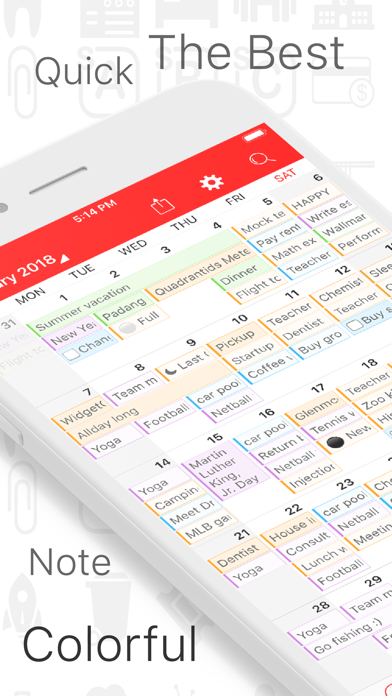
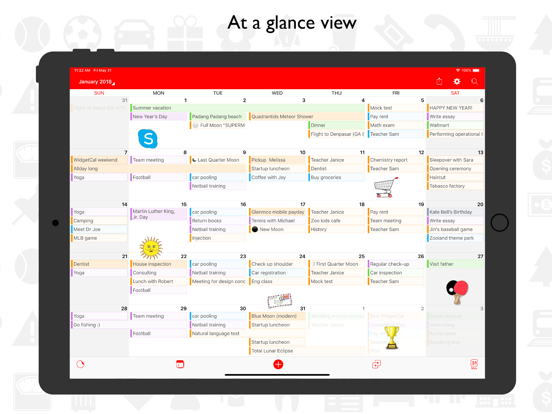
Awesome Calendar 2 is the most powerful you'll ever have in a calendar app and makes your daily calendar come alive. It also supports powerful features like Checklist, Notes app, Stickers for iMessage, Designed Marker and Stickers, Widget, Class Time-Table, Custom icon and theme color and so on.

"STICK IT" ON THE CALENDAR
Awesome Calendar 2 includes tons of cute stickers that you can place directly on your calendar views like a post-it. Mark an important day, or decorate the entire calendar however you like!

WIDGET LOOK AT THAT?
A handy full-month widget provides instant access to your Awesome Calendar 2 schedule from your lock screen or control center. Your calendar is always a swipe away.

REMIND ME WHY I LOVE YOU
Adding calendar events is only the start. Awesome Calendar 2 also lets you make check-list Reminders for upcoming events, and write Notes for yourself including photos.

● Universal app for iPad, iPhone and iPod

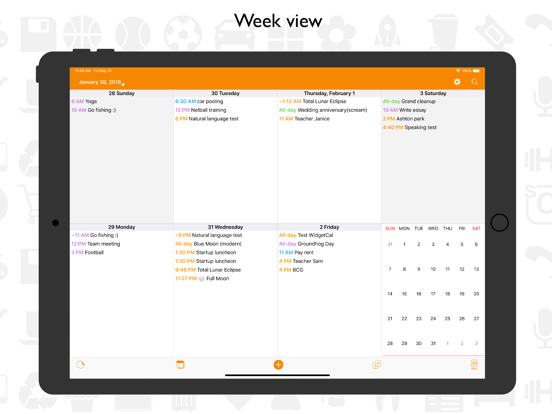
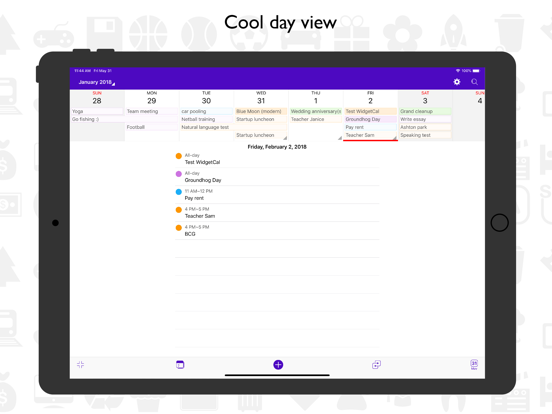
● Month, week, day, reminder and note list view

● Customize home screen icon color

● Widget with month overview

● Mark your important day with designed marker

● Tons of cute stickers

● Custom alert sounds

● Note with photos

● Class timetable for routines

● Search through 30 years of events, reminders, and notes

● Weather forecasts to help you plan your day in advance

● Print or export Notes and Calendars as PDF

● Customize everything: text size, theme color, days of the week

● Stickers for iMessage

● Badge app icon

We've made Awesome Calendar 2 as fun to use as it was to create! Enjoy clever animations, sounds, and vibrations as you decorate your calendar and schedule your life. Have a suggestion for something we can improve? We'd love to hear from you!

* Awesome Calendar 2 Premium Subscription *
Some features listed above are available for premium subscription. Awesome Calendar 2 Premium is 14.99 USD per year (price may vary by location). We offer 3 months free trial if user wants to try. After the 3 months free trial this subscription automatically renews for 14.99 USD per year unless it is canceled at least 24 hours before the end of the trial period. Your Apple ID account will be charged for renewal within 24 hours before the end of the trial period. Subscriptions may be managed and auto-renewal turned off in Account Settings. The subscription fee will be charged to your account at confirmation of purchase. Any unused portion of a free trial period will be forfeited once upgraded to the subscription.

Email: [email protected]

Privacy policy: https://wp.me/P1YDeW-rR
Terms of use: https://wp.me/P1YDeW-rT

Awesome Calendar 2 App Comments & Reviews

Awesome Calendar 2 Positive Reviews

Awesome and amazingThis calendar is so amazing, because the apple calendar is amazing the one thing it lacks is month view were i can see all my events instead of a dot that i have to click on to see what i have for that day, so the awesome cal 2 is almost identical, except has this amazing month view. The only thing the apple cal does better is when adding new events the apple cal remembers your title (for ex you type Tr and right away apple cal starts showing previous events you have made as far as title and time and location which makes making events that you have made in the past so much faster, so what i do every time im adding a new or exciting event i use apple cal but then use awesom cal 2 for everything else. But id love to only have to use awesom cal and not ever have to even open apple cal. So if this is possible please bring in a update. Thanks.Version: 5.2

Finally!Awesome Calendar has been my family’s favorite calendar for years. Been waiting for Dark Mode, Apple Watch & Widgets and they are finally here! The complication choices & list view for the watch is fantastic! I have to say that I like the esthetics of the old version better for iPhone and this version is missing some of my favorite customizations. Please bring back font style & pt size choices. Please bring back the ability to “star” an event which filled in the whole day in color. Appreciate you adding weather & stickers for week view. Also! Adding customizable alerts for individual calendars was a Nice touch! My wish list includes changing the Apple Watch complication month or day to be a contrasting color rather than both white and the addition of a two-day complication (today & tomorrow). Any chance the days prior to and after the current month not be grayed out? It’s looks funny not showing the whole week. Thank you!.Version: 5.2

Event Day ShrinkageI Love this app. I use it Daily. It is definitely my “go to”. I only have one small complaint. When I am on a day with an event opened up and editing it, and then I need to go to another app and check the details of what I need to type in the event day that I have opened, the event day window drastically shrinks. One can still edit the window, but the view of what you see while typing is much smaller. The only way to fix this is to close the window and start over. If you do this, be sure to not leave the app, or the shrinkage will more than likely happen again. It’s not a major problem, just a frustration when you’re in the middle of a thought. This has not and will not cause me to stop using this app. Again, I Love it and use it Daily..Version: 5.3

Looks like a great app so farI really liked how easy it was to get started and it was setup immediately with all my reminders and calendars. The big thing that's missing for that last star is a feature I use quite a lot for time blocking - scheduling my to-dos/tasks. I didn't feel this had good functionality for that on the calendars. Two of my fave features on my current app are that I can schedule to-dos into time blocks on my calendar and that I can drag and drop appointments and tasks into different time slots on my calendar. It also keeps track of how long I spend overall on a task which is a plus but not required. Currently seeking a diff app as my current one is glitchy and doesn't automatically download reminders or calendars from Apple, only google/MS. Hoping I've missed some task management features and this could be the app for me..Version: 5.3

Love this appI have been using Cal king for about a year. I have tried multiple calendar apps. It is hard to find one that meets all my criteria but this one nails it! I love the layout esp the weekly one, the ability to have the to do’s and the scheduled events on the same page, the integration with my apple devices, the ability to change the flow of the weekly format. Most apps just have the column format for weekly but yours actually is viewable even on a small device. I also like the month calendar on the same page as the weekly. All in all, good job. I have tried to use the icons a few times but they don’t stay put from format to format and are esp ugly on the iPhone device. So i just don’t use them..Version: 5.3

Many great features & someone to helpI need to be able to see writing on a calendar rather than dots like other phone calendars. This feature is amazing! I love the Reminders feature, too. The Notes are attached directly to the day. However, I’m blown away by the added functionality of Tags on Notes. I am not electronically savvy. I didn’t understand how to use Tags. When I submitted a request for help, they actually had a string of conversations with me via email! I am so grateful. (One Tag I have is “blood pressure”. I can see my recorded fluctuations so easily.) If I were a student, I’d probably be blown away with the new Class Schedule feature. I wholeheartedly recommend this app! I love the new color coding option!.Version: 4.2

Rewriting reviewSeveral months ago I was using Awesome Calendar 2. This calendar is awesome and it’s one of my favorites. The problem I had previously is, it would not delete certain appointments, and therefore I wasn’t able to use the app. I rated it low because the company never answered one of my emails for help. I emailed them over 10 times. I just checked yesterday and tried the calendar out again, and it is working just fine. All the appointments that I want to delete are deleting and all the functions are working properly. I never was able to contact customer support but they fix the problem so it’s a great calendar to use!!!.Version: 5.2

I love this calendarI use this over all others I have downloaded. This is my go to and it syncs with Google and Apple so I can simply use this. I do hate that I have to add things to those calendars. I’d rather add to this first and use this to sync with all others but you have to have basics set up on other calendars first. ( Like color coding has to be done via Apple or Google and the. It syncs to Awesome cal. I do find the widget is useless right now as it shows blank and I have to click it for it to open up the actual calendar. Overall the best app as it shows me the complete day with details for each color. Vs how others just show a colored dot..Version: 5.5

Perfect Niche CalendarThis is exactly what I was looking for! A weird in between of a calendar and a to do list. Basically I was looking for something that looked like a calendar and would give me a birds eye view of things that I had completed during the week/month and this does EXACTLY that. Good for someone who isn’t looking for a calendar that’s full of reminders, but instead one that will inevitably be full of things you had set out to do day in and day out. Really happy with its simple yet effective interface as well..Version: 2.3

I like it the best except for one thingI tried out tons of other calendars and like this one the best. Especially the ability to have a to do item/task appear on the monthly view along with events and etc. Only there is an issue with the to do/task feature. I would have given 5 stars if support would actually respond to requests for help regarding the above mentioned feature. For some reason I cannot get the to do/task to repeat monthly even though there is an option for this. The events show repeating but not the task/to do. Hopefully someone with the development company will responded to my latest request for assistance with this function..Version: 3.0

Disappointing - mostlyI paid the FULL price and have been using the app for a couple of months, but I need to switch to a different program. I can’t bear it any more! Entering events is MISERABLE! No default time, no default duration, no default calendar! The event end time usually defaults to the next DAY. Ugh!! The screen looks nice, but performing even small routine tasks is difficult if not impossible. Really disappointing. 1 star BUT there is one thing that it does REALLY WELL, and that is Apple Watch “complication” for your calendar. Far better than Google (Apple Watch default). Few programs out there for this, and this is the best I’ve seen! 5 stars.Version: 5.3

Original BetterWished I could have kept the old version. That was a 5 star app. Still a good calendar. Like that you can use different colors for different things. But selection is less and I don’t like how you have to go back into the date and to change the color from the default blue. The original app for Awesome Calendar was in one step, add info, pick your color, and close. And you had the option to change the background color for the whole day. But…it is still free and you can up-grade for a price. So, I still recommend..Version: 5.5

Awesome Calendar 2 isn’t as good as Awesome CalendarI use Awesome Calendar mostly for the “note” feature. Notes have a header field which shows up in the day block on the calendar. Awesome Calendar 2 doesn’t use headers for its notes, so the whole text of the note shows up in the date block. Awesome Calendar 2 _does_ provide a “tag” field for the notes, but if you put anything in the tag, you won’t ever see it again, and can’t use the tag for anything. At this point I’m trying to figure out how to cancel the subscription so I can remove Awesome Calendar 2 & go back to Awesome Calendar, which is a great app! :).Version: 5.0

Useful calendarI think the calendar would be “perfect” if we could do without the ads 😊. The ads do not appear to interfere with the view of the calendar. I just rather the ads not be visible. I appreciate that the app is free though. The Kalends calendar offers a lot of useful features such as, reminder , note, event. They’re user friendly, plain to see notes. Thank you for replying to subscribers concerns and inquiries, for listening to us. Thank you for sharing this online planner..Version: 2.1.1

Birthdays will not go awayReally like this app as a calendar solution, particularly the month view, and the ability to change font size. There is one issue that will more than likely make me move on to another app: birthdays! For the life of me, I cannot get this app to take out birthdays. I use Google calendar as my primary to sync to awesome cal2. I have thoroughly removed all birthdays on my local and Gmail calendar. Over and over. The birthdays still show up in this app. I've deleted and reinstalled. Same issue. It clutters up my day and monthly view. I don't know what to do. 3 stars.Version: 5.3

Rather disappointingA disappointment compared to the original Awesome Cal (which, by the way, is phenomenal). Functions about the same, but the aesthetics… ugh! One of the things that kept me using Awesome Cal was the font size/style. Narrow and tall, you can see most of the event without having to turn your phone to landscape view. It beat every other calendar app I looked at. Not so with v2. Wid(er) fonts mean less visible texts, and this, for me, is a dealbreaker. As long as the original app continues to work, I’ll keep using it. As for version 2, as long as this grievous omission persists, I’ll pass..Version: 5.1.1

Amazing, but...This calendar rocks this is a perfect calendar that has color and stickers that you can add, but there are some ads but they are never inappropriate there is a way to get rid of them if you want to pay for the premium price whatever that is and also get more stickers but I have been using this for about a month and a half now and it works great. I hope you enjoy it!.Version: 2.4

No Complication on WatchAs was Calendar king, Awesome Calendar 2 is perfect for me EXCEPT: There are Complications, but not on the Apple Watch Face! Yes, Awesome Calendar 2 has a Complication that works very well when you click on the stem and then find and tap it. But there is no way to have a small icon on the Watch face so you can open it with one tap. I requested this twice on Calendar King, but nothing happened. Because of this missing feature, I’ve switched back to Calendar 366. Please implement this ASAP!.Version: 4.1

Missing features but best app out of 12 I testedThere’s no way to customize the theme or background and you’re forced into white or dark mode and dark mode ONLY works if the phone is set to dark mode. I should be able to have dark mode all the time. No way to customize the widget and select which calendars to display. If I turn off a calendar in the app then the widget removes it from being displayed. Also I should be able to change the widget theme independent of the app. Syncing between iPhone and iPad does not work for presets. The preset names sync but none of the calendars are selected on the other device so I have to duplicate every preset view. Does not allow you to have default multiple alerts. I can’t find a single calendar app to support all my needs but this one seems to be the best for my use case and I tested over a dozen..Version: 5.5

Monthly charge not worth itI use this Calendar to keep track of random things. But I’m using the free version. When it asked me to subscribe it only gives me the option to subscribe monthly. I would be fine with paying a one time charge. But I do not have that option. There is a few quirks with this calendar. But for the most part it’s easy to use. But there are certain parts that are inconvenient..Version: 5.5

The best calendar app PERIOD!Look no further I have used version 1 of this app for years and now this version 2 is just even better!! In every way, I can see in much clearer view the events under every day in Green especially, before the way version 1 did it my eyes had a very hard time seeing the events. Love it , thank you !!!!.Version: 5.3

Good calendar appI have been using this Calendar App for just over a year now and so far I absolutely love it. The ease of use, color coding and such is great. I pay for the premium upgrade because I like it so much. I just have one suggestion that would be great to see happen: The ability to use more than one marker on any given day in different colors. This would be so greatly appreciated. Thanks for the great app..Version: 3.0.2

Pet sittingI have a very busy schedule and this is the only calendar I use. I put the date into my daily calendar and it automatically shows up in awesome calendar. At a glance I see the whole month and then I print it out and post it. I would be lost without it and the color coding is amazing. Thank you so much!.Version: 5.4

Great app butWhen I first got this app it linked to my Google calendar I have 2 accounts and now I pay for the yearly and now it doesn't link to Google calender. I really like the stickers and such it is a fun app! But will probably stop using because it was convenient to open my Google desk calendar add all my events and such and presto it was on the Kalender and then could just add cute stickers. Now I have to go in and add dates to this app and that is time consuming.. I did email support so I will wait for their response..Version: 3.0

It does not work correctlyIPhone 6S. IOS 14.5. It is a nice app with good features but at least on my Iphone 6 S it has a lot of flaws. I am testing the plus version to evaluate taking the subscription. Web opening the application it shows a date that is not the current one. You have to click on today's loot to go to the current date. It does not show the weather on any of the screens. I can’t install the month view widget..Version: 3.0.1

Simply The BestThe creators of this app have thought of it all! As I use it more and more I notice all the little ways that they worked to make this the most convenient and user friendly calendar and reminder app EVER. I’m in love and am asking the craters to please please continue to keep up on supporting this app as technology advances and changes and I will be a forever customer!.Version: 2.1.1

Good CalendarI’ve enjoyed using this calendar since, I believe, the beginning of the year (2023). I just wish it retained more of the past calendar dates. I noticed just last week that the “save” button had disappeared. I tried to save my next dental appointment and realized it wasn’t there. However, when I pressed the area where it used to be, the appointment saved..Version: 5.4

Great CalendarI love this app and use it daily. I have one request, but I can’t post it to the support forum on my phone and I can’t reach the forum on my computer. I’d like to be able to have the option for a third reminder for an appointment. Right now there’s only two and in a previous version there was three options. And I’d like there to be a custom time alert too..Version: 5.3

Love itI love this calendar app. I love that you can list and see multiple things each day. I love that you can colorCoordinate so you can keep track of the types of things you have put in your calendar. And its free…..I truly cannot remember the last time I downloaded a free app that worked as well as this one.Version: 5.2

Best calendar ever!I have been using several calendars before but they was not my thing, too simple or not easy to use but KALENDS is what I was looking for...it is user-friendly and has bunch of feaures what i needed....moreover it is fun, designed stickers, cutom alert sounds, widget and so on.... Everything is on it. I gotta to say that KALENDS would be my last calendar app...highly recommend:).Version: 1.0

Great stand alone calendarI was looking for a simple stand alone calendar that did not need to connect to the calendar on my phone. This is it! It does what I need it to do. I can record notes, reminders, etc that I don’t want syncing to my phone calendar. (But it can be synced to your calendar if you choose.).Version: 5.1.1

Too many ads.Why can’t you just charge more and let one opt out of those silly ads with install buttons strategically placed to cause loading of more junk which i guess is ok for those with nothing better to do. Nice package but too much interference with undesired stuff. If one needs something one will certainly go get it. Grump grump..Version: 2.2

Thanks for Being ThereI’m an Apple iPhone 6 user, and after three years of use the frame holding the phone together split open (which seems to be what these phones do). Even so, everything still works except the Calendar. That’s when I found a substitute.........and that’s why I say Thanks For Being There. WAA.Version: 2.3

Almost perfectThe week and month views are the best and the recurring reminders help keep to dos top of mind in a beautiful and clean UI. The only thing that really bothers me is that past events are not grayed out so it feels a little confusing when you look at your calendar as to what day it is. This one feature would make this a 5 star app..Version: 5.3

Notes to change colorSo far so good only been using for a few minutes but I do like that I see the writing on it instead dots. Only issue I’m having is I can’t change the color on my notes. I really wish I could. If I can I can’t seem to figure it out. I am able to change it for the holidays but not on my notes if that could change that be great.Version: 2.3

Best calendar app for meLove this app, def needs some Improvements in some areas, which I have left suggestions on site. I’ve tried every calendar todo app available and this one makes the most sense. Would love to see repeating notes so I don’t have to move them each week, and the ability to select which reminder list will show in week view or month view. Ty!.Version: 2.2

Negotiating aspects of calendarMy biggest dislike is all the “holidays” which I have no control over. Many I don’t recognize and would like to remove all that don’t “apply” to me. Also, it is difficult negotiating back to main calendar after scheduling events - and, scheduling events can sometimes be challenging ..Version: 5.4

The Reminders aren’t workingThis is a very good app. I would give it 5 stars (instead of the 4 stars I gave it) if I could get the reminder feature to work. I’ve contacted customer support, but as of yet, I have not heard back from them. Hopefully, they’ll respond to my request for assistance, and provide me with a solution to this issue..Version: 3.0.2

Has potentialI like the options available, especially having tasks mixed in with the calendar. My suggestions: incorporate dark view as to match new iOS. Also, my biggest complaint, the method of input of a new calendar event. The “rolling day” method is annoying if you are adding a date months in advance (having to scroll thru all the dates!!). Fix these couple things and this could be my new calendar app. Thx..Version: 2.1.1

Excellent Calendar!I love this calendar. I was using one that I never could find anything on. This one lets me look at the whole month and write several things down on the same day. And I can slide over towards the end of the year and slide right back..Version: 5.3

Can’t change colorAfter this last iphone update I can’t change the color of my reminders on this calendar. I use a different color for bills needing paid, birthdays etc. now it’s all the default color. Not happy.Version: 5.5

Almost perfectThe app is great. Almost perfect. The only thing I would change is the date on the app does not show the current date. Mine currently shows 2 and it is the 11th. I have no idea why this is and I can’t find a setting to change it. Again, an almost perfect app. Would recommend..Version: 5.3

KJVThis was great. But why did you change the background color from black to IOS Off Black. It should be the users option to choose a background color. I liked it in dark mode when the white text was floating and it made it appear as thought the background was transparent. IOS needs to catch up to the rest of the worlds technology..Version: 5.4

CalendarI like the app but I don’t like the advertising on the bottom..Version: 5.5

Terrible you charge now!!I like the old one better. My old app lost all my info and I was forced to use this one. Also, now you charge just to use the color feature. The colors are also pastel and not vibrant like the old app. It’s terrible that now I have to pay just to have color!! Not a fan!!.Version: 5.5

A Great Personal CalendarI’ve tried a lot (some excessively expensive) calendar apps and after using AC for while, I find it has a very agreeable UI and an intuitive menu structure. However I can’t make full use of (Apple) Reminders from within Awesome Calendar because there is no way to access url links or local links I have added (links to other apps such as Craft Notes) to reminders. Until that is fixed, I’ll have to stick with native Apple Calendar..Version: 5.5

Please bring back the lunar calendar optionI love the previous version and have been using it for years. I just discovered this version and lots of great enhancements to the previous but missing the lunar calendar - please bring it back in future releases thank you!!!!!.Version: 5.5

Been using these calendars for yearsLove them! Integrate with everything and super customizable. Highly recommend 🙏.Version: 5.3

Great App, just have one problem.The app is great I love how it is simple to add events/reminders etc. Not only that, but it is also simple to read them in calendar mode. I would like the ability to control the holidays though, it lists all provinces and the holidays, obviously I don’t all the extras..Version: 5.5

App is great.Came back to this app after previous ones kept asking for more money. Still looks great and functions great - but one complaint. On the third widget, my reminders aren’t shown after their slotted time, as well as completed reminders aren’t shown..Version: 5.5

Sync issuesI really enjoy this app except the sync issues I am having. The app is installed on both an iPad mini 6 and an iPhone 13 max pro (both with the latest iOS). If I add a note from my iPad it syncs to the phone but the reverse does not happen. Any help on fixing the issue would be greatly appreciated..Version: 5.3

Don’t need to sync calendarI was looking for a calendar app that would act as a second calendar because I don’t want everything displayed on one. You’d be surprised by how utterly impossible it is to find an app that does such a simple concept. I literally downloaded 20+ calendar apps and tried them all. This one, along with 2 others, were the only ones that didn’t require you to sync your pre-existing Google/Apple calendar. I’m using this to add “notes”, not “events” and it works well. Has stickers as well. Gave it 4 stars because the text is really crammed for each day. Maybe they should change the font sizes..Version: 5.3

Quirky sync issuesWould like to rate a 5 but app falls short in syncing between devices for reminders, if I add time to a reminder in iPad it doesn’t add it to iPhone and vice versa. Same for priority level. If I add it on one device it should mirror it on the other. Actually missed a call with time on iPad but didn’t flow to iPhone. Otherwise a very decent app for current price point..Version: 5.3

It’s truly A W E S O M E!!I’ve been using this calendar for several years and love 💕 all features. My calendar looks soOoo damn cool and I can literally see my schedule at a glance since it’s colour coded with emojis. Everyday I spend ~ 5 minutes planning my day and it brightens my mornings just looking at my AWESOME CALENDAR 🥰.Version: 5.2

FeedbackA little more in the instruction category and less in the banners at the bottom of your screen…. Thanks.Version: 5.3

All reachable with thumbFinally a calendar with a month view and a system where you can reach most important functions with one hand and one thumb!.Version: 4.2

Ok, but needs adjustments.The date does not appear on the icon when the app is closed..Version: 5.1.1

Great and easyLove this app! Works great and shows the weather for the days.Version: 3.0.2

Great Calendar appPerfect calendar app. Gives you a full months view on your iPhone, much handier than stock app. Just needs an updated widget..Version: 4.2

Meh it’s okWithout having the paid version it’s just ok I like having each day defined. What I’m meh about is the name and color on the icon those can go !.Version: 4.1

Semble bienPouvez-vous ajouter la langue Française? Cela m’aiderais car je ne parle pas l’Anglais!!! J’apprecierais beaucoup, car l’app semble très bien! Merci beaucoup ;).Version: 3.0.2

CalendarKeeps crashing! I will be changing to another calendar, because nobody is replying to my email. Maria A..Version: 2.4

Calendar kingI really like this application et the widget. 👍.Version: 2.4

Add¬ificationsI dislike that the date comes up like a notification so I’m my folder it looks like I’ve got 28 notifications. I also dislike that I can’t scroll to next month without premium. But otherwise, it’s better than the iPhone calendar and comes up in my widgets which I like!.Version: 2.3

Free International Money Transfer 💸Enjoy high maximum transfers into more than 20 currencies while saving up to 90% over local banks! The cheap, fast way to send money abroad. Free transfer up to 500 USD!AdvertorialVersion: 5.5


What do you think Awesome Calendar 2 ios app? Can you share your thoughts and app experiences with other peoples?

Please wait! Facebook comments loading...

Awesome Calendar 2 iPhone Images
  • Awesome Calendar 2 iPhone image 1
  • Awesome Calendar 2 iPhone image 2
  • Awesome Calendar 2 iPhone image 3
  • Awesome Calendar 2 iPhone image 4
Awesome Calendar 2 iPad Images
  • Awesome Calendar 2 iPad image 1
  • Awesome Calendar 2 iPad image 2
  • Awesome Calendar 2 iPad image 3
  • Awesome Calendar 2 iPad image 4