New Marketing Lab, Inc
Exif Metadata Customer Service

- Exif Metadata Customer Service
- Exif Metadata App Comments & Reviews (2026)
- Exif Metadata iPhone Images
- Exif Metadata iPad Images
Exif Metadata lets you quickly and easily view, edit, and remove metadata, including GPS location, from your iPhone and iPad photos. It is a must-have tool for serious photographers and casual iPhoneographers alike.
10 reasons to use Exif Metadata:
- It's free to try
- View, edit, or remove Exif metadata on the fly
- View, edit, or remove location data from your photos
- Bulk edit multiple photos at the same time
- Filter photos missing location or metadata
- Your photos are processed on device and never sent to a server
- Extension lets you view metadata directly from the Photos app
- Works on both iPhone and iPad
- Supports Dark Mode
- Highly rated with an average of 4.5 stars
REAL REVIEWS FROM REAL USERS
"Still the best app for editing Exif metadata." -- by iPad User 0222
"As a conscientious parent, I am reluctant to share photos of my children on-line. This app clears any personal data and eases my concerns. Plus it is very straight forward and easy to use." -- by T puffin
"This app is perfect in its simplicity. It’s the only exif app i have found which allows you to view metadata within the camera roll - awesome!" -- by Fshhshsns
"EXIF Metadata does exactly what it says it will do. It’s extremely easy to use and the customer support is great. The inexpensive lifetime Pro version is worth every penny." -- by Apple TV Fan
"Very clean interface, does its job very well. If you want to bulk update the metadata on a collection of photos (eg imported from somewhere else) this is your solution. Highly recommend." -- by JT Player
FEATURES SPOTLIGHT
View Exif metadata:
- View basic photo information at a glance
- View 50+ metadata tags
- View location data such as GPS data, address, map location
Edit Exif metadata:
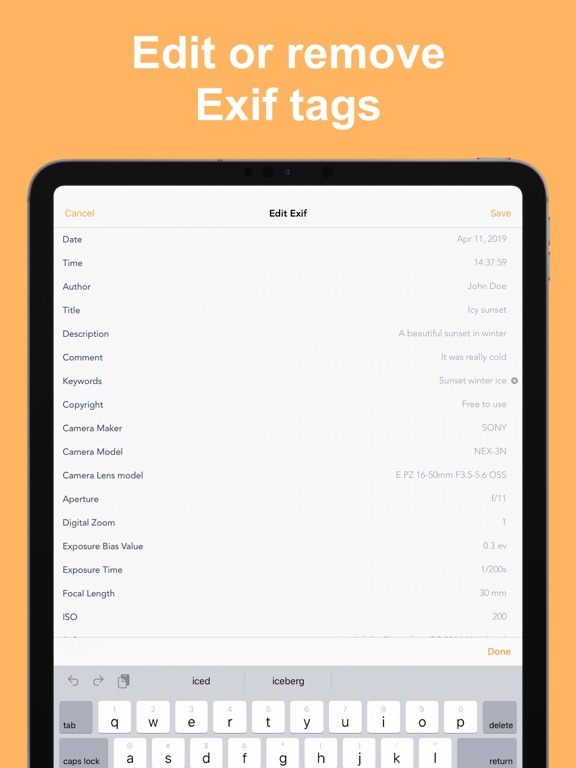
- Edit aperture, exposure, date, time, author, description, copyright, and more
- Edit geotags or spoof location
Filter photos:
- Pro users can filter photos missing location and Exif metadata
Remove Exif metadata:
- Remove GPS location data independently of other Exif data
- Remove all metadata at once
Bulk edit metadata:
- Pro users can edit metadata of multiple photos at once
Clean & simple design:
- Optimized for iPhone and iPad
- Supports Dark Mode
Photo extension:
- Access metadata of your photos directly from the Photos app
Protect your privacy:
- Easily share photos online without any metadata
This app works with:
- All photos in your iPhone or iPad camera roll, except ProRAW photos
- Photos in iCloud Photo Library
- Photos in Photo Stream
Exif Metadata Pro:
The Pro version of Exif Metadata can be purchased via an annual subscription or one-time payment to remove ads and gain the ability to edit metadata for multiple photos at once.
Payment will be charged to your Apple ID account at the confirmation of purchase. The subscription automatically renews every year unless it is canceled at least 24 hours before the end of the current period. Your account will be charged for renewal within 24 hours prior to the end of the current period. You can manage and cancel your subscriptions by going to your App Store account settings after purchase.
Terms of use: https://www.sixstarapps.com/terms/
Privacy policy: https://www.sixstarapps.com/privacy/
HAVE QUESTIONS OR NEED HELP?
If you have any question about the app, or need help about something, please do not hesitate to contact us at www.SixStarApps.com. We’ll be happy to help!
Exif Metadata App Comments & Reviews
Exif Metadata Positive Reviews
Great & freeIt does what it says it does and it removes all that Apple will let you remove. in case other people didn’t know Apple won’t let you remove absolutely everything so that’s not the developers problem that’s Apple‘s problem… As for the ads after you download a picture just exit out the app & reenter if u dont wanna pay to get rid of the ads instead of acting like a child in the reviews..Version: 2.16
Should Be 5 StarsI have used nearly every EXIF app for iOS. They ALL seem to be missing something another app has. Even all the paid ones. This one is no different. This one is the most complete however. It shows things others don’t (like HDR rendering for example), and it allows you to edit almost all data, which is fantastic. But the problem is, it only works for photos, not videos. This is very disappointing, as it’s incomplete for this reason. Please add videos, and I will revisit my review. Thanks for an otherwise fantastic photo metadata app!.Version: 2.8
Simple, clean, and intuitive!This is a great app if you are a novice, a pro, or somewhere in between. This app has several features available I cannot find in any other similar apps. (Talking to you serious photographers) I really appreciate having a one time purchase option as well..Version: 2.12
Good app for basic info from pics in the Camera app, missing some key featuresI would like to know Focus mode, preview size and type, white balance and other information not found here. Most importantly, I am unable to access images that are not in the camera app. I would also like to access pictures on the file system and I keep many of my pictures in a folder on a OneDrive. I’d probably upgrade if it were a bit more complete..Version: 2.8
Mostly Good...I like most everything. Though I would like to be able to access the app directly from the the photos via activities (the way I would if to copy, print or edit with another app like photoshop express etc...) Also being able to add a free text addition to the address would also be nice. As I was updating old photos and some the location businesses have closed so I was not able to put in an exact place..Version: 2.0.1
It’s functional (-:Free version can edit EXIF data, e.g. dates, on iPhone photos, only one file at a time. The interface is clear and well-designed. Ad viewing takes a few seconds after each edit in the free version. Files are saved as JPGs after editing, not in the native iPhone photo format. I am not sure if that’s a shortcoming that can be fixed, or an iOS limitation. Four stars, because it’s a solid app overall despite those minor quirks..Version: 2.1
Exif not savingI’ve reviewed a lot of pictures I had without location and date and now when I go back to it, it shows that the location did save but the date is forgotten 😩. I will need to review each picture again to reset the date but I’m hesitant to do it with this app again... it would be useful if we could also save the pictures under another name so I can put the date there as well..Version: 2.8
UpdatesI like the updates to this app because they actually do something. Not like those fast food apps I have that apparently fix bugs. They probably do, but at least these updates do something new..Version: 2.16
Cool appI would love to have a feature where I can search images by whether or not they have metadata in them. I changed the date or a ton of photos but when I do that I leave leftover Exif. I learned about this pretty late and have a ton of images with uncleared Exif that I can’t locate. A feature from the app where I can search every edited photo or every photo that has uncleared Exif would be great..Version: 2.2
It works enough!It removes metadata. I needed to remove a specific piece of metadata and this app appears to let you do that. Upon saving however I noticed it didn’t remove it. Removing all the metadata works great though. The ad after export is crazy but I understand the need to monetize and it’s placed after you use the features so I don’t have much to complain about..Version: 2.16
Correct the meta dataEXIF is useful to correct the meta data in a photo that was scanned and has the date of the scan not the date of the original photo. Only disadvantage is that just year alone can not be selected. Day, month, and time must be entered too. With photos, used for genealogy software, scanned from early 1900’s photo albums, only year is known..Version: 2.2
Great App!!I downloaded this on a whim wondering how to find out quickly how to save some favorite site locations for a gps map for customers. I love it. It takes your photo and provides the exact gps location it was taken from!!! Now if it could gather all your fave coordinates and create a map....heaven!!!.Version: 1.5
Great appI don’t do reviews often but this is a great app, and the pro version is very cheap. Another thing is that the free version doesn’t really limit anything, the only things you get with pro is no ads and multiple photos at once, so there’s no actual limiting of features..Version: 2.1
Does what it was advertised to do.I’m going to sell some high-buck snow tires and I don’t want the entire universe on CraigsList to know my street address, latitude and longitude, elevation above sea-level. This app removes all that with one click. (The free version does have a lot of adds, but they only show After you finish editing.).Version: 1.5
Photos app integration is FANTASTICI used the EXIF action from the photos app, and it just slides up with all the information I need. It does it in a beautiful and unobtrusive way. It’s such a delight to use, and I am always impressed with how easy it is to use with the Photos app..Version: 2.8
Mapping is limitedThe geolocation is shown in a small map within the app. It sure would be nice to expand or contract the map to see better there the location actually is. Better yet, have an option that passes the geotag to Apple Maps so I can use that. For example, to get directions to where the photo was taken..Version: 2.5
Erases Metadata AND converts HEIC’s into jpeg’s !How awesome is that? 1) it allowed me to easily use the free version first After using it, I purchased the pro version. 2) lets you keep the original photo w/ the metadata and you can easily add metadata to either photo. (I never review apps).Version: 2.15
It’s been a great use…This was a great app, I purchase the pro version and it was okay! But now iOS 15 added their own metadata feature on their photos app, so thank you, I will not be needing this app anymore..Version: 2.11
Can't select file by folder or dateYou are stuck with selecting the pics organized by type. Not very useful when you want to look at most recent pics or for a specific date or in a specific folder. Paid Pro version doesn't solve this..Version: 2.12
Missing features?The app has been fine when I want to change dates and locations, but I can't edit the more detailed info like Orientation, Shutter Speed Value, Subject Area, and other detailed values. Exif Pro doesn't state if you can edit these when you subscribe,and I'm not willing to check it out!😕.Version: 2.8
Great for handling old photosCan easily change location and date to match original photos that I have preserved by taking pictures of them. Would be 5 stars but there doesn't appear to be paid option to delete the ads..Version: 1.7
Bought the pro versionI knew right away I would need this. It is easy to use, just tap and get your pix, choose from the menu at the bottom and push to erase the metadata. You can also rewrite. Just simple..Version: 2.1
Happy userI love this app they made it real easy and no hassle to add a location to a photo in any format that it may be in on ur device iv tried 2 other apps for this one and i couldn't add a location on my jpg formate photos but this app lets me.Version: 2.1
Very Informative AppThis application helps you remove personal information from photos. The application also allows you to + descriptions and memories to treasured photos..Version: 2.2
Adds EXIF to Photos appThis app adds an EXIF option right into the IOS Photos app. No need to go to the separate app! Just click Share option and go down the list to EXIF. Very helpful..Version: 2.8
Almost PerfectWould give it 5 stars if there was an option to just add the location without having to replace the existing image. I have captions on my photos, and they get wiped out because it replaces the image..Version: 2.8
Feature Request - Multiple SelectI would really like the ability to easily select multiple photos by simply dragging my finger down like photos selects, or at the very least a select entire album button..Version: 2.12
Great functionality but ads too intrusiveI’d give this a 5 based in functionality, but it has the most intrusive ads I’ve ever seen in an app; they are literally the equivalent of web pop-ups, which are the scourge of web browsing. Knocking it down to three stars due to the intrusive ads..Version: 1.7
One of the few apps that actually does what it saysNothing further to add, download it, you won’t be disappointed. Shoutout to the peeps who made this..Version: 2.12
All photos selecSure gives you an amazing amount of data on every pic your phone take..Version: 2.12
Exif …No instructions provided. No data came to screen, after I selected a single photo to test the app. A HELP file would be nice, because after I provided negative feedback I was sent the answer: if screen is blank after I test a photo, it means the photo HAS NO EXIF DATA..Version: 2.8
Simple and fastAs a conscientious parent, I am reluctant to share photos of my children on-line. This app clears any personal data and eases my concerns. Plus it is very straight forward and easy to use..Version: 1.1
CrashingThe app loads, i find the album i want, i select the photos i want to edit, i put the info in, then the app crashes right before the app has time to edit the info. i even turned my phone off then on to see if this will help with the crashing . . . nope, no go as it still kept crashing. i would love if i could change the oder of the albums, instead of it being based entirely upon when the folder was made = where it appears on the list..Version: 2.8
So refreshingAs briefly stated above, it is just refreshing to download an app that works the way it says will work, and does so efficiently, not to mention is priced fairly..Version: 2.15
FantasticAbsolutely the best app I’ve found for identifying metadata on my iPhone photos. The developer has done a wonderful job in making this application user friendly..Version: 2.0.1
First free meta data changerI’m trying to hide something and this helped me change the date.Version: 2.14
Doesn’t transfer photo with metadata.We need to transfer the iPhone photos to PC with their metadata. This has an option to transfer with metadata but the data does not transfer. Otherwise test this is a great app to see the metadata..Version: 2.12
One IssueI like this app however occasionally when editing location data an error occurs that says, “Failed to edit location data.” This doesn’t happen on all photos so I’m not sure what the issue is..Version: 2.2
Exif genialCe programme devrait être incorporé à au système d opération quand on visionne une photo.Version: 2.12
Ok, but ads are full screen in your face for long periods at timesAs per the title.Version: 2.16
GPS not readLooks great in many ways, but does nor appear to be able to read GPS data from exif as embedded by camera. This for me was the whole point, as Lightroom Mobile doesn’t either..Version: 2.14
Great Program, GREAT SERVICEThe program is exactly what is needed to change the GPS on a batch of photos The technical issue I had was answered and correctly resolved within 10 minutes repeat 10 minutes This made me so happy I immediately bought Sebastien’s matching compress photo app…. Works just as well Thank You Sebastien at EXIF METADATA !!!.Version: 2.11
Show all without location. Needs reverse optionI'd give it 5 stars and buy if you can reverse that feature. I would like to see all that has location and remove it.Version: 2.12
ExitI finally got a program that is well built..Version: 2.8
Great for Film ScansAn excellent, light weight tool to add data to film scans for an iPad photography workflow. I like to keep my film stock and ASA rating tied to my images and Exif makes this a snap. It would be great if this could be done to all 36 frames at once but currently the app suggests only batch editing 20 at a time as it can cause the app to crash if you select many more than that. I feel like the developers will solve this in time though as they have been quick to solve issues that arise when new iPadOS updates cause bugs..Version: 2.5
LoveWorks great for the purpose I need it for..Version: 2.5
Easy to use, works well to make your location privateEasy to use, works well to make your location private. I t never crashes, works with every photo I’ve tried it with ..Version: 2.2
Easy to useI have been using this app for months now and found it works great for my purpose. I have some pics that were not dated because the camera date stamp was disabled for a series of pictures and scanned photos I wanted to archive didn’t have any exif info since they were originally analog. Works like a charm! The extension works perfectly too to view exif data just using the share button when in Photos on iOS. Love it!.Version: 2.1
For videosYou guys allow videos to be edited as well.Version: 2.1
App that actually worksI’m always very skeptical about free apps and always read the reviews. Most seldomly live up to the claims of the developers so I was very pleasantly surprised that this app met my expectations. I was able to add or change the location data and the dates with no issues. In the free version you can only edit one pic at a time but that works for me. Little heavy on the advertising but hey, it’s free. I have no problem recommending this app if you need a quick edit of the Exif data. Well done! Used on IPad..Version: 1.7
Doesn’t work on video files?This inky works on photos as far as I can see there is no support for video files..Version: 2.0.1
LoveRate 5 stars..Version: 1.5
Free International Money Transfer 💸Enjoy high maximum transfers into more than 20 currencies while saving up to 90% over local banks! The cheap, fast way to send money abroad. Free transfer up to 500 USD!Version: 3.4
What do you think Exif Metadata ios app? Can you share your thoughts and app experiences with other peoples?
Please wait! Facebook comments loading...