A-Shell Customer Service
- A-Shell Customer Service
- A-Shell App Comments & Reviews (2026)
- A-Shell iPhone Images
- A-Shell iPad Images
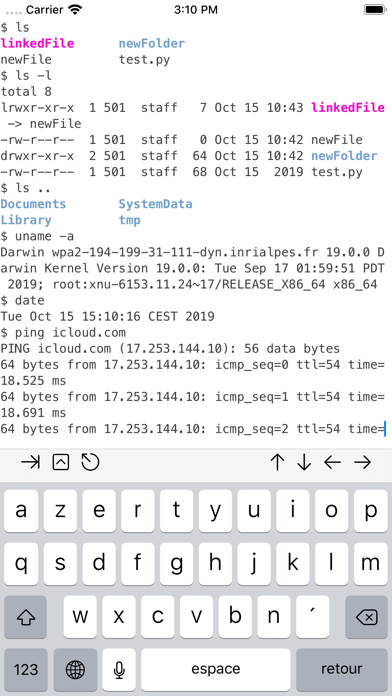
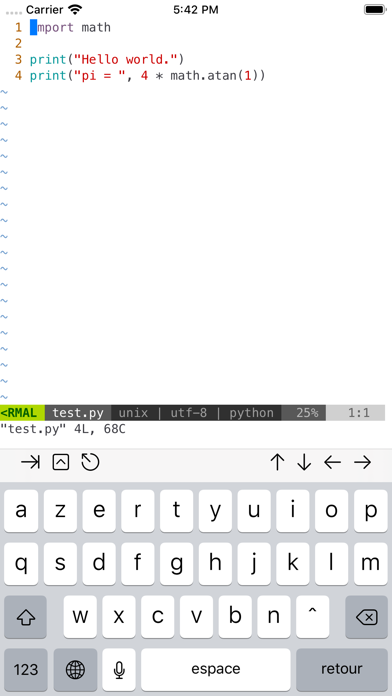
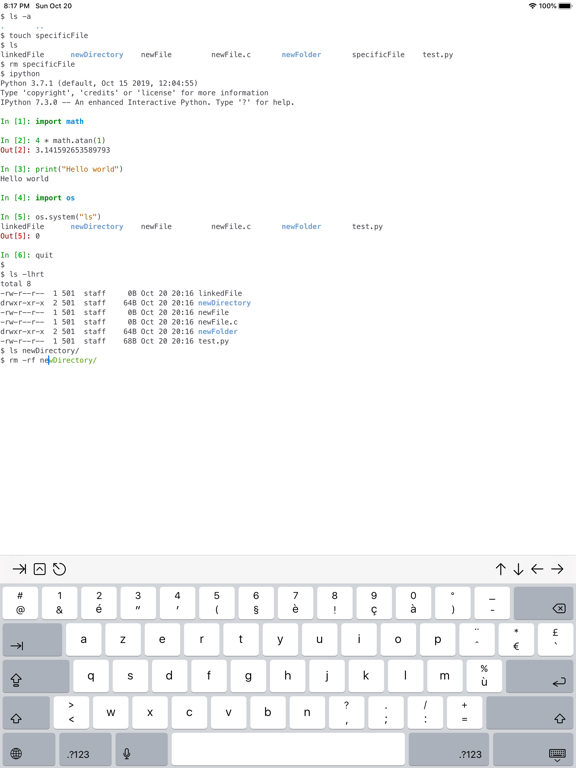
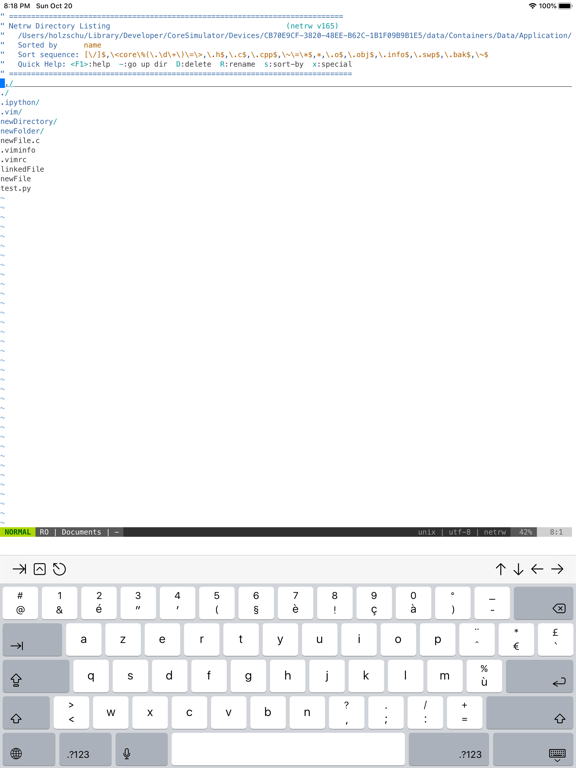
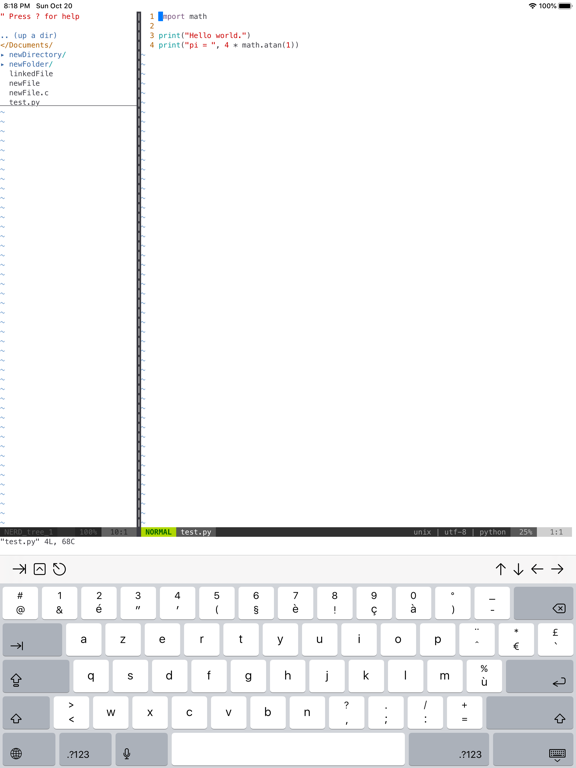
a-Shell is a complete local terminal emulator, allowing to run most Unix commands on your iOS device. You can transfer files using scp and curl, edit them with vim and ed, process them using grep, awk and sed. You can work with git repositories using lg2.
Most commands are compiled for iOS native Arm64 format, making them fast and well integrated with the BSD Unix that powers iOS/iPadOS.
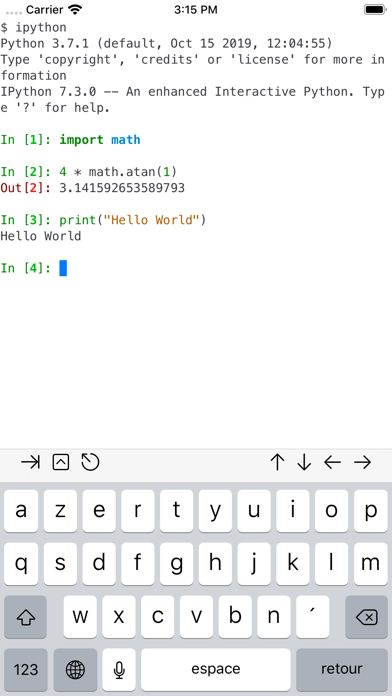
a-Shell includes Python, Lua, Perl, JavaScript, C, C++ for programming and TeX (texlive 2025, with Tikz and LuaTeX) for text processing.
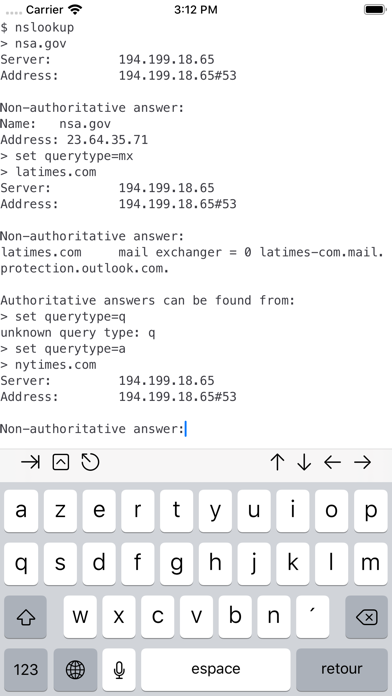
There are also multiple network utilities: nslookup, ping, whois, ifconfig... Type help for help, help -l to get the full list of commands.
a-Shell can be controlled from Shortcuts: run commands in order, process files in a-Shell, get the results as text or files, transfer files to other apps...
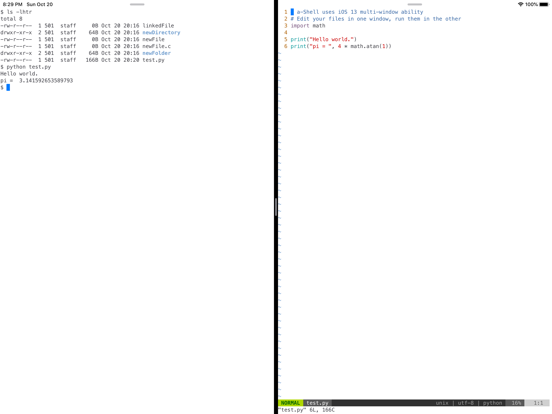
a-shell uses iOS 13+ “multiple windows” ability, so you can run multiple shells at the same time, with different commands, in different directories. You can edit a file in one window with vim and process it in the other with python.
Compile your C or C++ programs to webAssembly using clang or clang++, and execute the resulting binary. A complete webAssembly SDK is included (WASI-libc).
a-Shell is the complete version. If you need a smaller app, and you don't need a C compiler, a TeX engine, or numpy and matplotlib, there is a-Shell mini.
A-Shell App Comments & Reviews
A-Shell Positive Reviews
The notable boundary-pusher of local command line functions on iOS/iPadOSThere are now quite a few terminal emulator-esque apps on the App Store, but I've been using a-Shell since it was joined only by Blink (from which it was forked) and iSH. As it was then, a-Shell remains the only one of these with which one can actually accomplish command line tasks *locally* beyond screwing around. I am ultimately not a command line native, and I don't have the basic theory beneath my use of Python scripts, yet I've been able to accomplish startlingly powerful things within this app, thanks in large part to gracious and immediately-available support via the project's Discord server. If you've found yourself here by way of a Siri Shortcut's requirement, I would encourage you to take the time to investigate the commands said shortcut(s) run - try running them yourself!.Version: 1.10.2
A-Shell is a must-have for bringing the full power of a terminal interface to your iOS device.A-Shell is an outstanding terminal interface app for iOS, boasting a user-friendly design and powerful features. It supports a wide range of Linux commands, enabling seamless interaction with servers and local files. Its robust performance ensures smooth operation, even with complex scripts, and regular updates enhance its reliability and security. Whether for professional development or personal projects, a-Shell is a must-have for bringing the full power of a terminal interface to your iOS device..Version: 1.14.0
Pretty cool, but missing some featuresIt would be nice to be able to have a bashrc or something that allows you to control prompts, and a ps and kill functionality and screen, etc…. for batch jobs. But the really odd thing is hitting a button (other than space and enter keys for some reason) won’t repeat the character - that’s super annoying in vim for instance, because it means you have to do some funky things just to move the cursor around at any sort of speed. [EDIT: The developer said there’s a setting to use the cap’s lock as an escape key that if you disable, allows you to get this feature. For those who don’t know you can use control-[ to get an escape char too.] But overall really cool/useful. Even with a lack of wget (not a fan of curl), you can do pip install wget then python -m wget
Great app but hamstrung by ios?Thanks for creating Carnets and a-shell. They’ve both been essential for iOS programming. However, it seems that every app is restricted to accessing and modifying files that are only within their own respective directories? I can’t seem to cd my way into another folder that resides in the Carnets folder and vice versa (because Carnets doesn’t have its own terminal, for example) And secondly, there seems to be a problem when trying to install sklearn in a-shell. It keeps throwing up the error “setuptools not found” but when I pip install setuptools, it says that “requirement already fulfilled” and I have been able to use setuptools when making packages before so it seems that it is there but I can’t install sklearn? I’m not sure what can be done. Apologies if I’m doing something wrong. Thanks..Version: 1.7.5
Very impressive application given its inherent limitationsThis app deserves five stars for being as amazingly capable and straightforward as I feel bash can be given iOS sandboxing and other limitations. I have tried a few different terminal/bash/ssh apps now this is definitely a favorite of mine. I like the mini version too not because I need the light weight but because it means two commands can run at once (if I fight with iOS memory management to keep both apps “foregrounded” 😂)..Version: 1.14.0
A-shell is quite capable of many Unix-like activitiesAfter running both iSH and a-shell, I found more capabilities in a-shell. Plus, with local and remote shell capabilities, there is a better method for running Linux or Unix commands, sftp’d over from a cloud server and run in the a-shell command line. I was able to run inxi from a recent sftp grab and piped results to a local text file. ISH cannot do that yet, as ssh and sftp are not yet implemented..Version: 1.13.0
Very cool, but a bit limited?This is a very VERY cool app. I love the fact that you are able to actually access real phone files and change them, unlike some fake ones I’ve seen out there. It has many of all the Linux commands as well, which is awesome. One thing I am confused is why it doesn’t have the sudo command, and why I “need permission” to access some files. Overall, as a new Linux user, I find this to be VERY cool. If anyone can help with the permission issue, that would be much appreciated..Version: 1.6.5
Surprised Apple even signed, glad though. TyCan we lowkey emulate inside this another copy of the app or the fs unmounted from local to cloud in order to allow for chmod , chown, etc, oh and our own root file system just to emulate Linux even if it is agentless . Right now it looks like Apple wants to give us rw , r, r. Like why bother lol. At least all the python executables are integrating visually but DONT touch it or DARWIN will scream. Smh lol. Apple Apple Apple...⌫☮︎︎🔝☠️☠️☠️📲🕹🔑🗝🛒🎈📦📦📦🔐🔓🔓🔗🖇📂🆔⚛️♨️♨️♨️7️⃣7️⃣7️⃣⏺▶️⏏️🔂🔀↩️♾🔝🔚🏴☠️🏴☠️🏴☠️.Version: 1.4
Love the terminal butI love the terminal but it needs modifier keys on the keyboard. How does one ctrl+c and many other common keybindings? It would be a wonderful terminal if the author would add ctrl, alt, and the super keys. So the developer responded to this review and thank you for explaining where the modifier keys are however it would have been nice to have this information. The icons don’t look like the modifier keys. IMHO the author should use words instead..Version: 1.9.1
Great app for vim & python usersI have been using it for educational purposes. I am currently learning the basics of python through the “Python For Everybody” course on Coursera. I was able to write short scripts on a-shell to pull and process data from the web. My only problem so far is that I am struggling to install scipy on a-shell. Hopefully I will find a solution to that problem soon..Version: 1.15.0
An Amazing AssetA-Shell is an amazing asset for the iPadOS/iOS ecosystem. A fast, feature rich terminal, full python (including modules) and vim support (including plugins), symbolic linking from iCloud files to on-device locations, curl, and much more, it makes the iPad a full computing environment. Thank you for spending what must be many hours on this, and know that this app is used daily..Version: 1.8.1
Five Stars because it *exists* and because of its potential aloneI just downloaded this, and I have fiddled with it a bit, and I am astonished. My little command-line heart went pitter-pat as I was able to successfully do even the simplest things before I have even started to look at the full capabilities. Thank you!.Version: 1.12.1
I love it!Thanks so much to the developer of this amazing shell. I’ve been trying to find a way to turn my iPad into a coding sandbox for a while, to exercise new coding ideas without having to boot up my laptop. This is just what I was looking for. Not sure if the Apple restrictions would allow for it, but it would be amazing if node/npm could be ported to this environment..Version: 1.6.4
Really shines with integrated SSH clientWhile the ability to navigate around the iOS file system is novel, what I really like is the simple integration of SSH into a-Shell. I can remote login to my home server seamlessly. And a-Shell supplements my keyboard with crucial-to-terminal keys that Apple doesn’t provide: Tab, Control, and Esc..Version: 1.5.1
Needs some quality of life improvementsHi dev, if you read this please implement tab completion of commands and parameters for commands. Please also add more buttons on the helper bar (hyphen, double quote, semicolon). the existing tab completion should list all commands matching user input, e.g. if user types pip and hits tab it should list all commands starting with pip including pip, pip3, pip3.9, etc. Thanks for the great app and keep up the awesome work!.Version: 1.7.1
At last, a real terminal appI’ve grown frustrated with several terminal and/or ssh clients that offered limited features, only supported old ciphers, etc. a-Shell is a real working terminal, and is as useful for working with remote BSD and Linux boxes as a terminal app on MacOS. Bravo!.Version: 1.10.7
Remote shut off commandMe and my friends have messed around a bit with the app but I don’t know how to use the remote shutoff command. If you could give me a template that would be great. THANKS!.Version: 1.9.4
It is a shell, I’ll say that for it.A 4096 bit rsa key generates much faster on here than iSH. If you copy a cat’d public key and paste it into your authorized keys through another ssh app you’ll probably run into denied permission issues when trying to connect. For reference, this appeared to be a clipboard issue when pasting the cat outputted a-shell key into the authorized keys file of a server already connected via Termius. Tap support could be better. Cursor could stay in prompt when a selection occurs but doesn’t. So far it’s not a great SSH tool. More of a novelty shell for limited local play..Version: 1.15.0
I love this appThis is truly one of the most empowering apps on the AppStore enabling my phone and iPad to be much more powerful. This is something that should be native to iOS and iPadOS but I'm very grateful that Nicolas developed this tool !.Version: 1.15.0
The BestI tried several other clients to use ssh on them but they’re absolutely useless and required lots of configs to set up. This app allowed to me use ssh just as I use it with a terminal. Tnx..Version: 1.7.2
AwesomeIt's a surprisingly good shell for ios. Thankyou. I think some more customization would help such as larger arrow keys or maybe a built in dev keyboard with easier special char access..Version: 1.8.5
Simply Awesome!This is exactly what I was looking for (and trying to build as a web app lol). I finally have a use for my iPad !! lol Seriously tho, this is the coolest app to hit the App Store since Pythonista! I’m gonna build so much cool stuff to run on this. 🤓❤️ this 💻 !!!! Yes it has its stupid and unnecessary restrictions, but IMO that’s just Apple being Apple. Not the developer’s fault lol. This is the closest I’ve ever seen to a real computer on iOS. It’s totally amazing and u gotta try it..Version: 1.5.1
A power users toolHaving the power of Unix, a Python interpreter, and integration with Shortcuts unlocks power that is not usually available to iPad users. Really really cool..Version: 1.15.0
Wonderful app, some suggestionsImpressive shell on IOS. when I use “pip install tensorflow”command, it will always go wrong: Could not find a version that satisfies the requirement tensorflow.Version: 1.3
Missing nanoThis app is great, but the absence and inability to install nano using sudo install nano takes it down just a tiny notch. Nano is just such a simple and easy text editor. My go to for programming. Plz give.Version: 1.12.1
Epic ImplementationIt’s very pleasing that we can have such terminal environment in iOS and iPadOS. Still, I have a suggestion: a package manager. If we have access to a package manager like macOS’s Homebrew or Linux’s APT, it would be incredible! I know it’s a hard work, but it would be worth it. I would love to help with doing that, and I’m sure there are other people who feel that way as well. Best of Luck!.Version: 1.5.1
Amazing, can we add readline shortcuts?
Unable to use vi in an ssh sessionThe app seemed very slick upon first use. I figured out how to copy ssh keys in order to ssh into my server in the cloud Vim works great running on the iPad (I’m using on the iPad Pro latest) Problem is once ssh’ed into server, any attempt at editing files (using vi) the cursor disappears, nothing works, I have to kill the app UPDATE this issue is fixed by setting the terminal to emulate vt220 and doing a resize after entering the ssh session.Version: 1.5.1
Hell yeah NicolasI just got the iPad Pro magic keyboard. I’ve been wanting to practice my command line and VIM. aShell will allow me to do both! And I can run Python files. Nicolas, you are the best!!!.Version: 1.4.1
Ganz in OrdnungA lot of work went into this. Shell seems stable. Now to read more about this shell and shell scripting abilities..Version: 1.15.0
ImpressiveEspecially given all the constraints on iOS/iPadOS, this is really well done 🙏.Version: 1.12.5
Excellent toolSuch a light-weight tool and works so well! Definitely recommended.Version: 1.8.5
It really worksThis is the first command line app that just worked. It is faster than my Mac Pro on typical cmds. Way cool..Version: 1.7.4
Very good appQuite useful, would recommend.Version: 1.12.9
PromisingThis is promising! If job control and better completions are added to the shell it would be very good. Also, git being added would allow for a great dev environment..Version: 1.2
GoodI have been using the LibTerm app and I recently discovered this app. It seems good so far. The ed command seems to work weird.Version: 1.3
Runs a terminal directly on iPadThis is a pretty impressive terminal. I can run python programs directly on the terminal. Support for pip, SFTP, SSH, etc..Version: 1.15.6
Love it!So happy I found this app. Keep up the great work..Version: 1.15.0
Good stuff but some flaws.One is you can’t run shell scripts. How about compiling bash or zsh just as a shell script interpreter? Second is the vim editor can get stuck in recover mode and the only way out is to re-install a-shell..Version: 1.5.1
Thank You !Now I have used it and am delighted to have a shell terminal (or is that terminal shell?). Anyway, thanks :).Version: 1.4.1
Add a help screenSo the help screen that’s already in it does not specify all the commands you can use.Version: 1.1
GoodGreat work, but missing core features of basic commands. Can't ssh on anything but port 22, which really limits usefulness..Version: 1.4
Awesome!Awesome terminal app! :).Version: 1.10.3
The best Termux alternative for iosCurrently the best Terminal application on the App Store. Use it for my Raspberry pi with ssh. Great job dev !.Version: 1.13.0
Acknowledges shortcomings very quicklyResponsive, responsible Developer behaviour that should be emulated by others! Fixed a yt-dlp bug that entirely broke my iPad Pro workflow in <3 days. Thank you!! <3.Version: 1.12.4
Very niche app but works very wellI was surprised at the amount of features this app had. This is just a linux terminal on an iPad, and it works well. I use it to run code and ssh, and both work pretty well. I would recommend using an actual keyboard, since it is a command line. Even so, this app works without a physical keyboard since there’s an escape button you can press on the bar. This app is open source too, which is a bonus. Overall would reccomend.Version: 1.12.1
PerfectLiterally everything I need. So straightforward, no hassle, easy to use, and it emulates a Linux power shell very effectively and accurately. Clean layout that resembles a terminal on Mac OS computers. It’s also completely free. How more people don’t know about this app is beyond me..Version: 1.12.1
HelpHow do I get python to work.Version: 1.10.3
Free International Money Transfer 💸Enjoy high maximum transfers into more than 20 currencies while saving up to 90% over local banks! The cheap, fast way to send money abroad. Free transfer up to 500 USD!Version: 1.17.5
What do you think A-Shell ios app? Can you share your thoughts and app experiences with other peoples?
Please wait! Facebook comments loading...