Arc Studio Labs, Inc.
Arc Studio Screenwriting Customer Service

- Arc Studio Screenwriting Customer Service
- Arc Studio Screenwriting App Comments & Reviews (2026)
- Arc Studio Screenwriting iPhone Images
- Arc Studio Screenwriting iPad Images
Arc Studio Pro supports your screenwriting process from idea to finished script:
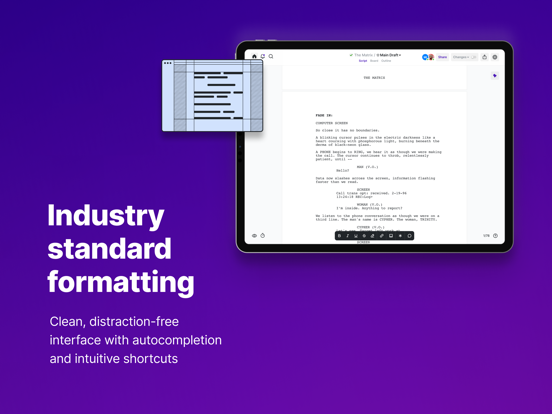
* Format your script according to professional industry standards without even thinking about it
* Write with flow, thanks to distraction-free, thoughtful design
* From idea to story: Outline and visualize your story-structure with the most advanced beat-board available
* Collaborate: Write with others in real-time, receive feedback and margin notes directly in your script
PROFESSIONAL FORMATTING
Arc Studio Pro automatically formats your screenplay to industry standards, even if you don’t know what they are. It’s super-easy to use for beginners and fully-customizable for pros.
* Fully automatic, industry standard page layout and text formatting
* Import and export Final Draft, PDF, and Fountain
* Use intuitive shortcuts to format your text perfectly and effortlessly
* The most advanced autocompletion on the market: Character names and sluglines automatically completed for you, for faster typing and consistent naming.
* Elements are chosen for you based on what's most likely, and can be configured.
KEEP IT FLOWING
Stay focused thanks to state of the art design. Write with ease and only think about your story, not the page margins or when you saved the last time.
* Intuitive interface
* Autosave and automatic backups for worry-free writing
* Super-pretty night mode
CRAFT YOUR STORY
Arc Studio Pro takes you beyond just formatting, and helps you build your story with the most powerful outlining features on the market.
* Build your story from basic elements: plots, characters, and locations
* Add beats and organize them in acts or sequences
* Rearrange your story with intuitive drag & drop
* Tag your beats with plots and characters, for intuitive color coding
* Highlight certain storylines and characters to see their arcs at a glance
TEAM WORK
Arc Studio Pro is the screenwriting app that focuses most on collaboration. Screenwriting is often teamwork, so we want to make it as easy as possible for you to work together - that’s why we offer the most sophisticated collaborative writing tools on the market.
* Write at the same time in the same document in real-time
* Invite collaborators with one click via email
* Comment directly on the script
* Request reviews and send read-only excerpts
WORRY-FREE EDITING
Tying to find a certain scene or deleted dialogue? Miss a bit of text? Arc Studio Pro keeps track of all your edits and makes it easy for you and your collaborators to recover previous versions. Never search through piles of papers, different documents or endless emails again.
* Search and manage your history with ease
* Track your own changes
* See who what others changed – who and when
* Delete and recover whole scenes thanks to sophisticated history features
PAY-AS-YOU-GO
Arc Studio on iOS and iPadOS requires an annual Pro subscription.
A 7-day free trial is included.
PRIVACY AND TERMS
Privacy policy: https://www.arcstudiopro.com/privacy
Terms and Conditions: https://www.arcstudiopro.com/terms
Arc Studio Screenwriting App Comments & Reviews
Arc Studio Screenwriting Positive Reviews
Lots of room for improvementThe iOS app is several steps behind the desktop and web apps - issues with formatting (inability to bold, italicize), copying/pasting text, and even selecting text snippets to stash. Intermittent sync issues between the desktop/web apps and the iOS app. Support has been spotty - these issues have been reported and the advice is to check for updates, but issues persist regardless. I’m toughing it out until I finish my current project and my subscription expires..Version: 3.290.0
Worth the moneyI've already been using Arc for years, and was surprised when I saw some bad reveiews here, so I wanted to leave one to set the record straight. This is is the best screenwriting software out there, and I have tried all of them. I am writing feature film screenplays so keep that in mind for this review. It's not just a phone app, it's also has iPad, Mac, and web browser versions. I am primarily using the iPad and Mac versions. I was looking for something with google docs like multi-user functionality, and it has that, as well as a beautiful minimal UI so I can focus on writing. I also really like the versioning and branching features, helps you keep track of what you did when, and who did what (like github but for screenwriting, it's awesome). Another feature I love is the beat sheet, you can write out your beats and then fill in the script. But you can also drag and drop the beats around and it will move the script to follow. The developer is also super responsive to bug reports and feature requests, and they have a support site where you can vote and request features/bug fixes. But overall I am just so impressed by Arc Studio. Like I said, tried em' all, this is the best..Version: 3.308.0
WAY better than Final DraftThe organization of supplemental writing features and the simplicity of snapshots along with the Browser/App/Cloud ecosystem make this the best screenwriting tool hands down. The iOS version of this app definitely needs some updates—there are a few bugs that need ironing out. That said, I’m giving it five stars because I think it’s much better than the 3 stars it currently has and hope more people start using this. The iPad is my favorite filmmaking tool I don’t want to have to jump onto a laptop every time I need to work around a bug..Version: 3.308.0
Say Goodnight, Final DraftArc Studio Pro is the app that Final Draft should aspire to. It’s clean, neat and elegant. It helps you focus with your outline to the side and helps you with the pre-writing (populating character names, creating bios, as well as locations and story arcs. This is a fully featured app as opposed to the extremely watered down version of FD. It allows you to take snapshots, tracks your revision history and creates a character arc timeline which allows you to see the journey of your characters across the entire script. I highly recommend that you do the pre-writing because it will give you a clear path forward. Some people like to go for it, and the program allows that flexibility. The app also keeps track of your writing activity and nags you when you’re slacking off (at your direction, of course). It writes Final Draft files as well as Fountain files, which FD can read if your production company insists on using Final Draft. The yearly subscription is well worth it..Version: 3.7.3
Excellent app with few bugsI had been looking for a new application to collaborate with others on projects with for some time and have to say I find Arc Studio to be one of the best I have experienced on a mobile device. I ended up subscribing to the full plan but did find a bug in which the modal window does not go away after finalizing the subscription. I found that a fix is to exit the app, remove it from background processes, lock the device and then launch it again. With the exception of this interface issue I am quite pleased with my experience..Version: 3.151.0
Enjoyable, but has bugsThis is my preferred writer. However, it looks as though it has yet to be updated with iPadOS 16 to the point it’s almost* unusable. For some reason, there is a massive purple block that covers most of the screen. Almost like the UI thinks there should be a keyboard there, but since I have the Smart Keyboard attached to my iPad, it’s just wasted space. Please fix. I enjoy writing on the go and my iPad Pro is my tool of choice..Version: 3.118.0
An Absolutely PHENOMENAL Screenwriting AppAs someone who works solely from an iPad, I was so relieved to find a screenwriting app that worked seamlessly. Yes, there are others (and I’ve tried them) - and NOTHING compares to Arc Studio. I wrote my first full-length screenplay in three weeks, and now halfway through my second - and AS makes it a breeze. I learned the software in under an hour and was blitzing through the shortcuts and leveraging the features like a pro! Just as important as the functionality is, how an app is supported is a critical component. I can say, without hesitation, I’ve never received better customer service on for any app on the App Store. That doesn’t say a lot, that says it all. Thank you to the amazing developers and support team!!!.Version: 3.74.0
Amazing Screenwriting Software!This is by far my favorite screenwriting software! It’s available on iOS, Mac, and browser based! It’s so clean and efficient. The ability to write where ever on any device is so killer and shockingly not something any other platform offers! The creators are also super friendly and willing to hear feedback! I’m so happy with their apps! Thank you so much ArcStudio team!.Version: 1.0
Better than FD MobileAs a longtime user of FD mobile, I finally had enough of the bugs, glitches, crashes, data loss, and “shake to undo”. So I switched over to ASP and I’m fairly happy. Most of the experience is better. I haven’t had any crashes or sync conflicts with the desktop app. I feel more secure than when I was using Final Draft, but that’s the bare minimum and (in FD’s case) completely unacceptable for the biggest screenwriting software. But this is a review for ASP, and thus here are my thoughts: It’s a decent screenwriting app with all the features you’d expect, plus stability that should be standard. I don’t love paying a subscription, but at least it covers both desktop and app. There’s really not much to say other than it scrolls nicely, formats well, syncs fine, and just works. It’s a somewhat smooth experience with a few bumps, partially due to the following issues: -Due to the categorization separating line types, it is not easy to delete or select whole chunks of text on mobile. Desktop works fine for that but I don’t always have my computer or a keyboard. -This categorization also can result in some wacky spacing between lines, which doesn’t seem to be reflected in the actual exported draft, thankfully, but it’s still annoying. -You can’t view alternate drafts, and most of the OPTIONS UI still goes off the screen or disappears when you want it to stay. It used to be the desktop version’s UI, where all of the options would just run off the edge of the screen, so this is an improvement. -A recurrent issue is that keyboard is permanently on screen and I cannot scroll to the very last line I have written. This is a huge headache on mobile and needs to be fixed ASAP. -Export seems to be broken in the sense that you have to export as the default name it gives the file, then rename it later or the file will fail to save. Maybe this isn’t a common issue, and certainly not a desktop one, but it has affected me multiple times to where I just accept it. -Can’t see page numbers until you export..Version: 3.174.0
What happens after the 7 day plan finishes and I stay on the free versionHi what features will I loose once the five days I have left are finished and I choose to stay on the free one. Could you please let me know. Will I loose my screenplay or any part of it if I do not pay..Version: 3.174.0
Navigation BarHey, I do love the app, however! The navigation bar now pops up for no reason. I’m on an IPad Pro, and this has only started to happen in the past few days. I know you’re all on it, so thank you for all your hard work. Cheers!.Version: 3.129.0
I love it, but…I use arc studio on the app and on my macbook, i have no complaints in general but for the app i wish i could access Projects and could edit who had access to scripts on the app. but there is no option even regarding projects.Version: 3.58.2
My Favorite So FarI’ve used every platform at this point and had low expectations for Arc because they were unknown but they’ve exceeded my expectations. By far my go to screenwriting software now that they’re on mobile..Version: 1.0.2
Greatest software yetARC Studio is superior. I love it so much. I can write on my phone when I get inspired on the go, and it shoots straight to my computer for when I get to my desk later. LOVE IT. Thank you guys at ARC Studio. Seriously..Version: 3.79.0
BugsSum bugs browser version is better.Version: 3.74.0
Great with serious drawbacksThe PRO version of this software is nearly $100 bucks. I’ve paid that twice now. But into my second year, the iPhone version is still a buggy unpredictable mess: Making selections in the scene context menu is frustrating, doesn’t always work as expected. Tapping the little running man icon doesn’t always successfully activate this menu, making context selection a cat and mouse chore. The settings menu is larger than the frame, making buttons and text fall off the edges of the screen, and everytime I activate it, it shows up in different places on screen, making it very difficult to navigate and work with. Turning on page line breaks produces a very strange result: page lengths are not consistent, making some pages much much longer than others… and after a few pages, the page line breaks just stop appearing altogether. ALSO, turning on the page line breaks feature introduces a bug, where after a certain point in your writing, text falls below the fold on screen, making it impossible to continue writing. Turning this feature OFF, restores my ability to continue writing, but leaves me with very large irregular gaps in my text. I’m bummed the beat outliner, character and location building features are not included in this version of the software. For a $100 “Pro” version of the software I should have the complete set of features across devices. Seriously, you guys have quite a bit of work to do to make this package more usable and stable..Version: 3.151.0
FeedbackI gave the app three stars since it would be nice if they had a way to switch from the script to the story beats and edit characters and storylines like on the desktop version. Or a way to make notes if I have an idea to add later or information I don’t want to forget about like locations. but I can’t do that on the app. if I can I don’t know how they don’t have any tutorials on how to use the app on their YouTube channel that I could find. I’m hoping they can incorporatethe story elements into the app soon I don’t want my money to feel wasted. When I could have paid for the basics with a writer duet. I work back and forth between my phone and computer a lot..Version: 3.129.0
Appreciate the Effort, but...On the one hand, I greatly appreciate the developer’s investment in iOS screenwriting apps. The iPad in particular has been begging for a fully-featured app that can support full time writing, without needing to use a Mac for any stage of the process. However, the design of this app is incredibly distracting. The animated character is annoying and unavoidable. Every line is shaded grey, with invisible text saying “double space”—why is this simpler than tab? And far less simple than Fountain, which would just have you start typing the character’s name. Additionally, the dark mode is inexplicably blue instead of grey/dark grey. Full screen isn’t truly full screen (tons of unavoidable elements), zooming the page requires a slider instead of just pinching, it goes on and on and on, and ultimately is too much to handle. What I DO appreciate is the outlining baked right into the fabric of the app. This is absolutely the future of what screenwriting apps need to focus on. But this needs to be in addition to a minimalistic writing environment, not instead of it. When you sacrifice the blank page, you sacrifice the most important thing—the writing itself. I will be sticking with Slugline, which is underpowered, but minimalistic in a way that is important. If Arc Studio can crack the ability to enter a minimal mode, I would consider returning. And if they could figure out a way to allow for Fountain style writing, even more so. But for now, this app is sadly not for me... PS: I gave it four stars, because I appreciate the investment of effort into iOS screenwriting and want to encourage it. Hopefully enough changes will be implemented that I’ll be able to update it to a five star review in the near future. Update: Another issue that needs to be fixed. Once the initial trial expires, there is no way to even open any portion of this application. This is a problem because there is no way to test any of the new features without paying 100 dollars—which I obviously won’t do sight unseen. They need to figure out a way to give people who are on the fence a continual way to keep reassessing the application’s progress..Version: 3.1.2
Good enough to be 5 starsThis app is really good, I had it for one day and I can write a script for my YouTube Channel which is Gacha and if I didn’t find this scripting app I would of still be scripting on Google Docs. And that’s my review. First time doing a review so I hope it’s okay… ☺️😝😌.Version: 3.112.0
Love this app!Arc Studio is great! I mostly use it on my computer but the app is super handy for editing, really easy to use. The support team is great too, always get quick and efficient help when I need it!.Version: 3.79.0
Free International Money Transfer 💸Enjoy high maximum transfers into more than 20 currencies while saving up to 90% over local banks! The cheap, fast way to send money abroad. Free transfer up to 500 USD!Version: 3.405.0
What do you think Arc Studio Screenwriting ios app? Can you share your thoughts and app experiences with other peoples?
Please wait! Facebook comments loading...