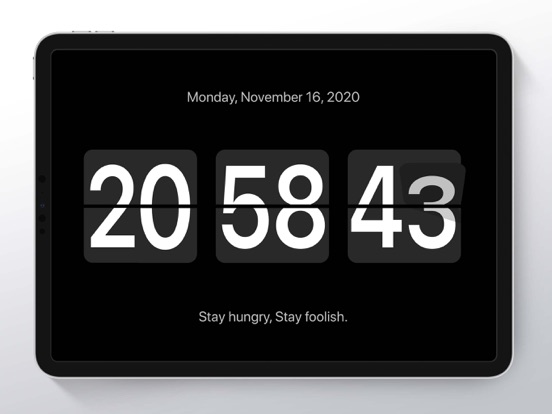
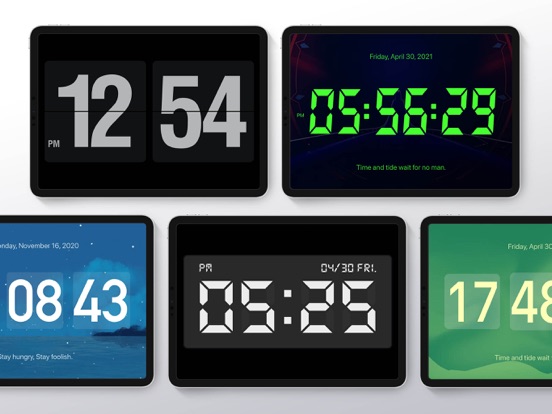
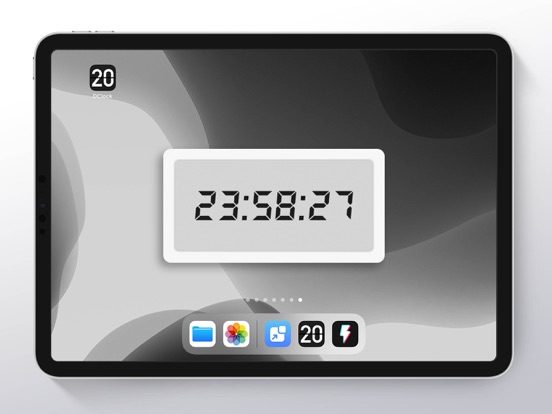
DClock is a useful flip clock and the interface design exquisitely. It looks great and is easily visible from across the room so you always know what time it is. There is flip animation display when time changes.
Features:
【Minimalist Design】Less is more.
【iOS14 Widgets】Support newest clock widgets on iPhone
【Rich Themes】DIY your own clock themes
【White Noise】Focus on your study
【Pomodoro Timer】Focus on your task
【Inspirational Quotations】Add your own quotes
【Alarm Clock】Variety of alarm clock musics
【Floating Clock】Always float on your screen
You can see your health data such as daily step in new clock themes.
Your support is greatly appreciated.
Tips:
DClock optionally integrates with apple health. this data is used to display your steps and walking distance if you select one of those themes.
DClock - Digital Flip Clock Positive Reviews
Wow !I love this app! It is so cute and you can change it in watever you want ! I did it pink ! So beautiful!.Un petit peut dure à instalerVersion: 2.8.6
Great app butGreat app but please fix these issues: add seconds to the general theme. 24 hour clock not selected but clock still reads 00:00 at 12am.STeVeNnNnNnnnnnnnnnnnnnnnnVersion: 1.9.5
Very goodLove the design.GfdfhhvrtvVersion: 1.4.2
Love the app but no temperature in CelsiusThere’s no way to get the displayed temperature in Celsius even if all my phone settings are set to it..PPBourassaVersion: 2.8.2
Nice butThe app has nice features but the only bothering thing is that it starts in a horizontal view. If you could make it vertical and rotatable would be more convenient..Great-PhoenixVersion: 2.7.1
Free International Money Transfer 💸Enjoy high maximum transfers into more than 20 currencies while saving up to 90% over local banks! The cheap, fast way to send money abroad. Free transfer up to 500 USD!AdvertorialVersion: 2.8.6
DClock - Digital Flip Clock Negative Reviews
When it worksIt is a great clock when it works. It has a tendency to go to a 24 hour clock and no matter what I do I can’t change it until it decides to revert back to how I have it set. The large clock will show the correct time but the widget has a mind of its own. When it is working it has an issue with displaying the current time. It will show the time that the screen went dark and takes a bit to catch up..Old&Tired115Version: 2.8.2
It’s a clockIt’s true. It is a clock. BUT there are other themes shown as locked with no way to unlock them. If this guy actually wants to make money from this app, he has no idea how.
I was willing to pay a buck, maybe even 2, so I could get the seconds showing in the widget, but I just can’t find any way to pay.
So, if all you want is a really basic clock widget then get this. If you want anything more that appears to be promised, find one of the other countless clock apps out there..Haff713Version: 1.5.3
New update added white border to widgetI’ve used this for years to display military time on a widget, but I noticed now it has a white border around the widget, which looks terrible. Editing, trying to update it in the app (which the pic of it in the app does NOT show the white border) did not fix the issue. Can’t use it now, it looks glaringly terrible.Carrie (west)Version: 2.8.3
Not working as intendedThis widget worked great for the first few months, I paid for the VIP clocks and preferred to use the “Flip Clock(VIP)” widget so I could use my custom themes, however, one day it reverted to its default theme on my homescreen and no matter what I do it will not register my custom themes..CosmicBean20Version: 2.8.2
Please fixSince the iOS 16 update, the clock doesn’t display the correct time. It displays a time from a few minutes ago and is frozen..Beech8Version: 2.7.3
ClockI don’t understand why you would ask for a review within 30seconds of receiving the app. Don’t you think that you should wait at least a day before asking for.Ron 2753Version: 2.8.5
Widgets are blank after update.I updated flip clock today. In the update it said “bug fixes”. I think they meant to say “bug installation”!
All widgets are blank now even after removing the widget and making a new one. Deleted app, re downloaded and still all widgets are black..WookjuiceVersion: 1.9.2
Great if only it could tell the timeAs long as you don't need to know the time,this is a great app. I like the look of the widget, but when it tells me the wrong time it is of no values. It is often of by several minutes..ConnexusVersion: 1.5.2
FreezesMoved widget to Home Screen to have large clock there, but it freezes so you get the wrong time happened 5 different times today.53shawnVersion: 1.5.3
GlitchySome of the functions were not reliable, videos to add additional functionality would not play. Deleted..Otown DavidVersion: 1.9.5
Can’t get flip clockSpent the money to get the flip clock widget and the styles didn’t update to show other style options I purchased. I deleted and reinstalled with no luck. Feel like I have been tricked.DartdeanVersion: 2.6.3
Does not display 12-hr mode on screen!I like the widget, but I hate that the 12-hr mode does not activate on the Home Screen. It only shows when you click into the app! 😩 Please fix it..Darith3duhVersion: 1.5.6
Great app, butThe time change has messed it up. Can't get it to show the correct time anymore..IPodLover18Version: 2.7.0
Clock doesn’t refreshGreat design but the clock widget doesn’t refresh without occasionally opening the app. That seems to be a recurring issue with a lot of clock widgets..Bible lover dudeVersion: 1.4.2
Don’t push reviewsDon’t push reviews. Bring more beautiful fonts and add transparent theme. Thanks.Uchiha, ItachiVersion: 1.5.1
Not always workingWidgets do not always show the correct time. A lot of times, will not update for quite a while. Despite a bunch of updates lately, this is still happening consistently..ConundrumVersion: 2.2.1
Incorrect timeNever says the correct time haha ,, only one job to do.NeedawidgetthatwirksVersion: 1.5.3
No flip animation?I think I got ripped off. I paid for this purely for the flip animation that shows in one of their preview images. I don’t see any way to get that flip animation on any version of the clock. If I’m wrong developer, please let me know how to do it. *EDIT* I found it but I think it only works in full screen mode. I only wanted it for the widget :-(.Idkidkidk123123123Version: 2.8.2
BadVery bad.Fedor-97Version: 2.8.2
The widget won’t show the correct time!!The widget is 1h behind and did adjust for daylight savings time this needs a update!!!.J.hony b goodVersion: 2.8.0
Too many adsThere is too many ads everyTime you click something sometimes like there’s ads almost all the time like I’d rather you guys not buy it I mean get it because it doesn’t show the real time and it says like 17 and something seconds it’s so annoying don’t click get it’s really boring like don’t download it.LalaalalalalalsksksskssVersion: 2.7.0
Payoneer 💰Payoneer is an online payment platform that lets you transfer money from any corner of the world! A best and must have payment service for every blogger, traveler, freelancer, affiliate marketer, consultant, virtual assistant, business person, online sellers, and receivers. Earn $25 for free by joining Payoneer. Sign Up Now!AdvertorialVersion: 2.8.6
 少杰 施
少杰 施