RTA Customer Service
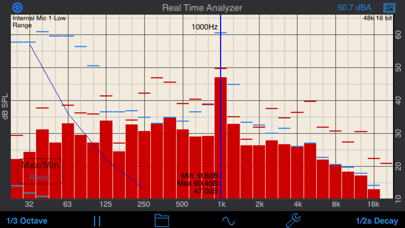
A Real Time Analyzer for the iPhone, iPad and iPod Touch. Test your speakers, tune your room, do acoustical analysis work or just have a better understanding of audio frequencies. RTA is a professional-grade acoustical analysis tool. All filters meet or exceed ANSI and IEC Class 1 specifications.
Includes Octave and 1/3 Octave modes, with selectable decay times, as well as Peak Hold and true linear Average mode.
*** iOS Microphones
We have analyzied every iOS device, including all of the iPads, all iPhones, and iPod touches, and have created microphone compensation files that are applied automatically. You can trust the results you are getting, often within just a few dB of a far more expensive analyzer. Calibration is updated regularly, automatically, from our cloud-based calibration database.
Upgrade to our iTestMic or iAudioInterface2 to bring your system up to full professional specs.
*** Save and Recall Graphs
You can save and recall graphs, marked with the GPS location, date & time, and your comment, as well as store the image to your photo roll.
Export the data as an XLS formatted file to your computer for inclusion in reports or further analysis.
*** Max and Min Bars
You can also turn on resettable Max/Min bars (see image #4) to capture peaks. Double-tap to reset the bars.
*** Specifications and Devices
The internal iPhone mic has a noise floor near 30 dB, and if your are running iOS 6, clips around 120 dB.
*** Touch GUI
Fully interactive touch GUI features includes scroll up/down, pinch to zoom or compress the vertical dB scale, or swipe horizontally to get a cursor that reads out the exact dB level and frequency across the screen. To make the cursor disappear, swipe it off the graph to the left.
The landscape-mode display flips 180 degrees so that you can face the internal mic in either direction.
*** Overlay Curves
Also included are optional noise curve overlays, in NCB, RC, PNC, NC, X-Curve and NR mode. See picture #2 for an example. Use this feature to get a quick reading on the noise levels in a room. Also includes the cinema large-room X-curve overlay.
*** Calibration
RTA can be fully calibrated, whether you are using it with the internal iOS microphone, or one of our professional test & measurement mic solutions. And, if you are using iTestMic, the mic calibration is transmitted directly to the app, so you are always calibrated.
*** RTA or FFT?
If you are wondering if you should download this app or our FFT app, check out our website, we have a page devoted to this topic.
See our other acoustics and audio apps, including AudioTools.
RTA App Comments & Reviews
RTA Positive Reviews
How accurate?How accurate is this compare to a calibrated measuring mic? My goal is to EQ my room to have a flat response. I have an iPhone XS Max..Version: 9.6
The best iOS RTAIgnore all of the rest of them because this one is actually calibrated for your iOS device. I tried other apps setting up my vehicle and this one is obviously accurate. After about 10 minutes of tweaking the EQ on my head unit my new speakers sound 1 million times better. If you have a hard time setting your EQ to sound good this one will get you there..Version: 10.5
Super RTA!!!I use this app at least 8 days a week! When the new iOS update came out the app was having problems fitting the screen. Everything still worked as expected, just smaller. I emailed the developer about the issue and had a response in 5 minutes! That is customer support if over seen it. In the response I was assured the new update is awaiting approval from Apple. Thanks Andrew for keeping us all afloat..Version: 9.3
Good toolI normally use smaart to tune but I’ve had this app for a long time and I still use it in a pinch. I’ve checked out some of the other RTA apps and overall I have to say this one. Straightforward, no unnecessary bells and whistles. Highly likely built by someone who actually works in the industry.Version: 11.1
Does not work on MQDY2LL/A iPad Pro with iTestMic 2The app keeps saying “Accessory found iTestMic 2” then “Accessory removed iTestMic 2” and repeats until the mic is removed from my iPad Pro. Sometimes it just crashes or freezes on my iPhone 12. Both have latest IOS..Version: 11.3
Works!Simple to use and it provides all the info that I need. Works fine on my iPhone 15 Pro..Version: 11.3
Was amazingUse to be the best RTA app out but have been having a lot of issues with it lately. Most recent problem is that the screen won't expand now..Version: 9.3
Good, but FFT is better (I guess)I was at work (I'm a live sound engineer) and we were discussing speaker phase, when I said "They should make an app so you could test spkrs with iPhone." It didn't take long before I found all the Studio 6 products. I now have SpeakerPop, GEN, SPL, & RTA. They all work wonderfully. That said, I was a little disappointed to learn about FFT. It's not made too clear in the descriptions, but FFT is basically a more accurate & detailed version of RTA. I wish I'd bought FFT, since I want the most accurate thing availible. However, I'd already purchased RTA, & because of App Store rules, I can't trade it in towards FFT. If you're going to spend $10 on an app, you are probably going to use it for work like me, so splurge & get the $20 FFT. I am debating it, my main hangup is that I've already spent $10 on the RTA app..Version: 0
JZJust saved my bacon. Have a Trane Centravac chiller making a whine noise. This showed it is an 8k whine at the compressor. Now I have some data to go back to Trane with. I csn use this im my small audio room in my house now for some frequency readings. Its worth the dough..Version: 9.0
Has been great until now.Not working properly with iOS 13.0 on iPhone XS..Version: 9.3
FixedWow! Fixed. It's nice to have such a good tool back working in a good way. This really is a valuable tool for visualizing as you run live sound. Thanks for fixing it. ---------- Same as before. This app continues to run after you exit it and drains your battery. I cannot understand why, update after update, the developer continues to cling to this "feature". If you actually think that there is some use for this "feature", make it an option. I shouldn't have to stop the app before I exit it; this is not the iPhone paradigm and, as a result, users are likely to forget to do it. You hit home to exit the app, pocket your phone, and a few hours later discover this app still running and your battery low. ------------ Same problem. This app continues to run after you exit the app and it drains your battery. ----------- Same problem. ----------- Yet another update that does not address the biggest -- well, only -- flaw in this app: it still continues to run after you exit it which drains your battery. ------------ I wish the author would make the battery-draining background mode optional. ----------- The author continues to tweak many aspects of this app, but it still keeps running after you exit it which drains your battery. ----/--/ Same thing again. The author obviously likes to drain your battery. --------- New do-dadhs, but it still drains your battery if you're not watching. ---------- Still has no way to turn off -- much less to default off -- the battery-draining background operation. Despite many updates, this app hasn't had a favorable review since 2013. ------------- Another update and the battery-draining background operation continues. I really can't understand why this can't be made optional with the default being off. ---------- With each new update, I hope that they will finally remove (or at least make optional) the battery-draining background mode. But, this latest update is unchanged in this respect. ----------- New iPhone 6. Latest everything. Still drains the battery by continuing to run after you exit the ap. ---------- Well, they did it again. Another update and the battery burn continues. -------- What can I say? The battery drain continues in yet another update. No wonder this is no longer the most popular RTA in the Apple store. When will the author fix this? ----------- Another update and the drain continues. --------- Another update retains the battery-draining background operating feature. When you exit this app, it keeps running and sucking your battery. You have to manually kill it. This single "feature" just ruins this otherwise excellent app for me. ------------- Yet Another update and it is clear that the developer feels that this battery-draining background feature is somehow desirable. I have given up. Obviously, they do not read these comments because we have yet another update and the background battery drain remains. They obviously like this "feature." -------- I've been a huge fan of this app for years. I consider it essential for live- sound work. But, recently, they added this "background" mode in which the app keeps running even when you exit it. To stop it, you have to manually kill it... a big and inconvenient extra step. And if you forget to kill it, it will run down your battery. When you're mixing a show, you don't want this extra step. This silly "feature" is a disaster. I have complained and complained and yet this "feature" persists. There are other Real Time Analyzer apps. If you are looking for one, despite how good this app is, I suggest you look elsewhere because of this one overwhelming problem..Version: 8.9
Useful, but....A few months ago this app was updated to compensate for the iPhone's microphone not being able to register the 20Hz - 35Hz range. Since that update (including this last update) the app has way over compensated in that area. I would like to use this app and trust it, but as of now, it's too hard to tell whats accurate when there is constantly a curve upward from 35Hz to 20Hz. It's a better app with the mic's natural roll off. Please fix the compensation or return it to how it used to be. PLEASE!.Version: 0
Suprisingly accurate.I was hesitant to buy this app, thinking there was no way it could be remotely accurate. But since it was ten bucks, I figured it must be somewhat professional. So, I bought it, played with it a little, and then tested it against my analysis rig. I use smaart v.6 with a sound devices usbpre and an audix tr40a mic. I set up my rig and tested this app against it and was blown away by the results! It's very accurate considering the hardware it uses, and is a great app to have as a pocket rta. It's not as accurate or in-depth as smaart, but it's handy and is less than 1/100th the cost of my setup (not including the computer required to use it.) Overall, a great product. I have since bought studio six's tone gen and polarity check and am pleased with them as well..Version: 0
Good appI've been a professional sound man for 30+ years I've seen a lot of gadgets some work and some don't but if you need good ball park measurements this app is what you need. I've tested it against my DBX RTA, Signal Scope and Mac the Scope on my lap top and it's accurate if you calibrate it properly. It's a good app for spot checking a room before you set your system..Version: 0
If you know what this is, BUY IT!Extremely handy tool for the audio folks, an RTA in your pocket. iPhone is somewhat limiting at a mere 105dB max and noisefloor of 28dB on my phone but for most basic quick tweaks, this will do the job. Of course if you get a real mic, this app is priceless. So Nathan and Luke, stop reading this and buy it already :).Version: 0
Great app!Have been using it to tune rooms for small concerts, as a pink noise source and analyzer. I keep it running during the show, and it really helps isolate feedback. Haven't had the battery issue that the other reviewer had, but I just make sure to exit the app when not using it. Great work!.Version: 7.8
CrashesThe app ran fine after OS4 upgrade, but started crashing after last update of RTA was installed..Version: 0
Great product for audio professionalsI calibrated a rig of 6 jbl Vertec 88's and 4 80's per side, driven by Lake. And then compared it with a reading from my DBX rta mic. And I must say I was very surprised. It did pretty good. It does lack response above about 12k and below about 40hz. But with the externel mice coming in February. It will be an awsome thing to have.Version: 0
Surprisingly useful toolOthers have already stated the strengths of this application. So I'll just restate how convenient it is to have it with me at all times. You never know when you might be called upon to ring out some stage monitors.....Version: 0
Excelent professional softwareI am a Latin Grammy winner music producer, using the RTA to tune every room where I mix, and I am getting excepcional results. I was not convinced at first, but after listening to my work on the radio, I trust the curves to the "T". Thanks guys for creating this great tool!!!.Version: 0
Meh...I liked it more before the last update. Now 30% of the screen is being used for unnecessary toolbars and buttons. The iPhone display isn't exactly large to begin with. Looking into other apps now unfortunately....Version: 0
Car audio absolute needThis app combined with the switcheasy 'thumbtack' microphone makes a very, very accurate method of tuning in your car stereo. when results are compared to an expensive audiocontrol RTA, the margin of diff. is negligible. i highly recommend this app. btw, the microphone sold by this company is also excellent, and an even better match then the above mentioned mic..Version: 0
Useful, but needs updates/configurabilityGreat app! I wish it was updated for newer products(iPad models, iPhone 5, etc.).Version: 5.1
RTAGreat app, works well, real easy to use and easy to calibrate. If you are looking for an inexpensive RTA this has got to be the one..Version: 0
Great, easy app!Title says it all - works well, easy to use and self-explanatory. This should be on every sound engineer's phone!.Version: 6.8
Great deal for ten dollars!Very handy tool with freq selection. Very handy to spot feedback freqencies for live sound performances..Version: 0
FOH EngineerGreat tool for the money. I use this app for quick references during every live show..Version: 6.5
RtaNice rta...be nicer if there was a pink noise out.Version: 0
Good AppNice. But would be even more useful with NC and NR curves as well..Version: 0
Perfect for what it isI am a pro audio engineer and this app has proven very handy for nailing feedback problems on live gigs and frankly has saved my butt a few times helping me quickly rough in a system eq while the band's set has already started..Version: 0
Great rough inOriginally got this app on an iPhone 3G. Still works great on my 8. Sure you can’t use it with fancy external mic’s but it will get you 90% there so I can save my ears for the fine tuning. Also really handy for sweeping speakers after a rental for a quick and dirty damage assessment..Version: 10.5
Free International Money Transfer 💸Enjoy high maximum transfers into more than 20 currencies while saving up to 90% over local banks! The cheap, fast way to send money abroad. Free transfer up to 500 USD!Version: 11.8
What do you think RTA ios app? Can you share your thoughts and app experiences with other peoples?
Please wait! Facebook comments loading...