Teruaki Onoda
MiTypewriter For IPad Customer Service

- MiTypewriter for iPad Customer Service
- MiTypewriter for iPad App Comments & Reviews (2026)
- MiTypewriter for iPad iPad Images
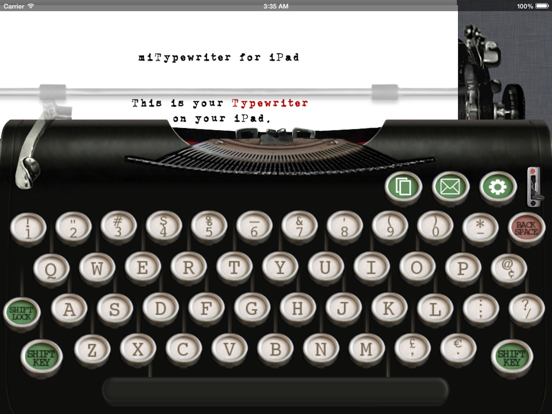
This is your typewriter on iPad.
Features:
- Realistic typewriter on your iPad
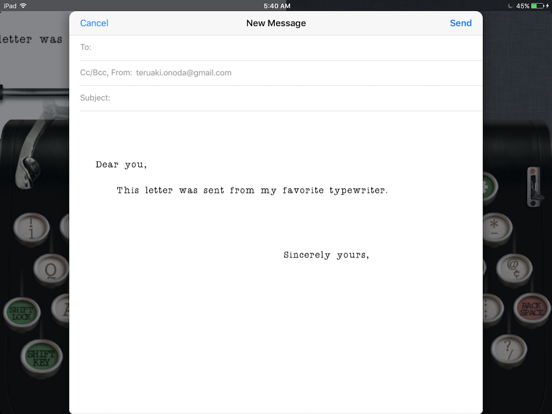
- Email by image or text
- Backspace key to erase type
- Fonts (Old Typewriter / American Typewriter)
- Keyboard layouts (QWERTY, QWERTZ, AZERTY, and QZERTY)
- Colors (Red/Black ink ribbon)
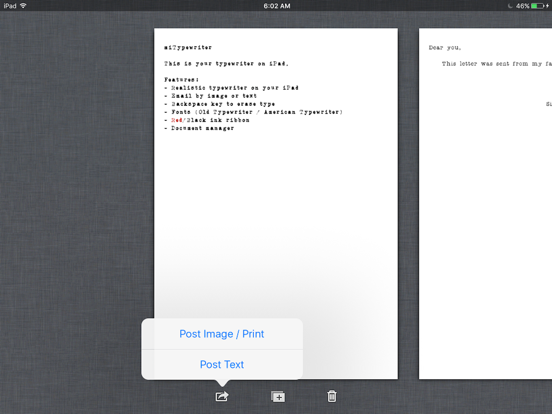
- Document management
- External Keyboard
- Drag to move cursor
- AirPrint
Updates:
- Update for iOS Compatibility
MiTypewriter for iPad App Comments & Reviews
MiTypewriter for iPad Positive Reviews
Yeah, okay......but I really wish there was the option to hide the virtual keyboard when typing. I just want to see my own real keyboard. Also, unlike a real typewriter, you can only single space. It shouldn’t be hard to add a double space option. Also, be forewarned that on my new iPad Mini I can barely only see one option. Are there more? I really hope that the developer reads this and can make this truly a five star app. I really only think it’s 3.5 or even just 3 stars, but I’m being generous. If it wasn’t for these issues then this would be way better than the black Hanx typewriter NOTE: I can’t stand the look of his other ones, nor the either too small or too large a font, but at least I don’t have to see a keyboard, just the carriage and platen part. So, for this reason I’m going back to using the black typewriter in the Hanx app and put up with the too small a font and single spacing..Version: 3.5
Request to update the keyboard layoutThe font type of the app is appealing. May I request an update to complete keyboard that have all the symbols (such as < >, [ ] and { })? I have Hanx writer, it's a good app. If you can add wifi keyboard support to hide the keyboard, Hanx writer will be overtaken. It's time to give it an update in 2 years for a 10 year old classic..Version: 3.5
After all these years, my favorite appPlease don’t try to review this app if you’ve never used an actual manual typewriter (that means one not powered by electricity). This reminds me of my mother’s 1935 Underwood and is just as unforgiving, as a typewriter app should be. She typed my father’s master’s thesis on it, and they weren’t even married yet. MiTypewriter also reminds me of an original 1984 Mac Classic SoundMaster program that added old typewriter noise with each keystroke and made that awful first keyboard semi-usable — even pleasant to use. As an early adopter who spent hours on it every day, that meant a lot. I return to this app again and again in lieu of Notebook™, Teams™, Word™, Pages™, Notes™, and all the other soulless word processing programs when I need something peacefully analog, an app that unites fingers with some of the other five senses. My dear millennials, I pray that you find a real typewriter to play with before they disappear altogether, because this is the next best thing. Which is not saying much, I grant you. But when they’re all gone, what else will there be that is this satisfying?.Version: 3.5
Digital UnderwoodI also have Hanx Typewriter App & Typing Writer. All three are good apps but my favorite by far is miTypewriter because when I move from the draft/writing phase to the editing, I am able to easily export text as text via email or I can copy and paste into one of my other writing apps. If you want to preserve the typewriter look you can export as an image. miTypewriter is also based on a manual typewriter, which I prefer to an electric. I would love to have a version for my MBP..Version: 3.2.3
A lot of fun for something that works this wellI have enjoyed using this app. It gives the right sound and the right look through out. I am working it into my everyday writing. Just one thing, I would like to be able to set up something and work on it, then create a file in the app so I can set up another file and work on that. If that could be done it would make this a six star app..Version: 3.2.3
This is the best, most reliable typewriter app on the iPadThank for creating such an outstanding app! It is the most reliable typewriter app in the App Store. Hanx writer is good, but export problems keep me from making it my go-to typing app. Thank you creating such a great experience that brings creating great content back to its distraction free roots! Keep up the great work!.Version: 3.5
Pretty goodI first thought there was a noise problem of no sound but you have to enable keyboard clicking sounds..Version: 3.2.3
Its OkIt does what it needs to do. the UI needs some work to make it more attractive. Also need ability to space without hitting SHIFT key..Version: 3.5.1
I don't agreeThis app does it's job. I don't agree with the one-star review below. The power of this app is exactly the old-style typewriter look and feel. I wouldn't use it at all if it weren't for that! The app is a success for me because I get that look and feel - it makes me want to write each morning! That being said, I do wish for one thing to make this app perfect. I'd love it if the sound a the end of the line was NOT as it is now. At the end of a line, you get a bell (good) but then the sound of someone moving the return to the next line (not good), even though you have not yet done that yourself. This is incongruous and distracting. There should only be the sound of the bell at the end of the line, then the sound of me hitting the return bar when I in fact move it. That's it. That completes the authentic look and feel of the old typewriters for me. Other than that, I love it!.Version: 3.2.1
Very goodEverything is fantastic.I wish I could find this App for Mac.Version: 3.2.3
My favorite typewriter appI have HanxWriter and Electratype and this is my favorite by far..Version: 3.2.3
On screen keyboard does not disappearThe on screen keyboard does not disappear like it does on the Hanx..Version: 3.5
BlurryI like the overall performance, but the keys and text look blurry... is there a retina version for ipad?.Version: 3.2.3
Awash in a sea of nostalgiaI truly appreciate all of the detail put into this app. There is nothing like typing on an antique typewriter and while this app can not mimic the feel of placing one's fingertips into circular grooves and pressing down on those stiff, heavy keys it makes up for it with authentic sounds and imagery. The familiarly distinct clicking when a key is pressed, the bright ring when you have reached the full width of a line, the mechanical swoosh as you return to begin again on the next line below; all of these compliment the app's remarkable antique display. It only takes a couple of sentences to relearn the shift and character keys and your sent back to a 1930's newsroom hoping to meet your editor's 5 o'clock deadline. The only improvement I would like to see is the ability to "scroll" the paper back down to correct a mistake on previous line without having to delete everything in-between of course..Version: 0
LovelyI have a long standing love for writing on typewriters. They are essential to writing letter to my grandad, its just the way writing was meant to be. The tapping and and clunking noises just make me write better. The tactile interaction with a metallic machine (something no program could bring us...but whatever). My inner author comes alive when I use a typewriter. Part of the charm of typing is the commitment every letter key hit holds because there is no delete when a mistake is made on areal typewriter. Alas, back space does delete your typos, but these are modern times... I have nothing bad to say about this fun, simple successful program. .99$ too boot. Go for it it's fun to have a reasonably simulated typewriter on this uber technological iPad gizmo we all decided to buy. It offers a nice break from autocorrect too. I find it too be annoying sometimes. Love this app, glad they made it. This is the only app I ever gave five stars to. It does it's job very well. Kudos. It's harmless and fun, and a good cheap way to discover how typewriters truly bring out one's inner author. It's not quite the same, but you'll never have to hunt out a replacement ribbon or fix a bad jam. So they balance out to make a pleasant document composition experience for anyone who likes a bit of throw back retro aspect adding to their writing endeavors. Totally worthy purchase!.Version: 2.1.0
Almost like my real RoyalIf I were just rating this typewriter according to how much I love using it, it would get as many stars as there are. However, there are a couple of real-typewriter things missing. And I'd argue for one newfangled improvement: --The underline option that serves the purpose of italics is missing. I mean, with old typewriters, the underline key served to indicate that a word should be italicized. (And I would argue that you should NOT add an italics feature--make it as true to the old experience as possible, with one newfangled exception, below.) --To be able to underline, there needs to be a BACK key that will return over words already typed without erasing them. --Add the ability to scroll the carriage backward and forward, to move up and down the page. --Newfangled exception: Add a key that allows you to insert a correction without having to untype everything to get back to one mistyped letter..Version: 2.2.2
Love it!I'd say this typewriter app is, for the most part, better than the "native" keyboard that is integrated into the iPad OS. I thought it would be more challenging to type with...but it isn't. Overall, I am making fewer "dumb" mistakes when typing with this and I would attribute that, in good measure, to the quality of this app's design. As convenient as the iPad's keyboard function is, something just isn't kosher with it a lot of the time. This, however, does the trick, and is fun to boot! I would love to see a clearer, cleaner way to save, and a way to roll the paper up or down - as with a real typewriter - to make changes/fix mistakes. But that's nitpicking. For a novelty app, miTypewriter is worth every penny. I can't speak much about its usefulness as a "productivity" app, but would love for it to be one...saving, the roll function, and maybe even a more advanced "return" like in the more "advanced" typewriters, where the thing adjusts to a new line on its own... Get that stuff integrated, and it'll prove very useful. In the meantime, I'm gonna see how things play out with this app as I play with it!.Version: 0
App can Save and Edit with Scroll and Reposition and has Red inkHere is the secret to this great app. Find and select the Green key with the cog, then select under Option Simple UI Mode to OFF Only then you will have access to all 3 upper Green keys AND the Black / Red ribbon select Lever. Choices of Old Typewriter, American Typewriter fonts, QWERTY, QWERTZ, AZERTY, QZERTY Select the upper Green key, with with 2 pages outlined in white 1) saves the current page 3) access previous pages by swiping left and right Icons at the bottom of the screen directly underneath the page will allow: 1) Post image/ Print mail save to camera roll, print 2) + selects New Paper or Duplicate Paper 3) trash can will discard pages appearing directly over Edit without backspacing and deleting good work by placing your finger on the paper: 1) two gray triangles will appear where the type bars strike 2) move paper until the unwanted text us just to the left of the gray triangles 3) use backspace to delete typed text You can also use the Platen Knob (far left black knob) for scroll and left/right positioning.Version: 3.2
Awesome!This is Awesome, love it just for the mere fun of it. Feels like typing on an old school type writer and makes it less of a drag to write reports on it. At least for me, very cool. Only thing is that it seems to be an early build that is missing a few things like being able to go back up a line once you've shifted down. ( unless I missed that button?). Automatic alignment and borders, automatic shifting to the next line would be nice. At least as an option. More features, saving multiple documents within the program and being able to sync to pages. But for two dolla! It is pretty fun as it is, just to write..Version: 0
Excellent typewriter!Works well with blue tooth keyboard and there is no lag. Old typewriter look and sound effects are super. Alternate keyboard layouts provide additional symbols. Changing the keyboard within a document does not change the previously typed symbols but changing the font changes all text to the same font. App saves pages automatically and displays the pages in a row so you can select a page to edit, delete, email as plain text, and email as image or save to photo album. Feature wanted: ability to underline text using the symbol for that above the 6 on the qwerty keyboard. A real typewriter lets you back up and do this..Version: 3.0.1
I love this app!This app adds some real character to digital letters. It has inspired me to write "email letters" that have a far more personal touch than typical serif expenditures. Some reviewers want more features added, but the beauty of this app is its simplicity and quirkiness, which likens it to an actual typewriter. Some writers (Woody Allen and others) still prefer typewriters because they are more difficult to edit on, and make you choose your words more carefully. If you want a host of features, go with Pages or QuickOffice. I like my quirky digital typewriter. It will force you to type correctly, no spell-check here!.Version: 0
Nostalgic FunI use this app more often than I anticipated. It is addictive. I have the Zagg bluetooth keyboard and it works perfectly. While it is a tad blurry on a retina display iPad, it's not to the point where anything is unreadable (even when viewing it in full letter form). At first, having no wrap-around text option frustrated me. After using it a handful of times, though, I learned to simply start a new line on my own, just like an old typewriter. I use this app to compose short notes to my friends, make lists, and sometimes, I just type to type. The authentic sounds are the icing on the cake!.Version: 3.0.2
Fun - but hoping for even more authenticityI have little doubt that this is the most authentic typewriting experience I can get with an iPad. However, there are two things that I miss with a real typewriting - I wish there were no backspace and that I can look at a larger area of the page and what I have typed. I know most people want their backspace - so I wonder whether it is possible for there to be an option to turn it on or off. I need to quite editing too much - and a typewriting is supposed to help me with that. All things being said, I do love the aesthetics. I love looking at my words and that is, for now, a great incentive to type up boring things that I simply must write..Version: 3.2.1
Carlos R. Pérez-SierraNice app. I look forward for future upgrades that would make it more practical and functional for other apps. We, the Spanish-speaking community (rather, the Spanish-typewriting community), also participated in the nostalgic era of the old school typewriter. Please, make us part of the deal and become an all-stars application by adding the particular characters of our language: [Hoping that they will show up correctly in this review] "Ñ", "ñ", "¡", "¿", and the vowel "acento"; if possible, also the seldom used "diéresis"). Thanks a lot..Version: 0
Great AppWonderful retro fun under constant evolution. I would really like to see TAB stops added to the next version. It would be nice to be able to have paragraph indentation and centering in future editions to make it even more like an old fashioned typewriter. Also a button to preview you letter without exiting the typewriter screen would be a wonderful addition. If you used a typewriter in the past and want to compose things spontaneously, this app is for you..Version: 2.1.0
Fun & Developer Clearly Has Plans to Expand!This App is fun! It operates just like a vintage typewriter (and I used one throughout high school in the late 70s)! Sure, it would be nice to be able to save documents, but before giving this App a lousy review, take a look at the features the developer indicates that he or she plans on adding with the next update and in the future! Half of the fun of all these Apps are getting the updates! Lighten up and enjoy this one & anticipate the next update!.Version: 0
Just like the real thing but better!I purchased this app in the hopes that I could do some writing while I was away from my laptop and pc...so far so good, only I would like to see a save feature and an edit feature. Giving us a spell check option would also be quite nice. This is an amazing app, and I would have no problem recommending this to all my friends!.Version: 0
Great App, Needs More OptionsVery cute app...looks and sound like a real typewriter! It would be a shame if more options are not added. Suggestions: option to change the look of the actual typewriter (like skins), Save option, and some extra setting options besides just the two fonts to take advantage of all that an iPad has to offer visually. Otherwise, what a cool idea this is for an app!.Version: 0
OkWell this app is cool, with a few exceptions, I cannot open any of the downloaded emails I sent myself from this app, so to just be able to view it from in the email does not help, anyone know what kind of file reader you need for this? printing is important maybe as well, also would be nice to select anywhere on the page and type, if you realize you made a typo half way down the page you gotta backspace/ erase to correct the error. To center would be cool too, lots of nice possibilities....Version: 2.2.2
As analog as it getsThis is as close to a manual typewriter as you can get. Auto return? Nope. Spell check? Nope. Save files? Nope (but you can print it out and save the hard copy, just like the old style of typewriter and of course email it to yourself). It does allow you to backspace correct, so it is sort of like an old IBM Selectric on steroids. It is because of all these "short comings" that this app is perfect. I love writing on this. I love this app..Version: 3.2.1
Love it!Great app!!! I love the feel and sounds of the retro typewriters. I found myself wanting to do more than just send e-mails and texts to friends though... I actually wanted to write on it. I would definitely give this app 5 stars if it had a save function and option to transfer your work onto a separate file or folder. Please do this... I can actually have fun while I work..Version: 0
Just Simple FunI really have no use for this app but I find myself using it all the time. I like the sounds and having to hit the return lever. I also like the imperfection just like an old typewriter. Ok, I'm not going to write anything to publish on this but who cares. I find myself free writing instead, letting the sound of a typewriter inspire me. Thanks for a fun, fun app!.Version: 2.2.2
Highly recommended!This is nostalgia! The sound and looks of an old typewriter. Even the return handle works like a charm, sounds like it, too. Also, if you e-mailed to a recipient on a PC, receiver can open message using the XML Editor in the drop down menu, well it worked on my XP. In regards saving and editing, well, the old typewriters did not do edits and save--had to start over using a new sheet..Version: 0
Great app! More updates!This app is very creative, but there are just a few things I would like to see added: A louder sound when you move And u should be able to pull the paper out when you're done, and more updates! There haven't been any updates for this app since I bought it about over a year ago!.Version: 2.2.2
Great Idea - Needs a Few FixesI actually love this app. I am completely surprised at how much I missed the interaction with the typewriter. Great for the creative juices! BUT....this really needs TWO big features. The first is the ability to save the letter as a file. The second is a word-wrap option. While I love the old DING and hit RETURN....even my last typewriter had an auto-return feature..Version: 2.2.2
Needs to be updated for Retina DisplayThe app is pretty cool in and of itself. But, to be honest, I was shocked to see how pixelated the typewriter and typed letters were. It would be nice to have iCloud integration and also open in Pages - It just sends a .jpg attachment in an email. I loved to type with the sounds of the keys and the sound of the return. Might be worth the purchase, though I'd rather have this keyboard integrated into my basic iPad keyboard for everyday use..Version: 3.2.1
Looks good.It's a fun app to break the boredom of Pages. It seems like the copy function, from this app, could be quicker without having to manually select text out from the formatted email. If you like retro, or mechanical typewriters, this app is fun for banging out a few paragraphs. Might be nice if there was a way to review longer texts..Version: 0
Good, but missing featuresThis app does what it does very well. But it is missing some of the most important features of an old fashioned typewriter. You cannot backspace without deleting characters. And, you cannot over strike characters. It should also include at least a couple more old typewriter fonts to chose from. It would also be nice to see some stationary choices..Version: 3.1
Margins and external keyboards would be niceI know it takes away from the nostalgia by allowing the use of the external (bluetooth) keyboard. But I really wish this were an option. I would also really like to see full 8.5x11 page format, with the ability to adjust the margins on the typewriter. If so, I could use this app for more than just sending nostalgic emails. A tab function would be nice, too. If you could do that, I'd even consider writing my screenplays on this thing... hm... maybe. :) It's definitely a fun app. But being forced to use the onscreen keyboard results in too many typos..Version: 2.1.0
Fun appMy friends have been amused to watch me type on this old school typewriter. It makes realistic typewriter noises. I have had some trouble mailing typewritten notes to PC users. They don't always show up as accessible files. No problem emailing Mac users. I like this app!.Version: 0
TalkNAboutBackNTheDay!This is a great app! I hope there will be upgrades, i.e. Additional fonts added and sizes. This truly types and sounds like a real typewriter. I also like the fact that you can email what you type. This app has a lot of potential. Can't wait to see what's next!.Version: 2.2.0
Very cool inspiration to write.I get writers block and this app keeps me focused. But sometimes I write other places as well so it would be cool to paste text to get me started. Also advanced editing options on or off, would be nice, cause all this computing has me spelling bad lately and it would be nice for some help out before I email a typed document..Version: 2.2.2
Nostalgic, needs a little graphical clean-up.Great app, but the graphics could use a bit of clean-up. The carriage return, in particular, is a bit weird (just remove the cut off bit to the right and it would be fine...) But overall a nice experience. It sounds nice and is easy to use..Version: 2.0.0
Love it!I am really enjoying this app...the typewriter sounds and graphics are just perfect. I am using it for creative writing rather than emails, though...it is just a nice place to play around with ideas. I can't wait for future editing improvements as mentioned above. It should be pretty awesome..Version: 2.1.0
Beautiful yet functionalFirst of all this app is a beautifully rendered old school typewriter and certainly bring back sweet memory. However there is still room for improvement, for eg after composing a short letter and save as image to send via email, there is a chance a large blank space would have left between the end of paragraph and the phase "Sent from iPad"; would be nice if that blank space can be shorten or better yet customizable (for example allowing user to add image as an option). Will look forward to future update..Version: 2.1.0
Need Keyboard SupportThis is pretty cool, but needs bluetooth keyboard support to be really cool. It does not support either the bluetooth keyboard or the dock keyboard..Version: 0
Cute, but...It seems to be missing some "key" parts to a manual typewriter. There is no tab button for indentations, there are no margin numbers for page set up, you never quite know where centre is, and to centre a title or something you do have to backspace and count out your letters in order to centre it. When you hit return and wish to go to centre the page resets to the previous line, there is no double space triple space settings either. The maker of this needs to go get a manual typewriter then find someone (like me) who is old enough to teach you how to set up pages, margins, tabs, etc. without those functions it's just a cute app to play with nothing more. There was an art to using one of these typewriters in order to create documents or even pictures! Jeez I'm old lol.....Version: 3.0.1
Cool app, just a suggestion...I love the application but it would be great to be able to write more than one page, scroll through and read what I have written and open previously written files… It is great writing on a typewriter like this, just wish I could use it for more than a letter/email....Version: 2.1.0
"feeling nostalgic"A good beginning. I would like to be able to slide the return carriage manually and set tabs if possible. Sliding the carriage would allow me to center type quickly and be able to start from any place on the page. Another cool feature would be to see the little arms fly up and hit the paper, with the occasional jamming effect. All in all, it's a fun app to get writing with. Thanks MeHi, PS do you have a trashcan to throw crumpled paper into, something like the Apple Newton had?.Version: 2.2.2
Love itThis is what I was exactly looking for. :) I hope there will be more paper options available in the future such as postcards, newspaper like letters and so on..Version: 2.2.2
Such fun!Really enjoy using this app. The developer seems to really listen to feedback. Adding optional keyboard support and new page to the keyboard layout make this good app, great! Would recommend unconditionally..Version: 2.2.1
Supports 3rd party keyboards!I love this app. The customer support is also awesome. I asked if they would add support for 3rd party keyboards and white dev wrote back the next day to say they had added the feature! Now I can enjoy clackety keys anywhere, even with my wireless keyboard. Delightful app with all the valued restrictions of a proper manual typewriter. I'd buy it twice!.Version: 2.2.0
Neat, yes buy it!Try it. You'll not regret it in particular if you ever used these things at work or at home. It's a refreshing..Version: 0
Very realistic experienceGives the real feel of those old ones.Version: 2.0.0
Excellent!Go buy it and enjoy!.Version: 0
Free International Money Transfer 💸Enjoy high maximum transfers into more than 20 currencies while saving up to 90% over local banks! The cheap, fast way to send money abroad. Free transfer up to 500 USD!Version: 3.5.1
What do you think MiTypewriter for iPad ios app? Can you share your thoughts and app experiences with other peoples?
Please wait! Facebook comments loading...