EuroSmartz Ltd
Save2PDF Customer Service

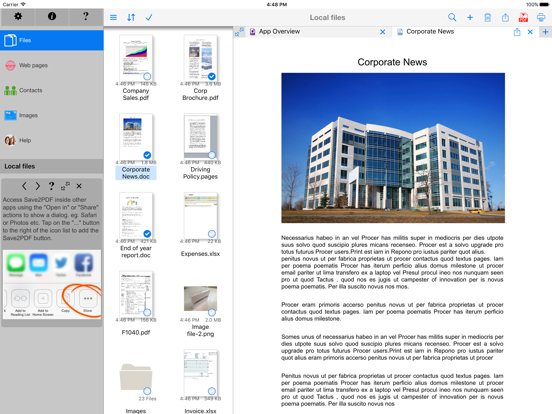
Create professional, great looking PDFs simply and easily right on your iPad without having to go near a computer! Save2PDF will convert most file formats into a PDF including Word, Excel, Powerpoint, Pages, Numbers, Keynote, Photos, Web Pages, Contacts and many more formats.
What the Press Say:
Macworld: "Save2PDF is a superb app that provides a fairly unique function"
iAppSin: "Save2PDF is a practical app dedicated to converting and merging PDF files"
iPad.net: "It is definitely a must-have app for professionals who use their iPad for business purposes"
TouchMyApps: "There’s currently nothing like it at the App Store and iDevice users who’ve always wanted to create their own PDF files should definitely check it out."
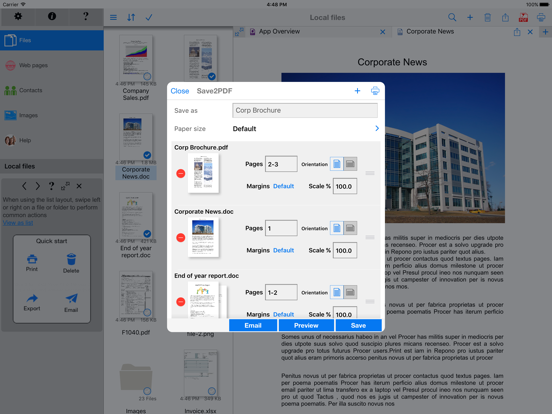
Save2PDF also enables easy merging of several documents into a single PDF, even if the files are completely different formats (i.e. create a single PDF by combining a document with a spreadsheet, or a Pages document with a Word file). It is also just as easy to merge multiple PDFs into a single PDF file.
One of the other powerful features of Save2PDF is the ability to select a few pages from a file (i.e. a document or PDF) and a few from one or multiple other files - creating a new PDF containing only the pages required from those files.
The PDF creation, arrangement and preview screen is intuitive and easy to use. Rearranging document order, selecting page ranges and adding further documents is all contained within one single area; there is no complicated file structure or hierarchy to learn!
Save2PDF can easily be used in conjunction with other apps like Pages, Numbers or Keynote, simply use Open in.....Save2PDF to transfer any file from another app and convert it into a PDF - all done in only 2 steps! Providing the other app supports Open in... file sharing, transferring documents into Save2PDF is easy.
FULL PDF CONVERTER
• Convert common file formats into a PDF right on your iPad without using a computer
• View/Convert/Merge Microsoft Office files, iWork files, Photos, PDFs, Contacts, Web Pages, Email attachments as well as many more file formats
• Create a single PDF from multiple files even if they are a different format (i.e. merge a Word file with a Pages document etc)
• Email and print finished PDF directly from within Save2PDF
MERGE or APPEND PDF FILES
• Merge multiple PDF files together
• Add a page to an existing PDF file (i.e. a cover letter or fax cover)
• Quickly and easily add further appendices to an existing PDF document
CREATE PDFs FROM OTHER APPS
• Import files from other apps using the Open in... file sharing to transfer into Save2PDF & convert into a PDF
• Works with any app that has the Open in file Sharing built in (i.e. Mail attachments, Pages, Numbers or Keynote & many more)
• Transfer documents and files from a computer into Save2PDF either via iTunes or by mounting the iPad as a disk or using the free file transfer software, WePrint
FULL CLOUD SERVICES SUPPORT
• Fully integrated with iCloud, CloudMe, Dropbox, GoogleDocs, Box.net, WebDAV
• Convert documents & files in the cloud to PDF without downloading them first
• Move or Print documents on your iPad from your Cloud account
FULLY FUNCTIONAL PRINTING
• Print to ALL printers (Network/WiFi/USB/Bluetooth) via your Mac or PC or direct to most WiFi printers without additional software. Also print to Apple AirPrint printers
• Print from Pages, Numbers or Keynote extremely quickly & easily without the need for an AirPrint printer using Open in
• USB & Bluetooth printers can be used with free print server software (Windows & Mac)
• Print remotely via 3G/4G/EDGE
WEB PAGE PRINTING
• Browse and print web pages to ALL printers
• Convert web pages to PDF documents for sharing
• Store passwords and clear history/cache
• Multiple tabs for splitting up browsing
QUICK HELP - if you need it
Save2PDF App Comments & Reviews
Save2PDF Positive Reviews
Crude but Effective!This is the only app I have used that lets me make properly formatted, professional looking PDFs. Most of the other apps do the conversions fully automatically, but rarely get it right. This one has a very clunky and slow interface. Not particularly user-friendly, BUT since it lets me control settings for margins and size, and then lets me preview the results, I can tweak things to make the PDF look right. The whole point is to get a useable PDF. From there I can export to an app such as PDF Expert to fill fields, sign, email, edit, or whatever..Version: 3.3.2
Well worth it!This is an excellent little App for producing PDF files from any source to print or save. Would be great to add wireless printing in addition to Apple Air..Version: 3.0.1
Printing email as PDF is copy/pasteThe app description hints that Save2PDF will show up as a printer. I hoped I could make a PDF of an email. The app requires selecting the email content and copying it, which is then put into a PDF for saving or printing when you open the app. That's clunky and about 75% of the solution. The header info (to/from, date) is not captured. It works, but is not as good as the "Print as PDF" printer option on my laptop that lets me save an email as a PDF file..Version: 2.6.1
Excellent ServiceI had an issue-the service person was diligent and persistent-even when I wasn't sure how to describe my problem in depth, they never gave up on me and found a solution. I run a small service business and I am fully aware of the fact that service support sells product, not sales people. Great job, keep up the good work..Version: 2.6.1
Great at what it doesI use the program to convert photos to PDFs files to reduce the file size for email. Also a photo emailed as Pdf prints with higher resolution. Only use the program once a week but when needed it works great.Version: 2.6.1
Save2PDF great "work" toolWorks well and makes the iPad just that much more like a "work" computer. Well worth the price if you "print" PDFs from a web page or download PDF documents to read off line..Version: 2.8
5 StarThis is the only app that gives you precise control to change page size and spacing on left, right, above and below on page during converting into PDF..Version: 2.6.1
Love this appI’ve used this app for years (16). Its my go to for creating and saving web pages, recipes, emails and many other documents. Give it a try, you won’t be disappointed..Version: 2.9.2
Must-have appIt would be hard to imagine life without this app. Worth many times its price. Great for saving web pages for offline viewing later..Version: 2.6.1
PDFThe app is handy and reliable. Thank you for your thoughtful design of the many useful features..Version: 3.1.1
Just what I wanted!I was looking for an app that could take documents from different sources and combine them into a booklet. This app will do that with no problem..Version: 2.6.1
Great AppGreat app, however it does quit sometimes when printing/using from within other apps..Version: 2.6.1
Looks good, but . . .Difficult to figure out how to use this app. Inadequate instructions..Version: 3.0.1
Excellent all around.Not lacking anything I need/use..Version: 3.0.1
Recommend this AppLove it. Use it daily for several years..Version: 2.6.1
Great app.Works really well! Has a lot of options. Newest edition working 100%!.Version: 2.8.2
UpdateLatest updates made this app easier to use!.Version: 2.8.1
WonderfulGreat program for converting and storing documents from many sources.Version: 2.9.1
PDF ConverterWorks on most files..Version: 2.7.2
Good stuffUseful for my work.Version: 3.0.1
Love It!Really makes traveling easy..Version: 2.9.1
Not pretty, but gets the job doneI'm using Save2pdf as a pdf printer for mobile Safari on my iPad (not using any of the other features). It's doing a great job. Exactly what I was looking for. I gave it 4 stars because the interface isn't intuitive. For example, selecting a file by tapping the file name gives different options than tapping the checkbox next to the filename. The interface is too brightly colored for me. As mentioned elsewhere, when the iPad goes to sleep, it "forgets" the print settings. I have to switch to Save2pdf and back to mobile safari to be able to save pdfs again. Not a big deal, but it should be mentioned in the documentation somewhere..Version: 1.1.3
Great App Great SupportNot only is the app very useful but the support is exceptional..Version: 2.7.1
Save to PDF isVery useful!!.Version: 2.6.1
Works greatDoes what it says - converts to pdf - works great.Version: 3.3.2
Actual pdf printer - update: no longer worksUPDATE: app no longer allows direct printing to pdf from safari using the AirPrint menu! the workarounds (adding a z before the http address) arent sufficient since encrypted pages such as receipts cannot be transferred in this way. huge disappointment since this is the main reason I bought this app. email support stated that this is actually an issue from the ios5 update, which no longer allows the AirPrint pdf printer. I bought this app primarily for one purpose - printing web pages/receipts from safari to pdf files. it does this perfectly. the other pdf converter apps I looked at didn't seem to have this function (relying instead on "open in" transfers or using the app's built in browser). this app actually integrates a real pdf printer into any other app that supports AirPrint, incl safari. also provides very useful features that allow you to delete pages and merge PDFs. ive been using this app a lot so it is well worth the price. issues I hope to see improved in future versions: improved stability (crashes every now and then), dropbox integration..Version: 1.2.3
Dev is taking the heat for Apple's stupid decisionIf you don't know by now, several apps including this one were previously able to print-to-pdf using iOS 4's print share feature. That meant any app that supported native iOS printing would also let you create PDFs. Save2PDF showed up as a printer as long as it was open in the background. For now, that feature is lost because iOS 5 does not permit it. It's probably not coming back anytime soon, so we need to move on to solutions that work now. Save2PDF is a solid app with lots of great functionality even without this feature. The latest release goes a long way toward making it easier to print web pages from the in-app browser. Tabbed browsing is now supported, and it remembers passwords. This means the browser is more practical for extended use when you know you will need "print". I use an online customer management site which allows me to create merged documents like contracts. Now that Save2PDF saves passwords I don't have to worry about a hassle logging in every time. The tabbed browsing also makes it easier for me to call up the douments I'll be converting. The ability to save directly to Google docs is awesome. i use Echosign to send contracts. With this app, I can create a PDF contract using the customer management website, and then upload it directly to Google Docs which gives me an easy way to get the contract into Echosign. If anything, Save2PDF makes dealing with iOS limitations less annoying. Update: The developer is also very responsive to support emails..Version: 1.2.3
Versatile APP. Highly RecommendThis is overall the best and most versatile PDF creator for the iPad that I have used. And I have tried a bunch. The lack of a "virtual" printer feature is not the developers fault. All other functions of this app are excellent and have worked exactly as advertised for me. I have never had it fail to create a PDF through a supported app. The Apple productivity apps and Safari unfortunately do not allow you to open in Save2PDF directly. This is an artificially imposed limitation of Apple as I understand it. Not the developer. This is a very powerful full featured app. Because of that it does have a bit of a learning curve. The only issues I have are with Apple and their obsessive and aggravating desire to dictate how you can do things on their devices. When I have had trouble accomplishing something in Save2PDF, their support staff has always communicated promptly with me and resolved the issue. You can purchase this app with confidence..Version: 1.2.3
Very practicalI needed a way to save a few pages from a magazine on Zinio as a pdf to use in another app, was able to take screenshots and save in photos but then needed a way to convert to pdf. This app worked like a charm, including supporting opening the new pdf in my other app in one step. Couldn't be easier. It sees all my printers, and dropbox and email also, setup was easy I had a newbie question, didn't grasp the how-to from the well-written FAQ/help info, and emailed support, and had a helpful pleasant response back from \Andrea in less than an hour that solved both my problems instantly. Can't get much better than that. I can see many levels of functionality here--very glad I got this app!.Version: 1.2.4
Exactly What I NeededDoes most of what it claims to do. Access documents through "Open In" interface. Will print to any network printer whether or not AirPrint. Links to DropBox and GoogleDocs very easily. There is an issue opening Documents with page headers, as others have noted. The Headers are destroyed. Also, "Stationary" (background graphic) from Pages is lost; but this can be overcome by having Pages do the "Open In" as a PDF file, which sort of defeats the purpose. It may be less useful with DocsToGo which can pass only in native format (no PDF). Works well for editing PDS files (combining or taking pages from several to form a single one). Easy hand-off to Adobe's PDF Reader, which is still the top app for reading / annotating / signing PDF documents. Some difficulty (non-intuitive) linking to WebDav, but easily overcome using their Help / Email request option. My Experience is that they really DO respond as quickly as they claim, and the hand-holding is excellent. For customer support they warrent a 5-Star rating. The pricing seems a bit strange. This version works on iPad, but cannot be also sued on iPhone. There is a version for the iPhone that indicates that it will work with BOTH iPhone and iPad, and it's $1 less. This seems to be true of all EuroSmartz Apps..Version: 1.4
Good AppI'm mainly taking time to write this review because a box pops up requesting a review every time I open the app. It is super annoying. That said, I appreciate what the app does. I can easily turn web pages into PDF files. It probably does more than that but that is all I use it for. I used to use Evernote for saving things but I kept running out of my monthly storage allowance and don't want to pay to raise my storage allotment. This app lets me save, with the option of saving to many different apps. Cabinet or Box are my favorites to save to. Haven't yet tried to print a pdf from app so I don't know if it will be a problem but I can print from where i store my files..Version: 2.1
The Apple of my eye is EUROSMARTZNobody's perfect. Right? Apple got a lot of stuff right, and...a lot of stuff dead wrong. So...When somebody gets something right we should acknowledge that. Eurosmartz software is doing a lot of right stuff. I won't go into AltaMail (truly great Eurosmartz email), because this is about one of their other products: SAVE2PDF. SAVE2PDF is what Apple should have done for their iOS platform, but didn't. We know why they didn't (consumer oriented toy), but many serious users have been adapting to iOS though Apple cannot (thank god for IBM's recent alignment). The good news for me is that none of us need wait because Eurosmartz is already here. In strength. SAVE2PDF allows me to print to ANY network printer AND manipulate, save and cloud store PDF documents. It's quick, straight forward and smart. True to their name. Janine, at Eurosmartz is fast to help out whenever i have something I can't figure out. And really, no other iOS software firm I know of responds in 60 minutes to email questions.....! Thank you Janine..Version: 2.1
What happened to printing TO this app?This used to be my must used app. When the capability for it to show up as a printer was removed, it simply became another PDF reader that anyone can print from. I used to use this as the printer by loading the app, exiting and then running another app and when selecting a printer, this app would show up as a printer and you could print to it - which basically means you had "print to PDF" functionality in your iOS devices. Not sure why you guys did that or if is an artifact of iOS 5, but that was The biggest selling point of this product - and a clear differentiator..Version: 1.4
Fabulous!This app. provides a very useful conduit for printing or saving as a PDF file without requiring the computer to be turned on. Combined with Good Reader for creating folders and storing multiple file formats, you have a winning combination! I have found it necessary to open the app. first for the print functions of save2pdf to be recognized by other programs or apps., but this is a minor inconvenience and has become an automatic part of my routine in dealing with a variety of documents and printers..Version: 1.1.3
Great App but Misses Key NeedGreat app, but I bought it specifically to convert PowerPoint slides to PDFs... and there is no page size option that fits a single PowerPoint slide. The only opens are "US Letter", "US Legal", and "A4". PPT slides are 8"x10", which fits none of those easily. A side note... I DID e-mail customer support, and I was *very* impressed at their prompt response (15 minute reply time, on Thanksgiving!). But their "fix" was to have me figure out what zoom factor best fit a slide on a page layout, and go from there. None do exactly, and the zoom factor resets with each print. Provide a way to add to the available paper sizes (especially since the key point of this app is creating PDFs... printing is just a side function), and this review will go to 5 stars..Version: 1.2.3
O.K., but needs some work on PowerPoint PDF GenerationI get a lot of PowerPoint presentations emailed to me and I wanted to put them into PDFs so I could annotate them in Goodreader. I had been waiting for an app like Save2PDF and was elated when it came out. The price was steep, but so worth it to me, I thought. I'm more than a little disappointed. When I generate a PDF from a Powerpoint, it generates two pages on a single page, and this results in it being smallish on my Goodreader screen (and not as easy to read). More importantly, it isn't exactly two pages, it is more like 1-7/8 PowerPoint pages on a single PDF page. That means the next page starts with 1/8 of a PPT page, followed by a full PPT page, and then another partial page. It gets pretty ugly. I am delighted this app is out, but the PDF it generates, at least from PowerPoint, isn't quite ready for prime time. Since I paid so much money for it, I hope they improve it so it is more usable for me. I can't speak to other formats (e.g., Word or Excel), but given the reviews, I am guessing those work better..Version: 1.1.3
Needs ability to save to webdav, dropbox etc...Great app for converting a file to a PDF. Problem is, once you have the PDF, it's difficult to save it to use in other applications. Almost all of the PDF programs have the ability to write webdav, dropbox and other cloud storage services but this app does not. The only way I've been able to figure out how to make this work is to use it to email the file to myself and then use "Open in…" to view the attachment and open it in the app that I need to use to annotate it. This is a great app, but the ability to not easily save the file to the cloud is a major deficit. If that is fixed, I'd rate this considerably higher..Version: 1.4
Just what I wantedSave2PDF is a fantastic APP. Worth the full price. I don't have a wireless printer and why do I want to waste paper and ink anyway! Now I can print receipts, recipes, reservations and web pages. I am sure I will discover other uses. I find the software easy to use, not sure what other reviewers are doing wrong. I use my IPad for sales calls and the ability to save documents as PDF files allows me to show proofs to clients and then forward via e-mail. No paper printing required..Version: 1.1.3
The best apps ever!!!!!!This is highly recommended apps especially for iPad 2 , it works perfectly, although price is $ 9.99 (too high!!!) but it is really worth it, believe me!!! I have been shopping around but to no avail... This is apps will help you both personal and business use, don't miss this excellent apps.. Or else you will miss 1/3 of your life! Thanks for Eurosmartz Ltd for making this apps possible, keep up the good work, hopefully you can lower the price so everybody can use products! Again I salute for this!.Version: 1.1.3
Great appNot as elegant as an Apple app but still very effective..Version: 2.2
A good solid app!Thank you developers, for not succumbing to the the desire to convert your long-established app into a subscription model. I also very much appreciate you continuing to update it while still keeping it functional on older ios versions. To other users: if you resent the subscription model as much as I do (or just have too many already), the fact that it isn't is a good reason alone to get Save2Pdf. They also do not save any of your info; it's fully private. Other app developers, if you're after true user loyalty, take note!.Version: 3.3.3
Awesome!I was looking for something to merge some screen shots into a single document...love this app! So easy to use! I would love something just like it for my lap top..Version: 3.2
YessssIl fais tout ce qu’il faut qu’il faisse et merci..Version: 2.9.2
Excellent and useful appExcellent application. One of my most useful apps..Version: 1.1.3
Solid pdf tool, excellent support.I have tried several pdf conversion tools. This one works the best ... consistently. Other tools I have used distort the formatting. Save2pdf is feature-rich. As a result, the menu options take a little getting used to (where/how to invoke function needed within the tool), but overall this I a great tool. I am particularly impressed by the support. Tina responded almost immediately to a quick question I had..Version: 1.8.1
No Problem Web Pages to PDFHey, I don't understand all the negative reviews! This app is perfect and simple to use to turn web pages into PDFs. I have been using this app for over 3 years now and have never encountered anything but success. Eurosmartz updates have made this app even better..Version: 2.2
Works great!Simple to use and works great....Version: 2.1
Great apI am just getting started, but so far so good!.Version: 1.8.1
Pretty goodOverall, pretty good at converting documents to PDF. Support for .pptm would be huge. occasionally misaligns powerpoint documents..Version: 1.6.1
ExcellentMakes porting data between apps in IOS a breeze. I use this app all the time especially with DEVONthink To Go. It allows for the easy transport of complex documents between IOS and OSX..Version: 1.8
Create PDFIt's a little glitchy but its the best app to create PDFs. Can create from camera roll and other PDF files. Great for school and work..Version: 1.8
Save2pdfApplication très appréciée. Très bel interface avec " goodreader" et avec "drawingbox". Très utile pour moi: je ne m'en départirais pour rien au monde..Version: 1.7
Works wellSolid app. Replaces acrobat in my life. Does what it is supposed to. A bit tricky to figure out the first time, but works great once you understand how to use it..Version: 1.6.1
Great AppSimple to use and does what it advertises..Version: 1.6.1
Save2PDFThis app is great for saving copies of web pages and other items on my iPad..Version: 1.4
Great!Awesome app I keep all my pdf in this and easy to sort by creating new folders..Version: 1.6.1
GreatEasy to use and makes great pdfs.Version: 1.5
Fantastic!Does as claims, crash and hassle free! I use this almost daily as I have migrated most of my daily tasks and work from desk/laptop to iPad. This was one app that filled a gap in my personal processes..Version: 1.5
ExcellentMy go-to app for creating PDFs and for combining several files into one PDF..Version: 1.5
Great appLove it... Worth having.Version: 1.4
GreatThis app is the most useful thing on my iPad. I can do stuff here more easily than I can on my computer. Great..Version: 1.4
Can't rotateI printed to pdf selected 24 x 36 sheets from a set of pdf drawings but they showed in portrait instead of landscape mode, and I can't rotate them. Also, If I zoom into a portion of the drawing I cannot print to PDF that view only; it has to the whole page..Version: 1.4
Super app!This app uniquely allows me to copy documents off the internet & either: a) email or b) save on the iPad (for later off line use) e.g. files, articles, camera/auto/iPad app manuals, lists of stores I regularly visit, metro schedules, bus/train routes (accessed & stored offline via the iPad GPS), POIs, photos, airline/hotel confirmations. Great when traveling abroad to allow offline access to the english version of key documents downloaded earlier off the internet - saves having to carry paper versions. All downloaded docs can be neatly filed in folders for easy access. I couldn't live without this app now. I have a 3G iPad, but no contract, so I am not inconvenienced at all by lack of regular internet contact..Version: 1.4
Not badThis app is not bad but it doesn't deliver all that I expected. For example, it says it is RTF document compatible but I have yet to find a iPad app that will open an RTF document without messing up the formatting and this app is no different. Most documents seem to convert ok though. I do wonder why I need to pay extra for the iPhone version. That really bothers me too..Version: 1.2.4
Great App!This App sure makes my life a lot easier!.Version: 1.4
MrWorks as advertised. Easy to learn.Version: 1.3.1
La solution attendue...Enfin une application qui répond à nos attentes et objectifs. Adobe Created PDF peut aller se coucher....Version: 1.3.1
Excellent ApplicationThis is really an awsome application. You must try it to see it. Thank you to the developper team..Version: 1.3
Simply Brilliant!Just the printing feature alone is worth getting this app for. I was able to separate one PDF with multiple pages into several small ones and e-mail it right from the separation process. This app is very intuitive, practical and simple to use! Very happy user, worth every dollar, I only wish I could have this app on my iMac too!.Version: 1.2.4
Doesn't WorkI bought this in order to print to a PDF, as it's supposed to do. It doesn't even bring up the option in the print dialogue when the app is running. Maybe an issue with iOS 5? Regardless, it's useless to me. *****UPDATE***** -- Found a solution! You have to start save2pdf first, followed by your iWork app. 5 Stars now!.Version: 1.1.3
Great!!!!Such a great and helpful tool as a script supervisor on set!.Version: 1.1.3
Solid PDF appIt feels like this program opened up my options in using the iPad. Solid pdf application!.Version: 1.1.3
Awesome!Very helpful app. The Dropbox integration makes this a must have for any iPad user!.Version: 1.1.3
Save2PDF for iPadThis app is just superb! Just started to use it and I love it. It has all the features you would expect of a PDF app and more..Version: 1.1
Free International Money Transfer 💸Enjoy high maximum transfers into more than 20 currencies while saving up to 90% over local banks! The cheap, fast way to send money abroad. Free transfer up to 500 USD!Version: 3.3.3