EZ Receipts Positive Reviews
Sad but true.I have had nothing but heartache with working with the WageWorks Customer service. I will never understand that, I, a non WageWork Employee, an understanding the regulations and concept of this card and its benefits more than its employees. Thankfully this application makes me confident when speaking and trying to help educate them but still they persist with their ignorance. With that being said, this application has helped me understand the balances available to me. I suggest you all just believe in the app and don’t even bother calling their customer service unless they owe you money haha 😂.BVelez1994Version: 3.19.0.196
Easy to use but would be great with enhancementsTracking your receipts is important when using a health savings account. There’s quite a delay from the time you make a charge until the app request a receipt. Then when the receipt is requested, you have to find that receipt that you may have saved in your photos or electronically somewhere.
My suggestion would be to be able to attach receipts immediately to a transaction. If that is not possible, the alternative would be to have a folder we could scan receipt they can later be associated with the transaction. this way I can take a picture of the receipt on the day I make the transaction. And when a receipt is requested, I can easily attach it to the said transaction..EW JimVersion: 6.5.0
Issue After IssueI will say uploading receipts in the app is convenient, easy and reimbursements are quick. BUT AVOID MISTAKES! I erroneously submitted a parking claim that was above the value available that month. It was denied, which I understand. But after that mistake, my account was suspended for a month. I was very upset because Wage Works was no help in this situation and my organization was also helpless. After the suspension was lifted, I no longer had access to stop, pause, resume payroll deductions which Wage Work proudly claims as a part of their app. After I use all of the funds from the account, I will no longer participate in this program. The pre-tax benefits do not make that much of a difference and is not worth the headache..Do Better WWVersion: 6.10.0
Not user friendlyThis app is mediocre at best. It’s already a pain to have to defend all of your spending to “align with IRS guidelines “ but then to have an app that is not user friendly adds to the frustration.
This week I can’t use the app because it keeps crashing.
You can’t upload more than 5 documents at a time. This is super challenging when you have to defend a purchase with required multiple documentation (letter of medical necessity etc)
This app adds stress to my life. Ugh.Vict MacVersion: 7.3.2
Very frustrating, portrait mode doesn’t work on SOME screensThis app is very frustrating and not user friendly. I have an iPhone 11 Pro and the reimbursement “select” / “pick” screen is absolutely useless unless your phone is in landscape mode. Some features are just not available at all or only available on a website.
If you switch to another app to copy/paste data, it’ll intermittently close everything you’re working on and make you start over - it almost forces you to use a second device for things that should just simply be a very easy thing to do.
If I had a choice of another app, I’d 100% make the switch..Shicaca44811Version: 3.35.0
Super easy to useSuper easy and simple to use. Everything is easy to do. Submitting receipts could not be easier. Upload and that’s it! No faxing and mailing like the other company my employer used to use. I just don’t like calling. Always get someone overseas that acts like a robot. But as far as this app, it couldn’t be easier to use. It gives balances, you can check the status of your claim without getting lost on a website trying to navigate through it..Erod07Version: 3.21.0
Makes life easierI’ve had an FSA for many years and dealt with old fashioned paper forms and submitting claims using faxes. This is much easier, you type in basic claim information, take a photo of your Explanation of Benefits / receipt, and you’re done. The app also helps keep track of your submissions for the plan year and when you are getting close to your annual limit. Highly recommended!
(BTW, if you are reading this in 2021, check out the new rules related to rollover, you might be able to rollover all unused funds to 2022, not just $500. This is specific to 2021 due to COVID.).Apostle220Version: 3.38.0
AlertsI recently left my job where I had an HSA Waiver card that had a balance of over $1,000. I was not notified by my employer or Wage Works that the card would only be good for a short period of time. I thought I had until the end of the year to use the money. I was really disappointed that no one alerted me to this when I asked about what to expect when I resigned. I hope that in the future when someone leaves their employer that has this happen that Wage Works would send an alert to notify them that they only have a short time to use the money..HGF2019Version: 3.26.2
App is buggyI’ve found it very frustrating to use this app to upload receipts. Today the errors I’ve gotten include network connection failed and something about a TLS error, being unable to connect securely.
Last week when I tried to use it, it would stop responding after each receipt and I would have to quit the app and restart it to upload my next receipt. I don’t have any option but to use their web interface instead..IggyaaVersion: 7.2.0
It’s a painThe functionality of the app is decent enough. Although, you used to be able to submit a receipt before it was posted in the account and that was awesome. Is gone now. The big pain with this app is the login. It never remembers who you are, always asks you to setup Face ID but if you leave and come back it says Face ID has expired and it wants permission to use Face ID again. I’m always having to name a new password because the requirements are more challenging than my banking and healthcare accounts. The login is clumsy. After that, it’s helpful..WestsideWaifsORVersion: 6.9.0
Efficient claim serviceThis app provides such a convenient way to use your phone and take a picture of your receipt submit it and in a matter of days. I completely love the service this app provides. In future I would like the app to have a 30 minute window in which you can adjust claims in case you made an error, or to provide a comment section that may help the processor understand some things that are not clear..CamayShariVersion: 3.34.1
Server is not availableI’ve been trying to log in for several days and consistently receive the message: “The server is not available to access your account. Please try again at a later time.” My app is up to date, and I haven’t received any communication indicating there’s an issue. Please look into this as soon as possible..MPDEAN0906Version: 6.10.0
App is good. (4 stars). Customer service atrocious.(00 Starr’s)Only one claim made and denied for receipt. Which is clear and correct. Called and after 15 minutes of press rodeo spoke to someone who not only was not acknowledging any of my concerns but continued to say the exact same thing as if reading a prompt. I even provided the information they repeated to me. Answer the same for everything. Felt sorry for them if this is the freedom they have at Customer Service. Probably will not participate in this program next year..EddiedanielaVersion: 3.30.0
Easy and efficientThis app makes submitting receipts through the “pay me back” program super easy. I have never had any issues. I can also check my transit card amounts. It also send me alerts if I use my card, or if someone else does in the case of being stolen, as happened recently. I’m really grateful for an app that takes the headache away from what otherwise could be a really cumbersome process..HaleyCalVersion: 3.31.0
Face ID login expiring serves no purposeAs someone who works in cybersecurity it’s frustrating to see an app force me to login before I can start using Face ID again. Make this optional. I use a password manager and have a very strong password, you are not making anything about my account more secure my regularly scoring my ability to log in with Face ID.
Love everything else about this app it would be nice to see this move to an optional setting..NCJayGVersion: 6.3.0
Poorly done but no choiceApp freezes after each receipt submission, requiring closing, restarting, and re-authenticating. The photo feature is bizarre. You have to draw a shape inside the photo to indicate where the receipt is in the photo instead of just using the photo like every other app. At least this app works even if it’s clunky. The website submission form doesn’t generate required menus for selection and is a complete fail so you have to use this app..Shea5678Version: 7.3.1
Recent updatesWas working very well for me until I recently updated. Buttons aren't working, frames aren't showing properly, need to exit out of app and bring it back up after every step in order to move forward. Now trying to upload photo of receipt and am unable to go to next step because the next button is outside of the frame of my screen..IluvmyshVersion: 3.13.0
Very well put together app.Couldn’t have been easier to use. Submitted receipts for out-of-pocket expenses. Built-in scanner automatically cropped the camera pictures of my receipts making them look like they had actually been through a scanner. Information was easy to access and the whole thing took a couple of minutes. Wish other companies’ apps worked this well!.83smashVersion: 3.21.0
What’s up with this app?Have tried to access this site to get reimbursement for my SS B premiums and all I get is a blank white screen. What’s going on?
Am sure I’m not the only person trying to get reimbursed. It worked this past year and now I can’t even access the EZ Receipts. Very disappointed. BTW, I am trying to access via my IPad Pro. Had no problem last year..Round2itVersion: 6.2.1
Works ok, wish it had notes field and picsWe can’t use the debit card feature (company restrictions), so I use the app to submit everything. Works well, except it would be 5 stars if it had:
1) A notes field for the “Pay Yourself” option. It would make matching up payments and bills/receipts much easier.
2) The option to take a picture of your related statement/bill. This would also be extremely helpful in case you are audited..LaknormnVersion: 3.19.0.196
Slow, poorly designed with too many stepsWorkflows have too many redundant steps, submitting claim is super slow (after hitting the final button there's like a minute long progress bar that cannot be explained by just image upload - besides, the app could have started image upload asynchronously the moment the user picks it, waiting till the final submit with that just wastes the user's interactive time). In general, no analysis seems to have been performed of user time wasted by the app designers..The_OloVersion: 3.28.1
WageWorks is not so easy to get into.Face ID login is enabled in settings for this app, but it does not allow Face ID login to work when opening app. Rather it states “Face ID not enabled by device”. Round and round I go. On the developer’s website to report an issue, the options to report “log in trouble” are options solely based on issues around logging into service on a computer or via web browser…not the app (e.g. where do I log in? type of help topics).BigBadDad49Version: 5.2.0
Free International Money Transfer 💸Enjoy high maximum transfers into more than 20 currencies while saving up to 90% over local banks! The cheap, fast way to send money abroad. Free transfer up to 500 USD!AdvertorialVersion: 7.3.2
EZ Receipts Negative Reviews
Okay app, but with some major PITA issuesIn general this app is okay to use, but it has several major issues/flaws. First, in using the app on my iPad, I have to have a keyboard connected in order to enter the receipt dollar amount, specifically to move past that screen. Without the keyboard and its enter key, I have no way to finish submitting the receipt. The second issue is more sneaky and has to do with the image that the app captures of your receipts. The app make you feel like you are choosing the area of the receipt to submit by moving the sides of a rectangle/trapezoid around on the image, but the chosen area is not what is submitted. What is submitted appears to a cropped version of your original image, and the cropping seems to ALWAYS chop off an important part of the receipt. Why make me feel like I have directing the cropping, but then just upload whatever the app thinks is correct? PRO TIP; if you are having claims denied, look at what image was uploaded. Chances are its a horrible crop of your receipt. I have submitted the same receipt three or four times trying to get the app to upload the whole image. Try taking the photo with lots of room on all sides of the receipt so the auto-cropping chops off the extra room instead of the important parts..Willowdale FairyVersion: 3.21.0
App was destroyed in upgradeThis horrible app just compounds all my dissatisfaction in the Wageworks program, Customer Service, and every other aspect. Every submission is a problem, you have to follow up and argue with every receipt. The fact that the app doesn’t have all the options needed, causes me to have to call and have them fix it over the phone each and every time. When speaking to them, you then have to discuss and argue about the same things every time. I have a service animal, As per federal law,it is an eligible expense, clearly listed on their website, anything medical of hers is mine. The app however, has removed the guide dog option from the description list, so the only option to choose is other, since is clearly not a co-pay or prescription. The company rejects it, then you have to call and argue. Previously this worked on the app but they stupidly removed Guide dog maintenance from the list. I have asked Customer Service to report this problem more than once, then the trying to tell me it’s not an eligible expense, I elevate to supervisors, they say of course it is, and I go back around in the circle about the stupid app. Update: recently submitted another claim, anticipated problems getting rejected so called customer service yet again. As per usual, customer service is useless, so I elevated it to supervisor again. They keep telling me to look at the second list,, Past the common descriptions to the second category. While the online version of the form does has another category, the supervisor is shocked to note that the app is missing this entire category, listing more options. I wonder what else is on the list besides the one I need. In either case, the app update remains to be useless.. TJVersion: 3.31.0
Poor user experienceI am a user experience designer and am not technically illiterate. This is more of review of the process itself. The app works fine unless your receipt and/or EOB is not accepted. Instead of letting you know why those items are not accepted you just get another message that says … receipt is needed. I thought something was wrong with what I submitted so I scanned the items again. I submitted one at a time, I submitted both together.
It’s hard to speak to an actual person, only a Chatbot which tells me something might be missing. Nothing is missing. All the information IRS requires is on the EOB and receipt. You need to provide feedback to the user to let them know what is wrong. Why are these items not being accepted? Providing feedback to the user is a standard UX principal. Just coming back with a message again and again that receipt is needed is not telling me a darn thing about how to resolve the situation.
I bet I can submit those receipts for the next month and I’m still gonna get “receipt required” time and time again..SankerbrandVersion: 7.4.1
Some good elements but login security is terribleIf you can get past the absolutely absurd password requirements and the very poorly designed authentication features, this app is actually pretty good. I love the upload photo options for receipts and the overall functionaloty of the app. However, the headaches I continually have due to the app logging me out and forcing me to remember a ridiculous password because Face ID stops working is a major flaw. Every time you update the app it logs you out. When that happens I have to reset my password every time because, well the whole point of Face ID is...wait for it...so that you don’t have to remember your password!!! The thing that makes me laugh is that you can’t use any of your last 20 PASSWORDS? 20? That’s insane. So I end up making more and more cryptic passwords and forgetting each one. Anyway, while this review is mostly tongue in cheek, please make sure that your app updates transfer the authentication with them going forward so that Face ID will keep working. Otherwise, the app is mostly good..WxManWinsteadVersion: 3.30.0
Uploading receiptsNow this is my BiG issue and Problem. I started using the app mid year last year and all the receipts I uploaded all of them are not denied, I don’t have problem cropping the receipts. 3 weeks ago they updated the app. My 2 receipts; one from my chiropractor and 1 from Kaiser vision is denied. I talked to the rep and they said they cannot see the DATES. I told them its the same
Chiropractor and same receipts that I uploaded last year i am not denied and this month i used my WAGEWORK card to purchased another reading glasses thru kaiser w and my receipts from same
Chiropractor ITS DENIED.
The problem of the new updated app was they only take the middle portion of the receipts and not the entire receipts that’s why ALL THE CUSTOMER REP they say i cannot see the dates and your name etc because they only see the AMOUNT and not the entire receipts you uploaded. FIX THIS PROBLEM it’s adding STRESS ON this uncertainty times! It should be easy but its not in reality!.AmtjsVersion: 3.37.1
FrustratedI have used EZ Receipts for years and have loved the program. However, now I have an iPhone that uses finger print technology that absolutely identifies me as the user. Despite using my finger print after opening the app, it still requires that I get a one time PIN number sent to my phone to log in. After entering the PIN number, the system is poor at recognizing that PIN number. The last 5 times I have logged in, it rejected the one time pin I was given, even though It was entered correctly, requiring me to request a second number. Come on guys, you have a good program, fix these annoying problems. 1. If I use my finger print for positive ID when opening the app, there should be no need for a pin. 2. Fix the problem your program has in accepting the one time pin number given. 3. If I leave the program for just one second for any reason, the program requires that I log in again by going through the one time pin process AGAIN. What a waste of my time..MT Broker JoVersion: 3.17.0.105
Nothing But ProblemsThis app is such a PITA. Every time I use it there’s a different problem. It won’t let me login, keeps saying “forbidden” every time I get to the two factor authentication. Tried uninstalling and reinstalling the app and still having the problem. Called the 800 number and they couldn’t help either.
These are ongoing problems. They’ll fix it, the app will work for a month or two, then right back to the same problems. I have to pull out my laptop to figure out what is in my account. This most recent issue I get an error message that says “The server is not currently available to access your account. Please try again at a later time.” Spent 30min on the phone with customer support last night to be told it’s a known issue that they can’t seem to fix. I was told to delete the app, leave it off my phone for a day, and then download and try again. SHOCKER, it STILL DOESN’T WORK..Lostie122Version: 7.3.1
App doesn’t work and they know it.First, wageworks claim that any legitimate FSA claims from a major hospital or healthcare provider will automatically be taken care of. This is true only about half the time. For the rest they want receipts, but don’t submit receipts via this app because they go into a blackhole never to be processed. Whenever contact the support team about emails for receipts already submitted, I get told it’s a known issue, and they’re working on it, but they won’t turn the feature off until it’s fixed, instead they let users carry on submitting through the app and continue to send “receipts needed” emails to you. In summary, app is broken, they know it’s broken, but they’re still going to let you waste your time submitting receipts with the false sense of security that what you’re doing is working. For a company that has revenues of more than $500M a year, it’s really not great at all..TonyMoroney69Version: 4.0.3
Doesn’t send full image, causes bunches of unnecessary denialsDon’t use the app. Perhaps it works on some device, but I struggled with claims in 2021 because I didn’t realize that each time I uploaded a photo, the app would only keep a bit of it (heavily cropped in most instances). I don’t know if this is because of high res imaging or bad logic, but after months of denied claims (some were processed), I started thinking that either the humans were blind (how can you say I don’t have supporting documentation when I’m providing full receipts with name/provider/date/every-required-piece)…or that the app was messed up. I started resubmitting claims and new claims through the website and suddenly, documentation was not a problem. Don’t use this app unless they do some major fixes on the image uploads or you just want a bad year of wasted time..Balloon!manVersion: 5.1.0
Problems, problems, problems...I won’t ramble about all the issues WageWorks and their app has caused. What I will say is DO NOT open an FSA or HSA if WageWorks administers the plan. More work than it’s worth to get reimbursed. (They want it that way!) WorkTerra used to be my FSA account admin and I miss the ease of use and amazing customer service. Seriously, I don’t save enough on taxes to fight for the $2,000/yr. I had withheld. My time is worth *far* more. Will never use a plan if WageWorks is connected in any way. I’d rather pay a bit more in taxes than spend half my life trying to upload a $6 receipt for an infant med only to be declined because the receipt doesn’t match up with their perky little tip: “What makes a good receipt?” I suppose they should offer an online course called “Beware of Bad Receipts! They May Kill You! They’re Bad!!”.Want HD BackVersion: 3.24.0
“EZ” Is a MisnomerThis app is so frustrating. While I’ve managed to get the hang of it so that 60-70% of my claims are approved on the first try, the amount of time and energy consumed on the rest of the claims overshadows that fact. There are pre-set categories that you must select from when loading receipts. Inexplicably they include ineligible categories so in case you wanted to give a more accurate item description by selecting one of those options, your claim will be denied. Essentially everything I submit is now RX or OTC - Eligible. Not sure how that is helpful in the review process but it’s the only way I have found to get claims approved.
Once my claim for an approved item is processed, I tend to stick with that product. Unfortunately there isn’t a standard review process because I’ll be denied and approved for the same product purchased on different dates. There is not functionality to go back and tweak or ask a follow-up question about a claim that’s been denied - you now have the capability to add additional photos to a claim that’s been denied (but only insofar as you share them with the app prior to opening it or convert them to PDF)
The new function that is supposed to auto-approve is worthless. It consistently misidentifies products as ineligible though I’ve purchased them for years. It’s increasingly difficult to add images of receipts. If I don’t select images from my photo album when first prompted, I’m limited to using the 4 photos I previously shared with the app (because I’m OBVIOUSLY not going to allow this app to access my entire camera roll) The only other options are submitting a PDF or taking a Live Photo of a receipt - do the developers really bother understand how clunky a process that is for the 80% of receipts that are digital (and not already in PDF format)?
The icing on the cake, however, is that when attempting to use the help/FAQ functions… not a single internal link to an answer was functional. They literally ALL gave me errors.
It’s hardly surprising then that the most recent update notes from the developer contained a typo for the word “and”. They put as little thought into their public release notes as they do the functionality of their product..Becca J RadtkeVersion: 7.0.1
Poorly designed / unusableI am not sure who gave this a five star rating, but this app has so many issues. I've just started using it and every time I try to submit anything it freezes and doesn't allow any other option other than to complain about it in the help area. I have to close it, re-login, every time I want to do second action.
I have submitted receipts that disappear and I've had to log back out and back in to resubmit them. Sometimes it tells me I already submitted them, but it doesn't show them there. I've made several complaints and no one seems concerned.
I have removed the app. Checked for updates. Added it back. Same thing..Algiers cliche kissingVersion: 7.2.0
Fix your login issue!!!I’m so tired of trying to log onto this website using your app which doesn’t work most of the time. As some of the other users have commented, it habitually logs me out. My pin login and Face ID login seldom works and it defeats the purpose of having both. When I thought I got the password right, but it does not allow me to login, I try to resetting but to no avail. The app simply keeps saying my password information is incorrect when I am on the menu to reset the password under Forgot Password. After so many attempts, I’ve come to the conclusion that this app is seriously flawed and the only way to truly use the features on most days is to log onto the website with a desktop/laptop. FIX this!!!.Rainbow7878Version: 6.0.0
Attempting to violate HIPAAOverall they’re decent, but they need to have a better validation system. Right now you upload a receipt. Well recently they denied a receipt that the provider gave to me and they’re requesting to upload my EOB from my insurance company. I’m sorry, no, you do not get to violate my rights to privacy and I do not want you having info that you should not have in the first place. The receipt matches the charge, it’s from the health care facility and that apparently is not sufficient in their mind. They expect you to do all this in addition which creates a lot of wasted time. I even told them if they need more info they need to contact the company, but they wouldn’t get any info due to HIPAA which they confirmed! So essentially they are admitting they are openly disregarding peoples rights..XxxxfuxxxxVersion: 3.38.0
Allow multiple pictures to be uploadedI will never use the app again. I suspected I would have a problem, and I was not wrong. My first claim was fine, but when I submitted a second one, it was denied because there was no date in the receipt image I uploaded. Well, that’s because the receipt was too long to fit in one picture. The app does not allow for the submission of multiple images. At least not that I could find. As a result, claim denied and I had to resubmit from a desktop. I knew something like this would happen. I hate having to add more and more apps to my phone. And then when they don’t work, that’s evening more irritating. Stop promoting the use of an app that doesn’t work very well!!.Cbates614Version: 6.5.0
Worst app you get stuck withThis is literally one of the worst applications I am forced to use as companies use this service for their benefits. The app is not intuitive, has a terrible UI, navigates you to web for any request for more info, the navigation to website terribly fails and you get stuck with no info on your balance.
I’ve been dealing with this company for a decade now and I can for sure say that it has become worse during this time and there’s been almost zero improvement or work done to help the end user’s experience slightly better. This what happens when a company gets paid independently from the end user and their experience with their service..ManiramezanVersion: 6.2.1
The last five years show an average app rating of less than 2 stars!Apple says the app has 4+ star rating.. I scrolled back through the last 5 years of reviews, the average star rating is less than 2 stars! The app is getting worse. Previously you could only submit one claim at a time. (Enter one claim -> sign out -> log back in -> create claim 2) this wasn’t ideal, but it’s better than it is now. Now it just crashes and you can’t add any claims. I hope they fix it. The simplicity of the design is alright, but the performance and crashing is a huge issue. The app reviews are obviously not being read and I don’t know where the 70k thousand 5 star reviews are supposedly coming from..AmberinaustinVersion: 7.1.0
CriminalsReceipts that are submitted don’t show as submitted, nor can you tell if you even submitted one (view it, marked pending, etc.)
This platform is incredibly difficult to follow.
I have 3 kids, and if one healthcare bill includes 2 or more of my kids, wage works can’t handle it. I can only select one dependent when submitting a single receipt for reimbursement.
They refuse to do math. If I pay 2 bills at one time, I cannot submit both receipts and expect wageworks to do simple math. X + Y = Z. I have a unpaid claim from 2017 that I have submitted and resubmitted, and made several phone calls regarding and they still can’t do the math to figure out how it was paid. CRIMINALS! But I guess that is what is to be expected in the healthcare industry..AllieGLoveVersion: 3.28.1
Password Resets ProblematicWas hoping to quickly add a receipt, but now cannot log in at all. Was forced to a password reset, which you cannot do in the app. Updated off line, but password constraints quite extensive (must be 15-20 characters). Strong password set by phone did not convert over to app - and now I am unable to set something that will work for both as I now have to wait a full day to reset again. I’ve already spent 20 minutes going back and forth with all the approvals and now locked out. Such a hassle for something that should have been quick and easy tonight..Amber749Version: 7.3.2
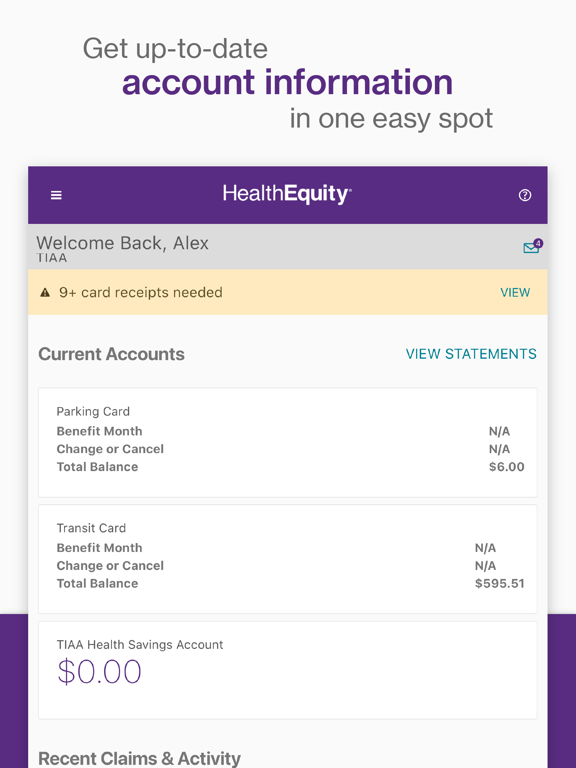
You guys can access the app?I have never successfully logged into this app on the first day of trying. Every attempt ends in a lockout. The password requirements are absurdly complex, and to make matters worse, there appear to be multiple separate login portals (EZ Receipts, WageWorks, HealthEquity) with no clear guidance on which one actually applies to you. It feels like the app was designed to keep you out of your own money. For a service that’s supposed to simplify healthcare spending, the fact that basic access is this broken is unacceptable. A few times a year I need this app urgently and every single time it fails me. Negative tars if I could. I have no idea how this has 4.7 stars..Franz LutzVersion: 7.3.0
App Doesn’t Keep Data after UpdateHad just downloaded the app and then went to a meeting. Had it set up properly and had entered some data for next claim. Had to go back to look at something from previous claim and all data removed. Went to meeting and had to download a new update that was issued less than 2 hrs before - minutes after my last download. Doesn’t remember the password. So much for using strong password and setting up Face ID. As though I had never been in app before. Can’t reset password more than once a day. Then please keep the information form last version to this version.Subs5Version: 7.4.0
Usability is so bad!This app looks pretty but suffers from all the problems associated with not having an actual interaction designer or usability person involved. Violates basic user needs and design principles for ease of use. Their website is equally bad. Nothing like having to deal with the terrible US health insurance rigamarole only to also have apps that make it worse. Only giving two stars because at least I can see the information about my accounts in the app easily. Entering a receipt, however, is one of the most onerous things I’ve done in an app lately and that’s the only reason I have the app!.AppsReviewNicknameVersion: 3.26.3
Not so EZWith every update or bug fix, the app gets worse. After hoping that you can even log in, you pray that your submission doesn’t disappear into the abyss. If it does, you may not be able to re-enter it while you’re already logged in. It only lets you submit one claim. Then, you have to log in again. The app sometimes just boots you out or freezes after you press submit. So, you have no choice but to start all over by logging in.
Customer service can’t tell you why your claim was denied saying that it was the IRS. And, they charge my account a monthly administrative fee..Happy.Girl6425Version: 7.3.2
Wage Works dose not work!Who ever designed this program needs to go into a different line of work. Something that should take minimal time has taken me days and often resulting in no success. Calling WW is also futile. Though those on the other end are gracious, their responses to questions provide no practical assistance at all.
I am not sitting in front of a fax machine or copy machine with scanning capabilities. And the WW app is a joke as regardless of countless times to register and. Or log in via the app, WW does not recognize me.
Did the IRS design the program to frustrate people into not taking advantage of Flex Spending benefits!? I’m joking; but WW’s user unfriendly program is not a joke..Ppoodle pantsVersion: 3.26.2
Receipts lost in a black holeTake a photo of your receipt using your camera and store it in your album. The app does not save photo’s and will “lose them” (and the app does not save photo’s to your phone). So when you think all is good, especially when the receipt is from your dentist or vision provider, shred your receipt, only to find a few months later your card is suspended, I would say this app is unreliable. Two stars for ease of submitting receipt, -3 for me having to call my providers to get new receipts the app lost..Live-a lotVersion: 6.8.0
Absolute GarbageThis is a rating for the company and the service they provide.
1. They send me an FSA debit card with the wrong account access information. I ended up having to search the internet for their phone number to call and be told I had downloaded the wrong app.
2. You get a debit card which is supposed to make paying for medical expenses “easier” but it doesn’t because you still have to submit receipts. The old company I had that did this was connected to my insurance company so they knew when I made a payment that was associated with a medical expense..JshsjansbbVersion: 7.1.0
Poor Cam Use on iPad and CrashesIt’s slightly better than cut...tape..fax.. It is great at seeing balances and knowing status, so it gets a 2.
* horrible to try to take pic with iPad of receipt. The image is 90 deg rotated so up isn’t up when aiming. The AUTO thing is constantly moving the frame when I just want a stupid WYSIWYG pic, the. The final image isn’t what I cropped anyway. Way too many reshoots..
*about 1/3 of the time after finally winning the picture battle, when I hit submit, the stupid thing crashes to to desktop.
Please just dumb down the camera and fix the crashes...MajorNaddsVersion: 3.37.1
Terrible AppThe login is beyond frustrating. It asks if you want to use Face ID, yet never uses it & makes you enter your password every time. What’s the point? I have tried to take a picture of my receipt for 15 minutes & it won’t accept it. I have great lighting & can clearly see everything on the receipt in the frame. It doesn’t make sense why it won’t take it! It is very finicky! Then if you get a receipt accepted, it won’t let you choose the amount you want to be paid back. All in all, it’s enough of a hassle to make me not even want to use an FSA!.KaedertotsmomVersion: 6.9.0
Payoneer 💰Payoneer is an online payment platform that lets you transfer money from any corner of the world! A best and must have payment service for every blogger, traveler, freelancer, affiliate marketer, consultant, virtual assistant, business person, online sellers, and receivers. Earn $25 for free by joining Payoneer. Sign Up Now!AdvertorialVersion: 7.3.2
 HealthEquity