DWANGO Co., Ltd.
IBunkoS Customer Service

iBunkoS provides you the best way to read novels, documents and comic books on iPhone.
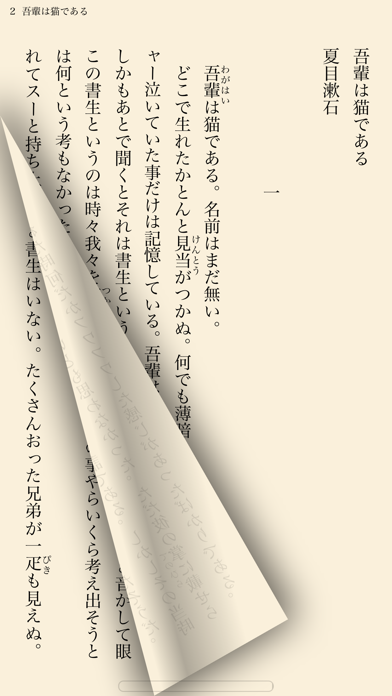
Thanks to a realistic interface, you can enjoy reading as you would with a real paper book. Reading on your iPhone is now easier than ever!
This is a great iPhone app for all the book lovers!
Read books and comics in vertical setting with comfort
・Support both horizontal (left open) and vertical (right open) writings.
・The app automatically detects the binding direction of a PDF document.
Double page spread and page effect
・When viewed landscape mode, the pages switch to the double page spread. The pages containing landscape format images are automatically treated as a double page spread.
・You can "flip" pages just like reading a real paper book.
Feature about 230 built-in books and "Aozora Bunko"
・ You can download a book with simple controls from "Aozora Bunko", the Japanese digital library that provides copyright-free Japanese literary works.
・ The app comes with the well-known books from "Aozora Bunko".
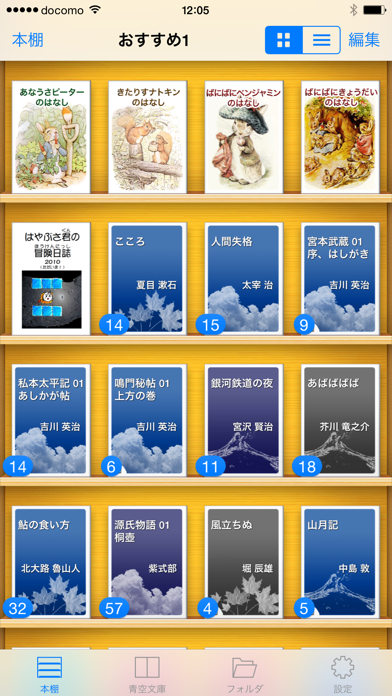
"Bookshelf" function
・Create a bookshelf as you need.
・You can easily choose a book you'd like to read by browsing the book covers displayed on the shelf.
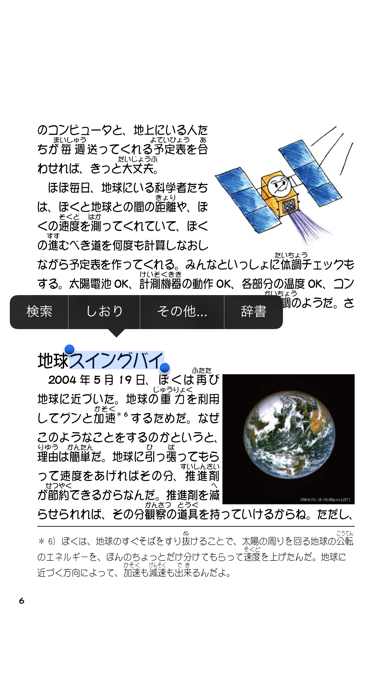
"Bookmark" function
・You can place as many bookmarks as you want and add notes on it.
・Select text as a bookmark in order to highlight the sentence.
Supported file formats.
iBunkoS supports the following file formats as books:
- .txt, .pdf
- .zip, .rar (containing .txt or .jpg/.png files)
- .cbz, .cbr
Transfer files
・Transfer the files using iTunes 'File Sharing' via the USB cable as well as via Dropbox, SkyDrive, pogoplug, Box, SugarSync. The app also supports both the WebDAV and the FTP servers.
Utilize data from PDF
・Support the table of contents or hyperlinks on the file.
・Select and search words (when the data contains text).
・Using our own processing technology, app can select a Japanese words smoothly.
Smart screen design removing the white space
・Eliminate unnecessary white space for better readability on the screen.
Thumbnails of pages show quick reference for where you'd like to read
・List the page thumbnails at the bottom of the screen or in the full screen.
・The page with bookmarks will be attached a mark. You can also display only the page thumbnails which contain bookmarks.
History back pages
・Viewed pages are saved in history so you can easily go back to the previous page.
Look up words in the dictionary
・You can use the iPhone's built-in dictionary as well as other dictionary apps that support custom URL schemes.
・Just select text and tap the button to look up the word.
Passcode lock
・You can set passcode lock on specific bookshelves or the "folder" screen that stored transferred files.
Various page settings
・Available various settings such as enable/disable the flipping effect or change the position of the tap control.
・Customize your iBunkoS to suit your own preferences!
You will find many more convenient functions and settings.
IBunkoS App Comments & Reviews
IBunkoS Positive Reviews
Good appPlease. support gif file.Version: 3.4.13
Is there a plan to cloud?It is great to share reading progress with other ios devices. It is hard to find where I read on iPhone when I want to read iPad T^T.Version: 3.4.25
Could you put this app on Chinese App Store?Hello, i am Chinese, i want to buy this HD version on Chinese app store, but i can't find it, could you put this app on Chinese app store, thank you very much.Version: 3.4.38
Great app for reading TXT,but...Please add support for more formats, especially epub, in the next upadate!!!!.Version: 2.2.0
Fantastic.It does its job perfectly. Read from Aozora Bunko or your own txt/zip files, and of course supports images. There's not just dictionary options, there are many options such as Tweet and Daijisen support. Do not hesitate. Wonderful app. Buy now!.Version: 2.3.1
Best reading app out there!!Would you mind adding a feature so that I can rename a book folder in a shelf manually?.Version: 3.0.4
Best Japanese Study ToolEverything about this app is beautiful. The read out loud function is perfect for studying kanji..Version: 3.0.1
Add epubPlease add epub format support..Version: 3.0.3
GreatA nice and comfortable app but hope to support epub files.Version: 3.3.0
最新出现的问题我的软件,总是在打开8秒左右的时候闪退,希望尽快修复bug,谢谢!.Version: 3.3.1
The best reading AppAs a chinese user,i love ibunko very much.It has a simple interface ,but makes me fell comfortable. Compared with the goodreader,ibunko has more flexible settings which fits your reading habit. Such as adjusting the font, line spacing, layout and so on. Absolutely ibunko is a great reading software..Version: 1.02
Great for reading Japanese novels on the goThis app is The iPhone equivalent to I文庫HD on the ipad. Unless you use your iPad a lot, I would recommend the iPhone version over it. It’s cheaper and the iPhone is just far more portable then the iPad. Anywhere outside or inside just pick it up and start reading.Version: 3.4.17
AmazingThis try is a useful tools for those who are learning Japanese and want to try their hand on reading real novels. I recommend though that you have at-least a years study behind you and know a good amount of kanji. And as a boom reader itself it's really useful I use it for all works I want read on my iPod.Version: 2.2.3
Free International Money Transfer 💸Enjoy high maximum transfers into more than 20 currencies while saving up to 90% over local banks! The cheap, fast way to send money abroad. Free transfer up to 500 USD!Version: 3.4.42