Homedatasheet.com, Inc.
Exif Wizard-Pro Customer Service

- Exif Wizard-Pro Customer Service
- Exif Wizard-Pro App Comments & Reviews (2026)
- Exif Wizard-Pro iPhone Images
- Exif Wizard-Pro iPad Images
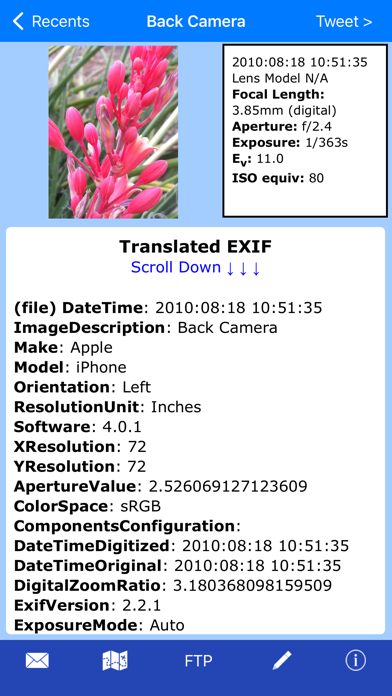
Exif Wizard-Pro is an Exif reader for photographers who are serious about their digital images.
- Work in native screen resolution, portrait & landscape, on your iPad.
- Move through an album using left or right finger "swipe" gestures on the preview images
- Ability to e-mail photos from within the app which retain their Exif data
- Upload images via FTP (passive mode, which virtually every recent server supports) and select your upload directory via a graphical user interface. Send one image at a time, or let Exif Wizard-Pro upload an entire album for you with the touch of a button.
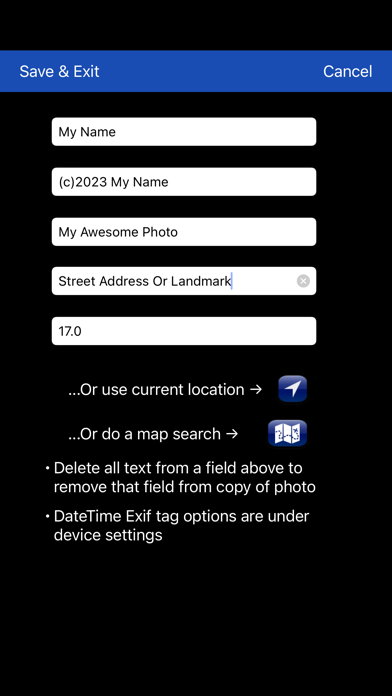
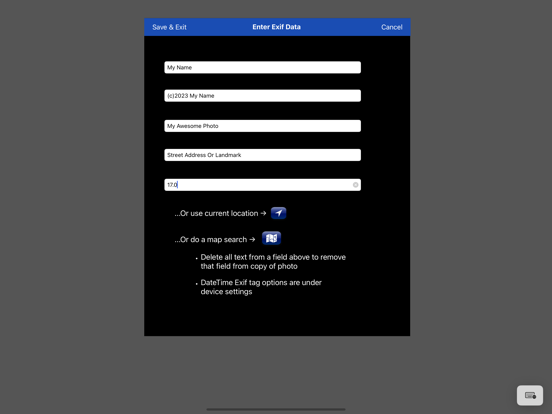
- Create a copy of an existing photo with the option to add, modify, or delete some Exif tags (Artist, Copyright, ImageDescription, Software, and GPS Location). Copies are placed at the end of your Recents album (Camera Roll). (JPEG images only)
***iCloud Photo Library Users - In the event a photo you believe is in your iCloud Photo Library fails to load, please open Apple's built-in "Photos" app to verify its presence, then try Exif Wizard-Pro again. Note that it may take several seconds or more to download a photo.
***If you edit a photo in Apple's built-in Photos app, it may become inaccessible to Exif Wizard-Pro. Reverting to original should restore access.
FTP security: Exif Wizard-Pro sends FTP data (including your password) unencrypted and, if you choose to store your password, saves it on your mobile device unencrypted. Therefore, you should NOT enter your main server password into Exif Wizard-Pro. If you have not done so already, set up an FTP account with limited access permissions. Consult your sources of technical support for further information.
Expectations Management: The process of importing photos from your desktop, laptop, or stand-alone digital camera to your mobile device is controlled by Apple. Some image editing programs, social media sites, and image upload/storage services remove Exif data from photos. Thank you for your understanding.
Notes:
- Web photos can be stored in your Recents album (Camera Roll) with Exif information by touching and holding the photo, and then touching "Add to Photos" on the action sheet which will appear.
- If you experience slow loading of photos for a selected album, go to the "Settings" app (from your home screen) and, in Exif Wizard-Pro's settings, scroll down and turn ON the "Fast Load" switch.
*** If Exif Wizard-Pro is not displaying GPS/mapping information for photos you have taken with your iOS device, it may be because you did not enable geotagging when you first used the built-in Camera app. To grant permission now, from your home screen, touch Settings -> Privacy -> Location Services. Make sure the "Location Services" switch at the top of the screen is ON, then scroll down and turn on the switch next to "Camera." Keep in mind that if you enable geotagging, people you transmit your photos to may be able to determine the locations where those photos were taken using any number of mobile and desktop Exif applications.
Exif Wizard-Pro App Comments & Reviews
Exif Wizard-Pro Positive Reviews
Great app for geotagging, couple of bugsI use this app regularly for geotagging photos I've transferred from my regular camera, and it works well for that purpose. Two minor complaints which I hope the developer will address are that the iPhone and iPad versions lose in-process changes to a photo if the app is closed and reopened. The iPad version does not offer a hybrid view when geotagging using map search..Version: 7.0
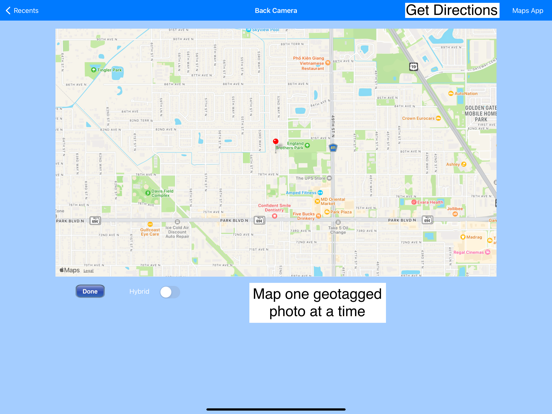
Works wellLooks like it’s been a long time since anybody posted a review. It works well for viewing the EXIF data. Its map display not only shows position but also the direction the camera was pointed. Very useful..Version: 12.5
Great app for Exif infoUsed the free version for many years. Loved it. Added features of the Pro version are well worth the modest price. This app provides a very complete set of exif info, including image direction, which is important to me..Version: 12.6
Useful and informativeI have been using the app for several years. It is dependable and the output is easily accessible and well organized. I frequently use the option to email results with an image. My wish list for a further expanded version includes the ability to select, view, and send a customizable subset of data elements and the ability to access the app features through a share sheet or the Workflow app. I am, though, completely satisfied with this app. Very nice work..Version: 8.1
Pretty slick, 1 glitchI like it. Getting the date and location data with mapping is great. One glitch: if you pull up the map from a photo, go back to the photo, then swipe to the next photo and hit the map button, you get the map location of the first photo. The only way to "update" the map display seems to be to choose a photo directly from the roll/album..Version: 2.5
Top-notch for EXIF...plus great for A/B'ing pix!Just like the title says. Pro version has all EXIF, including Hipstamatic combo info--a huge plus. The other "unlabeled benefit" is the ability to A/B compare photos with it. (Around iOS 5, the native Photo app lost its forward/back arrows, making instant A/B'ing impossible. This is one of a few apps that works around that utterly needless and dumb 🍏 exclusion.) Highly recommended..Version: 8.1
Very Very VERY! Nice!I quickly moved on from the free app which was about all I needed, but I gotta have more! So the Pro app at $1.99 was a no brainer. I just wish you could PLAY a Movie also as it gives you all the info. maybe that will come shortly seeing how well made this app is. There is now no need to open the iPhone "Photo" app at all! Keep up the good work! Love it!.Version: 4.0
Great EXIF informationI was looking for an app to give EXIF information because trying to compare some photo testing made in my iphone, ipad and canon camera and could not know what photo was taken by each one. This app helped me a lot and gave a lot of additional info. I do recommend it..Version: 1.4
Tweak the FTPFTP upload requires you to add a name to the file. Why not allow the upload to default to whatever name the system assigned to it? I observe the map location issue pointed out by others, annoying but not a big deal. Overall very useful App, worth the $2.Version: 2.5
Favorable reviewI just loaded and tested the $1.99 version of this app and it is awesome, simple and accurate. We are looking at Emergency Management use and this is great. I do not normally write reviews but in this case it would be a disservice to the developers not to..Version: 2.3.1
It's alright buuuutIf there's other apps out there that can implement exit data modification for png files why is it not out already? Also the interface could use some some remodeling. Other than that it is sufficient for displaying image data; I just wish it came with additional support..Version: 8.1
Good appBut needs to add an extension to the built-in Photos app to at least view metadata, and preferably edit it from there or have a link to open the app to the photo being viewed..Version: 6.3.1
Does the job but......it does not seem to recognize when the iPad is in landscape mode. It only displays in portrait mode, even when the iPad is turned on its side. It does show the Exif data, and it all seems to be accurate. But I want it to work in landscape orientation. 5 stars if it did that..Version: 1.5
Good exif viewerAwesome to finally be able to see the date and places when my photos were taken. Cool that it displays original filename too now on iOS 5..Version: 2.2
IPad 4?I have a few photos in my camera roll and its not giving me half the info I can see on iPhone 4S.Version: 4.0
Always worked for me. Apple 5 & 6.Gets that useful photo data.Version: 8.0
Great!Really useful app to have when you need to read your Photos..Version: 7.0
No shutter count infoPlease add shutter count info on next update..Version: 2.2
Awesome!App works flawlessly for photos and videos!!!.Version: 5.3
Top NotchThe best EXIF viewer I know of. I can handle metric, but adding English values would be appreciated..Version: 8.2
ExcellentJust what I was looking for to add to my photo tools!.Version: 2.2
Useful!Works great to find out how big your files are, aperture, ISO etc. Very handy!!.Version: 4.1
Crucial app for reading EXIF and for detailed viewing!I use this app daily for two critical purposes. The first and most obvious one is to read EXIF data to remind me which app(s) I have used for a photo — so that I can correctly tag it before uploading it. Less obvious, though equally valuable, is the ability to view an image at the highest level of detail — more detail than the Photos app allows. On my iPhone 5, this ability allows me to compare similar photos to check fine focus details. I use this feature many times a week!.Version: 5.4
Free International Money Transfer 💸Enjoy high maximum transfers into more than 20 currencies while saving up to 90% over local banks! The cheap, fast way to send money abroad. Free transfer up to 500 USD!Version: 13.0