Digital Ruby, LLC
You Doodle - Draw On Photos Customer Service

- You Doodle - draw on photos Customer Service
- You Doodle - draw on photos App Comments & Reviews (2026)
- You Doodle - draw on photos iPhone Images
- You Doodle - draw on photos iPad Images
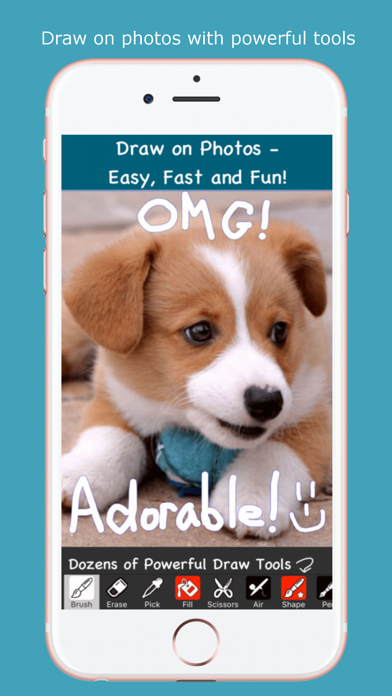
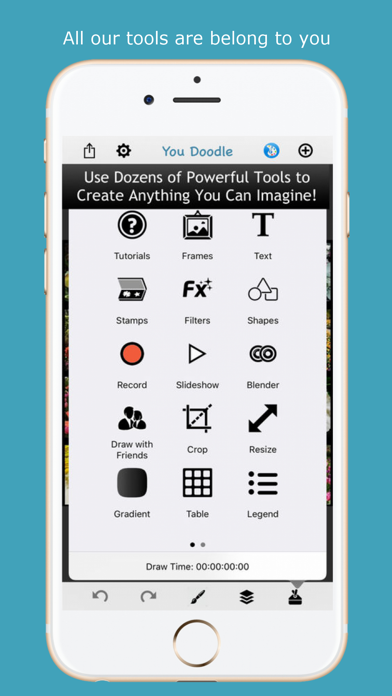
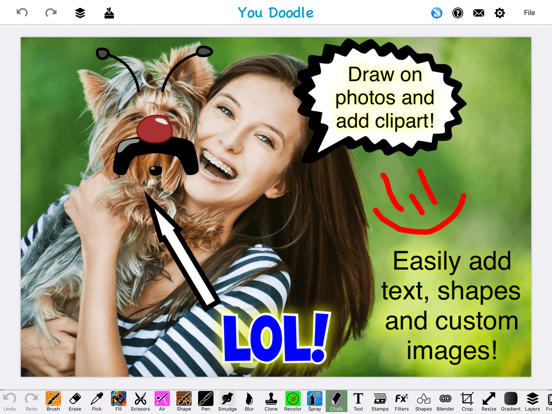
You Doodle has hundreds of tools! You can markup a photo, create a meme or any other type of project you can imagine. You Doodle does it all. Draw on photos, add text, insert shapes, work with layers, blending two photos, placing stamps, stickers, scrapbook with collage and frames plus many more tools are available in You Doodle. You may even create custom stamps and stickers right in the app.
Drawing on photos has never been simpler. You Doodle works in iMessage and the photos app and supports Apple pencil, along with Adonit and Pogo Connect stylus. Dragging in and inserting images from other apps is a snap. No other app lets you draw on a photo as easily as You Doodle.
You Doodle is a full featured art studio and here are some of the features:
- iOS10+: use You Doodle in iMessage to add stickers, GIFs, APNGs, draw on photos, use the camera and much more! Save GIFs from Safari to the You Doodle iMessage app.
- Many draw tools: brush, air-brush, shape and 3D brush, calligraphy pen, eraser, color picker, flood fill (super fast with real-time preview), spray, chalk, recolor (with tolerance), blur, smudge, clone stamp, scissors
- Apple pencil support on iPad Pro
- Backup and restore settings, documents, stickers, colors, etc. between devices!
- Record your drawing for playback as a video
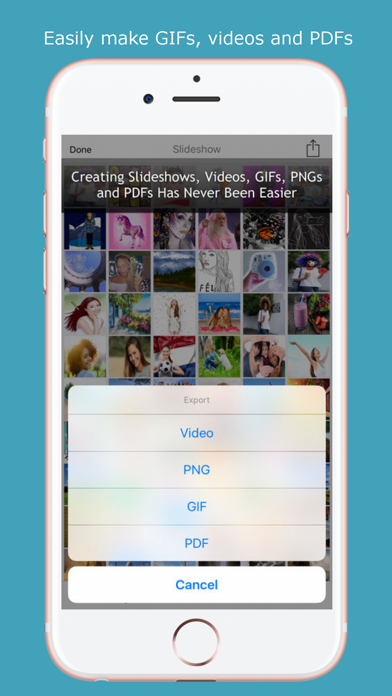
- Create slideshows and import photos, videos and GIFs. Export to Video or GIF. Add music that is downloaded to your device. Add custom watermark with pro version.
- Share to PDF, Instagram, Flickr, Facebook, Sketch Book, Twitter, Tumblr, Dropbox, Weibo, Email, Text Message, Camera Roll, Printer or Copy to Clipboard.
- Split view on supported devices
- Force touch on supported devices
- Import fonts from Safari or other supported apps (zip, ttf, otf)
- Quickly draw and add text with the new photo editor extension
- Save to your sketchbook from other supported apps
- Supports up to 16 megapixel camera images (4096x4096), depending on device
- Gradient tool
- Turn your art into a T-shirt!
- Many blend modes for brush and fill tool
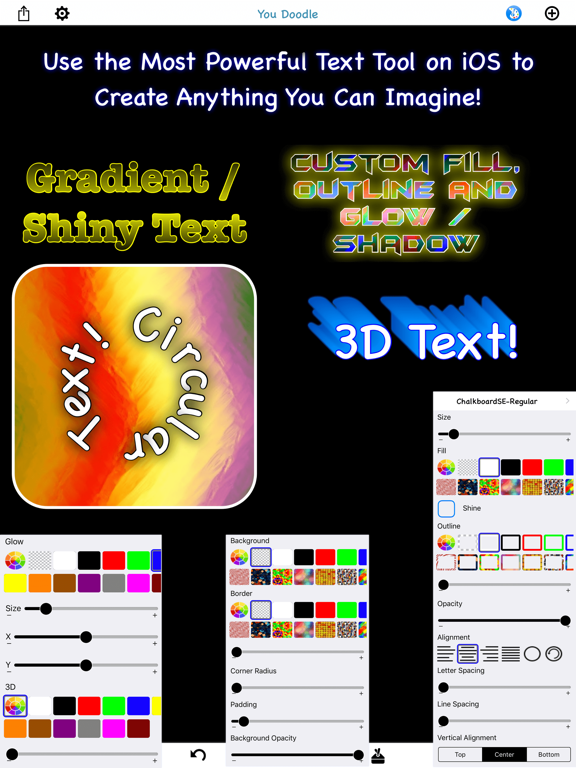
- Add text to your photos with tons of colors, fonts, outlines, glow, 3D, circular, shine, scaling and rotation
- 3D rotation (X, Y, Z) for text and images with perspective (perspective on iOS 7+ only)
- Pixel perfect rotation and placement of text and photos
- Draw in real-time with nearby You Doodle users (iOS 7+ only), everyone must have the same You Doodle version
- Insert multiple images at a time to create a collage
- Draw on top of the first page of your PDF and Office documents from Dropbox
- Use the blender tool to blend the foreground and background in interesting and fun ways
- Tons of cool stamps with offline support once downloaded
- Post your entire photo on Instagram (with square cropping) and other social networks
- Hundreds of picture frames and collages
- Over 30 amazing filters and effects
- Add shapes like arrows to highlight interesting bits in your photos
- Your own personal sketchbook to save your drawings to your device
- Flip, rotate, crop and filter your photos
- Glow effect for draw tools
- Legend creator for maps and other diagrams
- Simple table / spreadsheet creator
- Mask the background to the foreground and filter the background for some really cool effects
- Add custom fonts from your Dropbox folder
- Adonit Touch and Pogo connect stylus integration
Try out You Doodle today, I know you'll love it! I'm just one guy doing everything and I listen to feedback. Please let me know what I can do to improve your You Doodle experience.
- Jeff Johnson
Follow on Instagram: @you_doodle - https://instagram.com/you_doodle)
Follow on Twitter @YouDoodleApp
Like on Facebook - https://facebook.com/youdoodle
Support email - [email protected]
You Doodle - draw on photos App Comments & Reviews
You Doodle - draw on photos Positive Reviews
Awesome All the way!! Please Add Highlighting capability!UPDATE 5/4/19~Is there a way to Highlight screenshots of articles etc? If so, how? If not, Please Add! I’m not an artist of any kind and Highlighting print is something that would be very useful for me and I’m sure others as well. This app has been easy to use every time I've needed it! It does exactly what I want and I can save or share my work just about anywhere! Love it! I have the paid version and highly recommend it to anyone and everyone! Update: I’m not any kind of artist, and only use this app occasionally. Usually to crop a pic or add a greeting or whatever to a picture. In the past, I had no problem doing these things. I actually just a few minutes ago cropped a screenshot and it was easy. However, recently after several attempts to add Happy Birthday to a pic, I had to give up! I even tried to type it in a frame. Not sure what has changed, but it’s gotten too complicated for me, I guess. I have the paid version btw, don’t know if it makes any difference regarding my problem, just thought that I’d mention it. It’s a Great app! Especially for people who know what they are doing. 🤪.Version: 7.7.5
First day and it does exactly what I have been searching forI’m not an artist but I needed a tool that allows me to play being one on not tv. I tried another app but it’s help was organized by “here’s a tool and this is what it does”. Not helpful. This app’s help is organized by “here’s what I want to do” and provides simple easy to follow videos and most importantly doesn’t leave out the starting point for which tool to use. No frustration with this app. I was able to get done in about five minutes what I couldn’t figure out in a few hours on another app. About the only thing I would want is the ability to send a link for the help video to my phone so I don’t have to keep switching between the app, the video, and where I was in the video. Time to unsubscribe from that other app, another bonus for YouDoodle, you don’t have to sign up for a short “hope you’ll forget trial” just to see if it will work for you..Version: 8.2.2
One of the best drawing apps in the App Store.Title says it all. I love this app and used it for ages and still using it. One of my favorite meme creation apps also great for picture editing sure that was the intention, but imo it’s great for everything else too. It seems very basic and limited and yes it kinda is but for the most part if you’re skilled enough (no offense if any was taken) you could use this as a serious drawing app for many things, It even excels in things other apps don’t. It could use some improvements though (one improvement I’ve been hoping for is more layers) but despite the limitations it is a beautiful and inspiring app! I highly recommend it. P.S. Sorry for late review, thought I left one years ago..Version: 8.2.5
Been using for 10 years for freeThis is one of my top five apps. I’ve been using it for8-10yrs without realizing it. It’s just one of those apps I can’t live without. I love it because it doesn’t freeze up all the time like Photoshop and has basic bones for photo editing good enough for the quality of a holiday photo. I’ve gotten so good at it, I have a friend who has been Asking me to do his holiday cards the past 5 years. Not sure how they make money because I don’t think there are in-app purchases if that makes a difference. It’s rare to say that about an app. No brainer. Update: I paid the $1.99 for ad free upgrade. Anytime I’ve had a question, support response very quickly. I’m now using it daily.Version: 7.9.3
Novice in the visual arts spectrumThis app is one of the most amazing drawing tools I've ever had privilege to access, never mind for FREE! I can express ideas through my fingers. Sketching images then adorning them with colors, line thickness and smudging all of those to soften the pixelation. Not perfect, but either am I. Fantastic intuitive tools allowing me to create things that I could not possibly do with my own limited abilities. Very well done. Update: I got a Bamboo fine line stylus that worked w/ You Doodle right out of the box! Blew all the earlier efforts out of the water. Again, an amazing app years in and still learning how to use more and more of the fairly deep bench of tools allowing for different techniques providing a choice of solutions..Version: 7.7.0
Nuh uh!OMG I have 3 complaints already. Alright #1. I tried taking the photo from my library and drawing,.. “Doodling,,” on it, and yet it said I had to pay for the designs. #2. Not just paying for designs, you have to pay for some monthly feature pack. So almost everything. Plus some tools that are really handy. #3. The brush never is the size I need. It’s too big, or., its to small! So please make a line for all the sizes for the brush!! But, I have some positive thoughts of this app too!! #1. It’s really easy to save your work, and it turns out awesome in photos. It really clear too see! #2. There aren’t very many bugs. There are at least 2 or 3 but otherwise it’s good!! Keep up on good work with that. And #3. So many brushes,filters,and paint designs! It’s really handy for when you need colorful paints but, 😽 bye!.Version: 7.6.6
GREAT APP! much better than apple markupI've been using this app for over two years and it's helped me in so many situations. I did buy the full version just based on how often I used the free version. Even though quite a bit of functionality is accessible to the free version as well. It's super handy to be able to easily + quickly (and accurately) mark up photos and quickly send them to others. Thanks! Update: still an excellent app, and worth the money. Even with Apple adding Markup built in , I still constantly find myself using this app! Update; December 2017, still an excellent app! I use very often, it’s much better than the built in crap markup function , it’s no comparison at all..Version: 7.6.3
LOVE LOVE LOVEThis app is no joke. I love it. I have used it to make designs when I couldn't leave my bed and needed an outlet for my art. I even created a company using designs I made on YouDoodle. Plus if you have issues you can contact the designer of the app directly. Tell me where else you can do something like that. Incredible. I highly recommend it to any one. Kids, novice, beginner or advanced. I can't say enough about how well this app works. It goes well beyond just your basic drawing and picture manipulation app. The free version is fine but the $5 version is WAY worth it and actually underpriced. I highly recommend getting it NOW. No joke. - Nicholas Conlon.Version: 7.5.91
Perfect app, is all i have to sayNeed i say more? download it. for the ones who love editing and detail, this will have what you’re looking for i promise. just take your time and explore the features and you’re bound to find what you’re looking for. i’ve been using this app for years and it does what i want perfectly:) i just use it to edit photos for my personal use, photography wise, and it’s easy to use. been using it for so many years figured i’d give it what it deserves (this rating and review. all from the heart and i didn’t get paid. good things just deserve the right appreciation). thank you so much Jeff!.Version: 8.2.2
I love it, but...I LOVE this app! I've had it for over a year now! But for some reason it keeps on crashing all of a sudden! ;-; I really love this app but I don't know what to do, I think it might be from that last update. Ever since the last update when I record my screen with the record button and get everything set up I draw, after that I stop the recording and save it to my camera roll. I go to the the save video and it recorded the actual time it took to draw or do what I was doing instead of the short version! I really hope this gets fixed, I would give this five stars but because of the constant crashing and recordings getting messed up I'll give it four stars. I love this app, but I can't even use it..Version: 7.5.91
WOW! (from a graphic artist)Excellent choice for fundamental graphics tasks on iPhone. I tried several other drawing apps, but with this one you can cut & paste sections of an imported image—something none of the others seemed to be capable of (as far as I could tell). Also, everything else is very intuitive once you explore it a bit. Thank you & congratulations, Jeff. Please don’t mess it up like too many developers do! Almost gave it 4 stars because several of its functions get squirrelly when I open the app within iOS’s Photos app, so if I need such functions I have to open at the app icon and import photos..Version: 8.0.2
Incredibly Simple to UseThis app is great! It’s always been very easy to use. Nothing is overly complicated or difficult to use. As compared to most other apps of this type. Anything that I’ve wanted to do so far, I’ve been able to with relative ease. I use it all the time at work to take pice of machines and type in the unit # and other info on the pic. Then I upload that pic to whatever app I’m using. It’s just easy to use. Unlike most apps. I can’t say that enough. I highly recommend it to everyone. Especially if you have a need at work for adding info to a pic to avoid extra emails and texting..Version: 7.9.0
Awesome appI’ve been using You Doodle for a few years now and just upgraded to Pro. I’m happy to contribute to this developer because this app has been and still is my go-to image editing app on both my iPhone and iPad. I also had the need / opportunity to contact customer service regarding a glitch I found and I’m happy to report the developer responded very quickly within a couple hours, was easy to communicate with, and fixed the glitch in less than a day. Not only am I very satisfied with this app, I am also very happy with this developer. This is a great app from an excellent developer, please try it, you won’t be disappointed..Version: 7.6.2
Powerful tool!Don't let the name You Doodle fool you - this app has tons of features! Because of that, there is a learning curve but there are many helpful tutorials for just about every feature. The fact that it can do so much makes me want it to do even more - more fine-tune control over the pens and markers, the ability to add more layers, etc. It could also be a little more intuitive - there are many features I just had no clue how to use and no one wants to watch a video for every thing they do. But even with that, I highly recommend this app and the money spent on the full version is well worth it..Version: 7.6.5
Almost perfectI love this app. It’s my go to photo editing or just for a fun drawing. I usually use it to make up fictional maps and flags because I just find that entertaining and it performs the task almost as amazing as I could want. I’ve had the full version for a while and I think it’s most definitely worth the cost. The only two things I can think of that hold it back are the lack of being able to turn off/on anti Aliasing (maybe there is a way and I’m just too dumb to figure it out) and being able to add more layers so I draw and put stuff on other layers besides just the foreground and background. Besides that it’s definitely worth your time. Probably the best drawing app on here..Version: 7.6.8
11/10THE BEST APP The app is free, and that is amazing! Buying the full version is definitely worth it. You don't have to pay for a subscription or anything, just one payment and you have everything! Plus there are sales all the time, so it's pretty cheap. I tried a bunch of other apps on my iPhone and iPad, and none of them worked as well as this. It's simple, friendly, super detailed, everything! The only thing I don't like is that there are only 2 layers: foreground and background. I've been hoping for an update with more layers, but it hasn't happened yet. Other than that, it's great! Definitely worth getting..Version: 7.5.91
Free version more than adequate, paid features occasionally unlocked for a time by watching add.The free version is versatile. I have downloaded and deleted a ton of free image editing apps over the years. It ain't perfect but it's the only freebie to pass the test of time. Among other features It allows for 3 layers that you can freeform edit. Thats a lot of mischief if you learn the app. Granted I don't use this to filter selfies. I use it for evil... like putting my exes head on the body of a snake. I don't know how long it will last but recently the premium paid features are offered for a bit if you watch an ad..Version: 7.8.7
I BOUGHT THIS - AND I NEVER BUY APPSI have been using the free version of You Doodle for a few years and it is awesome. So easy to use and I am always finding some new way of using it, combining photos with artwork, using all types of color or glowing color…the list goes on. I especially like the close up magnifying circle when drawing close up work on my small iPhone. I never buy apps, but made an exception for this. Totally worth the purchase price, don’t tell anyone, but I would have paid a lot more. Get it while you can..Version: 8.2.2
<3 This App, One Suggestion ThoughHello! I have had You Doodle since it first came out. It has been the best photos editor that I have came across. It always ceases to amaze me!! I have one suggestion. So I use a software called Gimp on the computer. Sometimes I am too lazy to upload my photos from my iPhone to the computer. So I use your app. I like making silhouettes and I have to erase around whatever I am making. It's very time consuming. Is there a way that you could use like a green screen eraser. Something like that. :p (Btw I do use a green screen) GO DOWNLOAD THIS APP!!!.Version: 7.5.91
Great app for digital artistsI’ve been using this app for a while now, and it was actually suggested to me by my girlfriend (ex now, but same difference) Anyways, this is the only free app that I can use without confusion and difficulty to draw digital art. I know it’s supposed to be used as a draw on pictures kind of thing, but it can be a very helpful alternative for the expensive art apps that digital artists are forced to buy. It’s helped me create truly amazing things, and it’s honestly one of the bests apps that I’ve ever downloaded ❤️❤️ highly recommend.Version: 7.6.3
I love this appI can’t even tell you how much I love this app. I always was looking for a simple app that I could edit Gacha and draw on, I tried Ibis paint x but that was too confusing. I looked a this app and decided that I should try it, and I LOVED it. I showed it to all my friends and they downloaded it too. I also wanted to say that I think it’s amazing that you can watch a video to get every tool for 2 hours, it’s very useful to kids and adults who don’t or can’t spend money on this game. I love this app and hope everyone uses it!.Version: 7.8.1
Great programI use this program for children illustrations and much more. No this is not as complete as Photoshop or Illustrator which I currently have, but for an iPad app it does much of what I want and expect from an app without being too complicated to learn. Using an Apple Pencil is a plus. I highly recommend freezing screen while you draw so you can turn screen and work on what would otherwise be awkward angles. Customer support has been quick with answers..Version: 7.9.0
TEN star winner!!! ⭐️⭐️⭐️⭐️⭐️⭐️⭐️⭐️⭐️⭐️Every artistic creation I make I owe to "You Doodle!!" I discover new possibilities with each use.. there is just no limit to what you can do with this amazing app! Don't ever take this away, or I'd be totally lost! I use it with my iPad & enjoy many compliments from people who think I must have Photoshop! But this is my little secret.. I just let them think I am a creative genius, when in reality it's the "You Doodle creator who has made it all possible. Thank you so much, I am in awe of your skills & talent that make me look so good!.Version: 7.6.0
PNG’s and editingI believe that this issue arose after the most recent update. Importing PNG’s and editing them was a seamless process since the beginning, but suddenly it hasn’t. When importing the image, I adjust some of the settings (exposure, saturation, etc.) but the moment that I confirm that I am finished, the resolution is completely fried. (There’s a severely rasterized outline and the pixelation is extremely high) I know this is a small problem, but I would just hope that it could be resolved eventually because I really do think this is the best editing app out there. Thank you!.Version: 7.6.2
Had this app since foreverMy cousin first showed me this app back when I had an iphone 5s. I’m not an artist by any means, but sometimes I like to fool around and doodle. This app has many great features for free that allow me to do whatever I need to do. It also has a lot of need features for editing pictures. Every funny pic I sent to my friends has been made with this app. I knew I was going to have to download this app on my iPad too as soon as I got it..Version: 7.9.3
Few needed featuresI enjoy this app very much and it’s good, two suggestions however, add an auto cut feature which removes parts of pictures. The second thing is to make it possible to delete stickers from the iMessage screen because I have a few stickers that are disproportioned or poorly edited that I do not enjoy looking at. Otherwise, this app has a lot of good features and a lot of little extra fun things such as theme customization for those who have bought the pro version in addition to extra tools and no ads..Version: 7.7.1
Only app I have ever gotten premium version ofThis app is really high quality. It does everything I want it to do for editing text, pictures etc. on the fly, they even offered me a discount on the full version and for once I actually accepted it because I was enjoying it so much. I do feel the stickers are sort of random but better to have extra features then to be missing features. You should definitely stop reading reviews and download the app..Version: 7.8.3
Nice and simple!I had a simple need: to annotate a few photos with text and circle a few features to highlight them. Guess what? I was able to do this without spending hours trying to figure out how to do so! It took me about 5 minutes to figure out how to do it! It has many, many more features that I didn’t need, but it was refreshing to be able to do something simple without spending hours!.Version: 7.8.8
This app does everythingMemes, comics, cartoons... Enough to say I drew the cover of my novel with it. There are so many apps that I delete after using but this one is always on my iPad and iPhone. I just used it to fix a drawing made in a fancy app as importing and saving here is so fast. I like the toolbars and menus outside the drawing area; you don’t waste time “customizing”, it is always ready to go. Good selection of fonts. Great value especially if you are into cartooning or other simple graphics. Simple and best..Version: 7.6.6
Thank you :)To be honest at first I found it difficult to use the app. It had great features which attracted me in the first place like being able to add multiple photos onto one background. It was a feature I always enjoyed using and therefore the more I used it the more I became familiar to it. It was amazing and I was so glad to see that I am able to edit pictures in different ways. It has been amazing!!!.Version: 7.8.8
Really good so far... With one shortcoming that may only bug me...This is one of the few apps to support both pressure sensitivity and direct editing from the iPhone Camera app, so I really like it. However, a couple of things keep it from being five-star just yet: 1) No support for the Wacom Bamboo stylus for iPhone, which is arguably as popular as the other supported ones (though I will say the 3D Touch support helps to make up for it) 2) No way (far as I can tell) to get pressure sensitive settings when in "direct from Camera app" edit mode. This second one is really the issue for me, since it means that the app doesn't support the two features that I'm looking for at the same time! That said, the other features are really good, so despite this shortcoming, I'm still supporting the developer by purchasing the app, and I hope that others will, so he can keep working on it!.Version: 7.6.6
This game is good but…This drawing app is so much fun and there isn’t too much ads in it. It is really fun to do and you can be VERY creative. But there is something I would ask; why is SO confusing? Not to be rude but some of those materials I used I did not have a clue what it meant. And whenever I tried to use a material, it would tell me “ go to apple settings” and that’s really annoying but overall, it’s really fun to use and it’s a good use of your extra time you have so that’s why I gave it 4 stars! :).Version: 8.3.0
More fun than a video game for kids.I’m older now but in the Eighties, before computers. I produced speaker support color slides. Multiple exposers on color slides using masking and a color light box made the product. Now I do much more on my Phone just for fun. Well worth the money. Painting over landscapes is relaxing. Very challenging. Still not to good with layers but working on that. The Grand kids are doing some work. Colorizing old b&w photos is another challenge..Version: 8.2.2
IncredibleI've used this app for over a year now and it still amazes me what it allows me to do and create. It allows me to draw over photos with so much precision that it looks like it is a part of the photo. My friends and family are surprised and amazed how well my doodles can look through this app. I would definitely recommend it to friends and doodlers. I would recommend it more for amateur or people who doodle for fun than professional artists though..Version: 7.5.91
Good but a few problemsThis app is a really good app and i love it and as said in the other reviews they say that we can't draw on our pictures but that not true we can even search for pictures in google through the app and that cool . Now the minus points are that we are not allowed to use some things without a purchase ,also the app is a bit confusing sometimes i don't know which to press but overall awesome 😎.Version: 7.8.7
Wonderful App!This is an incredible application. I use it for everything and it’s served me well for a couple of years now. I purchased the full version early on and it was a worthwhile buy. Recently I’ve been running into a bug where if I try to use the text addition (I make props for movies occasionally with this app) it bugs out and the entire app crashes. Do you know a way to fix this? Overall, amazing app and thank you so much for it..Version: 7.7.3
GREAT APPYou Doodle is one of the first app that I downloaded, and overall the Best, once you learn what the app can do, it's a blast, and an awesome meme maker. I don't give reviews, but I was using it this morning and just had to say something.. I also have You Doodle +, but I've never used it,,I purchased it because I wanted to contribute to a GREAT FREE app,,I might have to try it out now that ( I think ) I've mastered You Doodle. Highly Recommend this App..👍🏽👍🏽👍🏽.Version: 7.7.3
Does everything I need it to....Multiple layers would be great but has otherwise done everything I need it to in editing images for band logos, flyers and stuff like that. Ability to easily import fonts is a big plus. That fact that this is only a few bucks and not a dopey subscription is a huge. You can use free also, just have to endure some ads. Use it a lot on iPad..Version: 7.8.3
Still highly recommend, I use this all the time, very fun!You Doodle is so much fun, and is easy to navigate. I enjoy making fun and funny enhanced pictures using You Doodle! Thanks for making such a cool app! Very fun and cool app to create your own personalized photo creations. I use it for mockups of ideas I have, to help visualize. I make funny collages for my friends and family birthday, etc. You Doodle is a great app with excellent tutorials!.Version: 7.8.3
Easy to use, my “go-to” mark up appThere are probably a bunch of changes I would propose to this app, but the basic concept is well done. I use it all the time on the iPad for almost ANYTHING sent to me that needs comment, changes, whatever. Import, mark it up, and send back as a PDF. I would like to import images on top of the imagine that I’m working on. For example, if I had an image of a candle, I might want to import an image of a flame on it..Version: 7.8.1
My workhorseBack when I first downloaded this app I wanted to dismiss it immediately after downloading it just because it looked like a little kid app. I’m glad I didn’t, because it’s become the absolute workhorse in my photo editing app arsenal. It’s easy and does what I need it to do well. I have many other far more sophisticated apps with a lot of other features, but for basic editing, I find myself always opening youdoodle. A+.Version: 7.6.4
Great until recentlyThis app has been one of if not the best graphic design/ photo editing app I've ever used. It has been easy to use and very helpful and convenient. Unfortunately, it has been very poor lately. Almost every thing I do, the app crashes. I'm currently using an iPhone 8 so I'm not sure if that has anything to do with it. I've deleted and redownload it but no luck. Hopefully this can be fixed soon as I would like to get back to editing as soon as possible..Version: 7.8.3
Fantastic AppI do a lot of screenshot editing for IG and Twitter, and I use this app quite literally every day. It’s absolutely a pleasure to use this. I love it so much in fact that I also bought it for my iMac to use with my Wacom Intuous Pro tablet. I’d recommend paying for full access, because you will definitely get your money’s worth—especially if you’re constantly editing like I am. Great app—thanks!.Version: 8.2.2
This app deserves an editorial award from the App StoreYou Doodle is the most user-friendly and feature-rich app for students and educators who want to combine photographs, crop off parts of some pictures, and then add annotations. If you are a professional artist and want a blank canvas with a graphics drawing tablet, look elsewhere. This is the go-to app for people who want to convey knowledge and make meaningful annotations to legal, medical, or schoolwork..Version: 7.9.3
Photoshop for your PhoneAt first using this app you think it’s just the standard drawing app, but the more you play around the cooler it gets. Along with the standard brushes, colors etc. you can customize pretty much anything and there are enough options for 10 apps. Filters? Got it. Copy/Paste? Got it. Recoloring? Got it. Try this app out. It’s pretty much a phone version of photoshop plus Instagram editor plus a standard drawing software..Version: 7.7.1
Okay I guess...This game isn’t much fun with low amounts of tools and stuff, I find other games like this way more fun then this Reasons: old, kinda crappy, need more cool tools,.Version: 7.8.7
Doodle is a Stadivarius, and it's BRILLIANTThere are other apps to correct your images, and they do it aptly: they are "swiss-knife" apps, you can repair anything and everything, you have the tools. Doodle, by Jeff Johnson, himself a graphic artist, is more than a tool, it's an INSTRUMENT, very well tuned and crafted. The more you learn — and practice! — the more your art will be subtle and refined. BRAVO to Jeff Johnson, this app is my GO-TO app to create. Very intuitive, very easy to use! For amateur artists and pro artists alike, this app is GREAT! Cette appli est SENSATIONNELLE!.Version: 7.5.91
You doodleI love this app so good iditing.Version: 9.0.0
Been using for years, I love itI bought this app specifically to support the guy developing it, it’s really impressive that one man created this whole app and has been updating it so consistently. It’s a pretty simple app that a kid could figure out, but if you have some skill and patience, it can be a really powerful tool for drawing and editing photos. I’ve used it for drawings and designs, making silly edits, and even touched up specific areas of my grad photos without it being detectable. Genuinely adore this app and will probably use it until I die..Version: 9.0.0
Very handy photo app.This is just a 1 man operation. A one-time fee for the cost of a fancy coffee these days. Support the fella. Seriously, where can you go wrong? A handy little photo editing app I use for projects. Throw this in your repertoire of photo apps. (2024).Version: 9.0.0
Very straightforward and streamlinedIf you’re like me, then you’ll love this drawing app as a drawing app. You can’t have more than two layers, but this personally helped me sooo much as a digital artist because I actually started learning digital art tricks by bypassing this. The tools are exactly what you need, and once you learn how manipulate them well, they’re so much more easy and enjoyable to use compared others (I’m comparing to PicsArt, Adobe, Ibis, etc) though, I’ll admit apps such as Ibis have more options and can be good for you if that’s what you enjoy, but if you’re looking to make your experience straightforward, I think this is as uncomplicated as it gets.Version: 8.3.0
How much I love itOMG! I love this I get to edit fun photos and draw its my dream drawing all and I loveeee it.Version: 8.2.5
Original CapturzI have loved this package from the start even though I work with Lightroom and Photoshop. There are things that are made easier here, like filling colour in between trees, clouds, outlines. The colour selector eye drop is easier and the brush works like a charm. I love the spray gun for grainy effects. You can layer up the opacity. I have fixed the tiniest of colour imperfections and blended. There are some cool effects such as cartooning and swelling. Don’t dismiss this package for the simplicity and the abilities. Good one to have in your repertoire..Version: 8.2.5
What can I say...Love it !There are not many apps I would give 5 stars to but this one deserves 6 ! Cannot fit into this review how much I enjoy it..Version: 8.2.5
AmazingI drive practically everything on here and it’s just perfect. I have nothing else to say..Version: 8.2.2
Great app +++It’s just what I was looking for. A great app for marking up photos. It’s excellent for quickly marking up circuit board traces, for following signal flow..Version: 8.2.2
Easiest drawing app!I’ve been using this app for years! Importing photos to draw on top of is much easier than in procreate, and even the quality of the photo is clearer..Version: 8.2.2
Awesome!!Love being able to customize photos with drawing on top. Great for branding!! One of my top 3 apps I use everyday for creating amazing effects for our company. It’s easy to use. Highly recommend!!.Version: 8.1.2
Best app everI hope this app never changes 10/10.Version: 7.9.3
Small but mighty picture editor!So many great features. Easy to use. Do a lot with it on my phone making quick touch ups to photos of art before posting to Instagram..Version: 7.9.3
IMPRESSIONNÉ PAR LE POUVOIRJ’ai téléchargé cette appli dans le but d’apporter une modification rapide sur une photo. Je dois vous avouez que je ne m’attendais pas à autant de fonctionnalités et d’avoir autant de facilité à se retrouver dans les menus qui sont très élaborés pour une version gratuite. Je vous garantie que vous ne serai pas déçu..Version: 7.9.3
This is an amazing appThis is an amazing app I wanted to edit pictures for a long time and now I can this app is simply amazing.Version: 7.9.0
Easy, peezy, picture appySeriously I used it for 20 minutes and decided it deserved my money. Normally I would have deleted an app within that time. Nuff said..Version: 7.9.0
I am happy to use itEasy to use and so helpful ..Version: 7.9.0
For artistsAre use this to sketch over photos of my paintings to help me plan out next steps and point out things I need to fix I love this app as an artist.Version: 7.8.8
Amazing!I can’t believe I downloaded this app four years ago! It’s great. Many other reviews say that you have to pay to use the app, but that’s completely untrue. You *might* have to pay to use some features, but you could also watch an ad to unlock all of the tools for 2 hours. You Doodle is great for both drawing and editing photos. I really like all of the colour picking tools. I can always find the perfect colour (or pattern even!) The scissors are great for moving elements of an image around when I’m editing pictures. I’ve made many birthday cards and Christmas greetings using this app! Another thing I like about this app is how easy it is to use. Sure, you could download an app with more features, but how long would it take you to figure it out? With You Doodle, everything is right there (with labels, too) There are a couple things that I’d like to see in this app though. Firstly, it’d be great if we were able to add more layers to our drawings. Another thing that could improve this app is a selection of different brushes. I know that you can *sorta* make your own brushes with the airbrush feature, but it’d be great to have some pre-made brushes. Again, these are just suggestions. All in all, You Doodle is a great app for drawing and editing photos. There are a few things that *could* be added, but the app is great without them, too. If you’re looking for a free app to draw or edit photos with, You Doodle is an awesome choice..Version: 7.8.8
Loveeeeee uLove ya.Version: 7.8.8
It’s fine!🐞🍒I mean I’m happy that I don’t have to pay for it. But I’ve seen a lot of reviews of: Oh, I need to pay for it!! No you don’t. And: I can’t even erase stuff!! You can. So if you see any of those reviews don’t believe it and download it ✨ASAP✨!!🦋🍯.Version: 7.8.8
Give It All Five StarsThis app is AMAZING I used at school for technology class.Now I use this app at home 🏡.This is a very educational app for 8 year olds and I am one of them.BEST APP EVER.Who ever made this app deserve’s full rating⭐️⭐️⭐️⭐️⭐️..Version: 7.8.7
MemesDo a few more YouTubes. Trying to make cartoon memes.Version: 7.8.7
Where have u been all my life!!Ooeee! What an app...so easy to navigate, so much u can do...and so many designs to choose from! Have been putting off updating iOS becs. it meant losing a fave photo layering app..but this one lvs. it in the dust. Yup, am going 2 get Pro version. Kudos!.Version: 7.8.7
Sketchbook and copying lowers the quality of image.I love this app, I’ve been using it for over five years now. It’s been the app that got me into digital drawing. My only complaint with it is that when I copy and paste the quality gets significantly lower. I do a lot of animations on this app so I used a lot of copying and pasting and I noticed that the quality of the image lowers drastically when you copy and then paste it. My other complaint is when uploading an image from the sketchbook, the quality on that lowers a lot too. It’s really frustrating and I was wondering if there was a way for you to fix that? Anyways, those are my only two complaints. Apart from that everything about this app is great!.Version: 7.8.7
AmazingVery realistic download it and will have a blast reco a stylist best colouring as well as drawing app out there u need. To DOWNLOAD NOW and have fun!.Version: 7.8.7
RecommendMost drawing apps have either limited features or complex tools. You doodle is simple and doesnt require much info on how to use this app..Version: 7.8.7
NopWeird.Version: 7.8.7
Randomly such a good appI downloaded this app a few years back, I don’t even remember what for, but it has been the most useful app I have ever used in my life. I have used it for photoshop, digital art creation, post creation for my senior class instagram page, and I even designed my senior class t-shirt on here. Literally endless uses, I have never written a review for an app but I feel that everyone should know how good this app is! 10/10 recommend..Version: 7.8.7
Absolutely Stunning!User friendly, has everything I want. Use any fonts on my iPad. Almost FREE!!!.Version: 7.8.7
Easy to learn and great variety of functionsThis app is very easy to learn and use. Functions cover a great variety of range! Super handy!.Version: 7.8.6
Love it!I can trace anything I want with it! I’m gonna use it for my YT videos!.Version: 7.8.4
NoiceSo far so good! Cant wait to figure it all out..Version: 7.8.3
I bought this app, it’s worth itIt’s a very complete photo editing app, i’m really glad i found this. i use it regularly ✨ the free version is great too, so it’s definitely worth checking out and seeing if it suits your needs (which i’d guess it probably does).Version: 7.8.3
Excellent AppSo easy to use for manipulating photos. Love it!.Version: 7.8.3
#1 App I always go back toI never do reviews but here you go.Version: 7.8.3
NiceNice.Version: 7.8.3
Editing picturesGreat app for editing pictures and marking pictures to your camera roll and social media accounts.Version: 7.8.3
It’s really good!!It’s really good is one my favourite thing to do in The house.Version: 7.8.3
10/10This app is great! No crashes and rarely any ads! Would recommend to a friend!.Version: 7.8.3
The very best!Pretty much all you need in straight forward editing! But we’re too busy to go back and thank the artists who put it together. Here’s your thank you! You’re the best!.Version: 7.8.3
Free International Money Transfer 💸Enjoy high maximum transfers into more than 20 currencies while saving up to 90% over local banks! The cheap, fast way to send money abroad. Free transfer up to 500 USD!Version: 10.0.1
What do you think You Doodle - draw on photos ios app? Can you share your thoughts and app experiences with other peoples?
Please wait! Facebook comments loading...