Samepage: Team Collaboration Customer Service

- Samepage: Team Collaboration Customer Service
- Samepage: Team Collaboration App Comments & Reviews (2026)
- Samepage: Team Collaboration iPhone Images
- Samepage: Team Collaboration iPad Images
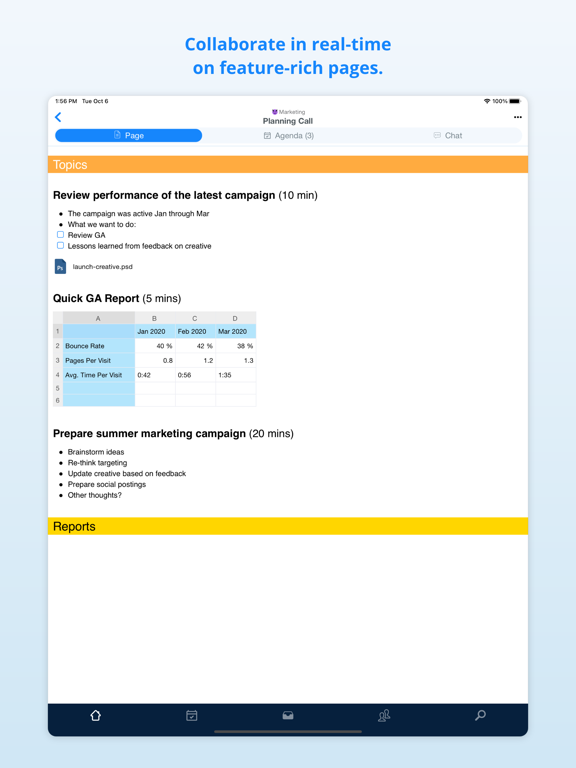
Samepage facilitates communication, project management, running meetings, online collaboration, and more by combining team chat, video conferencing, screen sharing, task management, file sharing, and real-time team document collaboration in a single cloud-based collaborative workspace.
Teams use Samepage to coordinate marketing campaigns, run meetings, plan events, organize product development, run customer support departments, and connect offices around the globe.
Use Samepage to:
· Work with your team on various types of content. Pages, Task boards, Sheets, Calendars, and more.
· Discuss in context. Each page has it's own chat, and so you'll never lose a context for your conversation.
· Manage tasks and projects with Task boards (or Kanban boards for those who know).
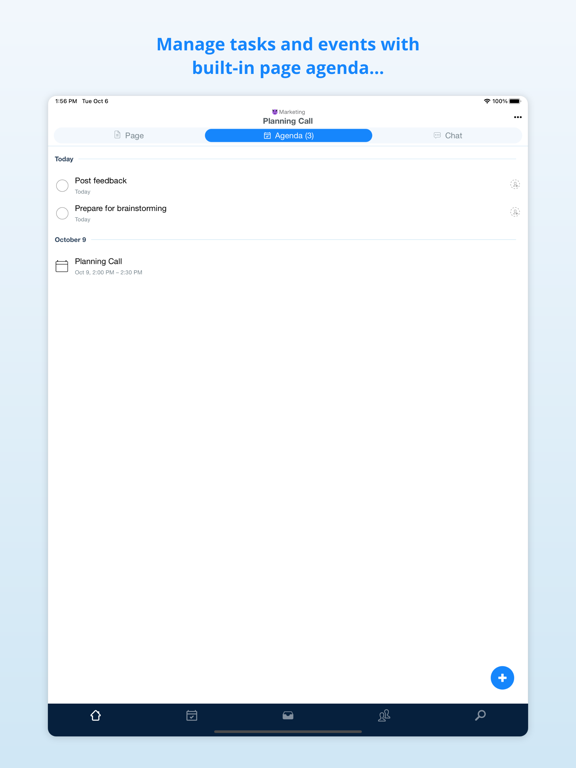
· Do minimalistic project management with built-in page agenda to keep tasks and events related to particular content.
· Make productive meetings with integrated audio and video calling.
· Share files, images, videos, diagrams, code, and much more with your team.
· Collaborate effectively with your team and with people outside your organization.
Don't pay for a separate chat and video calling tool. Samepage comes with chat, direct messaging, and video calling for free. They nicely integrate with our collaborative canvas to keep context and conversations together. Samepage provides you with a complete all-in-one collaboration tool.
Samepage: Team Collaboration App Comments & Reviews
Samepage: Team Collaboration Positive Reviews
PracticalThis app is great. It’s simple and everything is contained in one place. I tried other apps and you have to get all these plugins just to make it do simple things. Some things that bug me: When tapping to interact with a file or message, the pop up menu disappears before you can do anything with it. Removing alert notifications (the red dot/number) for events was hard to figure out. I guess it wasn’t intuitive. It took me a couple days to figure out that I needed to hit the bell icon to make it disappear. It’s a bit confusing because the red dot appears on the top right on the logo button. When accepting or denying changes on iOS, if the change was a tag, it always wants to start a chat. I have to go on the desktop to make any adjustments..Version: 2.20180108
Good app, needs a couple of improvements.Great way to collaborate with teams, we need a few improvements: 1) iPad version needs multitasking enabled. Would make life a lot easier to be able to have the multitasking view with another app open. 2) calendar needs different views, not just the weekly agenda view. Specifically would like a month view. 3) recurring events needs better management; we need to be able to have the option to delete a single date in a recurring event rather than just deleting all the recurring events..Version: 2.20210524
Awesome collaborationI use this app to communicate and make timelines for my weddings. It is so ridiculously easy, I love how my clients can easily add in info and my team all has the information right on their phone. Samepage has been a game changer!.Version: 2.20220207
Love this appThis app brings together all the needed pieces for my social media management business. We plan all our content in here, and it truly helps me and my team to stay on the...wait for it...same page!.Version: 2.20210111
New updateI love this app and use it all the time, but the new update goes really slow. It looks nice and intuitively makes more sense to navigate through, but the slowness has me not wanting to open it to see what notifications are happening..Version: 2.20190114
Keyboard in chat no longer working in iOS 14.5Just a note to the devs - the keyboard is no longer opening when in a chat. Same for iPad and iPhone.Version: 2.20210412
Versatile and ConvenientThe built-in chat screen sharing video conferencing on top of all the organizational features it’s just fantastic. We use it every single day..Version: 2.20210315
Great appReason for a company and it does everything we needed to do. It’s like Slyke on steroids plus project management, and even some training stuff..Version: 2.20220207
Get it!This is a great app for business it just life in general. It keeps everyone together and smooth running..Version: 2.20210531
Perfect!We just started using this app and it’s almost perfect. Just need to add default phone calendar integration! Changed to 5 after i learned to subscribe to calendars!.Version: 2.20180723
Excellent AppDoes all the features of web version. It is well put together. No bugs or gaps that I have found..Version: 2.20200831
Needs editing capabilityI would rate this app with 5 stars if it had the ability to edit documents. This feature is a must for Samepage to be a complete solution. Samepage works great on Macs, and Windows PCs since it uses a client that syncs documents to and from Samepage, but what about someone who only has an iPad or iPhone available to them? You can open Office documents from the Samepage app into apps like Quickoffice, but when you save the changes, it creates a new copy of the document that is then stored locally on the iOS device. There is no pathway for it to sync back to Samepage. Therefore, you end up with a versioning problem, and you must then email the change to someone else to have them upload it to Samepage. That’s very inefficient, and it’s likely that end users will simply skip uploading the updated file to Samepage. Kerio needs to give us the ability to save edits back to Samepage. Until then, this app cannot be used for anything more than viewing documents..Version: 1.3
5 starsEverything we need all in one hub.. Works great for my Sports Management Nonprofit.Version: 2.20220207
It’s awesome!I love everything about this app.Version: 2.20201221
LMCPCGreat product!.Version: 2.20211206
Excellent collaboration toolThis is a review of the Sampage service, more than of this app, which works just fine. I am president of a local historical society. We are working on a book about a local historic site, and it wasn't always easy to keep everyone on our book committee involved. But then I learned of Samepage, which is definitely living up to its name! I can upload chapters as they are ready for review and everyone can access them and comment. It has been heaven..Version: 1.3
Great start.Same page is like Dropbox, but without all of the confusion and the ability to remove other shared users stuff. It's got some really great collaboration options, also, to get you out of email management of your workflow/process..Version: 1.2
Quite buggy but usefulI really like the concept of this app. Though it’s difficult to get used to in iOS. Finding where to change certain settings is like a game of hide and seek. Then searching in the knowledge base... The bugs are quite annoying. The avatars for user and company won’t work for anyone on iOS (basically it shows that it’s uploading but nothing ever changes, and it’s done it for multiple users with Apple products but users with Android seem to be able to change theirs without issue.) Attempting to use emojis is like fighting an uphill battle, whenever I click on the emoji on my keyboard it comes up for just a moment before switching back to my regular keyboard. If I’m quick enough, I can tap an emoji before it switches back. Not bugs but suggestions for the devs: the ability to have a chat nickname would be nice along with the ability to click on a users name or avatar and bring up a short “profile” for said user (and maybe let admin see what the user is assigned to and whatnot across the company). That’s all I have so far without having used the app for more than a couple of days..Version: 2.20180730
Great app!Love Samepage, great to have on-the-go now..Version: 1.0
Best Collaboration Tool Since Sharepoint!I’ve used a lot of different collaboration tools over the years, both personally and professionally. For a web-based system with free apps for every platform, this can’t be beat. I am currently using the free version (new interface) and it does about 98% of what I need. Its so versatile that I even have a site set up for friends and family. As great as it is, there are a few areas where it could use some improvement: 🔹I’d love to be able to create a distinct “landing page” that you see every time you start up. 🔹I’d like the ability to define “bookmarks” in my various content pages that I could link to from other pages. 🔹The tables are good, but could be a lot better if they would give you more formatting options, allow linked text and have a programming syntax guide. 🔹(Wish list 1) implement an image library. I have a lot of graphics I reuse in the site, but I think they are being stored as separate files, which counts against my storage cap. 🔹(Wish list 2) add a player for common file types. Currently, unless it is a Youtube video, the user has to download the file and play it externally. Still, all else being equal, this is an amazing tool with great support and only continues to get better!.Version: 2.20210125
AmazingGAME CHANGER. The app works amazing as well..Version: 2.20201221
One of the best work apps I’ve ever usedI can actually get real work done on my phone with this app. It’s easy and intuitive if you are familiar with the desktop version. I can do anything on my phone that I can on my computer, and some things are actually easier to do on my phone. This app lets me leave my desk. Highly recommend.Version: 2.20200727
Team tab?Where is it???.Version: 2.20181113
Free International Money Transfer 💸Enjoy high maximum transfers into more than 20 currencies while saving up to 90% over local banks! The cheap, fast way to send money abroad. Free transfer up to 500 USD!Version: 2.20260406
What do you think Samepage: Team Collaboration ios app? Can you share your thoughts and app experiences with other peoples?
Please wait! Facebook comments loading...