Paylocity
Paylocity Customer Service

- Paylocity Customer Service
- Paylocity App Comments & Reviews (2026)
- Paylocity iPhone Images
- Paylocity iPad Images
The Paylocity Mobile App gives you the tools you need to stay connected and access HR and payroll information, all in one intuitive experience.
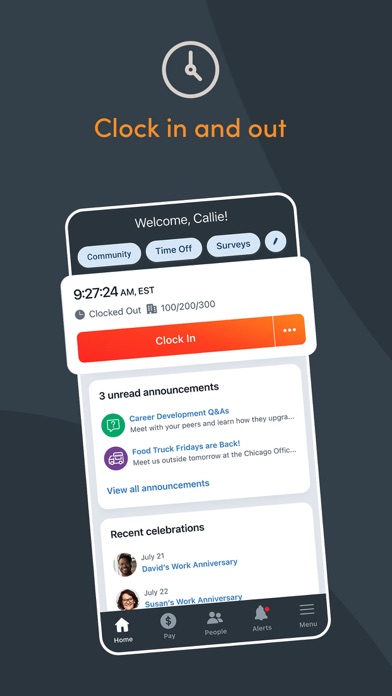
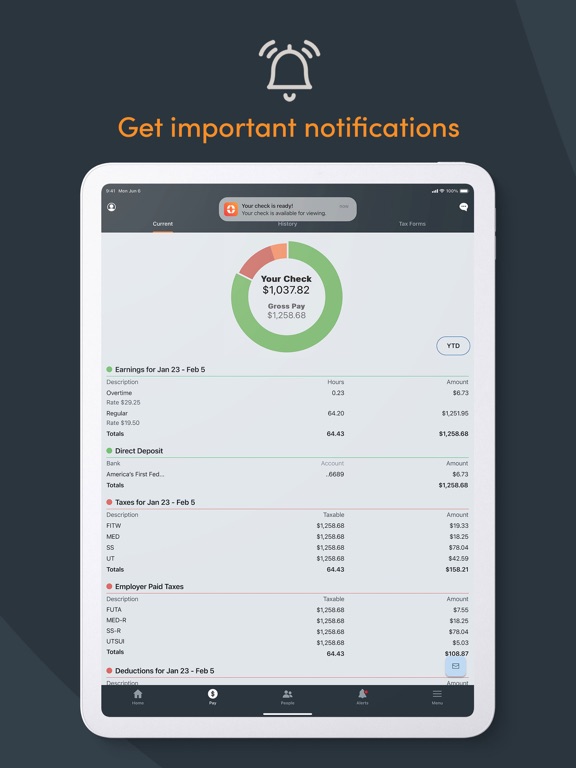
Easily view paychecks, clock in and out, check schedules, update personal information, access messages, and complete tasks, all from a personalized home screen. Submit receipts, reconcile expenses, and use company cards with built-in controls.
It’s just another way Paylocity helps you handle it all with one unified platform.
Why employees love it:
- Secure access to everything you need — with just one login
- Edit personal info, search the company directory, or view current and historical pay info
- Receive push notifications for activities like time-off request approvals, checks becoming available, chats, and more
- Access Community, Paylocity’s social collaboration hub, to get important updates from leaders and connect with peers
- Request access to a portion of earned wages before payday
- Track expenses and card use
- Review schedules and timesheets
- Clock in and out
- View an interactive org chart to check organizational structure and reach out to colleagues
Why supervisors love it:
- Experience one, unified platform
- Submit, view, and approve time-off requests with real-time push notifications
- Review and approve expense reports and timecards
- Manage Journal entries for direct reports
- Create, view, and edit schedules and shifts
Security features:
- Biometric functions are available for secure quick logins
- All activities are encrypted and routed safely to secure Paylocity servers
- Sessions will time out if inactive to prevent unauthorized access
- Excessive failed login attempts will lock a user account
App usage:
To use the Paylocity Mobile App, your employer must be a Paylocity client, and you must be an authorized user with Paylocity credentials. Security role rights, specific access to the Paylocity mobile application, and functionality listed below may vary from company to company.
Paylocity App Comments & Reviews
Paylocity Positive Reviews
Honest Review from an Employees stand point!Paylocity has been really good to me, and I genuinely appreciate how smooth and reliable their platform is. The interface is easy to use, and everything—from checking pay stubs to managing time off—feels intuitive and straightforward. I especially like how transparent everything is; I never have to dig around to find what I need. Their customer support has also been solid. On the few occasions I had questions, the responses were quick, helpful, and friendly. It feels like they genuinely care about making sure users have a good experience. Overall, Paylocity has made HR tasks effortless and stress-free. I’d definitely recommend them to anyone looking for a dependable, user-friendly payroll and HR solution..Version: 25.10.0
Has Good Functionality, User Interface Has Some Serious DrawbacksI realize that I am an old school User Interface critic - that’s because it was my job as a Business Systems Analyst to try to give my users the best experience back in the day when companies wrote their own systems. What prompted this review was the fact that I opened the app today and was presented with a complete login screen. Which wouldn’t be remarkable except for the fact that this happened two days after I ‘opted in’ to the screen that said I would stay logged in for 3 months unless I accessed sensitive information. Which I did not. And the fact that this was at least the third time it happened in the past two months. OK, that’s hideously annoying thing number one, because you don’t access this app for fun but to clock in and start getting paid. But, even more annoying is the fact that the ‘“Submit” button for the “Punch” function is at the bottom of the screen, which, on an iPhone 12, is where you swipe up to close the App. The “Submit” button on the “Punch” screen often gets ‘pressed’ inadvertently when you just want to close the App , leaving you clocked in or out by accident. Why not put the “Submiit” button at the top of the screen, safely out of harm’s way? Also, it’s hard to imagine that there is no functionality to export schedules to external calendars! Fixing these things would greatly enhance the user experience. Thanks..Version: 22.7.390
Current Version has Extreme issuesI was hesitant to write a review at first after returning to my previous workplace, which uses this app for clocking in and out, time cards and more. However, after about 2 weeks my workplace has still not been able to resolve the issue where time punch is locked for me and within the past week I started having a new issue where I can't even submit both clock in and clock out for correction to my supervisors using the system. And on top of that, I tried deleting and redownloading the app after rebooting my phone twice just to attempt to fix the issue and the forgot password feature is not working correctly. I submitted a request to change my password several times and out of the probably at least 12 times I attempted, I only received 1 message and the one time password it gave did not work. Please get on this ASAP paylocity team, I don't know what the problem is but these are all recent issues. FYI my workplace has already reactivated me as a current employee on your system so I believe I should be able to punch in and out at least..Version: 24.1.0
Room for improvementThe app used by my previous employer gave employees who had forgotten to clock in/out the ability to go back and fix it in the app. The event was still flagged in the system, so at the time of processing payroll management still had the ability to deny the change and question the discrepancy. I work in a veterinary hospital, when you get called back early due to an emergency (which can happen at any time) often people don’t remember to clock in from lunch. When this happens is an inconvenient system of leaving the manager a note with the correct information for them to manually go in and facilitate the fix. If this were possible within the app it would make everything more streamlined. Also, employee performance reviews would be a good option, both with management and as a anonymous peer review. If they are going to do it all, Paylocity could also add a scheduling feature to show work schedules/ shifts/ assignments for your place of employment. Everything together in one easy access app..Version: 22.2.701
Works well within its functionality4 stars for a really solid app in terms of reliability and user interface The average employee will likely find this app useful in terms of clocking in and out. I’m sure managers find other features much more handy, but most of the time, you won’t ever find yourself having to access the rest of the app at all. Considering that fact, the development team could add some features that would likely increase adoption and improve user experience. Please consider these enhancements: ** Create a Home Screen widget or Siri command ** A widget for clocking in and out would be so useful. If your app’s primary function is to quickly do one task, there’s no reason that function shouldn’t be turned into a widget. Even better if it could be voice activated: “Hey Siri, clock out for lunch on Paylocity” ** Add custom scheduling and notifications ** My employer does not give me a set schedule. It would be nice if the employee could input their own schedule (for purely personal purposes). This could be the basis for adding notifications to remind you when it’s time to punch in or out (based on your custom schedule, or your employer-defined one). Tapping the notification could take you straight to the punch in screen or punch widget. It’s easy to lose track of time when working, and having to manually set alarms is annoying and easy to forget. Overall nice work. It’s tough to build a reliable, feature-rich application but your devs did a nice job..Version: 21.3.599
Very handy!The Paylocity app is very handy and user friendly. As an HR professional using Paylocity for pretty much anything and everything involving our company and employees, I’m impressed with all of the neat features it offers. Our employees typically say they prefer using the mobile app over the web browser! As administrators within the Paylocity system, we do call support for assistance when needed and it’s quick and easy to get in touch with a representative, however nearly impossible to get through to our designated account manager, which defeats the purpose of having one in my opinion. There have been occasions where we would call for support and the representative was not knowledgeable and would just refer to the Knowledge Base articles on the site, which I can do myself, usually leaving us with an unsatisfactory answer forcing us to call back and hope to reach someone more knowledgeable about the system. Paylocity representatives should also be thoroughly trained in compliance and legal topics, such as tax and garnishment procedures, and especially E-Verify. All in all, Paylocity is great and consistently improving to meet our evolving demands and the mobile app is an essential tool for all users. I would recommend this company/software to any business who wants a simple program that provides many great essential and bonus features to their employees and administrators..Version: 24.3.0
It's alright, could use some improvementsI've only been using it a few months, but there are some things I encounter that are irritating, here's a few: The app could use a dashboard or home screen with useful info and shortcuts. Currently, when opening the app you're shown the plain menu. It would be nice to see a screen with relevant info like your current timesheet/hours, your last paycheck amount, etc., as well as shortcuts for your most-used items like clocking in/out. Why do I constantly get logged out? Even after enabling TouchID it still logs me out every other time I open the app. If a user's own biometrics aren't a secure enough method of logging in, then why even offer the option? It's frustrating to make a user keep entering their password. When you do have to log in, it's nice that the app uses the OS's password manager integration. However, it doesn't work correctly. When attempting to use my phone's password manager, the app searches for a credentials for "localhost" instead of Paylocity. So then you have to erase that text and type in "Paylocity", which is super tedious. Combined with the above issue, it creates a very frustrating login experience before you even can use the app. Please add support for Siri shortcuts. It would be incredibly useful to say "Hey Siri, please clock me in", or "submit my timesheet" or whatever like you can do with many other apps at the moment..Version: 18.12.133
An issue with the “Announcements” option on the home page.Once I’ve selected the recent announcements (from the home page) and I’m done reading them I can no longer select that “Announcements” option any further. I cannot view them again. I should be able to review them anytime by selecting “Announcements.” Instead it says, “All caught up.” This creates a problem when my memory may fail to remember exactly what that announcement said, such as a time or a date. I’ve looked around and cannot find anywhere the option to review them. Why is it they are not still available. This is VERY USER UNFRIENDLY. Please update the app to apply a continually availability option to review recent and all “announcements.” Thank you..Version: 24.2.2
Its ok...You can't use on boarding on the app, company set users cannot use the app for their CS log in. As an employee it's great with viewing pay and time off but you can't see everything that's available in the self service portal and the sections on the left are confusing because links you see in the SS portal for example under "pay" would go to Company links not under Pay which is confusing. I love the pie charts that shows your check breakdown you can see everything that has to do with your check and pay which is great. My other complaint is that it's not user friendly to download actual pay stubs; you have to email it yourself and the email but is just a little mail icon. I wish the checks you could click on like the SS portal and see the stub. It seems like they are working on a lot of upgrades so I hold out hope for them..Version: 22.8.461
Helpful,but employees info displayed needs more optionsI like that you can see what time you punched out for lunch while you’re at lunch. It’s also helpful that you can ask for vacation time while you were at home. But what I really HATE is that you have no control whether this App displays your birthday for everyone to see. There’s a reason why websites that you can look up information on other people don’t include the day of their birthday. People can find too much information about you that way. Would you like to display the last four digits of my social as well? I understand if the app needs that information but employees should have control over whether that information is displayed. Several other people at work have mentioned they don’t like this either..Version: 24.11.0
Could be betterIt’s nice to be able to punch in and out on my phone, but some things could be better. For example, on the desktop version, my location is turned off, so I can easily punch in working from home, on location if I have WiFi, or in the office. On my phone, location services is turned on, so I can ONLY punch in the office. It would also help if the desktop and app versions mirrored each other better. Currently they look as if each was set up by two different teams with two different objectives. More uniformity between the two would be awesome. I don’t really need the social media aspect, either. What’s important to me is punching in and out, checking my time sheet, managing my PTO, my pay information, trainings and documents like my company’s handbook. Anything that has to do with anyone else is useless to me..Version: 25.11.2
Too secure! Otherwise niceGotta love this. Beats punching a clock. I'm a retired SaaS infosec person working a part-time YMCA job. This app makes it super easy to submit time sheets. There's big room for improvement in the session management subsystem. Here's the use case. I'm signing in to work as I enter my workplace. I'm also fumbling with a key, opening a door, and schlepping my stuff. I open the app and hit the orange Clock In button. Then the app prompts me for my password. Not every day but only unpredictably. Gaaah! Password! did I remember to save it last time? What is it? Try something. Doesn't work. Then I think, to heck with it I'll email my supervisor and skip Clock In You don't have to expire your sessions this way! You can renew the session every time I use the app, for a preset number of days. And you won't compromise security. On the mobile side the session token is in the secure enclave either way. So I don't have to sign in again except maybe after a vacation. Because refreshing my creds at Clock In time is a big nuisance. Please consider this suggestion..Version: 23.12.4
Using Paylocity for clocking in and outI have had consistent problems with submitting when I am ready to do so. I use an iPhone and I have a tendency to hit the submit button when I do not intend to. If the submit button was relocated it would be helpful, perhaps at the top of the screen. I have problems editing which is time consuming and tedious. It is difficult to go into my writing at a specific location. Instead I need to scroll, stop, rescroll etc. And the most important change I would like to see in the Paylocity format would be to have a copy of the notes that I’ve written each time. It would be extremely helpful for writing monthly progress reports, etc. having reference to one’s work seems essential..Version: 24.11.0
Efficient enough and inspiring!Thank you team for all that you do to help us keep up tracking our schedule, timesheet, clock-in-out, awards and lot more! After using the mobile app for more than 3 years now, I would like to bring some minor modifications that you may further research to check the possibilities of bringing them into implementation! 1. Schedule: Can you add an option for the employee to pre-add their own timings into Paylocity, instead of looking into their own calendars! 2. Tasks: Can you add a new option for the supervisor to be able to add new tasks routinely (everyday with a checklist option for the employee to mark complete and later notify the supervisor) and special or urgent tasks labeled ASAP! With additional notes dialogue box! 3. Inventory: Adding an inventory option can help keep track on the office or work related items and mark them up immediately for purchase or supply request! Making the application holistic in nature can bring in more traffic, which I felt to share with you according to my personal experience. With regards Avi.Version: 19.1.247
Well… ok with my employer… but reverted to the mobile websiteWorked flawlessly so far; no issues or recommendations BUT maybe it would be a nice feature to have seconds on the clock as well and have choices of digital or analog (a circle with the same digital clock with seconds, and circle on 00 seconds is a grey outline and seconds fills with blue up all around until 60 seconds and restarts), just like on the website desktop version. UPDATE Since after getting the iPhone 15 pro max and maybe there was an update for this app then… I think it would help with say.. if you started lunch .. it would give the option to end lunch after that.. and have the option to start lunch disabled since you started it awhile ago. To each their own I guess or perhaps it’s just simply the way my employer had it setup. I really don’t know. Recently I started lunch twice where the mistake was to have an end lunch. Of course I’d go thru punch corrections with my employer. The website doesn’t do that .. only gave me to end lunch. Just saying. Overall a good app if you are careful on your time and lunch punches..Version: 24.6.6
Best Seld Service app out there!The Paylocity mobile app is hands down one of the best-functioning apps in the payroll industry. It provides seamless access to all my important information, including check stubs, time off, retirement details, and company chat and more. The app never crashes and runs smoothly every time I use it. The user interface is intuitive and user-friendly, making it incredibly easy to navigate. Whether I'm checking my latest paycheck or managing my benefits, the Paylocity app consistently delivers an outstanding experience. It's truly the best out there for anyone looking for a reliable and efficient payroll app..Version: 24.6.0
Paylocity ReviewI Love everything Paylocity does to help their clients. Only issue I ever had was kinda a kick in the balls though. For whatever reason they double-paid everyone in our company recently. So like a normal human being I transfered the money from one account to another. Then enjoyed a nice high priced dinner. Well…a month and a half later they are still taking chunks outa my check to repay that double-payment. Which means I’m barely making ends meet because someone at Paylocity made a mistake. Yeah, I get that I probably coulda not spent that money, but I at the time, I wasn’t sure if they were even gonna figure out what had happened. Eithervwho, yeah, other than that incident they have been great. 🤷🏼♂️.Version: 24.7.8
Update 26.4.2Alright, I originally left a 1-star review until my beloved feature of viewing previous time cards returned. I received confirmation today that, starting June 5th, employees will once again be able to access this coveted feature. Bless all of you Kings and Queens—you’ve earned these 5 stars!! 👑⭐️⭐️⭐️⭐️⭐️** 😭😂 *PAST REVIEW* Please explain why you’d “update” your app to function worse. Before I could view past time cards. While the update is cleaner you took away a key feature that I imagine a majority of Paylocity users use which is viewing past time cards. Please address this. Until then 1 star (:.Version: 26.5.2
Smooth and simpleIt’s so easy to stay updated with our schedules and communication is even more simple. This app make it so convenient to keep everything having to do with work separate from my home life. When I am home I do find myself logging on just to see what’s new with my work family. There’s always a new update and this app helps me stay in the loop without mixing my home life app and communications with work. I think people should use it more often because if they did… they’d understand how much more simple work and home is, all by separating the two with this simple app. -Morrow Bojangles, Georgia ❤️.Version: 25.7.2
WorkI really love my job I love the people I work with the girls are so understanding respectful I have never worked in the place like this. This is my first time and I miss the girls. They’re at work since I was only able to work one week and I had an accident where I hurt my leg and I haven’t been to work since but I will not change my job for anything. I love the way we are there at work. Thank you Joanne for hiring me thank you Stephanie for teaching me the stuff you’ve been teaching me I really want to go back to work already and show you that I can be a good team worker. Thank you for giving me the opportunity. I’ll be back soon..Version: 23.12.6
User friendly, perfect app for workVery user friendly! One of my main jobs is to help new hires navigate this app and it’s so user friendly that once you’re in, YOU’RE IN! In my opinion, it’s the perfect app for all demographics! It’s very rare that I am asked for help navigating it. The main issue people have is logging out in order to find their user ID. I simply tell them to tap the human head and click log out. It’s almost too easy! Grateful that my work place is partnered with Paylocity, it’s truly the perfect workplace app! Doesn’t send unnecessary notifications and has all you need in one place!.Version: 25.9.2
Major Room for Employee ExperienceIf you have a non-desk job company this is not the app for your staff (manufacturing, construction, etc.) No direct deposit or tax setup changes option, even though DD was supposed to be re-launched end of 2024. Cannot complete reviews or anything in Performance outside of Journals. Cannot view attendance points. Cannot view employee documents. No single sign on for benefits through E-Navigator which from what I was told is one of the better integrations. Essentially, what an employee can do on a desktop should be available in the app. Admin/Manager side: Cannot reverse time off requests in Time and Labor. Point system is not setup to utilize schedules for expiration of points deeming it essentially useless. Cannot change time off requests to require a comment from employee which creates unnecessary questions from management. All performance should be available but only Journals are. Payroll itself is great though, but when looking for a system that handles it all there is a lot of improvements needed and quickly before we start jumping ship. Yes, feedback has been submitted..Version: 25.1.4
Love This App!I’m in the app every day. I use it to view my paystub’s, request time off, see journal entries from my director in video messages, take trainings, updates from my company on our community page, view my HSA and FSA balance and file claims, and enroll in my benefits. It is so easy to have everything in one place. I just refinanced my home and was able to email my paystubs and W-2s with a secure password to my mortgage broker. I can’t say enough good things about this app. It has really been beneficial during Covid and getting updates from my company. I am a remote employee so I don’t go into an office every day and this helps me feel connected to my colleagues..Version: 21.3.599
Wish I could respond to negative reviewsMost people complaining about these topics don’t realize they are company settings that their employer sets up in paylocity’s system, not a limitation of software. punch in/out issues, no access to mobile punching (company setting), incorrect PTO balances (company setting), took out too much child support (company set up), have to log back in after too much time away from app (standard security setting). The list goes on and on. Some people just don’t know the bigger picture. Otherwise it’s spam from Paycom reps. Wouldn’t put it past them..Version: 20.5.51
Very convenientIt’s nice to have this app available. Before installing this I was taking scans of each paycheck/paystub and adding it to my files folder on my iPhone (which I still do though redundant). But with this app I can easily look back and see my previous checks and the breakdowns of each including overtime, holiday pay and even what paid time off I’ve acquired. The fact that I can also pull up my w-2 makes it that much better. This is a very good app and if your employer uses this system you should definitely download and use it..Version: 24.1.0
Atleast you guys triedEdit; Its been almost a year now and finally the functionality for management side to edit time cards has been added... kinda. I don't understand why you guys over complicated it. The form to correct punches limits you so much. Basically all it shows you is the employees that are missing a clock in or clock out punch and for that it allows you to add the subsequent missing punch. However what about when a employee has no punch at all?, or when they clock in twice? (Only lets me add a clock out and no way of deleting the duplicate clock in or editing the second clock in that was supposed to be the clock out and is at the correct clock out time)? You guys just created more problems for yourself when you could have either made all options available to change or just gave us the time card view so we can edit just like in browser. Original; The app is only good for personal use Managing my employees via the app is a major pain and only viable via the web version. The reasons for this include; That the time off function is missing its most crucial part from the web version which is the calendar section so we can see when our employees are off at a glance. I have a active position out of the office most of the time and being able to quickly see the calendar at a glance would be great. Time card approvals: I personally dont see why we only have approval permissions on the app and not full punch changing permissions like on the web version? It would make my life so much easier if I can update/fix punches via the app. The side bar is way too sensitive, when you click the 3 lines on the top left to scroll through the options it automatically clicks one where my thumb was scrolling, and its not me accidentally pressing it because I will be scrolling without lifting my finger and boom it will select and open one at random making me have to quickly fling my finger to just scroll through the options..Version: 23.7.163
Good app, very glitchyHas a lot of great features and the design is clean and straightforward. However there are lots of issues. I keep getting logged out despite always selecting the option to stay logged in for months at a time. This happens 4 or 5 times a week, often multiple times a day. My app is up to date. I also am sent back to early February every time I open the schedule inside the app, despite it being mid-April now. The hamburger menu icon also disappears frequently and I have to restart the app to get it to return, which often logs me out. If these issues were fixed I’d give 5 stars..Version: 21.3.599
Free International Money Transfer 💸Enjoy high maximum transfers into more than 20 currencies while saving up to 90% over local banks! The cheap, fast way to send money abroad. Free transfer up to 500 USD!Version: 26.5.2