Apple
AppleLogic Remote Customer Service

- Logic Remote Customer Service
- Logic Remote App Comments & Reviews (2026)
- Logic Remote iPhone Images
- Logic Remote iPad Images
Logic Remote is a companion app for Logic Pro and GarageBand on the Mac. It provides an innovative way to extend the creative power of Logic or GarageBand by using your iPad or iPhone. Designed to take full advantage of Multi-Touch, Logic Remote offers new ways to record, mix, and even perform instruments from anywhere in the room, turning your iPad or iPhone* into a mixer, transport control, and a flexible Touch Instrument.
Play Logic Instruments
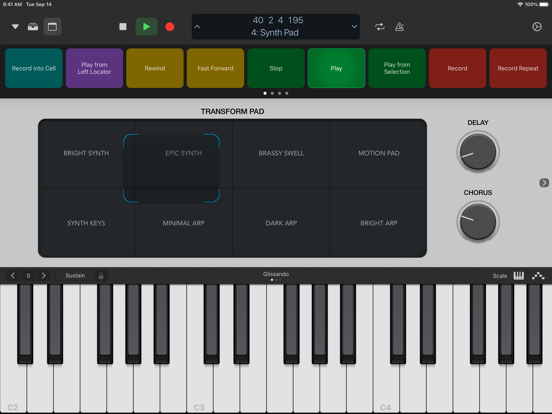
• Play any Logic instrument using a familiar piano keyboard or guitar fretboard
• Tap out beats on drum pads or a drum kit
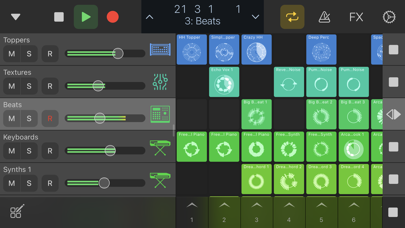
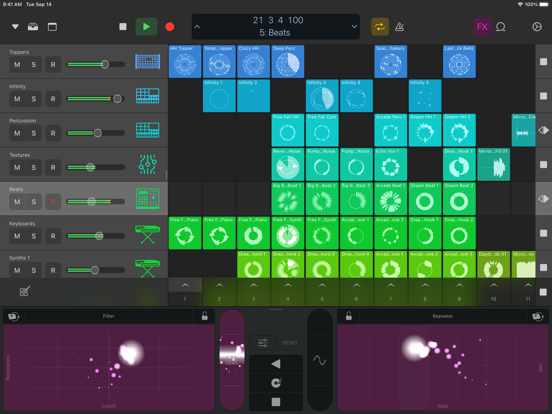
• Control Live Loops by triggering cells or switching between scenes
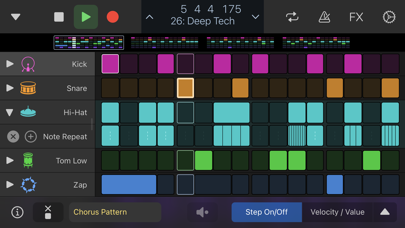
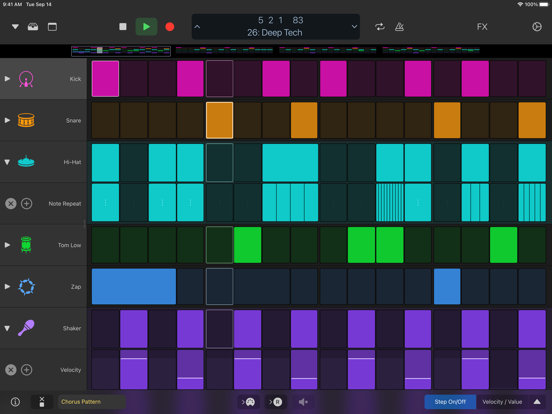
• Program beats, bass lines, and melodic parts in Step Sequencer
• Perform Remix FX over individual tracks or the entire song
• Use the scale mode to limit notes to fit the key of your song
• Tap and strum entire chords using Chord Strip view
• Make simple or dramatic changes to your sounds with Smart Controls
• Add the Arpeggiator plug-in to any instrument
Navigate Logic Projects
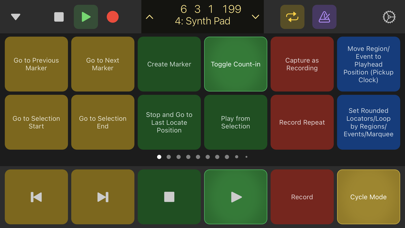
• Operate basic transport controls like start, stop, record, and cycle
• Swipe the LCD or bar ruler to navigate to any location
• Select and jump to any Logic project marker
• Control recordings on your Mac from another room
• Browse the Sound Library and remotely change Patches
• Enable Smart Help and hover over interface elements on your Mac to display documentation on your iPad
• Remotely trigger Logic key commands with customizable buttons
Mix Your Logic Sessions
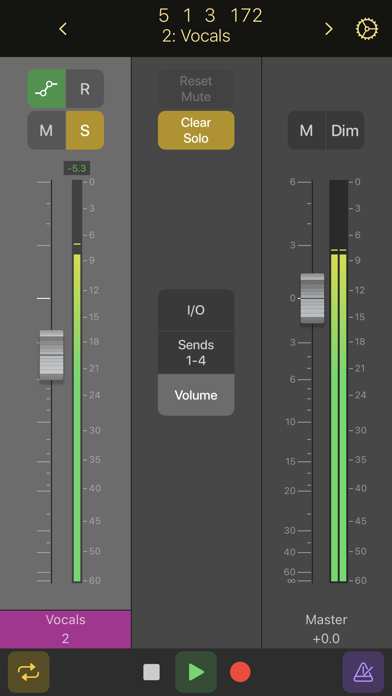
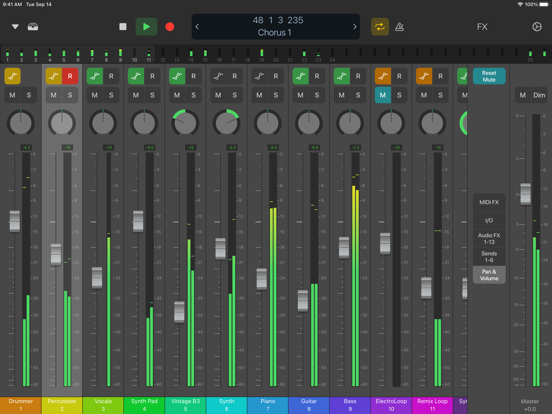
• Use Multi-Touch gestures to adjust Mixer volume, pan, solo, and mute controls
• Swipe to scroll or jump in banks to navigate through Mixer faders
• Use the level meter strip to monitor levels and identify clipping
• Enable and change automation modes for each fader
• Use Multi-Touch gestures to shape the tone of your tracks with Visual EQ
• Plug-in view provides access to Logic or Audio Unit plug-in parameters
*Smart Controls, Sound Library navigation, Smart Help, full mixer, and access to plug-in controls are available only on iPad
Logic Remote App Comments & Reviews
Logic Remote Positive Reviews
Really cool! Needs pedal effects for guitars!!!Just got this for my iPad to use with GarageBand and I’m really impressed! Pretty much everything I want for editing stuff while using GarageBand feels great on a touch screen. The only thing I don’t like is that for some reason guitar pedals have been omitted from the app for some reason. I’m a guitar and bass player so I love using all of the different amps available. Those are all there but the more precise controls and knobs for the amps themselves that can be accessed on Mac can’t be accessed on this app. Nor can the pedals. I find this rather odd and disappointing because I love experimenting with the different effects I can get with all of them. Think of it, placing the pedals on the pedal board, tapping them to turn them on, making fine adjustments to the knobs would be easy, and using the whammy pedals by rubbing your finger over them would feel a lot better than clicking and dragging your finger over a touchpad or using a mouse on a computer. I’ve looked at the smart help guide on the app and there is a page for pedals but it only gives directions for using them on Mac. Hopefully they add it because being able to do everything via the companion app would make things even more seamless..Version: 1.5.5
Dear AppleWhile everyone knows how great this app and Logic are, its kinda messed up, if you read all of the reviews from upset users, that you don’t do a very simple thing to prevent the issue where a users app updates and its not backwards compatible with their Logic. Apple you have the data on all the user’s machines. You know I have a Mac Pro 3,1 that only supports El Capitan and therefore only supports Logic Pro X 10.2 (I think, I forget exact version). All you have to do is block inter-system apps like Logic Remote and Keynote Remote from updating if you detect a Mac in the users account will not be compatible with the update. A lot of people will be very happy. And tbh, you should probably give people back backwards compatibility in the next release and then do this the right way, the smart way, the Apple way, going forward. While I did end up buying a Mac that supports Catalina, I didnt buy a new one, because my hardware requirements are so specific I cant just buy a new Mac even if I wanted to. I think this is true for quite a few audio folks, so in the event this is a business strategy, it probably won’t sell as many Macs as it might frustrate some folks to “switch”. I’m sure you’ve done your market research, but still there’s enough data to prevent this in the first place, and I dont think upsetting people and breaking their setups is a good way to sell computers. Maybe if youre Microsoft, but not if youre Apple. Cheers..Version: 1.3.4
It’s about time, thank you very much…I’m soooo happy to finally have Logic for iPad. I loved my iPad in concept, but without running the standard Apple apps I like I was really about to sell it. The only thing that I held out for was this and then the iPad was perfect and reasonable for me. Logic literally came in at the 11th hour as I’d listed my iPad for sale. So far I’m beyond happy with the app. I get people complaining about compatibility, but you know… I don’t use ancient doodoo machines, so I cannot relate. M1 smokes your silly Xeon crap. Price is reasonable for a subscription. I’d hoped my $200 Mac Logic investment would carry over, but $49 a year I can live with too as long as it keeps getting worked on and added to. FINALLY, YO! Now just start welcoming game devs in please….Version: 1.5.3
So soSo, this app is ok. It's got connectivity issues just like any other wifi dependent app. Even when you connect on a computer to iPad closed network I still can't trust it. I'm using iPad Air 2 and a MacBook Pro with all the latest updates to the iOS on both so its not an issue of outdated equipment or software. I don't get why I can't just plug my pad into the computer and use it as a touch extension, it can be done, I've seen and used such apps so I'm not sure why apple can't get that option together, but then, Apple has made quite a few confusing choices since Steve (rip). An iPhone without a headphone jack? I don't even know what to say about that, really, I'm baffled. Really? It seemed to me like Apple was ALL ABOUT the enjoyment of music in the simplest way possible. I don't even know how to use iTunes anymore not to mention that they tempted me with a cloud music trial and me like an idiot up uploaded my 3,000 plus song library including over two hundred ORIGINAL PEICES RECORDED AND PRODUCED BY MYSELF. when the trial ended they didn't return my music, any of it except the 5 albums I bought from Apple. I'm 50 years old, I bought all my music from reality based stores before there was this cloud BS. it should go without saying that I've lost all confidence in this company. Back to Logic remote. I am a multi instrumentalist. I can play drums on an iPad better than most on a kit. But that requires the ability to arrange the pads so I'm not having to jump the board to go from a closed high hat to an open high hat. Or doing descending rolls across the toms like I'm playing twister. Do SOMETHING right and at least provide that option in your next update. Sadly, this world we live in seems to depend on AI. I know it won't last forever but in the mean time throw us people who actually use this garbage a bone will you?.Version: 1.3.2
I was thinking can we....I been an logic user since Logic Pro 7 and I must say we’ve come a long way. I’m aware their are quite a bit of concerns on the back end logic of the logic remote, yet I’m not here to speak on it at this time. As a songwriter I find this tool extremely helpful , especially when your recording yourself and want to eliminate the back and forth to the control room - I was wondering if by chance you can integrate the notepad project and track functions on the app - this helps with documenting lyrics and calling out those specifics for the mixer per track - it be nice to never have to leave the booth - it also would be nice not to have to go back and forth between the notepad app - idk, maybe similarly to the way the audio recording (voice memo) has been ended to logic - is it possible to tag notepad notes the a session? Just throwing out ideas - I myself am just a novice developer but I’m sure you guys can figure it out. I’d love to hear back - this would be a game changer for us songwriters in the industry.Version: 1.5.1
Add this essential function:The app has worked great so far and I have not had a single issue with it. I’m just writing saying that in order to take full advantage of the Logic Remote, there should be a more similar interface in some things as the OS version. Most specifically, when opening plugins for things like synthesizers and adjusting the advanced controls. This may be impossible to do with 3rd party plugins, but should definitely be a feature with the plugins that do come with logic. Right now when opening a plugin, you have to scroll through several pages of parameters when the whole plugin interface could fit on the screen. The will greatly facilitate and improve use of things such as the latch automation feature and will truly make Logic Remote just as powerful as any physical synth connected to a project..Version: 1.5.1
Great but…Please continue to improve on this great app. I would love to see the timeline scrub feature moved from the top under the transport menu to the very bottom. Having it up there has my hand covering the tracks, making it harder to see. Also, please give the option to hide track numbers at the bottom of the mixer view since they rarely match with the Logic tack or mixer numbers. And lastly, adding more detailed plugin UI like you did with the track EQ. I did find a bug where adding or moving a plugin to another slot causes it to disappear while it’s really still there. Selecting another track fixes it..Version: 1.5.5
Excellent for tracking without an engineerExcellent for starting and ending recording when you’re at your instrument and away from the control desk. However, there are many functions that seem broken, currently. For example, record enable and solo buttons on the remote do not trigger the change in the daw. I have to get up and go to the desk to enable/disable. Similarly, the metronome button is very finicky in the same way. I’d give this a higher rating if all the buttons worked as intended. I’d also give this a higher rating if the app could connect to the computer via Bluetooth instead of just WiFi. There are situations where I don’t want the rig connected to the internet or WiFi and the fact that both the mobile device and the computer must be for this to work isn’t ideal..Version: 1.5.6
Fretboard play surface has only 10 frets. Why?The fretboard play surface for midi input has only ten frets, and there’s no work around. One would think that because the instrument is digital they could have a scrollable 24 fret interface, or at least 12. Shoot, even 11 frets might kind of make sense given that the twelfth fret is an octave of the open string and can therefore be easily accounted for. But 10 frets? What a weird and limiting choice. It almost feels like a joke someone decided to play on musicians. Just a weird awkward choice. There’s no way to expand or scroll the fretboard or any alternative fretboards to download. Nope. Just ten frets for everyone forever. Seriously, why? And why am I the only person online who seems to be baffled and stultified by this?.Version: 1.5.5
Not backward compatible. Knife in the backThis app is not backwards compatible with logic below 10.5. So, my 24 3.5 gHZ xeon cores, 128 gB ram ssd equipped Mac Pro is now ‘old’ and ‘weak’. So no new logic for me. And, since iOS does not allow managing versions of the installed apps - I get this, a useless companion app for software I cannot install. Beware. If you have automatic updates turned on - you’re in trouble. If your ios device would need repair - you’re in trouble. The answer I’m afraid is not fun: apple is not an investment in your future tools but investment in their marketing department. Switch to a good multi platform package like Studio One, Ableton or Steinberg before it is too late. That would give you more peace of mind, healthier nerve system and will save you a lot of money in the years to come..Version: 1.4.1
This is for Logic for iPad NOT LOGIC PRO X OR LOGIC REMOTEBE AWARE that a majority of these reviews consist of reviews about Logic Pro X compatibility with older macOS and Logic Remote connectivity ANYWAY I love that this is finally available on the iPad! I can essentially work the same flow I’m use to on Pro X on my iPad. There are a few things that are specific to the Mac version (access to Sampler, some Flex functions) but it’s easily worked around. Plus a good number of apps I’ve gotten for my iPad do have a Mac version so when I get my new MBP, it’ll easily transition over! The absolute portability and touch based workflow is pretty easy to get use to. I have a Magic Keyboard so MOST commands work the same (PLEASE USE A KEYBOARD IT WILL MAKE EVERYTHING FLOW SO MUCH BETTER) My requests/suggestions: - more key commands similar to Logic Pro X when using a keyboard (cmd+A, cmd+J, cmd+R, etc.) - If there’s a way to make highlighting a bit faster, that would be wonderful - Being able to map a mouse to use additional functions (example: using the right click as the Cut or Pencil tool).Version: 1.5.3
Nice AdditionAlthough I am new to Logic Pro X, I find this app to be a very useful companion to the DAW itself. I have been working on the program with this app ever since and, when I don’t, I see the difference! Being able to play instruments from the iPad makes the experience more enjoyable and productive, in my opinion. The keyboard shortcuts, with the functions named, are just amazing. I mean... you don’t have to guess, or remember which key does what; it’s written, there, to make your life better. The app is well thought out and makes the work flow smooth and pleasant. I do really enjoy using it..Version: 1.3.4
I like it but....So let me start with, when I first downloaded the app I was running on OS 10.9. The controller worked great! I could mix from different positions, which was awesome! Then, me wanting to stay with the latest technology, kept up with the updates to find out this app would no longer support my OS and I had to upgrade my OS to continue to use it. That's BS! I say that because I use 2 DAWs, Pro Tools 10 and Logic X. If I update my OS, I can no longer use PT 10. I know this is a free app, and I'm not upgrading my OS for something so minute of a luxury. It's unfortunate because I liked the app so much. Why can't this software be backwards compatible? Or give me the option to download the previous versions before the OS requirement. Or make a controller for the older OS systems? Disappointed.Version: 1.3.2
Not native resolution on 10.5” iPad ProI’ve been using the app since it was first introduced, and it is a great control surface app... especially since wireless networking issues were resolved. I wish the transport controls were at the bottom of the screen, and larger, however... my only gripe, besides the strangeness of seeing it upscaled for the iPad Pro 10.5” display... surely they could fit another fader or two on that display. Who cares if it is a multiple of 2, 4, or 8? Another fader is another fader. Looking forward to having this rectified. Not a huge deal-breaker, of course, since it does so many other things very well. Just the anal side of me that being a life-long Apple user has produced..Version: 1.3.3
This is greatI didn’t know this existed until recently. I’d call it Logic Controller so it pops up when searching midi controller apps. This is better than any of those. The app makes it easy for me to hit record when I’m tracking drums alone. I also appreciate the grid layout midi pads. I can play finger drums with them, & they’re velocity sensitive too. Regarding those, I would suggest being able to edit what midi note they output so I don’t need to reroute on the computer. Other than that, it’s far above anything else I’ve tried..Version: 1.5.4
Excellent, just wish that undo wasn’t so hard to get toOverall, this app works great. Connects reliably and quickly, can access so many things without having to go over to my computer. My only wish is that undo could be available from the main screen. It’s such a hassle to have to click settings, then undo, then go back to the main screen again every time I want to undo or redo. Please put undo/redo on the main screen and I would give 5 stars!!.Version: 1.5.3
BuggyIt looks like Logic Remote does not know how to handle track stacks correctly. It appears to be unaware of what a track stack even is. It just always displays the component tracks, regardless of whether the corresponding track stack on the Mac side is expanded or not. Further, there is no method for expanding or contracting a track stack on the Logic Remote side. Apparently, there has been a lack of communication between development teams. I think I complained about this once before and was told that it was a feature, not a bug. Whatever it is, it makes the Logic Remote mixer pretty much useless to me. Anyway, Apple sure seems to be dropping the ball an awful lot lately. Anyone wanna buy an iPad?.Version: 1.4.1
Oh, The GUI’s Beauty and Ease Of Use Astounds!Clean, easily readable graphical interface replete with metering for most every channel and buss. This app is wonderfully navigable by mere intuition, with immediate responsiveness from users’ touch input on the iOS device they’re running it on, makes Apple Logic Remote an absolute joy to use, especially while away from the host computer’s display, keyboard and mouse. ‘Use it mostly while entering musical notes into Logic Pro from a beefy 88-key hammer action Akai controller keyboard some distance away from the Mac. Kudos, Apple!.Version: 1.5.5
Does what it says!You can do many things remotely with this app, like the smart controls where you can easily play and record, or just play your song with ease… The magic thing about this app is it’s speed. It works fast with and without a cable. When you press something, it immediately happens on your mac. Don’t know why others hate this app so much, maybe because they don’t like the iphone version. It could be awesome if it had even more options. I mean it does support many actions right now, but still not so many. I think it has more potential. It’s a great tool in my workstation, but still sometimes I get tired using it and get back to the computer, because I will need to edit something not present on the app.. Give it a try if you have an iPad, you might love it! Thanks for reading!.Version: 1.4.1
New 10.5 FX option glitching outThere is the new FX function that allows you to create effects in Logic, but whenever I try to use it, it glitches and bugs out on me while recording, and I can’t undo what has recorded, which is very frustrating. I tried to record a filter out in my track, and it would just glitch out and reconnect to the 2018 MacBook Pro that I am using, and my iPad is an iPad Pro, so the hardware isn’t the issue. Please update this so it functions properly. Also I had to re-record things due to the Logic app recording a filter out section, and it filtered out part of the whole track, not just the section that I wanted..Version: 1.4.1
Buggy, stopped working after a day.Super buggy. Tried to use it on my brand new iPad Pro, synced it with my 2020 MacBook Pro. Worked like a charm for the first day, it was an amazing tool I was hyped. Then it just stopped working. Don’t get me wrong, it syncs and I am able to see my audio levels still. However all the controls stopped working, I can’t even get it to move a knob. Pretty disappointed, especially after getting teased with how perfect it is when it actually functions correctly. I hope the folks at Apple fix the issue. Logic is one of my favorite DAWs ever, synced with the iPad is just pure gold. Please help!.Version: 1.4.1
Very good, but needs Step Sequencer controlThis is an excellent remote control app for a DAW, much better than the average DAW control app, especially for no additional cost. However, it badly needs the ability to program the notes of the Step Sequencer that was added in the Logic 10.5 update. This seems like it would be a fairly easy update for Apple to perform. The Logic Step Sequencer is great, but a step sequencer that you have to program with a mouse is so old school. This Logic Remote app needs to let you program notes in the Step Sequencer. Thanks!.Version: 1.4.1
Works Flawlessly!This app works very well for me. I’ve been using it for a few weeks now, and it really is a great tool. I can use the app to start/stop logic while recording myself and more. Setup after installing is effortless, and it stays connected amazingly well with virtually NO lag in Logic or my Behringer X-Touch control surface! I have had Zero issues using this app. I Would have given ⭐️⭐️⭐️⭐️⭐️, but I’d like to see more functionality in this app for Logic Pro X. But I do believe more tools/settings will be added in future updates. This app is Great!! And Free! 😎.Version: 1.3.3
Latency troubleWas psyched to learn that Apple created an app which I could use to enter midi data for a GarageBand project in a Music Applications course. It's true this can be done but listening to the metronome on GB and tapping anything musical on the iPad left drastic timing issues which need to be hand corrected one at a time. The point of the course is to get you aware of features you may not have used otherwise so perhaps this is a learning curve. But I suspect it's the Bluetooth connection that has the delay in receiving the midi data in sync with the songs metronome. Would it be better to export the metronome sound to the iPad so I'm tapping in sync with the device instead of the DAW? I don't know, but I see why direct connection has its strengths. If anyone reads this knows a solution let me know. Otherwise I see it as a disappointing app. I left three stars because I see this app has other features that I may appreciate outside of this midi project..Version: 1.3.2
The change of the timesBack in the day, it would take a lot of equipment to do with this app is doing these channel strips has full control over logic Pro 11. This is just fantastic when it comes to remote work and having hands on experience I’ve been doing this for four years and I follow logic update, when it used to be E-magic should I say anymore?.Version: 1.5.5
Fantastic concept but crashes are annoying workflow killersI've started using this app to record vocals on my current project. It's very helpful to be able to control many different aspects of the recording process remotely. However, on every multi/hour sessions I've done there is a crash on my computer on the Logic side related to this app. Logic Pro continues running but whatever service listens for events from the app crashes. This results in having to do a restart which completely kills my flow. Please work with the Mac app team to resolve these issues!.Version: 1.4.1
Really enjoying this app.👍🏼 Gives me the freedom to record on my own without having to run back and forth to the computer. Still working through learning the capabilities of it. I use it on my phone, probably a little more accessible on an iPad. Would be awesome to have some accessibility away from the studio for listening to mixes and taking notes..Version: 1.3.4
Lazy Bad AppleThis could easily be a five a 5 star app but I’m only giving one star. There are many easy fixes that can be added to improve this app. Been waiting a long time but Apple is asleep at the wheel. Seriously, how hard can it be to add a transpose button to the fretboard. It Would make creating bass lines to lower tuning on the road a lot easier. Love logic but this app is crap..Version: 1.3.5
I love this appCan’t believe I’ve been using Logic without it. Very handy! When is that next major Logic update!? Would like to see more creative controls such as a wiggle of the finger on the piano to vibrato Would love for smart controls to be brought to the iPhone in some capacity for those of us who don’t have iPads, but my workflow will definitely change for the better with this app! Thanks team!.Version: 1.3.5
Was great for a while but...I use this app for GarageBand on my Mac. It usually works well but then, it started to lag. It started with playback, then it affected the recording process of the keyboard. I can’t edit the note length or placement unless I use the mouse on the laptop, which is a drag. (No pun intended.) I’d highly recommend creating a remote control app for the Mac version of GarageBand since this app doesn’t work for as well as it should. I understand that this is primarily for Logic Pro on the Mac but I currently don’t own a compatible midi keyboard..Version: 1.5.1
Works GreatI use this all the time to connect to GarageBand on my Mac, and it’s a really great tool to have. I’ve always enjoyed using it so I can have a separate midi controller, mixer, or keyboard shortcuts. Great app and i can’t wait for the next update. As functional as this app is, its not a necessity, and it doesn’t speed up my workflow too drastically, its just an nice extra thing to have..Version: 1.5.3
I agree!I totally agree! This where PC shines update the OS in PC you still can use 10 year old software what more can you ask for. I believe it’s a way to sell more newer version of Mac many may agree while time is tight right now most can’t rush out to apple store and by a new Mac every 3 years. If your Mac is nearly outdated in 3 to 5 years maybe I need to start thinking about a Microsoft surface pro..Version: 1.5.1
Versatile programOverall I love using these Logic programs. I find them much more user friendly and intuitive than others, with plenty of features for different styles of production and recording. Special request for mobile: Please have the export to MIDI track feature available for audio flex pitch data ? Thanks! 😁.Version: 1.5.7
Had to check the screen to get it to workThe only grape that I have is that I was thinking that it would just connect automatically to my Apple machine because they’re both Apple, and that was not the case. I had to actually watch the screen and assert that the phone connected to GarageBand..Version: 1.5.6
Best MIDI controllerThe best MIDI controller for Logic is your iPad and Logic Remote App. I can easily see my aux/bus sends, efx inserts, adjust volume/pan, makes automation easier and faster, I can adjust some plugin and software synth settings, etc. It’s also great for going through presets on software synths. I load this app every time I load Logic. Couldn’t imagine using Logic without it..Version: 1.5.6
We need a Full versionThis app is great BUT!!! By now we should have some type of full version of Logic Pro x for iPad to use when we are away from our macs. We should be able to create or edit sessions remotely. There has to be a way please make it happen. If GarageBand has a version logic needs it as well.Version: 1.5.1
LotsoflapjacksGreat app! Works perfectly for me with GarageBand. My only complaint is that there isn’t Bluetooth connection too. I’m often off WiFi and stranded without a cable, but I still have a laptop. Despite the lag that would occur, I would use it so much more if it had Bluetooth. That said, it’s a great app until you’re stranded!.Version: 1.3.3
Awesome app but plug-ins need helpThis is a message to the developers. Well, this app is really awesome and eliminates the need for dock control on mini keyboards, there is an issue with the GUI for plug-ins are virtual instruments. The S88 keyboard by NI, have this capability built-in to mirror the virtual instrument or plug-in. If this app can duplicate that the need for the S88 is redundant and opens the door for more competition and functionality on mini keyboards. Please make this happen!.Version: 1.5.4
HelpfulVery helpful to be able to record while not on top of the computer. Also the listen to the audio adjust audio away from the speakers. A must have tool when working on my music..Version: 1.5.4
Needs an update for Logic 12 (incompatible)Great app and an important part of the Logic Platform. I’d love for this app to enable control for the iPad as well as the Mac as it is available on the iPhone (similar to Keynote Remote from the iPhone). It has the potential to be a true DAW host remote (not just for the Mac). Users like myself like creating on the iPad and need that remote access. Thank you 🙏🏽.Version: 1.5.6
Free International Money Transfer 💸Enjoy high maximum transfers into more than 20 currencies while saving up to 90% over local banks! The cheap, fast way to send money abroad. Free transfer up to 500 USD!Version: 1.5.7