FOUTURE
Potions – AI Shortcuts Customer Service

- Potions – AI Shortcuts Customer Service
- Potions – AI Shortcuts App Comments & Reviews (2026)
- Potions – AI Shortcuts iPhone Images
- Potions – AI Shortcuts iPad Images
Potions: Instant AI Assistance for Any Task. Paste, brew & share. No subscription, start for free.
-- Reply to emails, proofread text, create content, get inspired & more --
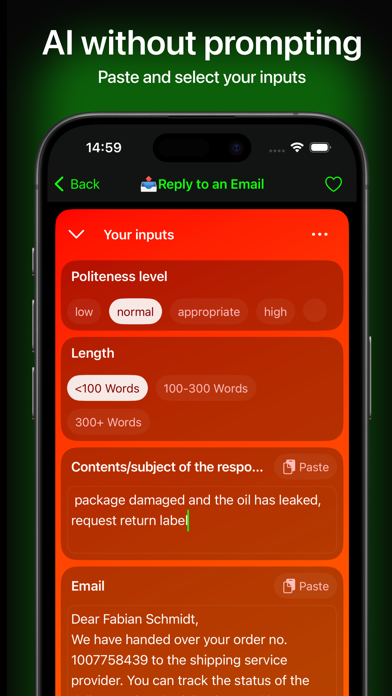
Discover our expansive and ever-growing collection of customizable prompt recipes: accomplish everyday tasks with just one tap – quick email replies, summaries, creative inspiration, and much more. Get started for free and transform how you handle daily text tasks in seconds.
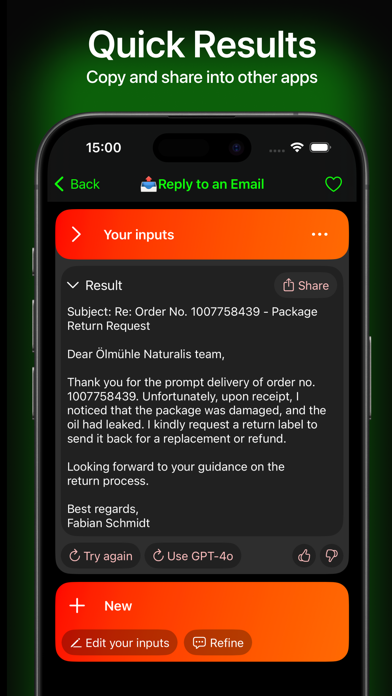
Customize your launchpad for direct and hassle-free access to (chat) GPT-3.5 and GPT-4o! Copy results with one tap or refine them directly in Potions. Start now for free and get your welcome bonus!
== Customizable Prompts ==
Tailor each recipe to your specific needs with simple input fields.
== Immediate Results ==
Execute recipes with a click, receiving responses in real time.
== Versatile Applications ==
From replying to emails to creative writing tasks, Potions supports you in every area.
== No Subscription Needed ==
Start for free and pay only for what you use with our prepaid token system or use your own API key
== Cutting-Edge AI Technology ==
Powered by the latest GPT-4o, Potions provides fast, precise, and intelligent responses.
== How It Works ==
The app has two main tabs: Launchpad and Gallery. In the Gallery, find all prompt recipes sorted by categories with a search function. Test recipes or add them to your Launchpad, where you can sort, duplicate, and customize them. Use the “Execute Recipe” view to configure prompts and input the desired content. Send the prompts and receive quick, precise responses – perfect for complex tasks with GPT-4o.
=== Example Recipes ===
Email Response
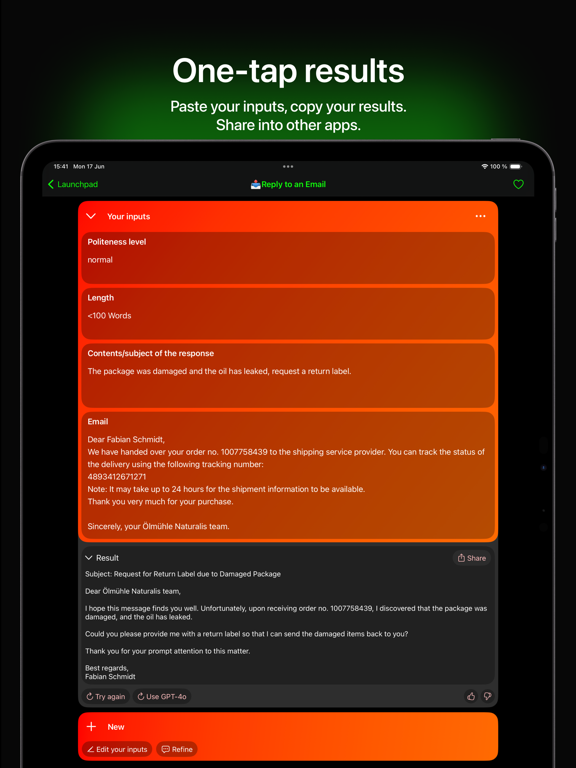
The AI creates an appropriate reply to your emails by allowing you to select the tone, level of politeness, and length, and then inserting the email content.
Summarize
The AI generates a concise summary by inserting the text.
Brainstorming
The AI provides creative ideas for your next project.
Social Media Posts
The AI generates engaging posts for your social media channels.
Project Planning
The AI creates a detailed project plan with tasks, timelines, and responsibilities based on your input.
Travel Planning
The AI creates an itinerary with recommendations for accommodations, restaurants, and attractions based on your destination, dates, and preferences.
Workout Routine
The AI designs a customized workout plan with exercises and tips based on your fitness goals and available equipment.
Meal Plan
The AI creates a weekly meal plan with recipes and a shopping list tailored to your goals, preferences, and allergies.
Language Exercises
The AI generates daily exercises and tasks to improve your language skills, customized to your level and focus.
Presentation Creation
The AI creates a presentation structure with slide suggestions and content based on your topic, style, and key points.
Customer Support Responses
The AI drafts a professional and friendly response to customer inquiries by selecting the tone, query, and specific information.
Blog Post Ideas
The AI generates creative and relevant blog post ideas and outlines based on your topic, audience, and writing style.
Contract Drafting
The AI creates a detailed contract draft that meets legal requirements, based on the type of contract and specific clauses.
Potions – AI Shortcuts App Comments & Reviews
Potions – AI Shortcuts Positive Reviews
⭐️⭐️⭐️⭐️Potions has completely transformed how I handle my daily tasks! Whether I need a quick, professional email reply or some creative inspiration for a new project, this app has me covered. The customizable prompts are a standout feature—it’s so easy to tailor them to exactly what I need. Plus, the real-time results are incredibly fast and accurate. I also love the flexible pricing model. No subscription means I only pay for what I use, and the option to integrate my own API key is a nice touch. The welcome bonus made it easy to explore all the features without any upfront commitment. Overall, this app is perfect for busy professionals, students, and anyone who wants to boost their productivity or creativity. Highly recommend!.Version: 1.06
It’s a great app idea!It’s a great idea implemented in a decent way. I’m curious to see where this app will go over the next couple months.Version: 1.05
Quick access formulasIt’s good at what it does. Anything this does you can do yourself with Chat GPT, copilot, etc….. The benefits of this app are the formulas which shortcut the legwork/setup. This app is definitely useful for quick access to frequently used formulas on the fly..Version: 1.02
5 starsI found the app, thank you Please add the option for the app shortcuts by Apple into it I would rate the app 5 stars.Version: 1.05
NiceInteresting app pretty cool.Version: 1.05
First time userI love this app. It is very simple to use..Version: 1.06
ProductiveVery Productive.Version: 1.04
Free International Money Transfer 💸Enjoy high maximum transfers into more than 20 currencies while saving up to 90% over local banks! The cheap, fast way to send money abroad. Free transfer up to 500 USD!Version: 1.12
What do you think Potions – AI Shortcuts ios app? Can you share your thoughts and app experiences with other peoples?
Please wait! Facebook comments loading...