Shortcuts Customer ServiceApple

Shortcuts Customer Service

  1. Shortcuts Customer Service
  2. Shortcuts App Comments & Reviews (2026)
  3. Shortcuts iPhone Images
  4. Shortcuts iPad Images

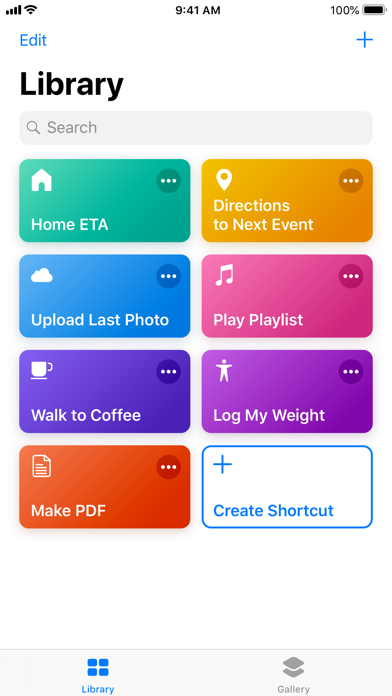
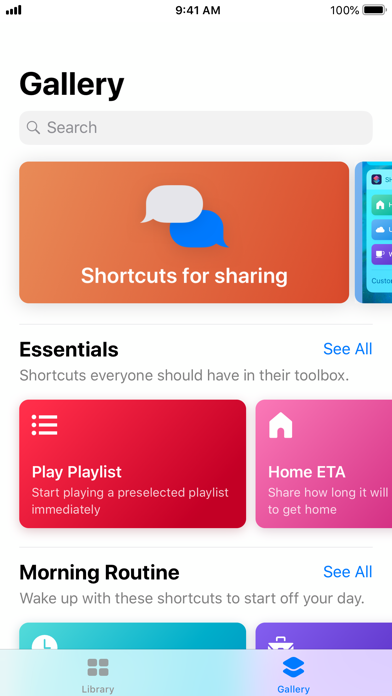
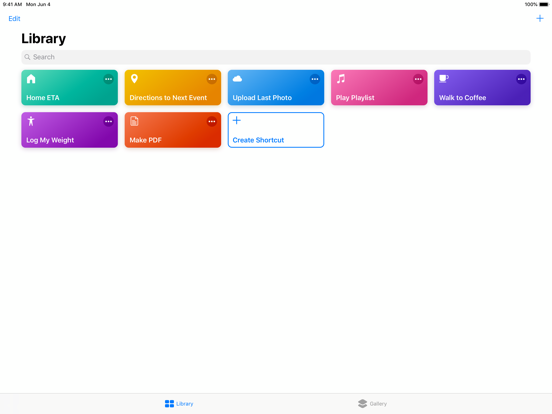
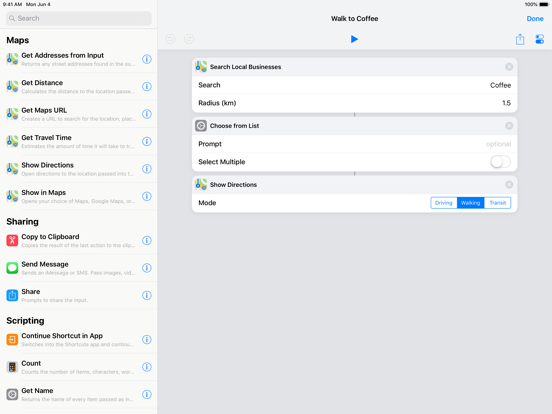
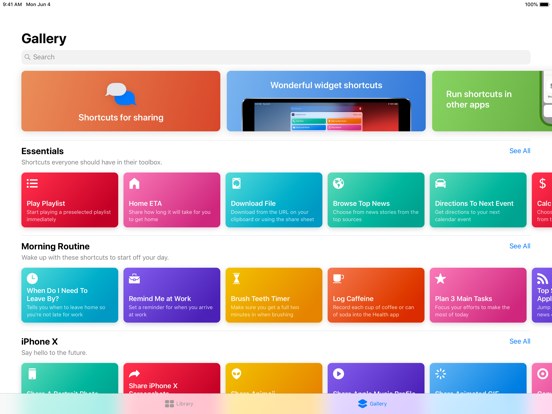
Siri Shortcuts deliver a quick way to get things done with your apps with just a tap or by asking Siri. The Shortcuts app enables you to create personal shortcuts with multiple steps from your favorite apps. Start from hundreds of examples in the Gallery or drag and drop to create your own. 

Shortcuts includes over 300 built-in actions and works with many of your favorite apps including Contacts, Calendar, Maps, Music, Photos, Camera, Reminders, Safari, Health as well as any app that supports Siri Shortcuts. 

Use the Shortcuts app to:
* Get directions home, send your ETA and start listening to the news, just by asking Siri
* Add a home screen icon that calls a loved one 
* Make animated GIFs
* Make PDFs from Safari or any app with a share sheet
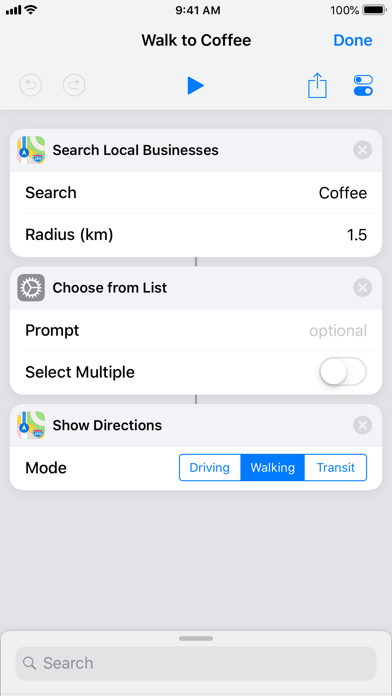
* Get directions to the nearest coffee shop in one tap
* Tweet the song you're listening to
* Get all of the images on a web page
* Send a message including the last screenshot you took
* And so much more...

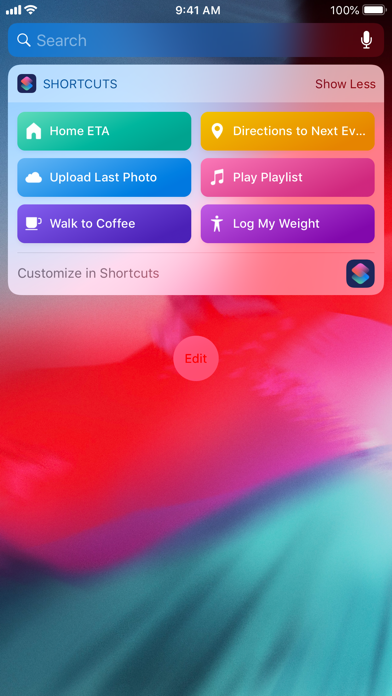
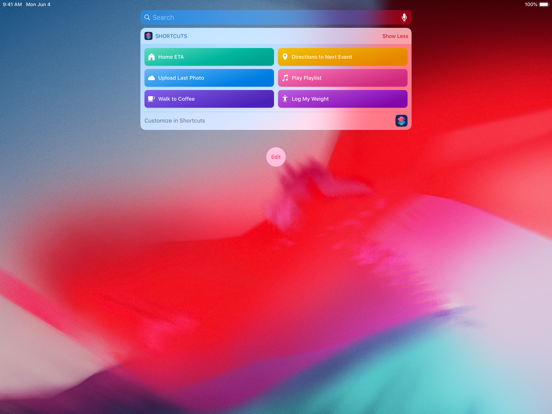
Shortcuts can be launched from the Today widget, from Search or by asking Siri. You can even add an app icon to your home screen for your favorite Shortcuts. 

Shortcuts opens up incredible possibilities to automate things you do regularly on your iPhone and iPad. 

Shortcuts App Comments & Reviews

Shortcuts Positive Reviews

I like it. I want more.I like having one button or word set my volume, playlist, and shuffle/repeat, especially when my central nervous system is acting up and this playlist is something that helps. I really like it. I also see why other people are wanting more. You have hooked me and I want more. Right now it is like playing with blocks in a vacuum: limited output nodes and iOS does not let Shortcuts know what is going on outside. I have to make broad assumptions about when most of these shortcuts will fire, my playlist being an exception because it is completely contained in my phone. I understand the desire for privacy and not executing arbitrary programs no matter how small, but Shortcuts is advertised as being able to order your favorite coffee at your favorite cafe. If it is allowed to touch my credit cards, why is it not able to know my location and the viable routes to my destination and the travel time of each route the way some apps can if I go the long route? In other words, if I make the shortcut or give it off of the approved gallery and other apps cannot make shortcuts, what is wrong with making a delayed text message or other shortcuts that do arbitrary things? This a toy, demonstrated by the gallery still only having 50 shortcuts a year later. I request that we be allowed to go deeper, because clever use of websites allows for arbitrary exploitation in a way that is more likely to involve bad actors..Version: 2.2.2

Shortcuts improves on Workflow appI had used the Workflow app for a while before they joined apple, and it blew my mind how completely it improved the way I interact with my phone. Now that Workflow has changed to Shortcuts the app is so much faster and seems much more deeply integrated into iOS. Editing shortcuts is much more intuitive now that the actions menu remains available at the bottom of the screen. The visual redesign is also really refreshing. It still amazes me that I can do so much with this app. My only complaints: I have Drafts 4 installed but Shortcuts doesn’t recognize it and continues to redirect me to the app store to download. This is a huge pain as many of my shortcuts are based on that version of Drafts. Additionally, the Drafts actions show the icon for Drafts 5, but the actions themselves refer to Drafts 4 (the “View in App Store” link even directs me to Drafts 4, which I already have installed). My other smaller complaint is that I wish there were more connections to system settings - I would love to be able to turn rotation lock off or on with one click, or access and update my alarms via Shortcuts but neither of these seem to be possible (yet)..Version: 2.0

Let me mark reminders as complete!Apparently this is the easiest way for me to make a feature request 🙄 Anyway, I’ve been using this app before Apple took it over, and it’s generally really useful. I do have a few complaints though: 1. The new UI flow for creating a shortcut is generally hard to use. I understand why the shortcuts are on a card at the bottom now, b/c it gives more of a feeling of being able to flip back and forth, but you have to pull the card up from the bottom slowly or else you pull up the widget screen, and what’s on the card first is suggestions (not what I want) & I have to tap on the search bar to bring up the actual categories and get over to Favorites (generally what I want to see first). 2. There are still some gaps in terms of actions. For example, the reason I’m writing this review is that I want to change a reminder from checked to unchecked through Shortcuts, but the only option I have is to delete the reminder instead, an action that requires three confirmations before executing. That’s a major slowdown to my script. Plz add this feature..Version: 2.1.1

“Almost” Perfect AppThis app is amazing and I am loving what all this app can do! I enjoy watching videos of people design their own shortcuts and then make one that works for me. A couple of suggestions to make for future versions: Can we have a few instructional videos for new comers to learn to make their own shortcuts? Maybe a few varieties of beginning, intermediate and advanced. Can we have a better way of searching or seeing all of the commands that shortcuts has in its library? Last but not least, can there be a way to set a clock alarm to a specific and not “suggested” enable or disable time? I would love to set a clock alarm based on a variable. See the Set Brightness command where you can change it from a slider to a place where you can input a number or variable. My goal is to have Siri ask me what time I want to get up and have her take my speech input, store it as a variable and pass it to a new clock alarm. Thanks for the great app and I look forward to seeing its improvements..Version: 2.0

Missing the Performance of WorkflowThis is a good app. I am glad to see the ability to create Siri Shortcuts. However, while it has more functionality, it is not as stable as Workflow. Apple Watch functionality has been largely crippled, as it can only run shortcuts that don’t have menu options such as logging caffeine or setting a tea timer. It is great to see some advanced functions like running an script over SSH, but it is missing some of the basics capturing a webpage to Notes (like Evernote can). Shortcuts also needs a training manual to help us learn how these commands work. It is powerful, but that comes with complexity. At the end of the day, Shortcuts is a great idea, but at the end of the day, we need our digital assistants to be simple. They need to understand us. Having to train them this way isn’t going to further our adoption. Automation is great in its own right, but a digital assistant needs to be easy, simple, adaptive to us, able to understand us in context, in tone, etc. Shortcuts is great for automation, but not a true replacement for the work needed to make Siri a serious tool in the digital assistant space..Version: 2.1.2

No baloney, works like it says it does!Like the title says, it actually works! Not like other apps claiming to be able to change app icons and not work, this one does! You also get to choose what image the app is so thats a plus! Overall I’m very happy with this app and its functionality🤩. It makes customizing your iphone homescreen even more the better while being fairly easy to use. While everything else is good, the only thing that keeps it from a 5☆ review would be its color range/selection when customizing an app. When going for a certain aesthetic in color, the shades are very important and the limited color choice sadly puts a damper over it😔. In the end, i reccommend trying out this app :)))).Version: 2.2.2

Amazing & powerfulI've already made workflows to mass delete any number of photos from my camera roll and also get latitude & longitude from Apple Maps. I also used it with regex to scrape PDFs that were containerized in JavaScript AJAX stuff which prevented downloading Of said PDFs the normal way. Oh and I created an MPG logger so I can track performance of my vehicles using a CSV text file on Dropbox. I can't wait to develop more useful workflows. I'm so very happy this functionality all takes place CLIENT SIDE and not server side like If This Then That. I use this app to fetch evapotranspiration rate of the day before from a State website using JSON. I also have created a workflow that takes all my Markdown journal entries from Dropbox (filenamed with dates) and puts them into Calendar with an X-Callback-URL. Then I can load journal entries using Calendar and my favorite Markdown app 1Writer side-by-side. Awesome stuff. So happy Apple is still maintaining this app!.Version: 1.7.6

Amazing!Wow this app is great. I love every bit of it and it is going to make my day operate so much smoother. It’s easy to put together and fun as well (can’t stop making shortcuts). I say just spend some time with it and you will quickly learn the app. I also love the how preset shortcuts are available to give examples and help you learn new tools. You can edit these in any way just as if you made it from scratch. The only thing I would like to see (so far) is when I am making a shortcut to start a playlist in music, I wish I could set up a list of multiple specific playlists to choose from rather than having to make a short cut for each individual playlist. So maybe in the next update you can add this option as well. For example: I have many music playlists but I would like to add my top three to access on the fly. Five gold stars 🌟🌟🌟🌟🌟 Apple wins again!.Version: 2.0

Lacking, but does well for what it currently hasFirst off, the shortcuts app is amazing for what it can do so far. I, like many others, was hyped out of my mind by the announcement, and was somewhat disappointed with the end result from iOS12. But I've made quite a few shortcuts so far that let me do some stuff I do every once in a while, but it's not an everyday thing as it was advertised, or as I'd hoped. There are so many things such as 'send a notification' that will pioneer the future of this app, but the thing that's really missing is automation and triggers other than pressing a button on my device. Universally, it could start out with 'when I open an app' or 'when I receive a certain notification' and eventually branch out to provide support for devs to add their own triggers. This is really the only thing missing from Shortcuts being an everyday essential. Until then, IFTTT will be one of the only options for iOS users (although limited).Version: 2.1.3

Works well except one major bugI’ve enjoyed making music playlists that launch with one click. I started adding music to my home screen on my IPhone X. I started have major problems with my phone, namely it kept going into black screen when I did basic tasks. I did several restores, one from iCloud backup and another from ITunes but the problem continued. I thought that I had a hardware issue so I got a new iPhone X and loaded all my apps from the App Store. The Apple store ‘genius’ concluded that I probably had a faulty iCloud backup. But I had the same problem on my new iPhone! Fortunately, I was finally able to fix the problem by deleting all the playlists that I had added to my home screen. For some reason, this action of adding playlists to the home screen from within the app caused my IPhone X to constantly freeze. I was very lucky to find this fix because all the experts couldn’t figure out what the problem was..Version: 1.7.8

Needs work to be greatPretty good, but needs some more work from Apple to be great. For instance, you can have it open Find my Friends, but you can’t have it pull a friends location to do something simple like “ETA to Friend.” ETA home is nice, but I’d rather have it pull ETA to wife to send her since I sometime meet her out. When you add in the Home app the issues really start to show. For instance I have a “goodnight” setting that turns of the TV, turns off my patio lights and dims my living room and kitchen lights to 75%, it then waits 30 seconds and dims more and repeats that until everything is off. The problem is that it doesn’t ignore an unnecessary command, it just fails. If the TV is already off the whole string stops, the same with any lights. The convenience is lost when I can’t have it be a universal command for every time I go to bed. Hopefully they’ll continue to improve it and more third party apps will add support..Version: 2.0

Still has a way to goWhile I use it every day, this app suffers from Apple’s UI oversimplification and attempts to integrate Siri actions with their iOS version of Automator. As a result, you don’t always know which icon to push to do a thing. Certain workflows are unintuitive to build (e.g. I shouldn’t need two steps to ping a URL). And getting workflows from other applications needs a lot of work - the whole “you have to perform an action in the app to make it appear” thing makes Shortcuts feel limited, not powerful. And the widget... woof. The buttons are ever-so-slightly too small. I don’t mis-tap, but I wish the tap areas were larger. And using workflows that have interactivity (alerts or inputs) often makes them flat out freeze up, requiring me to open up the app just to run them, especially if I trigger a second workflow while a first is just... hanging. But, hey, it’s not bad for what it is. But it could be a lot better..Version: 2.2

Miss Apple Watch FeaturesWorkflow was the #1 app for me on my Apple Watch, beside activity. With it, I could easily log information (like caffeine or water) directly into the health app merely by tapping a complication on the watch face. I used it to track notes and requests I would get throughout the day. However, with Shortcuts, those capabilities are severely limited, and if I would like to do the same things, I have to speak directly to Siri to execute them, something that is not normally convenient for me. Please add a Shortcuts app to the Apple Watch, or at least allow Shortcut complications on the Watch. Beyond that complaint, I truly love Shortcuts. The ability to link with so many different apps is amazing, and I do appreciate its simplicity and capability. I just don’t use it nearly as much as I would (or as much as I used Workflow) merely because it is not easily accessible through the Watch..Version: 2.2.1

Don't know what happenedI mainly liked workflow becuase it was a quick and convenient way to make PDFs out of pictures, which is often how handwritten papers are submitted. The problem is all of a sudden it became useless for that a while ago. Now I take the pictures run the routine to select them and turn them into a PDF and it spits them back out in a random order. It didn't used to do that, but now it does for whatever reason. It's incredibly frustrating to have to go and look through 20 pages of a PDF to make sure they're all in the right order only to do it all over again when I find one or two of them are just in some random spot for no reason. I'm not giving it 1 star because that's not all the app can do or all I use it for, but its 90% of the reason I use it and it's become a huge hassle everytime..Version: 1.7.8

Here is how to fix this...I love the capabilities this enables including how it works with Siri to build a list of simple commands. The problem is, whenever I do one of these shortcuts I am left tapping away the shortcut menu or tapping to confirm the commands. In the same amount of taps it is sometimes easier to carry out an action on my own that I specifically made the shortcut for which defeats the purpose of this whole thing. There needs to be scripting commands to automatically close the app and/or bring me to the homescreen or lock the phone. Maybe an option to carry out a command without confirmation or leaving me in an app I have to close. If I tap a shortcut button from my home screen and it carries out a command why would I want to be left in the shortcut menu main page? Shortcuts are supposed to save time/taps..Version: 2.2

Fun, but needs moreIm a basic user and I love shortcuts. I got this after wanting an easier way to add shortcuts to Siri that the “Siri and search” did not offer. You can add more complex shortcuts, but a little hard unless you understand how scripting works. It’s easiest to just use ones others have created. I feel the shortcut features could be better/easier to understand for the basic user. I also feel not enough apps support this feature. When they do it’s just one command and not enough to work with. Once other apps start adding more ability to use shortcuts in their apps this will be great. Here is to hoping....for now it only does a few needed things, but nothing too wow crazy. Lol.Version: 2.2.2

It’s really cool and powerful, butI am really enjoying the experience, as a programmer I like how I can put together things this easily, but just one request, when you use Siri to activate the shortcuts, for certain tasks it opens the shortcuts app, it would be better if it just did the task right at the Siri interface. Also, it would be really cool to have Siri ask the questions for the ‘ask for input’ option so that we don’t have to type in the answer, just say it to Siri. I know there is dictation but it takes you away from Siri to the dictation menu and its not that intuitive. But overall I am really happy that this app exists, Thank you Apple..Version: 2.0

This is the future of iOSThis is the thing that can make your phone do all your needs. For everyone that loves Apple this can potentially be the next big thing and change smartphones forever. Apple needs to give this app more access so it runs in background and have it able to control system settings so you can truly program your phone to do the things unique to your personal experience. This is a way for Apple to give the user way more power but still control the software for Optimum performance! I hope Apple sees this potential soon before someone else takes the idea and builds on it. Will be 5 stars when they unlock full power!!!!!!!.Version: 2.0

Hopefully It Becomes More PowerfulAt the time of this writing, the app has just been introduced, and I find it underwhelming. However, Apple has a track record of adding valuable features and capabilities over time, so I hope that occurs. Right now it is not quite as broad in its capabilities as existing players like IFTTT, and it’s surprising that out of the gate Shortcuts isn’t compatible with more of Apple’s own basic apps like Weather. A plus is that its automations are native to the operating system rather than beholden to a 3rd party app like IFTTT that must remain open in the background. I’m just getting started with Shortcuts but so far I don’t see many of the built-in workflows or DIY workflows that bring much value to me right now, so hopefully new capabilities are added..Version: 2.0

Wow!!!Disclaimer: I’m a huge fan of Apple Products and this one is free and awesome! I just found this APP and after looking at other solutions, and I chose this one because it’s owned by Apple. No extra sign ups and garbage in email. I prefer native apps when I can get the functionality that I need. I work for a large corporation and on my PC(yuck!) IT Dept has my Chrome browser locked down 🙄, and you know what I’m talking about. Anyways, I have a ton of repetitive tasks that I do each day. I have saved myself tremendous time, limited mistakes, and provided myself a bit more confidence on my making my corporate goals just by incorporating workflow into my productivity scheme. I’m still learning how best to use it, but it has me excited. I use it with Todoist(unfortunately Reminders is lacking), Camera, Calender, standard file manipulations, and other native iOS apps. Now that Apple owns this app I’m truly hoping that their is support for other native apps, like numbers, keynote, etc. I’d easily pay for this App once that is accomplished..Version: 1.7.8

The idea behind it is great.I think that the idea behind Shortcuts is genius. The ability to have your phone accomplish multiple tasks for you with the click of a button is a dream come true. But, if someone is wanting to create their own shortcut or edit a pre-made one, the process is complicated and not very easy to understand. Granted, Apple provides the user with a step by step guide on their website, but not everyone has the time or the patience to read through it and understand all the complexities involved. Again, the idea behind Shortcuts is brilliant, but as a technology enthusiast I would’ve hoped it would be easier to understand and experiment with..Version: 2.0

Annoying glitch.I installed this app as soon as I updated to iOS 12. While I think the app shows promise, there is an annoying glitch that not even Apple has a solution for! I created two playlist shortcuts. When I prompted Siri to play one of my playlists she said: “Running playlist” the first few seconds of the first track started playing, but then Siri interrupted and exclaimed, “Done!” which interfered with the flow of the music! After her exclamation the music resumed playing. I paused the music and prompted Siri to play the other playlist, and the same thing happened again! Because of this I was only able to give this app three stars! I want to give it four or five stars, but not until this issue is resolved!.Version: 2.0

Great potential but very buggyThere is so much that can be done with this, but bugs make it hard to figure out which shortcuts could work and which ones will end up being more frustrating to use than manually doing some actions. Some examples: The “Get Current Song” action can sometimes either get stuck on one song and won’t change the value given even if you change the song, or it takes running the shortcut twice before it recognizes what song is actually playing. Any shortcuts that give directions will not work from the widgets if you access them from the lock screen or by swiping down to the Notification Center and then to the right to show the widgets. It will only work if you are at your home screen and swipe right from there. It’s hit or miss whether or not your shortcuts will work in a normal every-day use case. The app could benefit greatly from having an option on every action in the app to report an issue. Currently there’s no good way to report a problem with an action or show other users that the action doesn’t work correctly..Version: 2.0

Desperately need to be able to organize shortcuts into foldersI have maybe 50 shortcuts now and the number grows constantly. It’s becoming a management nightmare! Loops that repeat a variable number of times would be very very very useful. Siri needs to be able to handle selecting from a list without opening the shortcuts app and we need a way to stop her from shouting “done” when switching to shortcuts to continue execution. Also a way to change the confirmation from “running shortcut” to “ok”. These changes would polish the execution of a work flow and elevate the magical effect of talking to Siri to something uncanny..Version: 2.2

Can you fix this issue ?I cant give a real rate because I have just downloaded this application and tried to do some stuff in it. Then I went to “add widgets” to put the shortcuts application with the other applications in the first page. Then I went back to the first page to see the result, it appears there but when I pressed “show more” that related to this application, the section that is for the application became stuttering and doesn’t show anything. I tried to reinstall the application, remove it from “add widget” and re-add it and nothing happens. I hope you fix this problem..Version: 2.0

3 stars for nowI made a shortcut for my Apple music in order for when I say “Hey Siri - play my selection” to shuffle & repeat all songs from 3 different playlists I have in the cloud but it can’t be done, the app crashes and kicks me out if I use the widget, or if I give the command to my home pod Siri replies back with “something’s wrong with the shortcut app”, something like that. I can’t wait for a fix so that I can finally shuffle & repeat all songs from multiple playlists. P.S. For now, I guess, the only way around would be to make 1 playlist with all the content of the playlists you would like them shuffled in which case there would be no need for the shortcuts app.., hmm.., so.., yeah! Please have this fixed a.s.a.p., thank you..Version: 2.0

Brilliant, Powerful and Loads of PotentialSend email issue: “Show Compose Sheet” option is not visible without first logging into an email account. This is a problem now with Google blocking the Shortcuts app. Since the Mail app will be opened and I have my Google accounts available with it, I feel like logging into an email in Shortcuts is redundant and makes sharing scripts more difficult. Feature Requests: Please allow scheduling Shortcuts to automatically run at certain times. Please do not require a separate in-app email login for email accounts that are already linked Apple Mail on my smart device. Let it work like calendars where subscribed calendars are already accessible in Shortcuts. Also I need to be able to search and find email messages like I can find calendars events. Please add Google Drive as an option for working with storage related actions. Original Review: I feel like I'm barely scratching the surface of all that this app can do, it is one of a kind and pure genius. I didn't know how much I needed an app like this until I started using it..Version: 2.2.1

This app is awesome, such a great purchase by AppleI have been using workflow for years so when apple bought workflow and said they would be integrating it into ios 12 as Siri shortcuts I was so excited. This app changes the way you can use your iphone. Not sure why the one dude said you cant do email to a todo list. You actually can shortcuts makes doing everyday activities much easier. I use shortcuts everyday. From creating a script to map a location to creating a complicated script to create a whole website from input data. Programmers will have a blast with shortcuts..Version: 2.0

Straight forwardLove the app, glad to finally have some automation. I have been able to write shortcuts to be more productive, but due to lack of examples and intuitive ways to see what for example the “scripting” section actually is capable of I am somewhat limited. I have put shortcuts on hold expecting desired features need to be added only to realize that there was another way Apple expected you to go about writing your shortcut. Knowing how programmers function, this becomes a road block when there are almost infinite ways To accomplish the same thing. This becomes a “your holding your phone the wrong way” all over again(to those of us who remember the iPhone 4 bumper cases....Version: 2.1.1

Put location always on in the appSo I made a emergency app the if you click it from your home screen, it gets you your location, but it doesn’t work because the location only works while in the app, can you make it so it’s always on? Because then when I’m in trouble, I can’t just click my app, I have to go search for shortcuts, find my app, click it then it sends the text with my location to my parents or someone who can help me. Please add a always on feature to the location because that would be a huge help..Version: 2.1.2

Keep Going!This is going to push iOS forward in meaningful, time-saving ways we can’t even imagine right now. I encourage EVERYONE to at least tinker around with this. The more that use it, the more developers will support it, and soon you’ll be asking Siri to just give you the result you want, not all the *work* that comes with producing it. Congrats, Apple & Workflow team! I already got it to control Pocket Casts, and I have next to no idea what I’m doing! I’m excited by the possibilities, and can’t wait to see many more developers offer shortcuts over the coming months..Version: 2.0

Love the update for weather!First of all, I’m in love with this app! I’ve been playing around with all the function in the app. This recent update is also amazing. Only one problem, even though it gives the option to enter custom location, I still need to enable location services in order to do so. It kinda contradicts with the purpose of entering my own custom address. Location service is a battery drainer and I only turn it on when it’s absolutely necessary. Could you please update it so we could just enter the location without enable the location service?.Version: 2.1

Very Nice!I use this a lot, not only for fun, but to make things easier. I feel like I may want to make something like an image (or video) that pops on the screen for some time, then goes away. Here are my suggestions. 1. Show Image Shows an image for 5 seconds (or time chosen) with the option of a “Done” button. - Settings: Optional “Done” button, [time input] (like the “Wait” option.), optional run in background. 2. Show Video Kind of like “Show Image”, but you can customize it more. - Settings: Optional “Done” button, [time input], view time (example: automatically at 0:00 to [end of video]. You can choose the start position and end position.), optional run in background. 3. Show Presentation More like show video, but with slides. - Settings: Optional “Done” button, start frame, optional run in background. I would really appreciate if these were added in. Thanks..Version: 2.2.2

GreatThis it the best so to use when trying to get an icon change (for under iOS 14)although it is a little complicated so you will need to Search up a video. But when I try to open up an app it does this weird transaction but is still open up the app.🙂👌👍.Version: 2.2.2

Nice on iPhone, Apple Watch Interface Needs WorkWorkflow is great on iOS. I use it everyday without any issues. The interface on watchOS needs some work. It doesn't feel smooth. A few suggestions: - remove the circular progress bar and "play button", these don't matter to me as a user. I want to press a button and have the action executed, as far as I am concerned having the extra "play" screen is a waste of time/space. - the pop ups to elicit user data are fine. - on the main screen when you open workflow there is text in the bottom, remove that. It takes up space. I would prefer if the buttons were larger or could fit more workflow buttons on screen. - the watch face complications feature has weird behaviour. I would like to use this, but it defaults to run the last workflow/action, this is annoying. It would be good if either there were 1) multiple watch complication options, or 2) the workflow complication opened the main workflow screen. Love the app, great job!.Version: 1.7.6

Works great but..Need to get rid of “Shortcut Says...” when you run your shortcuts. Apple car play support would be awesome. Currently Siri will ask you unlock your iPhone..Version: 2.1

Amazing App!I use this to customize my app icons, but overall it’s amazing!.Version: 2.2.2

Very cool, but poor access to help documentationVery cool what you can do, but the ability to access help documentation that you need while configuring the workflow is not great..Version: 1.7.6

Using on an iPhone and an iPad just doesn’t workThey both NEED to be updated to the latest os OR ELSE! The smart decision of syncing Today widgets worked.. for no one.. For one, iPads don’t have Apple Health... my iPhone is on iOS 12 and my iPad is on iPadOS Beta 7 so iOS 13. First removed Apple Watch capability and now just this...Version: 2.2.2

ITurn off system should be added.Version: 2.2.1

Problème de décimalMalheureusement, quand l’on utilise la fonction «Demander l’entrée» en tant que nombre, et que l’on entre un nombre à décimal, il en résulte uniquement un nombre sans décimal quand on affiche l’entrée. Je crois que le problème vient de la virgule, car si l’on utilise un point (utiliser en anglais quand il y a des décimales) tout va bien, mais il faut l’entrée au clavier et la manœuvre est plus longue..Version: 2.1

Great app (people who are having trouble with the home screen thing, read this)I love all of the potential in the scripts you can make in this app. The GIF-making is fun to mess around with. My only problem is that when I search for an element and drag it into my workspace, the search bar gets cleared. It’s especially annoying when I’m adding multiple variables. To the people having trouble with the home screen, you need to click the share button in the top right corner in Safari. That will open a share sheet that has that button on it. Click it and it will exit Safari to the home screen. When you click the new app icon, it will redirect you twice, and you will end up in the shortcuts app..Version: 2.2.2

A little help for lost peopleIt’s really great and for the ones who want to add it to their screen when it takes you to the web site data you click on the “share button” on the page and you add it to your screen! It’s as simple as that!.Version: 2.2.2

😻I like it!.Version: 2.2.2

MenusIn the scripting option when you put a menu on the script and add it to the home screen, it shouldn’t bring you to shortcuts for the menu it should just pop up on the screen like when it says that there’s 20% battery left. Otherwise, the app is very helpful.Version: 2.2.2

I LIKE ITI like it bc you can do shortcuts like if your in danger you can make a shortcut about thet.Version: 2.2.2

Good!It’s really cool&good also,YOU CAN DECORATE YOUR APPS!.Version: 2.2.2

This is a great, great app — but…For the love of $deity, can we have a longer text-editing field? Editing a 200+ line TaskPaper entry for creating an OmniFocus project is an extremely delicate, error-prone exercise in frustration. Throw us a bone, here! :).Version: 2.2

Supper for server managementWith one tap I can quickly manage my home server by SSH.Version: 2.1.3

Programmable? CheckAwesome? Check!.Version: 2.0

Great app!Time saver!.Version: 2.0

AwesomeI love this app so much! It makes my whole life simpler and I love making custom app logos with it.Version: 2.2.2

Just get it!That is all..Version: 1.7.6

SurprisedI downloaded this app thinking it was something else. But was pleasantly surprised!!! Such a cool app..Version: 1.7.6

ReadGood but u need to add automations to ipad please add it.Version: 2.2.2

ConfusingI’ve heard its a good app but its very confusing. i got this app to change the icons of my apps and widgets and stuff but it gave me all this random stuff i didnt want. Please make it easier to find things.Version: 2.2.2

Amazing lol 😂This is amazing I used it for when I charge my phone it says stuff! 😂.Version: 2.2.2

Love thisLove this.Version: 2.2.2

Spotify CompatibilityThere is no way to start a specific playlist or play a specific song on Spotify, which would be awesome if added in the future..Version: 2.2.2

Does not workIt does not work i want to change my app icon bit it does not work so can you help me with that pls.Version: 2.2.2

Good but it has a problemIt takes so long to upload.Version: 2.2.2

It’s a so so appI think that it is very useful. I don’t really use it to often but it do use it. That’s all I have to say about it. Good bye! Enjoy your day!.Version: 2.2.2

Cool but I need helpGreat app! It’s pretty helpful but every time I try to add a shortcut to my home screen it takes me to a website instead of adding the shortcut to my home screen. Not sure why..Version: 2.2.2

Free International Money Transfer 💸Enjoy high maximum transfers into more than 20 currencies while saving up to 90% over local banks! The cheap, fast way to send money abroad. Free transfer up to 500 USD!AdvertorialVersion: 2.2.2


What do you think Shortcuts ios app? Can you share your thoughts and app experiences with other peoples?

Please wait! Facebook comments loading...

Shortcuts iPhone Images
  • Shortcuts iPhone image 1
  • Shortcuts iPhone image 2
  • Shortcuts iPhone image 3
  • Shortcuts iPhone image 4
Shortcuts iPad Images
  • Shortcuts iPad image 1
  • Shortcuts iPad image 2
  • Shortcuts iPad image 3
  • Shortcuts iPad image 4