Nibble Apps Ltd
Snapsie - Take Progress Pictures Customer Service

- Snapsie - Take progress pictures Customer Service
- Snapsie - Take progress pictures App Comments & Reviews (2026)
- Snapsie - Take progress pictures iPhone Images
Take before and after pictures and track your progress with the newest addition to the FitMenCook app family.
How to use Snapsie:
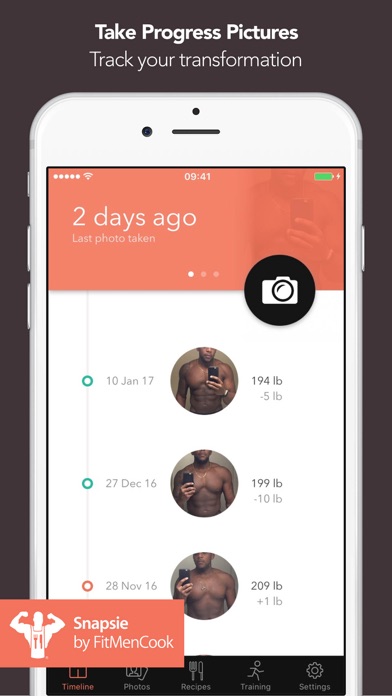
1/ Tap the camera icon to take your first picture
2/ Enter your weight in pounds, kg or stone (optional)
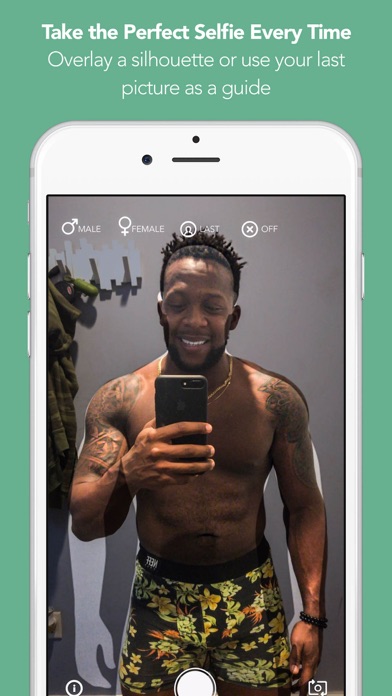
3/ Take additional pictures, by overlaying the last picture you took, so you can line up the two shots perfectly (optional)
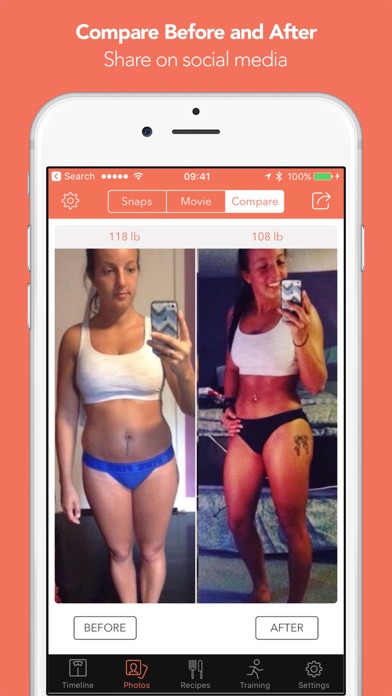
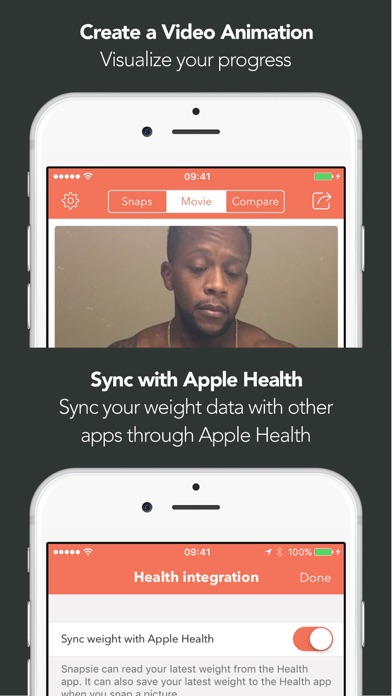
4/ Pick two pictures to create a customizable side by side comparison and share on social media. Alternatively, create a movie showing your transformation over time.
You can also:
• Set reminders
• Import pictures you've previously taken
• Sync weight data with the Apple Health app
• Quickly see how your weight has changed and how many weeks it's been since you've started
Snapsie is a great way to stay accountable on your training goal.
If you need some additional help, we've included links inside the app to the FitMenCook app for healthy recipes and also to a free training plan from David Kingsbury who is a Hollywood celebrity personal trainer.
Snapsie is a collaboration between Nibble Apps, FitMenCook and David Kingsbury.
Privacy Policy: http://nibbleapps.com/privacy/
Snapsie - Take progress pictures App Comments & Reviews
Snapsie - Take progress pictures Positive Reviews
Easy way to compare photosI’ve been using this app for 3 years now. I love that I can track my progress and see how my body has changed over the years. It’s easy to use and I love that my photos are private. The reason I give it 4 starts is because I have to scroll to find the picture that I want to compare it to. I take weekly pics, multiple poses. So if I want to see a pic from 3 years ago, I have to scroll a LONG time to get to that one pic. I’d love to be able to search by month and year the pic was taken and have the pictures show up. Even better yet if I can search by weight too. 128 pounds 2 years ago can be a lot different to 128 currently since muscle shows different than fat..Version: 1.1
Love this!!!Love this app but on the picture video (the one that plays showing your weight loss) I have so many pictures showing my progress in different areas a video doesn’t make since using all of them. Please make it to where I can select a bunch to do a slide show. I have lost 150lbs and this app keeps me motivated.Version: 1.1
Great App- Helps Stay MotivatedUpdate: I love this app but it’s no longer working on the latest iOS. The app has been great in keeping me on track with my fitness goals. It helps keep me accountable to get into the gym knowing I’m taking my weekly picture and weight keeping me motivated to reach my fitness goals. It’s simple to use and like how it has has comparison feature to view before and after progress. Only thing that I dislike is it saves the pictures in my photos and doesn’t give me option to not do so, minor annoyance. Overall I’ve recommended this app many times..Version: 1.1
Good app!I love that this app doesn’t crash or take forever to use, unlike some other picture apps. I just have two suggestions 1. It would be nice if we were able to move the pics up and down so we can scale them next to each other in the compare section. This is super important to me so I can see my results in correct proportions. 2. It would be nice if we could change the date of the photo that we upload from our camera roll. Sometimes iPhone will set the current date on an old pic that you cropped or edited today. So, if I upload a pic that was from May but I cropped it today before uploading, the app says the before pic is from today, which is incorrect..Version: 1.1
Simple . Easy to Use. Exactly what i needed !I wanted an app that could track my timeline of progressive photos for my weight loss but i wanted something simple . While other apps have more features (adding waist siZe, neck, macros , calories , etc) i didn’t want all of that. I just wanted an App that showed my progress and my weights. This gave me exactly that and lets me upload photos from my camera roll. I also love how it lets you see your progress through a movie slide show or lets you compare specific photos . Great app!.Version: 1.1
Just getting started..I am new to the app and looking at its features. One thing I don’t like is that for the meal prep and recipes your only option is to download the additional apps Snapsie has suggested. They should have something setup to where you are able to upload your own meal plan and/or recipes and also be able to share that info. I am following a meal plan with a trainer right now and I want to be able to upload that directly to snapsie and not have to download/go through an additional app. Annoying..Version: 1.1
So far okDownloaded this app with the hope that I can compare between pics for my fitness progress. Unfortunately, this app won’t let me upload my previous pics to compare, when I try to upload the pics, it all shows blank. At first I thought it was because it was slowly loading the pics so I can upload them, but no. Will reconsider my rating if this gets resolved..Version: 1.1
This app should be so much more popularOnly thing missing is the ability to choose the pictures that show up in the movie. My pictures are from a bunch of different angles so it doesnt come out right.Version: 1.1
ProgressThis app tracks progress very easily and simple. Keeping the dates of the pictures and also the weight that you are during the pictures. It is overall a very good workout app for me, since I am trying to gain..Version: 1.1
Can we change dates on pics?Love this app, except I have loaded some pictures from another phone and I’d like to change the dates for my timeline. I can’t figure out how and am not sure if there is a way. I also cannot find a “support” option..Version: 1.1
Import picturesI would like to be able to import pictures. Can you make this an option?.Version: 1.1
Great app overallFinally found an app for before and after pictures. Great app if you keep taking pictures of your weight loss journey. Definitely recommended 👍.Version: 1.1
Great app- very satisfiedGreat app- exactly what I wanted it to do. I love having the transparent image so you can get the same pose. Also like that the images save in the app so you don’t have to store them in your photo album..Version: 1.1
Loosing weightThis is my first time using this app and it seem like a good one .Especially since we can download pictures.Version: 1.1
Good, but weight doesn't syncThe app is nice and reliable. Except for syncing weight. I weigh myself everyday and note it in the Apple health system. Yet this app never pulls the data when I upload a new picture. It's mildly annoying..Version: 1.1
Love it, just need a minor changeIf there could be a way to take both front and side pics for one day that would be awesome!.Version: 1.1
Nice but needs workI like the idea of the app. It’s useful to keep track of your physical changes overtime. However, it has not been updated for 2 years. The app still doesn’t support the New iPhone display size. It would be nice to integrate this app into the Mealprepro app or FitMenCook app..Version: 1.1
ProgressThis app is great for tracking progress. Highly recommend if your serious in seeing you get closer to your goals!.Version: 1.1
Exactly what I wanted!I didn’t want a collage app...I just wanted to track my progress and do side-by-side comparisons of “before” and “after”. Great job app developers!.Version: 1.1
So easyI don’t know if there is an easier app to track your progress..Version: 1.1
SimpleLove the simplicity of the App. Just a picture with your weight and the date. Just what I wanted..Version: 1.1
Good StartI like this app, wishing there was a spot to add progress measurements along with tracking your weight..Version: 1.1
Well ExecutedThere was definitely some thought put into this app - you can tell the developer really had the user in mind. The platform is simple and straightforward to use. All you have to do is set up a reminder to notify you that you need to take a picture (you can set it to notify you once every week or once every month), take your picture and enter your weight. The app compiles all the data into a timeline to track your progress (or lack there-of for some of you slackers). This app also allows the user to connect it with the Apple Health app to automatically share weight and other data between both apps. The user can also use other in app features like recipes for healthy meals, etc (of which I have not used yet). Overall, well executed. I would recommend this to a friend..Version: 1.0
Dear Nibble AppsI love the app! It is so simple to use and straightforward. I can tell you really thought about users and I might even buy FitMenCook! There are only two little things that I would like for the app to include: 1. Be able to add your body fat percentage where you can add your weight 2. Have the option to add a passcode and even a fingerprint lock Other that that I find it is so helpful. If these features were added it would be GREATLY appreciated. Thank you.Version: 1.0
Nicely done but...All in all it's a very good app that does what it should. The one MAJOR irritation is that it is hard to tell when the pics were taken on the compare screen. They need to display the date or some other clear chronological order..Version: 1.0
I've been waiting for an app like this!I love the fact that you can compare your before and after photos. And the way the camera captures your body in the same position is super helpful! I will be using this weekly. Thank you!.Version: 1.0
Progress trackerMy coworkers and I are doing a fitness challenge at our gym at work. It was suggested by the trainer to take pictures, since a picture is worth a thousand words. Truly excited about this app. I'm already using the FitMenCook app which I absolutely love..Version: 1.0
Awesome startI like FitMenCook app a lot for its recipes and UX, so I gave this a try when I got the announcement email. Cool concept! Utilities like overlaid shots and timelapse VDO are great. Would be cool to be able to mark photos with tags like #front #side #back so you can filter the result or create the VDO from each filter..Version: 1.0
Bomb appMy original comment was deleted because the username was taken. Sigh. Since I am not going to write it all out again, this app is great and would recommend. Just wish that the ounces were an option in the weight section so weight loss could be more specific..Version: 1.0
SnapsieIt's a really great idea especially for people who are having a difficult time losing weight. By taking frequent pictures you really can see a difference..Version: 1.0
GreatBeen taking pics and this app has helped a great deal.Version: 1.0
Congratulations Fit MenThis app is great! I especially like the free workout book by David(can't remember his last name) awesome!!!!.Version: 1.0
Really coolEasy and cool. For a so personal app, could have a password to keep the photos blocked.Version: 1.0
Great appGreat concept of a personal fitness photo tracker.Version: 1.0
Good AppGood app.Version: 1.0
Lots of potential...but needs love!There are some great features in here - reminders, a time lapse movie, before and after pics, an overlay tool - but things seem buggy and I found that old pictures don't import properly, and the app sometimes crashes..Version: 1.1
Good design, needs some really minor improvements to be greatApp is great! I like the look and simplicity. However there are a few key features missing that would make it so much better. 1. Add photos from the camera roll 2. Photos for different profiles: front, side, back, etc.Version: 1.1
Great appGod job.Version: 1.1
Awesome! ButThe app is awesome let's you track all photos, make a movie, show timeline but I would like to take more then one kind of photo and the ghost setting (which is awesome!) only allows the last photo to be shadowed. Other then that this app rocks definitely recommend!.Version: 1.1
Free International Money Transfer 💸Enjoy high maximum transfers into more than 20 currencies while saving up to 90% over local banks! The cheap, fast way to send money abroad. Free transfer up to 500 USD!Version: 1.1