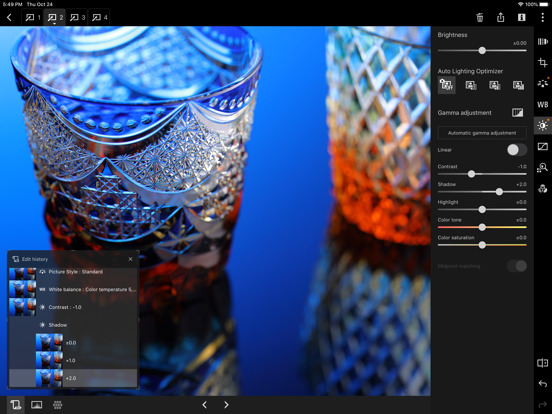
Canon Digital Photo Professional Express (Canon DPP Express) is an iPad/iPhone application to color edit RAW images with intuitive touch operation to be converted to JPEG file afterwards.
To continue using all Digital Photo Professional Express features, you must complete the (paid) subscription process.
When you purchase the subscription,
- Your image adjustments will be recorded.
- You will be able to export images without watermarks.
[Key Features]
- Adjust RAW images freely.
- Quickly and easily adjust RAW images anywhere, any time.
- Save multiple adjustment patterns and compare the results on a single RAW image.
- Use the change history function to readjust images until you achieve the perfect result.
- Save adjusted images to your Camera Roll in JPEG format. "
[Compatible Formats]
RAW(CR3/CR2 ), JPEG, HEIF (10 bit)
* Not compatible with .CRW or video file formats.
CR3/HEIF (10bit) images can now be displayed and saved in HDR PQ. The supported displays are as follows:
- iPad
- Ultra Retina XDR
- Liquid Retina XDR
- iPhone
- Super Retina XDR
- Super Retina HD
Note that the actual displayed image depends on the display performance.
[Image Input]
Via Camera Connect : RAW(CR3/CR2), JPEG, HEIF (10 bit)
Import from Camera Roll: [RAW (CR3/CR2), JPEG], [HEIF (10 bit) *excluding EOS 5D Mark IV/EOS R]
* Image data is saved in the app. In addtion, devices with iOS 12.1 and later can import CR3 files from the Camera Roll.
*HEIF (10-bit) files and RAW images shot with [HDR PQ settings] enabled can be imported using linked mode with the Canon camera app Canon Camera Connect .
*RAW burst files cannot be imported to smart devices. Extract the CR3 images from the RAW burst file in advance on the camera side, and then import them to the smart device.
[Compatible Camera Models]
For compatible models and features, please refer to the following website.
https://ssw.imaging-saas.canon/app/app.html?app=dppex
[System requirement]
iOS 17 / 18 / 26
iPadOS 17 / 18 / 26
[Important Notes]
Payment will be charged to your Apple ID account at the time of purchase confirmation. If you do not cancel at least 24 hours before the end of the current period, the subscription will automatically renew, and charges will continue. You can manage and cancel your subscriptions by going to your account settings on the App Store after purchase.
- If you uninstall the app, all image data imported from your camera will be erased.
- If application does not operate properly, try again after shutting down the application.
- Visit your local Canon Web pages for more details.
https://ssw.imaging-saas.canon/app/app.html?app=dppex
Terms and conditions
https://www.apple.com/legal/internet-services/itunes/dev/stdeula/
Canon DPP Express Positive Reviews
Canon DPP Express + A13 and iOS Photos revamped my workflowI have yet to find any issues using DPP Express with my SL3 and my iPhone. I usually stick to keeping edits to be as close to natural colors as possible, which makes DPP Express a great asset for me. The interface is much smoother than the desktop software. I also like that DPP Express can display histograms and focus points.
The JPEGs that come from DPP are surprisingly easy to touch up further in iOS Photos. The end result is a much faster process to get photos ready for either social media or printing, with results that are much better than smartphone cameras are capable of. Similar results on my desktop could take 3 to 5 times longer. Much of that can be attributed to the efficiency of iOS and the power of the A13 chip..Gallison83Version: 1.5.0
Need a desktop equivalentThe software is bit clunky to use but the quality of the photos processed from this tool
is amazing. Canon please release a desktop version or just allow the iPad version to run on Macs with Apple Silicon..EpshopbayVersion: 1.9.0
Almost great!I would love to see a few things added before I choose to subscribe. Please add ability to import directly from an SD card or external drive. I don’t particularly enjoy the canon connect process. Please add a dust/spot removal tool as well. If you ever could, please consider adding the ability to edit directly on an external drive. Those 3 things would be absolutely perfect for me on my iPad. I would happily pay for your subscription if the first two suggestions happen and the third would be the icing on the cake.
Oh and a way to organize photos in the app instead of just having them all on display at once.
Other than those 4 things, I love the app. It’s great and I see it really working for a lot of us photographers..CoryS89Version: 1.7.10
I keep coming back to thisThe speed, quality of conversions, and ease of use are phenomenal. The only gripe I have is the files need to be save on your iPad. No cloud functionality. I’ll go all in when and if they add cloud storage..ConcretedadVersion: 1.6.10
Yay!Yay! I don’t have to break out my 13 year old massively out of date laptop anymore. Now if only somebody would put in a channel mixer so I can channel swap infrared photos! That would be the only thing I’d add to this..Mmmmmmccccckkkkkk202020Version: 1.9.0
Almost perfectGreat app. However, with the ability to create a color profile, using a color checker. Will make it better. For some photographers color management is very important, the color profiler will be a game changer while in the field..MODISH PicVersion: 1.10.20
Fantastic AppI don’t understand all the critical reviews. The app is well designed with an intuitive interface. No other camera manufacturer is offering anything like this, This is very cool !.D xxxxxxxxxVersion: 1.3.10
NYCFirst time using this app and it’s so easy to use and definitely worth giving it a shot..2random2predictVersion: 1.8.0
I needed simple this is it!I was looking for an App to crop and reduce file size before sending images for review to other colleagues. I am like the ease of use and appreciate the edit functions that are available.
I use my Mac and the other Canon workflow for the more detailed edits..Happy.HygienistVersion: 1.1.0
Came from a T7 to a RI feel like I’ve been missing out ! Great app ..Stevenw96Version: 1.8.0
PLEASE allow access to folders!Selecting from the camera roll with hundreds of raws is very difficult.. please allow choosing a folder when importing a photo!.EffugioVersion: 1.7.0
No folders??Why can’t we select a folder when importing? Scrolling through the whole camera roll is tough..JoekoerberVersion: 1.7.10
Good except for subscriptionI’d rather buy the app outright. Especially since it is free on the desktop..Space city guyVersion: 1.8.10
Great apps for canon shootersEasy to use and great integration with other Canon apps. Used it for years!.Nick_ucla_andersonVersion: 1.7.11
I thought it would let me share it?Can’t share?.LarryRocVersion: 1.9.0
I have no idea how to use itI have no idea how to use it.Muscle M0MVersion: 1.10.10
Update for canon eos m100Hi! i nuy a eos m100 i cant use the app, the camera is pretty but update please i want to use it and others with the m100, thanks 📷👍.Alej2323Version: 1.5.0
Works well. One month in.Using a Canon 6d mark ii and a 2020 iPad Pro 11 with it. I find that the colors processed through this app when processing raw files are absolutely excellent. Better than many if not all third party development software like Luminar etc I tried on my MacBook Pro. Well that shouldn’t surprise you since it’s all the family so to speak. Has everything you need to process your photos to your liking. I usually only transfer a few raw photos at any one time through Wi-Fi and don’t fuss with the SD card much. Transfers are slow through Wi-Fi on their companion app Cameraconnect. Lens corrections with Canon lenses are supported too another plus. Multiple edits can be done independently on any one raw file easily. Not a fan of paying a subscription every month but is affordable enough. ($1.?? In Canada) Does not support raw files from my older Canon 6d which I hope gets fixed in the future as I still really like that old camera. If you have a supported camera and like editing your raw files I think you will like this app. Editing on an iPad works well..ColdSongVersion: 1.3.10
Very User Hostile! Extremely Unintuitive!Don’t bother downloading this app. It cannot access images in the iPad Photos program and it doesn’t sync with Canon Camera Connect, with which you are supposed to download RAW images from your camera. Also, there is absolutely no documentation available from Canon or any other source, so it ends up being an extremely frustrating experience. I hesitate to give it even one star. Canon has a lot to do to fix this program and make it more user friendly. My initial experience with Canon Camera Connect was identical. Only in the second version was it slightly easier to use. Get with the times Canon!.NugeelaVersion: 1.0
Mac laptopWould like this available on the Mac desktop or laptop.StampmacVersion: 1.9.0
First Photo 🙏👍👍Ri.Mach-z-man aka KevinVersion: 1.8.10
Free International Money Transfer 💸Enjoy high maximum transfers into more than 20 currencies while saving up to 90% over local banks! The cheap, fast way to send money abroad. Free transfer up to 500 USD!AdvertorialVersion: 1.12.10
Canon DPP Express Negative Reviews
Insultingly uselessThis software is a joke. Not nearly as powerful as the desktop software. No dodging and burning. No masks. Just the most basic raw conversion features and pretty much nothing else. You’re better off using the raw conversion built in your camera and or using any other photo editing software available in the App Store, which will be 10x better. Doesn't allow you to view or import from an sd card reader. Can only load files from camera roll, or cannon camera connect (which is also a joke). And on top of this all canon, have the audacity to charge money for this app!? What a joke. I have tried to use this software multiple times and paid the silly one dollar a month fee hoping that they had improved. But over the years it’s just the same old nothing burger. Two stars..TrisastranusVersion: 1.9.0
Mediocre and then went subscriptionThe app fell far short of DPP on the desktop and was limited to a few cameras and file formats. While it was free, it was worth having on your iPad Incase you wanted to do a quick edit in the field but once Canon changed it to subscription it was an instant delete.
I suspect if they’d kept it free and improved it, even gradually, the goodwill from having free raw editing on desktop and mobile would have been worth more than the small amount of subscription dollars they’ll earn.
Silly Canon, opportunity missed..Rk1234567kkVersion: 1.2.0
How do I give this zero stars.Dear Canon,
Your users spend thousands of dollars on your bodies, and lenses. Some of us faithfully hit all the upgrade cycles. And now you want to charge us $.99 cents a month for software on IOS that, oh wait, you provide at no charge for MacOS and Windoze and is part of the overall cost of ownership of Canon Gear.
Really? Someone please take the time to explain to us why you’ve done this because it’s narrow sighted. IMHO, you have really screwed the pooch and depleted a lot of customer goodwill..Mick94114Version: 1.5.0
Really disappointing output...Overlooking the fact this app does not support CR2 raws (I have an EOS R), the image quality that you get from processing CR3 RAW files in the app is pretty ugly. Equally as disappointing is how slow it functions. Granted, I’m “only” using a first generation iPad pro 12.9”, but every other RAW editor on this device flys.
It might be worth keeping around when I need to get a RAW file off my EOS R wirelessly, but on top of the dog performance and crap output, you can’t even export RAW files to use in another app..Colin RobertsonVersion: 1.0.11
Jumped on the Adobe subscription bandwagonYou buy a nice Canon camera for several thousand dollars, then you download this app and it wants to nickel and dime you for $1 per month… Also can’t access photo files unless they are stored in your camera roll, that’s a non starter for most pro workflows with external drives and even just plugged in camera cards. Direct transfer from camera is slow at best..Dann LVersion: 1.8.0
Useless as isI agree with others here.
This app is currently pointless.
Aside from the fact that it only accepts CR3 and jpegs, (which is ridiculous) it failed to import 4 jpegs! It complained of insufficient storage. Also ridiculous. This app also does not recognize HEIC files. iPhones have been shooting in HEIC for years now.
How is it that Canon who makes such fantastic cameras can allow the release of useless/bad software?!
Come on Canon. You can do much better..TDiz1Version: 1.1.10
No raw burst supportWhen I bought the subscription I was assuming that raw burst mode would also be supported with the R7 support? When you don't have a download for the Digital photo Professional 4 software for macOS Monterey, this is the only other to option to see the images out of camera for that mode. I had no other reason to download this app than that..SeanTheoArtVersion: 1.8.0
SadCan not believe i have had this app for less than minute and it is telling me that even though i have there camera that i spent to me a lot of money and now i have to buy your app instead of being able to just use it. I have had the camera for 3 days and now i am sending it back and getting a Nikon, no wonder you are losing the market to them and others good luck.AliasNemoVersion: 1.1.10
Canon cripple hammer strikes againIt seems lately Canon is in a race to the bottom to see how little value they can provide to the customer at inflated profits. This poorly executed app with a monthly subscription fee is a perfect example. One Spends thousands of dollars on their camera and lenses, but now they want you to pay to see and edit the pics taken with that equipment. Pathetic. Shame on you Canon..Priya jackVersion: 1.3.10
I was tricked in a Subscription I can’t cancel!!!This app isn’t for IPhone at all! It shouldn’t even be advertised on the App Store! This is only for Canon cameras!!! YOU ARE LIARS! Not only that there is no possible way to cancel the subscription I was tricked into buying! I will do everything I can to have you removed from the Apple App Store LIARS!!!.ALove21!Version: 1.8.0
UselessEven after moving to a subscription model, it fails to support all cameras that use .CR2. The app is not expanded to support .CR2 but only with a limited number of cameras. I have a 6D original, which supports .CR2 and is supported by Camera Connect but that file is disabled on DPPe. Why?
Does Canon really believe such restriction will lead to users upgrading for its excellent cameras to the new brood?.RujsVersion: 1.2.10
Money grab subscriptionDPP has always been free. Probably one of the reasons you bought Canon instead of Sony. Now Canon is moving to subscription based software to view/alter their RAW files. Without a way to view/alter RAW files your “pro” $6k R3 body is kinda pointless..HalfdonkeyedVersion: 1.8.10
What is canon thinking?Not good even without subscription and with this update and subscription they are making sure even the few who used it for a couple of times will no longer use it. Have no clue what the canon guys were thinking..Sri_SriVersion: 1.2.0
Canon Cripple Hammer strikesYes, I subscribed. Mainly because Apple has yet to provide raw file support for the RP (Canon you have anything to do with that? The R got supported pretty quickly.) I spent all this money on your cameras and then you chintz out on the necessary software. Been looking at the new Nikon Z50..Neilt11Version: 1.2.0
Should be freeI’ve spend thousands on Canon cameras and lenses. Don’t you have enough of my money? What do you think you’re accomplishing by watermarking exports? Why do you wish to alienate the people who actually care about raw images?.Davidm49090Version: 1.9.0
Cannot even download from camera roll anymore!!!Last week this worked and now I cannot download even single photo from my camera roll on my iPad Pro. I get en Error: download cancelled due to lack of space. I have 200 GB of space so this is NOT the problem. PLEASE FIX this Canon..Al696969Version: 1.1.10
Not good. Not that it’s a paid app it is even worse.This was already a mediocre photo editor but we could forgive its many flaws while it was free, now that Canon is absurdly expecting to be paid monthly for its use, I deleted it..JoeTheAppleGuyVersion: 1.3.30
Exporting is TerribleWhen exporting from the app to your camera roll it completely distorts the image..Canon R5 C userVersion: 1.7.0
Ummm….Please tell me I didn’t Spend thousands on canon camera and lenses then gotta pay 0.99 a month for a app to export raw images ?? Am I missing something? Or am I misunderstanding how this app works?.JfrfswdhbVersion: 1.9.0
They hold your images hostage unless you pay them a dollar a month.Why are they forcing us to pay a dollar a month just to remove water marks.PironioVersion: 1.2.0
Downloaded, prompted with subscription, deleted.I’m sure this works fairly well, but not well enough I’m inclined to pay monthly for it..RyanthewhiteguyVersion: 1.9.0
Canon is smoking somethingThe nerve of them to charge for this. Definitely makes me think less of this company that I’ve spent thousands of dollars with..OgdomlocVersion: 1.7.11
Should be freeThis shows how greedy a company can be. We spend thousands of dollars on cameras, lens and accessories and you want to us to pay for software that should be free. Unbelievable.Cpl LeeVersion: 1.9.0
I cant import my CR2 pics??For jpgs is fine, but ihave 4 free software in phone that i can edit them; i need to edit my cr2 ones…. Will not pay for this.CheranguistaVersion: 1.9.0
IPad Penalty Tax - Seriously?!Why is this application FREE to use on a MAC, but I have to pay a monthly fee to use on iPad.... I thought my purchase of a new Canon camera was enough... App Deleted - Seriously reconsidering future Canon purchases...johnny5Version: 1.2.0
Canon 6d Mark llWe need to be able to send images to Lightroom for the editing that this app can not do….LeBullcatVersion: 1.9.0
No 5D mark 4 support?What a waste of time but I bet the paid app later this year will take care of this? Just hope it’s cheap but with Canon I’m betting not!.Resqu2Version: 1.1.10
Horrible export qualityI didn’t like the expert quality was fuzzy and washed up.X2097933Version: 1.9.0
CameraDoes not support my camera.Acosme _Version: 1.7.11
DissatisfiedAfter spending over $40,000 USD on Canon equipment, I am shocked to learn that this app only works for a fee!.Max1030thursVersion: 1.10.10
RequestI have canon eos 70 D and it does not work . I am curios whether it will be able to do so in new update.Min Banyar AungVersion: 1.2.0
A paid app instead of free like for Windows and MacNot only a paid app it doesn’t support my Canon cameras notably: 5D, 40D, M3, and 7D mk2...
Disappointed. :( :(.Digital_PhotogVersion: 1.5.0
Cr2 must be addedUnacceptable to not support most all cameras in your line for raw. Fix it please..Ejy112Version: 1.1.0
Will not download raw from iPhone or iPad.Disappointing!.LtlabsVersion: 1.7.0
Paid Subscription???Im very confused. I’ve corresponded the Canon several times. They INSIST that this is a completely FREE app. No subscription required. They told me “This is not a canon app”. However the link they sent me takes me to this app ?????.Ranger673Version: 1.5.0
No support for raw files unless you have EOS R or m50Frustrating.TophertuttleVersion: 1.1.30
Why did Canon Create this App??Why, why, why would Canon allow this waste of time and money to create and advertise that the Apps function will let you ‘Adjust RAW images freely’ - then it displays a message that the cr2 images files imported are unsupported. Seriously!
iPad Pro and t7i.Dusty-JonesVersion: 1.1.0
Export qualityExports are literally garbage.Canonreview02Version: 1.9.0
Disappointed!!!This must be Canons attempt at rent taking. It’s a terrible idea. Canon will never be Google Photo’s or Apple Photo’s, why do they try.
Most of the features can be done in camera or with the free DPP on Windows or Mac. Why try to charge for it, it can’t be bringing in much income and will just piss off customers and sent them somewhere else for software. Come on Canon, grow up, give your head a shake and treat your customers like you care about them.
I know I am wasting my time but I had to vent..Gord.millarVersion: 1.9.0
Does not workTried, no photos alright.Spike0963Version: 1.9.0
Why canon do this?Why canon makes an application and charges it, it's illogical.PIERRESOTOVersion: 1.8.10
Low quality exportsIt’s possible I could be missing something but when I export an image in the original resolution, it compresses the file so the quality of the image is garbage, specifically the og file size is about 40mb in its .CR3 RAW format, the exported photo is 7.6mb.Chris P. BurgerVersion: 1.8.0
Why Canon?Why is canon charging a subscription for an app? Should be free for all canon owners!.MutchcVersion: 1.8.0
Doesn’t make senseI upload a photo to edit after subscribing and there are no extra features like it leads you to believe the only thing you can do is share and export.Stepmaster2000Version: 1.6.11
Paywall even though says it's freeFor a world class market leader of cameras Canon doesn't seem to understand the importance of designing and supporting apps for its products. The ones I have tried are overly complex to work with seamlessly, and the poor reviews are deserving.
This app is advertised as free but isn't. The $1,29 a month isn't a big problem rather the expectations of their dedicated users like me should be. While the app looks what I want in principal I will continue to use alternative apps..SuukotoVersion: 1.6.10
Pas au top!!!Prometteur mais encore incomplet. Difficile d’importer des photos RAW car seulement en Wi-Fi.Les photos Raw déjà sur votre iPad ne sont pas pris en charge alors que d’autres Apps autres que Canon le font facilement ( Lr CC ). Donc les ajustements sur une photo Jpeg sont limités..CarlCVersion: 1.0
Cr2Add cr2 please.Pimoz.comVersion: 1.1.0
No CR2?Since the vast majority of Canon DSLRs produce .CR2 files, why would you even think of producing software that does not support them? This really makes the software useless to 99 percent of Canon shooters.......Fortran77Version: 1.0.11
Why canon you persist at mediocrityArchaic linking with 5D mk4 has to open other app and was unable to access the raw cr.2
Will stick to the old workflow of shuttersnitch to Lightroom cc
Hope they can use their product on the field to see how it’s not responsive for professional work !! One day hopefully one day canon will respect their customers.Hardiesse.tvVersion: 1.0
Payoneer 💰Payoneer is an online payment platform that lets you transfer money from any corner of the world! A best and must have payment service for every blogger, traveler, freelancer, affiliate marketer, consultant, virtual assistant, business person, online sellers, and receivers. Earn $25 for free by joining Payoneer. Sign Up Now!AdvertorialVersion: 1.12.10
 Canon Inc.