Audio Damage, Inc.
Enso Looper Customer Service

- Enso Looper Customer Service
- Enso Looper App Comments & Reviews (2026)
- Enso Looper iPhone Images
- Enso Looper iPad Images
*** PLEASE READ ****
Enso is an AudioUnit V3 plugin; it requires an AUv3 host like Cubasis, Garageband, AUM, etc. THERE IS NO STANDALONE APP; it is only a container for the AUv3.
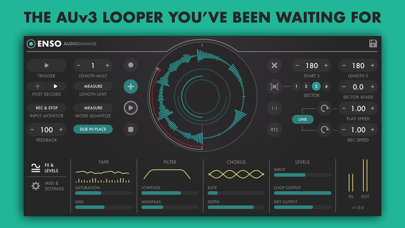
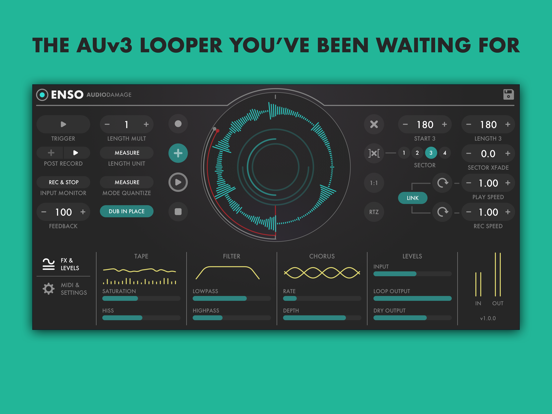
An architecturally unique and sonically characterful looping toolkit for producers and live performers, inspired by both modern looper pedals and vintage tape-based setups, Enso combines elegant and intuitive UI design with a deep but accessible feature set and stellar sound quality.
Enso’s operation will be immediately familiar to users of hardware looper pedals or plugins such as Ableton Live’s bundled Looper. Start playback of the host DAW, hit Enso’s record button and capture your instrumental performance into a loop of whatever length you like, up to ten minutes (five minutes on iOS). Then, without stopping playback, overdub further passes to create layered grooves, complex harmonic textures, or dense, evolving soundscapes.
Beyond those basics, though, Enso takes software looping into new territory. Two Overdub modes configure the plugin for conventional looper pedal behaviour or Frippertronics-style ‘dual tape deck’ manoeuvres, affecting the handling of the Feedback parameter for an endless range of layering possibilities; and up to four Sectors can be effortlessly defined, each with its own start and end points, for on-the-fly rearrangement of the loop.
With Enso, time and motion become truly fluid, as speed and direction are handled completely independently for playback and recording, the ‘through-zero’ bipolar Speed controls smoothly transitioning from forwards to backwards, and vice versa, in real time. Want to record forwards at half speed, while simultaneously playing the buffered loop in reverse at 1.25x? Of course you do…
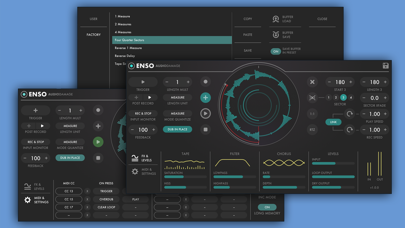
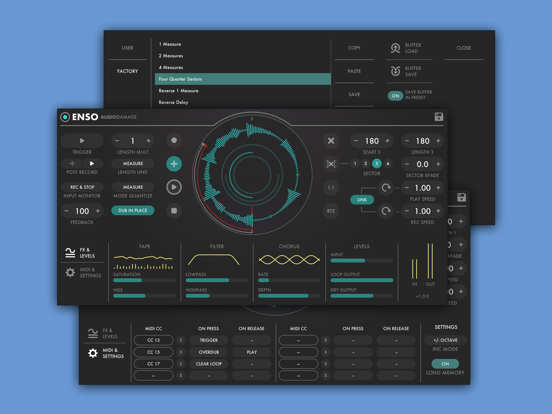
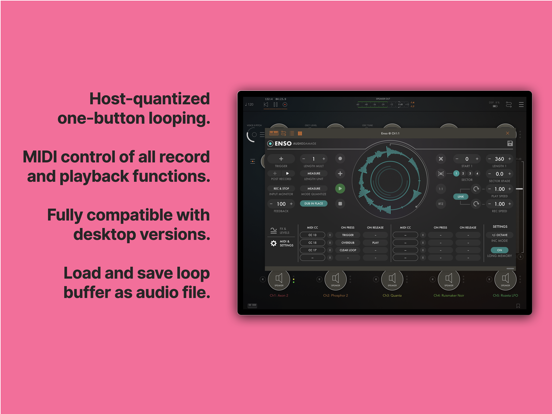
Onboard tape-style saturation, filtering and chorus effects bring dirt, frequency-shaping and stereo thickening to the party; and a comprehensive MIDI assignment system makes it a snap to set your MIDI pedal or button controller up for operation of all Enso’s buttons and switches. With its animated play and record heads, meanwhile, the looping waveform display provides a clean, clear visual representation of the potentially mind-bending temporal acrobatics taking place, letting you get a handle on exactly what’s happening at a glance.
Giving you everything you need for limitlessly creative looping, on stage and in the studio, Enso is one of Audio Damage’s most beautifully realized plugins yet, and an empowering addition to any musician’s arsenal of effects
Enso Looper App Comments & Reviews
Enso Looper Positive Reviews
Great looper, but some wonky behavior...Chiefly that for some reason, at least when loaded in AUM, if you have it on a send channel (or even just as an insert effect), even if you pull the channel fader all the way down, you can still hear the loop playing. I’m not sure if it’s an aum issue or Enso, but I’ve never experienced this with anything else before. Please fix and this would be 5 stars, cause its otherwise great..Version: 1.0
No competition no complaints.Getting this app will give your iOS device super looper powers of devices many times its cost in the real world. A great value and great sound..Version: 1.1.2
Good bye Audio DamageI liked this app, even though I rarely use it. My problem is the excuse of blaming negative customer reviews for price increases. That’s a really poor way to do business. It also displays ignorance of how the market works. Good bye Audio Damage..Version: 1.1.2
This is it.Hands-down the best looper on this or any platform..Version: 1.1.2
Enso update adds stability that was much needed, thanks!This app is now fantastic! I saw potential for it over a year ago, but it was not stable enough to use for my setup at that time. Running Enso in Aum, I was able to load as many instances as my iPad Pro could handle. Today, I was deliberately trying to make Enso crash, but I was able to load 6 instances of Continua each recording into 4 of Enso (24 instances of Enso total.) Previously if I loaded more than a 2-3 instances of Enso, they would all crash and I would lose everything I had recorded. Bravo Audio Damage, now this app is in my opinion, the most useful app for looping on iOS..Version: 1.0.10
Awesome. Could be used more than just loopingThis is a very necessary tool for music production. It is very well designed. It’s main function is for looping but with 5 minutes of record time it could be used to quickly overdub existing recordings without having to switch apps or create projects and extra bounces in your DAW of choice. That comes in handy. My main wish for the developer is to please make a MIDI version of this app with similar features and intuitive design. An Undo button could be very helpful if possible mainly as a failsafe for accidental clears on iOS. Thank you..Version: 1.0
An unbelievable looperAuv3 and a great layout make this perfect for multi app use. I rock an iPad 4 so it’s old but can loop and use AUM with a few apps well. I know loopers are cpu heavy, so I hope they keep it optimized for us oldies (and iPhone 7). The options are great and every option from ambient to Keller Williams style looping this is ace. I do think they could make more colors coded buttons or bigger loop on loop overdub but it’s cool. I guess with midi mapping I can make those on a synth too ehh, sweet. Thanks for really looking into what loopers want you have done well so cheers yawl!.Version: 1.0
AmazingSpend 5 mins reading the manual. It’s short, concise and will pay huge dividends. You will have this thing humming in no time (within 30 mins you’ll pretty much have it down). I say this because I put this gem aside when I wasn’t able to just pick it up and hammer out a masterpiece on day 1. Still don’t have the masterpiece but I do have a lot of fun with this thing! 5 stars for bringing a new workflow to this iOS universe. Beautifully executed.Version: 1.0.15
Perfect for reducing CPU usage in AUMI was looking for a low-friction way to record a couple of bars from a synth in AUM and bounce it to audio without ruining my AUM flow. This app achieves that goal. Just load it up as an effect, set # of measures you’d like it to record, and once it’s done you can remove the synth that was supplying the audio. Make sure to watch AudioDamage’s YouTube tutorial on how to use Enso - some things weren’t intuitive for beginners! After watching the video, I appreciate how powerful this thing is. It does a lot for the price. Update: It looks like this plugin doesn’t work as intended inside of NanoStudio 2. Hard to tell if it’s the plugin’s fault or the DAW itself. Either way, docked a star for it, it’s the one thing preventing this from being the perfect audio looper for me on iOS.Version: 1.0.15
ExcellentThis effects app is excellent and has so many uses aside from simply looping. It’s also very sad to see how many bad reviews that here from people who simply don’t understand how auv3 effects work..Version: 1.0
Guess I don’t have need of one.Since I create ambient music and sound scapes I thought getting this app was a no brainer. But, even though it seems plenty versatile, at the current stage of my music development I can’t find any real use for it. I’ll leave it on my bag of tricks though in case I have an epiphany or something..Version: 1.0
Dream looper for AUMThis is probably the most fully featured looper that I’ve used. Now I can just place ENSO on any channel and loop everything. Best part is that I can use the looper to “freeze” the tracks and free up so much cpu on my old iPad..Version: 1.0
BravoAnother wonderful instrument/tool from AudioDamage. Clear, intuitive interface. Unique looping functionality. This thing is deep. Keep up the great work..Version: 1.0
PerfectMy title says it all. This comment is for the devs. Dear Audio Damage, please make a stand alone version of this, with perhaps four separate loopers. I’d buy that in a heartbeat. Great job!.Version: 1.0
Runs loops around other mapsNow I can’t ask what you’re using on your instagram videos. Bummer. Ace app btw, mate..Version: 1.0
The desktop version has moved to iOS!Highly recommended, very deep, innovative developer..Version: 1.0
TapesloopsoRack effect in your favorite auV3 host and jam along with your mad self, backwards even. Great app from one of the best developers in pro audio, cheers!.Version: 1.0
Got some problems over here.I downloaded the app - but neither AUM or GarageBand recognize the app as an audiounit. Haven’t been able to use it at all..Version: 1.0
Where is AUV3Downloaded and only see it as an IAA plugin, no AUV3 to be found.Version: 1.0.15
Dope looperWould be dope to see it fleshed out as standalone app as well.Version: 1.0
Enso is a fantastic (even more) live performance looper after this update! MUST HAVE.Enso has had a rough start as it is a brilliant app but at the beginning of its journey on iOS it lacked a few key features for mobile performance (mostly quantization stuff, if you had the right gear or setup or workflow, it didn’t matter... but for many of us it was a brilliant tool but cumbersome at best). Now that this has been addressed, there’s suddenly a Looper on iOS that is extremely different to the alternatives and therefore a must have due to its now amazing practicality of use. The cross fading between sections is an amazing feature on Enso and allows your to either have different loops running per sector (with adjustable lengths) or a single loop with a huge cross fade time which will yield amazing ambience results when transitioning to one sector to the other. There is effectively now on iOS a broader choice of Loopers on AUv3 format, which to me honestly meant I hadn’t used Enso since like a few months after it’s release. Now I am thinking I will be using it a lot since my other favorite looper (Audiokit Looper) is amazing but far more robust and cpu heavy since it aims at becoming a full “daw-less” loop station. Both apps are amazing but thanks to Enso’s new update I can now say there is not much of a comparison since they both serve very different purposes. TH-U has a decent looper too and it’s a free app, therefore Enso was updated at the right time as otherwise it would have been simply not a good alternative considering TH-Us is free. However, since not only is Enso far better, but also has the whole sector thing going, it is really a unique looper now that quantization works as expected and therefore a unique tool on iOS every looper-oriented musician should try. I am sure I will be using it a lot now Audio Damage, thank you so much for this, you have really not disappointed at all. As a personal note, I would probably still very much prefer if Trigger was also quantized regardless... it is a fantastic app and in all honesty this probably is for the better as it means you ALWAYS can trigger a function without quantization. It can be useful, just not too much for me (for now, however the cross section fading might lead to me using this more for ambience stuff so who knows). This is definitely a must buy in my opinion, if you want a good looper this is a fantastic alternative. In comparison to Audiokit which aims at being a DAWless looper, you can load several instances of this meaning it can be far more versatile in many regards. I would buy both if you can afford them, and if you can’t... I think it comes down to how you want to loop. Look up some videos to see what you prefer, but you can’t go wrong with Enso or Audiokit anyway. Audio Damage, I have heard the reason behind not bringing Quanta to iPhone and I completely understand it. That being said, if that ever happened I’m sure many of us Quanta owners would be very happy about it. Thank you so much for your fantastic work as a developer and I cannot wait to see what else you’ve got on the works for us! ⚡️👌🏼.Version: 1.0.15
👍🏻👍🏻👍🏻👍🏻👍🏻Doug Woods sold me on this!.Version: 1.0
Inspiring looper playground.Absolutely amazing , creative looper that can be adjusted to match many workflows. Like many high end plug ins, to get the most out of the looper it may take a few YouTube tutorials but is pretty easy to just start getting lost in loops. This is one of those apps I can easily get lost creating a field of random gestural sounds that can later be further processed and sampled. Love the ability to change both the record direction, play direction, speed, fade etc. I can’t believe I can take this with me in my pocket or on the iPad. Insane..Version: 1.1.2
Amazing creative toolAs a longtime user of the EHX Hazarai looper and a recent convert to the Red Panda Tensor, “creative” looping is a major part of my workflow. Enso is amazingly powerful and once you get a hang of the workflow it opens up a TON of oddball possibilities. Stability seems to suffer even with one instance in GarageBand or when you get multiple instances running in AUM or Audiobus, but if you only run one instance in a reliable host it’s an amazing piece of kit for an unbeatable price..Version: 1.0
It’s greatPretty cool. Seriously though, who uses GarageBand lol.Version: 1.1.2
Works with Garageband (but you need to insert it properly)Been reading a lot of previous reviews on this but I have to say that it WORKS with Garageband. Except this isn’t an AUv3 instrument. Apps like this are NOT added from the AUv3 menu. They are similar to 3rd Party Effects. You need to select an existing audio or instrument track (or add a new one), go to “Plugins and EQ” - which is where you add effects like reverb, and EQ, tap Edit, then look for “Audio Unit Extensions”. Enso will be listed there..Version: 1.0.10
This audio unit won’t load inside hostI have a 2018 iPad Pro. For some reason, this audio isn’t detected inside Cubasis 2, GarageBand, Audiobus, or BeatMaker 3. I’ve tried restarting the apps and the iPad itself. Am I missing something ? I have Quanta as well, and it works fine..Version: 1.0
Brilliant looperIf you like looping frippertronic style, this is it. Go check the demo walkthrough on the website for a full explanation of everything enso does..Version: 1.0
Free International Money Transfer 💸Enjoy high maximum transfers into more than 20 currencies while saving up to 90% over local banks! The cheap, fast way to send money abroad. Free transfer up to 500 USD!Version: 1.3.3
What do you think Enso Looper ios app? Can you share your thoughts and app experiences with other peoples?
Please wait! Facebook comments loading...