Music City Apps
Nashville Numbers Customer Service

- Nashville Numbers Customer Service
- Nashville Numbers App Comments & Reviews (2026)
- Nashville Numbers iPhone Images
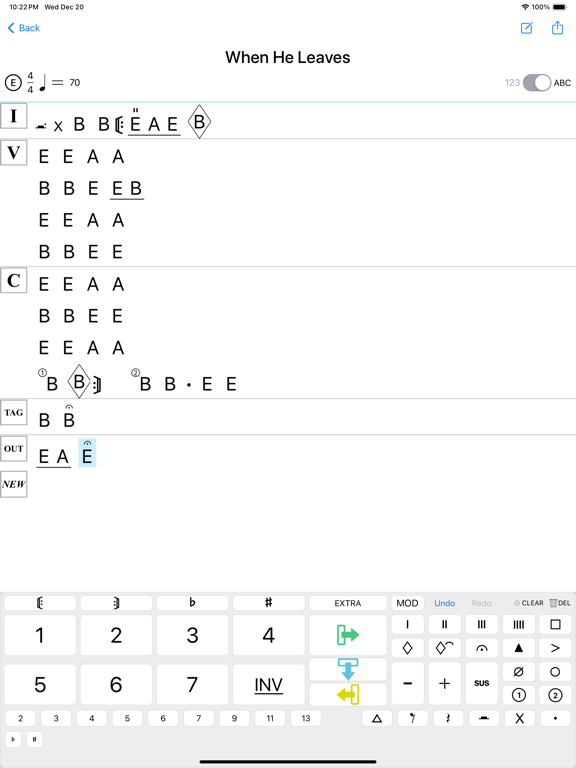
- Nashville Numbers iPad Images
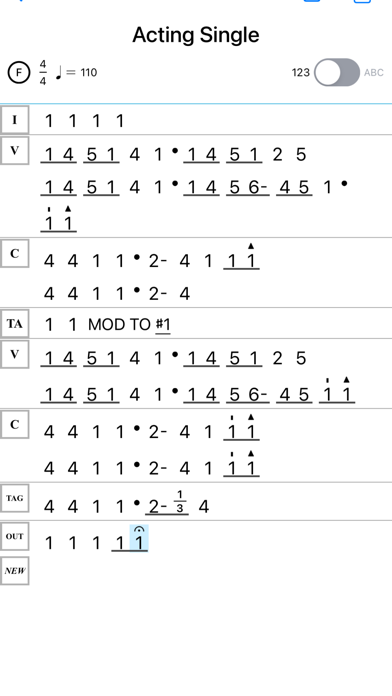
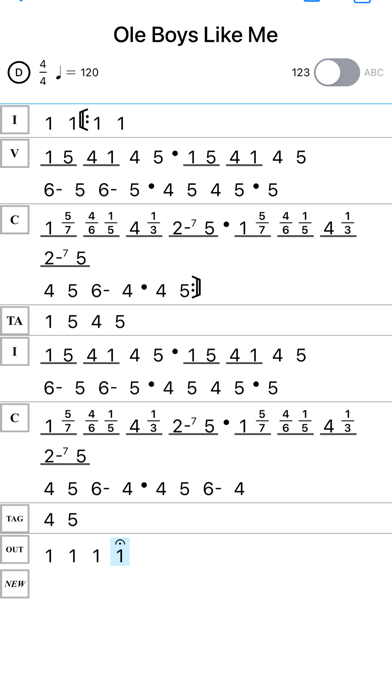
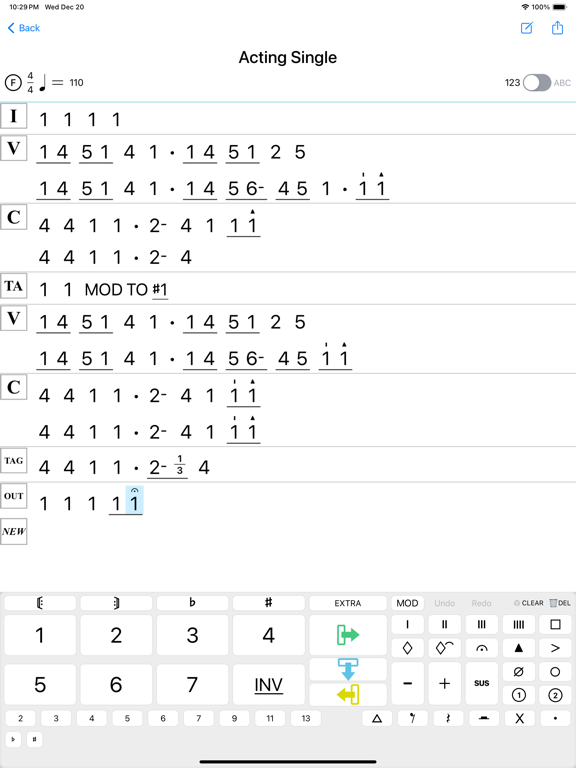
Music notation is made simple with this shorthand system which puts chords into numbers 1 though 7 and streamlines the page into a simple and clean format. Forget about pencil, erasers and photocopy! This app combines technology with tried and tested methods; allowing users to create song charts with the ease and speed of pen and paper.
For over 60 years, the Nashville Number System has been the standard for musicians in live performance, recording sessions, and teaching environments. The published book has become required reading in many of the most prestigious music schools, including Belmont, ETSU, Lee and Liberty University, while also being required reading for anyone when they get their first gig in music city.
This innovative app brings the must-read instructional book by Chas Williams, with well over 50,000 copies sold, into our digital age by seamlessly allowing charts to be written on your digital device!
Please give feedback of a 5 star review, or contact us directly. If you’re not happy with the app, we will issue a full refund of your purchase price (in exchange for not writing a bad review) and insure your issues are reviewed and fixed. You can keep your version and be notified when an update has been made.
Thank you for your business. My name is Leland and I’m on the development team along with Chas. My personal email is [email protected] so you can contact me with issues or great musical stories!
Chart Everything My Friends!!!
Nashville Numbers App Comments & Reviews
Nashville Numbers Positive Reviews
Truly wonderful!I have spoke with the developers a few times and they have truly created something wonderful. Is it buggy? Yes. Are they always taking feedback to improve? Yes. I submitted a suggestion yesterday and it is already in the cue for an update. I do wish we had updates more frequently, but this is created by developers who are not full time developers and this is a side project from their main careers. However, this reason is another for why this app will blow you away. I use it and then transfer the PDF to ForScore to store and annotate and it’s a wonderful combination! Couldn’t recommend it more!.Version: 1.6.4
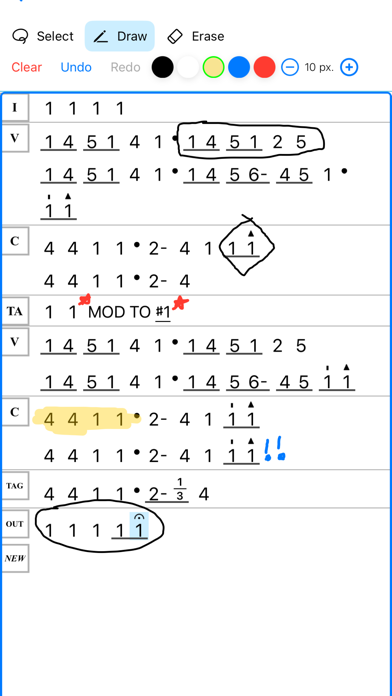
Makes Clean Charts, Fast, But Poor StorageAs a full-time Nashville instrumentalist and arranger, this app has been handy for making easy-to-read charts using classic Nashville Number Notation, on a basic level. The interface is easy to use, mostly, especially for arrangements without too many twists and turns. Overall, this app gets the job done for basic charting. The app is almost as efficient as pen and paper, for an experienced chart-maker, but it’s not quite there, yet NNS lacks in a few ways: - Instead of offering text-based notes for written cues etc, NNS only offers freehand “drawing tool” style annotation, which appearz sloppy and difficult to make legible— easily inserted text windows would vastly improve this app. - Organized Storage is lacking here. Charts are exclusively listed alphabetically, and there is no option to make folders or lists for specific artists, venues, etc— This feature is glaringly missing, and it’s puzzling why something like this isn’t present for organizing users’ charts. I plan to continue using NNS. However, it’s no substitute for pencil & paper, the gold standard of chart making. Hopefully this app can continue to improve, because it’s very close to being truly amazing.Version: 1.6.4
Brilliant!!!This app is tremendous! I can literally chart on the fly quicker than with pen and paper. The developers have been so responsive in answering my questions. I’m new to NNS, after decades of charting tunes the old way. Thousands of gigs and countless rehearsals later- you CAN teach an old dog new tricks. The system has been a revelation to me, and the app has depth and simplicity at the same time. That’s a lot to ask. This app would be a bargain at 5 times the price! Congrats!.Version: 1.6.4
Great AppReally loved charting with this app, was super fast. Had some problems lining up consecutive lines when the types of chords used are different. Ie if your first line has no accidentals or split bars, if you need those in the following line it shifts where your measures land and is out of sync with the previous line. Had a few Nashville guys tell me this was harder to read because the spots where the measures land kept shifting. Would be awesome to be able to make more specific spacing adjustments in a future update so you can manually line up measures between lines/sections..Version: 1.6.4
FinallyI just started using the app this weekend and it’s the only thing I’ve seen that actually works for the number system. I showed it to a friend who’s a long time studio guitarist and a charting master and he was very impressed. The only issue I’ve found is while it’s very intuitive I haven’t been able to get different bass number in a chord like in the samples. I’m sure it’ll be easy once you found out how. Maybe ad that to the tutorial..Version: 1.6.2
Copy/pasteIve really wanted a NN app for a long time and stumbled on this one. Great idea but charting is taking me so much longer with it. Can only copy/paste by starting a new section and pasting into that new section making the chart look confusing if I for instance just want to copy a 4 bar phrase to use in the same repeating chorus without using repeat signs. Would love to just be able to long press a bar or 2 and paste them wherever I need them. As is it just seems much quicker to chart on paper and take a picture. Am I missing something?.Version: 1.6.4
Copy paste bugJust bought this app today. Using it on a brand new iPad Pro 12.9”. The app is good but there is a significant bug with the copy paste section feature. It seems to work for a bit then crashes the app. copy paste section saves a lot of time when it works. a deal breaker for me until it gets fixed. If the app owner wants I can send a screen recording of the issue.Version: 1.6.3
Thank You!Finally an App that gets it. I’m a professional musician in Nashville that needs to be able to make charts quickly using he Nashville number system. This is it! Very intuitive, and saves so much time compared to old fashioned paper charting and scanning. Also the ability to instantly change it to traditional chord charts for those who prefer copies in that format is priceless..Version: 1.0
Pretty good... but needs improvedIt’s definitely a start, but no notation available for drummers. You can’t save as you go so if you back out it won’t have the whole chart you just did. Also if you want to space out your measures more you can not without a question mark being in there. I can see some potential but still needs work. If you’re into printing charts and don’t need standard notation I.e. as a drummer this is probably a great score for you. However it was my intention to convert to all digital. I’d still say it’s worth the small fee..Version: 1.1.2
ExcellentNew to Nashville in 1991 I met Chas and learned the NNS from his book. Last week, nearly 30 years and countless charts later I discovered the app. Excellent! Took about 15 minutes to figure it out and another 15 to write my first chart. On behalf of myself, and everyone who has to decipher my charts, THANK YOU!.Version: 1.6.2
A couple featuresReally great app, just missing a couple of features that would make it perfect. Please add more traditional notation on the second page! Would love to be able to write rhythmic notation above a Nashville number. Quarters and eighth notes (dotted and undotted) and triplets would be awesome and so helpful to include in more rhythmically complex songs. Thanks!.Version: 1.6.4
Essential ToolThis app is the perfect for making neat charts quickly! Love how easy it is to make into a PDF, and the switch that converts numbers to letters makes it even more versatile. And... the interface makes it possible to chart in real time! Big Win for Musicians here!.Version: 1.0
At long last!!!I have literally been waiting years for this app to be released, Well, it’s finally here and it exceeds all my expectations! Super easy to use, intuitive and logical. I can’t wait to get started charting out all of my material. This one’s going to be a game changer!.Version: 1.0
Multiple beats per barHow do you connect multiple beats as one bar? Also it would be nice to share charts from and musician to another. So you open within the app.Version: 1.2
ICloud & MacOS CompanionI’ve used this app a little and I like it. I’m not a studio whiz and I don’t use NNS everyday, but iCloud integration would be huge, especially with a true MAC companion app (this version works on my M2 MacBook), so I can work off of whichever device is closest, without having to retype the song. Thanks for this!.Version: 1.6.4
First rate for quick number chartsSuper handy, intuitive for quickly & clearly making & sharing Nashville Number charts. And it’s getting better with every update..Version: 1.4
Really well done!Finally, there’s an app for that!! And it works great! Now all we need is a place to post and share NNS files. Then this app will get 10 stars! :).Version: 1.6.3
Pushing the envelopeThis app is easy to use and very powerful. The Number System itself is as pros know the best way to quickly compose and refine, and this makes it easier than ever.Version: 1.0
Great app!This app is perfect for writing quick charts. It is very intuitive. The developer is quick to answer questions and provide help too..Version: 1.4
Easy PeasyThis app was very easy for me to use and begin charting with. Just get in there and start pushing buttons. Very useful…👍🏻👍🏻.Version: 1.6.4
This is awesome !First try and it’s very intuitive. How do I stop it from underlining everything and where’s the highlighter button.Version: 1.6.3
Charting music made easyWow this app is so easy to use. For me it’s faster than pen and paper. I recommend this to all my studio musician friends!.Version: 1.1.4
Major/minor notationHi. I am not seeing a way to notate major(M) or minor (m) chords when they are accidentals. I am using annotation for now but that is tricky and messy. I am missing something simple? Thanks!.Version: 1.6.3
Great Chart app!I’ve tried several charting apps but this one does what I need with a very simple interface, I’m very happy I found it!.Version: 1.0
ExcellentSo glad the App is finally available..Version: 1.0
No help in appI have a basic understanding of the NNS but the app is usable because the help sparse. I guess it’s supposed to be intuitive but it’s not intuitive for someone like me who’s not totally steeped in NNS. It needs a thorough user guide..Version: 1.6.4
So far so good.In my opinion this is a really good app. Especially for the price. However, I think it needs a line to put the artist. -Lenny.Version: 1.6.3
Super FASTGuys I can’t tell you how much time this has saved me,,,.Version: 1.1.4
Very CoolThanks for developing a simple way to write chord charts. This looks it will become my favorite “go to” app!.Version: 1.0
Yay! This is amazing!I’ve been waiting and looking for an app like this! So glad it is finally here! Great app. THANK YOU!,,.Version: 1.0
Awesome App !!!Just what I’ve been looking for !!.Version: 1.0
Needs Help.I love this app, but I need to use it in landscape mode! I can’t seem to flip it..Version: 1.2
Nashville NumbersVery easy to use. Great app..Version: 1.0
Great app! Needs a few minor functions…UPDATE: I’m adjusting my score in advance of the updates I mentioned before. Why? The developer has responded. They are clearly listening, and want to make a better/more functional app. Honestly though, if you currently use chord charts and don’t know much about numbers go read about it. There’s a great article on Sweetwater titled “Nashville Number System Demystified” for a good start, but there is more to learn. It’s life changing for any stage musician. Especially a hired gun like myself, playing the same songs for different artists in different keys. I started charting in numbers this year, and when I found this app a whole world opened up. Is it perfect? Not quite yet. But it works. And it’s the best option available by far. Highly recommended. OLD REVIEW: I really love this app. It’s my go-to for creating charts. Very intuitive and easy to use and I would highly recommend it. It would be nice for some iCloud back up options to be added so charts created on my phone will automatically be available when I switch to the iPad. For the time being, sharing it to myself isn’t that difficult. I’d just hate to be on stage, needing to reference a chart, and then realize that I forgot to copy a song over… The main function I would like to see added is not so much landscape mode, but to be able to use the side-by-side function of the iPad (in landscape mode). This way I could use a music app simultaneously and pause/repeat sections while creating charts without having to switch back and forth between apps which is distracting when trying to count time. Additionally, my iPad Pro is usually attached to a Magic Keyboard, which requires the tablet to be horizontal and doesn’t have a portrait option..Version: 1.6.4
Here We GoGreat app. Well done y’all!.Version: 1.0
ExcellentGreat app - just what I needed..Version: 1.0
Great App!Great app!.Version: 1.6.4
Great appGreat app!!.Version: 1.0
Free International Money Transfer 💸Enjoy high maximum transfers into more than 20 currencies while saving up to 90% over local banks! The cheap, fast way to send money abroad. Free transfer up to 500 USD!Version: 1.14
What do you think Nashville Numbers ios app? Can you share your thoughts and app experiences with other peoples?
Please wait! Facebook comments loading...