上海轮廓科技有限公司
Bambu Handy Customer Service

- Bambu Handy Customer Service
- Bambu Handy App Comments & Reviews (2026)
- Bambu Handy iPhone Images
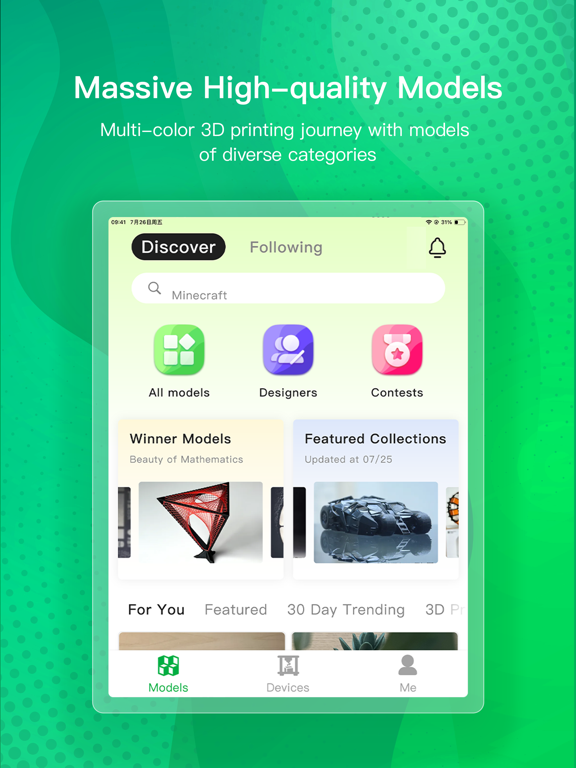
- Bambu Handy iPad Images
Remotely control your Bambu Lab 3D printers, explore MakerWorld’s vast library of free models, and print your favorite designs with one tap!
Remote Printer Control
- Remotely operate the machine to start and stop printing whenever needed
- Get real-time printing status and resolve errors promptly
- Access to learning resources and step-by-step instructions to fix printing problems
- High-resolution live view of the printing process
- Automatic records of the printing process to help diagnose printing failures
- Automatic timelapse video of the printing process to share with others
3D Model Discovery with MakerWorld
- Explore countless creative models and enjoy high-quality printing for free
- Find trendy works and customize your unique models with MakerLab
- Like, collect, and print in one tap to bring your ideas to life
- Interact with makers and redeem credits for Bambu products
Bambu Handy is a free 3D printing platform. We are open to any feedback and suggestions. Whether you are an expert, hobbyist or newcomer, we would like to grow together with you. Contact: https://support.bambulab.com/en
Bambu Handy App Comments & Reviews
Bambu Handy Positive Reviews
AWESOMESo I’m 12 years old and last year I saved up every penny I had and bought my bamboo lap. A1 kudos to the A1 awesome printer haven’t had any problems fantastic job same thing for the app. My favorite part is all the contest around summertime I’ll go to the beach with my familyand labs will have a little contest surrounding about beach objects so like little shovels and pale and stuff this is so awesome to see because a lot of professional qualified people wanting to win like money or something or a prize will make a bunch of stuff out there for free that I get to benefit from and now those models are just there forever the contests are so clever cause they encourages people to make stuff that they wouldn’t normally make with hopes of a reward you can find pretty much anything you want to print. I’m not very handy and don’t have a computer so I’m not able to use other websites so all I’m using is bamboo handy and it’s so awesome if you’re thinking about getting a 3-D printer or download this app for someone who does please you can find literally anything on here and if you can’t with a minimal effort, you can find it somewhere elsebut I haven’t need to bottom line. Awesome printer awesome map kudos to all the awesome people working at bamboo labs love ya..Version: 3.6.0
Great serious beginner tool.If you are serious about printing and have the money to invest you are sure to get it back with your first ten prints. The product is very very easy to build and assembly is easiest when you use the manual off on a tablet and can watch a you tube video on the how to assemble. There are items not included in other similar models and steps you can forgive but overall the process is the same. Creating after feeding each tube is extremely easy. This is my second printer. The first was an experiment that led to an instant addiction. So far everyone seems to agree, your first one leads to a better one. I am about to check only overnight product. A toy for my daughters. During my wake hours I’m busy creating and need to work on my Cad skills to make what I want but so far the last 24hrs have exceeded my expectation. Bambu labs is exactly what I dreamt of when I considered a second printer, and Black Friday discounts are the best. Compact and quiet this is a work horse for me. I hope the review works. I think the extra parts are for creating stuff. It seems to be what everyone is doing with it. Best of luck, happy building!!.Version: 3.10.2
Best software everGoing from a Frankenstein hand me down ender 5 - that constantly needing to fix/adjust not to mention using multiple firmware/softwares for a single print just for it to fail. To a P1S with AMS. Best decision I’ve ever made. The software alone is worth every penny, in my opinion. The fact I can be anywhere and think of something I want to print, find a model, send print, all from the convenience of my phone is incredible. 10/10. Bambu is the one and only brand that I ever recommend to others regardless of experience level. When People say “bambu is a little on the expensive side” like yeah sure it is but it’s one of those things where you get what you paid for and it’s everything you could want in a printer, quiet, convenient, dependable, reliable, and so so easy to navigate even for beginners with zero experience. Thank you Bambu for making every single part of the process as simple and clear as possible for your products and us as users. Your product and services help getting into the hobby the best experience.Version: 3.4.2
A Must-Have App for Bambu X1 Carbon Owners!I'm thrilled with the Bambu Handy app for iPhone! As an owner of the Bambu X1 Carbon, this app has become an indispensable tool for me. Not only does it allow me to seamlessly view the prints from my Bambu X1 Carbon, but the app's latest update has truly taken it to the next level. Previously, I had issues viewing the printer's built-in camera through the app, but the developers have gone above and beyond to address this problem. Thanks to the update, the camera viewing feature now works flawlessly! I can't express how grateful I am for this improvement—it's made my experience with the Bambu X1 Carbon even more enjoyable. The user interface is intuitive, and the app runs smoothly without any hiccups. The Bambu Handy team has done an outstanding job in creating an app that perfectly complements the Bambu X1 Carbon printer. Thank you so much to the Bambu Handy team for your dedication to excellence and for continuously working to enhance the app's features. I highly recommend this app to all Bambu X1 Carbon owners. You won't be disappointed!.Version: 1.0.13
The Best in the IndustryAfter trial and error, frustration and defeat, despiration and failure with several of the well known brands of 3D printers I was recommended to give Bambu a try. What the heck, my expectations by this time were very low. Upon completing the set up I started to print a football team logo that took about 3 hours. I turned it on, sent the file and just kinda forgot about it. When I finally looked at the completed print I was amazed, wow. None of the over lapping, voided spots, or stringy print. I started my second print and all perfect. This printer has been going on non stop and a week into this printer I am still in awe. Hands down Bambu is in my opinion the best of the best when it comes to 3D printers. Again, this is coming from someone who has tried almost a dozen different company name brands that are out on the market. I’m far from a being any expert, but this overall experience with Bambu has made it all very easy and very fun to learn and print. My hats off to Bambu!.Version: 3.7.0
I’ve been printing a very long time and I love my Bambu machines.Don’t know why this is controversial but I like Bambu Handy just fine. People complain about just about anything these days and 3D printings no exception. There are tons of options out there from tons of manufacturers. I started long ago on RepRaps, had a very early Prusa, then a MK2, etc etc; I’ve owned 15 different machines because I like tinkering. At this stage in my enjoyment of the hobby I absolutely enjoy the Bambu machines just…well, work. I spend more time printing, less time leveling, fidgeting with gRBL, adjusting pinda probes etc etc.. I’ve done enough of that. So I enjoy Bambu and I enjoy the app. I wish it could be a bit more robust; to allow slicing on it etc but understand that’s a limitation of the phone OS etc etc. Still, I enjoy starting and monitoring prints from around the house, in the yard etc.. It’s as close to a consumer grade machine as I’ve found, personally and like I said, I’m good with that..Version: 3.6.0
Beginner 3d - easy to set up and get goingBambu Handy makes the transition from the unknown of even turning on the machine to the felling “you got this! Go for the next step!” The free models to get you going really helps. Allowing you to see what the print will look like with the “preview”, allows me to print with confidence. As you print it double checks with your material type and color before you print. The live stream hands down a favorite. The ability to start a print from the app when you’re not at home is really cool. Then once started the ability to know see it live (yes noted above, dipped on that one twice). From the app to the printer to learning the new Bambu slicer….their app adds a level of confidence I was not expecting. Thank you.Version: 3.14.0
Great app but always room for improvementBambu handy is obviously a must have for any owner with a Bambu lab printer, the application has its limitations more specifically in the models section where you can choose models to print and slice from the app. The only downside to the models and remote slice/print fall in the cataloging as not many options are displayed when compared to its desktop counterpart, this isn’t the end of the world as being able to send a print from your phone is a huge advantage by itself. The other side of functionality in the app comes in viewing your print remotely and being able to control the settings from print speed, fan speed and pause/cancel. This side of the application isn’t perfected yet either with issues in controlling the fans and every so often failure to bring up the live camera feed. All of these which can be easily fixed with enough time, in all I use the app every day when printing and am very happy to even have software like this that exists. Thank you Bambu lab!.Version: 2.6.0
Great app, super useful but…This app is actually really useful. Comes in handy but has some features that need to be added for it to be a real tool for the printers. I hope Bambu sees this. I know they listen to their customers input. I’ll start with the things I like, the new update allowing you to change the AMS while printing is beyond amazing. AMS control and viewing is great, good alerts and allowing us to have touch screen controls with the P1S is so much easier than using that crappy screen the P series come with. Now my cons or things that need changing. First off please allow us to get notification tones. The only app I want an alert for notifications doesn’t have anything. Use default apple tones i don’t care. Just give me alerts so i know when prints are done or something happened. Second, multiple build plates. I can’t count how many times I’ve started a print with multiple plates on the PC app to finishes a plate at work. Then go to try and print the next plate only to see my only option is to reprint the same plate. Last complaint, is when you open the camera. Almost every single time it says “there are 2 instances in use, please close one”. Not a breaker but kinda clunky and should be polished up and not error out everytime you first launch the camera. Other than that the app is an amazing great and useful app. Must have for any Bambu user!.Version: 2.15.5
Let’s be real, there’s nothing betterThese reviews often overlook how Bambulab stands out from the competition in both printers and apps. One of the standout features for me is the ability to monitor my prints through the app’s live stream without incurring any additional monthly fees. This level of convenience and transparency is a huge plus. Additionally, I appreciate the option to browse and access various models for printing at no extra cost, which is a fantastic bonus. Having used several 3D printers over the years, I can confidently say that Bambulab operates on a different level. The combination of advanced technology, user-friendly app features, and overall functionality makes it a superior choice in the 3D printing space..Version: 2.13.0
Worked better before the last update.Love being able to print from my phone. I have several other brands of printers and that is definitely the deal breaker for me with a printer. I work a lot and need to be able to start prints when I am not home and check on them. The app worked great for the most part before the last update. Now mid print when I am trying to check on the print when I open the app it often says there is nothing printing or will be stuck at the same spot I last looked at it or it says offline. I refresh it 2-3 times just to get it to connect. This was not an issue before I updated the app. I am also not having issues with my internet as everything else works fine and I can get it to work after several refreshes..Version: 2.8.0
⭐️⭐️⭐️⭐️⭐️ Fantastic Companion App for Bambu Printers!Bambu Handy makes managing 3D prints incredibly easy and convenient. The live camera feed, real-time notifications, and remote start/stop features work flawlessly. I love that I can monitor prints right from my phone, even when I’m away from my printer. The interface is clean and intuitive, and connecting to my printer took only a minute. I especially appreciate the ability to check filament status and queue up jobs without needing to be at my computer. It’s the perfect companion to the Bambu Studio software and my P1S printer. If you own a Bambu printer, Bambu Handy is a must-have — reliable, fast, and full of smart features that make printing feel effortless. Highly recommended!.Version: 3.7.0
Fantastic printer management app!Bambu Handy is the best 3D printer companion app I’ve ever used! Super simple, fantastic easy to understand and use UI, every functionality you could need and then some. The only thing it’s missing is a better file management system that lets you search the files on your printers SD Card and the ability to sort them into folders, etc. but then again Bambu Slicer is also missing that functionality. Beyond that the app has pretty much everything you could ever need. Bambu Handy is honestly a large part of why I prefer using my Bambu printers over my numerous Creality printers with octoprint , it just works well rarely has any problem connecting to the printers and is never unresponsive..Version: 3.4.1
Absolutely amazingThe Bambu Handy app has been an awesome addition to my 3D printing setup. It’s fast, intuitive, and makes managing prints ridiculously easy. I can monitor my printer in real time, check on progress from anywhere, and even make quick adjustments without needing to run back to the machine. The interface is clean and well organized, and everything just works the way it should. Notifications are instant, camera streaming is smooth, and connecting to my printer was effortless. I also appreciate how the app ties into the whole Bambu ecosystem—super convenient and really polished. If you own a Bambu Lab printer, this app is a must. It genuinely makes the whole printing process more efficient and enjoyable..Version: 3.10.2
Good AppIt’s a pretty good app, easy to connect and has never had connection issues. The app it self is pretty straightforward and easy to use with access to a selection of prints from very talented people. The only thing I wish it had was a more complex pre print set up, as of the current state all you can do is very limited compared to the desktop slicer. I would like to see features like being able to make gcode pauses, change the filament settings from the app instead of the desktop slicer, customize the supports and support painting, and being able to upload a stl file from your phone into the handy app to print instead of using the slicer. Although these might be very difficult to implement, it’s not a necessity and the app is still great..Version: 2.14.0
Love the P2S!I started with a large 3d printer years ago. At the time is was top of the line, open and slow. It died and we waited before pulled the trigger. It was a little bit of a change to consider a Bambu product due to smaller size but with the ability to have a great AMS and software suite that was easy enough for my wife to have the confidence to use it was a godsend. In 9 days we have logged over a 100 hours. My wife just loves it. She bought over 1000 dollars in Filament after only two days of printing. So I can honestly say it was a great investment on many levels. The fact that the software is easy to use for varying levels of printing is great. My wife just loves it..Version: 3.10.2
You’re not only buying quality, but also peace of mind.I recently got a P1S as a Christmas gift and have printed twice as much stuff in 3 days as I did with my Ender 3’s lifetime. You literally just load or keep the current filaments, select or upload a model, and click print. It feels like ordering something online and having it made in a couple ours. That’s the best way to describe it. And it works EVERY SINGLE TIME. Not a SINGLE print has failed me. And everything comes out perfect for my projects and models. It’s worth every dollar and the added camera and smart sensors make this thing almost impossible to mess up..Version: 3.12.0
Works great but lack of customization of objectsI have the bambu lab a1 with the ams lite works great only complaint is the ams lite is not enclosed but not the point of review I wish the app would have a little more customization with prints instead I have to go on the computer and use maker world to change infill percentage pattern and if I want more then one object on the plate but can’t expect much more at least coming from a printer that was extremely slow never could use my phone to start a print also had to use the computer and I had to unplug the sd card bring to cura and cura sucked at getting how long a print would take right and it wouldn’t tell me how long is left so huge upgrade coming from the elegoo Neptune 3 pro.Version: 3.4.2
Notifications StoppedSo the app is indeed handy, but somewhere between my purchase in May and July, the app stopped notifying me of errors (like spaghetti detection, front cover falling off, any AMS issue) while printing. It now only gives me a notification when a print is finished or if I have cancelled the print. This is a major pain and has already caused a lot of frustration and lost time. Somewhere in either an iPhone update or a Bambu Handy update, these crucial error notifications were lost. Bambu Lab, if your reading this please update this app so that we can see these crucial notifications again. I have seen people complaining about this issue on Facebook as well. Note, I have an iPhone 11 with the latest iOS and most recent Bambu Lab download..Version: 1.2.5
Font Too Small in New Update, Otherwise: Good AppBambu handy was fine for monitoring and printing 3-D projects up until now. But the latest update reduces the font size of everything in the app. And there’s apparently no way to change the size of the display. That’s my only complaint. Please add a way to change the font size. Otherwise, the app is great for monitoring your print jobs—Turning on and off the light and the fans and registering the filaments in the AMS. In fact, if I could use bambu handy for all print jobs (loading .3mf files) and not just makerworld projects, instead of bambu studio, I would. Bambu studio is difficult to set up, buggy and hard to control at times..Version: 3.12.0
It has everything I need!It has everything from tools to toys! Thousands of amazing models made by talented people! I would recommend this app to people who want a mobile 3D printer slicer where you can print whatever you want. If you want to tweak any models you find you have to download the computer software, but that’s also easy to use! Overall this app is amazing and has made my 3D printing journey so much easier, I used to have a Creality printer with the Creality slicer but that was kind of complicated for me, but Bambu Lab printers are so much easier to use and the app is just perfect for me. Thanks!.Version: 3.21.0
X1C Incredible PrinterThe X1C is an incredible 3D printer, and I couldn’t be happier with my purchase and my experience with Bambu Lab. I first tried 3D printing years ago, but the technology just wasn’t where it is today. I ended up frustrated and gave my old printer away. The X1C, however, has completely changed the game for me. It’s practically plug-and-play—you can start printing right out of the box and learn as you go. I’m constantly picking up tips and tricks from other users, which makes the journey even more rewarding. One day, I hope to upgrade to the new H2, but until then, I’ll keep dreaming—and continue loving my X1C..Version: 3.4.1
Great appI’m pretty new to 3d printing and I recently got my first 3d printer a while ago. I was pretty worried about the setup if it was going to be hard but it’s actually very easy! Also I LOVE makerworld… it’s free and i haven’t experienced anything happening wrong with my prints. You can manage your filament(s) easily and If something goes wrong, the app will send you a notification so you can stop it even if you’re not home. I haven’t really tried out the other features yet but ik they are all great! I’m definitely giving it 5 stars, its a great app for beginners and it’ll make you addicted to 3d printing 💀💀💀.Version: 3.15.0
Works greatI’ve been using it for a few weeks now and honestly the app is extremely easy to use for printing. The Con, the controls are presets with a phone or tablet and you cannot make the same modifications as when using a computer. So if you want more modifications you have to use the computer app. The other issue is camera it’s super delayed of just straight up does not work if you want to try and see how things are proceeding when you’re not at the printer. One major pro is you can click on designers of models when using the app on a phone but the same does not work when using the app on the computer, why is this? No idea but it’s great to be able to go to a designer’s page rather than having to search through all the models just to find what this designer has out there. Overall, I’ve found the app to be great for beginners to learn basics. Easy to use, control and print designs from the system. It doesn’t overwhelm you optimization and keeps it simple so anyone can use it to print models..Version: 3.9.0
Any printer Bambu printer works very well with thisThis app has helped me start my small business of selling fidgets at my school by being able to show people what it will look like and has helped people trust me and I because of this app I have made just under 200 dollars of profit. I strongly recommend this for any one that is trying to start a small or large business especially teens with creative minds. The printer it’s self cost me 200 dollars so it is in the price range for some one that just wants to make some extra cash and it’s also a very good Christmas present. Hope this helps!.Version: 3.11.2
Bambu Handy is truly an excellent supplemental appWhile I would love to have even more features in Bambu Handy and even selfishly desiring features that should probably do not belong in a mobile app. I have to say the existing features, control and oversight this app gives me for the printing process on my FDM printers is truly awesome. It’s definitely one app I know I can depend on. Thank you BBL!! p.s. I would be really nice to be able see if supports are enabled for a model from MakerWorld, and maybe even be able to set basic support settings for the model in the app before sending it to the printer..Version: 3.6.0
Exceptional with issuesIt’s the best I’ve ever used but there are things that need improvement. Finding and installing profiles for new filament is counterintuitive. I recently found a tuned profile for a filament I use a lot. It popped up on the screen during a job. I didn’t want to interrupt the job to install it. It warned me that it would. Not sure why. Like it was expecting to change filament mid job. Once the job was done, I haven’t been able to find it again. Similar things like this pop up frequently. I’m sure it’s fine if you dedicate a huge amount of time to printing but I don’t. Overall though it’s by far the best I’ve used.Version: 3.8.0
New Update blowsI used to quite like this app. It doesn’t have landscape for iPad, but it’s still quite easy to use and I can monitor my printer. BUT! In the new update, the browsing feature changed and it’s awful. You used to just click a model and view it, you know, the logical interaction literally everyone else uses. But now, when you tap a model, it opens an additional browsing page where it also shows similar models. So basically the clicks for EVERYTHING have DOUBLED. I hate it. If I want to browse “related models”, the way it used to work was fine. I shouldn’t have to essentially confirm my selection just to view a model page..Version: 2.18.0
Overall, great appThis is my first, and only, 3d printing app and my first brand of 3d printers. Almost every part of it was easy to understand and was (mostly) simple to use as a beginner. One problem I HAD, was that filament got stuck in the printing tube thingy. It took a lot of help from my friends and just pure luck to get it out. It would be nice to see tutorials on these things because most tutorials don’t actually tell you what to do. Then again tutorials are kinda out of their control. Besides that ONE thing, it’s by far the best and (somewhat) beginner friendly app..Version: 3.6.0
One Thing ThoughThis app is obviously super user-friendly and phenomenal in 99 out of 100 ways… But if the developers happen to ever come across this comment, please please please… Can you just add the ability to resize the models in this app? Like we can do it if we’re on the computer version of bamboo studio, but can’t do it through this app. And it would just be super awesome if I didn’t have to go fire at my computer and jump through all those steps in order to just make the model slightly bigger or smaller or whatever..Version: 3.6.0
Amazed with suggestionsOverall it’s simple. The concept of making a platform for their community to access and making it simple is a really good idea. I would however ask the option of still being able to open device page while viewing prints, instead of having to going back to the models homepage in order to see the Device page. Basically an easier ways to navigate back and forth between pages instead of having to go back..Version: 3.8.0
Should have done this years agoBambu Labs is just fantastic all around. Their printers are like a luxury car. You pay more but you are paying for reliability, consistency, and a better experience. I used to waste hours a week adjusting my old printer. Now, I just hit print. I have recommended Bambu Labs to dozens of people. Their app and software is so easy to use and very intuitive. Love that I can monitor the print remotely and even stop it on the very rare occasion the print fails. No more wasted material and no more wanting to throw my machine at the wall..Version: 3.6.0
Almost great.I’m really impressed with the unit and the app overall. When printing an item that requires multiple plates, instead of just telling you your item if complete - when printing plate 2 of 3 - it should tell you plate 2 of 3 is complete, advise you to remove the item, and with one click, start printing plate 3. I shouldn’t have to go back into the app, go into my printing history, locate the item, find which plate should be next, and go through several clicks to print the third plate. I would also like a toggle to have imperial measurements for temperatures in the app..Version: 3.15.0
Wonderful! With one caveat…This app has single-handedly given me a new hobby. I’m obsessed with waking up to a long print done perfectly. Tons of incredible creativity at your fingertips! All that aside, there’s one MAJOR FLAW in your app. Sharing a review with photos rarely works! I always have to try at least 10 times before it will successfully allow me to rate any design with photos. It crashes and freezes even selecting the photos. This is crucial to our generous creators, and needs to be rectified. Thank you. Happy holidays!.Version: 3.10.2
I LOVE BAMBUIf you’re thinking about getting a 3D printer get BAMBU I used to have an elegoo and it broke the BAMBU is 10x better and the app makes it so much easier to find things to print and check the progress on what you’re printing I very highly recommend getting a BAMBU printer ( I personally use the A1 printer because it’s not so expensive as the other printers and it can print 4 colors in one print) I keep finding out new things about my printer and I love designing and printing things. Highly recommend get BAMBU Ps. DONT EVER PULL THE SD CARD/ USB OUT OF THE PRINTER WHILE ITS PRINTING I KNOW WHAT IT DOES FROM EXPERIENCE..Version: 3.6.0
Easy to use!This A1 printer it is fun and easy to use, coupled with the app and website, there is so many options and models. It can be a bit overwhelming. It was mostly plug-in play, however, things like setting it up in a room with the appropriate climate was something that we didn’t know until we failed several prints. A lot of trial and error was involved when we . A couple weeks in and we have some semi successful prints under our belt. I love the opportunity of connecting with other designers out there, that is probably the most helpful option..Version: 3.13.0
Great but have to restart for monitoringJust getting into 3D printing and with Bambu H2D. This app really lives up to its name and is very handy and works well. The one complaint I have is that if you leave the app and go back to Devices tab to monitor a print, 90% of the time for me it tells me my printer is offline abs it won’t update. I need to force kill the app and restart it and it works well again and I can monitor the progress again. Doesn’t matter if I’m on my home WiFi or remote it behaves the same. But otherwise it’s just great for submitting prints, browsing the maker’s world, etc..Version: 3.4.2
Very handy appOverall the app is pretty easy to navigate and makes printing printing simple but searching is a little annoying with having to go back several layers sometimes instead of just defaulting to home. It would be nice if we could do some customization on prints other than just changing the number, being able to scale or rotate would be nice. Don’t need to have all the function of the browser but would be nice to have a few features. Otherwise super simple to just find, print, and monitor status..Version: 3.13.0
Lot of companies don’t need to make an app for that, but this one made THE app I’VE ALWAYS WISH FORHonestly, this is the best app that I’ve found for any sort of device let alone for a 3-D printer. The fact that I can do just about everything from my phone except use external STL files on the slicer is amazing bamboo not only gives you a mini thing of verse but it lets you print directly from your phone watch your printer and load new prints without ever having to touch your printer and being on the go..Version: 3.13.0
Great tool!I am normally around my printers, therefore I assumed this app would be useless… well! It ends up that Bambu Studio is not only limited but a bit buggy, sometimes filaments cannot be updated from there, but guess which app works great 100% of the time? In addition to it, having the ability to skip pieces that might fail on the plate is something that is only possible using this app (or if you are fancy enough to buy a more expensive version of the printer you can also do it in screen)..Version: 3.4.2
Camera issuesI am a man of my word and Bambu fixed the issue with the camera, my previous review was a 3 star due to the cameras not connecting and having inconsistent issues and I wasn’t able to view the cameras for 2-3 months. And now I have access and can view my camera no problem. Really appreciate Bambu got addressing the issue and getting it fixed. If the issue comes back I will be back to update my review but it’s been 3 days and all 4 printer cameras can be viewed no problem..Version: 3.5.0
Excellent App!Love the way the App is “built”. The integration of models, and device connectivity is a real benefit. Yes, I know that it’s become far more proprietary and “enclosed”, but if that is an issue for you, then you are probably already beyond a model library anyway. Designing your own 3D models and then slicing them with Orca moves you into a different category already. Work arounds are already done for you. Nevertheless, it’s a great easy tool for my 12 YO son. (And I find it perfectly adequate for my Solid Works 3D design/modeling software, coupled with the BamBu Labs Slicer.).Version: 3.4.1
The bar at the bottom needs to stay there or stay goneI like the app. It works well and does what it says on the box. I really hate the bar on the bottom of the screen though. As soon as you touch the screen to scroll the bar hides itself. As soon as you lift your finger the bar reappears. This means that as you scroll through models, the bar is constantly appearing and disappearing. Pick one or the other. It makes it incredible distracting to scroll. Also a way to refresh the models page without force closing the app would be nice..Version: 3.3.0
Love itMy parents got me this for my birthday and I haven’t been able to stop printing things is so satisfying to see that a print is done and now I am home to Joel the 3D printer.Version: 3.22.0
Manque affichage paysage sur iPad.L’app fonctionne très bien. Mais pour l’utiliser sur iPad c’est moins plaisant car elle ne supporte pas le mode paysage..Version: 2.16.0
Live Activities, IPad app and on-IPad slicing needed!Bambu handy is super convenient for checking the status of prints. I think that if the app used Apple’s Live Activities software feature to see print % and printer status on the Lock Screen or Dynamic Island, it would greatly improve the user experience. Native IPad app. The buttons and app layout on IPad are a bit clunky and inconvenient to use. Slicing on IPad. I’m certain that this has been brought up, but I definitely think that M1 powered devices and newer are able to process slicing on device. I would definitely use it..Version: 2.7.0
First Attempt EverCouldn’t have been an easier set up and first print, super excited to try more..Version: 3.22.0
GreatWorks perfectly with almost no guanentee of getting a virus.Version: 3.22.0
Feel like a kid with a new toyThis is an awesome app works wonderfully with the BL a1. Now to create in a way that is amazing.Version: 3.21.0
Very good but buggy and poor wikiFirst it is a great app. intuitive and more user friendly than fusion 360 ( just try to figure that mess out). Here are the gaps. First the wiki is very poor. it has incorrect screen shows, ( ie. H2D info is wrong ). Unclear how to bind printers and instructions are far too complex and full of horrible screen shots . When works it’s great! when it doesnt its frustrating. ASK: please take some time and clean up the help page and wiki. ASK: show separate help areas by printer ASK: filiment line up and sync is really poor. fix that !.Version: 3.22.0
FantasticSo easy to use I’m brand new to this and it has made 3d printing very enjoyable.Version: 3.21.0
Working well with iPad ProWorking great, fast real time refresh etc.Version: 3.21.0
适合小朋友玩很棒.Version: 3.21.0
Amazing !Just WoW !.Version: 3.21.0
Great appLove how easy it is to use.Version: 3.21.0
AwsomeVery handy.Version: 3.20.0
…Very nice.Version: 3.20.0
Great printersI love this app to monitor my printers, it’s very helpful and customizable.Version: 3.20.0
H2sApp and printer works great.Version: 3.20.0
Really goodIt was awesome at the start and it’s really really good.Version: 3.20.0
Gets the job doneIdeally it would follow iOS conventions like a tap on the top bar scrolls up. And let me swipe back immediately after hitting the Add to Collection button; don’t make me wait for the modal to disappear. But otherwise it’s excellent..Version: 3.20.0
Always works wellAlways works like it should.Version: 3.20.0
An incredible and generous resourceFantastic print suggestion, algorithm, and amazing that somebody’s hard work and careful planning has been made available for free.Version: 3.20.0
Has been a pleasure to useEverything works as it should quality.Version: 3.19.0
NiceAwesome printers with tangled filament 😑.Version: 3.20.0
Neat little machineJust finished setting up machine. App is intuitive and easily integrated with machine. Easy to use and look forward to many happy printings.Version: 3.19.0
A1First 3d printer and this is perfect don’t need a computer unless I want to import some files I purchased.Version: 3.19.0
Love thisGreat ecosystem for 3d printing.Version: 3.19.0
Very user friendlySet up is simple and painless and the app is awesome with many models to print from 2 thumbs up.Version: 3.19.0
A1 MiniFantastic little 3D printer…well worth the money…have the AMS as well.Version: 3.19.0
Game changerI went from a old creality to a bambu P2S and no looking back. The app keeps all my current and future prints organized into collections. Checking on your print remotely is fantastic.Version: 3.19.0
Amazing appWorks great amazing free prints would recommend if you have a Bambu printer.Version: 3.19.0
Bambu handyBest app ever but please make it so you can edit the file.Version: 3.19.0
User friendlyApp is very user friendly and interfaces well with the website. Very easy to use..Version: 3.19.0
The BestPrinted awesome great speed and precision.Version: 3.19.0
It worksIt works just as advertised..Version: 3.18.0
Excellent MonitoringIt a great way to monitor activity and progress of prints. Also, it allows some control of the print..Version: 3.18.0
Bambú labThe best 3D printer, for a beginner and to have the kids entertain for a while..Version: 3.18.0
PrintingAwesome results.Version: 3.18.0
ExcelenteIncrível e fácil de usar.Version: 3.18.0
Perfect!Perfect print!.Version: 3.18.0
Best clipJust made some going to make more nice and easy to use definitely a thumbs up.Version: 3.18.0
Great App But Keeps Logging OutThe app is amazing but I don’t know why I have to log in every 24 hours..Version: 3.18.0
I love itI’m new to this and learning so all and all good device.Version: 3.17.0
Très coolFonctionne très bien.Version: 3.17.0
LighthouseExcellent design and product..Version: 3.17.0
Free International Money Transfer 💸Enjoy high maximum transfers into more than 20 currencies while saving up to 90% over local banks! The cheap, fast way to send money abroad. Free transfer up to 500 USD!Version: 3.21.0